Tire JAGUAR XF 2010 1.G Owners Manual
[x] Cancel search | Manufacturer: JAGUAR, Model Year: 2010, Model line: XF, Model: JAGUAR XF 2010 1.GPages: 225, PDF Size: 8 MB
Page 23 of 225
R
(FM8) SEMCON JLR OWNER GUIDE VER 1.00 EURO
LANGUAGE: english-en; MARQUE: jaguar; MODEL: XF
Occupant safety
23
Occupant safety
SEAT BELT SAFETY
Care should be taken to avoid
contamination of the webbing with
polishes, oils and chemicals, and
particularly battery acid. Cleaning
may safely be carried out using mild
soap and water.
The belt should be replaced if
webbing becomes frayed,
contaminated or damaged.
It is essential to replace the entire
assembly after it has been worn in a
severe impact, even if damage to the
assembly is not obvious.
Do not carry hard, fragile or sharp
items between your person and the
seat belt.
Seat belts should be worn by all
vehicle occupants, for every journey,
no matter how short.
When using seat belts to restrain
items other than occupants, take care
to ensure that t he belts are not
damaged, or exposed to sharp edges.
The use of comfort clips, or devices
that would create slackness in the
seat belt system, is not advised.
SEAT BELT CHECKS
Note: If the vehicle is parked on an incline, the
seat belt mechanism may lock. This is a safety
feature and the belt shoul d be gently eased out
from the upper anchorage.
The seat belts should be inspected regularly to
check for fraying, cuts or wear to the webbing,
and the condition and security of the mechanism, buckles, ad
justers, and mounting
points.
• With the seat belt fastened, give the
webbing near the buckle a quick upward
pull. The buckle must remain securely
locked.
• With the seat belt unfastened, unreel the
seat belt to the limit of its travel. Check that
it unreels smoothly with no snatches or
snags. Allow the belt to fully retract, again
checking for smooth operation.
• Partially unreel the se at belt, then hold the
tongue plate and give a quick forward pull.
The mechanism must lock and prevent any
further unreeling.
If any of the seat belts fail to meet those
criteria, immediately contact your Dealer/
Authorised Repairer.
Page 27 of 225
R
(FM8) SEMCON JLR OWNER GUIDE VER 1.00 EURO
LANGUAGE: english-en; MARQUE: jaguar; MODEL: XF
Occupant safety
27
If the vehicle is moving at or above 16 km/h (10
mph) and the seat belt of an occupied front
seat is not fastened, the warning lamp will
flash.
The flashing lasts for 10 seconds and repeats
every 10 seconds for approximately 5 minutes
or until the belt(s) is fastened or the vehicle
stops.
If the warning lamp re mains illuminated after
the seat belt(s) fastened, seek qualified
assistance as soon as pos sible. The vehicle can
still be driven with the warning lamp
illuminated, provided the seat belt(s) is
properly fastened.
Note: If a heavy object is placed on the front
passenger seat, it may activate the Beltminder
feature. It is recomme nded that the object be
placed in the luggage compartment or secured
using the seat belt.
Note: Although not advisable, it is possible to
disable the Beltminder function. Please see
your Dealer/Authorised Repairer to disable or
re-instate the function.
ACTIVE SEAT BELTS
The Active Seat Belt System enhances front
seat occupant support during extreme vehicle
manoeuvres such as understeer, oversteer or
high braking forces by te nsioning the seat belt.
Tension is released when the vehicle
manoeuvre is completed. The occupant may
notice a further slight in crease in tension just
prior to release of th e seat belt, which is
entirely normal.
In the unlikely event that tension is not released
after a manoeuvre is completed, bring the
vehicle to a safe stop. Unbuckle and re-buckle
the seat belt, which should then extract and
retract normally, before continuing with the
journey. Seat belts should be worn by all
vehicle occupants, for every journey,
no matter how short.
If the Active Seat Belts Unavailable message
and the yellow general warning symbol are
displayed in the message centre, contact your
Jaguar Dealer/ Authorised Repairer as soon as
possible. The vehicle is still safe to drive and
the Active Seat Belts will still function as
standard seat belts.
CHILD SEATS
For optimum safety, children should
travel in the rear of the vehicle at all
times; front passenger seat travel is
not recommended. However, if it is
essential that a child travels in the
front (not permitted in Australia), set
the vehicle seat fully rearward and
seat the child in an approved
forward-facing child seat. Do not use
a rear-facing child seat - an inflating
airbag could impact with the seat and
cause serious injury.
Do not use a forward facing child seat
until the child usin g it is above the
minimum weight of 9 kg (20 lb.) and
able to sit up unaided. Up to the age of
two, a child's spine and neck are not
sufficiently developed to avoid injury
in a frontal impact.
Do not allow a baby or infant to be
held or carried on the lap. The force of
a crash can increase effective body
weight by as much as thirty times,
making it impossible to hold onto the
child.
Page 118 of 225

L
(FM8) SEMCON JLR OWNER GUIDE VER 1.00 EURO
LANGUAGE: english-en; MARQUE: jaguar; MODEL: XF
Portable media
118
PAIRING AND CONNECTING A
BLUETOOTH® DEVICE USING THE
TOUCH SCREEN
For further informatio n on Bluetooth®, see
129, BLUETOOTH® INFORMATION .
1. Switch on your device’s Bluetooth®
connection. Make sure that it is in
Bluetooth® discov erable mode,
sometimes referred to as find me mode
(see your device’s operating instructions
for more information).
2. Switch on the ignition and ensure the touch
screen is active.
3. From the Home menu, select Audio/Video,
then My Music .
4. A menu will appear. Select Search new.
5. Select Vehicle to device option.
6. Identify your device fr om the displayed list
and select the corresponding Pair and
connect option.
Note: If more than 5 devices are detected,
it may be necessary to use the scroll bar to
see the entire list.
7. When prompted, enter the PIN (Personal
Identification Number) code into your
device. See your device's operating
instructions for more information.
8. Once your device is paired and connected
to the system, a confirmation message will
be displayed before switching to the My
music: Bluetooth screen.
Note: Due to the duration of a Bluetooth®
search, it is advised that the time-out to home
screen feature is switched off before
attempting to search fo r Bluetooth® devices.
This setting can be changed within Set-up,
Screen, Time out home .
AUTOMATIC BLUETOOTH®
RECONNECTION
If devices have already been paired and
connected, when Bluetoot h® is selected from
the My music menu, the system will
automatically connect to th e last used device (a
confirmation pop-up appears) . If the last used
device is not present, then the system will
search for other previously connected devices
and automatically conne ct if one is found.
If no previously connect ed device is found,
Please connect device is displayed and the
Change device option is given.
LOSS OF CONNECTION
If a loss of connection between the vehicle and
the Bluetooth® device occurs, a pop-up is
displayed. Select Reconnect to automatically
restore the connection. A confirmation pop-up
will appear before the touch screen reverts to
its previous mode.
CHANGING/DISCONNECTING A
DEVICE
1. From the menu, select Change device.
2. Select Disconnect . A confirmation pop-up
will appear and then you will be given the
option to Search new or select a different
device from the list of paired devices.
Page 126 of 225
L
(FM8) SEMCON JLR OWNER GUIDE VER 1.00 EURO
LANGUAGE: english-en; MARQUE: jaguar; MODEL: XF
Voice control
126
Voice controlUSING VOICE CONTROL
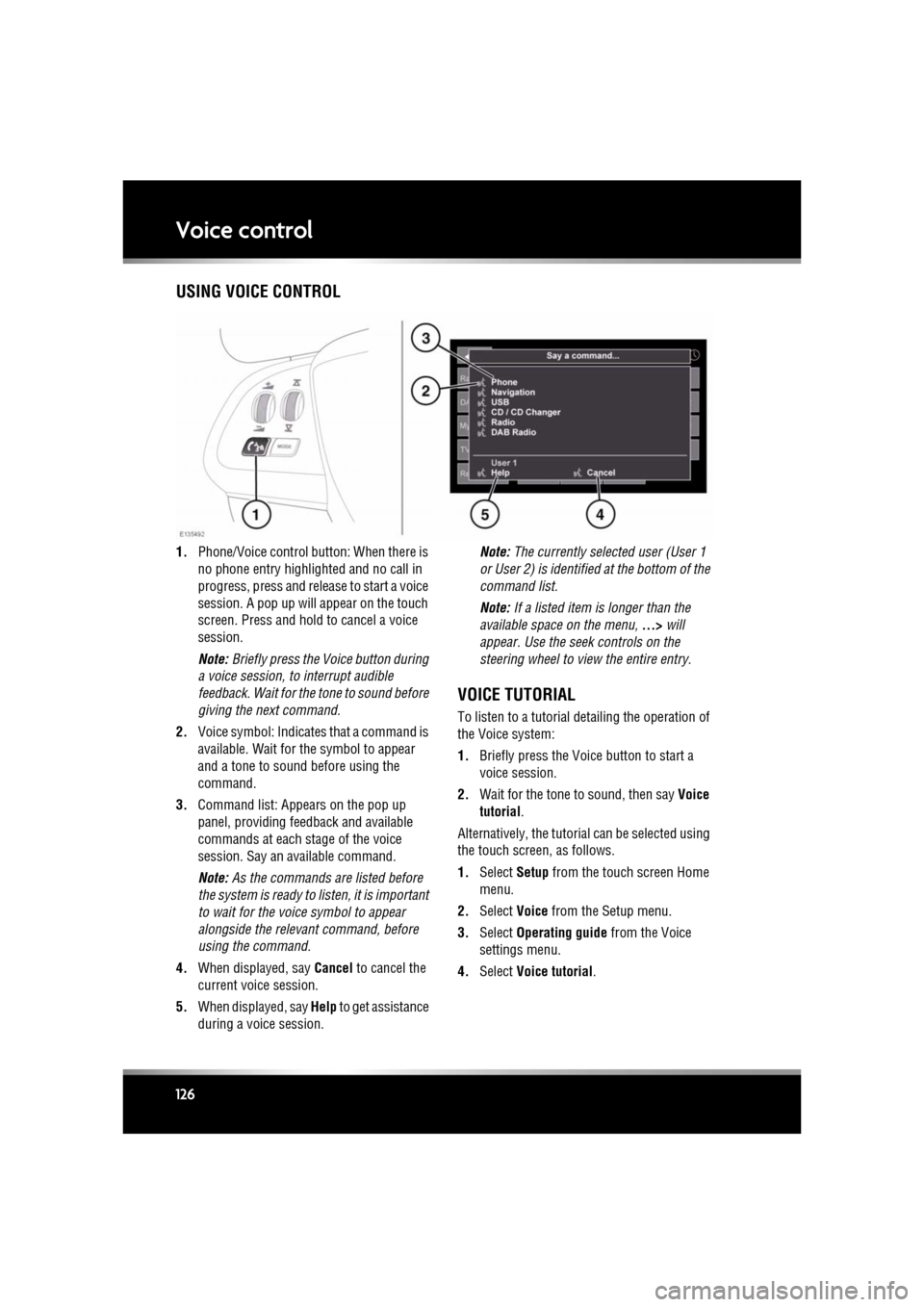
1. Phone/Voice cont rol button: When there is
no phone entry highlighted and no call in
progress, press and release to start a voice
session. A pop up will appear on the touch
screen. Press and hold to cancel a voice
session.
Note: Briefly press the Voice button during
a voice session, to interrupt audible
feedback. Wait for the tone to sound before
giving the next command.
2. Voice symbol: Indicates that a command is
available. Wait for the symbol to appear
and a tone to sound before using the
command.
3. Command list: Appears on the pop up
panel, providing fee dback and available
commands at each stage of the voice
session. Say an available command.
Note: As the commands are listed before
the system is ready to listen, it is important
to wait for the voice symbol to appear
alongside the relevant command, before
using the command.
4. When displayed, say Cancel to cancel the
current voice session.
5. When displayed, say Help to get assistance
during a voice session. Note:
The currently selected user (User 1
or User 2) is identified at the bottom of the
command list.
Note: If a listed item is longer than the
available space on the menu, ...> will
appear. Use the seek controls on the
steering wheel to view the entire entry.
VOICE TUTORIAL
To listen to a tutorial detailing the operation of
the Voice system:
1. Briefly press the Voice button to start a
voice session.
2. Wait for the tone to sound, then say Voice
tutorial .
Alternatively, the tutorial can be selected using
the touch screen, as follows.
1. Select Setup from the touch screen Home
menu.
2. Select Voice from the Setup menu.
3. Select Operating guide from the Voice
settings menu.
4. Select Voice tutorial.
Page 131 of 225
R
(FM8) SEMCON JLR OWNER GUIDE VER 1.00 EURO
LANGUAGE: english-en; MARQUE: jaguar; MODEL: XF
Telephone
131
Note: If more than 5 phones are detected,
it may be necessary to use the scroll bar to
see the entire list.
7. When prompted, enter the PIN code into
your phone. See your phone’s operating
instructions for more information.
8. Once your phone is paired and connected
to the system, a confirmation message will
be displayed before sw itching to the Digit
Dial screen.
Note: Due to the duration of a Bluetooth®
search, it is advised that the timeout to home
screen feature is switched off before
attempting to search fo r Bluetooth® devices.
This setting can be changed within Vehicle,
Syst settings , Display set, Timeout to home
screen .
CHANGING THE CONNECTED PHONE
Up to 10 mobile phones can be paired with the
vehicle in the same way. However, only one can
be connected and ready for use as a phone at
any one time.
To connect a different paired phone to the
vehicle, follow the steps below:
1.From the home menu, select Phone.
2. A menu will appear. Select Change phone.
3. Identify and select your phone from the
displayed list.
4. Once your phone is connected to the
system, a confirmation message will be
displayed before switch ing to the Digit Dial
screen.
TELEPHONE SYSTEM ICONS
Connect. Use to send or accept a
call and access last 10 calls list.
Disconnect. Use to end or reject a
call.
No phone connected.
Phone signal strength indicator.
Phone battery level indicator.
Bluetooth. Indicates that a
Bluetooth® device is connected.
Tick. Indicates that a Bluetooth®
device is paired.
Voicemail. Press and hold to dial
the stored voicemail number.
Scroll bar up arrow. Use to scroll
up lists of detected phones, calls
or phonebook entries.
Scroll bar down arrow. Use to
scroll down lists of detected
phones, calls or phonebook
entries.
Page 132 of 225
L
(FM8) SEMCON JLR OWNER GUIDE VER 1.00 EURO
LANGUAGE: english-en; MARQUE: jaguar; MODEL: XF
Telephone
132
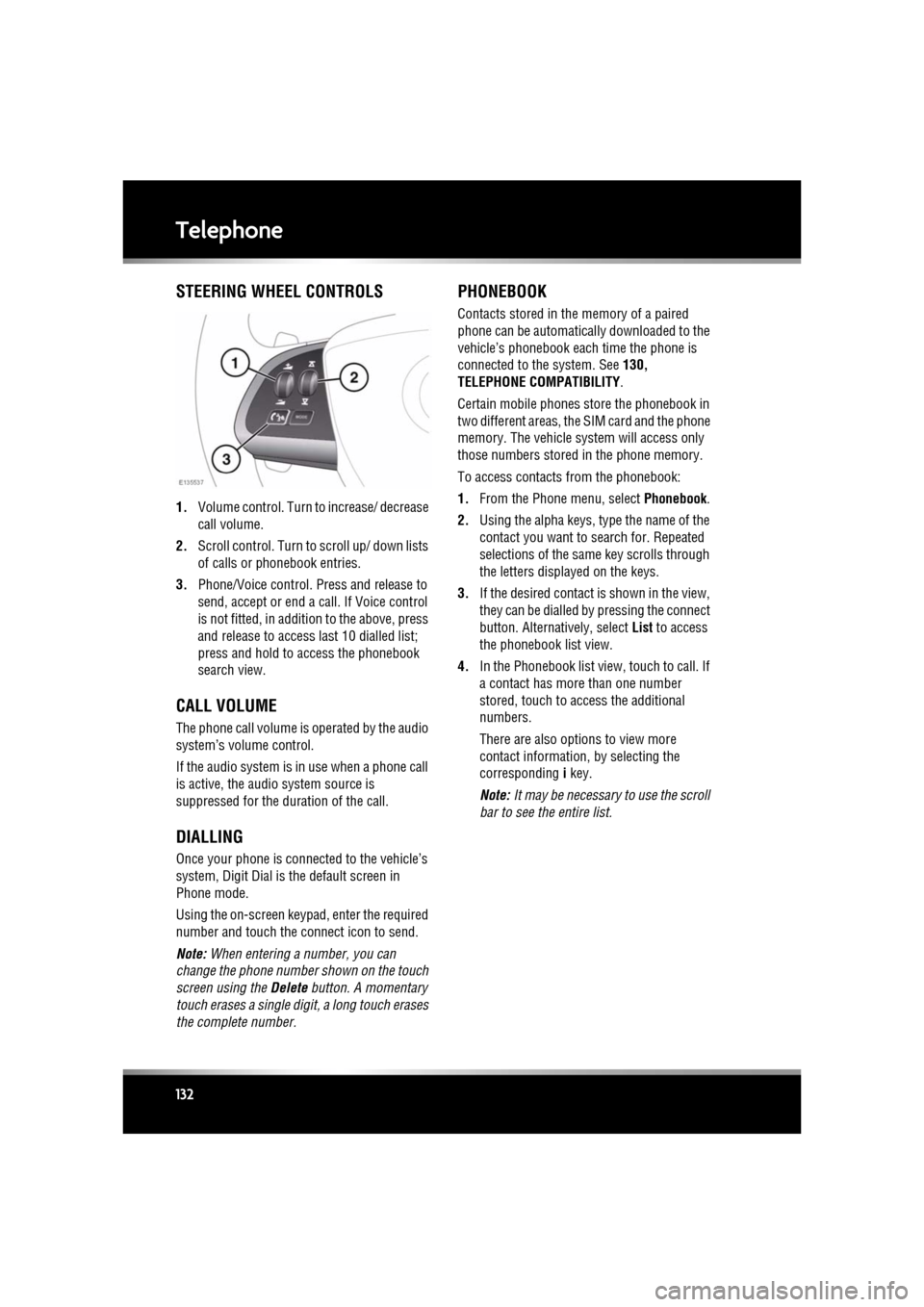
STEERING WHEEL CONTROLS
1. Volume control. Turn to increase/ decrease
call volume.
2. Scroll control. Turn to scroll up/ down lists
of calls or phonebook entries.
3. Phone/Voice control. Press and release to
send, accept or end a call. If Voice control
is not fitted, in addition to the above, press
and release to access last 10 dialled list;
press and hold to ac cess the phonebook
search view.
CALL VOLUME
The phone call volume is operated by the audio
system’s volume control.
If the audio system is in use when a phone call
is active, the audio system source is
suppressed for the dur ation of the call.
DIALLING
Once your phone is conne cted to the vehicle’s
system, Digit Dial is the default screen in
Phone mode.
Using the on-screen keypad, enter the required
number and touch the connect icon to send.
Note: When entering a number, you can
change the phone number shown on the touch
screen using the Delete button. A momentary
touch erases a single digi t, a long touch erases
the complete number.
PHONEBOOK
Contacts stored in the memory of a paired
phone can be automatically downloaded to the
vehicle’s phonebook each time the phone is
connected to the system. See 130,
TELEPHONE COMPATIBILITY .
Certain mobile phones store the phonebook in
two different areas, the SIM card and the phone
memory. The vehicle system will access only
those numbers stored in the phone memory.
To access contacts from the phonebook:
1. From the Phone menu, select Phonebook.
2. Using the alpha keys, type the name of the
contact you want to search for. Repeated
selections of the sa me key scrolls through
the letters displayed on the keys.
3. If the desired contact is shown in the view,
they can be dialled by pressing the connect
button. Alternatively, select List to access
the phonebook list view.
4. In the Phonebook list view , touch to call. If
a contact has more than one number
stored, touch to access the additional
numbers.
There are also options to view more
contact information, by selecting the
corresponding i key.
Note: It may be necessary to use the scroll
bar to see the entire list.