parking JAGUAR XF 2011 1.G User Guide
[x] Cancel search | Manufacturer: JAGUAR, Model Year: 2011, Model line: XF, Model: JAGUAR XF 2011 1.GPages: 225, PDF Size: 7.32 MB
Page 93 of 225
R
(FM8) SEMCON JLR OWNER GUIDE VER 1.00 EURO
LANGUAGE: english-en; MARQUE: jaguar; MODEL: XF
Parking aids
93
CLEANING THE SENSORS
For reliable operation, th e sensors in the front
and rear bumpers should be kept free from ice,
frost and grime.
Do not clean the sensors with abrasive
or sharp objects or materials.
When using a high pressure spray, only
spray the sensors briefly, from a
distance greater than 200 mm
(8 inches).
PARKING AID SYSTEM FAULT
If the system has a fault when engaging reverse
gear or turning on the ignition, then a single, 3
second tone will be heard and a pop-up
warning will appear on the touch screen. If
both front and rear park ing aids are fitted, the
warning indicator in the parking aid switch will
flash for 3 seconds and then switch off.
If a fault is detected, the system is
automatically disabled.
Note: The parking aid may emit spurious tones
if it detects a frequenc y tone using the same
band as the sensors (e.g. air brakes).
REAR VIEW CAMERA
It remains the driver's responsibility
to detect obstacles and estimate the
vehicle's distance from them when
reversing.
When Reverse ( R) is selected, the system uses
a camera to provide a wide-angle colour rear
view image on the touch screen.
The camera display has priority over the
parking aid display. To view the parking aid
display instead, or to cancel camera display at
any time, touch the display.
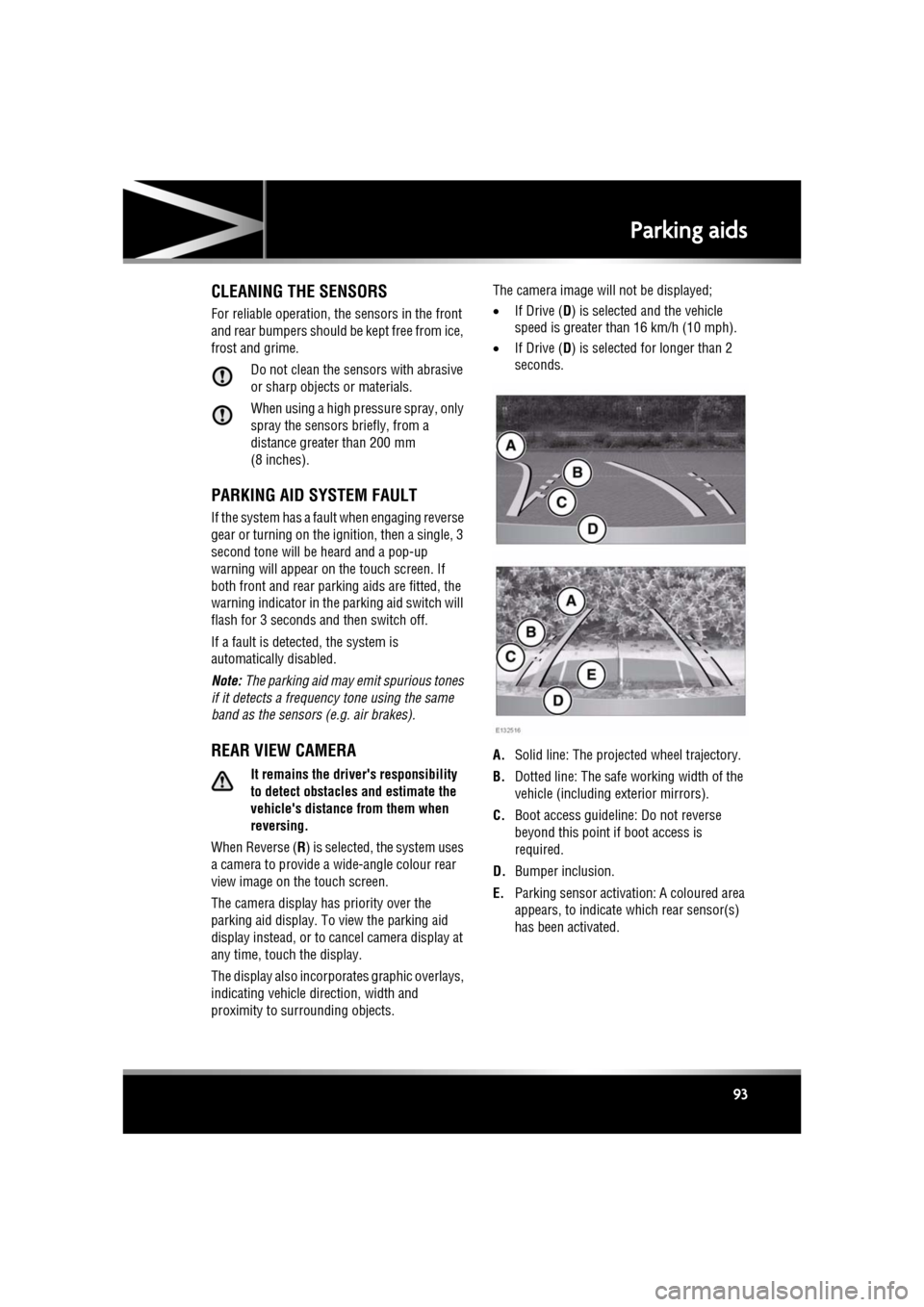
The display also incorporates graphic overlays,
indicating vehicle di rection, width and
proximity to surrounding objects. The camera image will not be displayed;
•
If Drive ( D) is selected and the vehicle
speed is greater than 16 km/h (10 mph).
• If Drive ( D) is selected for longer than 2
seconds.
A. Solid line: The projec ted wheel trajectory.
B. Dotted line: The safe working width of the
vehicle (including exterior mirrors).
C. Boot access guideline: Do not reverse
beyond this point if boot access is
required.
D. Bumper inclusion.
E. Parking sensor activati on: A coloured area
appears, to indicate which rear sensor(s)
has been activated.
Page 127 of 225

R
(FM8) SEMCON JLR OWNER GUIDE VER 1.00 EURO
LANGUAGE: english-en; MARQUE: jaguar; MODEL: XF
Voice control
127
The voice tutorial can be cancelled at any time
by touching the on-screen pop-up or by
pressing and holding the Voice button.
VOICE TRAINING
This is a feature designed to enable the system
to better recognise the vocal characteristics of
a user, once the training has been completed.
To carry out Voice training:
1. Select Setup from the Home menu.
2. Select Voice and from the Setup menu.
3. Select Voice training from the Voice
settings menu.
4. Select User 1 or User 2 , to start the
training.
5. Follow the on-screen and audible
instructions.
The training session can be cancelled at any
time by touching the on-screen pop-up or by
pressing and holding the Voice button.
VOICETAGS
Voicetags enable the user to personalise the
Voice system so that a single name can be used
to call-up a navigation destination, telephone
number or radio channel.
To add a Voicetag:
1. Briefly press the Voice button to start a
Voice session.
2. Wait for the tone to sound then say Phone,
Navigation or Radio .
3. Say Store voicetag .
Alternatively, Voicetag s can be managed via
the touch screen as follows:
1. Select Setup from the Home menu.
2. Select Voice from the Setup menu.
3. Select Voicetags from the Voice settings
menu. 4.
Select the system which the Voicetag is to
activate ( Phone, Navigation or Radio ).
Follow the on-screen and audible instructions.
NAVIGATION POI VOICE COMMANDS
To request the display of POI (Point Of Interest)
identifiers on the navi gation display, say
Navigation , followed by the name of the
desired POI category from the following list:
• Petrol station/Petrol.
• Parking/Car park.
• Jaguar Dealer.
• Hospital.
• Golf course.
• Tourist information.
• Restaurant/I’m hungry.
• Shopping centre.
• Hotel.
• Motorway service.
• Town centre.
Icons will appear on th e navigation display,
indicating the locations of the selected POI. For
further information about POIs, see 141,
CATEGORIES AND SUB-CATEGORIES.
Page 142 of 225

L
(FM8) SEMCON JLR OWNER GUIDE VER 1.00 EURO
LANGUAGE: english-en; MARQUE: jaguar; MODEL: XF
Navigation system
142
LIST SOFT KEY
The List button can be used when the
characters entered reduce the possible entries
to a small enough number.
You can also select List (when active) without
entering a POI name. All the relevant points of
interest will be displayed, e.g. in a selected
town or category.
ALL SOFTKEY
The All button shows a list of all POI
categories.
LOCAL POI SEARCH
This selects the points of interest in all
categories within 32 kilometres (20 miles) of
the vehicle.
• Touch the All Local POIs button.
RDS-TMC OVERVIEW
RDS-TMC (Radio Data System-Traffic
Message Channel) is a feature that announces
traffic hold-ups on your route as broadcast by
radio stations that transmit TMC information.
Touch the TMC button on the Navigation Menu
to access the TMC menu.
TMC events ahead on route can be displayed by
touching the Events ahead soft key. TMC can
be set to display on the map for all events, for
major events or can be switched off. During
route calculation, it can be set to avoid TMC
events along the route.
RDS-TMC DISPLAY
When a TMC signal is received the icon in the
top left of the screen will appear green. If a TMC
signal is not being received, the icon will be
shown with a bar through it.
The system will inform the driver of any
roadworks, narrow road, contraflow,
accidents, slippery road, diversion,
information, parking in formation, congestion
or other hazard.
The driver is informed of a traffic event as
follows:
• A TMC Event icon shown on the map at the
location of the event.
• Text can be displaye d showing the details
of each occurrence which can be selected
either by touching the screen icon or from
the traffic information list.
• Dynamic route guidance, which calculates
an alternative route when the system
receives the traffic event warning affecting
the route currently set in the navigation
system.
• Traffic event list shows all events sorted by
road name/ distance on your selected route
in a straight line or along your actual route.
The information rega rding the hold-up is
maintained and updated even if the vehicle
crosses into another country.
Page 143 of 225
R
(FM8) SEMCON JLR OWNER GUIDE VER 1.00 EURO
LANGUAGE: english-en; MARQUE: jaguar; MODEL: XF
Navigation system
143
RDS-TMC ICONS
Any traffic event (broadcast on TMC) in your
area, will be displayed as a warning icon on the
map and an alert may be displayed as a
message giving the road number(s) and
between which junctions the hold-up or event
occurs.
This data is stored in th e system for up to of 30
minutes.
The colour of the TMC icon changes in order to
show the type and priority of a TMC event. The
background colour of the icon returns to
normal when there is no longer an event or
hold-up, or if any re-route instructions are
calculated.
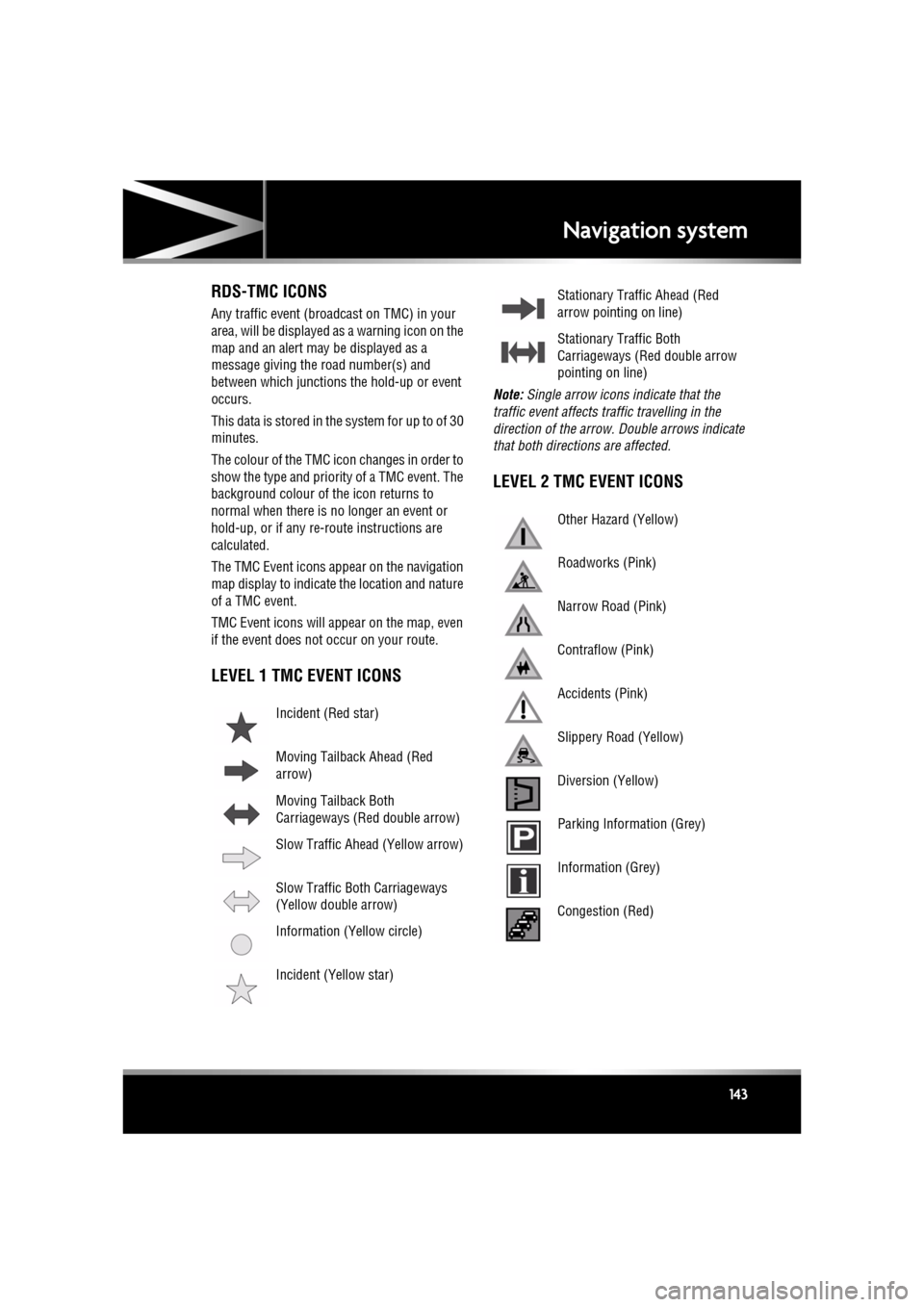
The TMC Event icons appear on the navigation
map display to indicate the location and nature
of a TMC event.
TMC Event icons will appear on the map, even
if the event does not occur on your route.
LEVEL 1 TMC EVENT ICONS
Note: Single arrow icons i ndicate that the
traffic event affects traffic travelling in the
direction of the arrow. Double arrows indicate
that both directions are affected.
LEVEL 2 TMC EVENT ICONS
Incident (Red star)
Moving Tailback Ahead (Red
arrow)
Moving Tailback Both
Carriageways (Red double arrow)
Slow Traffic Ahead (Yellow arrow)
Slow Traffic Both Carriageways
(Yellow double arrow)
Information (Yellow circle)
Incident (Yellow star)
Stationary Traffic Ahead (Red
arrow pointing on line)
Stationary Traffic Both
Carriageways (Red double arrow
pointing on line)
Other Hazard (Yellow)
Roadworks (Pink)
Narrow Road (Pink)
Contraflow (Pink)
Accidents (Pink)
Slippery Road (Yellow)
Diversion (Yellow)
Parking Information (Grey)
Information (Grey)
Congestion (Red)
Page 149 of 225
R
(FM8) SEMCON JLR OWNER GUIDE VER 1.00 EURO
LANGUAGE: english-en; MARQUE: jaguar; MODEL: XF
Tyre repair kit
149
USING THE TYRE REPAIR KIT
Avoid skin contact with the sealant
which contains natural rubber latex.
If the tyre inflation pressure does not
reach 1.8 bar (26 psi, 180 kPa) within
seven minutes, the tyre may have
suffered excessive damage. A
temporary repair will not be possible,
and the vehicle should not be driven
until the tyre has been replaced.
Before attempting a tyre repair, ensure
that the vehicle is parked safely, as far
away from passing traffic as possible.
Ensure that the parking brake is applied
and P (Park) is selected.
Do not attempt to remove foreign
objects such as nails, screws, etc. from
the tyre.
Always run the engine when using the
compressor, unless the vehicle is in an
enclosed or poorly ventilated space, as
this may cause asphyxiation.
To prevent overheatin g, do not operate
the compressor continuously for longer
than ten minutes.
Note: All vehicle drivers and occupants should
be made aware that a temporary repair has
been made to a tyre fitt ed to the vehicle. They
should also be made aware of the special
driving conditions im posed when using a
repaired tyre.
REPAIR PROCEDURE
Check the tyre sidewall prior to
inflation. If there are any cracks,
bumps or similar damage, do not
attempt to inflate the tyre. Do not
stand directly besi de the tyre while
the compressor is pumping. Watch the
tyre sidewall. If any cracks, bumps or
similar damage appear, turn off the
compressor and let the air out by
means of the pressure relief valve. Do
not continue to use the tyre.
1. Open the tyre repair kit and peel off the
maximum speed label. Attach the label to
the facia in the driver's field of vision. Take
care not to obstruct an y of the instruments
or warning lights.
2. Uncoil the compressor power cable and
the inflation hose.
3. Unscrew the orange cap from the sealant
bottle receiver and the sealant bottle cap.
4. Screw the sealant bottle into the receiver
(clockwise) until tight.
•Screwing the bottle onto the receiver
will pierce the bottle's seal. Once the
receiver has been fitted, a ratchet
prevents it from being removed.
5. Remove the valve cap from the damaged
tyre.
6. Remove the protective cap from the
inflation hose and connect the inflation
hose to the tyre valve. Ensure that the hose
is screwed on firmly.
7. Ensure that the compressor switch is in the
off ( 0) position.
8. Insert the power cable connector into the
auxiliary power socket.
9. Unless the vehicle is in an enclosed area,
start the engine.
Page 191 of 225

R
(FM8) SEMCON JLR OWNER GUIDE VER 1.00 EURO
LANGUAGE: english-en; MARQUE: jaguar; MODEL: XF
Fuses
191
PASSENGER COMPARTMENT FUSE BOX
Fuse No Rating
(amps) Fuse
Colour Circuit
F1 - - -
F2 - - -
F3 20A Yellow Driver’s seat adjustment.
F4 20A Yellow Driver’s seat adjustment.
F5 - - -
F6 - - -
F7 - - -
F8 20A Yellow Front passenger's seat adjustment.
F9 20A Yellow Front passenger's seat adjustment.
F10 20A Yellow Left-hand rear door controls.
F11 20A Yellow Right-hand rear door controls.
F12 - - -
F13 10A Red Steering column adjust.
F14 - - -
F15 - - -
F16 5A Tan Sunblind.
F17 - - -
F18 - - -
F19 - - -
F20 5A Tan Remote control receiver.
F21 5A Tan Foot brake.
F22 5A Tan Electric parking brake.
F23 5A Tan Driver’s seat. Audio system. Auto headlamps. Upper centre console switches.
F24 10A Red Front passenger seat. El ectric windows. Mirror adjustment.
F25 20A Yellow Driver’s heated/climate seat.
F26 15A Blue Trailer power socket. Road pricing system.
F27 20A Yellow Front passenger’s heated/climate seat.
F28 15A Blue Auxiliary power sockets.
F29 20A Yellow Keyless entry system.
Page 192 of 225

L
(FM8) SEMCON JLR OWNER GUIDE VER 1.00 EURO
LANGUAGE: english-en; MARQUE: jaguar; MODEL: XF
Fuses
192
LUGGAGE COMPARTMENT FUSE BOX
F30 10A Red Air conditioning.
F31 15A Blue Sunroof.
F32 5A Tan Starter control unit.
F33 5A Tan Diagnostic connector.
F34 5A Tan Instrument pack.
F35 15A Blue Interior lamps.
F36 10A Red Suspension system.
Fuse
No Rating
(amps) Fuse
Colour Circuit
F1 30A Green Air blower.
F2 30A Green Electric parking brake.
F3 - - -
F4 - - -
F5 - - -
F6 - - -
F7 30A Green Heated rear screen.
F8 30A Green Audio system (premium audio only).
F9 50A Red RBD link.
F10 40A Orange Rear electronic differential (e-Diff).
F11 - - -
F12 - - -
F13 - - -
F14 5A Tan Telephone.
F15 10A Red TV. DVD. DAB radio.
F16 - - -
F17 - - -
F18 - - -
F19 - - -
F20 - - -
F21 - - -
Fuse No Rating
(amps) Fuse
Colour Circuit
Page 194 of 225
L
(FM8) SEMCON JLR OWNER GUIDE VER 1.00 EURO
LANGUAGE: english-en; MARQUE: jaguar; MODEL: XF
Wheel changing
194
Wheel changingWHEEL CHANGING SAFETY
Before raising the vehicl e, or changing a wheel
ensure that you read, and comply with the
following warnings.
Always find a safe place to stop, off
the highway and aw ay from traffic.
Ensure that the vehicle and jack are
both on firm level ground.
Apply the parking brake, and engage
Park (P).
Switch on the hazard warning lamps.
Ensure that the front wheels are in the
straight ahead position, and engage
the steering lock.
Disconnect trailer/ca ravan from the
vehicle.
Ensure that all passengers, and
animals, are out of the vehicle and in
a safe place away from the highway.
Place a warning triangle at a suitable
distance behind the v ehicle, facing
towards oncoming traffic.
When one rear wheel is lifted off the
ground the selection P (Park) position
will not prevent the vehicle from
moving and possibly slipping off the
jack as the park brake only operates
on the rear wheels. Use the wheel
chock when jacking the vehicle.
Always chock the wheel diagonally
opposite the wheel to be changed,
using the wheel chock supplied in the
tool kit. Chock the front of a front
wheel, or the rear of a rear wheel.
If jacking the vehicle on a slight slope
is unavoidable, place chocks on the
downhill side of the two opposite
wheels. An additional chock will be
needed. Never place anything between the jack
and the ground, or the jack and the
vehicle.
Do not attempt to raise the vehicle
unless the jack head is fully engaged
in the jacking point. Only jack the
vehicle using the approved jacking
points.
Remove the spare wheel prior to
jacking the vehicle, to avoid
destabilising the vehicle when raised.
Take care when lifting the spare
wheel, and removing the punctured
wheel. The wheels are heavy, and can
cause injuries if not handled correctly.
Do not start or run the engine while the
vehicle is support
ed only by a jack.
Do not get under a vehicle that is
supported by a jack.
Never work or allow any person to
place any part of their body beneath
the vehicle with the jack as the only
means of support - use vehicle
support stands.
Take care when loosening the wheel
nuts. The wheel brace may slip off if
not properly attached, and the wheel
nuts may release suddenly. Either
unexpected movement may cause an
injury.
After use, the tool kit should be
returned to the under floor storage
area and correctly stowed.
Always ensure replacement tyres
have the correct rating and
specifications (e.g. load index, size,
speed rating) for your vehicle.
Page 207 of 225

R
english-en (10, 18, 21 & 25)
Index
207
rearsafety . . . . . . . . . . . . . . . . . . . . . . . . . 17
seatbelts . . . . . . . . . . . . . . . . . . . . . . . 167 seatbelt safety . . . . . . . . . . . . . . . . . . 23
warning lamp . . . . . . . . . . . . . . . . 26, 52
sitting correctly . . . . . . . . . . . . . . . . . . . 15
Changing a fuse. . . . . . . . . . . . . . . . . . . . 188
Changing a tyre . . . . . . . . . . . . . . . . . . . . . 90
Changing a wheel . . . . . . . . . . . . . . . . . . . 90
Changing the battery (timed climate) . . . 184
Charging the vehicle battery . . . . . . . . . . 184
Chassis number. . . . . . . . . . . . . . . . . . . . 200
Child restraints . . . . . . . . . . . . . . . . . . . . . 27 check list . . . . . . . . . . . . . . . . . . . . . . . . 28
positioning. . . . . . . . . . . . . . . . . . . . . . . 29
Child seats . . . . . . . . . . . . . . . . . . . . . . . . . 27 check list . . . . . . . . . . . . . . . . . . . . . . . . 28
ISOFIX anchor points. . . . . . . . . . . . . . . 30
positioning. . . . . . . . . . . . . . . . . . . . . . . 29
tether straps . . . . . . . . . . . . . . . . . . . . . 31
Cleaning
alloy wheels . . . . . . . . . . . . . . . . . . . . . 164
carpets and mats . . . . . . . . . . . . . . . . . 167
exterior . . . . . . . . . . . . . . . . . . . . . . . . 164paintwork . . . . . . . . . . . . . . . . . . . . . 165
glass . . . . . . . . . . . . . . . . . . . . . . . . . . 165
interior . . . . . . . . . . . . . . . . . . . . . 165, 166
leather . . . . . . . . . . . . . . . . . . . . . . . . . 166
parking sensors . . . . . . . . . . . . . . . . . . . 93
polishing . . . . . . . . . . . . . . . . . . . . . . . 165
rear screen. . . . . . . . . . . . . . . . . . . . . . 165
removing grease . . . . . . . . . . . . . . . . . 165
removing stains . . . . . . . . . . . . . . . . . . 166
removing tar . . . . . . . . . . . . . . . . . . . . 165
sunroof . . . . . . . . . . . . . . . . . . . . . . . . 165
underbonnet . . . . . . . . . . . . . . . . . . . . 165
using a car-wash . . . . . . . . . . . . . . . . . 165
Climate control auto . . . . . . . . . . . . . . . . . . . . . . . . . . . . 65
overview . . . . . . . . . . . . . . . . . . . . . . . . 65
recirculation. . . . . . . . . . . . . . . . . . . . . . 64
temperature . . . . . . . . . . . . . . . . . . . . . . 65
Climate seats . . . . . . . . . . . . . . . . . . . . . . . 66 Clock. . . . . . . . . . . . . . . . . . . . . . . . . . . . . 166
Closing
alarm sensor faults . . . . . . . . . . . . . . . . . 11
single locking . . . . . . . . . . . . . . . . . . . . . . 9
Closing the bonnet . . . . . . . . . . . . . . . . . . 160
Closing the luggage compartment . . . . . . . 67
Column lock . . . . . . . . . . . . . . . . . . . . . . . . 75
Condensation (headlamps) . . . . . . . . . . . . . 38
Conformity declarations . . . . . . . . . . 146, 202
Consumption fuel urban cycle . . . . . . . . . . . . . . . . . . . . 157
Consumption (fuel). . . . . . . . . . . . . . . . . . 157
Controls headlamps . . . . . . . . . . . . . . . . . . . . . . . 36
steering wheel set cruise speed . . . . . . . . . . . . . . . . . 94
Coolant
checking the level . . . . . . . . . . . . . . . . . 170
specification . . . . . . . . . . . . . . . . . . . . . 171
top up . . . . . . . . . . . . . . . . . . . . . . . . . . 171
Cruise control ACC (Adaptive cruise control) . . . . . . . . . 96 low speed switch-off . . . . . . . . . . . . . . 98
malfunction . . . . . . . . . . . . . . . . . . . . 100
operating . . . . . . . . . . . . . . . . . . . . . . . 96
override . . . . . . . . . . . . . . . . . . . . . . . . 98
resume follow mode . . . . . . . . . . . . . . 99
resume set speed . . . . . . . . . . . . . . . . 99
automatic switch off . . . . . . . . . . . . . . . . 95
change speed . . . . . . . . . . . . . . . . . . . . . 94
follow mode . . . . . . . . . . . . . . . . . . . . . . 97
operating. . . . . . . . . . . . . . . . . . . . . . . . . 94
resume . . . . . . . . . . . . . . . . . . . . . . . . . . 94
setting vehicle speed. . . . . . . . . . . . . . . . 94
D
DAB ensembles. . . . . . . . . . . . . . . . . . . . . . . 112
reception . . . . . . . . . . . . . . . . . . . . . . . . 112
DAB radio controls. . . . . . . . . . . . . . . . . . . . . . . . . 111
Page 209 of 225

R
english-en (10, 18, 21 & 25)
Index
209
warning lampactive . . . . . . . . . . . . . . . . . . . . . . . . . 53
off . . . . . . . . . . . . . . . . . . . . . . . . . . . 53
warning lamps . . . . . . . . . . . . . . . . . . . . 84
DVDs loading. . . . . . . . . . . . . . . . . . . . . . . . . 125
Dynamic mode . . . . . . . . . . . . . . . . . . . . . 83
E
EBA (Emergency brake assist). . . . . . . . . . 87
EBD (Electronic brake fo rce distribution) . 87
ECO Stop/Start . . . . . . . . . . . . . . . . . . . . . 79
Electric seats
front. . . . . . . . . . . . . . . . . . . . . . . . . . . . 12
Electronic brake force distribution (EBD) . 87
Electronic data . . . . . . . . . . . . . . . . . . . . . 199
Electronic parking brake (EPB) . . . . . . . . . 88
Emergency brake assist (EBA). . . . . . . . . 101
Engine
compartmentcleaning . . . . . . . . . . . . . . . . . . . . . . 165
fuse box . . . . . . . . . . . . . . . . . . . . . . 189
opening . . . . . . . . . . . . . . . . . . . . . . 160
overview . . . . . . . . . . . . . . . . . . . . . 161
coolant level checking . . . . . . . . . . . . . 170
diesel . . . . . . . . . . . . . . . . . . . . . . 153, 154 starting the engine . . . . . . . . . . . . . . . 74
DPF (Diesel particulate filter) . . . . . . . . 159
engine compartment . . . . . . . . . . . . . . 161
engine malfunction warning lamp . . . . . 52
failure to start . . . . . . . . . . . . . . . . . . . . 76
malfunction warning lamp . . . . . . . . . . . 52
Number . . . . . . . . . . . . . . . . . . . . . . . . 201
oil consumption . . . . . . . . . . . . . . . . . . 170
oil level check . . . . . . . . . . . . . . . . . . . 168
oil level consumption. . . . . . . . . . . . . . 170
oil specification . . . . . . . . . . . . . . . . . . 169
petrol starting the engine . . . . . . . . . . . . . . . 74
specifications. . . . . . . . . . . . . . . . . . . . 175
starting petrol . . . . . . . . . . . . . . . . . . . . . . . . . 77 switching off . . . . . . . . . . . . . . . . . . . . . . 75
Ensembles (DAB radio). . . . . . . . . . . . . . . 112
Entering a destination . . . . . . . . . . . . . . . . 138 by town . . . . . . . . . . . . . . . . . . . . . . . . . 141
Entering the vehicle entry and exit mode . . . . . . . . . . . . . . . . 22
keyless entry . . . . . . . . . . . . . . . . . . . . . . . 6
Entertainment CD
controls . . . . . . . . . . . . . . . . . . . . . . . 120
DAB radio controls . . . . . . . . . . . . . . . . . . . . . . . 111
navigation all softkey . . . . . . . . . . . . . . . . . . . . . 142
coordinates . . . . . . . . . . . . . . . . . . . . 140
list . . . . . . . . . . . . . . . . . . . . . . . . . . . 142
menu . . . . . . . . . . . . . . . . . . . . . . . . . 135
motorway . . . . . . . . . . . . . . . . . . . . . 141
POI categories. . . . . . . . . . . . . . . . . . 141
POI (Points of interest) . . . . . . . 139, 141
postcode . . . . . . . . . . . . . . . . . . . . . . 140
previous . . . . . . . . . . . . . . . . . . . . . . 140
restore defaults . . . . . . . . . . . . . . . . . 140
TMC . . . . . . . . . . . . . . . . . . . . . . . . . 142
TMC display . . . . . . . . . . . . . . . . . . . 142
TMC icons . . . . . . . . . . . . . . . . . . . . . 143
portable media
automatic reconnection. . . . . . . . . . . 118
changing device . . . . . . . . . . . . . . . . 118
connecting devices . . . . . . . . . . . . . . 113
connecting multiple de vices . . . . . . . 117
connections. . . . . . . . . . . . . . . . . . . . 113
controls . . . . . . . . . . . . . . . . . . . . . . . 115
lost connection . . . . . . . . . . . . . . . . . 118
pairing . . . . . . . . . . . . . . . . . . . . 117, 118
playing . . . . . . . . . . . . . . . . . . . . . . . 117
radio controls . . . . . . . . . . . . . . . . . . . . . . . 109
RDS (Radio data system) . . . . . . . . . 110
RSE (Rear screen entertainment) screen settings . . . . . . . . . . . . . . . . . . 60
telephone
last 10 . . . . . . . . . . . . . . . . . . . . . . . . 133