ECU JAGUAR XF 2011 1.G Owner's Manual
[x] Cancel search | Manufacturer: JAGUAR, Model Year: 2011, Model line: XF, Model: JAGUAR XF 2011 1.GPages: 225, PDF Size: 7.32 MB
Page 44 of 225
L
(FM8) SEMCON JLR OWNER GUIDE VER 1.00 EURO
LANGUAGE: english-en; MARQUE: jaguar; MODEL: XF
Mirrors
44
MirrorsEXTERIOR MIRRORS
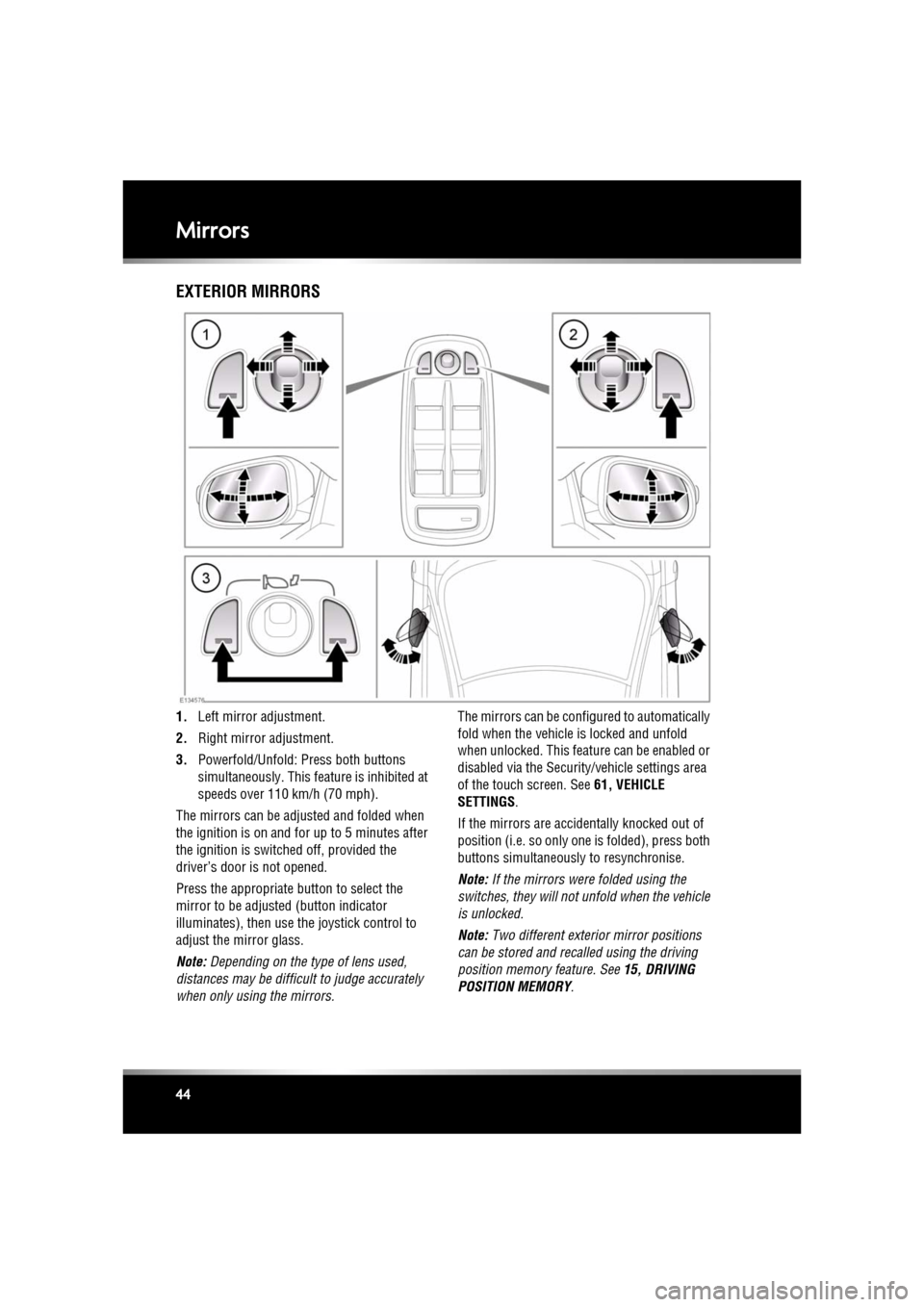
1. Left mirror adjustment.
2. Right mirror adjustment.
3. Powerfold/Unfold: Press both buttons
simultaneously. This feat ure is inhibited at
speeds over 110 km/h (70 mph).
The mirrors can be adjusted and folded when
the ignition is on and for up to 5 minutes after
the ignition is switched off, provided the
driver’s door is not opened.
Press the appropriate button to select the
mirror to be adjusted (button indicator
illuminates), then use th e joystick control to
adjust the mirror glass.
Note: Depending on the type of lens used,
distances may be difficult to judge accurately
when only using the mirrors. The mirrors can be confi
gured to automatically
fold when the vehicle is locked and unfold
when unlocked. This feature can be enabled or
disabled via the Security/vehicle settings area
of the touch screen. See 61, VEHICLE
SETTINGS .
If the mirrors are accide ntally knocked out of
position (i.e. so only one is folded), press both
buttons simultaneously to resynchronise.
Note: If the mirrors were folded using the
switches, they will not unfold when the vehicle
is unlocked.
Note: Two different exterior mirror positions
can be stored and recalled using the driving
position memory feature. See 15, DRIVING
POSITION MEMORY .
Page 45 of 225

R
(FM8) SEMCON JLR OWNER GUIDE VER 1.00 EURO
LANGUAGE: english-en; MARQUE: jaguar; MODEL: XF
Mirrors
45
MIRROR DIP WHEN REVERSING
The mirrors can be configured so that when
reverse gear is select ed, the passenger door
mirror automatically adjusts to provide an
improved viewing angle for reversing.
The exact dipped position can be adjusted
using the joystick control, when the mirror is
dipped. The next time reverse is selected, the
newly adjusted position will be selected.
When the gear selector is moved out of
reverse, or if vehicle speed exceeds 12 km/h
(7.5 mph) while reversing, the mirror will
return to its previous position.
Mirror dip can be selected or deselected using
the touch screen, as follows:
• From the touch screen Home menu, select
Set-up .
• Select Security/vehicle .
• Select Windows/mirrors .
• Select Reverse mirror dip - On or Off.
Page 48 of 225
L
(FM8) SEMCON JLR OWNER GUIDE VER 1.00 EURO
LANGUAGE: english-en; MARQUE: jaguar; MODEL: XF
Garage door opener
48
Garage door openerGARAGE DOOR TRANSCEIVER
Do not use the transceiver with any
garage door opener that lacks the
safety stop and reverse feature as
required by safety standards.
When programming the transceiver to
a garage door opener or entry gate,
ensure the area is clear. This will
prevent potential harm or damage as
the gate or garage door will activate
during the programme.
This device may suffer from
interference if operate d in the vicinity of
a mobile or fixed station transmitter.
This interference is li kely to affect the
hand-held transmitter as well as the
in-car transceiver.
The door transceiver is located in the rear-view
mirror. It can be programmed to transmit the
radio frequencies of up to three different
transmitters, which can be used to operate
garage doors, entry gates, home lighting,
security systems or other radio frequency
operated devices.
Although this section mainly describes the
procedures for a garage door opener, it equally
applies to the previously mentioned
applications.
In some countries, this feature is also known
as the HomeLink® Universal Transceiver.
For further information, see 50,
INFORMATION AND ASSISTANCE .
BEFORE PROGRAMMING
When programming a device that may
require you to press and re-press the
hand-held transmitter (cycle), unplug
the device during the cycling process to
prevent possible motor failure.
For best results, fit a new battery to the
hand-held transmitter of the garage door
opener (or other device ) before programming.
If your garage door opener receiver (located in
the garage) is equippe d with an antenna,
ensure that the antenna is hanging straight
down.
PROGRAMMING
Ensuring that the engine is switched off:
1. Ensure that the ignition system is on.
2. Hold the end of the original garage door
opener hand-held transmitter 50 to
150 mm (2 to 6 inches) away from the
transceiver in the rear-view mirror, keeping
the indicator lamp in view.
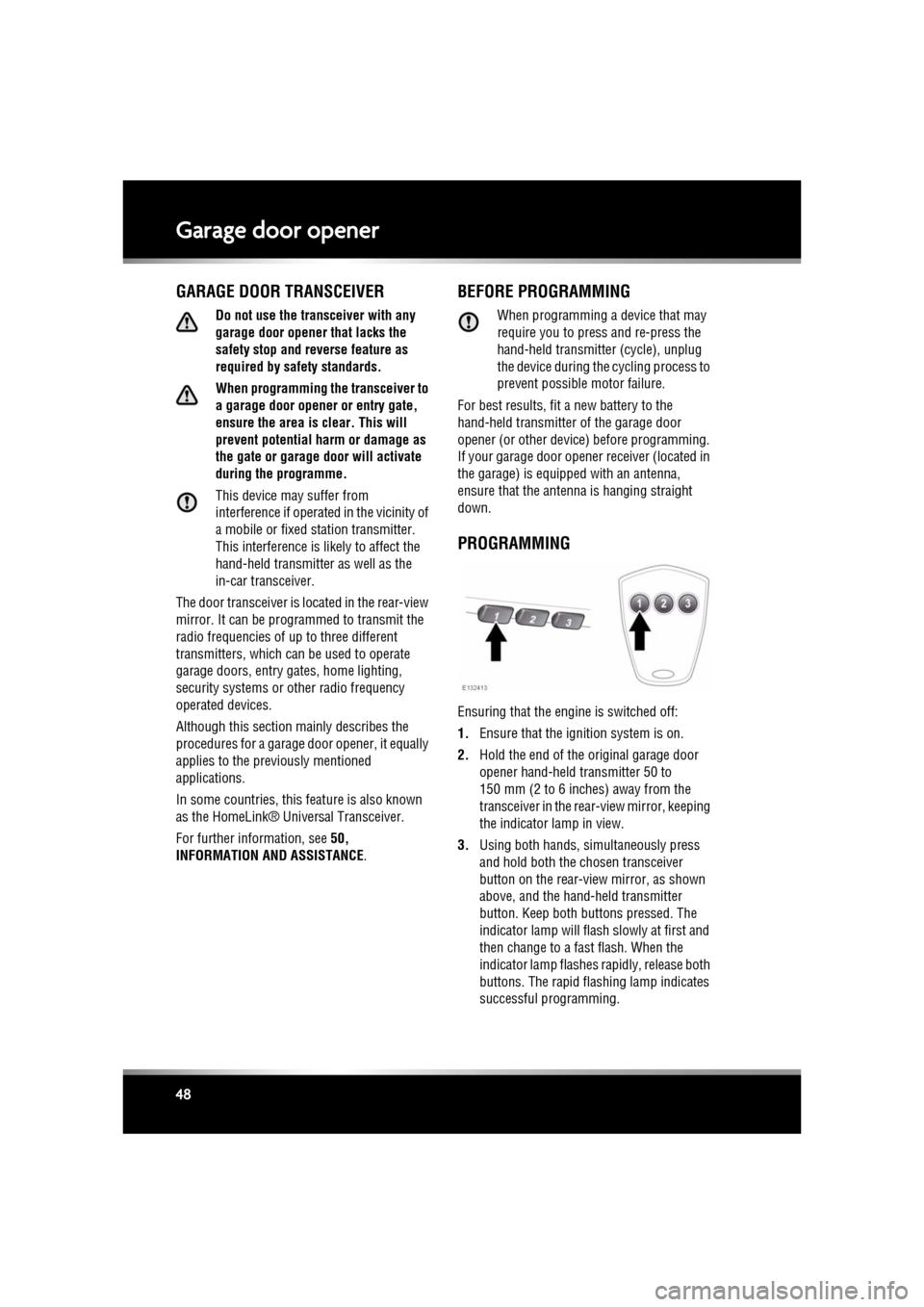
3. Using both hands, simultaneously press
and hold both the chosen transceiver
button on the rear-view mirror, as shown
above, and the hand- held transmitter
button. Keep both but tons pressed. The
indicator lamp will flas h slowly at first and
then change to a fast flash. When the
indicator lamp flashes rapidly, release both
buttons. The rapid flashing lamp indicates
successful programming.
Page 50 of 225
L
(FM8) SEMCON JLR OWNER GUIDE VER 1.00 EURO
LANGUAGE: english-en; MARQUE: jaguar; MODEL: XF
Garage door opener
50
ENTRY GATE PROGRAMMING
The technology of some entry gates requires
you to press and re-press (cycle) the hand-held
transmitter button every two seconds during
programming.
Continue to press and hold the desired
rear-view mirror button while you cycle your
hand-held transmitter until the indicator lamp
flashes rapidly.
INFORMATION AND ASSISTANCE
It is recommended that when you sell or
dispose of the vehi cle, the programmed
transceiver buttons be erased for
security purposes.
For information on the range of available
compatible products or accessories, or for
assistance, you should contact your Dealer/
Authorised Repairer.
You can also contact the supplier’s helpline on
0 0800 04663 5465. This toll-free number can
be called from anywhere within Europe. No
separate country code is required (the first zero
is not required when calling from within
Germany).
Contact can also be made via the internet. The
website addres s is www.eurohomelink.com.
The e-mail address is
[email protected].
Note: Keep the original transmitter for future
use or programming procedures if, for
example, you purchase a new vehicle.
Note: The manufacturer is not responsible for
any radio or TV interference caused by
unauthorised modifications to this equipment.
Such modifications c ould void the user’s
authority to operate the equipment.
Page 57 of 225
R
(FM8) SEMCON JLR OWNER GUIDE VER 1.00 EURO
LANGUAGE: english-en; MARQUE: jaguar; MODEL: XF
Message centre
57
METRIC/IMPERIAL/MIXED DISPLAY
The display of me tric, imperial or mixed units is
selected via the touch screen:
• With the touch screen switched on, select
Set-up from the Home menu.
• Select Security/vehicle , then select Units.
• Touch the appropriate button to select
Metric or Imperial units.
Note: Temperature display can be changed
between °C (Celsius) and °F (Fahrenheit)
independently of Metric or Imperial units.
SERVICE INTERVAL INDICATOR
The service interval message will only be
displayed when the vehicle has less than
3200 km (2000 miles) be fore the service is
due.
When the ignition is switched on, and the
vehicle has started it s service countdown,
SERVICE REQ'D XXXX km (XXXX MLS) is
displayed in the message centre.
When the service distance has been reached,
SERVICE REQUIRED is displayed in the
message centre.
If no service inte rval indicator is
displayed during the vehicle service
cycle, make sure that your vehicle is
serviced in accordance with the
intervals, as stated in the Service
Portfolio.
Page 58 of 225
L
(FM8) SEMCON JLR OWNER GUIDE VER 1.00 EURO
LANGUAGE: english-en; MARQUE: jaguar; MODEL: XF
Touch screen
58
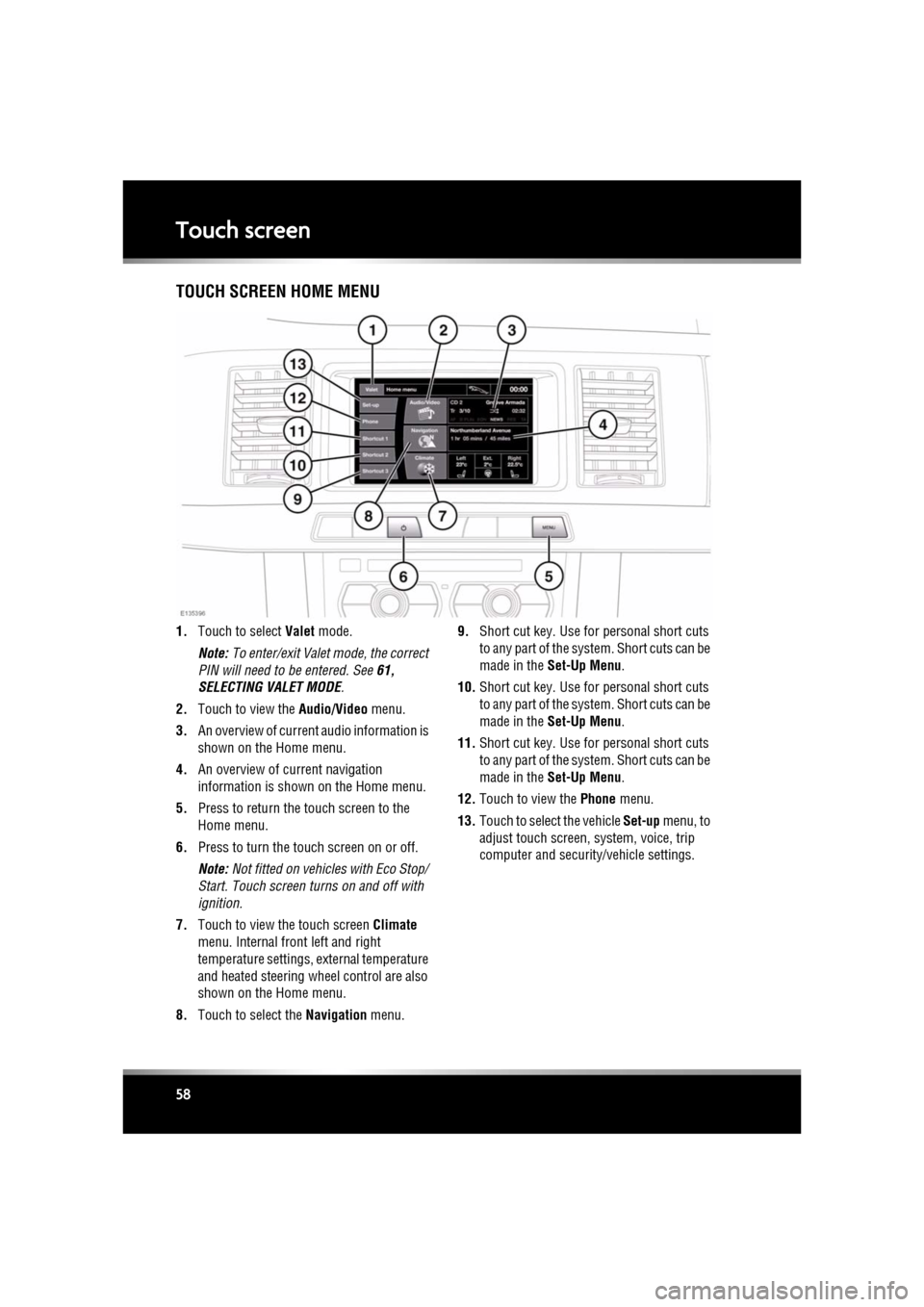
Touch screenTOUCH SCREEN HOME MENU
1. Touch to select Valet mode.
Note: To enter/exit Valet mode, the correct
PIN will need to be entered. See 61,
SELECTING VALET MODE .
2. Touch to view the Audio/Video menu.
3. An overview of current audio information is
shown on the Home menu.
4. An overview of current navigation
information is shown on the Home menu.
5. Press to return the touch screen to the
Home menu.
6. Press to turn the touch screen on or off.
Note: Not fitted on vehicles with Eco Stop/
Start. Touch screen turns on and off with
ignition.
7. Touch to view the touch screen Climate
menu. Internal fr ont left and right
temperature settings, external temperature
and heated steering wheel control are also
shown on the Home menu.
8. Touch to select the Navigation menu. 9.
Short cut key. Use for personal short cuts
to any part of the system. Short cuts can be
made in the Set-Up Menu .
10. Short cut key. Use for personal short cuts
to any part of the system. Short cuts can be
made in the Set-Up Menu .
11. Short cut key. Use for personal short cuts
to any part of the system. Short cuts can be
made in the Set-Up Menu .
12. Touch to view the Phone menu.
13. Touch to select the vehicle Set-up menu, to
adjust touch screen, system, voice, trip
computer and security/vehicle settings.
Page 59 of 225
R
(FM8) SEMCON JLR OWNER GUIDE VER 1.00 EURO
LANGUAGE: english-en; MARQUE: jaguar; MODEL: XF
Touch screen
59
TURNING OFF THE TOUCH SCREEN
Vehicles without Eco Stop/Start:
1. Press the screen on/off button once to
activate the screensaver (see 58, TOUCH
SCREEN HOME MENU ). If the screensaver
has not been set, a single press will turn off
the touch screen.
2. Press the screen on/off button twice to turn
off the touch screen.
3. To turn on the touch screen, press the
screen on/off button.
Vehicles with Eco Stop/Start:
1. From the Home menu , touch the screen off
soft key to activate the screensaver. If the
screensaver has not been set, touching the
screen off soft key w ill turn off the touch
screen.
2. From the screensaver, touch the screen off
soft key to turn off the touch screen.
3. To turn on the touch screen, touch
anywhere on the screen.
TOUCH SCREEN USE
Always run the engine during prolonged
use of the touch screen.
The buttons on the centre console, below the
touch screen display, are referred to as hard
buttons and should be pressed firmly. The
touch screen buttons are referred to as soft
keys and only require light pressure to
function. Do not use excessive pressure.
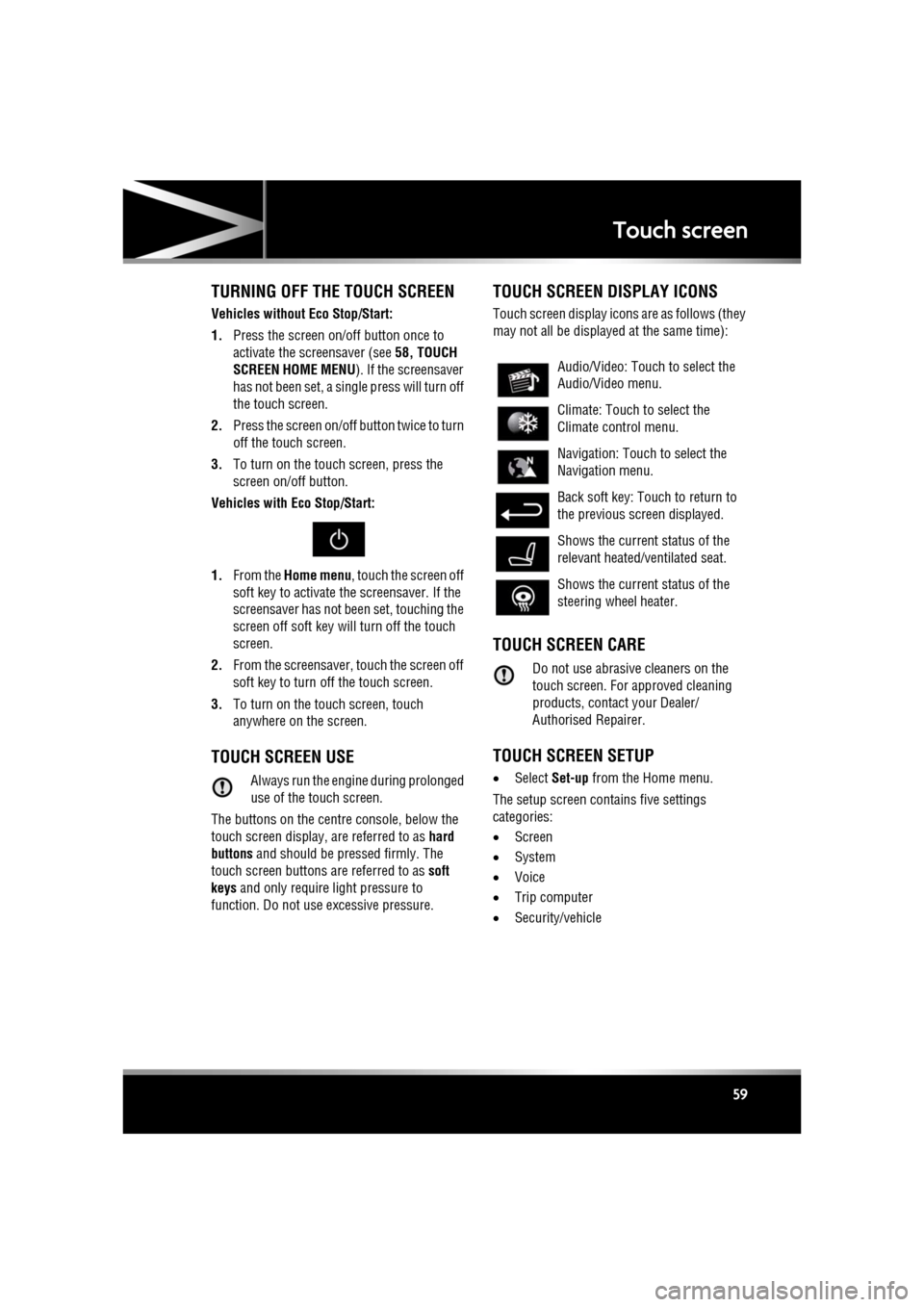
TOUCH SCREEN DISPLAY ICONS
Touch screen display icons are as follows (they
may not all be displayed at the same time):
TOUCH SCREEN CARE
Do not use abrasive cleaners on the
touch screen. For approved cleaning
products, contact your Dealer/
Authorised Repairer.
TOUCH SCREEN SETUP
• Select Set-up from the Home menu.
The setup screen cont ains five settings
categories:
• Screen
• System
• Voice
• Trip computer
• Security/vehicle
Audio/Video: Touc h to select the
Audio/Video menu.
Climate: Touch to select the
Climate control menu.
Navigation: Touch to select the
Navigation menu.
Back soft key: Touch to return to
the previous screen displayed.
Shows the current status of the
relevant heated/ventilated seat.
Shows the current status of the
steering wheel heater.
Page 61 of 225

R
(FM8) SEMCON JLR OWNER GUIDE VER 1.00 EURO
LANGUAGE: english-en; MARQUE: jaguar; MODEL: XF
Touch screen
61
The training session can be cancelled at any
time by touching the on-screen pop-up or by
pressing and holding the Voice button on the
steering wheel. See 126, USING VOICE
CONTROL .
TRIP COMPUTER SETTINGS
Trip Computer : Select to switch trip computer
readings between Trip A, Trip B and Trip Auto .
Select Reset to zero the trip computer
readings. Select Units to switch the trip
computer readings between Imperial and
Metric measurements.
VEHICLE SETTINGS
• Security : Select to enable/disable or alter
the settings of the following:
• Single/multi-point entry (2 stage
unlocking).
• Alarm sensors (interior and tilt).
• Drive-away locking.
Scroll down through the menu until the
desired feature is disp layed, then select On
or Off, as appropriate.
If drive-away locking is switched on, select
the desired speed (8, 16 or 32 km/h or 5,
10 or 20 mph).
• Windows/mirrors : Select to
enable/disable:
• Global opening/closing of windows
and sunroof.
• Exterior mirror dip when reversing.
• Automatic folding/unfo lding of exterior
mirrors when vehicle is locked/
unlocked.
• Interior mirror dimming.
Scroll down through the menu until the
desired feature is disp layed, then select On
or Off, as appropriate. •
Units : Select to switch between Imperial
and Metric measurements.
• Auto (AHB) high beam : Select to turn AHB
on or off, and set AHB for side of road
being driven on.
SELECTING VALET MODE
Valet mode allows the vehi cle to be locked by a
parking attendant, without giving access to the
luggage compartment and glove box. Valet
mode also prevents ope ration of the touch
screen, to prevent access to telephone
numbers or naviga tion addresses.
From the Home menu, select Valet, then enter
a four digit Personal Identification Number
(PIN) (personally chosen ). You will then be
prompted to re-enter the same PIN. On
completion, touch the OK soft key.
If you wish to cancel the PIN, touch the C soft
key. If the PIN is cancelled, or incorrectly
entered, you will be prompted to enter the PIN
again.
Once the PIN has been correctly entered, a
security information pop- up is displayed. Read
the information and remove the emergency key
from the Jaguar Smart Key.
Valet on is displayed to indicate that the PIN
has been accepted. The luggage compartment
and glove box are now securely locked in Valet
mode.
On exiting and securing the vehicle, remove the
emergency key from the Jaguar Smart Key.
Retain the emergency key and give the Jaguar
Smart Key to the attendant.
Note: The emergency key ca n be used to open
the luggage compartment, which may
de-activate Valet mode.
Page 62 of 225

L
(FM8) SEMCON JLR OWNER GUIDE VER 1.00 EURO
LANGUAGE: english-en; MARQUE: jaguar; MODEL: XF
Touch screen
62
DESELECTING VALET MODE
When you enter the vehicle, select the Valet
mode screen.
Enter your four digit PIN and touch the OK
button. A pop-up is displayed. Read the
information and stow th e emergency key in the
Jaguar Smart Key.
Valet off is displayed to indicate that your PIN
has been accepted.
• The luggage compartment will return to the
previously set security requirement.
• The glove box will now open as normal.
Note: If the PIN is forgotten, open the luggage
compartment using the emergency key blade
to cancel Valet mode.
Page 68 of 225
L
(FM8) SEMCON JLR OWNER GUIDE VER 1.00 EURO
LANGUAGE: english-en; MARQUE: jaguar; MODEL: XF
Luggage compartment
68
Do not repeatedly attempt to close the
luggage compartment after it
automatically re-ope ns, or the latch
may overheat. If the cause of the
automatic re-ope ning cannot be
determined: Unlock all the doors and
the luggage compartment with the
Smart Key; make sure that all doors, the
bonnet and the luggage compartment
are closed properly; lock the vehicle
again with the Smart Key.
The luggage compartment can be opened
using the appropriate button (1) on the Smart
Key, or via keyless entry (see 6, KEYLESS
ENTRY ). Provided the vehicle is not locked, the
luggage compartment can also be opened
using either the interior release button (7) or
the exterior release button (4).
The emergency key blade in the Smart Key can
also be used to open the luggage
compartment, as follows:
1. Press and hold the release button (3) on
the Smart Key, then remove the emergency
key blade (2).
2. Use the emergency key blade to remove
the cap (5) from the trim panel above the
license plate.
3. Insert the emergency key blade into the
lock (6) and turn clockwise to open the
luggage compartment.
If the security system is armed, the alarm
will sound when the luggage compartment
is opened. To deactiva te the alarm, press
the vehicle unlock button on the Smart Key
or press the engine START/STOP button
with the Smart Key inside the vehicle.SOFT-CLOSE LID
Care should be taken when manually
latching the boot lid as the soft-close
feature will automat ically close the
latch and possible injury may occur.
To activate the soft-close feature, lower the
luggage compartment lid onto the latch. The lid
will then automatically move to the fully closed
and latched position.
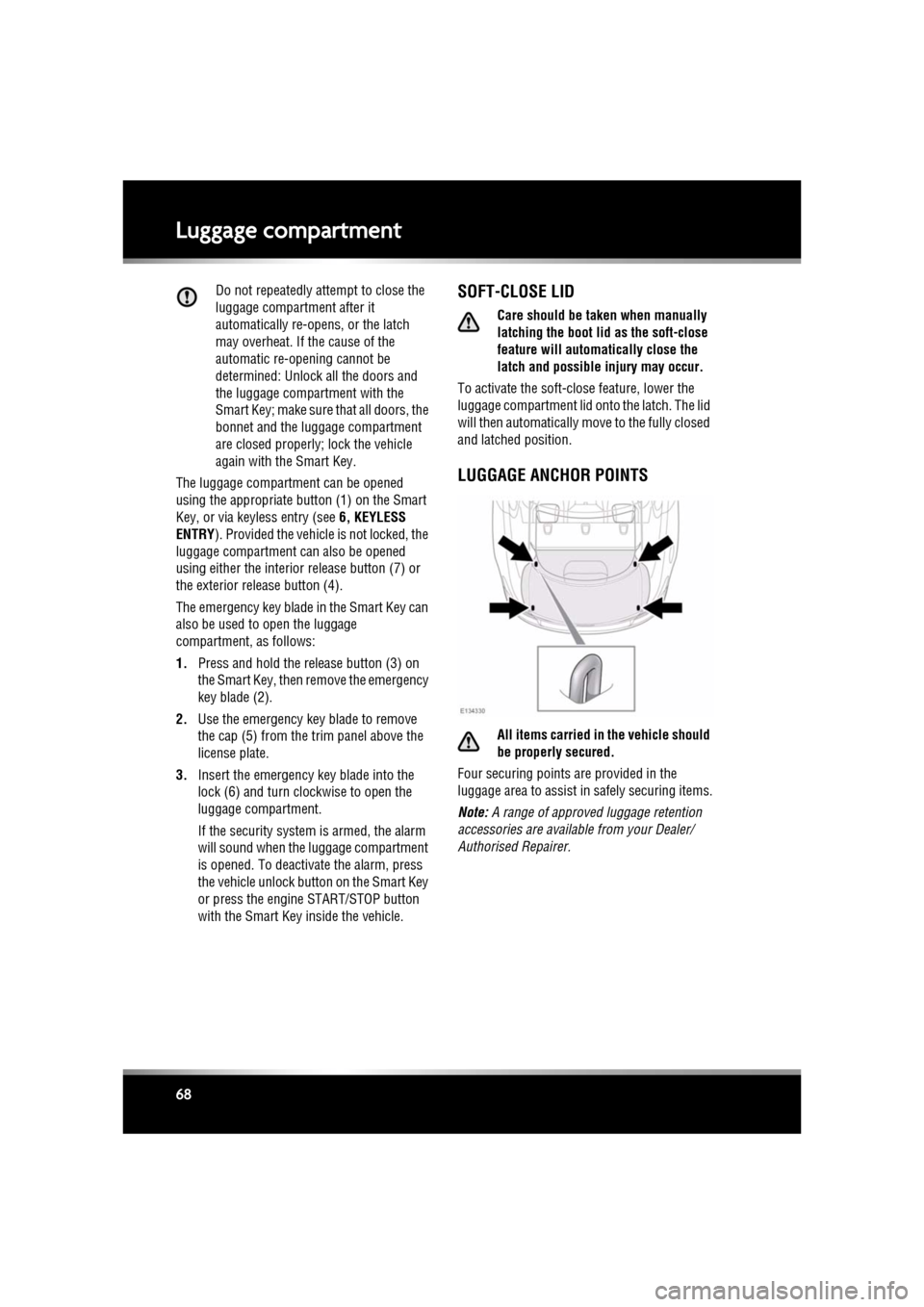
LUGGAGE ANCHOR POINTS
All items carried in the vehicle should
be properly secured.
Four securing points are provided in the
luggage area to assist in safely securing items.
Note: A range of approved luggage retention
accessories are available from your Dealer/
Authorised Repairer.