Touch JAGUAR XF 2011 1.G Owner's Manual
[x] Cancel search | Manufacturer: JAGUAR, Model Year: 2011, Model line: XF, Model: JAGUAR XF 2011 1.GPages: 225, PDF Size: 7.32 MB
Page 65 of 225
R
(FM8) SEMCON JLR OWNER GUIDE VER 1.00 EURO
LANGUAGE: english-en; MARQUE: jaguar; MODEL: XF
Heating and ventilation
65
AIR QUALITY SENSOR
If the air quality sensor detects pollution, air
recirculation is selected automatically to
reduce pollutants entering the vehicle.
The sensitivity of the se nsor can be adjusted
using the touch screen:
1. Select Settings from the Climate menu.
2. Touch the +/- buttons on the screen to
increase/decrease sensitivity.
To switch the function o ff, decrease sensitivity
to the minimum setting.
EXTERNAL TEMPERATURE
The external temperature is displayed in the
Home menu of the touch screen and in the
instrument panel.
When the external temp erature is low enough
that ice may be present on the road, an amber
snowflake warning lamp w ill illuminate in the
instrument panel.
AUTOMATIC CLIMATE CONTROL
AUTO mode should be used as the normal
operating mode. The air conditioning, heating
and ventilation controls automatically provide
an optimum environment at the selected
temperature.
Note: Screen heating and timed air
recirculation may be se lected in AUTO mode.
Any other manual adjustment cancels AUTO
operation.
Note: Water expelled by the air conditioning
may collect underneath the vehicle when
parked. This is not cause for concern.
TEMPERATURE CONTROLS
The driver and front seat passenger zone
temperatures can be i ndependently adjusted.
The temperature for each zone is displayed on
the relevant side of the touch screen.
Note: The maximum possible temperature
differential between the driver and passenger
settings is 3°C (5.4°F).
HEATED SEATS
Note: The seat heaters will only operate when
the engine is running.
The heated seats are controlled from the Home
or Climate menu on the touch screen.
• Touch the appropriate seat icon to switch
on the seat heater at maximum
temperature (3 red bars).
• Touch the icon a second and third time to
reduce the temperature (2 and 1 red bars).
• Touch the icon a fourth time to switch the
seat heater off.
This icon appears at the top of the
touch screen when the air quality
sensor is switched on.
Page 66 of 225

L
(FM8) SEMCON JLR OWNER GUIDE VER 1.00 EURO
LANGUAGE: english-en; MARQUE: jaguar; MODEL: XF
Heating and ventilation
66
CLIMATE SEATS
Note: The climate seats w ill only operate when
the engine is running.
Seat ventilation is cont rolled from the Home or
Climate menu on the touch screen.
Heated ventilation:
• Touch the red arrow above the appropriate
seat icon to switch he ated ventilation on at
maximum (3 red bars).
• Touch the blue arrow below the seat icon
once or twice to reduce the ventilation
setting (2 and 1 red bars).
• Touch the blue arrow a third time to switch
off seat ventilation.
Cooled ventilation:
• Touch the blue arrow below the
appropriate seat icon to switch cooled
ventilation on at maximum (3 blue bars).
• Touch the red arrow above the seat icon
once or twice to reduce the ventilation
setting (2 and 1 blue bars).
• Touch the red arrow a third time to switch
off seat ventilation.
To select backrest ventilation only:
• Select Settings from the Climate menu.
• Select the appropriate icon for full seat or
backrest only ventilation.
Page 75 of 225

R
(FM8) SEMCON JLR OWNER GUIDE VER 1.00 EURO
LANGUAGE: english-en; MARQUE: jaguar; MODEL: XF
Starting the engine
75
STEERING COLUMN LOCK
The steering column has an electronic lock,
which locks and unlocks in conjunction with
the vehicle Locking/Alarm system. The steering
column lock also locks when the ignition is
switched off, after a time delay. If the steering
column lock malfunctions, Steering Column
Locked is displayed in the message centre. If
this occurs:
1. Lock and then unlock the vehicle using the
Smart Key.
2. Try again to unlock the steering column
lock, by turning the steering wheel gently
to the left and right.
3. If the malfunction pers ists, seek qualified
assistance immediately.
SWITCHING OFF THE ENGINE
With the gear sele ctor in position P, press the
engine START/STOP butt on. The engine will
stop and the ignition sy stem will return to
convenience mode. The audio, telephone and
touch screen systems will revert to stand-by
mode and the JaguarDrive selector will retract
into the centre console.
Page 93 of 225
R
(FM8) SEMCON JLR OWNER GUIDE VER 1.00 EURO
LANGUAGE: english-en; MARQUE: jaguar; MODEL: XF
Parking aids
93
CLEANING THE SENSORS
For reliable operation, th e sensors in the front
and rear bumpers should be kept free from ice,
frost and grime.
Do not clean the sensors with abrasive
or sharp objects or materials.
When using a high pressure spray, only
spray the sensors briefly, from a
distance greater than 200 mm
(8 inches).
PARKING AID SYSTEM FAULT
If the system has a fault when engaging reverse
gear or turning on the ignition, then a single, 3
second tone will be heard and a pop-up
warning will appear on the touch screen. If
both front and rear park ing aids are fitted, the
warning indicator in the parking aid switch will
flash for 3 seconds and then switch off.
If a fault is detected, the system is
automatically disabled.
Note: The parking aid may emit spurious tones
if it detects a frequenc y tone using the same
band as the sensors (e.g. air brakes).
REAR VIEW CAMERA
It remains the driver's responsibility
to detect obstacles and estimate the
vehicle's distance from them when
reversing.
When Reverse ( R) is selected, the system uses
a camera to provide a wide-angle colour rear
view image on the touch screen.
The camera display has priority over the
parking aid display. To view the parking aid
display instead, or to cancel camera display at
any time, touch the display.
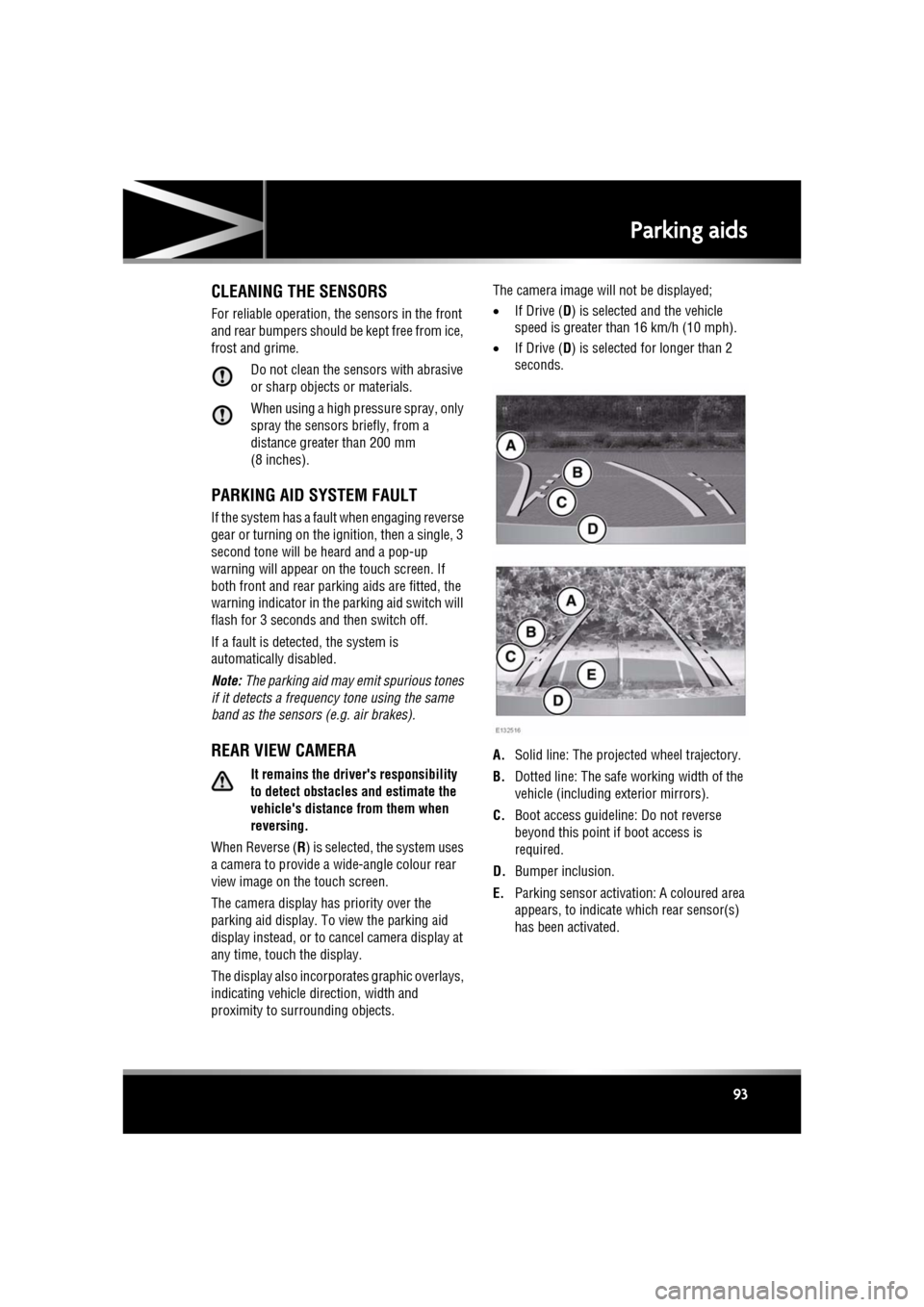
The display also incorporates graphic overlays,
indicating vehicle di rection, width and
proximity to surrounding objects. The camera image will not be displayed;
•
If Drive ( D) is selected and the vehicle
speed is greater than 16 km/h (10 mph).
• If Drive ( D) is selected for longer than 2
seconds.
A. Solid line: The projec ted wheel trajectory.
B. Dotted line: The safe working width of the
vehicle (including exterior mirrors).
C. Boot access guideline: Do not reverse
beyond this point if boot access is
required.
D. Bumper inclusion.
E. Parking sensor activati on: A coloured area
appears, to indicate which rear sensor(s)
has been activated.
Page 104 of 225
L
(FM8) SEMCON JLR OWNER GUIDE VER 1.00 EURO
LANGUAGE: english-en; MARQUE: jaguar; MODEL: XF
Audio/video overview
104
Audio/video overviewAUDIO/VIDEO CONTROLS
Sustained exposure to high sound
levels (greater than 85 decibels) can
damage your hearing.
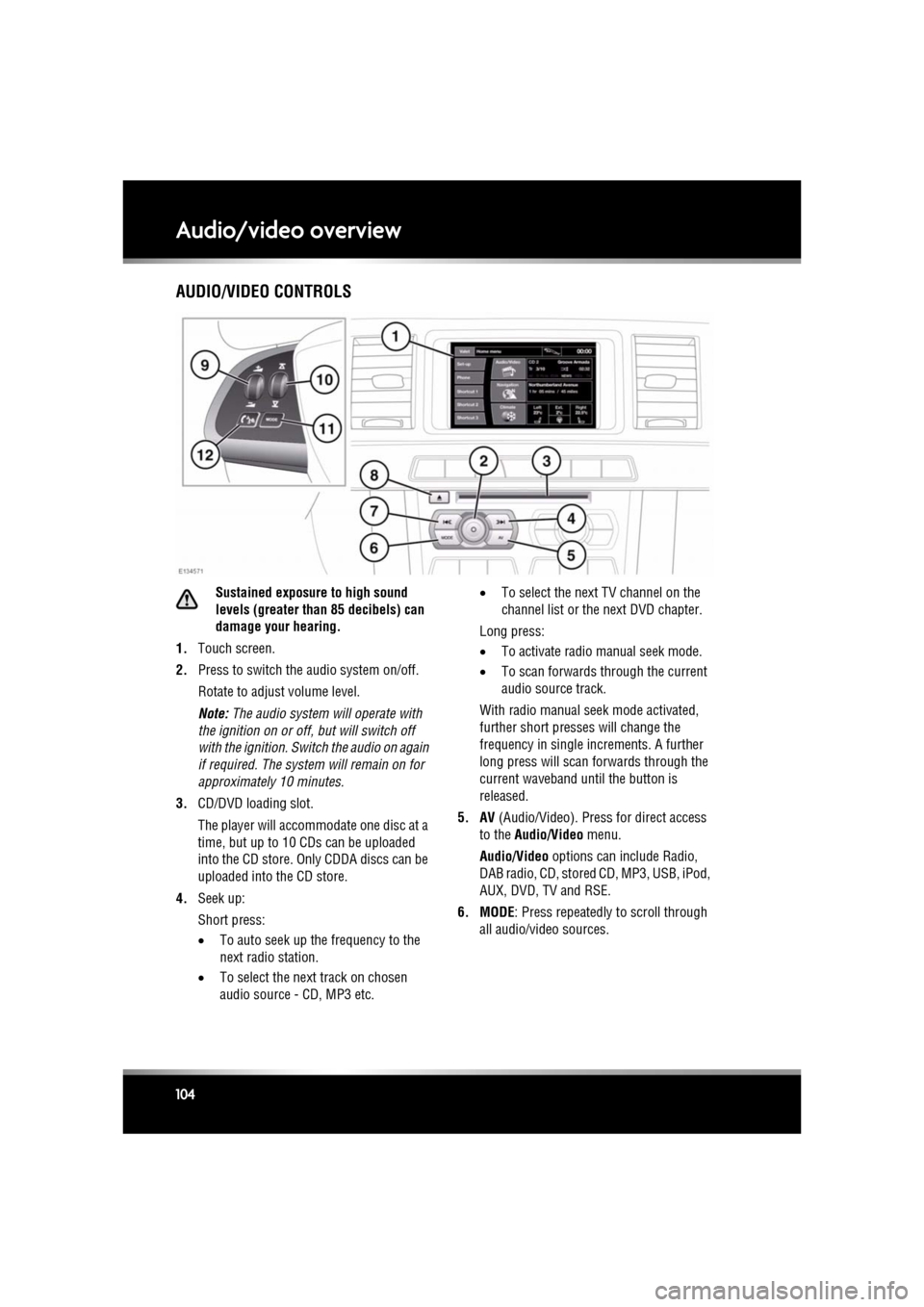
1. Touch screen.
2. Press to switch the audio system on/off.
Rotate to adjust volume level.
Note: The audio system will operate with
the ignition on or off, but will switch off
with the ignition. Switch the audio on again
if required. The system will remain on for
approximatel y 10 minutes.
3. CD/DVD loading slot.
The player will accomm odate one disc at a
time, but up to 10 CDs can be uploaded
into the CD store. Only CDDA discs can be
uploaded into the CD store.
4. Seek up:
Short press:
•To auto seek up the frequency to the
next radio station.
• To select the next track on chosen
audio source - CD, MP3 etc. •
To select the next TV channel on the
channel list or the next DVD chapter.
Long press:
• To activate radio manual seek mode.
• To scan forwards through the current
audio source track.
With radio manual seek mode activated,
further short presses will change the
frequency in single increments. A further
long press will scan forwards through the
current waveband until the button is
released.
5. AV (Audio/Video). Press for direct access
to the Audio/Video menu.
Audio/Video options can include Radio,
DAB radio, CD, stored CD, MP3, USB, iPod,
AUX, DVD, TV and RSE.
6. MODE : Press repeatedly to scroll through
all audio/video sources.
Page 105 of 225
R
(FM8) SEMCON JLR OWNER GUIDE VER 1.00 EURO
LANGUAGE: english-en; MARQUE: jaguar; MODEL: XF
Audio/video overview
105
7. Seek down:
Short press:
•To auto seek down the frequency to the
next radio station.
• To select the previous track or start of
current track on chosen audio source -
CD, MP3 etc.
• To select the previous TV channel on
the channel list or the previous DVD
chapter.
Long press:
• To activate radio manual seek mode.
• To skip backward through current
audio source track.
With radio manual seek mode activated,
further short presse s will change the
frequency in single decrements. A further
long press will scan backward through the
current waveband until the button is
released.
8. CD/DVD eject button.
9. Rotate to adjust volume.
10. Rotate (up or down) and release repeatedly
to scroll through:
•The radio presets.
• The previous track or start of next track
on chosen audio source - CD, MP3 etc.
11. MODE : Press repeatedly to scroll through
all audio/video sources.
12. If Telephone and Voice control are not
fitted, press to mute/un-mute audio.
Otherwise, if Tele phone is fitted, see 128,
TELEPHONE SYSTEM OVERVIEW. If Voice
control is fitted, see 126, USING VOICE
CONTROL .AUDIO SETTINGS
To view the audio settings menu, select
Settings and then Sound on the touch screen.
To adjust the sound settings:
1. Touch the + or - soft keys to adjust Bass,
Treble or Subwoofer levels.
2. If surround sound is fitted, touch the
appropriate soft key to select DPL II X, DTS
Neo6 or select Off to switch surround
sound off.
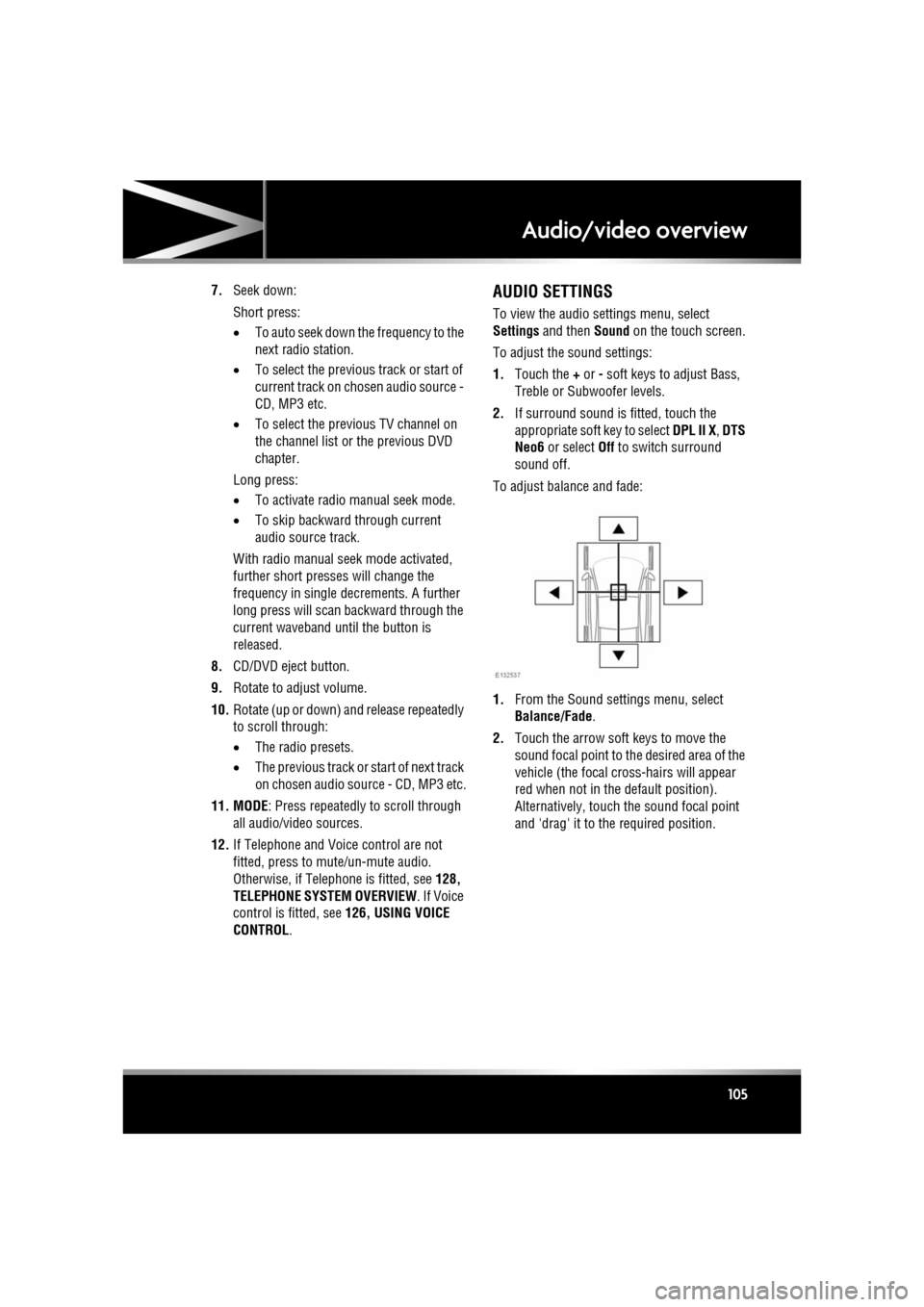
To adjust balance and fade:
1. From the Sound settings menu, select
Balance/Fade.
2. Touch the arrow soft keys to move the
sound focal point to the desired area of the
vehicle (the focal cr oss-hairs will appear
red when not in the default position).
Alternatively, touch the sound focal point
and 'drag' it to the required position.
Page 109 of 225
R
(FM8) SEMCON JLR OWNER GUIDE VER 1.00 EURO
LANGUAGE: english-en; MARQUE: jaguar; MODEL: XF
Radio
109
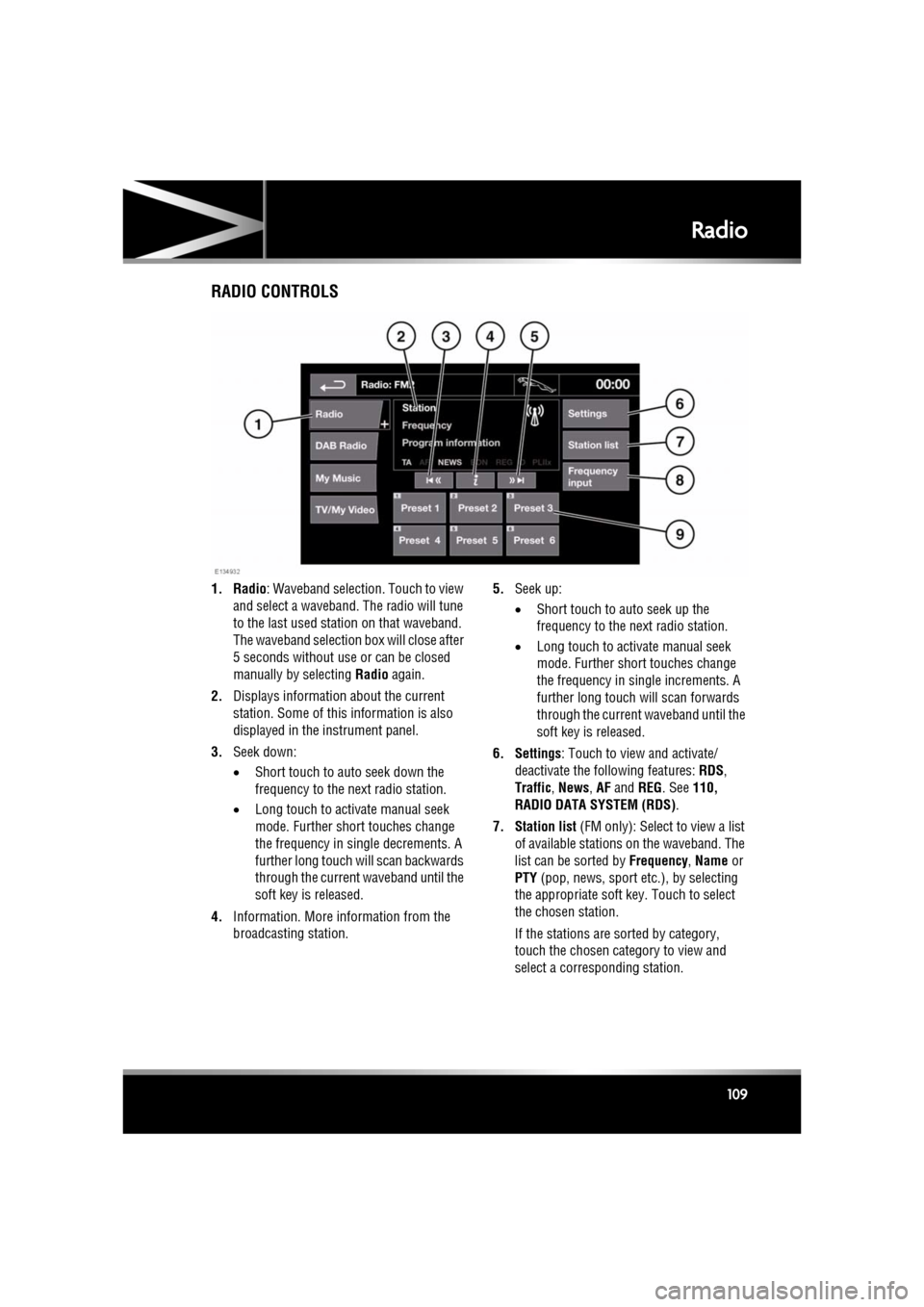
RadioRADIO CONTROLS
1. Radio : Waveband selection. Touch to view
and select a waveband. The radio will tune
to the last used stat ion on that waveband.
The waveband selection box will close after
5 seconds without use or can be closed
manually by selecting Radio again.
2. Displays informati on about the current
station. Some of this information is also
displayed in the instrument panel.
3. Seek down:
•Short touch to auto seek down the
frequency to the next radio station.
• Long touch to activate manual seek
mode. Further short touches change
the frequency in single decrements. A
further long touch will scan backwards
through the current waveband until the
soft key is released.
4. Information. More information from the
broadcasting station. 5.
Seek up:
•Short touch to auto seek up the
frequency to the next radio station.
• Long touch to activate manual seek
mode. Further short touches change
the frequency in single increments. A
further long touch will scan forwards
through the current waveband until the
soft key is released.
6. Settings : Touch to view and activate/
deactivate the following features: RDS ,
Traffic , News , AF and REG. See 110,
RADIO DATA SYSTEM (RDS) .
7. Station list (FM only): Select to view a list
of available stations on the waveband. The
list can be sorted by Frequency, Name or
PTY (pop, news, sport et c.), by selecting
the appropriate soft key. Touch to select
the chosen station.
If the stations are sorted by category,
touch the chosen category to view and
select a corre sponding station.
Page 110 of 225

L
(FM8) SEMCON JLR OWNER GUIDE VER 1.00 EURO
LANGUAGE: english-en; MARQUE: jaguar; MODEL: XF
Radio
110
8. Frequency input : Select to enter a known
frequency of a station on the current
waveband, using the numeric keypad that
appears. Select OK or wait for 2 seconds to
tune to the entered frequency.
9. Station presets: Ea ch waveband has 6
preset positions.
• Touch and release to tune to the
station stored on that preset.
• Touch and hold to store the current
station on that preset (the radio will
mute while the station is stored then
beep).
• Use the seek buttons on the steering
wheel to change to th e next or previous
preset station.
RADIO DATA SYSTEM (RDS)
Your radio is equipped with RDS which enables
the audio unit to receive additional information
with normal FM radio signals.
Note: Not all FM radio stat ions broadcast RDS
information.
Select Settings (6) to view or alter RDS
settings.
• Traffic/News : Provides local travel or news
information.
• Regionalisation (REG) : Select to prevent
the radio tuning into an alternative local
station that has a stronger signal.
• Alternative Frequency (AF) : Select to
allow the radio to automatically re-tune to
a stronger alternative frequency for the
current station. This is useful on a journey
where the vehicle travels through different
transmitter areas.
Page 111 of 225
R
(FM8) SEMCON JLR OWNER GUIDE VER 1.00 EURO
LANGUAGE: english-en; MARQUE: jaguar; MODEL: XF
DAB radio
111
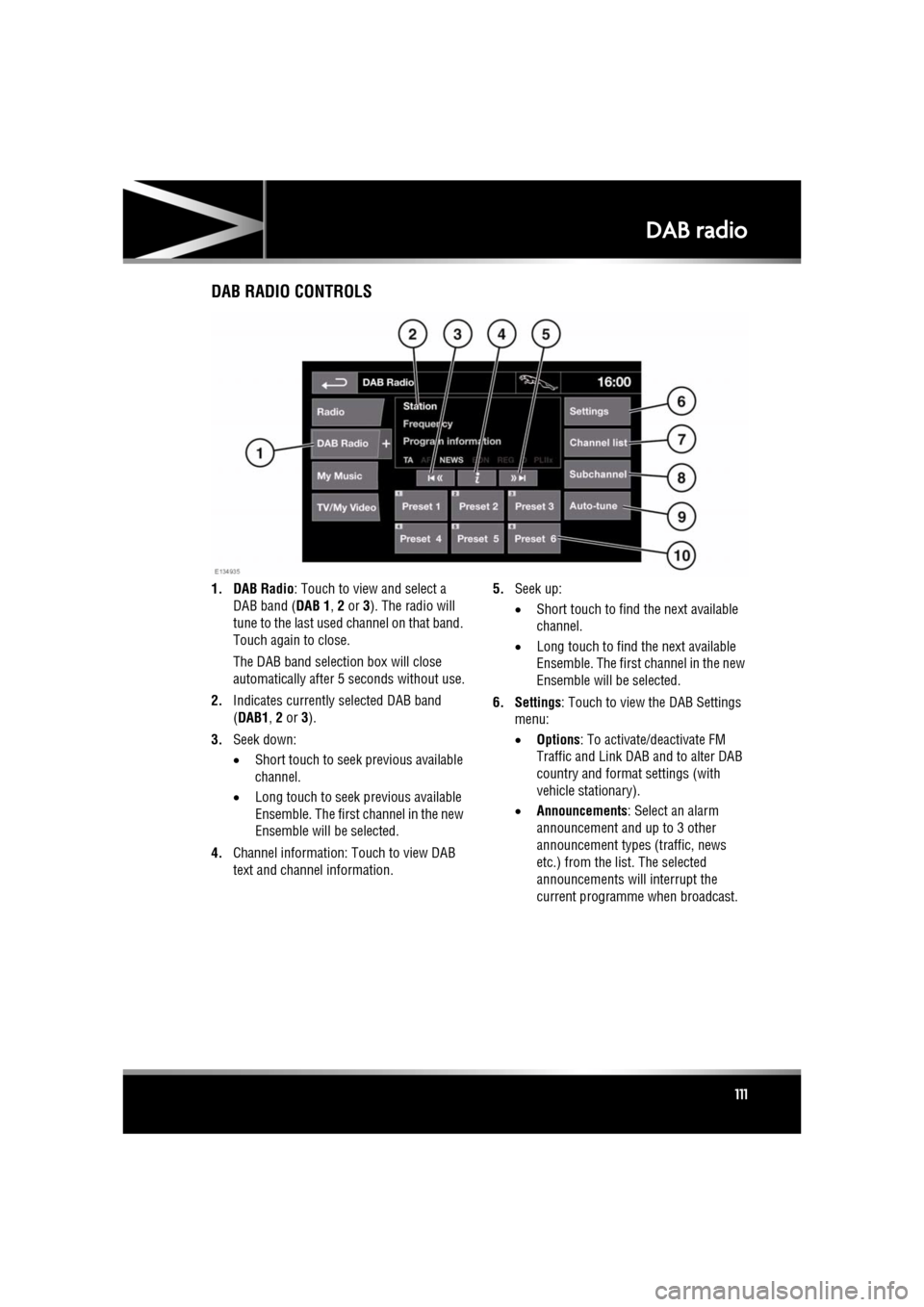
DAB radioDAB RADIO CONTROLS
1. DAB Radio : Touch to view and select a
DAB band ( DAB 1, 2 or 3). The radio will
tune to the last used channel on that band.
Touch again to close.
The DAB band selecti on box will close
automatically after 5 seconds without use.
2. Indicates currently selected DAB band
(DAB1 , 2 or 3).
3. Seek down:
•Short touch to seek previous available
channel.
• Long touch to seek previous available
Ensemble. The first channel in the new
Ensemble will be selected.
4. Channel information: Touch to view DAB
text and channel information. 5.
Seek up:
•Short touch to find the next available
channel.
• Long touch to find the next available
Ensemble. The first channel in the new
Ensemble will be selected.
6. Settings : Touch to view the DAB Settings
menu:
• Options : To activate/deactivate FM
Traffic and Link D AB and to alter DAB
country and format settings (with
vehicle stationary).
• Announcements : Select an alarm
announcement and up to 3 other
announcement types (traffic, news
etc.) from the list. The selected
announcements will interrupt the
current programme when broadcast.
Page 112 of 225

L
(FM8) SEMCON JLR OWNER GUIDE VER 1.00 EURO
LANGUAGE: english-en; MARQUE: jaguar; MODEL: XF
DAB radio
112
7. Channel list : Touch to view a list of
available Ensembles an d channels. The list
can be sorted by Ensemble, Channel ,
Subchannel or by Category .
• If an Ensemble is selected from the
list, all available channels from that
ensemble will be displayed.
• Sorting by Subchannel is only
available when the current channel is
broadcasting subchannels.
• If Category is selected, touch the
chosen category to view
corresponding channels, before
making your selection from the list.
Once the desired sele ction has been made,
select the Back soft key to return to the
main DAB menu.
8. Subchannel : If subchannels are broadcast
by the current channel, this soft key will be
active. Select to al low subchannels then
select the required subchannel with the
seek down / up keys.
9. Auto-tune: Select to scan for all available DAB Ensembles/channels. This needs to be
done before using the DAB radio for the
first time.
Auto-tune is also useful when travelling
long distances, so re gional Ensembles can
be tuned.
During Auto-tune, a pop-up shows tuning
progress.
The Auto-tune process will not affect
current presets, but some presets may not
operate if the channel they relate to is no
longer available ( No reception displays). 10.
Station presets: Each DAB band has 6
preset positions.
•Touch and release to tune the radio to
the station stored on that preset.
• Touch and hold to store the current
station on that preset (the radio will
mute while the station is stored).
• Use the seek buttons on the steering
wheel to select the next or previous
preset station.
Note: If you attempt to select a preset
channel that is now una vailable or invalid,
No reception is displayed.
DIGITAL RADIO RECEPTION
DAB radio can significa ntly increase the
number of radio channels /stations available.
The DAB signals are transmitted to most major
cities, towns and motorway networks.
Digital radio is transm itted from regional
transmitters. Some local channels are not
available outside th e range of their
transmitters. If you want to listen to local
channels as you move around the country, use
the auto-tune function (AUTO) to build new
channel lists.
Note: If any auxiliary electrical equipment is
connected to the vehicle, then this may reduce
the DAB radio sound quality.
ENSEMBLES
Unlike AM/FM radio, DAB transmits several
channels/stations on a single frequency. A
group of channels is k nown as an ensemble.
Some channels within the ensemble may have
subchannels offering seve ral listening options.
If reception is lost when the vehicle is in
motion, the vehicle may be out of range of the
ensemble. To build a new list of ensembles,
select Auto-tune .