Touch JAGUAR XF 2011 1.G Workshop Manual
[x] Cancel search | Manufacturer: JAGUAR, Model Year: 2011, Model line: XF, Model: JAGUAR XF 2011 1.GPages: 225, PDF Size: 7.32 MB
Page 139 of 225

R
(FM8) SEMCON JLR OWNER GUIDE VER 1.00 EURO
LANGUAGE: english-en; MARQUE: jaguar; MODEL: XF
Navigation system
139
START GUIDANCE
After selecting a destination, the system will
calculate the route.
There is now a choice to select 3 Routes,
Change route or to Start navigation guidance.
Touch 3 Routes to display a choice of three
different route options on the map.
The roads on the map are drawn in three
different colours to highlight each route.
EcoRoute helps you find the most fuel efficient
route available. A display of three leaves
indicates the most fuel efficient route.
Select route 1, 2 or 3 by touching the
respective box displaye d on the right side of
the map.
Touch Change Route followed by Route prefs.
to change the route setti ngs. If a destination is
already set, touch Waypoint to add a waypoint
in the journey if required.
When you have made your selection, if any,
touch Go.
Note: As you approach a j unction, in addition
to the voice guidance, an inset on the map will
display an enlarged view of the junction.
EASY ROUTE
In Route options , Easy Route can be turned On
or Off .
When On is selected, Easy Route changes the
calculation parameters of Route 3 in order to
reduce:
• Junctions.
• Turns.
• Turns that cross traffic.
• The priority of minor roads.
• Complex junction s and manoeuvres.
LEARN ROUTE
In Route options , Learn Route can be turned
On or Off.
When On is selected, if you make the same
deviation from the proposed route three times,
then the system will memorize the deviation
and offer that as the normal route from then on.
Select Reset all routes to delete any learnt
routes and return to the default settings.
VOICE GUIDANCE
To turn voice guidance on or off but maintain
route guidance, proceed as follows:
1. Touch Nav menu on the navigation screen.
2. Touch the Route voice guidance soft key.
The soft key will be highlighted when voice
guidance is enabled.
CANCEL ROUTE GUIDANCE
To cancel route guidance, proceed as follows:
1. Touch Nav menu on the navigation screen.
2. Touch the Cancel guidance soft key.
QUICK POI SELECTION
Touch the Map screen to display the POI
button. Touch the POI (Point of interest)
button. The screen shows six suggested
categories, five of which can be selected as
quick points of interest.
Note: The POI icons will not be shown if the
map zoom level is greate r than 1 km (½ mile).
Select a Quick POI category, or select More to
see further POIs. Touch OK to confirm a
selection.
The map screen with the POI icon(s) is
displayed. Select the five POIs you wish to see
when the Quick POIs are displayed.
Page 140 of 225

L
(FM8) SEMCON JLR OWNER GUIDE VER 1.00 EURO
LANGUAGE: english-en; MARQUE: jaguar; MODEL: XF
Navigation system
140
RESTORE SYSTEM DEFAULTS
If you have made any changes to the system’s
default settings, use this menu to restore the
original settings.
MEMORY POINTS
From the navigation menu, select Stored
locations . This enables you to manage
destinations such as, place of work, home,
favourite restaurant or areas to avoid.
From the Stored locations menu you can save
up to 400 memory points or add your home
address.
Select Memory Points to add a stored location.
Touching any of the Stored locations
submenus allows you to Add, Edit or Delete .
Select Add to store a memory point.
MEMORY POINT DETAILS
Touch Info to display the details of the selected
memory point. The details include Icon, Name,
Position and Tel.
The telephone number ca n be called by
touching the telephone bu tton if a telephone is
connected.
The memory point detail s can be edited from
the Stored locations screen.
POSTCODE
Not all countries have th is facility. Enter the
postcode of your waypoi nt or destination from
the keypad. The postcode must be entered
precisely, including any spaces or punctuation.
When the postcode has been entered touch OK.
EMERGENCY
Not all countries have this facility. Touch
Emergency on the Destination entry screen to
display a list of local po lice stations, hospitals
or Jaguar Dealerships. Press
Name to display the list in alphabetical
order or Distance to display the list in order of
proximity to the curre nt vehicle location.
Touch the name of the fa cility to set it as a
destination or waypoint.
MAP
After selecting map, the local area map is
displayed. Drag the circle to the area for your
destination or waypoint, zooming in if required.
This location can be stored as a destination or
waypoint.
COORDINATES
If you know the coordinates of your destination
they can be entered from this screen. The full
latitude must be entered first before the
longitude coordinates can be entered.
When the coordinates have been entered,
touch OK.
If the coordinates ente red are not contained
within the area covered by the available maps,
a message will be shown. This can also occur
if the incorrect coordina tes have been entered.
RECALLING A PREVIOUS
DESTINATION
After selecting Previous from the menu, the
screen shows a list of stored previous
destinations. Select your destination by
touching the bar. The deta ils will be displayed
for confirmation.
Note: In some markets, li st scrolling is not
active whilst driving for legislative reasons.
Only the items shown at the top of the list can
be selected.
Page 141 of 225

R
(FM8) SEMCON JLR OWNER GUIDE VER 1.00 EURO
LANGUAGE: english-en; MARQUE: jaguar; MODEL: XF
Navigation system
141
MOTORWAY
After selecting Motorway from the menu, enter
the motorway name or number, then select an
entrance or exit. All of the entrance or exit
junctions for the chosen motorway are
displayed.
The map showing the selected motorway and
the selected exit junction is displayed.
The destination has now been set and the route
is calculated.
POINTS OF INTEREST (POI)
After selecting Points of interest from the Nav
menu, touch Name to input the POI name, for
example Petrol to display fuel stations on the
map, or touch List for a list of POIs.
Alternatively, choose Category to see all
categories of POI and make your selection.
Use the scroll arrows to change pages.
Some POIs are sub-categorised, e.g. selecting
Community will be further divided into:
• Community Centre.
• Exhibition Centre.
• Hospital.
• Park & Recreation.
• Town Hall
Note: If entering a POI name results in too
many matches being lis ted, try entering the
town name first. If y ou do not know the name
of the POI you want, try selecting a POI
category.
Note: POI icons can only be displayed up to the
1 km (½ mile ) zoom level.
Once the POI has been selected the route is
determined. Touch Change route. to change
the route settings, or touch OK to start the
route calculation.
JAGUAR DEALER LOCATIONS
Details of Jaguar Dealers are held on the
Navigation System hard drive as a points of
interest (POI) category. Certain Dealers may be
located in areas that are not fully mapped on
the hard drive. If a route is set to one of these
Dealers, guidance may only be possible to the
nearest town centre; in this case a warning
message will be displayed.
Note: If Jaguar Dealers (or certain other
categories, such as airports) are selected, they
will be displayed across all search areas.
ENTRY BY TOWN
If a town name is entered first, the points of
interest listed will be restricted to that town.
• From the Input POI Name screen, touch
Town .
• Enter the town name required.
• Touch List to display the list of possible
towns.
• Select the town required.
The Input POI screen is displayed again.
• Enter the POI name required.
CATEGORIES AND SUB-CATEGORIES
The POI database is divided into a number of
categories. Each main category is further
divided into a number of sub-categories.
The first entry in the list of Restaurant
sub-categories, is ALL. This selects all of the
Restaurant sub-categories.
To narrow the search, touch the Town button.
This will display the alpha keyboard to allow the
desired town name to be entered.
When searching the database, only points of
interest in the current search area are included,
except for the sub-categories marked All
search areas in the POI category list.
Page 142 of 225

L
(FM8) SEMCON JLR OWNER GUIDE VER 1.00 EURO
LANGUAGE: english-en; MARQUE: jaguar; MODEL: XF
Navigation system
142
LIST SOFT KEY
The List button can be used when the
characters entered reduce the possible entries
to a small enough number.
You can also select List (when active) without
entering a POI name. All the relevant points of
interest will be displayed, e.g. in a selected
town or category.
ALL SOFTKEY
The All button shows a list of all POI
categories.
LOCAL POI SEARCH
This selects the points of interest in all
categories within 32 kilometres (20 miles) of
the vehicle.
• Touch the All Local POIs button.
RDS-TMC OVERVIEW
RDS-TMC (Radio Data System-Traffic
Message Channel) is a feature that announces
traffic hold-ups on your route as broadcast by
radio stations that transmit TMC information.
Touch the TMC button on the Navigation Menu
to access the TMC menu.
TMC events ahead on route can be displayed by
touching the Events ahead soft key. TMC can
be set to display on the map for all events, for
major events or can be switched off. During
route calculation, it can be set to avoid TMC
events along the route.
RDS-TMC DISPLAY
When a TMC signal is received the icon in the
top left of the screen will appear green. If a TMC
signal is not being received, the icon will be
shown with a bar through it.
The system will inform the driver of any
roadworks, narrow road, contraflow,
accidents, slippery road, diversion,
information, parking in formation, congestion
or other hazard.
The driver is informed of a traffic event as
follows:
• A TMC Event icon shown on the map at the
location of the event.
• Text can be displaye d showing the details
of each occurrence which can be selected
either by touching the screen icon or from
the traffic information list.
• Dynamic route guidance, which calculates
an alternative route when the system
receives the traffic event warning affecting
the route currently set in the navigation
system.
• Traffic event list shows all events sorted by
road name/ distance on your selected route
in a straight line or along your actual route.
The information rega rding the hold-up is
maintained and updated even if the vehicle
crosses into another country.
Page 159 of 225
R
(FM8) SEMCON JLR OWNER GUIDE VER 1.00 EURO
LANGUAGE: english-en; MARQUE: jaguar; MODEL: XF
Maintenance
159
DIESEL PARTICULATE FILTER (DPF)
Diesel vehicles equipped with a particle filter
have more efficient emission control. The
particles in the exhaust gases are collected in
the filter during normal driving.
When a DPF message is displayed, the filter
requires a regeneration cy cle to clean itself.
This requires the engine to have reached
normal operating temp erature. Regeneration
takes place automatically at an interval of
approximately 300-900 km (190-560 miles)
depending on driving c onditions. Regeneration
normally takes 10-20 minutes and is
automatically requested by the engine control
module if the vehicle is driven steadily at
vehicle speeds between 40mph to 70mph. It is
possible that the rege neration process will
occur at lower vehicle speeds, but the events
may take a little longer at a 50 km/h (30mph)
average speed.
DRIVING SHORT DISTANCES OR IN
COLD WEATHER
If the vehicle is fre quently driven short
distances or in cold weather conditions then
the engine may not re ach normal operating
temperature. This means that regeneration of
the diesel particle filter does not take place and
the filter is not efficiently cleaned. When the
filter reaches a condition when a filter
regeneration is approp riate and the current
drive style is not appropriate, a warning
triangle on the instrument panel illuminates,
and the message DPF Full. See manual is
displayed on the instrument panel. This is not
indicating a fault conditi on with the vehicle and
no dealership support should be required. Start
regeneration of the filter by driving the vehicle,
preferably on a main road or motorway. The
vehicle should then be driven for approximately
20 minutes or more. When regeneration is complete the warning
text is cleared automatically.
Note:
A small increase in fuel consumption
may be noticed temporarily during
regeneration.
ARDUOUS DRIVING CONDITIONS
When a vehicle is operated in severe or
arduous conditions, more frequent attention
must be paid to servic ing requirements. Refer
to your Service Portfolio for details or contact
your Dealer/Authorised Repairer for advice.
SAFETY IN THE GARAGE
If the vehicle has been driven
recently, do not touch exhaust and
cooling system co mponents until the
engine has cooled.
Never leave the engine running in an
unventilated area.
Do not work beneath the vehicle with a
jack as the only means of support.
Keep your hands and clothing away
from drive belts, pulleys and fans.
Some fans may continue to operate
after the engine has stopped.
Remove metal wrist bands and
jewellery, before working in the
engine compartment.
Do not touch electrical leads or
components while the engine is
running, or with the starter switch
turned on.
Do not allow tools or metal parts of the
vehicle to make contact with the
battery leads or terminals.
Page 163 of 225
R
(FM8) SEMCON JLR OWNER GUIDE VER 1.00 EURO
LANGUAGE: english-en; MARQUE: jaguar; MODEL: XF
Maintenance
163
LAMP FAILURE
Headlamp unit:
The headlamps are Xenon High
Illumination Density (HID) units.
Replacement or maintenance of
Xenon lamps should only be carried
out by qualified peronnel.
High voltage is required to ignite the
Xenon lamps.
Xenon lamp units operate at a very
high temperature. Ensure that the
lamp units have cooled before
attempting to touch them.
Used Xenon lamp units contain
mercury which is hazardous and can
be injurious to health.
All other lamps within the headlamp
unit are LEDs and should only be
replaced by a Dealer/Authorised
Repairer.
Correct disposal of th e Xenon lamp unit should
be referred to your Ja guar Dealer/Authorised
Repairer or your local authority.
Side, repeater and rear lamps:
These lamps are LED units and should
only be replaced by a Dealer/Authorised
Repairer.
LICENSE PLATE LAMP BULB
REPLACEMENT
Always replace bulbs with the correct
type and specification. If you are in any
doubt contact your Dealer/Authorised
Repairer for advice.
Before attempting to replace a bulb,
ensure that both the affected lamp and
the ignition are turned off. Otherwise,
damage to the vehicle’s electrical
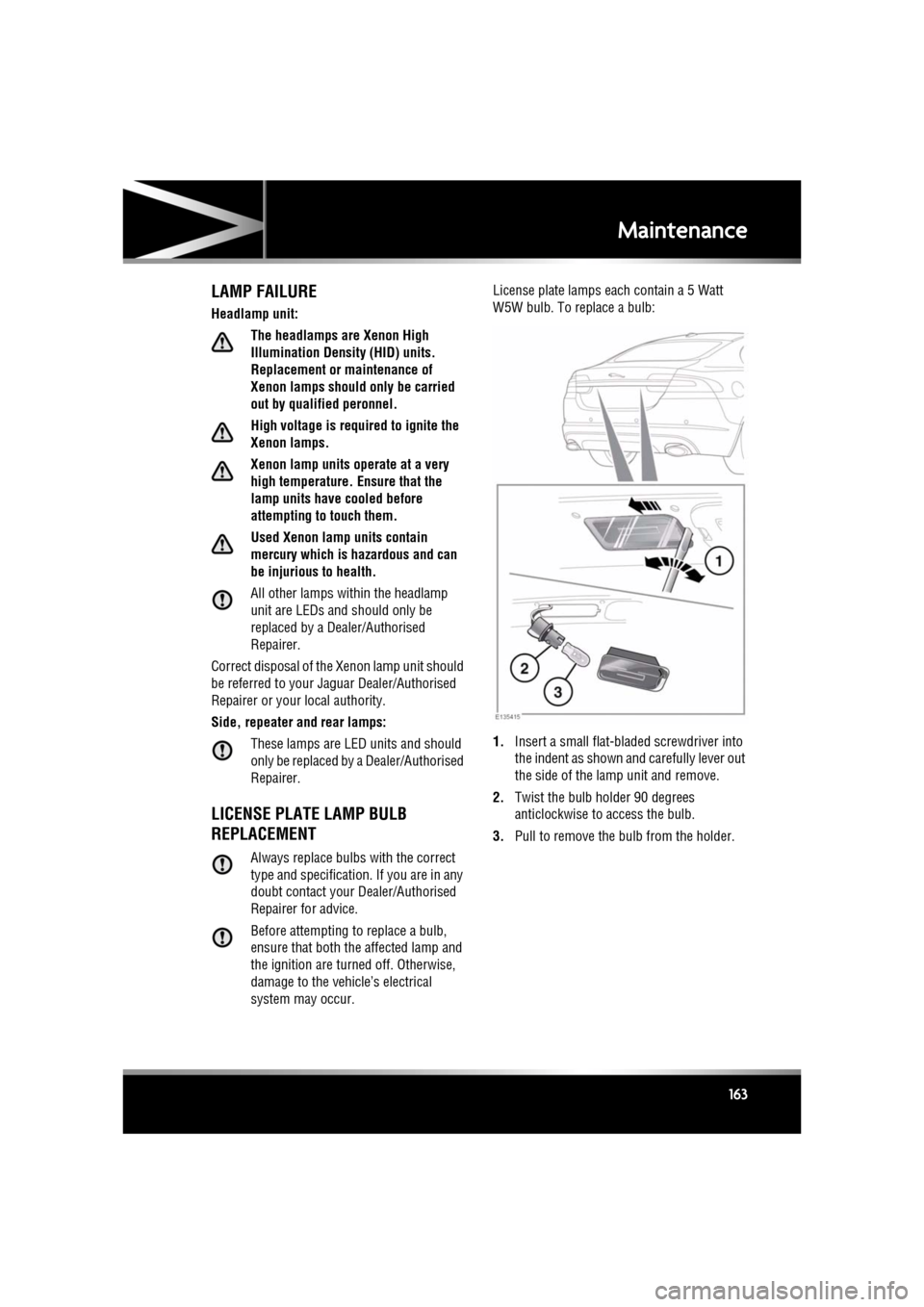
system may occur. License plate lamps each contain a 5 Watt
W5W bulb. To replace a bulb:
1.
Insert a small flat-bladed screwdriver into
the indent as shown and carefully lever out
the side of the lamp unit and remove.
2. Twist the bulb holder 90 degrees
anticlockwise to access the bulb.
3. Pull to remove the bulb from the holder.
Page 164 of 225
L
(FM8) SEMCON JLR OWNER GUIDE VER 1.00 EURO
LANGUAGE: english-en; MARQUE: jaguar; MODEL: XF
Maintenance
164
SUNROOF RESET
If the battery is disconnected, or the power
supply is interrupted, whilst the sunroof is
partially open it will need to be reset.
Once the power supply is restored, reset the
sunroof as follows:
1. Switch the ignition on.
2. Press the front of the sunroof switch, so
that the sunroof is in the tilt position, then
release the switch.
3. Press the front of the sunroof switch, and
hold for 30 seconds.
4. After 30 seconds the sunroof will begin to
move. Keep the front of the switch pressed
until the sunroof has fully opened, then
closed.
5. Once the open/close cycle has completed
and the sunroof has stopped moving,
release the switch.
The sunroof can now be operated as normal.
WINDOW RESET
The windows will need to be reset if the battery
is disconnected, becomes discharged or power
supply is interrupted.
Once the power supply is restored, reset the
windows as follows:
1. Close the window fully.
2. Release the switch, then lift it to the close
position and hold for 2 seconds.
3. Open the window fully.
4. Release the switch, then push it to the open
position and hold for 2 seconds.
5. Lift and release the switch to operate the
one-touch function.
6. Repeat the procedure on each window.
WARNING TRIANGLE
The warning triangle is located in the luggage
compartment, attached to an anchor point.
FIRST AID KIT
If supplied, the first aid kit is strapped to the
side of the luggage compartment.
FIRE EXTINGUISHER
If supplied, the fire exti nguisher will be located
either in the luggage compartment, or mounted
to the front passenger seat.
REPAIRING MINOR PAINT DAMAGE
Regularly inspect the paintwork for damage.
Any stone chips, fractures, or deep scratches,
in the paint/bodywork should be repaired
promptly. Bare metal wi ll corrode quickly, and
if left untreated can resu lt in expensive repairs.
CLEANING THE ALLOY WHEELS
Only use approved wheel cleaning
products.
CLEANING THE EXTERIOR
Some high pressure cleaning systems
are sufficiently powerful to penetrate
door and window seals, and damage
trim and door locks. Never aim the
water jet directly at the engine air intake,
heater air intakes, body seals or at any
components which may be damaged.
Never use cleaning products which are
not approved for use on vehicles.
Following cleaning of the vehicle
exterior (particularly with a pressure
washer), it is recommended that the
vehicle is taken for a short drive in order
to dry out the brakes.
Page 166 of 225
L
(FM8) SEMCON JLR OWNER GUIDE VER 1.00 EURO
LANGUAGE: english-en; MARQUE: jaguar; MODEL: XF
Maintenance
166
LEATHER
To prevent ingrained dirt and staining, inspect
the seat upholstery regularly and clean every
one to two months, as follows:
• Wipe off fine dust from the seat surfaces
using a clean, damp, non-coloured cloth.
Change frequently to a clean area of cloth,
to avoid abrasive action on the leather
surface. Avoid over-wetting.
• If this is not sufficient, use a cloth which
has been dampened with warm soapy
water and then wrun g out. Use only mild
non-caustic soap.
• Use Jaguar Leather Cleaner for heavily
soiled areas. Dry off and rub with a clean
soft cloth, changing surfaces regularly.
Use Jaguar Leather Cleaner several times a
year to maintain its appearance and
suppleness. The clea ner will nourish and
moisturise and help to improve the surface
protective film agains t dust and substances.
• Do not use solvents. Do not use
detergents, furniture polish or household
cleaners. While these products may
initially give impressive results, their use
will lead to rapid deterioration of the leather
and will invalidate the warranty. Jaguar
recommend a basic se t of products that
have been specially selected for the type of
leather in your vehicle.
• Dark clothing may stain leather seats just
like other upholstery products.
• Sharp objects such as belts, zip fasteners,
rivets, etc., can leave permanent scratches
and scratch marks on the leather surface.
• Unless spillages such as tea, coffee or ink
are washed away immediately, permanent
staining may have to be accepted.
If a valet service is used, ensure that the
specialist concer ned is aware of, and follows,
these instructions precisely.
CLEANING FABRIC UPHOLSTERY
Never use soap, ammonia, bleach or
other cleaners inte nded for use on hard
surfaces.
Do not use upholstery cleaner on
electrical equipment such as facia
switches.
When cleaning around electrical
equipment such as switches, ensure
that fluids do not leak into any gaps
around the components or between
panels or trim.
Use Jaguar Upholstery Cleaner, following the
instructions. Avoid over-wetting.
REMOVING STAINS
Most stains on woollen fabric can be removed
if treatment is carried out immediately, before
the stain has a chance to dry-in.
Most stains can be treated with one of three
cleaning fluids: Jaguar U pholstery Cleaner, dry
cleaning fluid or clean water. Follow the
instructions on the package.
INSTRUMENT PANEL, CLOCK AND
AUDIO EQUIPMENT
Only use a soft dry cloth to clean the
instrument panel, cloc k and audio equipment.
Do not use cleaning fluids or sprays.
TOUCH SCREEN
Do not use abrasive cleaners on the
touch screen. For approved cleaning
products, contact your Dealer/
Authorised Repairer.
Page 183 of 225
R
(FM8) SEMCON JLR OWNER GUIDE VER 1.00 EURO
LANGUAGE: english-en; MARQUE: jaguar; MODEL: XF
Vehicle battery
183
BATTERY MONITORING SYSTEM
(BMS)
If excessive battery discharge is occurring
when the engine isn't running, the system will
shut down non-essential el ectrical systems to
protect battery power.
CONNECTING BOOSTER CABLES
Always wear appropriate eye
protection when working with
batteries.
Make sure both batteries are of the 12
volt type and that the booster cables
have insulated clamps and are
approved for use with 12 volt
batteries.
Do not disconnect the discharged
battery.
Do not connect a booster cable to the
negative (-) terminal of the battery.
Always connect to the recommended
earthing point.
Ensure the bodywork of the donor and
disabled vehicles do not touch.
If the vehicle is fitted with a dual
battery system, the larger of the two
batteries must be used when
connecting booster cables.
Note: Before connecting booster cables,
ensure that the battery connections on the
disabled vehicle are correct and that all
electrical equipment has been switched off.
1. Connect the positive booster cable to the
positive terminal on the donor vehicle's
battery.
2. Connect the other e nd of the positive
booster cable to the positive terminal on
the disabled vehicle's battery. If the vehicle is fitted with a dual
battery system, t
he larger of the
two batteries must be used when
connecting booster cables.
3. Connect the negative booster cable to the
recommended jump starting earth point of
the donor vehicle.
4. Connect the other e nd of the negative
booster cable to a suitable earth point on
the disabled vehicle. The earth point should
be at least 0.5 metres (20 inches) away
from the battery and as far as possible
from any fuel or brake pipes.
• Check that all cables are clear of any
moving components and that all four
connections are secure.
5. Start the engine of the donor vehicle, and
allow it to idle for a few minutes.
6. Start the engine of the disabled vehicle.
7. Allow both vehicles to idle for two minutes.
8. Switch off the donor vehicle.
DISCONNECTING THE BOOSTER
CABLES
To avoid serious injury use extreme
caution when removing the booster
cables as the engine will be running
on the previously disabled vehicle.
This means that you may be working
close to components which are
moving at high speed, carry high
voltage, or may be hot.
Note: Do not switch on any electrical
equipment until after th e cables have been
disconnected.
The engine should be running on the
previously disabled ve hicle and the engine
switched off on the donor vehicle. Disconnect
the booster cables in the exact reverse order of
that used for connection.
Page 193 of 225

R
(FM8) SEMCON JLR OWNER GUIDE VER 1.00 EURO
LANGUAGE: english-en; MARQUE: jaguar; MODEL: XF
Fuses
193
F22 - - -
F23 - - -
F24 - - -
F25 25A Clear Fuel pump.
F26 15A Blue Audio system. Po rtable audio interface.
F27 10A Red Navigation. Voice recognition. Touch screen.
F28 15A Blue Trailer power connector. Road pricing system.
F29 15A Blue Trailer connector.
F30 25A Clear Driver’s door module.
F31 25A Clear Front passenger door module.
F32 - - -
F33 5A Tan Tyre pressure monitoring system.
F34 - - -
F35 10A Red Supplementary restraint system.
F36 10A Red Pedestrian protection system.
Fuse
No
Rating
(amps) Fuse
Colour Circuit