alarm JAGUAR XFR 2010 1.G User Guide
[x] Cancel search | Manufacturer: JAGUAR, Model Year: 2010, Model line: XFR, Model: JAGUAR XFR 2010 1.GPages: 3039, PDF Size: 58.49 MB
Page 2126 of 3039

Anti-Theft - Active - Anti-Theft - Active
Diagnosis and Testing
Principles of Operation Published: 26-Feb-2014
For a detailed description of the anti-theft - active system, refer to the relevant Description and Operation sections in the
workshop manual. REFER to: (419-01A Anti-Theft - Active)
Anti-Theft - Active (Description and Operation), Anti-Theft - Active (Description and Operation), Anti-Theft - Active (Description and Operation).
Inspection and Verification
CAUTION: Diagnosis by substitution from a donor vehicle is NOT acceptable. Substitution of control modules does not
guarantee confirmation of a fault, and may also cause additional faults in the vehicle being tested and/or the donor vehicle.
1. Verify the customer concern.
2. Visually inspect for obvious signs of damage and system integrity.
Visual Inspection
Mechanical Electrical
Door latch micro switches
Hood ajar switch
Passive anti-theft alarm horn (if installed)
Battery backed sounder (if installed) or battery backed sounder with tilt sensor (if
installed)
Vehicle horns
Fuse(s)
Electrical
connector(s)
Wiring Harness
3. If an obvious cause for an observed or reported concern is found, correct the cause (if possible) before proceeding to
the next step.
4. If the cause is not visually evident, check for Diagnostic Trouble Codes (DTCs) and refer to the relevant DTC Index. For
additional diagnosis and testing information, refer to the relevant Diagnosis and Testing section in the workshop
manual
REFER to: Remote Keyless Entry (RKE) Module (419-10 Multifunction Electronic Modules, Diagnosis and Testing).
DTC Index
CAUTION: Diagnosis by substitution from a donor vehicle is NOT acceptable. Substitution of control modules does not
guarantee confirmation of a fault, and may also cause additional faults in the vehicle being tested and/or the donor vehicle
NOTES:
If the control module or a component is suspect and the vehicle remains under manufacturer warranty, refer to the
Warranty Policy and Procedures manual (section B1.2), or determine if any prior approval programme is in operation, prior to
the installation of a new module/component.
Generic scan tools may not read the codes listed, or may read only five digit codes. Match the five digits from the scan
tool to the first five digits of the seven digit code listed to identify the fault (the last two digits give additional information
read by the manufacturer approved diagnostic system).
When performing electrical voltage or resistance tests, always use a digital multimeter (DMM) accurate to three decimal
places, and with an up-to-date calibration certificate. When testing resistance, always take the resistance of the DMM leads
into account.
Check and rectify basic faults before beginning diagnostic routines involving pinpoint tests.
Inspect connectors for signs of water ingress, and pins for damage and/or corrosion.
If DTCs are recorded and, after performing the pinpoint tests, a fault is not present, an intermittent concern may be the
cause. Always check for loose connections and corroded terminals.
Page 2137 of 3039
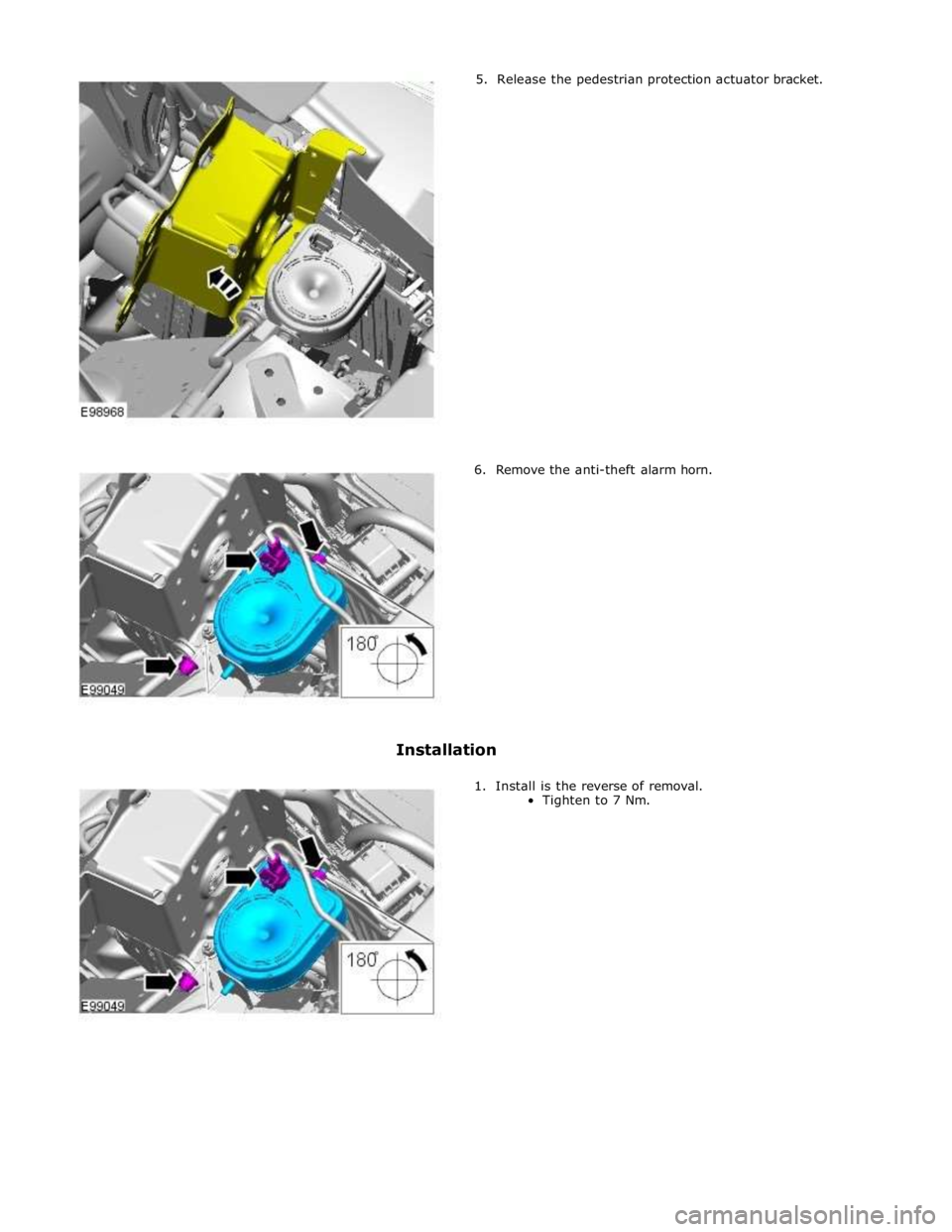
5. Release the pedestrian protection actuator bracket.
6. Remove the anti-theft alarm horn.
Installation
1. Install is the reverse of removal.
Tighten to 7 Nm.
Page 2172 of 3039
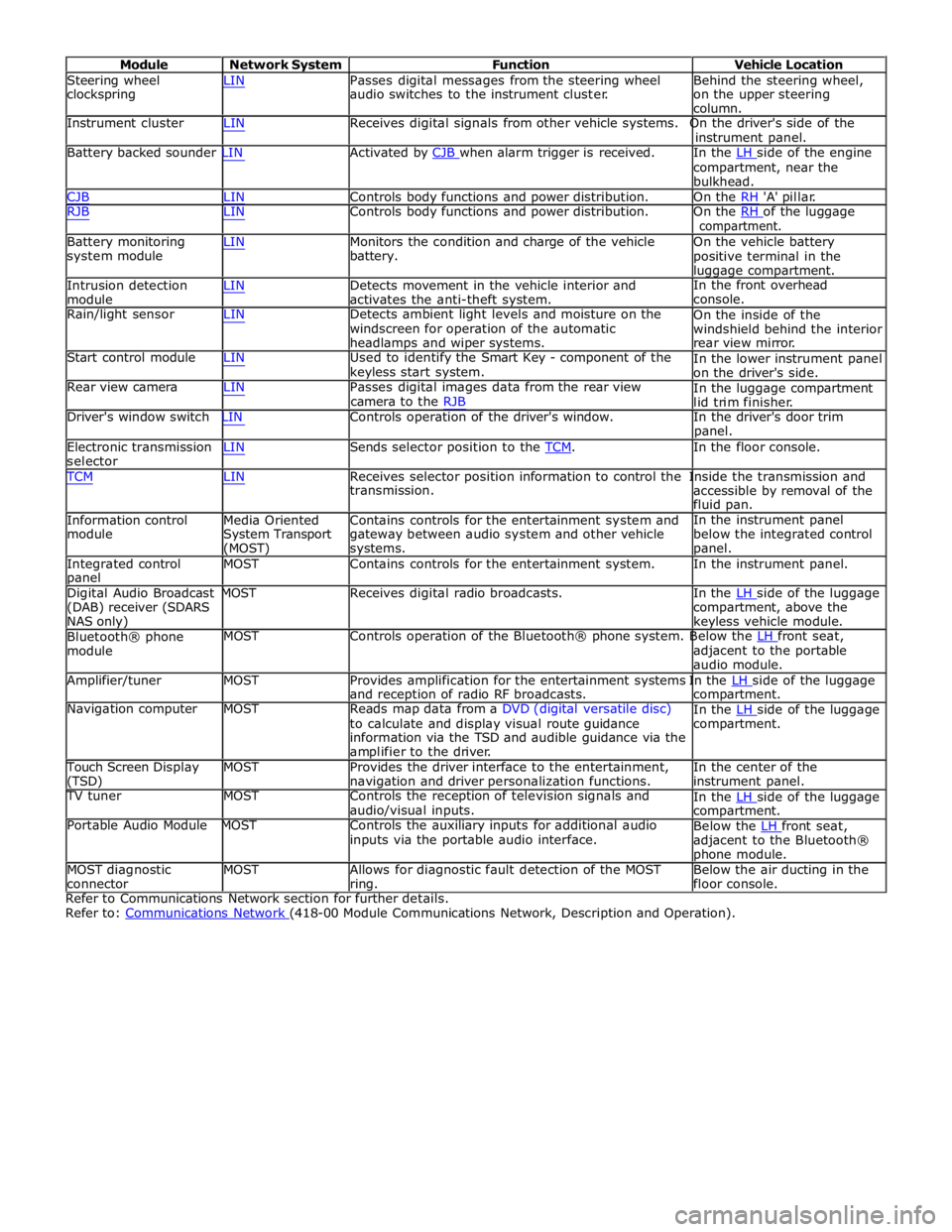
Module Network System Function Vehicle Location
Steering wheel
clockspring LIN Passes digital messages from the steering wheel
audio switches to the instrument cluster. Behind the steering wheel,
on the upper steering
column.
Instrument cluster LIN Receives digital signals from other vehicle systems. On the driver's side of the
instrument panel.
Battery backed sounder LIN Activated by CJB when alarm trigger is received. In the LH side of the engine compartment, near the
bulkhead.
CJB LIN Controls body functions and power distribution. On the RH 'A' pillar.
RJB LIN Controls body functions and power distribution. On the RH of the luggage compartment.
Battery monitoring
system module
Intrusion detection
module LIN Monitors the condition and charge of the vehicle
battery.
LIN Detects movement in the vehicle interior and
activates the anti-theft system. On the vehicle battery
positive terminal in the
luggage compartment.
In the front overhead
console.
Rain/light sensor LIN Detects ambient light levels and moisture on the
windscreen for operation of the automatic
headlamps and wiper systems.
Start control module LIN Used to identify the Smart Key - component of the
keyless start system.
Rear view camera LIN Passes digital images data from the rear view
camera to the RJB On the inside of the
windshield behind the interior
rear view mirror.
In the lower instrument panel
on the driver's side.
In the luggage compartment
lid trim finisher.
Driver's window switch LIN Controls operation of the driver's window. In the driver's door trim
panel.
Electronic transmission
selector LIN Sends selector position to the TCM. In the floor console. TCM LIN Receives selector position information to control the Inside the transmission and
Information control
module
Media Oriented
System Transport
(MOST) transmission.
Contains controls for the entertainment system and
gateway between audio system and other vehicle
systems. accessible by removal of the
fluid pan.
In the instrument panel
below the integrated control
panel.
Integrated control
panel MOST Contains controls for the entertainment system. In the instrument panel.
Digital Audio Broadcast MOST Receives digital radio broadcasts. In the LH side of the luggage (DAB) receiver (SDARS
NAS only)
Bluetooth® phone
module compartment, above the
keyless vehicle module.
MOST Controls operation of the Bluetooth® phone system. Below the LH front seat, adjacent to the portable
audio module.
Amplifier/tuner MOST Provides amplification for the entertainment systems In the LH side of the luggage and reception of radio RF broadcasts.
Navigation computer MOST Reads map data from a DVD (digital versatile disc)
to calculate and display visual route guidance
information via the TSD and audible guidance via the
amplifier to the driver. compartment.
In the LH side of the luggage compartment.
Touch Screen Display
(TSD) MOST Provides the driver interface to the entertainment,
navigation and driver personalization functions. In the center of the
instrument panel.
TV tuner MOST Controls the reception of television signals and
audio/visual inputs.
Portable Audio Module MOST Controls the auxiliary inputs for additional audio
inputs via the portable audio interface. In the LH side of the luggage compartment.
Below the LH front seat, adjacent to the Bluetooth®
phone module.
MOST diagnostic
connector MOST Allows for diagnostic fault detection of the MOST
ring. Below the air ducting in the
floor console.
Refer to Communications Network section for further details.
Refer to: Communications Network (418-00 Module Communications Network, Description and Operation).
Page 2451 of 3039

a power supply to operate the glovebox latch to unlock the glovebox.
The glove box opening is inhibited by the CJB if the anti-theft alarm system is armed and if valet mode is selected using the Touch Screen Display (TSD). The CJB detects the voltage signal from the switch but will not operate the glovebox latch if other condition exists.
GLOVEBOX SWITCH DESCRIPTION Component Description
The conventional glove box switch is located behind the instrument panel veneer. The round button of the switch is visible
through an aperture in the veneer.
Two screws hold the switch in position behind the veneer. The veneer panel has two bosses which the screws are threaded
into.
Page 2493 of 3039

Item Description Note: A = Hardwired; N = Medium speed CAN 1 Battery 2 Megafuse (250 A) 3 CJB 4 Radio frequency receiver 5 Keylesss vehicle module 6 Door handle, lock/unlock switch and antenna - front passenger 7 Door latch, fast latch - front passenger 8 Door latch, fast latch - RH rear passenger 9 Door handle, lock/unlock switch and antenna - RH rear passenger 10 Door latch, fast latch - LH rear passenger 11 Door handle, lock/unlock switch and antenna - LH rear passenger 12 Door latch, fast latch - driver door 13 Door handle, lock/unlock switch and antenna - driver door
System Operation
The hinged panels are secured with latches and strikers. A remotely operated central locking system controls the locking and
unlocking of the door and luggage compartment latches. A radio frequency Smart Key allows the vehicle to be locked and
unlocked by pressing the appropriate handset buttons. Two levels of central locking system are available: remote central
locking and an optional passive entry system.
The passive entry and associated passive start system allows the driver to unlock and start the vehicle without using a vehicle
key in a door-lock or ignition switch. The passive entry system is an optional fitment while the passive start system is a
standard fitment on all vehicles. The passive start system is combined with the passive anti-theft immobilization system.
Refer to: Anti-Theft - Passive (419-01B Anti-Theft - Passive, Description and Operation).
Emergency access to the vehicle is provided by two concealed key barrels: one located in the front left-hand door handle and
one located on the underside of the luggage compartment lid finisher. An emergency, removable key blade is fitted into the
Smart Key.
Operation of either key barrel unlocks the vehicle but does not disarm the alarm system. The key barrels in the door and
luggage compartment lid are concealed by a plastic cover which can be removed by inserting the blade of the emergency key
into a slot in the cover.
Locking and unlocking conditions using the emergency key in the door key barrel:
If the alarm is not armed the vehicle can be centrally unlocked.
If the alarm is armed the door only can be opened and the alarm will be triggered.
The vehicle cannot be double locked or the alarm system armed using the emergency key.
The vehicle can be centrally locked and unlocked from inside using the interior handle release levers on the front doors only.
Central locking and unlocking can also be performed using lock and unlock buttons on the vehicle's fascia. The driver can select
locking options, single point entry or drive away locking for example, from a menu available on the touch screen.
Central Locking – Radio Frequency Remote System
The radio frequency central locking system, provides locking and unlocking of the vehicle from inside and outside of the
vehicle. The system is operated using buttons on the Smart Key, which transmits radio frequency signals to the central locking
radio frequency receiver.
The system provides additional security by double-locking the doors from outside the vehicle if the lock button, on the Smart
Key, is pressed twice within 3 seconds; this function is not applicable in North American Specification (NAS) and Japanese
markets.
Additional buttons on the Smart Key provide for the convenience operation of the luggage compartment lid release, headlamp
delay and panic alarm functions. A global open or close feature is also available in certain markets using the lock/unlock
buttons.
Passive Entry
On vehicles fitted with the optional passive entry system, the vehicle can be unlocked without the use of a key blade or
pressing buttons on the Smart Key. The Smart Key operates the passive entry system in addition to the passive start system.
Refer to: Anti-Theft - Passive (419-01B Anti-Theft - Passive, Description and Operation).
The passive entry system is controlled by the keyless vehicle module and five low frequency antennas. One antenna located in
each door handle and one antenna located behind the rear bumper cover.
When a vehicle door handle is pulled to the first five-percent of its travel and the Smart Key is within one meter of the handle;
the Smart Key receives the low-frequency signal transmitted from the keyless vehicle module. The Smart Key responds with a
radio frequency transmission of its authorization code. The radio frequency signal is received by the central locking radio-
frequency receiver and passed to the keyless vehicle module which checks and approves the code as valid. Once the handle is
Page 2494 of 3039

door modules.
Locking of the vehicle is performed by pressing one of the buttons located on each exterior door handle, with the Smart Key
within a one meter range of the vehicle. When the door handle button is pressed, the keyless vehicle module transmits a
low-frequency signal via the low-frequency handle antenna to the Smart Key. The Smart Key transmits a radio frequency signal
which is verified by the keyless vehicle module and allows the doors to be locked or double locked and the alarm system to be
armed.
To double lock the vehicle, the button on the exterior door handle must be pressed twice within three seconds, with the Smart
Key within one meter range of the vehicle.
If a door, engine-compartment lid or the luggage compartment lid is ajar when an attempt to lock the vehicle is made, an error
tone is emitted and no locking action will occur.
Refer to: Anti-Theft - Active (419-01A Anti-Theft - Active, Description and Operation).
Engine Compartment Lid Latches Component Description
Two engine-compartment lid latches are located on the front crossmember. An engine-compartment lid release lever is located
below the instrument panel on the left-hand 'A' pillar and is connected with a cable to the latches. An engine-compartment lid
ajar switch is integrated in the engine-compartment lid latch.
Door Latches
The door latches are located at the rear of each door and engage with a striker on the adjacent pillar. Each door latch motor
assembly contains micro-switches for lock, unlock and door ajar. Motors provide for the central door locking and the double
locking feature. The electrical control for the door latch components is provided by the CJB and RJB via the driver's and
passenger door modules.
The interior door handles are connected by a cable to the latch release mechanisms. The interior door handles also incorporate
a locking facility to allow the doors to be locked from inside the vehicle when all the doors are closed. If a door is ajar the
locking feature is inhibited.
Luggage Compartment Lid Latch
The luggage compartment latch is attached to the bottom of the lid. The latch can be released electrically by pressing the
interior release button located on the outboard side of driver's lower knee bolster; a release button is also provided on the
Smart Key. There is also a release switch on the underside of the luggage compartment lid finisher.
On NAS vehicles an emergency release cable is attached to the latch. This allows the latch to be manually opened by pulling a
handle located in the luggage compartment lid interior trim.
Fuel Filler Door
The fuel filler door is electrically locked by a motor located on the fuel door housing. The fuel door is locked when the vehicle
is locked and alarmed. The fuel door can be opened when the vehicle is unlocked or locked:
via an interior handle,
via drive-a-way locking,
via the lock switch on the fascia,
via the external door key barrel. www.JagDocs.com
Page 2496 of 3039

Symptom Possible Causes Action outside (but opens from the
inside) GO to Pinpoint Test A. Door(s) will not unlatch/open when
using inside door handle
Child lock(s) engaged
Interior door handle
condition/installation
Interior release cable disconnected
from interior door handle or door
latch
Check that the child locks are
disengaged
Check the interior door handle
condition and installation
Check the condition and security of
the interior release cable
Single Door Will Not Open From
The Inside (but opens from the
outside) GO to Pinpoint Test B. Door(s) will not lock/unlock from key
fob, key or internal lock switch
Wiring harness/connectors
Central junction box (CJB)
Door lock switch
Cable fault
Check for relevant stored DTCs
Once any DTC related faults have
been rectified continue with the
diagnostic steps below
No lock / unlock function from
key-fob GO to Pinpoint Test C. Door ajar or miss lock signal at
message centre when door(s) are
closed or alarm triggering
Wiring harness
Instrument cluster
Incorrect striker
alignment/adjustment
Ajar switch circuit short circuit to
ground
Ajar switch failure
Latch Mounted Door Ajar Switch
Test GO to Pinpoint Test D. DTC Index
For a list of Diagnostic Trouble Codes (DTCs) that could be logged on this vehicle, please refer to Section 100-00.
REFER to: Communications Network (418-00, Diagnosis and Testing) /
Locks, Latches and Entry Systems - DTC: With (501-14, Diagnosis and Testing).
Pinpoint Test
PINPOINT TEST A : SINGLE DOOR WILL NOT OPEN FROM THE OUTSIDE (BUT OPENS FROM THE INSIDE) TEST CONDITIONS DETAILS/RESULTS/ACTIONS A1: CHECK THE EXTERIOR DOOR RELEASE CABLE TO EXTERIOR DOOR HANDLE IS INSTALLED CORRECTLY
1 Remove the door trim panel as necessary 2 Confirm the exterior door release cable is correctly installed to the exterior door handle Is the cable correctly installed?
Yes
GO to A2. No
Page 2504 of 3039
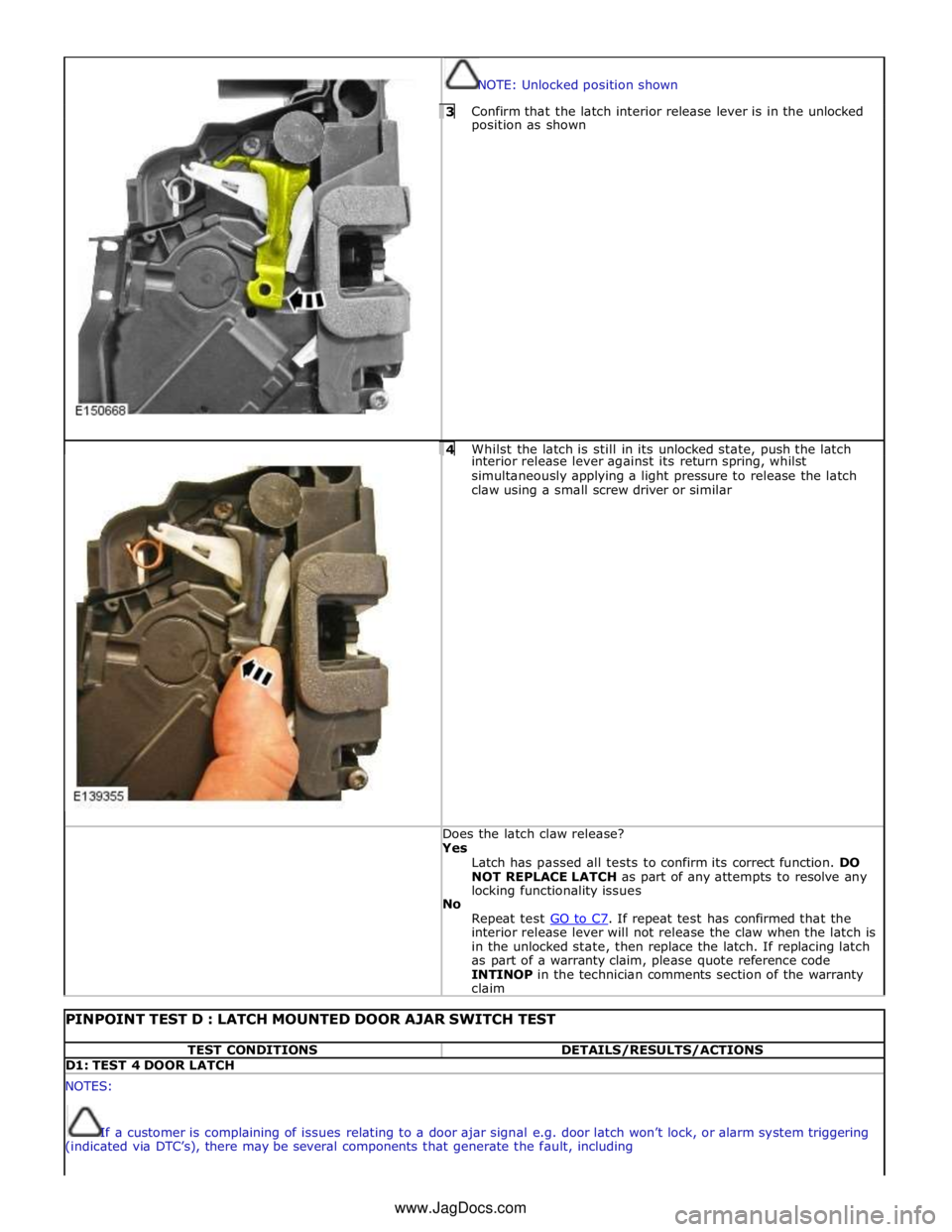
NOTE: Unlocked position shown 3 Confirm that the latch interior release lever is in the unlocked position as shown
4 Whilst the latch is still in its unlocked state, push the latch interior release lever against its return spring, whilst
simultaneously applying a light pressure to release the latch
claw using a small screw driver or similar Does the latch claw release? Yes
Latch has passed all tests to confirm its correct function. DO
NOT REPLACE LATCH as part of any attempts to resolve any
locking functionality issues
No
Repeat test GO to C7. If repeat test has confirmed that the interior release lever will not release the claw when the latch is
in the unlocked state, then replace the latch. If replacing latch
as part of a warranty claim, please quote reference code
INTINOP in the technician comments section of the warranty
claim
PINPOINT TEST D : LATCH MOUNTED DOOR AJAR SWITCH TEST TEST CONDITIONS DETAILS/RESULTS/ACTIONS D1: TEST 4 DOOR LATCH NOTES:
If a customer is complaining of issues relating to a door ajar signal e.g. door latch won’t lock, or alarm system triggering
(indicated via DTC’s), there may be several components that generate the fault, including www.JagDocs.com
Page 2505 of 3039

Body wiring harness / connectors
Door wiring harness / connectors
Alarm control module
Central junction box (CJB)
Door Latch ajar switch
To investigate the functioning of the door ajar switch contained within the door latch, to prove or eliminate the door
latch mounted door ajar switch as the root cause, follow the process below. This will prevent the unnecessary replacement of
a correctly functioning door latch 1 Remove door trim from door 2 Disconnect door harness from latch for access to connector pins for latch electrical testing 3 Inspect latch module for any visual damage NOTES:
Figure 1 - Unlatched position shown
Figure 2 - First safety latched position shown
Figure 3 - Fully latched position shown
Test will not work if latch is only in first safety latch position 4 Using a small screw driver or similar, rotate latch claw to the second fully latched position (figure 3)
5 Carry out continuity test between terminals 1 and 4 (left side) or 8 and 4 (right side) with claw closed Does the continuity test pass? Yes
The latch ajar switch is working correctly. Do not replace latch.
Investigate for fault elsewhere in vehicle system