belt JAGUAR XFR 2010 1.G User Guide
[x] Cancel search | Manufacturer: JAGUAR, Model Year: 2010, Model line: XFR, Model: JAGUAR XFR 2010 1.GPages: 3039, PDF Size: 58.49 MB
Page 204 of 3039

DTC Description Possible Causes Action B1A54-11
Occupant Belt Tension Sensor -
Circuit short to
ground
Safety belt tension
sensor voltage reference
or signal circuit - short
to ground
Refer to the electrical circuit diagrams and check safety
belt tension sensor voltage reference and signal circuits
for short to ground B1A54-12
Occupant Belt Tension Sensor -
Circuit short to
battery
Safety belt tension
sensor voltage reference
or signal circuit - short
to power
Refer to the electrical circuit diagrams and check safety
belt tension sensor voltage reference and signal circuits
for short to power B1A54-13
Occupant Belt Tension Sensor -
Circuit open
Safety belt tension
sensor voltage reference
or signal circuit - open
circuit
Refer to the electrical circuit diagrams and check safety
belt tension sensor voltage reference and signal circuits
for open circuit B1A62-02
Pressure Sensor -
General signal
failure
General signal failure
Refer to the electrical circuit diagrams and check safety
belt tension and mat pressure sensor circuits for short to
each other B1A62-11
Pressure Sensor -
Circuit short to
ground
Mat pressure sensor
voltage reference or
signal circuits - short to
ground
Refer to the electrical circuit diagrams and check mat
pressure sensor voltage reference and signal circuits for
short to ground B1A62-12
Pressure Sensor -
Circuit short to
battery
Mat pressure sensor
voltage reference,
ground or signal circuits
- short to power
Refer to the electrical circuit diagrams and check mat
pressure sensor voltage reference, ground and signal
circuits for short to power B1A62-13
Pressure Sensor -
Circuit open
Mat pressure sensor
voltage reference or
signal circuit - open
circuit
Refer to the electrical circuit diagrams and check mat
pressure sensor voltage reference and signal circuits for
open circuit B1A62-7B
Pressure Sensor -
Low fluid level
Low fluid level - bladder
damaged
Check and install new bladder as required. Refer to the
warranty policy and procedures manual, or determine if
any prior approval programme is in operation, prior to the
installation of a new module/component U0001-88
High Speed CAN
Communication
Bus - Bus off
Bus off
Refer to the electrical circuit diagrams and check CAN
network for short, open circuit. Carry out the CAN
network integrity test using the manufacturer approved
diagnostic system U0151-00
Lost
Communication
With Restraints
Control Module -
No sub type
information
Restraints control
module missing
message
Refer to the electrical circuit diagrams and check power
and ground supplies to restraints control module. Carry
out CAN network integrity test using the manufacturer
approved diagnostic system U0300-00
Internal Control
Module Software
Incompatibility -
No sub type
information
Master car configuration
file ID does not
correspond
Check correct occupancy seat module is installed for
vehicle specification. Check rear junction box for related
diagnostic trouble codes and refer to relevant diagnostic
trouble code index U2016-51
Control Module
Main Software -
Not programmed
Main software not
programmed
Check and install a new occupancy seat module as
required. Refer to the warranty policy and procedures
manual, or determine if any prior approval programme is
in operation, prior to the installation of a new
module/component U201A-51
Control Module
Main Calibration
Data - Not
programmed
Main calibration data not
programmed
Check and install a new occupancy seat module as
required. Refer to the warranty policy and procedures
manual, or determine if any prior approval programme is
in operation, prior to the installation of a new
module/component
Page 231 of 3039
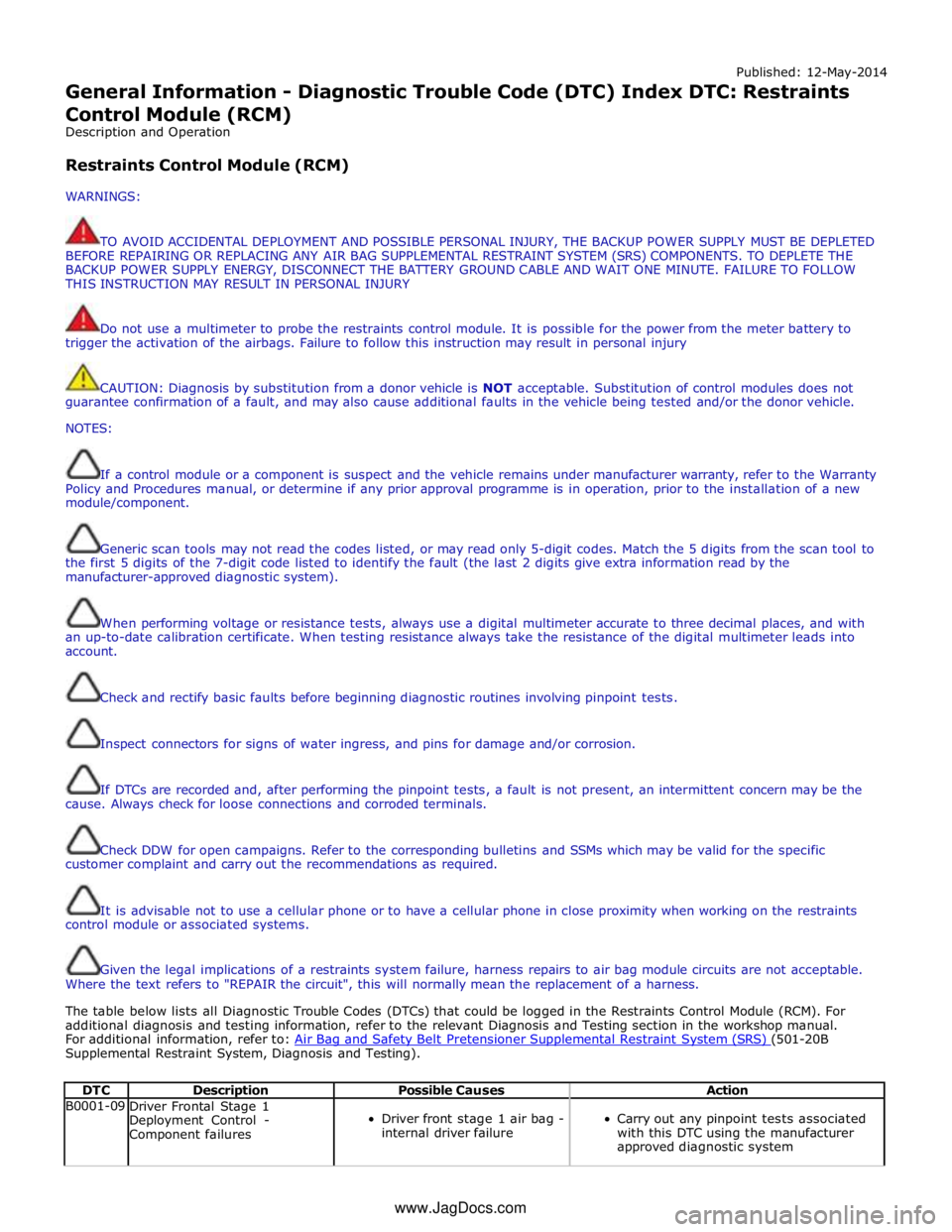
Published: 12-May-2014
General Information - Diagnostic Trouble Code (DTC) Index DTC: Restraints
Control Module (RCM)
Description and Operation
Restraints Control Module (RCM)
WARNINGS:
TO AVOID ACCIDENTAL DEPLOYMENT AND POSSIBLE PERSONAL INJURY, THE BACKUP POWER SUPPLY MUST BE DEPLETED
BEFORE REPAIRING OR REPLACING ANY AIR BAG SUPPLEMENTAL RESTRAINT SYSTEM (SRS) COMPONENTS. TO DEPLETE THE
BACKUP POWER SUPPLY ENERGY, DISCONNECT THE BATTERY GROUND CABLE AND WAIT ONE MINUTE. FAILURE TO FOLLOW
THIS INSTRUCTION MAY RESULT IN PERSONAL INJURY
Do not use a multimeter to probe the restraints control module. It is possible for the power from the meter battery to
trigger the activation of the airbags. Failure to follow this instruction may result in personal injury
CAUTION: Diagnosis by substitution from a donor vehicle is NOT acceptable. Substitution of control modules does not
guarantee confirmation of a fault, and may also cause additional faults in the vehicle being tested and/or the donor vehicle.
NOTES:
If a control module or a component is suspect and the vehicle remains under manufacturer warranty, refer to the Warranty
Policy and Procedures manual, or determine if any prior approval programme is in operation, prior to the installation of a new
module/component.
Generic scan tools may not read the codes listed, or may read only 5-digit codes. Match the 5 digits from the scan tool to
the first 5 digits of the 7-digit code listed to identify the fault (the last 2 digits give extra information read by the
manufacturer-approved diagnostic system).
When performing voltage or resistance tests, always use a digital multimeter accurate to three decimal places, and with
an up-to-date calibration certificate. When testing resistance always take the resistance of the digital multimeter leads into
account.
Check and rectify basic faults before beginning diagnostic routines involving pinpoint tests.
Inspect connectors for signs of water ingress, and pins for damage and/or corrosion.
If DTCs are recorded and, after performing the pinpoint tests, a fault is not present, an intermittent concern may be the
cause. Always check for loose connections and corroded terminals.
Check DDW for open campaigns. Refer to the corresponding bulletins and SSMs which may be valid for the specific
customer complaint and carry out the recommendations as required.
It is advisable not to use a cellular phone or to have a cellular phone in close proximity when working on the restraints
control module or associated systems.
Given the legal implications of a restraints system failure, harness repairs to air bag module circuits are not acceptable.
Where the text refers to "REPAIR the circuit", this will normally mean the replacement of a harness.
The table below lists all Diagnostic Trouble Codes (DTCs) that could be logged in the Restraints Control Module (RCM). For
additional diagnosis and testing information, refer to the relevant Diagnosis and Testing section in the workshop manual.
For additional information, refer to: Air Bag and Safety Belt Pretensioner Supplemental Restraint System (SRS) (501-20B Supplemental Restraint System, Diagnosis and Testing).
DTC Description Possible Causes Action B0001-09
Driver Frontal Stage 1
Deployment Control -
Component failures
Driver front stage 1 air bag -
internal driver failure
Carry out any pinpoint tests associated
with this DTC using the manufacturer
approved diagnostic system www.JagDocs.com
Page 235 of 3039

DTC Description Possible Causes Action B0029-09
Right Curtain Deployment
Control 1 - Component failures
Right curtain deployment
control 1 circuit - internal
driver failure
Carry out any pinpoint tests associated
with this DTC using the manufacturer
approved diagnostic system B0029-11
Right Curtain Deployment
Control 1 - Circuit short to
ground
Right curtain deployment
control 1 circuit - short to
ground
Refer to electrical circuit diagrams and
check right curtain deployment control 1
circuit for short to ground B0029-12
Right Curtain Deployment
Control 1 - Circuit short to
battery
Right curtain deployment
control 1 circuit - short to
power
Refer to electrical circuit diagrams and
check right curtain deployment control 1
circuit for short to power B0029-1A
Right Curtain Deployment
Control 1 - Circuit resistance
below threshold
Circuit resistance below
threshold
Carry out any pinpoint tests associated
with this DTC using the manufacturer
approved diagnostic system B0029-1B
Right Curtain Deployment
Control 1 - Circuit resistance
above threshold
Circuit resistance above
threshold
Carry out any pinpoint tests associated
with this DTC using the manufacturer
approved diagnostic system B0029-1C
Right Curtain Deployment
Control 1 - Circuit voltage out
of range
Right curtain deployment
control 1 circuit - high
resistance
Refer to electrical circuit diagrams and
test right curtain deployment control 1
circuit for high resistance B0029-56
Right Curtain Deployment
Control 1 - Invalid/incomplete
configuration
Incompatible configuration
Re-configure the RCM using the
manufacturer approved diagnostic
system B0029-95
Right Curtain Deployment
Control 1 - Incorrect assembly
Crosscoupling with other
firing loop
Refer to electrical circuit diagrams and
test right curtain deployment control 1
circuit for crosscoupling with other firing
loop B0050-11
Driver Safety Belt Sensor -
Circuit short to ground
Driver safety belt sensor
circuit - short to ground
Refer to the electrical circuit diagrams
and test driver safety belt sensor circuit
for short to ground B0050-12
Driver Safety Belt Sensor -
Circuit short to battery
Driver safety belt sensor
circuit - short to power
Refer to the electrical circuit diagrams
and test driver safety belt sensor circuit
for short to power B0050-13
Driver Safety Belt Sensor -
Circuit open
Driver safety belt sensor
circuit - open circuit
Refer to the electrical circuit diagrams
and test driver safety belt sensor circuit
for open circuit B0050-1E
Driver Safety Belt Sensor -
Circuit resistance out of range
Driver safety belt sensor
circuit - resistance out of
range
Carry out any pinpoint tests associated
with this DTC using the manufacturer
approved diagnostic system B0050-56
Driver Safety Belt Sensor -
Invalid/incomplete
configuration
Incompatible configuration
Re-configure the RCM using the
manufacturer approved diagnostic
system B0052-11
Passenger Safety Belt Sensor -
Circuit short to ground
Passenger safety belt sensor
circuit - short to ground
Refer to the electrical circuit diagrams
and test passenger safety belt sensor
circuit for short to ground B0052-12
Passenger Safety Belt Sensor -
Circuit short to battery
Passenger safety belt sensor
circuit - short to power
Refer to the electrical circuit diagrams
and test passenger safety belt sensor
circuit for short to power B0052-13
Passenger Safety Belt Sensor -
Circuit open
Passenger safety belt sensor
circuit - open circuit
Refer to the electrical circuit diagrams
and test passenger safety belt sensor
circuit for open circuit
Page 301 of 3039
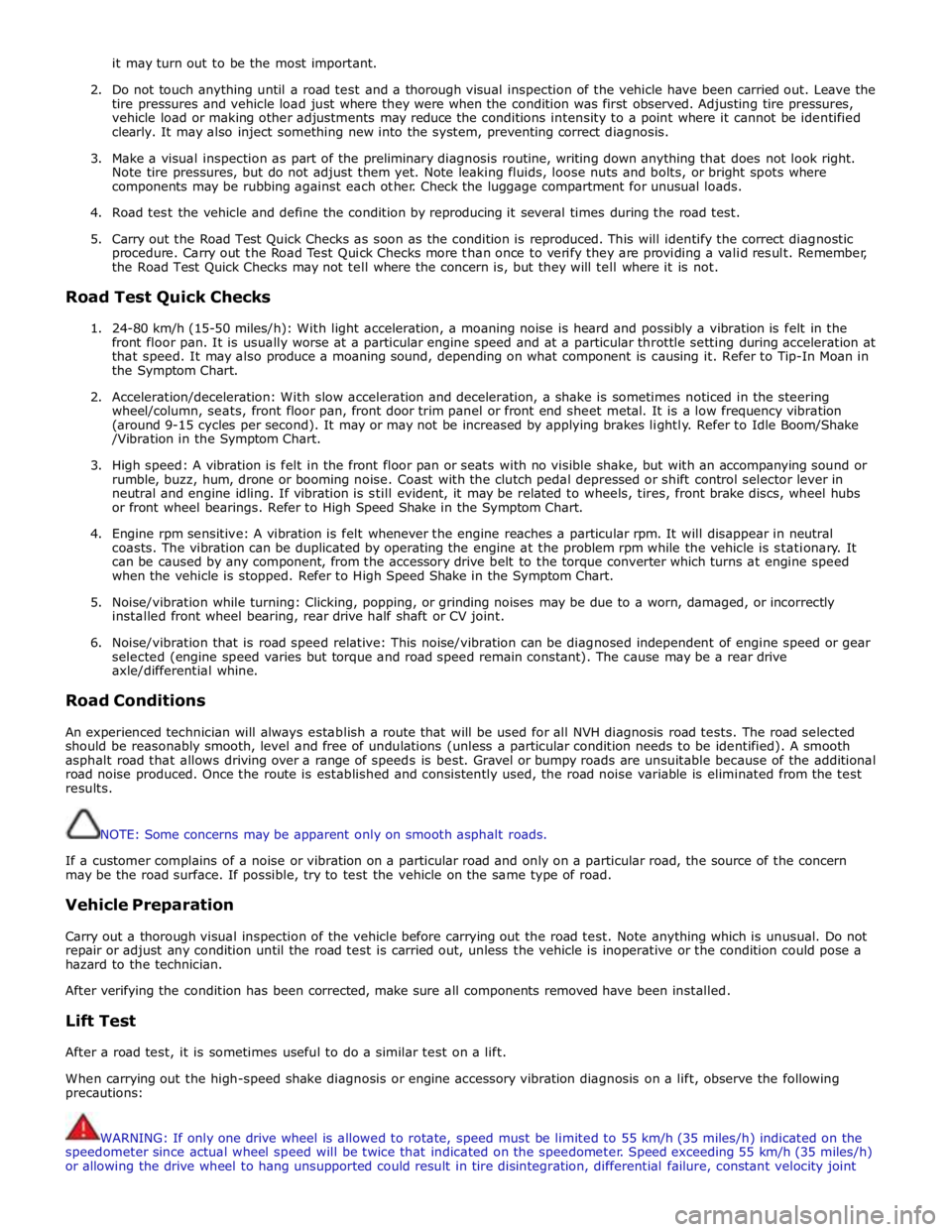
it may turn out to be the most important.
2. Do not touch anything until a road test and a thorough visual inspection of the vehicle have been carried out. Leave the
tire pressures and vehicle load just where they were when the condition was first observed. Adjusting tire pressures,
vehicle load or making other adjustments may reduce the conditions intensity to a point where it cannot be identified
clearly. It may also inject something new into the system, preventing correct diagnosis.
3. Make a visual inspection as part of the preliminary diagnosis routine, writing down anything that does not look right.
Note tire pressures, but do not adjust them yet. Note leaking fluids, loose nuts and bolts, or bright spots where
components may be rubbing against each other. Check the luggage compartment for unusual loads.
4. Road test the vehicle and define the condition by reproducing it several times during the road test.
5. Carry out the Road Test Quick Checks as soon as the condition is reproduced. This will identify the correct diagnostic
procedure. Carry out the Road Test Quick Checks more than once to verify they are providing a valid result. Remember,
the Road Test Quick Checks may not tell where the concern is, but they will tell where it is not.
Road Test Quick Checks
1. 24-80 km/h (15-50 miles/h): With light acceleration, a moaning noise is heard and possibly a vibration is felt in the
front floor pan. It is usually worse at a particular engine speed and at a particular throttle setting during acceleration at
that speed. It may also produce a moaning sound, depending on what component is causing it. Refer to Tip-In Moan in
the Symptom Chart.
2. Acceleration/deceleration: With slow acceleration and deceleration, a shake is sometimes noticed in the steering
wheel/column, seats, front floor pan, front door trim panel or front end sheet metal. It is a low frequency vibration
(around 9-15 cycles per second). It may or may not be increased by applying brakes lightly. Refer to Idle Boom/Shake
/Vibration in the Symptom Chart.
3. High speed: A vibration is felt in the front floor pan or seats with no visible shake, but with an accompanying sound or
rumble, buzz, hum, drone or booming noise. Coast with the clutch pedal depressed or shift control selector lever in
neutral and engine idling. If vibration is still evident, it may be related to wheels, tires, front brake discs, wheel hubs
or front wheel bearings. Refer to High Speed Shake in the Symptom Chart.
4. Engine rpm sensitive: A vibration is felt whenever the engine reaches a particular rpm. It will disappear in neutral
coasts. The vibration can be duplicated by operating the engine at the problem rpm while the vehicle is stationary. It
can be caused by any component, from the accessory drive belt to the torque converter which turns at engine speed
when the vehicle is stopped. Refer to High Speed Shake in the Symptom Chart.
5. Noise/vibration while turning: Clicking, popping, or grinding noises may be due to a worn, damaged, or incorrectly
installed front wheel bearing, rear drive half shaft or CV joint.
6. Noise/vibration that is road speed relative: This noise/vibration can be diagnosed independent of engine speed or gear
selected (engine speed varies but torque and road speed remain constant). The cause may be a rear drive
axle/differential whine.
Road Conditions
An experienced technician will always establish a route that will be used for all NVH diagnosis road tests. The road selected
should be reasonably smooth, level and free of undulations (unless a particular condition needs to be identified). A smooth
asphalt road that allows driving over a range of speeds is best. Gravel or bumpy roads are unsuitable because of the additional
road noise produced. Once the route is established and consistently used, the road noise variable is eliminated from the test
results.
NOTE: Some concerns may be apparent only on smooth asphalt roads.
If a customer complains of a noise or vibration on a particular road and only on a particular road, the source of the concern
may be the road surface. If possible, try to test the vehicle on the same type of road.
Vehicle Preparation
Carry out a thorough visual inspection of the vehicle before carrying out the road test. Note anything which is unusual. Do not
repair or adjust any condition until the road test is carried out, unless the vehicle is inoperative or the condition could pose a
hazard to the technician.
After verifying the condition has been corrected, make sure all components removed have been installed.
Lift Test
After a road test, it is sometimes useful to do a similar test on a lift.
When carrying out the high-speed shake diagnosis or engine accessory vibration diagnosis on a lift, observe the following
precautions:
WARNING: If only one drive wheel is allowed to rotate, speed must be limited to 55 km/h (35 miles/h) indicated on the
speedometer since actual wheel speed will be twice that indicated on the speedometer. Speed exceeding 55 km/h (35 miles/h)
or allowing the drive wheel to hang unsupported could result in tire disintegration, differential failure, constant velocity joint
Page 302 of 3039
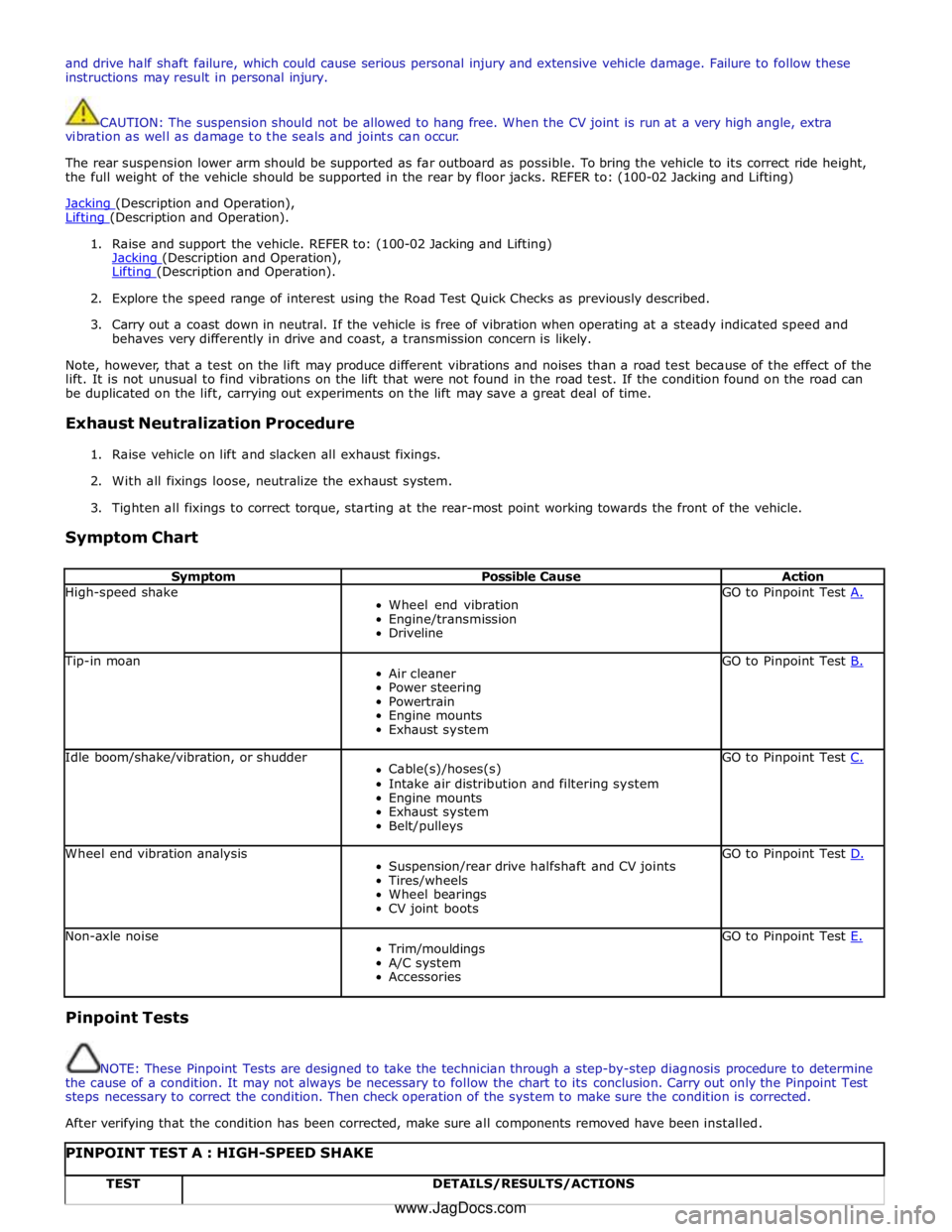
and drive half shaft failure, which could cause serious personal injury and extensive vehicle damage. Failure to follow these
instructions may result in personal injury.
CAUTION: The suspension should not be allowed to hang free. When the CV joint is run at a very high angle, extra
vibration as well as damage to the seals and joints can occur.
The rear suspension lower arm should be supported as far outboard as possible. To bring the vehicle to its correct ride height,
the full weight of the vehicle should be supported in the rear by floor jacks. REFER to: (100-02 Jacking and Lifting)
Jacking (Description and Operation), Lifting (Description and Operation).
1. Raise and support the vehicle. REFER to: (100-02 Jacking and Lifting)
Jacking (Description and Operation), Lifting (Description and Operation).
2. Explore the speed range of interest using the Road Test Quick Checks as previously described.
3. Carry out a coast down in neutral. If the vehicle is free of vibration when operating at a steady indicated speed and
behaves very differently in drive and coast, a transmission concern is likely.
Note, however, that a test on the lift may produce different vibrations and noises than a road test because of the effect of the
lift. It is not unusual to find vibrations on the lift that were not found in the road test. If the condition found on the road can
be duplicated on the lift, carrying out experiments on the lift may save a great deal of time.
Exhaust Neutralization Procedure
1. Raise vehicle on lift and slacken all exhaust fixings.
2. With all fixings loose, neutralize the exhaust system.
3. Tighten all fixings to correct torque, starting at the rear-most point working towards the front of the vehicle.
Symptom Chart
Symptom Possible Cause Action High-speed shake
Wheel end vibration
Engine/transmission
Driveline GO to Pinpoint Test A. Tip-in moan
Air cleaner
Power steering
Powertrain
Engine mounts
Exhaust system GO to Pinpoint Test B. Idle boom/shake/vibration, or shudder
Cable(s)/hoses(s)
Intake air distribution and filtering system
Engine mounts
Exhaust system
Belt/pulleys GO to Pinpoint Test C. Wheel end vibration analysis
Suspension/rear drive halfshaft and CV joints
Tires/wheels
Wheel bearings
CV joint boots GO to Pinpoint Test D. Non-axle noise
Trim/mouldings
A/C system
Accessories GO to Pinpoint Test E. Pinpoint Tests
NOTE: These Pinpoint Tests are designed to take the technician through a step-by-step diagnosis procedure to determine
the cause of a condition. It may not always be necessary to follow the chart to its conclusion. Carry out only the Pinpoint Test
steps necessary to correct the condition. Then check operation of the system to make sure the condition is corrected.
After verifying that the condition has been corrected, make sure all components removed have been installed.
PINPOINT TEST A : HIGH-SPEED SHAKE TEST DETAILS/RESULTS/ACTIONS www.JagDocs.com
Page 303 of 3039
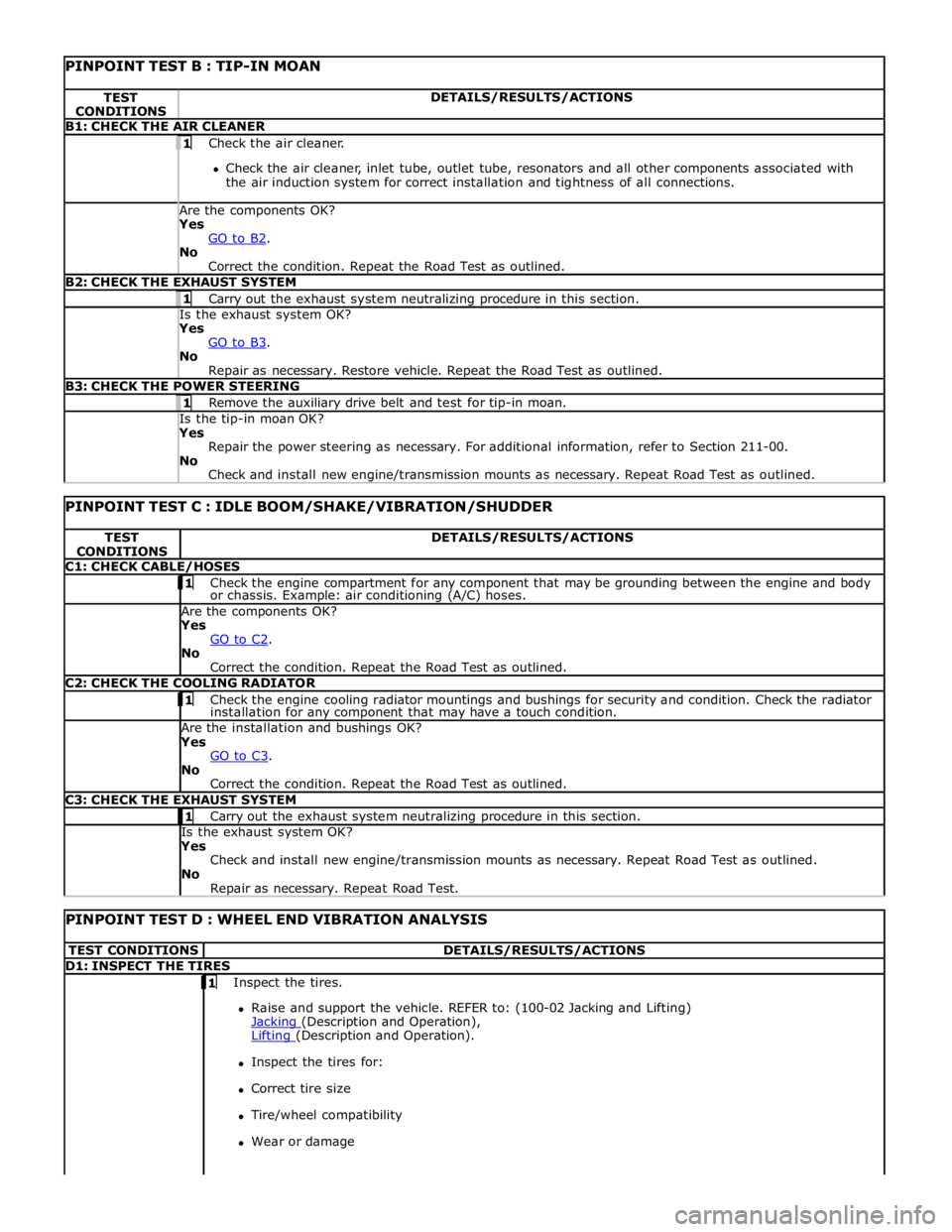
PINPOINT TEST B : TIP-IN MOAN TEST
CONDITIONS DETAILS/RESULTS/ACTIONS B1: CHECK THE AIR CLEANER 1 Check the air cleaner.
Check the air cleaner, inlet tube, outlet tube, resonators and all other components associated with
the air induction system for correct installation and tightness of all connections. Are the components OK? Yes
GO to B2. No
Correct the condition. Repeat the Road Test as outlined. B2: CHECK THE EXHAUST SYSTEM 1 Carry out the exhaust system neutralizing procedure in this section. Is the exhaust system OK? Yes
GO to B3. No
Repair as necessary. Restore vehicle. Repeat the Road Test as outlined. B3: CHECK THE POWER STEERING 1 Remove the auxiliary drive belt and test for tip-in moan. Is the tip-in moan OK? Yes
Repair the power steering as necessary. For additional information, refer to Section 211-00.
No
Check and install new engine/transmission mounts as necessary. Repeat Road Test as outlined.
PINPOINT TEST C : IDLE BOOM/SHAKE/VIBRATION/SHUDDER TEST
CONDITIONS DETAILS/RESULTS/ACTIONS C1: CHECK CABLE/HOSES 1 Check the engine compartment for any component that may be grounding between the engine and body or chassis. Example: air conditioning (A/C) hoses. Are the components OK? Yes
GO to C2. No
Correct the condition. Repeat the Road Test as outlined. C2: CHECK THE COOLING RADIATOR 1 Check the engine cooling radiator mountings and bushings for security and condition. Check the radiator installation for any component that may have a touch condition. Are the installation and bushings OK? Yes
GO to C3. No
Correct the condition. Repeat the Road Test as outlined. C3: CHECK THE EXHAUST SYSTEM 1 Carry out the exhaust system neutralizing procedure in this section. Is the exhaust system OK? Yes
Check and install new engine/transmission mounts as necessary. Repeat Road Test as outlined.
No
Repair as necessary. Repeat Road Test.
PINPOINT TEST D : WHEEL END VIBRATION ANALYSIS TEST CONDITIONS DETAILS/RESULTS/ACTIONS D1: INSPECT THE TIRES 1 Inspect the tires.
Raise and support the vehicle. REFER to: (100-02 Jacking and Lifting)
Jacking (Description and Operation), Lifting (Description and Operation).
Inspect the tires for:
Correct tire size
Tire/wheel compatibility
Wear or damage
Page 722 of 3039
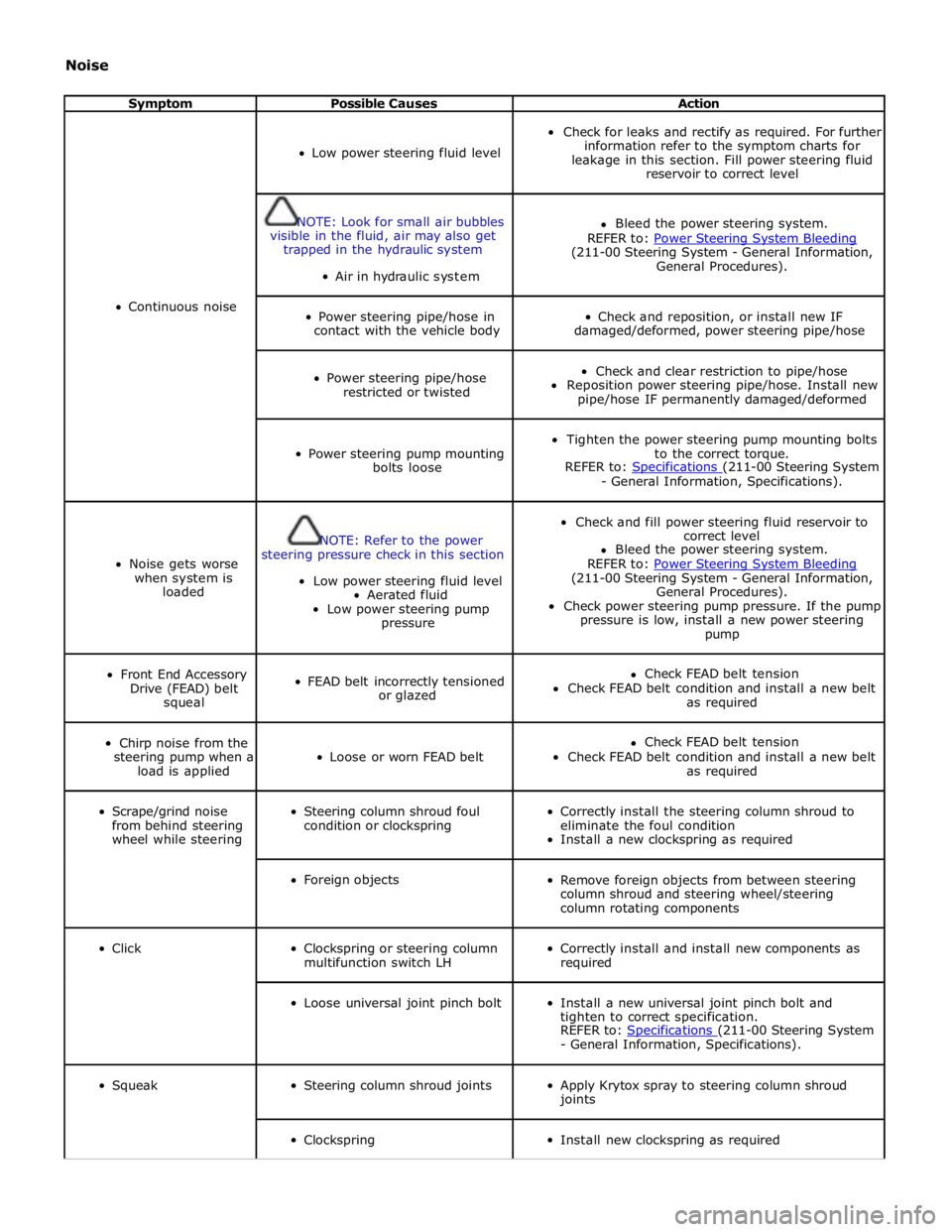
Noise
Symptom Possible Causes Action
Continuous noise
Low power steering fluid level
Check for leaks and rectify as required. For further
information refer to the symptom charts for
leakage in this section. Fill power steering fluid
reservoir to correct level
NOTE: Look for small air bubbles
visible in the fluid, air may also get
trapped in the hydraulic system
Air in hydraulic system
Bleed the power steering system.
REFER to: Power Steering System Bleeding (211-00 Steering System - General Information,
General Procedures).
Power steering pipe/hose in
contact with the vehicle body
Check and reposition, or install new IF
damaged/deformed, power steering pipe/hose
Power steering pipe/hose
restricted or twisted
Check and clear restriction to pipe/hose
Reposition power steering pipe/hose. Install new
pipe/hose IF permanently damaged/deformed
Power steering pump mounting
bolts loose
Tighten the power steering pump mounting bolts
to the correct torque.
REFER to: Specifications (211-00 Steering System - General Information, Specifications).
Noise gets worse
when system is
loaded
NOTE: Refer to the power
steering pressure check in this section
Low power steering fluid level
Aerated fluid
Low power steering pump
pressure
Check and fill power steering fluid reservoir to
correct level
Bleed the power steering system.
REFER to: Power Steering System Bleeding (211-00 Steering System - General Information,
General Procedures).
Check power steering pump pressure. If the pump
pressure is low, install a new power steering
pump
Front End Accessory
Drive (FEAD) belt
squeal
FEAD belt incorrectly tensioned
or glazed
Check FEAD belt tension
Check FEAD belt condition and install a new belt
as required
Chirp noise from the
steering pump when a
load is applied
Loose or worn FEAD belt
Check FEAD belt tension
Check FEAD belt condition and install a new belt
as required
Scrape/grind noise
from behind steering
wheel while steering
Steering column shroud foul
condition or clockspring
Correctly install the steering column shroud to
eliminate the foul condition
Install a new clockspring as required
Foreign objects
Remove foreign objects from between steering
column shroud and steering wheel/steering
column rotating components
Click
Clockspring or steering column
multifunction switch LH
Correctly install and install new components as
required
Loose universal joint pinch bolt
Install a new universal joint pinch bolt and
tighten to correct specification.
REFER to: Specifications (211-00 Steering System - General Information, Specifications).
Squeak
Steering column shroud joints
Apply Krytox spray to steering column shroud
joints
Clockspring
Install new clockspring as required
Page 726 of 3039

Hum
Continuous sound of varying frequencies, like a wire humming in the wind.
Knock
Heavy, loud repeating sound like a knock on a door.
Ping
Similar to knock, except at higher frequency.
Rattle
A sound suggesting looseness, such as marbles rolling around in a can.
Roar
Deep, long, prolonged sound like an animal, or winds and ocean waves.
Rumble
Low, heavy continuous sound like that made by wagons or thunder.
Scrape
Grating noise like one hard plastic part rubbing against another.
Squeak
High-pitched sound like rubbing a clean window.
Squeal
Continuous, high-pitched sound like running finger nails across a chalkboard.
Tap
Light, hammering sound like tapping pencil on edge of table. May be rhythmic or intermittent.
Whirr/Whine
High-pitched buzzing sound, like an electric motor or drill.
Whistle
Sharp, shrill sound, like wind passing a small opening.
Specific Steering System Noise Types
Belt Squeal
Belt squeal is a high frequency air-borne noise generated by slippage of the ribbed Vee belt on the power steering pump
pulley. Squeal increases with system loading and at full lock.
Clonk
Clonk is a structure-borne noise heard as a loose-sounding rattle or vibration coming from the steering column. Clonk can be
identified by driving and turning over cobblestones, rough roads, or high frequency bumps such as 25-50 mm tall tar strips.
Clonk requires a tie-rod load impact.
Column Knock
Column knock is a loose-sounding rattle or vibration generated by the steering column shaft contacting other portions of the
column assembly. The noise is both audible and tactile. Column knock is generated by driving over cobblestones or rough
pavement. It is not necessary to turn the steering wheel to create this noise.
Column Rattle
Column rattle is a metallic sounding noise created when applying a highly impulsive force to the steering wheel. Column rattle
is often used to combine the more general group of column noises including clonk and column knock. Column rattle noises can
be caused by clonk, knock, loose column components, bonus parts etc. A series of parked, straight-line driving, and cornering
tests should be carried out to isolate the source/sources.
Grinding/Scrape
Grinding is a low frequency noise in the column when the steering wheel is turned. It is generally caused by interference
Page 845 of 3039

Item Specification Camshaft journal maximum run out limit (mm) Camshaft journals to end journals 0.03 Camshaft journals to adjacent journals 0.015 Camshaft journal maximum out of round (mm) - all journals 0.005 Torque Specification
NOTE: A = Refer to procedure for correct torque sequence.
Description Nm lb-ft lb-in Engine cover mounting bolts 10 7 - Accessory drive belt tensioner retaining bolt 40 30 - Supercharger belt idler/tensioner bracket retaining bolts 25 18 - Secondary drive belt idler retaining bolts 40 30 - Power steering pump pulley retaining bolts 25 18 - Power steering pump retaining bolts 25 18 - Power steering pump bracket to engine retaining bolts 25 18 - Generator retaining bolts 48 35 - Starter motor retaining bolts 48 35 - Air conditioning compressor retaining bolts 25 18 - Engine mounting to engine mounting bracket retaining nuts 48 35 - Engine mounting to subframe retaining nuts 63 46 - Engine mounting bracket to engine retaining bolts 48 35 - Crankshaft damper pulley retaining LH threaded bolt 200 + 270° 148 + 180° - Flexplate retaining bolts 45 + 90° 33 + 90° - Exhaust manifold heat shield retaining bolts A - - Exhaust manifold retaining bolts A - - Engine wiring harness bracket retaining bolts 10 7 - Coolant outlet pipe 10 7 - Intercooler retaining bolts 25 18 - Intake manifold retaining bolts 25 18 - Oil Cooler retaining bolts 13 10 - Knock sensor (KS) retaining bolt 20 14 - Ignition coil retaining bolts 8 - 71 Spark plugs 20 15 - Fuel rail retaining bolts A - - High pressure fuel pipe retaining bolts A - - High pressure fuel pump retaining bolts 12 9 - Oil filter housing assembly retaining bolts 12 9 - Oil filter cap 28 21 - Lifting eye bolts 25 + 90° 18 + 90° - Manifold absolute pressure and temperature (MAPT) sensor sensor retaining bolts 5 - 44 Coolant pump retaining bolts 12 9 - Variable valve timing (VVT) oil control solenoid retaining bolts 10 7 - Camshaft position (CMP) sensor retaining bolts 10 7 - Camshaft cover retaining bolts 13 10 - Front upper timing cover retaining bolts 12 9 - Front lower timing cover retaining bolts A - - Engine rear cover retaining bolts A - - VVT to camshaft retaining bolts 32 24 - Camshaft bearing caps retaining bolts 11 8 - Primary timing chain fixed guide retaining bolts 12 9 - Primary timing chain tensioner retaining bolts 12 9 - Primary timing chain tensioner guide blade retaining bolts 25 18 - Auxiliary chain tensioner guide retaining bolts 21 15 - Auxiliary chain fixed guide retaining bolt 12 9 - Oil pump sprocket retaining bolt 21 15 - Cylinder head retaining bolts A - - Engine oil level (EOL) sensor retaining bolt 12 9 - Oil pan to oil sump body retaining bolts 12 9 - Oil sump body to engine retaining bolts 25 18 - Oil pan drain plug 23 17 - Oil transfer tube to Oil pan body retaining bolts 11 8 - Oil pump to engine block retaining bolts 25 18 - Pick-up pipe to oil pump retaining bolts 12 9 - Windage tray retaining bolts 25 18 - Piston cooling jet retaining bolts 12 9 - Engine block coolant draining plug 50 37 - Connecting Rod bolts Stage 1 10 7 - Stage 2 50 37 -
Page 1025 of 3039
Engine - V8 S/C 5.0L Petrol - Timing Cover
Removal and Installation
Removal
NOTE: Removal steps in this procedure may contain installation details. Published: 12-Sep-2011
1. Refer to: Battery Disconnect and Connect (414-01 Battery, Mounting and Cables, General Procedures).
2. WARNING: Make sure to support the vehicle with axle stands.
Raise and support the vehicle.
3. Refer to: Accessory Drive Belt (303-05D Accessory Drive - V8 S/C 5.0L Petrol, Removal and Installation).
4. Refer to: Accessory Drive Belt Tensioner (303-05D Accessory Drive - V8 S/C 5.0L Petrol, Removal and Installation).
5. Refer to: Thermostat Housing - Vehicles With: Supercharger (303-03C Engine Cooling - V8 5.0L Petrol/V8 S/C 5.0L Petrol, Removal and
Installation).
6. Refer to: Valve Cover LH (303-01D Engine - V8 S/C 5.0L Petrol, Removal and Installation).
7. Refer to: Valve Cover RH (303-01D Engine - V8 S/C 5.0L Petrol, Removal and Installation).
8. Refer to: Crankshaft Pulley (303-01D Engine - V8 S/C 5.0L Petrol, Removal and Installation).
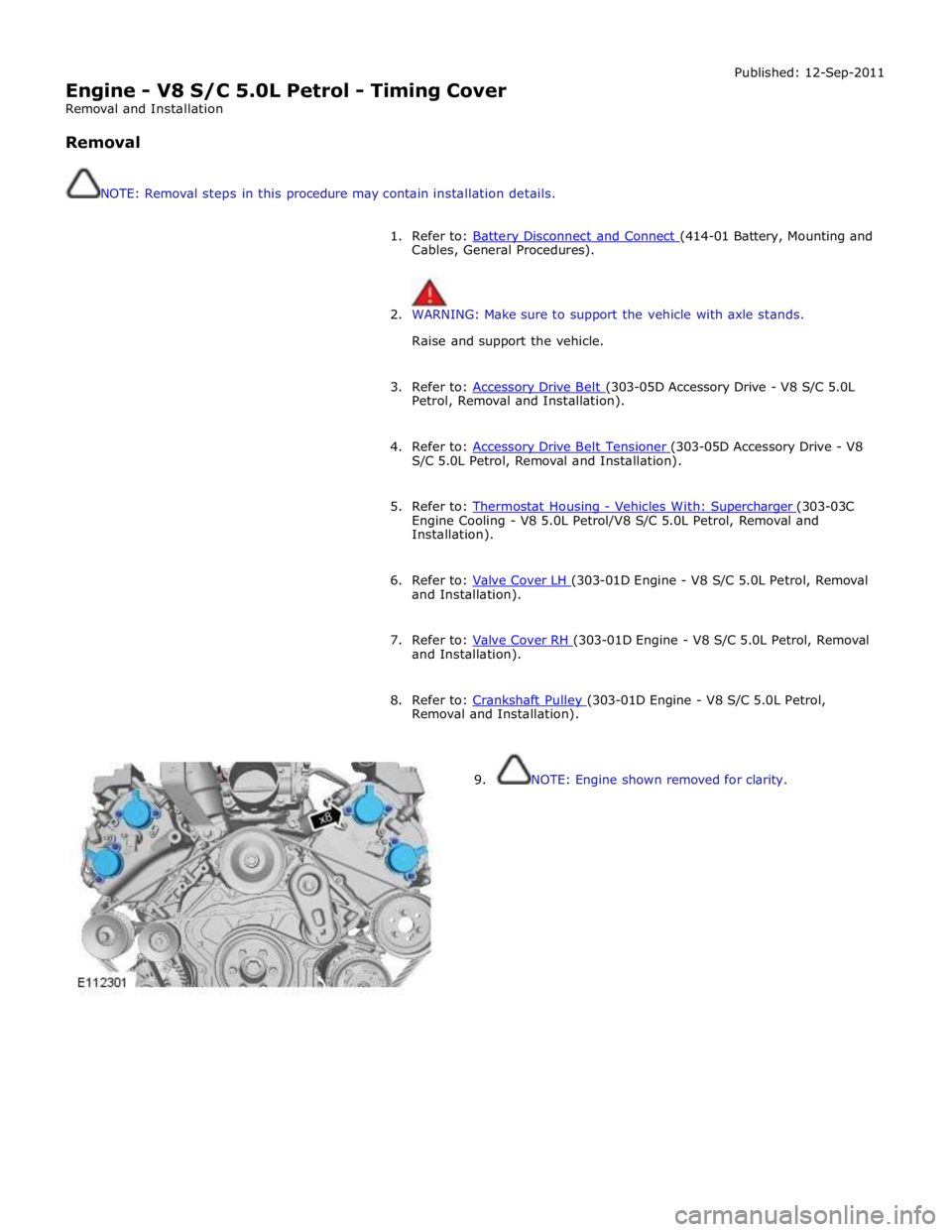
9. NOTE: Engine shown removed for clarity.