auxiliary battery JAGUAR XFR 2010 1.G Owner's Manual
[x] Cancel search | Manufacturer: JAGUAR, Model Year: 2010, Model line: XFR, Model: JAGUAR XFR 2010 1.GPages: 3039, PDF Size: 58.49 MB
Page 2101 of 3039
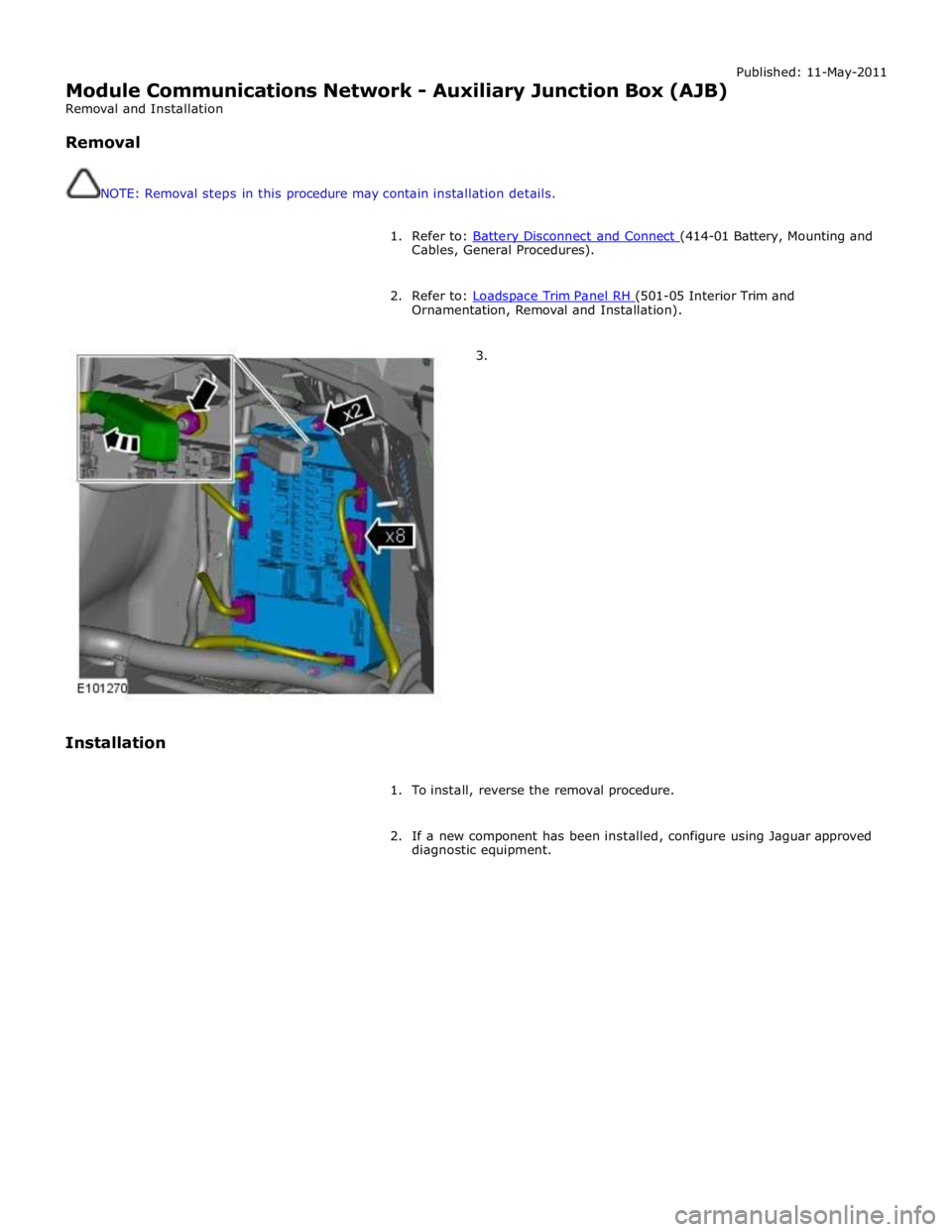
Published: 11-May-2011
Module Communications Network - Auxiliary Junction Box (AJB)
Removal and Installation
Removal
NOTE: Removal steps in this procedure may contain installation details.
1. Refer to: Battery Disconnect and Connect (414-01 Battery, Mounting and Cables, General Procedures).
2. Refer to: Loadspace Trim Panel RH (501-05 Interior Trim and Ornamentation, Removal and Installation).
3.
Installation
1. To install, reverse the removal procedure.
2. If a new component has been installed, configure using Jaguar approved
diagnostic equipment.
Page 2172 of 3039
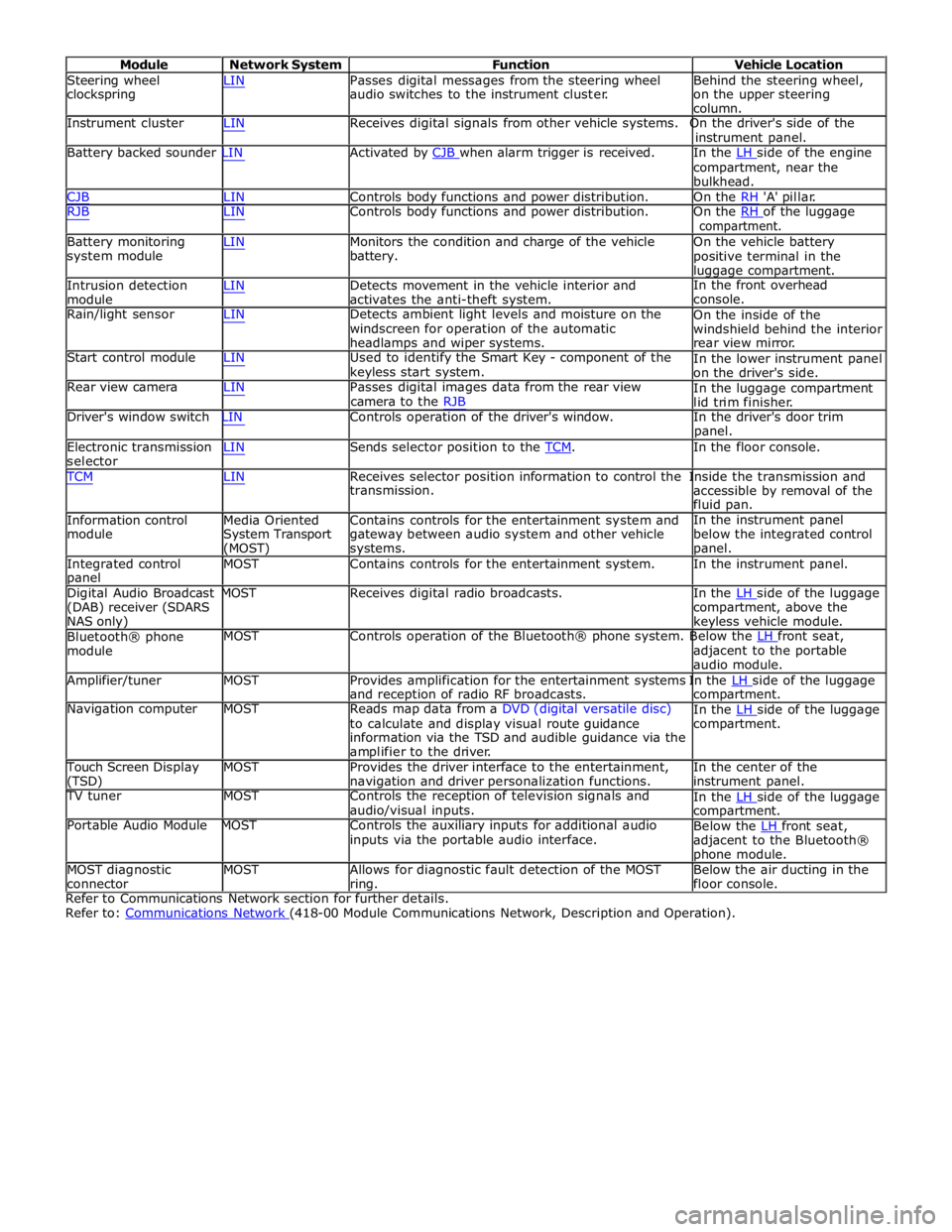
Module Network System Function Vehicle Location
Steering wheel
clockspring LIN Passes digital messages from the steering wheel
audio switches to the instrument cluster. Behind the steering wheel,
on the upper steering
column.
Instrument cluster LIN Receives digital signals from other vehicle systems. On the driver's side of the
instrument panel.
Battery backed sounder LIN Activated by CJB when alarm trigger is received. In the LH side of the engine compartment, near the
bulkhead.
CJB LIN Controls body functions and power distribution. On the RH 'A' pillar.
RJB LIN Controls body functions and power distribution. On the RH of the luggage compartment.
Battery monitoring
system module
Intrusion detection
module LIN Monitors the condition and charge of the vehicle
battery.
LIN Detects movement in the vehicle interior and
activates the anti-theft system. On the vehicle battery
positive terminal in the
luggage compartment.
In the front overhead
console.
Rain/light sensor LIN Detects ambient light levels and moisture on the
windscreen for operation of the automatic
headlamps and wiper systems.
Start control module LIN Used to identify the Smart Key - component of the
keyless start system.
Rear view camera LIN Passes digital images data from the rear view
camera to the RJB On the inside of the
windshield behind the interior
rear view mirror.
In the lower instrument panel
on the driver's side.
In the luggage compartment
lid trim finisher.
Driver's window switch LIN Controls operation of the driver's window. In the driver's door trim
panel.
Electronic transmission
selector LIN Sends selector position to the TCM. In the floor console. TCM LIN Receives selector position information to control the Inside the transmission and
Information control
module
Media Oriented
System Transport
(MOST) transmission.
Contains controls for the entertainment system and
gateway between audio system and other vehicle
systems. accessible by removal of the
fluid pan.
In the instrument panel
below the integrated control
panel.
Integrated control
panel MOST Contains controls for the entertainment system. In the instrument panel.
Digital Audio Broadcast MOST Receives digital radio broadcasts. In the LH side of the luggage (DAB) receiver (SDARS
NAS only)
Bluetooth® phone
module compartment, above the
keyless vehicle module.
MOST Controls operation of the Bluetooth® phone system. Below the LH front seat, adjacent to the portable
audio module.
Amplifier/tuner MOST Provides amplification for the entertainment systems In the LH side of the luggage and reception of radio RF broadcasts.
Navigation computer MOST Reads map data from a DVD (digital versatile disc)
to calculate and display visual route guidance
information via the TSD and audible guidance via the
amplifier to the driver. compartment.
In the LH side of the luggage compartment.
Touch Screen Display
(TSD) MOST Provides the driver interface to the entertainment,
navigation and driver personalization functions. In the center of the
instrument panel.
TV tuner MOST Controls the reception of television signals and
audio/visual inputs.
Portable Audio Module MOST Controls the auxiliary inputs for additional audio
inputs via the portable audio interface. In the LH side of the luggage compartment.
Below the LH front seat, adjacent to the Bluetooth®
phone module.
MOST diagnostic
connector MOST Allows for diagnostic fault detection of the MOST
ring. Below the air ducting in the
floor console.
Refer to Communications Network section for further details.
Refer to: Communications Network (418-00 Module Communications Network, Description and Operation).
Page 2177 of 3039

DTC Description Possible Cause Action C1B1415 Sensor Supply #1
Window position hall sensors
supply circuit - short to power,
open circuit Carry out any pinpoint tests associated with this DTC
using the manufacturer approved diagnostic system.
Refer to the electrical circuit diagrams and test window
position hall sensors supply circuit for short to power, open circuit C1B1511 Sensor Supply #2
Hall sensor supply circuit - short
to ground Refer to the electrical circuit diagrams and test window
position hall sensors supply circuit for short to ground C1B1515 Sensor Supply #2
Hall sensor supply circuit - short
to power, open circuit Carry out any pinpoint tests associated with this DTC
using the manufacturer approved diagnostic system.
Refer to the electrical circuit diagrams and test window
position hall sensors supply circuit for short to power, open circuit U001000
Medium Speed CAN
Communication Bus
Bus off Carry out any pinpoint tests associated with this DTC
using the manufacturer approved diagnostic system U014000
Lost Communication
With Body Control
Module
Missing message from CJB Carry out any pinpoint tests associated with this DTC
using the manufacturer approved diagnostic system U020800
Lost Communication
With Seat Control
Module "A"
Missing message from driver
seat module Carry out any pinpoint tests associated with this DTC
using the manufacturer approved diagnostic system U030000
Internal Control
Module Software
Incompatibility
Invalid configuration message is
received Re-configure the RJB using the manufacturer approved
diagnostic system. Clear the DTC and retest. If the DTC
remains suspect the DDM. Check and install a new
module as required, refer to the new module/component
installation note at the top of the DTC Index U200224 Switch
Signal stuck high Clear DTC and re-test. If DTC remains, suspect the
passenger side window switch. Check and install a new passenger side window switch U200424
Auxiliary Switch
Pack
Left or right rear door local
switch - signal stuck high Check for stuck rear window switch. Refer to the
electrical circuit diagrams and check left or right rear
door local switch circuit for short circuit U201011 Switch illumination
Rear window switch illumination
circuit - short to ground Refer to the electrical circuit diagrams and check rear
window switch illumination circuit for short to ground U201208
Car Configuration
Parameter(s)
Bus signal/message failures Cycle the ignition status and re-test. If DTC remains,
re-configure the RJB using the manufacturer approved diagnostic system U201324 Switch Pack
Signal stuck high Clear DTC and re-test. If DTC remains, install a new
driver door switch pack U201444
Control Module
Hardware
Data memory failure Suspect the DDM. Check and install a new DDM as
required, refer to the new module/component
installation note at the top of the DTC Index U210000
Initial Configuration
Not Complete
No sub type information Re-configure the DDM using the manufacturer approved
diagnostic system U300049 Control Module
Internal electronic failure Suspect the DDM. Check and install a new DDM as
required, refer to the new module/component
installation note at the top of the DTC Index U300255
Vehicle
Identification
Number
Not configured Re-configure the DDM as new using the manufacturer
approved diagnostic system and re-test. If DTC remains
install a new module, refer to the new
module/component installation note at the top of the
DTC Index U300281
Vehicle
Identification
Number (VIN)
Vehicle/component mis-match.
Corrupt VIN data being
transmitted, module previously
installed to other vehicle Check and install correct/new module as required, refer
to the new module/component installation note at the
top of the DTC Index U300362 Battery voltage
Mis-match in battery voltage, of
2 volts or more, between DDM
and RJB Carry out any pinpoint tests associated with this DTC
using the manufacturer approved diagnostic system
Page 2186 of 3039

DTC Description Possible Cause Action C1B1415 Sensor Supply #1
Front window position hall
sensor supply circuit - short to
power, open circuit Carry out any pinpoint tests associated with this DTC
using the manufacturer approved diagnostic system.
Refer to the electrical circuit diagrams and test front
window position hall sensor supply circuit for short to power, open circuit C1B1511 Sensor Supply #2
Hall sensor supply circuit - short
to ground Refer to the electrical circuit diagrams and test window
position hall sensors supply circuit for short to ground C1B1515 Sensor Supply #2
Hall sensor supply circuit - short
to power, open circuit Carry out any pinpoint tests associated with this DTC
using the manufacturer approved diagnostic system.
Refer to the electrical circuit diagrams and test window
position hall sensors supply circuit for short to power, open circuit U001000
Medium Speed CAN
Communication Bus
Bus off Carry out any pinpoint tests associated with this DTC
using the manufacturer approved diagnostic system U014000
Lost Communication
With Body Control
Module
Missing message from CJB Carry out any pinpoint tests associated with this DTC
using the manufacturer approved diagnostic system U020800
Lost Communication
With Seat Control
Module "A"
Missing message from driver
seat module Carry out any pinpoint tests associated with this DTC
using the manufacturer approved diagnostic system U030000
Internal Control
Module Software
Incompatibility
Invalid configuration message is
received Re-configure the RJB using the manufacturer approved
diagnostic system. Clear the DTC and retest. If the DTC
remains suspect the PDM. Check and install a new
module as required, refer to the new module/component
installation note at the top of the DTC Index U200224 Switch
Signal stuck high Clear DTC and re-test. If DTC remains, suspect the
passenger side window switch. Check and install a new passenger side window switch U200424
Auxiliary Switch
Pack
Left or right rear door local
switch - signal stuck high Check for stuck rear window switch. Refer to the
electrical circuit diagrams and check left or right rear
door local switch circuit for short circuit U201011 Switch illumination
Rear window switch illumination
circuit - short to ground Refer to the electrical circuit diagrams and check rear
window switch illumination circuit for short to ground U201208
Car Configuration
Parameter(s)
Bus signal/message failures Cycle the ignition status and re-test. If DTC remains,
re-configure the RJB using the manufacturer approved diagnostic system U201324 Switch Pack
Signal stuck high Clear DTC and re-test. If DTC remains, install a new
driver door switch pack U201444
Control Module
Hardware
Data memory failure Suspect the PDM. Check and install a new PDM as
required, refer to the new module/component
installation note at the top of the DTC Index U210000
Initial Configuration
Not Complete
No sub type information Re-configure the PDM using the manufacturer approved
diagnostic system U300049 Control Module
Internal electronic failure Suspect the PDM. Check and install a new PDM as
required, refer to the new module/component
installation note at the top of the DTC Index U300255
Vehicle
Identification
Number
Not configured Re-configure the PDM as new using the manufacturer
approved diagnostic system and re-test. If DTC remains
install a new module, refer to the new
module/component installation note at the top of the
DTC Index U300281
Vehicle
Identification
Number (VIN)
Vehicle/component mis-match.
Corrupt VIN data being
transmitted, module previously
installed to other vehicle Check and install correct/new module as required, refer
to the new module/component installation note at the
top of the DTC Index U300362 Battery voltage
Mis-match in battery voltage, of
2 volts or more, between PDM
and RJB Carry out any pinpoint tests associated with this DTC
using the manufacturer approved diagnostic system
Page 2943 of 3039
Rear End Sheet Metal Repairs - Back Panel
Removal and Installation
Removal Published: 11-May-2011
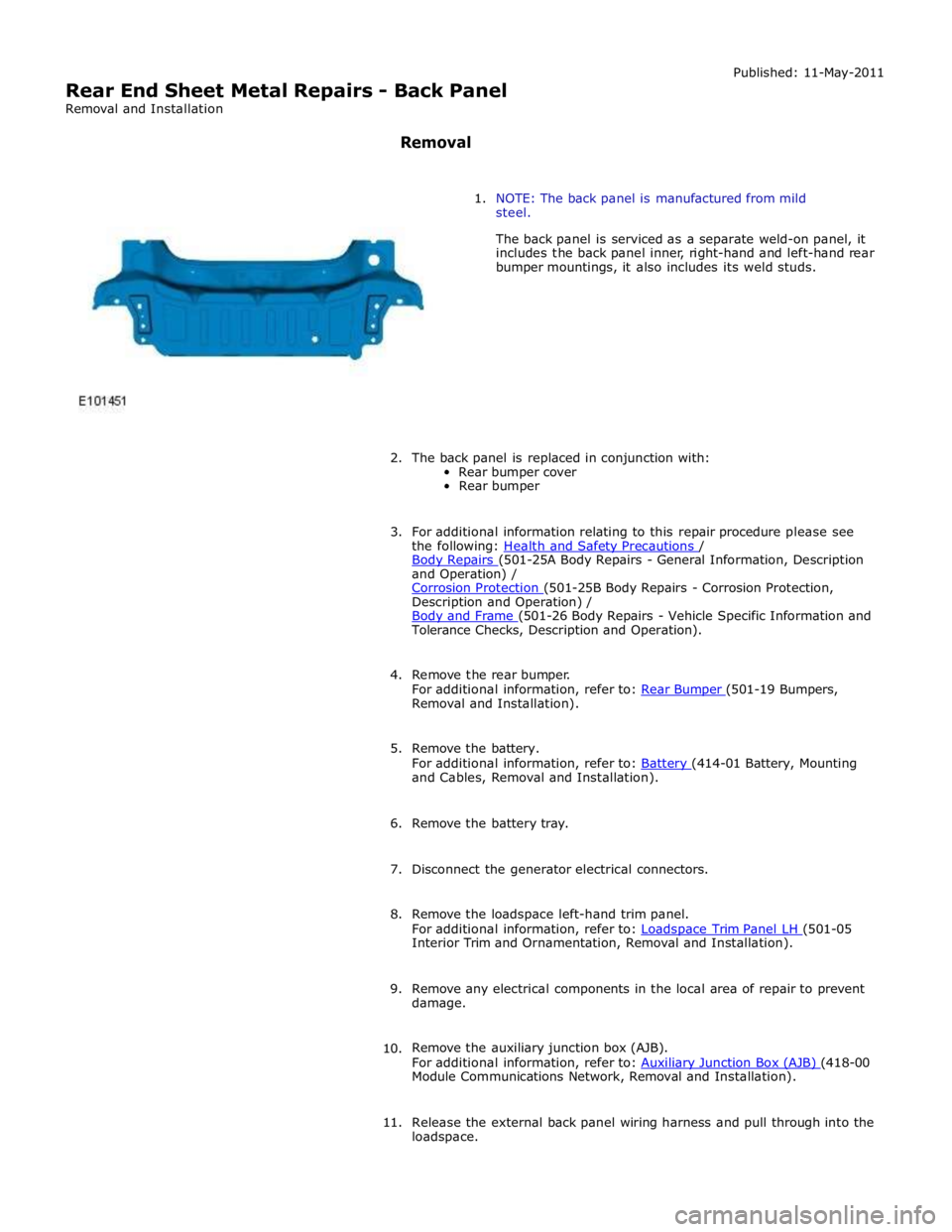
1. NOTE: The back panel is manufactured from mild
steel.
The back panel is serviced as a separate weld-on panel, it
includes the back panel inner, right-hand and left-hand rear
bumper mountings, it also includes its weld studs.
2. The back panel is replaced in conjunction with:
Rear bumper cover
Rear bumper
3. For additional information relating to this repair procedure please see
the following: Health and Safety Precautions / Body Repairs (501-25A Body Repairs - General Information, Description and Operation) /
Corrosion Protection (501-25B Body Repairs - Corrosion Protection, Description and Operation) /
Body and Frame (501-26 Body Repairs - Vehicle Specific Information and Tolerance Checks, Description and Operation).
4. Remove the rear bumper.
For additional information, refer to: Rear Bumper (501-19 Bumpers, Removal and Installation).
5. Remove the battery.
For additional information, refer to: Battery (414-01 Battery, Mounting and Cables, Removal and Installation).
6. Remove the battery tray.
7. Disconnect the generator electrical connectors.
8. Remove the loadspace left-hand trim panel.
For additional information, refer to: Loadspace Trim Panel LH (501-05 Interior Trim and Ornamentation, Removal and Installation).
9. Remove any electrical components in the local area of repair to prevent
damage.
10. Remove the auxiliary junction box (AJB).
For additional information, refer to: Auxiliary Junction Box (AJB) (418-00 Module Communications Network, Removal and Installation).
11. Release the external back panel wiring harness and pull through into the
loadspace.
Page 2949 of 3039
Removal and Installation).
7. Remove the battery.
For additional information, refer to: Battery (414-01 Battery, Mounting and Cables, Removal and Installation).
8. Disconnect the generator electrical connectors.
9. If the left-hand rear quarter panel is to be repaired, remove the
loadspace left-hand trim panel.
For additional information, refer to: Loadspace Trim Panel LH (501-05 Interior Trim and Ornamentation, Removal and Installation).
10. If the right-hand rear quarter panel is to be repaired, remove the
auxiliary junction box (AJB).
For additional information, refer to: Auxiliary Junction Box (AJB) (418-00 Module Communications Network, Removal and Installation).
11. Remove any electrical components in the local area of repair to prevent
damage.
12. Remove the rear muffler.
For additional information, refer to: Rear Muffler (309-00C Exhaust System - V8 5.0L Petrol/V8 S/C 5.0L Petrol, Removal and Installation) /
Rear Muffler (309-00C Exhaust System - V8 5.0L Petrol/V8 S/C 5.0L Petrol, Removal and Installation) /
Rear Muffler (309-00C Exhaust System - V8 5.0L Petrol/V8 S/C 5.0L Petrol, Removal and Installation).
13. Remove the exhaust muffler and tailpipe heatshield.
14. Remove the rear scuff plate trim panel.
For additional information, refer to: Rear Scuff Plate Trim Panel (501-05 Interior Trim and Ornamentation, Removal and Installation).
15. Remove the loadspace trim panel.
For additional information, refer to: Loadspace Trim Panel (501-05 Interior Trim and Ornamentation, Removal and Installation).
16. Remove the forced air extraction grille.
17. Release and lay aside the back panel and loadspace wiring harness.
18. Remove the luggage compartment lid weatherstrip.
19. Remove the rear bumper cover side retainer.
20. Remove the roof moulding.
21. Remove the headliner.
For additional information, refer to: Headliner (501-05 Interior Trim and Ornamentation, Removal and Installation).
22. Remove the side air curtain module.
www.JagDocs.com
Page 2964 of 3039
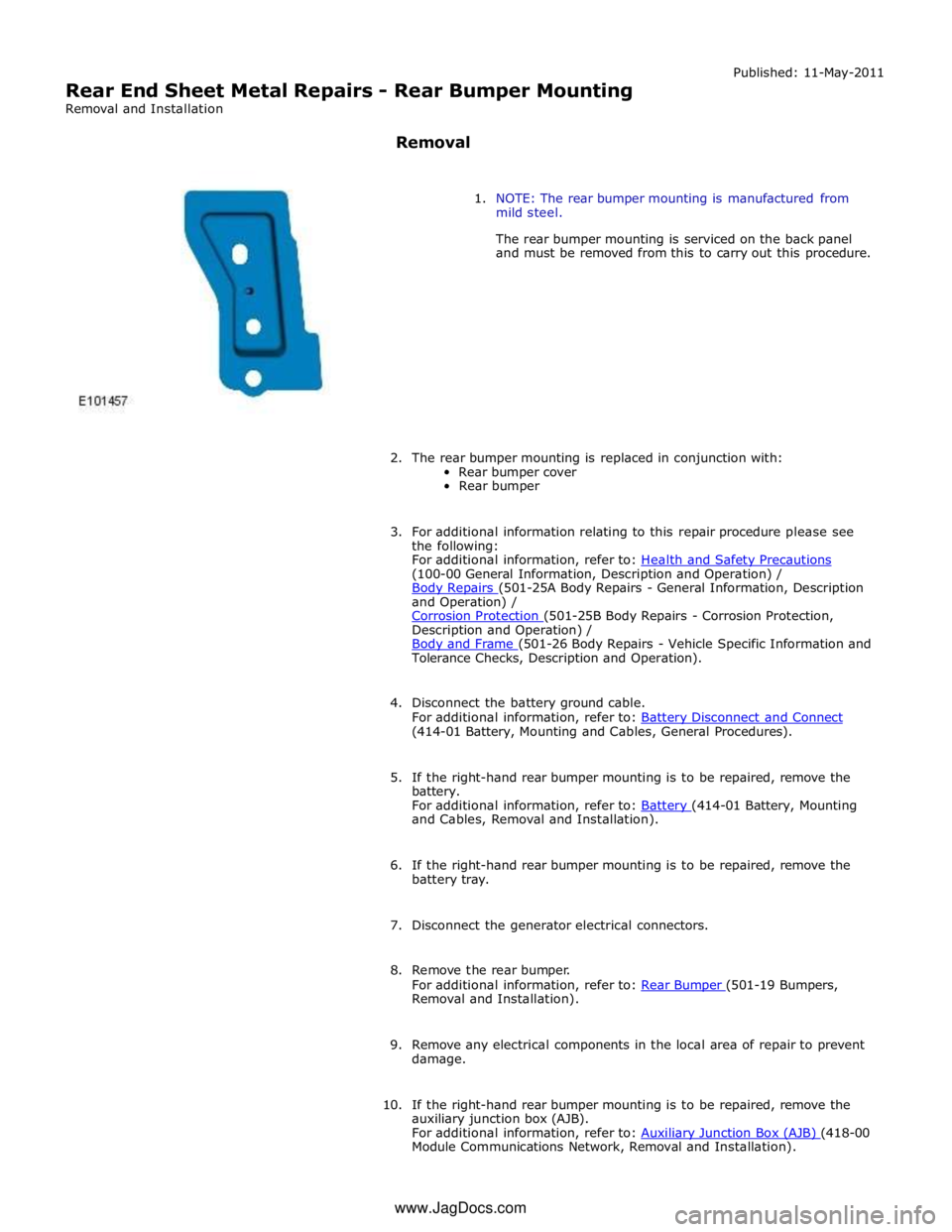
Rear End Sheet Metal Repairs - Rear Bumper Mounting
Removal and Installation
Removal Published: 11-May-2011
1. NOTE: The rear bumper mounting is manufactured from
mild steel.
The rear bumper mounting is serviced on the back panel
and must be removed from this to carry out this procedure.
2. The rear bumper mounting is replaced in conjunction with:
Rear bumper cover
Rear bumper
3. For additional information relating to this repair procedure please see
the following:
For additional information, refer to: Health and Safety Precautions (100-00 General Information, Description and Operation) /
Body Repairs (501-25A Body Repairs - General Information, Description and Operation) /
Corrosion Protection (501-25B Body Repairs - Corrosion Protection, Description and Operation) /
Body and Frame (501-26 Body Repairs - Vehicle Specific Information and Tolerance Checks, Description and Operation).
4. Disconnect the battery ground cable.
For additional information, refer to: Battery Disconnect and Connect (414-01 Battery, Mounting and Cables, General Procedures).
5. If the right-hand rear bumper mounting is to be repaired, remove the
battery.
For additional information, refer to: Battery (414-01 Battery, Mounting and Cables, Removal and Installation).
6. If the right-hand rear bumper mounting is to be repaired, remove the
battery tray.
7. Disconnect the generator electrical connectors.
8. Remove the rear bumper.
For additional information, refer to: Rear Bumper (501-19 Bumpers, Removal and Installation).
9. Remove any electrical components in the local area of repair to prevent
damage.
10. If the right-hand rear bumper mounting is to be repaired, remove the
auxiliary junction box (AJB).
For additional information, refer to: Auxiliary Junction Box (AJB) (418-00 Module Communications Network, Removal and Installation). www.JagDocs.com