brake JAGUAR XFR 2010 1.G Repair Manual
[x] Cancel search | Manufacturer: JAGUAR, Model Year: 2010, Model line: XFR, Model: JAGUAR XFR 2010 1.GPages: 3039, PDF Size: 58.49 MB
Page 483 of 3039
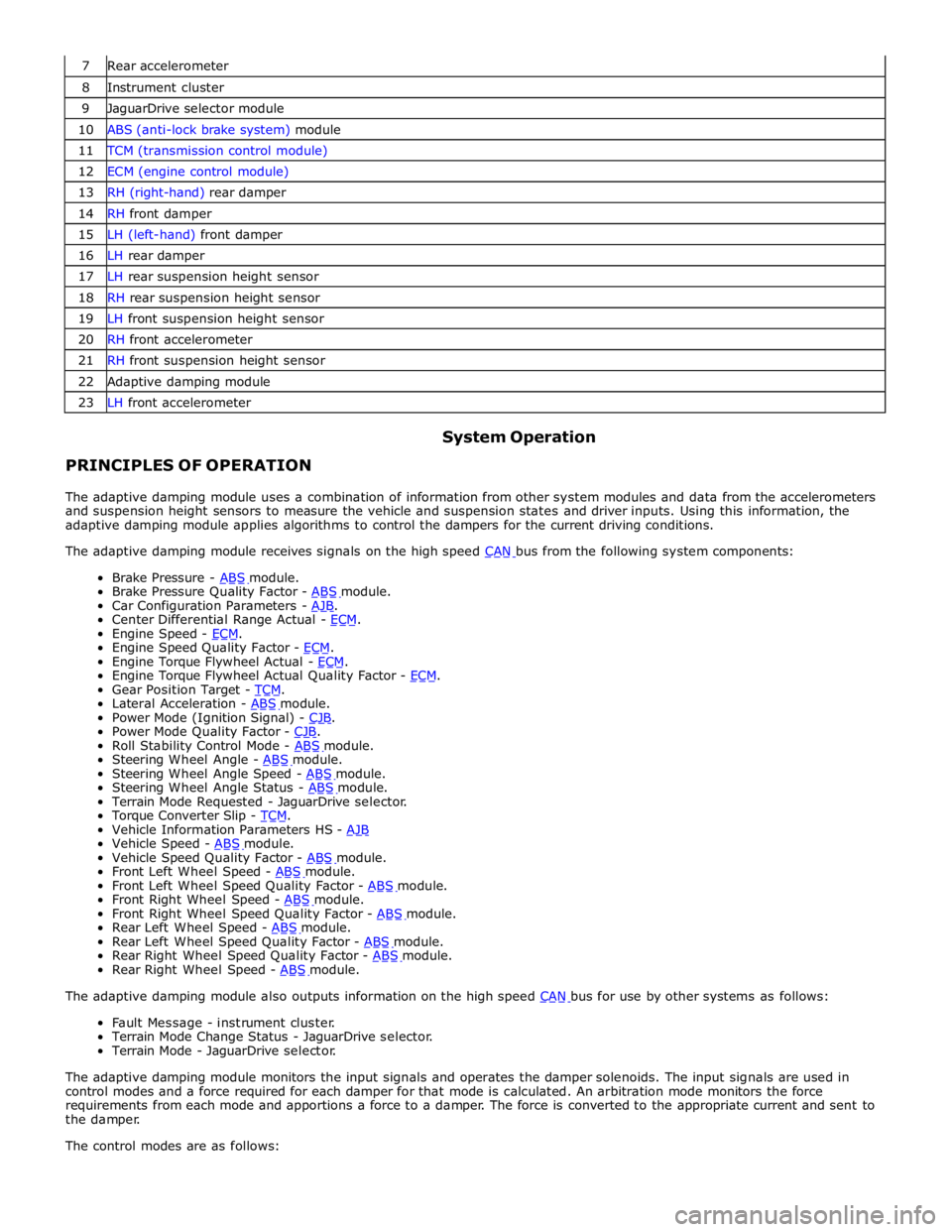
7 Rear accelerometer 8 Instrument cluster 9 JaguarDrive selector module 10 ABS (anti-lock brake system) module 11 TCM (transmission control module) 12 ECM (engine control module) 13 RH (right-hand) rear damper 14 RH front damper 15 LH (left-hand) front damper 16 LH rear damper 17 LH rear suspension height sensor 18 RH rear suspension height sensor 19 LH front suspension height sensor 20 RH front accelerometer 21 RH front suspension height sensor 22 Adaptive damping module 23 LH front accelerometer
PRINCIPLES OF OPERATION System Operation
The adaptive damping module uses a combination of information from other system modules and data from the accelerometers
and suspension height sensors to measure the vehicle and suspension states and driver inputs. Using this information, the
adaptive damping module applies algorithms to control the dampers for the current driving conditions.
The adaptive damping module receives signals on the high speed CAN bus from the following system components: Brake Pressure - ABS module. Brake Pressure Quality Factor - ABS module. Car Configuration Parameters - AJB. Center Differential Range Actual - ECM. Engine Speed - ECM. Engine Speed Quality Factor - ECM. Engine Torque Flywheel Actual - ECM. Engine Torque Flywheel Actual Quality Factor - ECM. Gear Position Target - TCM. Lateral Acceleration - ABS module. Power Mode (Ignition Signal) - CJB. Power Mode Quality Factor - CJB. Roll Stability Control Mode - ABS module. Steering Wheel Angle - ABS module. Steering Wheel Angle Speed - ABS module. Steering Wheel Angle Status - ABS module. Terrain Mode Requested - JaguarDrive selector.
Torque Converter Slip - TCM. Vehicle Information Parameters HS - AJB Vehicle Speed - ABS module. Vehicle Speed Quality Factor - ABS module. Front Left Wheel Speed - ABS module. Front Left Wheel Speed Quality Factor - ABS module. Front Right Wheel Speed - ABS module. Front Right Wheel Speed Quality Factor - ABS module. Rear Left Wheel Speed - ABS module. Rear Left Wheel Speed Quality Factor - ABS module. Rear Right Wheel Speed Quality Factor - ABS module. Rear Right Wheel Speed - ABS module. The adaptive damping module also outputs information on the high speed CAN bus for use by other systems as follows: Fault Message - instrument cluster.
Terrain Mode Change Status - JaguarDrive selector.
Terrain Mode - JaguarDrive selector.
The adaptive damping module monitors the input signals and operates the damper solenoids. The input signals are used in
control modes and a force required for each damper for that mode is calculated. An arbitration mode monitors the force
requirements from each mode and apportions a force to a damper. The force is converted to the appropriate current and sent to
the damper.
The control modes are as follows:
Page 493 of 3039
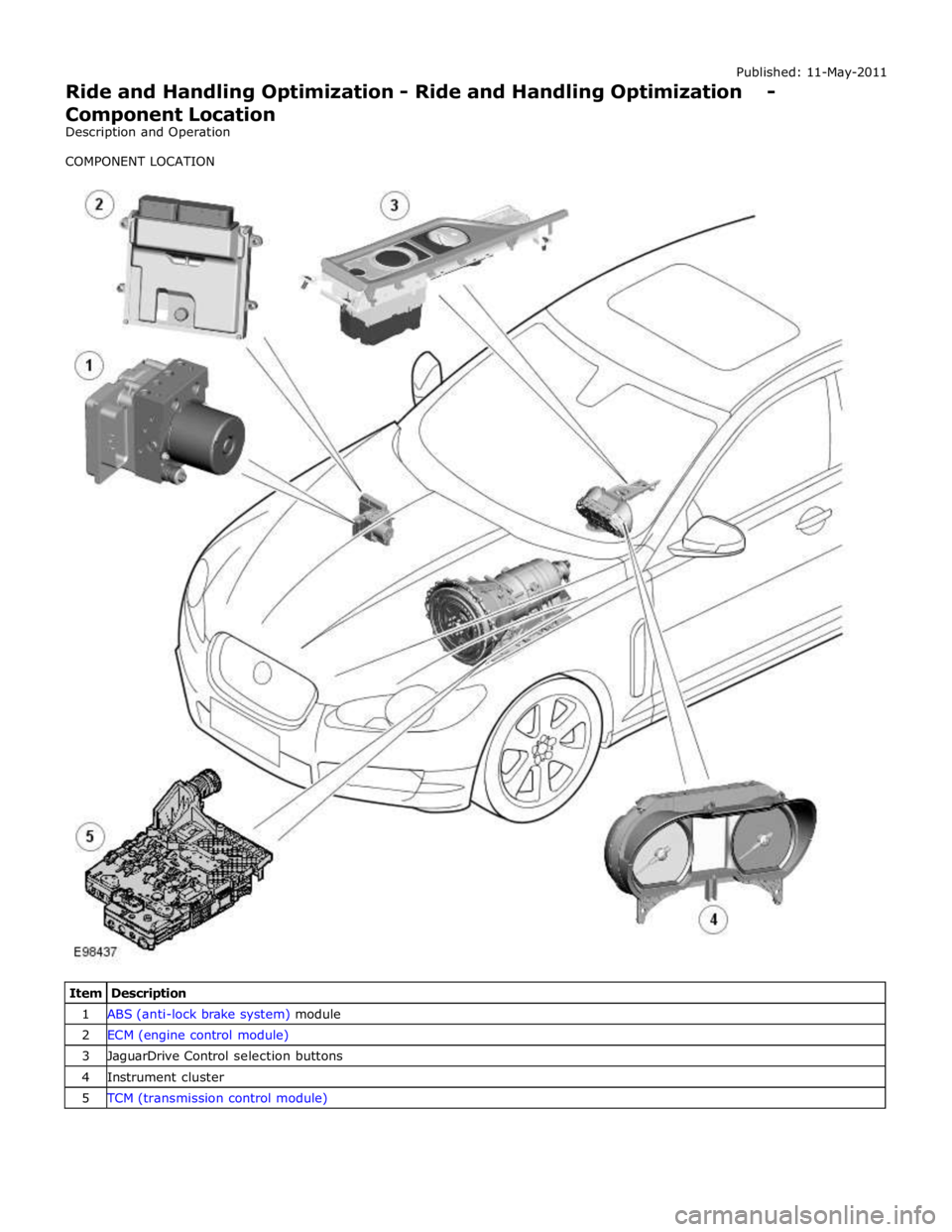
1 ABS (anti-lock brake system) module 2 ECM (engine control module) 3 JaguarDrive Control selection buttons 4 Instrument cluster 5 TCM (transmission control module)
Page 495 of 3039
Published: 11-May-2011
Ride and Handling Optimization - Ride and Handling Optimization - System
Operation and Component Description
Description and Operation
JAGUARDRIVE CONTROL OPERATION
Engine Management System System Operation
The Engine Management System (EMS) varies the accelerator pedal maps to change the amount of torque per percentage of
pedal travel. The EMS can also change the accelerator pedal response to control the allowed torque change relative to the
speed of pedal travel.
Each driving mode uses a combination of operating parameters for each sub-system. Changing between driving modes initiates
a different set of operating characteristics, which will be noticeable to the driver. The driver will notice differences in engine
response when, for example, the accelerator pedal is held in a constant position and the driving mode is changed from Winter
to Dynamic, the driver will notice the torque and engine speed increase. Similarly, if the mode is changed from Normal or
Dynamic to Winter the driver will notice a reduction in torque and engine speed.
NOTE: The change in torque and engine speed can take approximately 30 seconds and care must be taken not to confuse
the JaguarDrive Control system operation with an EMS fault.
Transmission Control
The TCM (transmission control module) changes the shift maps for the JaguarDrive Control mode selected. This changes the
shift points providing early or late upshifts and downshifts. For example, on slippery surfaces in Winter mode the transmission
will select 2nd gear for starting from a standstill on a flat surface to minimize wheel slip.
Anti-lock Braking System Control
The ABS (anti-lock brake system) module controls several vehicle functions and adjusts the operating parameters of these
functions to optimize the selected JaguarDrive Control mode. Traction control uses different slip/acceleration thresholds to
improve traction and vehicle composure. For example, the system sensitivity is increased on slippery surfaces to reduce wheel
spin.
If TracDSC is selected or DSC is switched off, then subsequently the JaguarDrive Control mode is changed, DSC is automatically
switched back on (or to TracDSC for Dynamic mode).
The stability control uses different threshold values for the selected mode, reducing the requirement for the driver to change
the DSC system mode for optimum performance in various driving scenarios.
Incorrect Mode Usage
Selection of an inappropriate mode is discouraged in the following ways:
The active mode icon is continually displayed in the instrument cluster message center
In any special mode, when the ignition has been in the off position continuously for more than 6 hours, the JaguarDrive
Control system defaults to the special modes off (DSC on).
Selection of an inappropriate mode for the conditions will not endanger the driver or immediately cause damage to the vehicle.
Continued use of an inappropriate mode may reduce the life of some components. The driver may notice a different vehicle
response, with the engine and transmission responses being different than in the special modes off.
Driver Information
The instrument cluster contains a message center, which displays vehicle information to the driver. The message center
contains the JaguarDrive Control mode icons, which display the currently selected mode. If no symbol is displayed, no special
mode is selected and the system is in special modes off.
Any required changes to the subsystems are also passed to the driver in the form of warning illumination in the instrument
cluster or appropriate messages in the message center, DSC off for example.
In Dynamic mode when the transmission is in manual mode, the gear information is displayed in amber when the appropriate
engine speed is reached for optimum sporty change point.
DIAGNOSTICS
JaguarDrive Control relies on the correct functionality of the sub-systems. If one of the sub-systems develops a fault, the
JaguarDrive Control system will not function, even though the fault is not in the JaguarDrive Control system.
The JaguarDrive Selector module and rotary control should only be investigated if there are no apparent faults in any of the
sub-systems. If a fault in a sub-system is subsequently corrected, the JaguarDrive Control system will function normally after
an ignition on and off cycle.
Page 497 of 3039
JAGUARDRIVE CONTROL DESCRIPTION Component Description
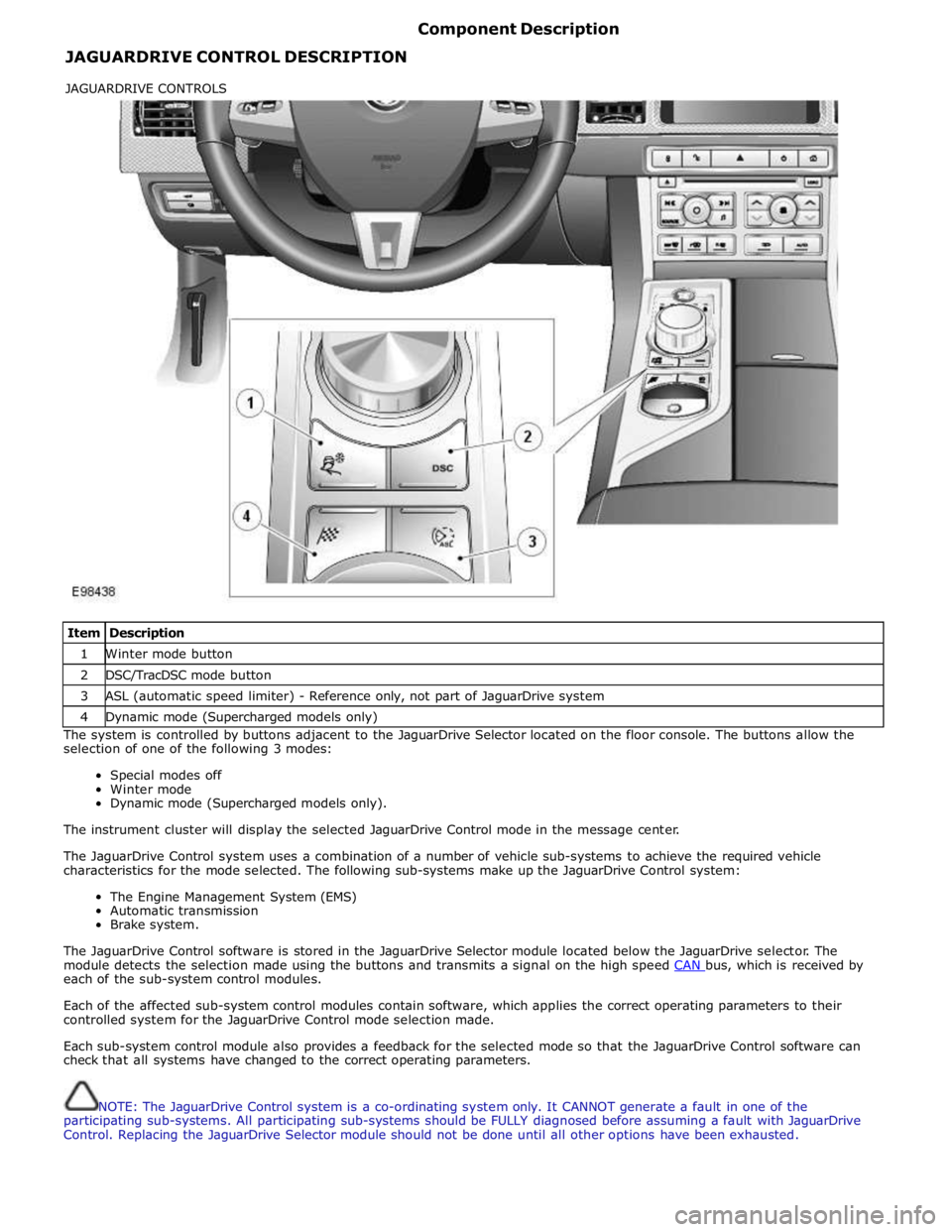
Item Description 1 Winter mode button 2 DSC/TracDSC mode button 3 ASL (automatic speed limiter) - Reference only, not part of JaguarDrive system 4 Dynamic mode (Supercharged models only) The system is controlled by buttons adjacent to the JaguarDrive Selector located on the floor console. The buttons allow the
selection of one of the following 3 modes:
Special modes off
Winter mode
Dynamic mode (Supercharged models only).
The instrument cluster will display the selected JaguarDrive Control mode in the message center.
The JaguarDrive Control system uses a combination of a number of vehicle sub-systems to achieve the required vehicle
characteristics for the mode selected. The following sub-systems make up the JaguarDrive Control system:
The Engine Management System (EMS)
Automatic transmission
Brake system.
The JaguarDrive Control software is stored in the JaguarDrive Selector module located below the JaguarDrive selector. The
module detects the selection made using the buttons and transmits a signal on the high speed CAN bus, which is received by each of the sub-system control modules.
Each of the affected sub-system control modules contain software, which applies the correct operating parameters to their
controlled system for the JaguarDrive Control mode selection made.
Each sub-system control module also provides a feedback for the selected mode so that the JaguarDrive Control software can
check that all systems have changed to the correct operating parameters.
NOTE: The JaguarDrive Control system is a co-ordinating system only. It CANNOT generate a fault in one of the
participating sub-systems. All participating sub-systems should be FULLY diagnosed before assuming a fault with JaguarDrive
Control. Replacing the JaguarDrive Selector module should not be done until all other options have been exhausted. JAGUARDRIVE CONTROLS
Page 502 of 3039
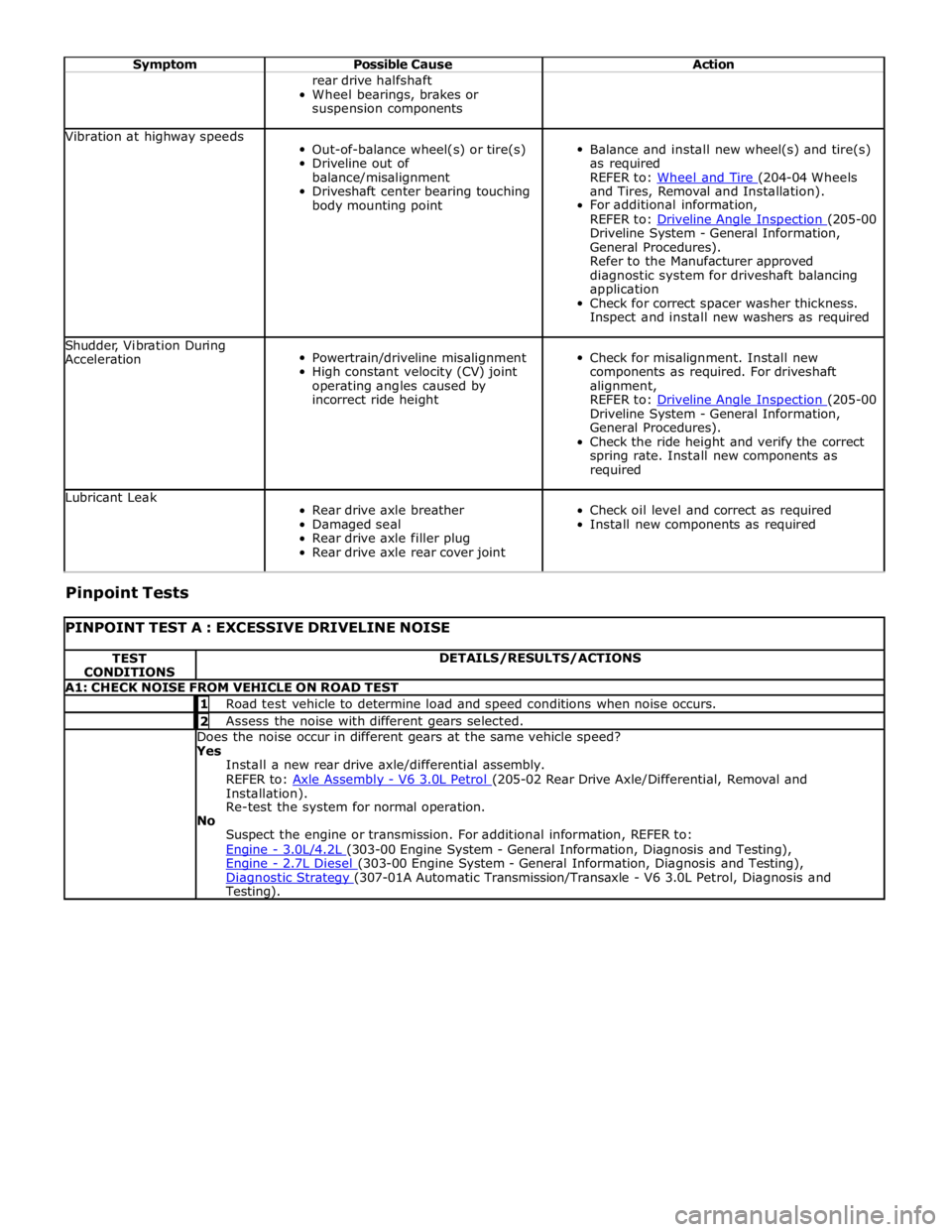
Symptom Possible Cause Action rear drive halfshaft
Wheel bearings, brakes or
suspension components Vibration at highway speeds
Out-of-balance wheel(s) or tire(s)
Driveline out of
balance/misalignment
Driveshaft center bearing touching
body mounting point
Balance and install new wheel(s) and tire(s)
as required
REFER to: Wheel and Tire (204-04 Wheels and Tires, Removal and Installation).
For additional information,
REFER to: Driveline Angle Inspection (205-00 Driveline System - General Information,
General Procedures).
Refer to the Manufacturer approved
diagnostic system for driveshaft balancing
application
Check for correct spacer washer thickness.
Inspect and install new washers as required Shudder, Vibration During
Acceleration
Powertrain/driveline misalignment
High constant velocity (CV) joint
operating angles caused by
incorrect ride height
Check for misalignment. Install new
components as required. For driveshaft
alignment,
REFER to: Driveline Angle Inspection (205-00 Driveline System - General Information,
General Procedures).
Check the ride height and verify the correct
spring rate. Install new components as
required Lubricant Leak
Rear drive axle breather
Damaged seal
Rear drive axle filler plug
Rear drive axle rear cover joint
Check oil level and correct as required
Install new components as required Pinpoint Tests
PINPOINT TEST A : EXCESSIVE DRIVELINE NOISE TEST
CONDITIONS DETAILS/RESULTS/ACTIONS A1: CHECK NOISE FROM VEHICLE ON ROAD TEST 1 Road test vehicle to determine load and speed conditions when noise occurs. 2 Assess the noise with different gears selected. Does the noise occur in different gears at the same vehicle speed? Yes
Install a new rear drive axle/differential assembly.
REFER to: Axle Assembly - V6 3.0L Petrol (205-02 Rear Drive Axle/Differential, Removal and Installation).
Re-test the system for normal operation.
No
Suspect the engine or transmission. For additional information, REFER to:
Engine - 3.0L/4.2L (303-00 Engine System - General Information, Diagnosis and Testing), Engine - 2.7L Diesel (303-00 Engine System - General Information, Diagnosis and Testing), Diagnostic Strategy (307-01A Automatic Transmission/Transaxle - V6 3.0L Petrol, Diagnosis and Testing).
Page 532 of 3039

6 Oil temperature sensor 7 High speed CAN from suspension control module 8 CJB (central junction box)
System Operation
ELECTRONIC
DIFFERENTIAL
-
5.0L
SUPERCHARGER
VEHICLES
FROM
2010MY
The
multi-plate
clutch
prevents
excessive
differential
slip and
therefore
maximizes
the
traction
performance
of
the
vehicle.
This
is
fundamentally
different
from
'braked'
traction
control
systems,
which
can
only
counteract
differential
slip when it
occurs.
A
certain
amount
of
differential
slip is
required
to
allow
the
vehicle
to
turn
corners
and
to
remain
stable
under
control
of
the
ABS
(anti-lock
brake
system).
The
system
is
completely
automatic and
does
not
require
any
special
driver
input.
The
multi-plate
clutch
actively
controls
the
torque
flow
through
the
differential
and
optimizes
the
torque
distribution in
the
driveline.
The
clutch
biases
the
torque
from
the
differential
to
the
wheel
with the
higher
grip
and prevents
the
wheel
with the
lower
grip
from
spinning.
www.JagDocs.com
Page 566 of 3039
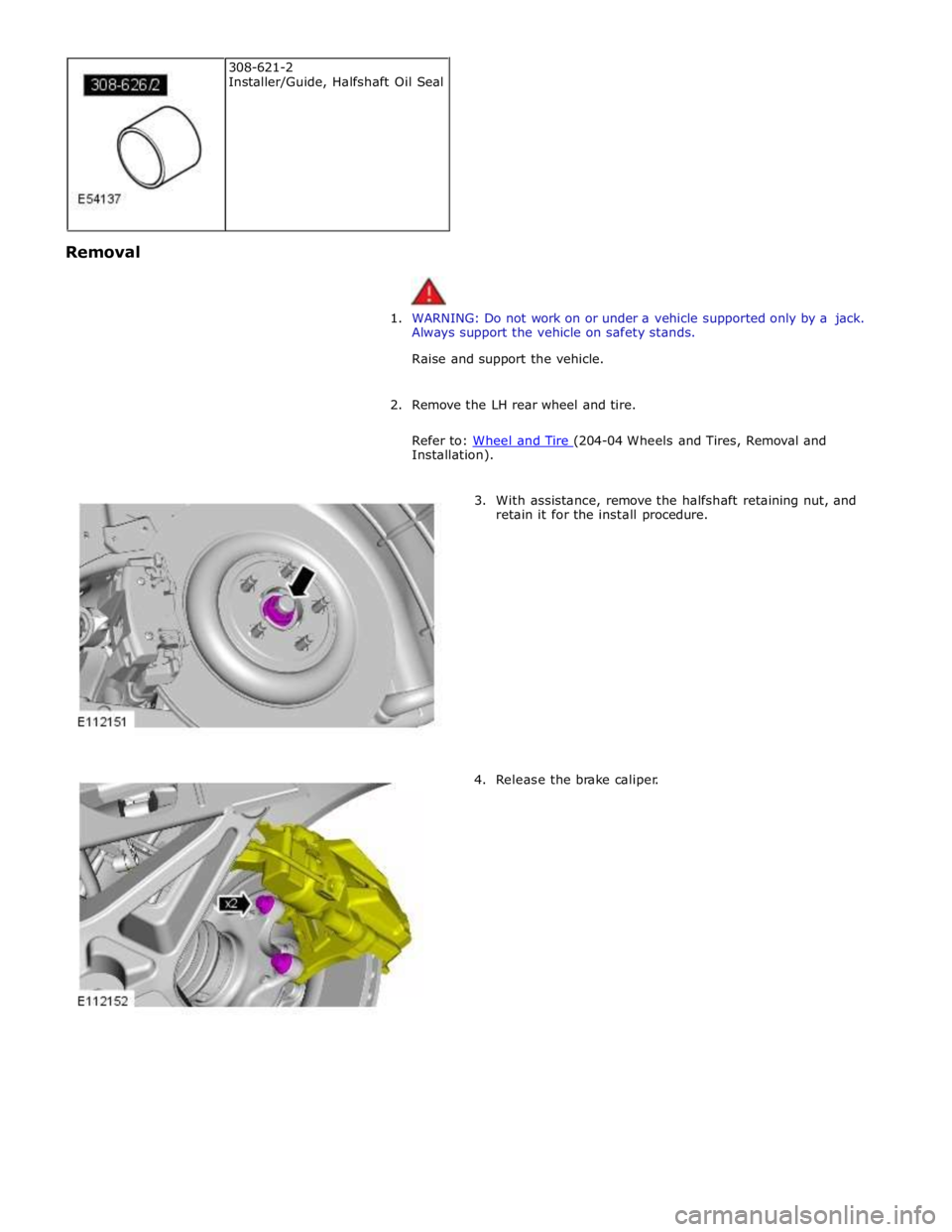
Removal
1. WARNING: Do not work on or under a vehicle supported only by a jack.
Always support the vehicle on safety stands.
Raise and support the vehicle.
2. Remove the LH rear wheel and tire.
Refer to: Wheel and Tire (204-04 Wheels and Tires, Removal and Installation).
3. With assistance, remove the halfshaft retaining nut, and
retain it for the install procedure.
4. Release the brake caliper. 308-621-2
Installer/Guide, Halfshaft Oil Seal
Page 573 of 3039
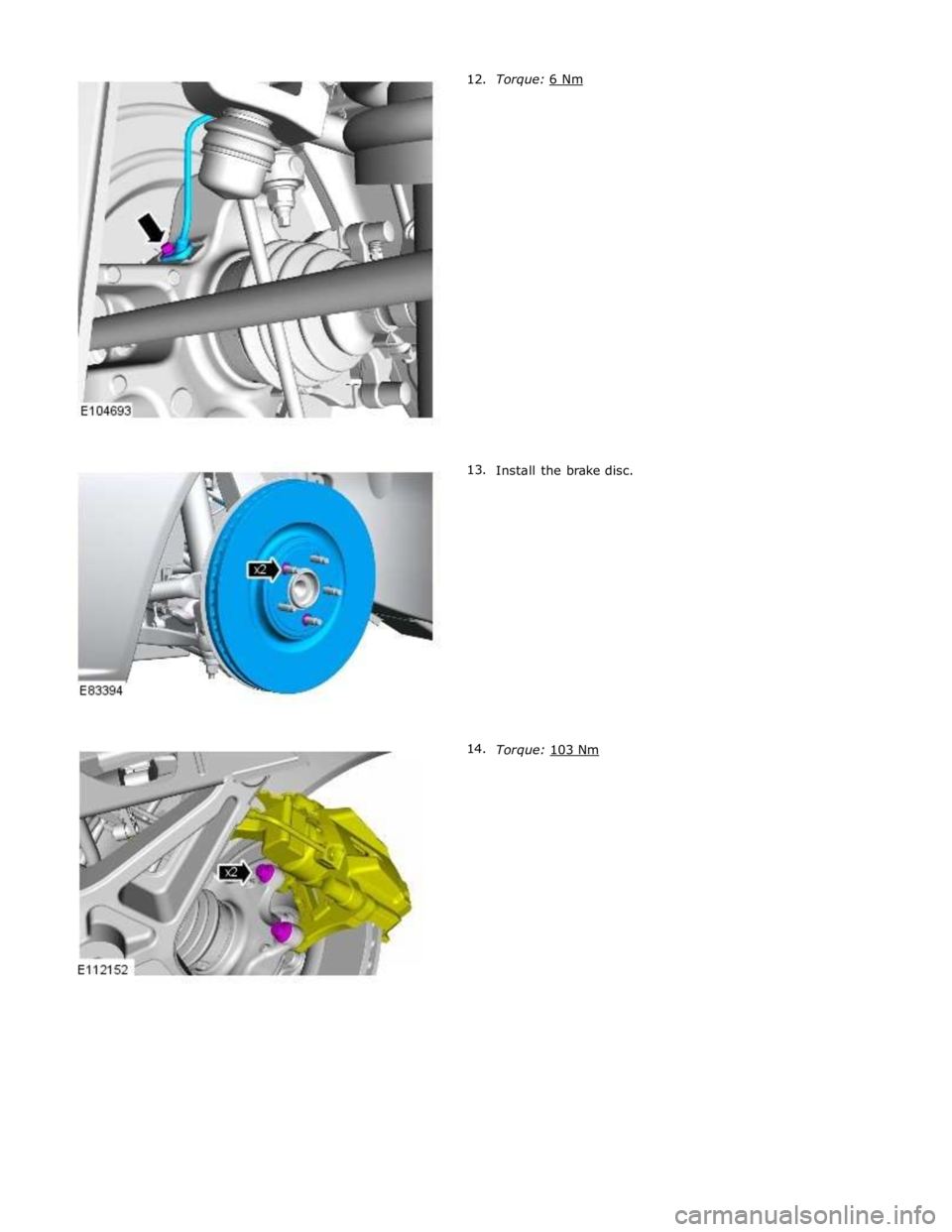
Install the brake disc.
Torque: 103 Nm
Page 581 of 3039
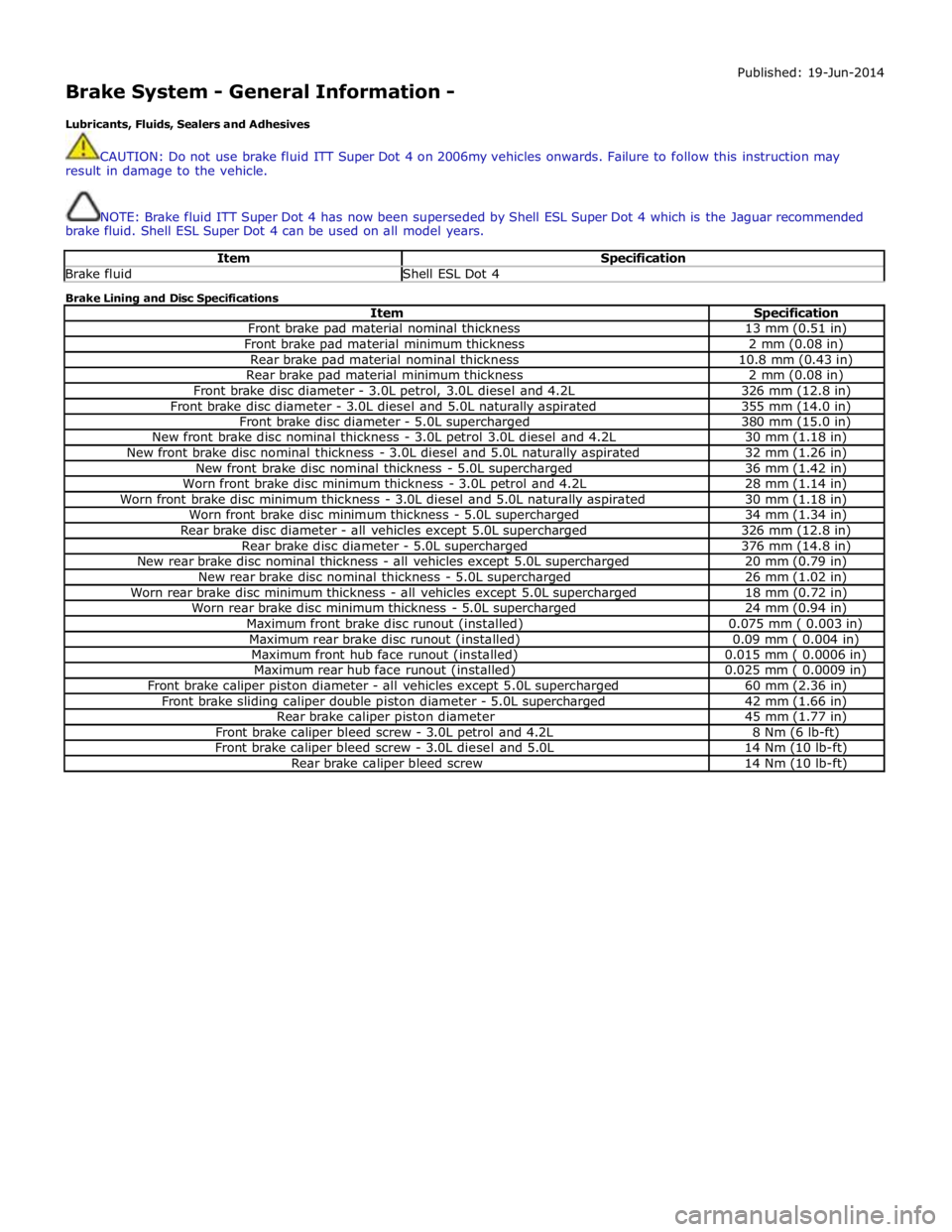
Brake System - General Information -
Lubricants, Fluids, Sealers and Adhesives Published: 19-Jun-2014
CAUTION: Do not use brake fluid ITT Super Dot 4 on 2006my vehicles onwards. Failure to follow this instruction may
result in damage to the vehicle.
NOTE: Brake fluid ITT Super Dot 4 has now been superseded by Shell ESL Super Dot 4 which is the Jaguar recommended
brake fluid. Shell ESL Super Dot 4 can be used on all model years.
Item Specification Brake fluid Shell ESL Dot 4 Brake Lining and Disc Specifications
Item Specification Front brake pad material nominal thickness 13 mm (0.51 in) Front brake pad material minimum thickness 2 mm (0.08 in) Rear brake pad material nominal thickness 10.8 mm (0.43 in) Rear brake pad material minimum thickness 2 mm (0.08 in) Front brake disc diameter - 3.0L petrol, 3.0L diesel and 4.2L 326 mm (12.8 in) Front brake disc diameter - 3.0L diesel and 5.0L naturally aspirated 355 mm (14.0 in) Front brake disc diameter - 5.0L supercharged 380 mm (15.0 in) New front brake disc nominal thickness - 3.0L petrol 3.0L diesel and 4.2L 30 mm (1.18 in) New front brake disc nominal thickness - 3.0L diesel and 5.0L naturally aspirated 32 mm (1.26 in) New front brake disc nominal thickness - 5.0L supercharged 36 mm (1.42 in) Worn front brake disc minimum thickness - 3.0L petrol and 4.2L 28 mm (1.14 in) Worn front brake disc minimum thickness - 3.0L diesel and 5.0L naturally aspirated 30 mm (1.18 in) Worn front brake disc minimum thickness - 5.0L supercharged 34 mm (1.34 in) Rear brake disc diameter - all vehicles except 5.0L supercharged 326 mm (12.8 in) Rear brake disc diameter - 5.0L supercharged 376 mm (14.8 in) New rear brake disc nominal thickness - all vehicles except 5.0L supercharged 20 mm (0.79 in) New rear brake disc nominal thickness - 5.0L supercharged 26 mm (1.02 in) Worn rear brake disc minimum thickness - all vehicles except 5.0L supercharged 18 mm (0.72 in) Worn rear brake disc minimum thickness - 5.0L supercharged 24 mm (0.94 in) Maximum front brake disc runout (installed) 0.075 mm ( 0.003 in) Maximum rear brake disc runout (installed) 0.09 mm ( 0.004 in) Maximum front hub face runout (installed) 0.015 mm ( 0.0006 in) Maximum rear hub face runout (installed) 0.025 mm ( 0.0009 in) Front brake caliper piston diameter - all vehicles except 5.0L supercharged 60 mm (2.36 in) Front brake sliding caliper double piston diameter - 5.0L supercharged 42 mm (1.66 in) Rear brake caliper piston diameter 45 mm (1.77 in) Front brake caliper bleed screw - 3.0L petrol and 4.2L 8 Nm (6 lb-ft) Front brake caliper bleed screw - 3.0L diesel and 5.0L 14 Nm (10 lb-ft) Rear brake caliper bleed screw 14 Nm (10 lb-ft)
Page 582 of 3039
Brake System - General Information - Brake System
Diagnosis and Testing
Principle of Operation Published: 11-May-2011
For a detailed description of the brake system, refer to the relevant Description and Operation sections in the workshop
manual. REFER to:
Front Disc Brake (206-03, Description and Operation),
Front Disc Brake (206-03, Description and Operation),
Front Disc Brake (206-03, Description and Operation),
Rear Disc Brake (206-04, Description and Operation),
Rear Disc Brake (206-04, Description and Operation),
Rear Disc Brake (206-04, Description and Operation),
Parking Brake (206-05 Parking Brake and Actuation, Description and Operation), Parking Brake (206-05 Parking Brake and Actuation, Description and Operation), Parking Brake (206-05 Parking Brake and Actuation, Description and Operation), Hydraulic Brake Actuation (206-06 Hydraulic Brake Actuation, Description and Operation), Hydraulic Brake Actuation (206-06 Hydraulic Brake Actuation, Description and Operation), Hydraulic Brake Actuation (206-06 Hydraulic Brake Actuation, Description and Operation), Brake Booster (206-07 Power Brake Actuation, Description and Operation), Brake Booster (206-07 Power Brake Actuation, Description and Operation), Brake Booster (206-07, Description and Operation).
Inspection and Verification
Visually examine the front and rear wheel and tire assemblies for damage such as uneven wear patterns, tread worn out or
sidewall damage. Verify the tires are the same size, type and, where possible, same manufacturer. Replace the damaged
wheel or excessively worn tire.
Wheels and tires must be cleared of any foreign matter and tire pressures adjusted to the correct specification.
If the tires exhibit uneven wear or feathering, the cause must be corrected. Check the steering and suspension components for
damage or wear and, if necessary, check and adjust front wheel alignment. REFER to: (204-00 Suspension System - General
Information)
Specifications (Specifications), Front Toe Adjustment (General Procedures).
Visual Inspection
Mechanical Electrical
Brake master cylinder
Brake caliper piston(s)
Brake discs
Wheel bearings
Brake pads
Power brake booster
Brake pedal linkage
Brake booster vacuum hose
Tires
Debris
Parking brake actuator
Parking brake module
Parking brake switch
Damaged or corroded wiring harness
Brake master cylinder fluid level switch Road Test
Carry out a road test to compare actual vehicle braking performance with the performance standards expected by the driver.
The ability of the test driver to make valid comparisons and detect performance deficiencies will depend on experience.
The driver should have a thorough knowledge of brake system operation and accepted general performance guidelines to make
good comparisons and detect performance concerns.
An experienced brake technician will always establish a route that will be used for all brake diagnosis road tests. The roads
selected will be reasonably smooth and level. Gravel or bumpy roads are not suitable because the surface does not allow the
tires to grip the road equally. Crowned roads should be avoided because of the large amount of weight shifted to the low set
of wheels on this type of road. Once the route is established and consistently used, the road surface variable can be
eliminated from the test results.
Before a road test, obtain a complete description of the customer concerns or suspected condition. From the description, the
technician's experience will allow the technician to match possible causes with symptoms. Certain components will be tagged
as possible suspects while others will be eliminated by the evidence. More importantly, the customer description can reveal
unsafe conditions which should be checked or corrected before the road test. The description will also help form the basic
approach to the road test by narrowing the concern to specific components, vehicle speed or conditions.
Begin the road test with a general brake performance check. Keeping the description of the concern in mind, test the brakes at
different vehicle speeds using both light and heavy pedal pressure. To determine if the concern is in the front or rear braking
system, use the brake pedal and then use the parking brake control. If the condition (pull, vibration, pulsation) occurs only
with the parking brake, the concern is in the rear brake system.