Ignition system JAGUAR XJ 2004 X350 / 3.G User Guide
[x] Cancel search | Manufacturer: JAGUAR, Model Year: 2004, Model line: XJ, Model: JAGUAR XJ 2004 X350 / 3.GPages: 227, PDF Size: 4.22 MB
Page 33 of 227
2 - 18 Security and Locks
If the system has been passively armed it
can be disarmed by either using the key
transmitter, by switching the ignition to
position ‘II’, or by unlocking the driver’s
door with the key.
Note:The security system will not
passively arm if a key is in the ignition
switch or if any protected entry is open.Battery Reconnection
If the battery has been disconnected and
is subsequently reconnected, the alarm
system will resume the same state as
before the battery was disconnected.
If the alarm was sounding when the
battery was disconnected, it will sound
again when the battery is reconnected
and will need:
• The transmitter un lock button to be
pressed
• Or a key placed in the ignition switch and turned to position ‘II’
• Or the driver’s door to be unlocked with a key
to disarm the vehicle.
Battery Back-up Sounder
(Retailer Option)
A self-contained, battery back-up
sounder can be fitted. This device will
sound the full alarm if the vehicle alarm is
activated, or if the ve hicle battery or the
sounder is disconnected when the
security system is armed.
Page 42 of 227
Before Driving 3 - 3
3 Before Driving
Seats
!WARNING:
1. Do not make adjustments when the vehicle is moving.
2. Front passengers must not ride with the seat fully reclined.
All seats, except the rear bench type,
are adjusted electrically by switches on
the side of the seat cushion. Adjustment
can be made with or without the ignition
key inserted.
Three different positions can be stored
and recalled by a memory system for
each seat. (Steering wheel, pedals and
door mirrors positions are also
memorised for the driver.) See Memory
Setting on page 3 - 31.
Note: It is advisable to move the seat to
the correct position in relation to the gear
lever and front and side vision before
adjusting the steering column, pedals,
mirrors and seat belt.
Front Seat Adjustment
Note: The full range of front seat
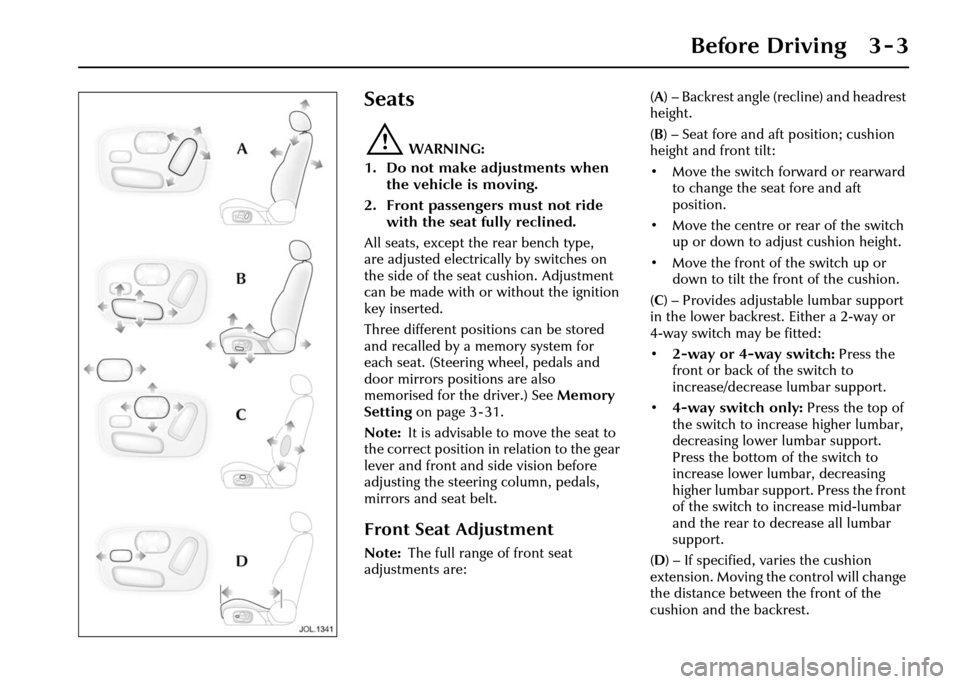
adjustments are: (
A ) – Backrest angle (recline) and headrest
height.
( B ) – Seat fore and aft position; cushion
height and front tilt:
• Move the switch forward or rearward to change the seat fore and aft
position.
• Move the centre or rear of the switch up or down to adjust cushion height.
• Move the front of the switch up or down to tilt the front of the cushion.
( C ) – Provides adjustable lumbar support
in the lower backrest. Either a 2-way or
4-way switch may be fitted:
• 2-way or 4-way switch: Press the
front or back of the switch to
increase/decrease lumbar support.
• 4-way switch only: Press the top of
the switch to increase higher lumbar,
decreasing lower lumbar support.
Press the bottom of the switch to
increase lower lumbar, decreasing
higher lumbar support. Press the front
of the switch to increase mid-lumbar
and the rear to decrease all lumbar
support.
( D ) – If specified, varies the cushion
extension. Moving the control will change
the distance between the front of the
cushion and the backrest.
Page 45 of 227
3 - 6 Before Driving
Pedal Adjustment
!WARNING:
Do not adjust the pedals whilst driving.
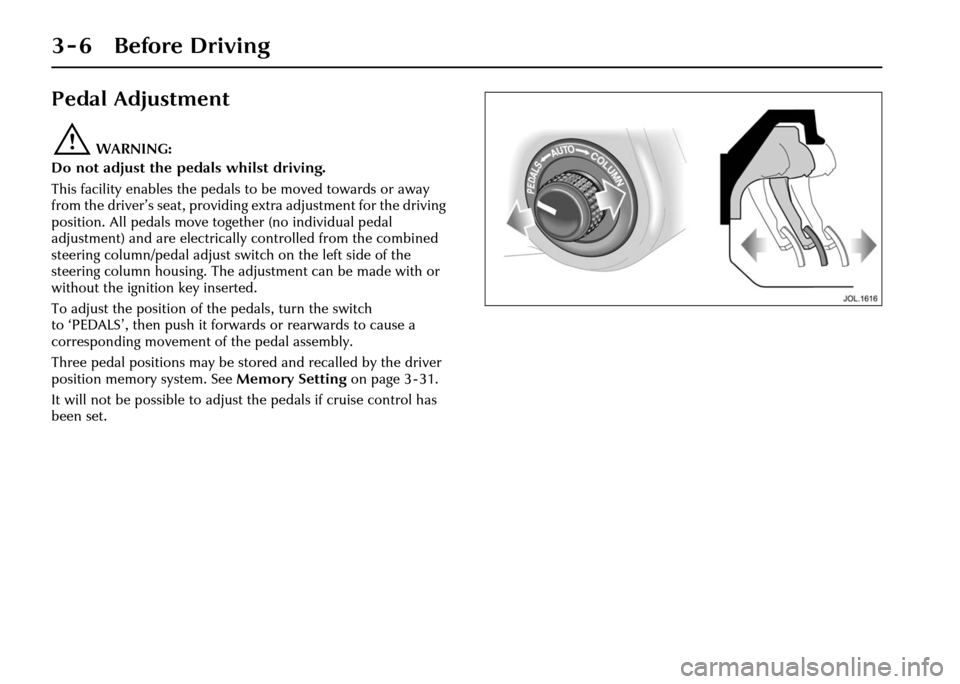
This facility enables the pedals to be moved towards or away
from the driver’s seat, providing extra adjustment for the driving
position. All pedals move together (no individual pedal
adjustment) and are electrically controlled from the combined
steering column/pedal adjust switch on the left side of the
steering column housing. The adjustment can be made with or
without the ignition key inserted.
To adjust the position of the pedals, turn the switch
to ‘PEDALS’, then push it forwards or rearwards to cause a
corresponding movement of the pedal assembly.
Three pedal positions may be stored and recalled by the driver
position memory system. See Memory Setting on page 3 - 31.
It will not be possible to adjust the pedals if cruise control has
been set.
Page 46 of 227
Before Driving 3 - 7
Steering Column
Adjustment
!WARNING:
Do not adjust the steering column
whilst driving.
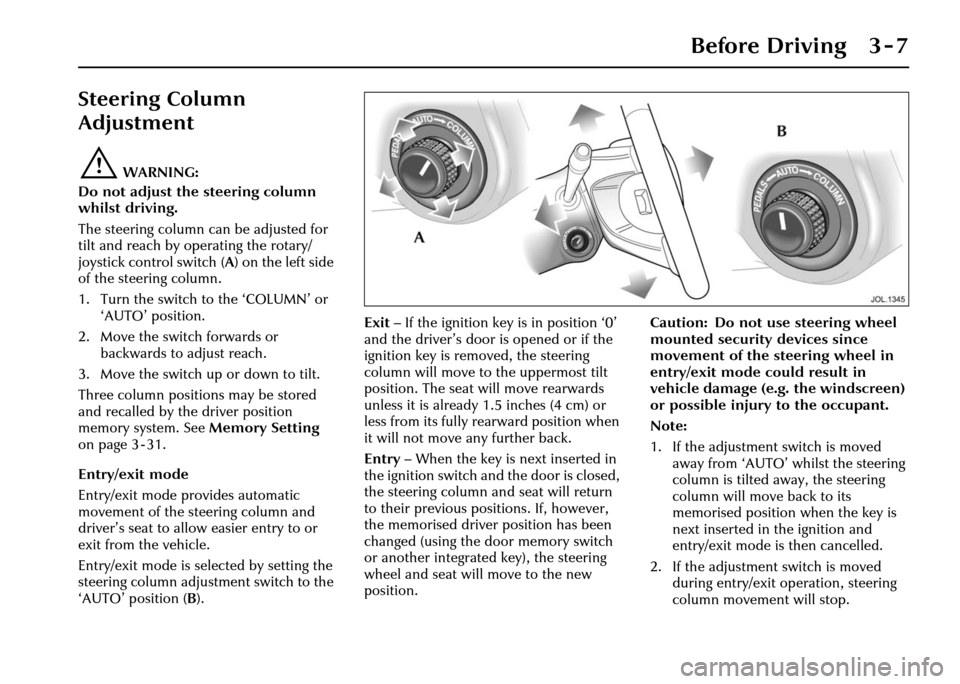
The steering column can be adjusted for
tilt and reach by operating the rotary/
joystick control switch (A ) on the left side
of the steering column.
1. Turn the switch to the ‘COLUMN’ or ‘AUTO’ position.
2. Move the switch forwards or backwards to adjust reach.
3. Move the switch up or down to tilt.
Three column positions may be stored
and recalled by the driver position
memory system. See Memory Setting
on page 3 - 31.
Entry/exit mode
Entry/exit mode provides automatic
movement of the steering column and
driver’s seat to allow easier entry to or
exit from the vehicle.
Entry/exit mode is selected by setting the
steering column adjustment switch to the
‘AUTO’ position ( B). Exit
– If the ignition key is in position ‘0’
and the driver’s door is opened or if the
ignition key is removed, the steering
column will move to the uppermost tilt
position. The seat will move rearwards
unless it is already 1.5 inches (4 cm) or
less from its fully rearward position when
it will not move any further back.
Entry – When the key is next inserted in
the ignition switch and the door is closed,
the steering column and seat will return
to their previous positions. If, however,
the memorised driver position has been
changed (using the door memory switch
or another integrated key), the steering
wheel and seat will move to the new
position. Caution: Do not use steering wheel
mounted security devices since
movement of the steering wheel in
entry/exit mode could result in
vehicle damage (e.g. the windscreen)
or possible injury to the occupant.
Note:
1. If the adjustment switch is moved
away from ‘AUTO’ whilst the steering
column is tilted away, the steering
column will move back to its
memorised position when the key is
next inserted in the ignition and
entry/exit mode is then cancelled.
2. If the adjustment switch is moved during entry/exit operation, steering
column movement will stop.
Page 55 of 227
3 - 16 Before Driving
Air bag fault warning light
The air bag warning light in the driver’s
instrument cluster will be lit for
approximately six seconds when the
ignition is turned on.
If the light remains on or flashes,
it indicates a fault within the air bag
electrical circuits. Report the fault to a
Jaguar Retailer immediately. It is safe to
drive the vehicle; however, in an accident
the air bags may not operate.
Air bag warning ligh t information is
shown on page 4 - 8. Air bag disposal
!WARNING:
Do not attempt to service, repair or
modify the air bag sy stem or its fuses.
All work on the air bag system,
including renewal after deployment
and renewal at the end of its service
life, must be carried out by an
authorised Jaguar Retailer.
In the event of the vehicle being
dismantled, air bag module removal and
disposal MUST be made by a qualified
person. Instructions can be obtained
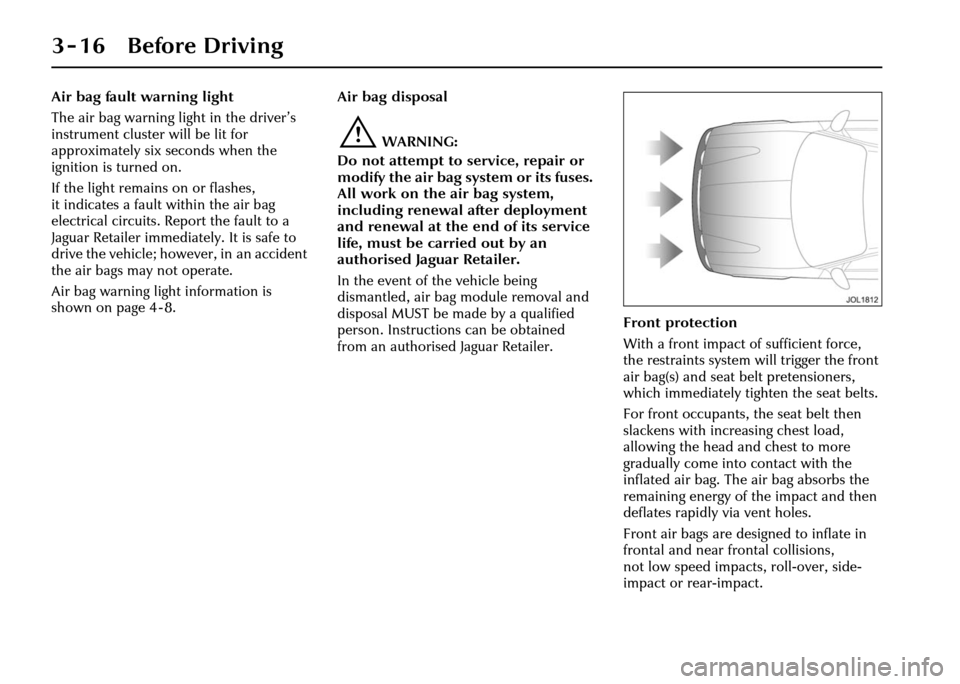
from an authorised Jaguar Retailer. Front protection
With a front impact of sufficient force,
the restraints system will trigger the front
air bag(s) and seat belt pretensioners,
which immediately tighten the seat belts.
For front occupants, the seat belt then
slackens with increasing chest load,
allowing the head and chest to more
gradually come into contact with the
inflated air bag. The air bag absorbs the
remaining energy of the impact and then
deflates rapidly via vent holes.
Front air bags are designed to inflate in
frontal and near fr
ontal collisions,
not low speed impacts, roll-over, side-
impact or rear-impact.
Page 71 of 227
3 - 32 Before Driving
Memory recall using an integrated
key
The integrated key will recall a memory
position when the unlock button is
pressed when set as follows:
1. Adjust the seat, steering column, pedals and exterior rear view mirrors
to the desired positions.
2. Press the M button: The red LED will illuminate for a five second period.
3. Press button ‘1’, ‘2’ or ‘3’ and then press any button on the integrated
key. Both button presses must occur
while the red LED is illuminated.
4. Repeat for the other integrated key, pressing the remaining memory
buttons.
To cancel integrated key memory recall:
1. Place a key into the ignition switch and leave in the OFF position.
2. Press the M button: The red LED will illuminate for a five second period.
3. Press any button on the integrated key
(except the panic button, if fitted) then
press the M button again. Both button
presses must occur while the red LED
is illuminated. Note:
If memory recall is performed
using an integrated ke y with the vehicle in
entry/exit position, the steering column
and seat will not return to the memorised
position until either the integrated key is
placed in the ignition switch or the
driver’s door is closed.
Driving position memory system
operating tips
• When making adjustments to a set driving position, reset the new
position in the same memory channel.
• A driving position will only be memorised during the five second
period when the red memory LED is
illuminated.
• Previous memory is erased when a new driving position is entered.
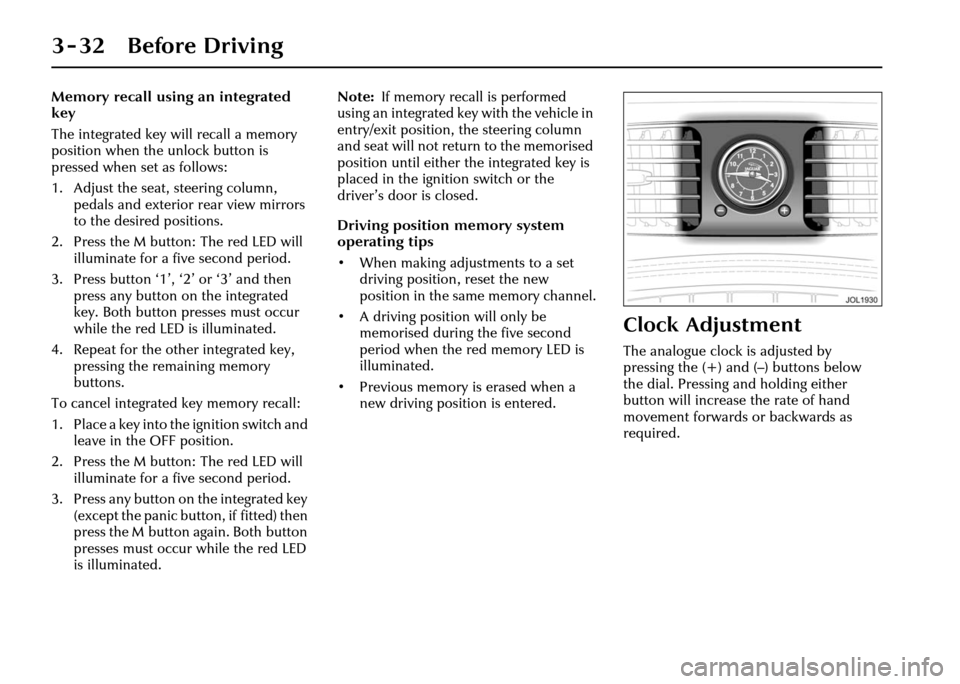
Clock Adjustment
The analogue clock is adjusted by
pressing the (+) and (–) buttons below
the dial. Pressing and holding either
button will increase the rate of hand
movement forwards or backwards as
required.
Page 76 of 227
On the Road 4 - 5
Warning Lights
Warning lights are arranged within the
instrument cluster.
There are two warning lights, one red,
the other amber, located above the
message centre for primary and
secondary status of the warnings
displayed by the message centre.
‘RED’ warning lights are for primary
warnings. A primary warning must be
investigated immediately by the driver or
a Jaguar Retailer.
‘AMBER’ warning lights are for secondary
warnings when the driver must take
action and then report the fault to a
Retailer at the earliest opportunity.
Other lights within the instrument cluster
indicate system status, such as blue for
main beam and green for direction
indicators, when in operation. Lamp check
A lamp check is initiated when the
ignition is switched ON and lasts for
three seconds (excepting the air bag
warning light which will remain on for
6seconds). Ifany wa
rning light remains
on after this period, investigate the cause
before driving.
Note: Not all lamps are included in the
lamp check, for example main beam
headlights or direction indicators.
Low Oil Pressure (RED)
This lights up with the ignition
switched ON and should go
out once the engine is running.
If the light remains ON once the engine
has started or comes ON whilst driving,
loss of oil pressure is indicated.
STOP the engine immediately and
investigate the cause.
Caution: Do not restart the engine
until the cause of loss of oil pressure
has been identified and rectified.
First check the engine oil level,
seepage7-6.
Page 78 of 227
On the Road 4 - 7
Brake (RED)
Lights up when:
• The ignition is ON and the parkbrake is ON.
• There is a fault with the parkbrake.
• The brake fluid is low.
If the light is ON and there are no
associated messages it means that the
parkbrake is applied.
If the light flashes, th ere is a fault with the
parkbrake system and the parkbrake
cannot be applied.
If the light is ON and the message
‘PARKBRAKE ON’ is displayed, it means
that the parkbrake is applied but the
vehicle is moving. Release the parkbrake
or stop the vehicle when it is safe to do
so. If the light is ON and the message ‘LOW
BRAKE FLUID’ message with a RED
priority light is displayed on the message
centre, low brake fluid is indicated.
In this case, loss of braking in one,
or both, brake circuits may be imminent.
!WARNING:
If the message ‘LOW BRAKE FLUID’ is
displayed, DO NOT drive the vehicle
until the fault is rectified. Consult a
Jaguar Retailer immediately.
Anti-lock Braking
System (ABS) (AMBER)
If a fault has been detected in
the anti-lock brake
system (ABS) or the electric
parkbrake system, this light will
illuminate.
A warning message will appear with this
light to indicate either ABS fault or
parkbrake fault.
The brake system will continue to
function normally, but without ABS
braking.
Should the light come on or stay on after
the bulb check cycle, stop the vehicle at
the first opportunity, turn the engine OFF
and then restart.
If the ABS light comes on again,
the vehicle should be driven to a Jaguar
Retailer at the earliest opportunity.
!WARNING:
If the ABS and brake warning lights
are ON at the same time, DO NOT
drive the vehicle until the fault is
rectified. Consult a Jaguar Retailer
immediately.
Page 79 of 227
4-8 On the Road
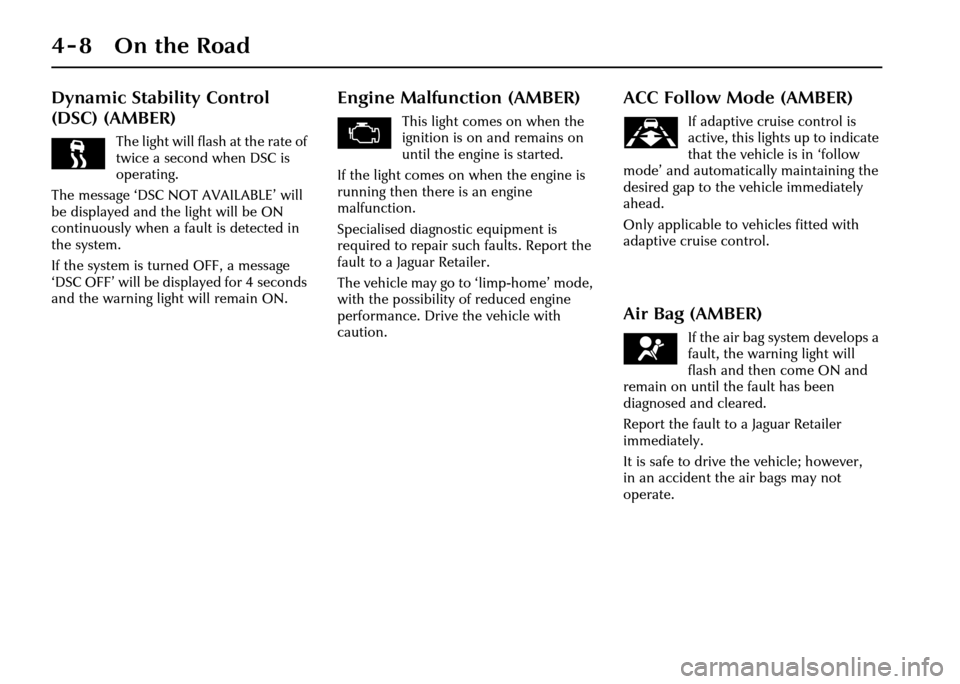
Dynamic Stability Control
(DSC) (AMBER)
The light will flash at the rate of
twice a second when DSC is
operating.
The message ‘DSC NOT AVAILABLE’ will
be displayed and the light will be ON
continuously when a fault is detected in
the system.
If the system is turned OFF, a message
‘DSC OFF’ will be displayed for 4 seconds
and the warning light will remain ON.
Engine Malfunction (AMBER)
This light comes on when the
ignition is on and remains on
until the engine is started.
If the light comes on when the engine is
running then there is an engine
malfunction.
Specialised diagnostic equipment is
required to repair such faults. Report the
fault to a Jaguar Retailer.
The vehicle may go to ‘limp-home’ mode,
with the possibility of reduced engine
performance. Drive the vehicle with
caution.
ACC Follow Mode (AMBER)
If adaptive cruise control is
active, this lights up to indicate
that the vehicle is in ‘follow
mode’ and automatically maintaining the
desired gap to the vehicle immediately
ahead.
Only applicable to vehicles fitted with
adaptive cruise control.
Air Bag (AMBER)
If the air bag system develops a
fault, the warning light will
flash and then come ON and
remain on until the fault has been
diagnosed and cleared.
Report the fault to a Jaguar Retailer
immediately.
It is safe to drive the vehicle; however,
in an accident the air bags may not
operate.
Page 81 of 227
4-10 On the Road
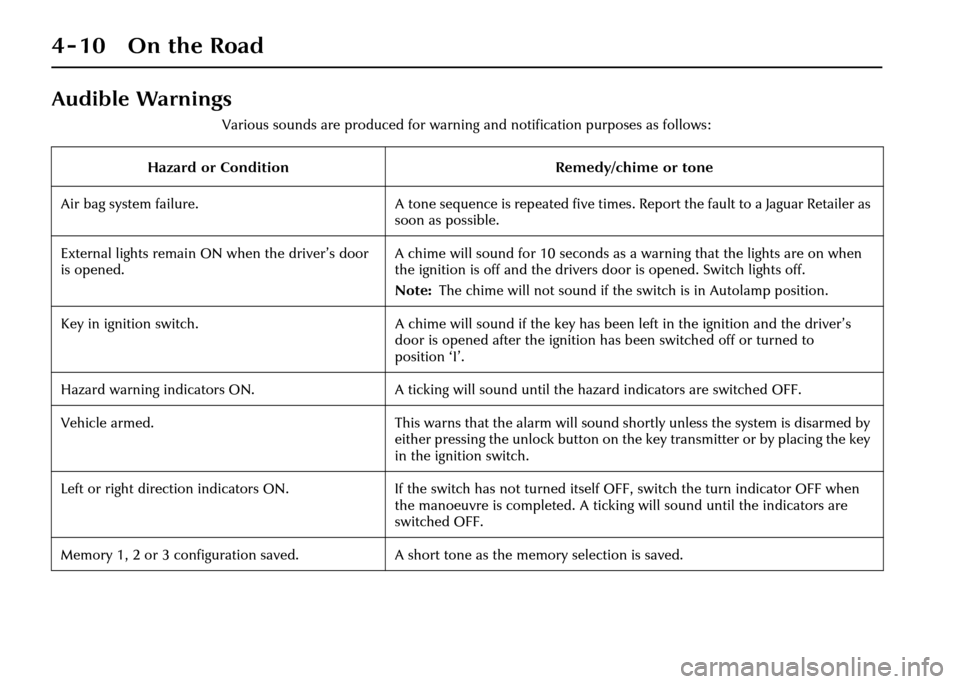
Audible Warnings
Various sounds are produced for warning and notification purposes as follows:
Hazard or Condition Remedy/chime or tone
Air bag system failure. A tone sequence is repeated five times. Report the fault to a Jaguar Retailer as
soon as possible.
External lights remain ON when the driver’s door
is opened. A chime will sound for 10 seconds as a warning that the lights are on when
the ignition is off and the drivers door is opened. Switch lights off.
Note:
The chime will not sound if the switch is in Autolamp position.
Key in ignition switch. A chime will sound if the key has been left in the ignition and the driver’s
door is opened after the ignition has been switched off or turned to
position ‘I’.
Hazard warning indicators ON. A ticking will sound until the hazard indicators are switched OFF.
Vehicle armed. This warns that the alarm will sound shortly unless the system is disarmed by
either pressing the unlock button on the key transmitter or by placing the key
in the ignition switch.
Left or right direction indicators ON. If the switch has not turned itself OFF, switch the turn indicator OFF when
the manoeuvre is completed. A ticking will sound until the indicators are
switched OFF.
Memory 1, 2 or 3 configuration saved. A short tone as the memory selection is saved.