ignition JAGUAR XJ 2004 X350 / 3.G User Guide
[x] Cancel search | Manufacturer: JAGUAR, Model Year: 2004, Model line: XJ, Model: JAGUAR XJ 2004 X350 / 3.GPages: 227, PDF Size: 4.22 MB
Page 31 of 227
2 - 16 Security and Locks
• If, after 15 seconds (passively armed), from opening the driv er’s door with a
key (as regional legislation dictates),
the key is not inserted into the
ignition switch and turned to
position ‘II’, or a passenger door is
opened before the drivers door.
• Any attempt is made to remove the radio or the front navigation system
(if fitted).
• Pressing the headlamp convenience button on the remo te transmitter
3 times within 3 seconds activates the
panic alarm (if enabled).
Error Audible Signal
Two audible signals will be heard
whenever one of the following conditions
are present:
• I f a n y d o o r i s o p e n w h e n a n a t t e m p t i s made to lock the vehicle.
• The luggage compartment or the hood is not properly closed when an
attempt is made to lock the vehicle.
• A key is present in the ignition switch and a button on the key transmitter is
pressed. See
Direction Indicator Unlock Alerts
on page 2 - 11 for the Notes regarding
error signals during failure of intrusion
sensor (if fitted), and inclination sensor
(if fitted).
Note: The error audible signal can be
disabled and the direction indicator flash
option can be enabled (and vice versa) by
a Jaguar Retailer.
Error Flash Signal (Retailer
Enable Option)
The direction indicators will flash seven
times whenever one of the following
conditions are present.
• If any door is open when an attempt is made to lock the vehicle.
• The luggage compar tment or hood are
not fully closed when an attempt is
made to lock the vehicle.
• A key is present in the ignition switch and a button on the key transm itter is
pressed.
See Direction Indicator Unlock Alerts
on page 2 - 11 for the Notes regarding
error signals during failure of intrusion
sensor (if fitted), and inclination sensor
(if fitted).
Audible Signals
An audible signal will sound when:
• The valet switch is pressed with the luggage compartment closed.
• The vehicle is in valet mode and the interior/luggage compartment release
button, or glove compartment valet
switch is pressed.
• The vehicle is locked (if enabled).
• The vehicle is unlocked (if enabled).
• A door is opened if the vehicle has been passively armed. This mode can
be cancelled by disa rming the security
system using the key transmitter,
or by switching the ignition to
position ‘II’, or by turning a key in the
driver’s door lock towards the front of
the vehicle.
• The lock button is pressed twice within three seconds (if enabled).
Page 32 of 227
Security and Locks 2 - 17
Security Features
The security system has been designed
for:
• Prevention of theft of the vehicle.
• Prevention of theft of items from the vehicle.
• Personal security.
The security system is integrated with the
vehicle electronics and engine
management systems making it far more
difficult for a thief to penetrate and steal
the vehicle.
Panic Alarm (if enabled)
When in or near the vehicle, the alarm
can be set off to dete r a possible offender.
For this feature to operate, the key must
not be in the ignition switch.
Pressing the headlamp convenience/panic
button on the key transmitter three times
within three seconds will activate the
‘Panic Alarm’.
The alarm is stopped by:
• Putting the key into the ignition switch and turning to position ‘II’.
Note:
1. The key transmitter cannot be used to cancel the Panic alarm. This prevents
unauthorised cancellation in an
emergency.
2. The panic alarm is normally enabled. If required, this feature can be
disabled or enabled by a Jaguar
Retailer.
3. The vehicle locking status will not change when the panic alarm is
activated.
Passive Arming (Retailer
Option)
Passive arming wi ll not lock the
doors, it only arms the security alarm
system.
Passive arming, if enabled by a Jaguar
Retailer, will automatically arm the
vehicle alarm system 30 seconds after the
last protected entry (door, luggage
compartment) is closed following the key
being removed from th e ignition switch.
When passive arming occurs the direction
indicators will flash once and a single
tone will be heard (if enabled). The red
security light on the fascia will start to
flash and will continue for as long as the
alarm is armed.
Opening the drivers door causes a
warning sound which continues for
15 seconds before the system goes into
the full alarm state. If any other door is
opened before the drivers door,
the system goes into the full alarm state
immediately.
When the system is pa ssively armed and a
key is used to open the trunk, a seven
second warning audible ticking will
sound before the full alarm is activated.
Page 33 of 227
2 - 18 Security and Locks
If the system has been passively armed it
can be disarmed by either using the key
transmitter, by switching the ignition to
position ‘II’, or by unlocking the driver’s
door with the key.
Note:The security system will not
passively arm if a key is in the ignition
switch or if any protected entry is open.Battery Reconnection
If the battery has been disconnected and
is subsequently reconnected, the alarm
system will resume the same state as
before the battery was disconnected.
If the alarm was sounding when the
battery was disconnected, it will sound
again when the battery is reconnected
and will need:
• The transmitter un lock button to be
pressed
• Or a key placed in the ignition switch and turned to position ‘II’
• Or the driver’s door to be unlocked with a key
to disarm the vehicle.
Battery Back-up Sounder
(Retailer Option)
A self-contained, battery back-up
sounder can be fitted. This device will
sound the full alarm if the vehicle alarm is
activated, or if the ve hicle battery or the
sounder is disconnected when the
security system is armed.
Page 36 of 227
Security and Locks 2 - 21
Before Programming
Caution: When programming a
garage door opener or entry gate that
may require you to press and re-press
the hand-held transmitter (cycle),
unplug the device during the ‘cycling’
process to prevent possible motor
failure.
It is recommended that for best results,
fit a new battery to the hand-held
transmitter of the garage door opener
(or other device) before programming.
If your garage door opener receiver
(located in the garage) is equipped with
an antenna, ensure that the antenna is
hanging straight down.
To Erase All Programming
For first time progra mming, ensure that
the engine is switched off:
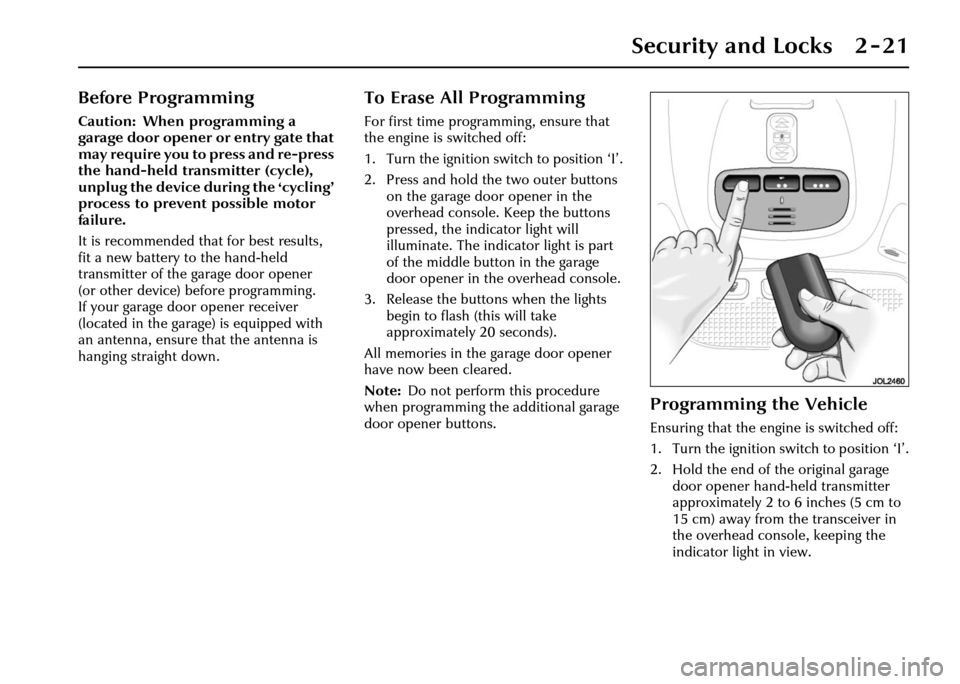
1. Turn the ignition switch to position ‘I’.
2. Press and hold th e two outer buttons
on the garage door opener in the
overhead console. Keep the buttons
pressed, the indicator light will
illuminate. The indicator light is part
of the middle button in the garage
door opener in the overhead console.
3. Release the buttons when the lights
begin to flash (this will take
approximately 20 seconds).
All memories in the garage door opener
have now been cleared.
Note: Do not perform this procedure
when programming the additional garage
door opener buttons.
Programming the Vehicle
Ensuring that the engine is switched off:
1. Turn the ignition switch to position ‘I’.
2. Hold the end of the original garage door opener hand -held transmitter
approximately 2 to 6 inches (5 cm to
15 cm) away from the transceiver in
the overhead console, keeping the
indicator light in view.
Page 42 of 227
Before Driving 3 - 3
3 Before Driving
Seats
!WARNING:
1. Do not make adjustments when the vehicle is moving.
2. Front passengers must not ride with the seat fully reclined.
All seats, except the rear bench type,
are adjusted electrically by switches on
the side of the seat cushion. Adjustment
can be made with or without the ignition
key inserted.
Three different positions can be stored
and recalled by a memory system for
each seat. (Steering wheel, pedals and
door mirrors positions are also
memorised for the driver.) See Memory
Setting on page 3 - 31.
Note: It is advisable to move the seat to
the correct position in relation to the gear
lever and front and side vision before
adjusting the steering column, pedals,
mirrors and seat belt.
Front Seat Adjustment
Note: The full range of front seat
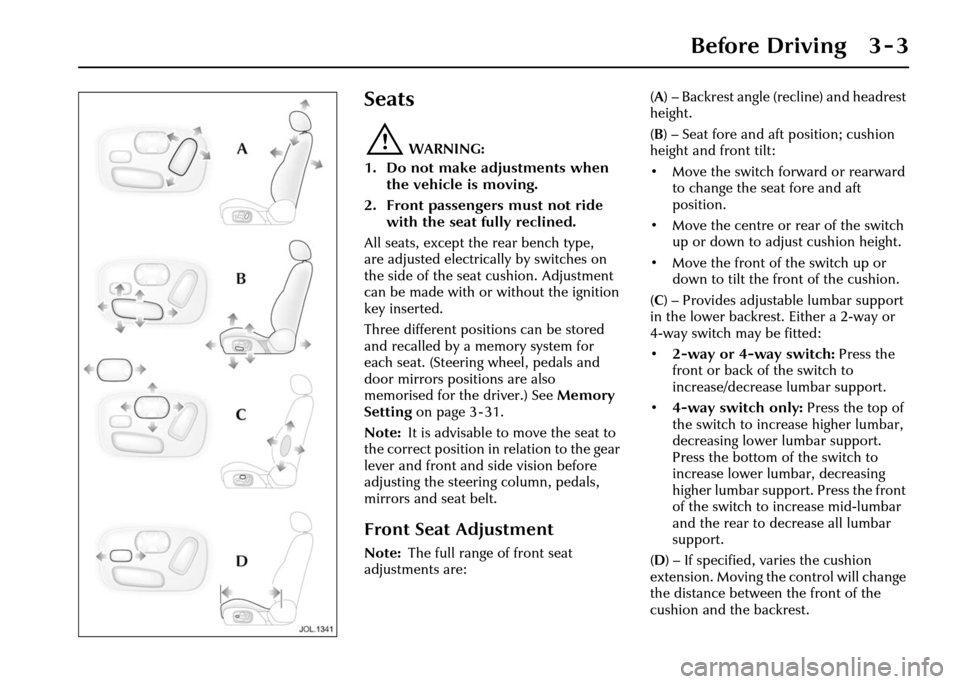
adjustments are: (
A ) – Backrest angle (recline) and headrest
height.
( B ) – Seat fore and aft position; cushion
height and front tilt:
• Move the switch forward or rearward to change the seat fore and aft
position.
• Move the centre or rear of the switch up or down to adjust cushion height.
• Move the front of the switch up or down to tilt the front of the cushion.
( C ) – Provides adjustable lumbar support
in the lower backrest. Either a 2-way or
4-way switch may be fitted:
• 2-way or 4-way switch: Press the
front or back of the switch to
increase/decrease lumbar support.
• 4-way switch only: Press the top of
the switch to increase higher lumbar,
decreasing lower lumbar support.
Press the bottom of the switch to
increase lower lumbar, decreasing
higher lumbar support. Press the front
of the switch to increase mid-lumbar
and the rear to decrease all lumbar
support.
( D ) – If specified, varies the cushion
extension. Moving the control will change
the distance between the front of the
cushion and the backrest.
Page 43 of 227
3 - 4 Before Driving
Head Restraint Adjustment
!WARNING:
Adjust the head restraint so that it is
just behind your head and never
behind your neck.
All headrests may be manually tilted,
except those fitted with rear display
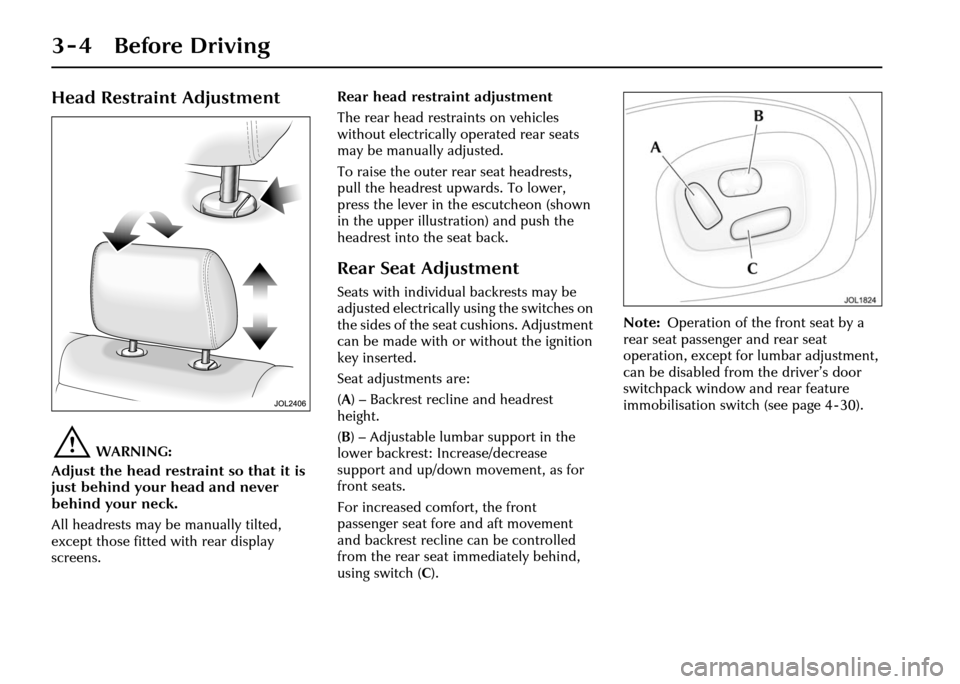
screens. Rear head restraint adjustment
The rear head restraints on vehicles
without electrically operated rear seats
may be manually adjusted.
To raise the outer rear seat headrests,
pull the headrest upwards. To lower,
press the lever in the escutcheon (shown
in the upper illustra
tion) and push the
headrest into the seat back.
Rear Seat Adjustment
Seats with individual backrests may be
adjusted electrically using the switches on
the sides of the seat cushions. Adjustment
can be made with or without the ignition
key inserted.
Seat adjustments are:
( A ) – Backrest recline and headrest
height.
( B ) – Adjustable lumbar support in the
lower backrest: Increase/decrease
support and up/down movement, as for
front seats.
For increased comfort, the front
passenger seat fore and aft movement
and backrest recline can be controlled
from the rear seat immediately behind,
using switch ( C). Note:
Operation of the front seat by a
rear seat passenger and rear seat
operation, except for lumbar adjustment,
can be disabled from the driver’s door
switchpack window and rear feature
immobilisation switch (see page 4 - 30).
Page 45 of 227
3 - 6 Before Driving
Pedal Adjustment
!WARNING:
Do not adjust the pedals whilst driving.
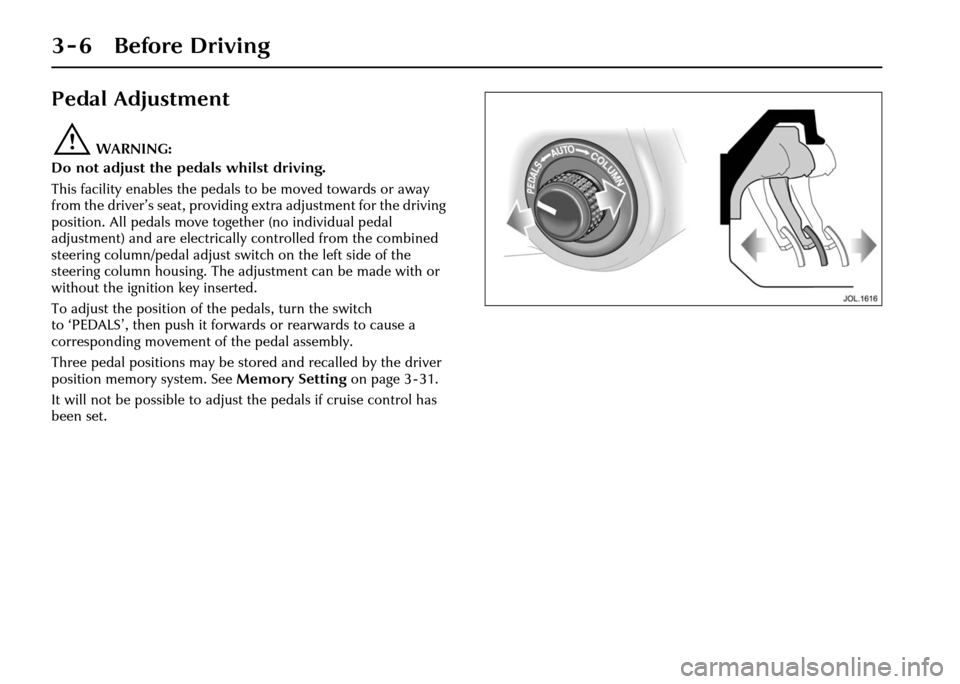
This facility enables the pedals to be moved towards or away
from the driver’s seat, providing extra adjustment for the driving
position. All pedals move together (no individual pedal
adjustment) and are electrically controlled from the combined
steering column/pedal adjust switch on the left side of the
steering column housing. The adjustment can be made with or
without the ignition key inserted.
To adjust the position of the pedals, turn the switch
to ‘PEDALS’, then push it forwards or rearwards to cause a
corresponding movement of the pedal assembly.
Three pedal positions may be stored and recalled by the driver
position memory system. See Memory Setting on page 3 - 31.
It will not be possible to adjust the pedals if cruise control has
been set.
Page 46 of 227
Before Driving 3 - 7
Steering Column
Adjustment
!WARNING:
Do not adjust the steering column
whilst driving.
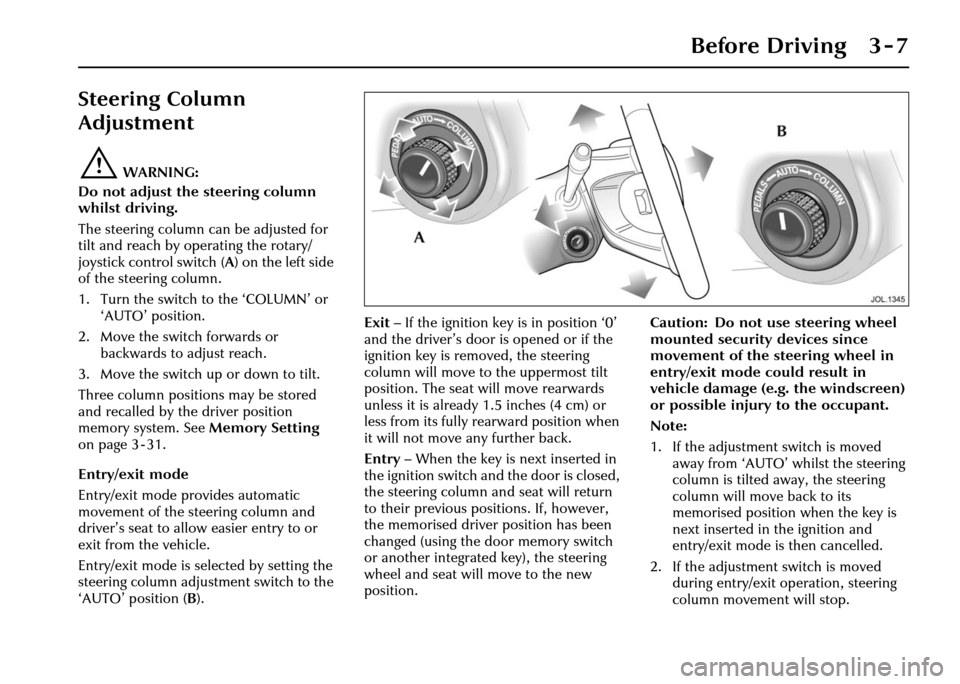
The steering column can be adjusted for
tilt and reach by operating the rotary/
joystick control switch (A ) on the left side
of the steering column.
1. Turn the switch to the ‘COLUMN’ or ‘AUTO’ position.
2. Move the switch forwards or backwards to adjust reach.
3. Move the switch up or down to tilt.
Three column positions may be stored
and recalled by the driver position
memory system. See Memory Setting
on page 3 - 31.
Entry/exit mode
Entry/exit mode provides automatic
movement of the steering column and
driver’s seat to allow easier entry to or
exit from the vehicle.
Entry/exit mode is selected by setting the
steering column adjustment switch to the
‘AUTO’ position ( B). Exit
– If the ignition key is in position ‘0’
and the driver’s door is opened or if the
ignition key is removed, the steering
column will move to the uppermost tilt
position. The seat will move rearwards
unless it is already 1.5 inches (4 cm) or
less from its fully rearward position when
it will not move any further back.
Entry – When the key is next inserted in
the ignition switch and the door is closed,
the steering column and seat will return
to their previous positions. If, however,
the memorised driver position has been
changed (using the door memory switch
or another integrated key), the steering
wheel and seat will move to the new
position. Caution: Do not use steering wheel
mounted security devices since
movement of the steering wheel in
entry/exit mode could result in
vehicle damage (e.g. the windscreen)
or possible injury to the occupant.
Note:
1. If the adjustment switch is moved
away from ‘AUTO’ whilst the steering
column is tilted away, the steering
column will move back to its
memorised position when the key is
next inserted in the ignition and
entry/exit mode is then cancelled.
2. If the adjustment switch is moved during entry/exit operation, steering
column movement will stop.
Page 49 of 227
3 - 10 Before Driving
‘C’ displayed: If ‘C’ is displayed in the compass window,
the compass must be calibrated. Drive the vehicle in a circle at
less than 5 mph (8 km/h) until the display shows a direction.
The compass will be calibrated once it has tracked a complete
circle.
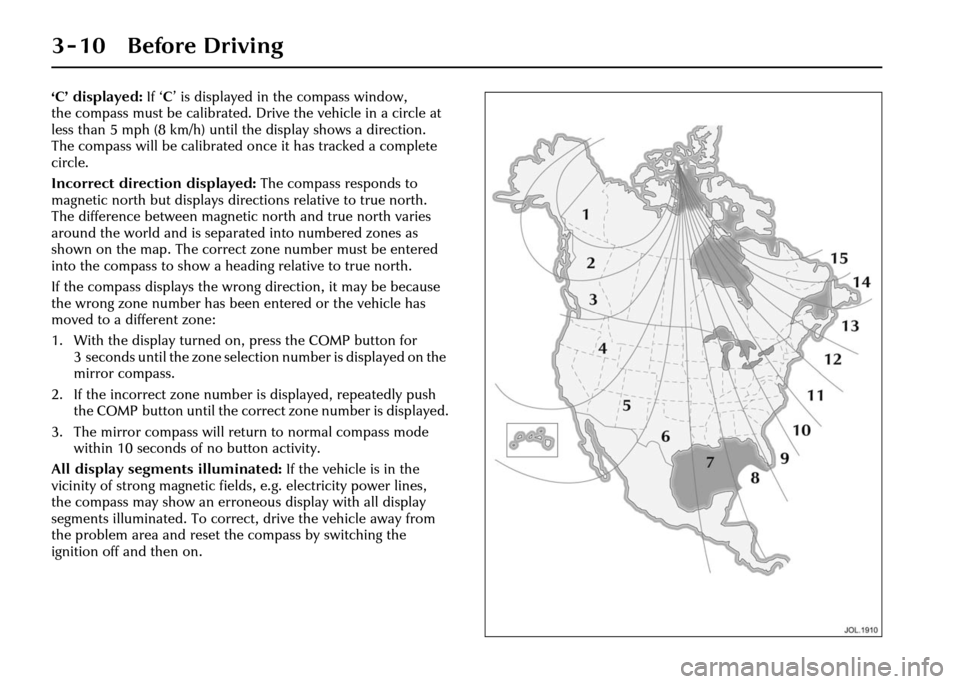
Incorrect direction displayed: The compass responds to
magnetic north but displays direct ions relative to true north.
The difference between magnetic north and true north varies
around the world and is separated into numbered zones as
shown on the map. The correct zone number must be entered
into the compass to show a heading relative to true north.
If the compass displays the wrong direction, it may be because
the wrong zone number has been entered or the vehicle has
moved to a different zone:
1. With the display turned on , press the COMP button for
3 seconds until the zone selection number is displayed on the
mirror compass.
2. If the incorrect zone number is displayed, repeatedly push the COMP button until the correct zone number is displayed.
3. The mirror compass will retu rn to normal compass mode
within 10 seconds of no button activity.
All display segments illuminated: If the vehicle is in the
vicinity of strong magnetic fields, e.g. electricity power lines,
the compass may show an erroneous display with all display
segments illuminated. To correct, drive the vehicle away from
the problem area and reset th e compass by switching the
ignition off and then on.
Page 55 of 227
3 - 16 Before Driving
Air bag fault warning light
The air bag warning light in the driver’s
instrument cluster will be lit for
approximately six seconds when the
ignition is turned on.
If the light remains on or flashes,
it indicates a fault within the air bag
electrical circuits. Report the fault to a
Jaguar Retailer immediately. It is safe to
drive the vehicle; however, in an accident
the air bags may not operate.
Air bag warning ligh t information is
shown on page 4 - 8. Air bag disposal
!WARNING:
Do not attempt to service, repair or
modify the air bag sy stem or its fuses.
All work on the air bag system,
including renewal after deployment
and renewal at the end of its service
life, must be carried out by an
authorised Jaguar Retailer.
In the event of the vehicle being
dismantled, air bag module removal and
disposal MUST be made by a qualified
person. Instructions can be obtained
from an authorised Jaguar Retailer. Front protection
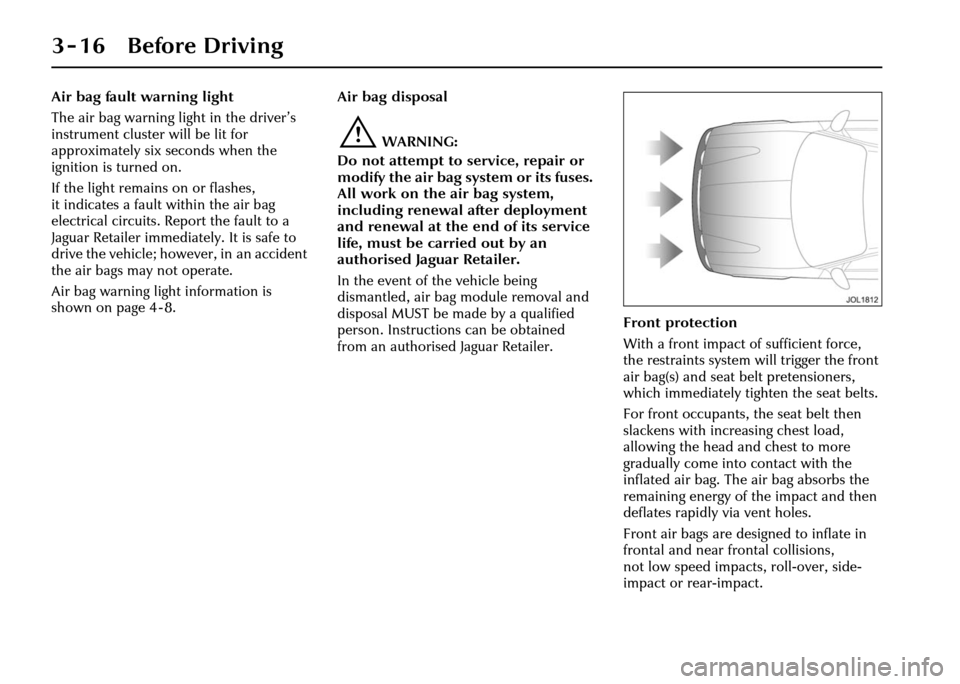
With a front impact of sufficient force,
the restraints system will trigger the front
air bag(s) and seat belt pretensioners,
which immediately tighten the seat belts.
For front occupants, the seat belt then
slackens with increasing chest load,
allowing the head and chest to more
gradually come into contact with the
inflated air bag. The air bag absorbs the
remaining energy of the impact and then
deflates rapidly via vent holes.
Front air bags are designed to inflate in
frontal and near fr
ontal collisions,
not low speed impacts, roll-over, side-
impact or rear-impact.