light JAGUAR XJ 2004 X350 / 3.G User Guide
[x] Cancel search | Manufacturer: JAGUAR, Model Year: 2004, Model line: XJ, Model: JAGUAR XJ 2004 X350 / 3.GPages: 227, PDF Size: 4.22 MB
Page 32 of 227
Security and Locks 2 - 17
Security Features
The security system has been designed
for:
• Prevention of theft of the vehicle.
• Prevention of theft of items from the vehicle.
• Personal security.
The security system is integrated with the
vehicle electronics and engine
management systems making it far more
difficult for a thief to penetrate and steal
the vehicle.
Panic Alarm (if enabled)
When in or near the vehicle, the alarm
can be set off to dete r a possible offender.
For this feature to operate, the key must
not be in the ignition switch.
Pressing the headlamp convenience/panic
button on the key transmitter three times
within three seconds will activate the
‘Panic Alarm’.
The alarm is stopped by:
• Putting the key into the ignition switch and turning to position ‘II’.
Note:
1. The key transmitter cannot be used to cancel the Panic alarm. This prevents
unauthorised cancellation in an
emergency.
2. The panic alarm is normally enabled. If required, this feature can be
disabled or enabled by a Jaguar
Retailer.
3. The vehicle locking status will not change when the panic alarm is
activated.
Passive Arming (Retailer
Option)
Passive arming wi ll not lock the
doors, it only arms the security alarm
system.
Passive arming, if enabled by a Jaguar
Retailer, will automatically arm the
vehicle alarm system 30 seconds after the
last protected entry (door, luggage
compartment) is closed following the key
being removed from th e ignition switch.
When passive arming occurs the direction
indicators will flash once and a single
tone will be heard (if enabled). The red
security light on the fascia will start to
flash and will continue for as long as the
alarm is armed.
Opening the drivers door causes a
warning sound which continues for
15 seconds before the system goes into
the full alarm state. If any other door is
opened before the drivers door,
the system goes into the full alarm state
immediately.
When the system is pa ssively armed and a
key is used to open the trunk, a seven
second warning audible ticking will
sound before the full alarm is activated.
Page 34 of 227
Security and Locks 2 - 19
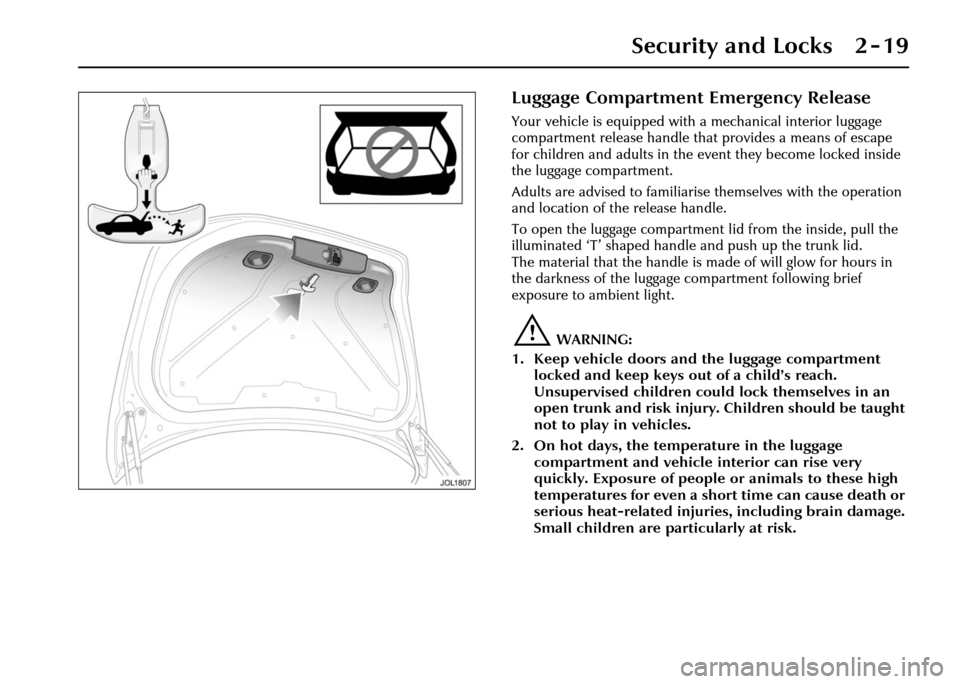
Luggage Compartment Emergency Release
Your vehicle is equipped with a mechanical interior luggage
compartment release handle that provides a means of escape
for children and adults in the event they become locked inside
the luggage compartment.
Adults are advised to familiaris e themselves with the operation
and location of the release handle.
To open the luggage compartment lid from the inside, pull the
illuminated ‘T’ shaped handle and push up the trunk lid.
The material that the handle is made of will glow for hours in
the darkness of the luggage compartment following brief
exposure to ambient light.
!WARNING:
1. Keep vehicle doors and the luggage compartment locked and keep keys out of a child’s reach.
Unsupervised children could lock themselves in an
open trunk and risk injury. Children should be taught
not to play in vehicles.
2. On hot days, the temperature in the luggage compartment and vehicle interior can rise very
quickly. Exposure of people or animals to these high
temperatures for even a short time can cause death or
serious heat-related injuries, including brain damage.
Small children are particularly at risk.
Page 35 of 227
2 - 20 Security and Locks
Garage Door Opener
Transceiver
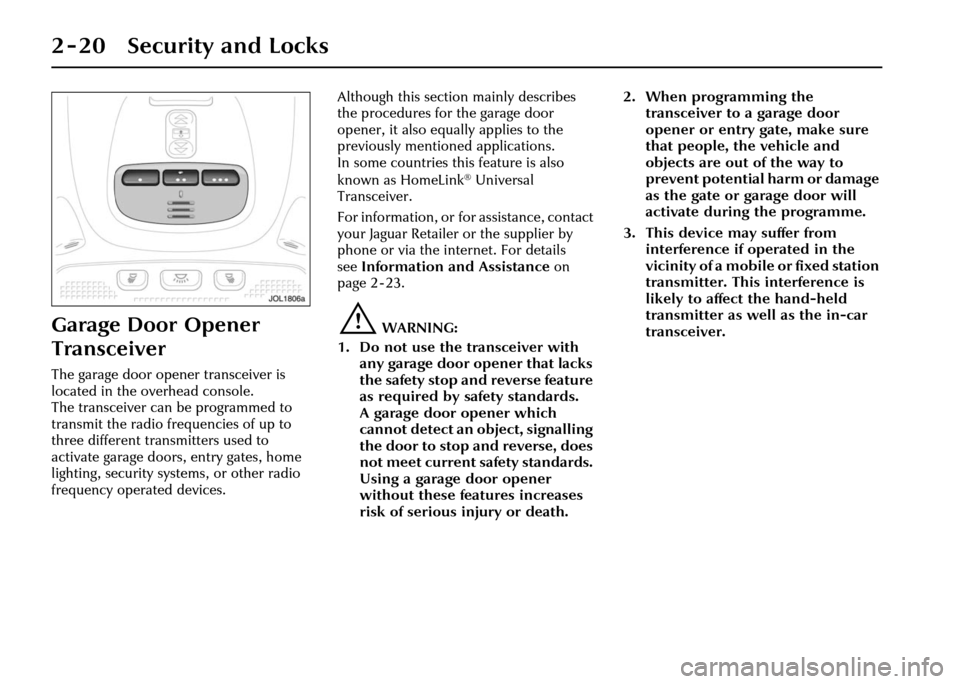
The garage door opener transceiver is
located in the overhead console.
The transceiver can be programmed to
transmit the radio frequencies of up to
three different transmitters used to
activate garage doors, entry gates, home
lighting, security systems, or other radio
frequency operated devices.Although this section mainly describes
the procedures for the garage door
opener, it also equally applies to the
previously mentioned applications.
In some countries this feature is also
known as HomeLink
® Universal
Transceiver.
For information, or for assistance, contact
your Jaguar Retailer or the supplier by
phone or via the internet. For details
see Information and Assistance on
page 2 - 23.
!WARNING:
1. Do not use the transceiver with any garage door opener that lacks
the safety stop and reverse feature
as required by safety standards.
A garage door opener which
cannot detect an object, signalling
the door to stop and reverse, does
not meet current safety standards.
Using a garage door opener
without these features increases
risk of serious injury or death. 2. When programming the
transceiver to a garage door
opener or entry gate, make sure
that people, the vehicle and
objects are out of the way to
prevent potential harm or damage
as the gate or garage door will
activate during the programme.
3. This device may suffer from interference if operated in the
vicinity of a mobile or fixed station
transmitter. This interference is
likely to affect the hand-held
transmitter as well as the in-car
transceiver.
Page 36 of 227
Security and Locks 2 - 21
Before Programming
Caution: When programming a
garage door opener or entry gate that
may require you to press and re-press
the hand-held transmitter (cycle),
unplug the device during the ‘cycling’
process to prevent possible motor
failure.
It is recommended that for best results,
fit a new battery to the hand-held
transmitter of the garage door opener
(or other device) before programming.
If your garage door opener receiver
(located in the garage) is equipped with
an antenna, ensure that the antenna is
hanging straight down.
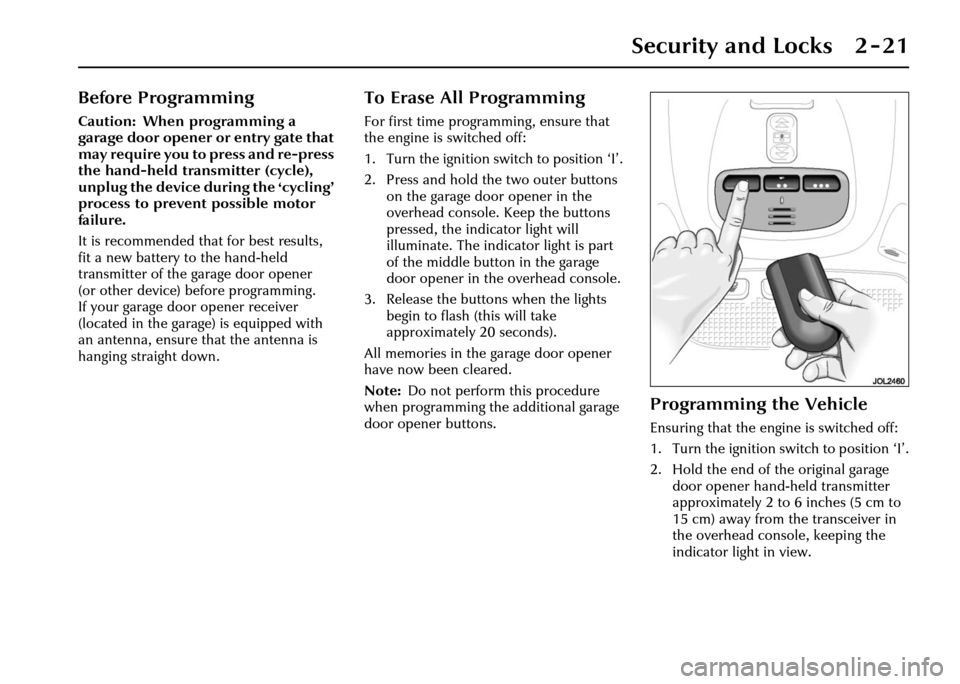
To Erase All Programming
For first time progra mming, ensure that
the engine is switched off:
1. Turn the ignition switch to position ‘I’.
2. Press and hold th e two outer buttons
on the garage door opener in the
overhead console. Keep the buttons
pressed, the indicator light will
illuminate. The indicator light is part
of the middle button in the garage
door opener in the overhead console.
3. Release the buttons when the lights
begin to flash (this will take
approximately 20 seconds).
All memories in the garage door opener
have now been cleared.
Note: Do not perform this procedure
when programming the additional garage
door opener buttons.
Programming the Vehicle
Ensuring that the engine is switched off:
1. Turn the ignition switch to position ‘I’.
2. Hold the end of the original garage door opener hand -held transmitter
approximately 2 to 6 inches (5 cm to
15 cm) away from the transceiver in
the overhead console, keeping the
indicator light in view.
Page 37 of 227
2 - 22 Security and Locks
3. Using both hands, simultaneously press and hold both the desired garage
door opener button on the overhead
console and the hand -held transmitter
button. Keep both buttons pressed.
The light will flash, slowly at first and
then change to a fast flash. When the
indicator light flashes rapidly, release
both buttons. The rapid flashing light
indicates successful programming.
4. If, after 60 seconds, the indicator light does not flash rapidl y, release both the
transceiver and the hand-held
transmitter buttons and repeat the
procedure starting with Step 2.
However, position the hand-held
transmitter at a different angle and/or
distance.
5. Press and hold the programmed overhead console garage door opener
button and observe the indicator light:
• If the indicator light is solid/continuous, programming is
complete. Your device should
activate when the garage door
opener button is pressed and held
for 1 to 2 seconds and then
released. • If the indicator light blinks rapidly
for 2 seconds and then turns a
solid/continuous light, proceed
with the following programming
instructions for ‘rolling code’
device equipment.
Note: To programme additional garage
door opener buttons, begin at Step 2.
Rolling code device equipment
programming
Note: A second person may make the
following steps quicker and easier as once
the button has been pressed there are
30 seconds only in which to complete
Step 3.
1. At the garage door opener receiver (motor head unit) in the garage, locate
the ‘learn’ or ‘smart’ button/switch.
Note: The name of the button/switch
may vary between manufacturers.
2. Press and release the ‘learn’ or ‘smart’ button.
3. Return to the vehicle and firmly press and hold the programmed garage door
opener button for 2 seconds and
release. 4. Repeat the press/hold/release
sequence 3 times to complete the
learning/training process.
The garage door opener in the overhead
console should now activate the ‘rolling
code’ device.
Reprogramming a sing le garage door
opener button
To programme a device to a previously
trained button:
1. Press and hold the desired pre- programmed garage door opener
button for at least 20 seconds, but no
longer than 30 seconds, until the
indicator light begins to flash.
2. Without releasing the overhead console button, position the hand-
held transmitter approximately 2 to
6 inches (5 cm to 15 cm) away from
the transceiver in the overhead
console, keeping the indicator light in
view.
3. Carry out Step 3 of programming the vehicle, see column 1.
Page 38 of 227
Security and Locks 2 - 23
Entry gate programming
The technology of some entry gates
requires you to press and re-press (cycle)
the hand-held transmitter every
2 seconds during programming.
Continue to press and hold the desired
overhead console button while you cycle
your hand-held transmitter until the
indicator light flashes rapidly.
Information and Assistance
For information on the range of available
compatible products or accessories,
or for assistance, contact your Jaguar
Retailer.
You can also contact the supplier’s
helpline on 1–800–355–3515 or the
website address for Homelink™ is
www.homelink.jci.com. Note:
Keep the original transmitter for
future use or programming procedures if,
for example, you purchase a new vehicle’
Caution: It is recommended that
when you sell or dispose of the
vehicle, the programmed transceiver
buttons be erased for security
purposes.
!WARNING:
The manufacturer is not responsible
for any radio or TV interference
caused by unauthorised
modifications to this equipment.
Such modifications could void the
user’s authority to operate the
equipment.
Page 44 of 227
Before Driving 3 - 5
Heated Seats
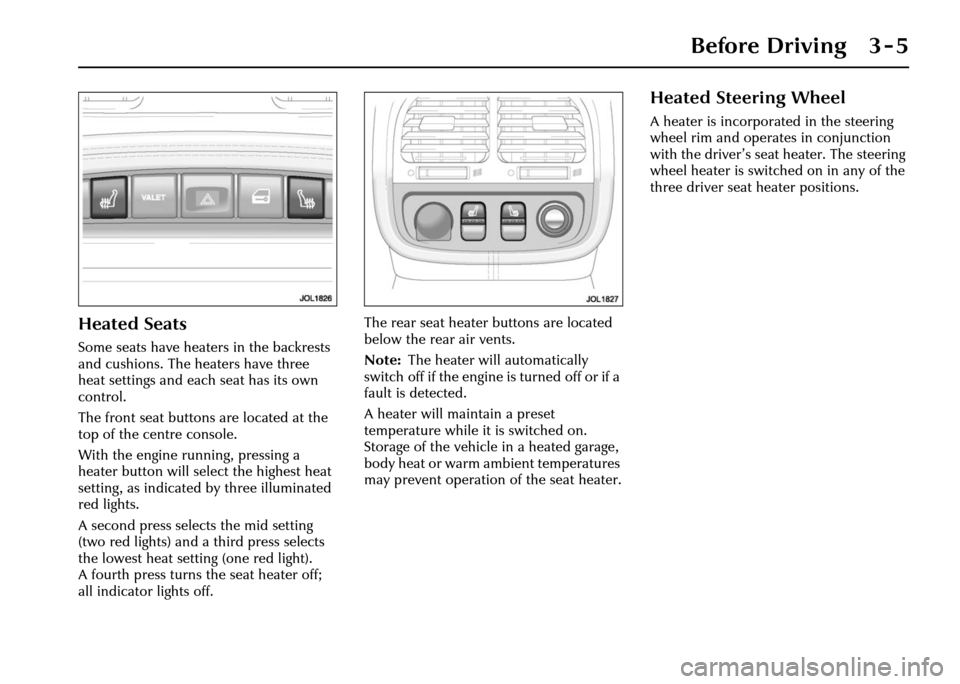
Some seats have heaters in the backrests
and cushions. The heaters have three
heat settings and each seat has its own
control.
The front seat buttons are located at the
top of the centre console.
With the engine running, pressing a
heater button will select the highest heat
setting, as indicated by three illuminated
red lights.
A second press selects the mid setting
(two red lights) and a third press selects
the lowest heat setting (one red light).
A fourth press turns the seat heater off;
all indicator lights off. The rear seat heater buttons are located
below the rear air vents.
Note:
The heater will automatically
switch off if the engine is turned off or if a
fault is detected.
A heater will maintain a preset
temperature while it is switched on.
Storage of the vehicle in a heated garage,
body heat or warm ambient temperatures
may prevent operation of the seat heater.
Heated Steering Wheel
A heater is incorporated in the steering
wheel rim and operates in conjunction
with the driver’s seat heater. The steering
wheel heater is switched on in any of the
three driver seat heater positions.
Page 48 of 227
Before Driving 3 - 9
Interior Rear View Mirror
The interior rear view mirror is of the
electrochromic type but electrochromic
operation may be switched on or off at
the mirror.
When switched on, the mirror darkens
automatically to prevent glare from a
following vehicle’s headlamps, and clears
when light levels return to normal or
when reverse gear is selected.
Electrochromic door mirrors are operated
in conjunction with the interior mirror by
the same buttons an d function in the
same manner.
Note:
1. Should a mirror assembly become detached from the windscreen, it must
be refitted by a Jaguar Retailer.
2. Ensure that the windscreen in front of the mirror is kept clean. Where fitted,
the moisture sensor for wiper
operation is located to the front of the
mirror casing. Any dirt may affect the
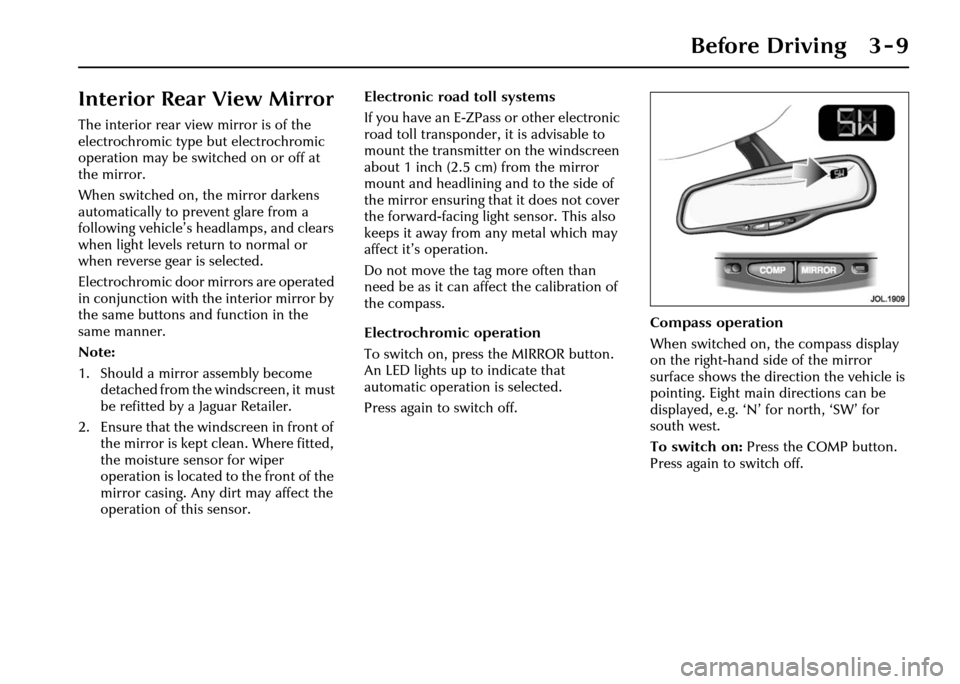
operation of this sensor. Electronic road toll systems
If you have an E-ZPass or other electronic
road toll transponder, it is advisable to
mount the transmitter
on the windscreen
about 1 inch (2.5 cm) from the mirror
mount and headlining and to the side of
the mirror ensuring that it does not cover
the forward-facing light sensor. This also
keeps it away from any metal which may
affect it’s operation.
Do not move the tag more often than
need be as it can affect the calibration of
the compass.
Electrochromic operation
To switch on, press the MIRROR button.
An LED lights up to indicate that
automatic operation is selected.
Press again to switch off. Compass operation
When switched on, the compass display
on the right-hand side of the mirror
surface shows the direction the vehicle is
pointing. Eight main directions can be
displayed, e.g. ‘N’ for north, ‘SW’ for
south west.
To switch on:
Press the COMP button.
Press again to switch off.
Page 51 of 227
3 - 12 Before Driving
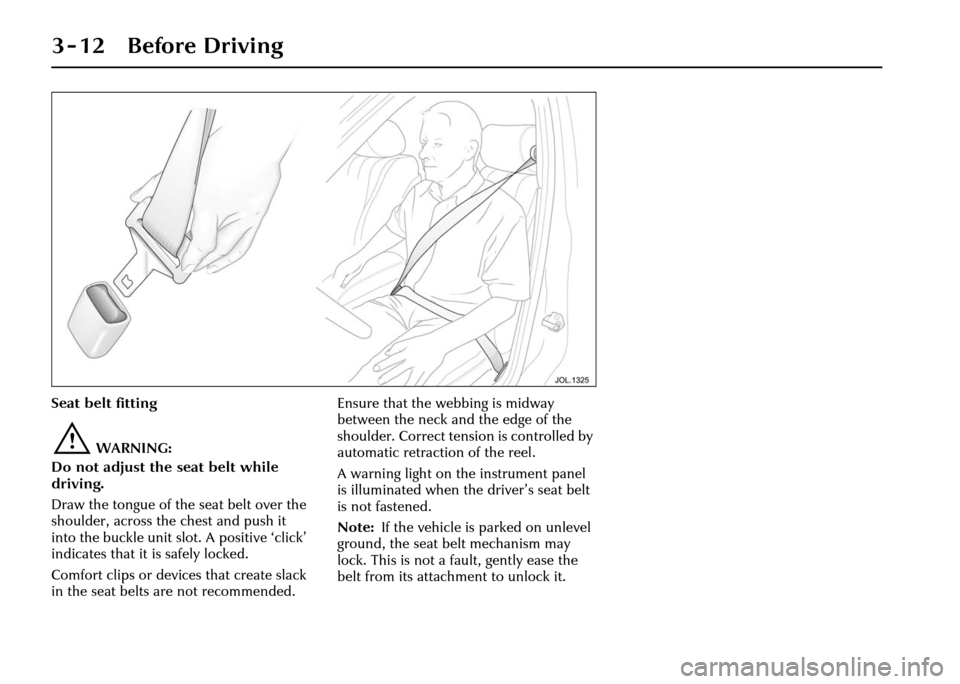
Seat belt fitting
!WARNING:
Do not adjust the seat belt while
driving.
Draw the tongue of the seat belt over the
shoulder, across the chest and push it
into the buckle unit slot. A positive ‘click’
indicates that it is safely locked.
Comfort clips or devices that create slack
in the seat belts are not recommended. Ensure that the webbing is midway
between the neck and the edge of the
shoulder. Correct tension is controlled by
automatic retraction of the reel.
A warning light on the instrument panel
is illuminated when the driver’s seat belt
is not fastened.
Note:
If the vehicle is parked on unlevel
ground, the seat belt mechanism may
lock. This is not a fault, gently ease the
belt from its attachment to unlock it.
Page 55 of 227
3 - 16 Before Driving
Air bag fault warning light
The air bag warning light in the driver’s
instrument cluster will be lit for
approximately six seconds when the
ignition is turned on.
If the light remains on or flashes,
it indicates a fault within the air bag
electrical circuits. Report the fault to a
Jaguar Retailer immediately. It is safe to
drive the vehicle; however, in an accident
the air bags may not operate.
Air bag warning ligh t information is
shown on page 4 - 8. Air bag disposal
!WARNING:
Do not attempt to service, repair or
modify the air bag sy stem or its fuses.
All work on the air bag system,
including renewal after deployment
and renewal at the end of its service
life, must be carried out by an
authorised Jaguar Retailer.
In the event of the vehicle being
dismantled, air bag module removal and
disposal MUST be made by a qualified
person. Instructions can be obtained
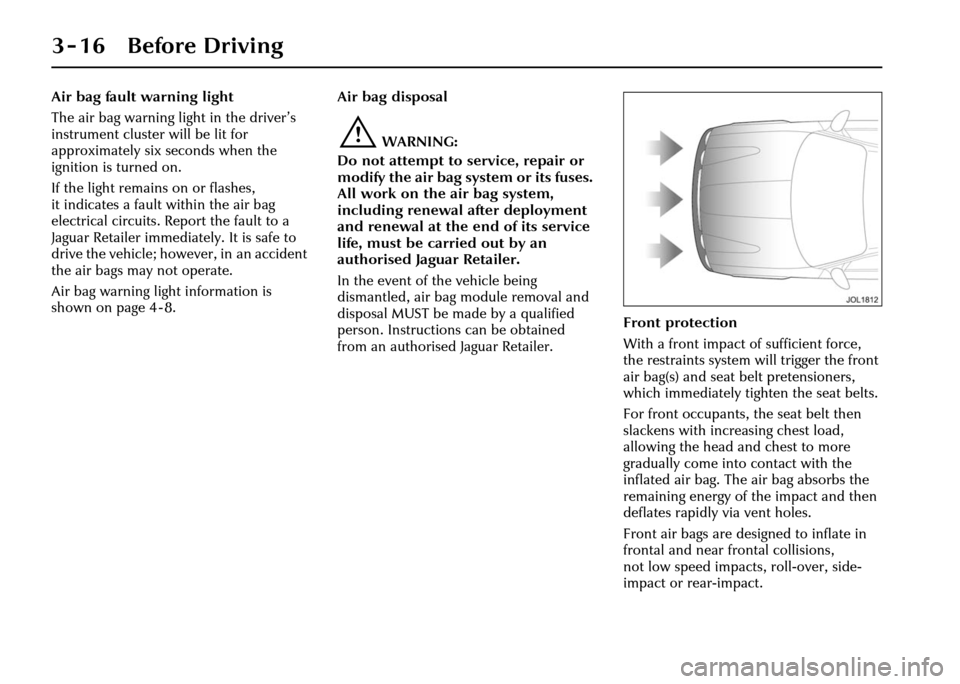
from an authorised Jaguar Retailer. Front protection
With a front impact of sufficient force,
the restraints system will trigger the front
air bag(s) and seat belt pretensioners,
which immediately tighten the seat belts.
For front occupants, the seat belt then
slackens with increasing chest load,
allowing the head and chest to more
gradually come into contact with the
inflated air bag. The air bag absorbs the
remaining energy of the impact and then
deflates rapidly via vent holes.
Front air bags are designed to inflate in
frontal and near fr
ontal collisions,
not low speed impacts, roll-over, side-
impact or rear-impact.