Security JAGUAR XJ 2004 X350 / 3.G Owner's Manual
[x] Cancel search | Manufacturer: JAGUAR, Model Year: 2004, Model line: XJ, Model: JAGUAR XJ 2004 X350 / 3.GPages: 227, PDF Size: 4.22 MB
Page 36 of 227
Security and Locks 2 - 21
Before Programming
Caution: When programming a
garage door opener or entry gate that
may require you to press and re-press
the hand-held transmitter (cycle),
unplug the device during the ‘cycling’
process to prevent possible motor
failure.
It is recommended that for best results,
fit a new battery to the hand-held
transmitter of the garage door opener
(or other device) before programming.
If your garage door opener receiver
(located in the garage) is equipped with
an antenna, ensure that the antenna is
hanging straight down.
To Erase All Programming
For first time progra mming, ensure that
the engine is switched off:
1. Turn the ignition switch to position ‘I’.
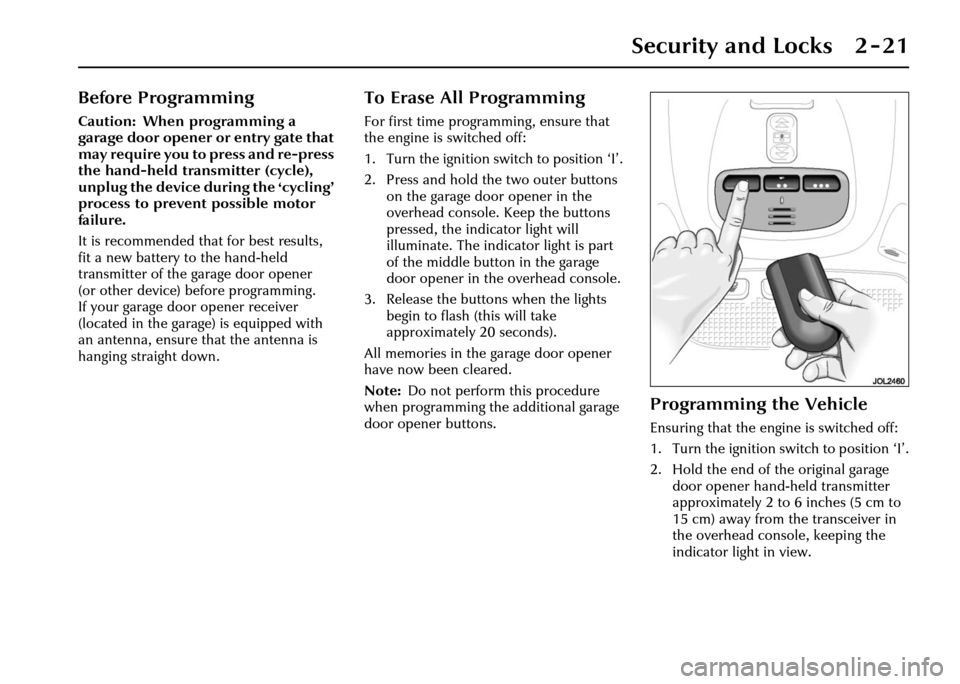
2. Press and hold th e two outer buttons
on the garage door opener in the
overhead console. Keep the buttons
pressed, the indicator light will
illuminate. The indicator light is part
of the middle button in the garage
door opener in the overhead console.
3. Release the buttons when the lights
begin to flash (this will take
approximately 20 seconds).
All memories in the garage door opener
have now been cleared.
Note: Do not perform this procedure
when programming the additional garage
door opener buttons.
Programming the Vehicle
Ensuring that the engine is switched off:
1. Turn the ignition switch to position ‘I’.
2. Hold the end of the original garage door opener hand -held transmitter
approximately 2 to 6 inches (5 cm to
15 cm) away from the transceiver in
the overhead console, keeping the
indicator light in view.
Page 37 of 227
2 - 22 Security and Locks
3. Using both hands, simultaneously press and hold both the desired garage
door opener button on the overhead
console and the hand -held transmitter
button. Keep both buttons pressed.
The light will flash, slowly at first and
then change to a fast flash. When the
indicator light flashes rapidly, release
both buttons. The rapid flashing light
indicates successful programming.
4. If, after 60 seconds, the indicator light does not flash rapidl y, release both the
transceiver and the hand-held
transmitter buttons and repeat the
procedure starting with Step 2.
However, position the hand-held
transmitter at a different angle and/or
distance.
5. Press and hold the programmed overhead console garage door opener
button and observe the indicator light:
• If the indicator light is solid/continuous, programming is
complete. Your device should
activate when the garage door
opener button is pressed and held
for 1 to 2 seconds and then
released. • If the indicator light blinks rapidly
for 2 seconds and then turns a
solid/continuous light, proceed
with the following programming
instructions for ‘rolling code’
device equipment.
Note: To programme additional garage
door opener buttons, begin at Step 2.
Rolling code device equipment
programming
Note: A second person may make the
following steps quicker and easier as once
the button has been pressed there are
30 seconds only in which to complete
Step 3.
1. At the garage door opener receiver (motor head unit) in the garage, locate
the ‘learn’ or ‘smart’ button/switch.
Note: The name of the button/switch
may vary between manufacturers.
2. Press and release the ‘learn’ or ‘smart’ button.
3. Return to the vehicle and firmly press and hold the programmed garage door
opener button for 2 seconds and
release. 4. Repeat the press/hold/release
sequence 3 times to complete the
learning/training process.
The garage door opener in the overhead
console should now activate the ‘rolling
code’ device.
Reprogramming a sing le garage door
opener button
To programme a device to a previously
trained button:
1. Press and hold the desired pre- programmed garage door opener
button for at least 20 seconds, but no
longer than 30 seconds, until the
indicator light begins to flash.
2. Without releasing the overhead console button, position the hand-
held transmitter approximately 2 to
6 inches (5 cm to 15 cm) away from
the transceiver in the overhead
console, keeping the indicator light in
view.
3. Carry out Step 3 of programming the vehicle, see column 1.
Page 38 of 227
Security and Locks 2 - 23
Entry gate programming
The technology of some entry gates
requires you to press and re-press (cycle)
the hand-held transmitter every
2 seconds during programming.
Continue to press and hold the desired
overhead console button while you cycle
your hand-held transmitter until the
indicator light flashes rapidly.
Information and Assistance
For information on the range of available
compatible products or accessories,
or for assistance, contact your Jaguar
Retailer.
You can also contact the supplier’s
helpline on 1–800–355–3515 or the
website address for Homelink™ is
www.homelink.jci.com. Note:
Keep the original transmitter for
future use or programming procedures if,
for example, you purchase a new vehicle’
Caution: It is recommended that
when you sell or dispose of the
vehicle, the programmed transceiver
buttons be erased for security
purposes.
!WARNING:
The manufacturer is not responsible
for any radio or TV interference
caused by unauthorised
modifications to this equipment.
Such modifications could void the
user’s authority to operate the
equipment.
Page 46 of 227
Before Driving 3 - 7
Steering Column
Adjustment
!WARNING:
Do not adjust the steering column
whilst driving.
The steering column can be adjusted for
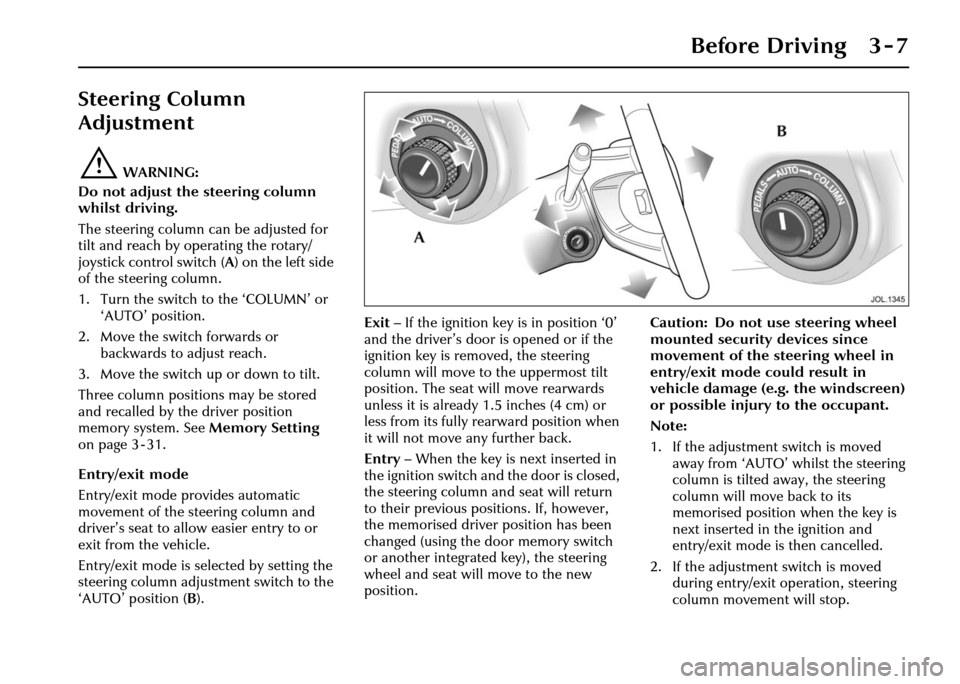
tilt and reach by operating the rotary/
joystick control switch (A ) on the left side
of the steering column.
1. Turn the switch to the ‘COLUMN’ or ‘AUTO’ position.
2. Move the switch forwards or backwards to adjust reach.
3. Move the switch up or down to tilt.
Three column positions may be stored
and recalled by the driver position
memory system. See Memory Setting
on page 3 - 31.
Entry/exit mode
Entry/exit mode provides automatic
movement of the steering column and
driver’s seat to allow easier entry to or
exit from the vehicle.
Entry/exit mode is selected by setting the
steering column adjustment switch to the
‘AUTO’ position ( B). Exit
– If the ignition key is in position ‘0’
and the driver’s door is opened or if the
ignition key is removed, the steering
column will move to the uppermost tilt
position. The seat will move rearwards
unless it is already 1.5 inches (4 cm) or
less from its fully rearward position when
it will not move any further back.
Entry – When the key is next inserted in
the ignition switch and the door is closed,
the steering column and seat will return
to their previous positions. If, however,
the memorised driver position has been
changed (using the door memory switch
or another integrated key), the steering
wheel and seat will move to the new
position. Caution: Do not use steering wheel
mounted security devices since
movement of the steering wheel in
entry/exit mode could result in
vehicle damage (e.g. the windscreen)
or possible injury to the occupant.
Note:
1. If the adjustment switch is moved
away from ‘AUTO’ whilst the steering
column is tilted away, the steering
column will move back to its
memorised position when the key is
next inserted in the ignition and
entry/exit mode is then cancelled.
2. If the adjustment switch is moved during entry/exit operation, steering
column movement will stop.
Page 113 of 227
4-42 On the Road
Starting/Stopping the
Vehicle
When the vehicle is stationary the
automatic gear selector may be left in ‘D’,
‘ 2 ’, ‘ 3’, ‘ 4’ or ‘ 5’, unless the vehicle is to
be parked. When stopping for traffic
lights, junctions etc., either select ‘ P’ or
apply the parkbrake and select ‘ N’.
Before Starting
Before starting the engine, new owners/
drivers should familiarize themselves with
the layout and operation of the controls
and instruments.
!WARNING:
Before attempting to start the engine,
check parkbrake is ON and gear
selector lever is in position ‘P’ or ‘N’.
To Start the Engine
The engine cannot be started until the
gear selector is in ‘ N’ or ‘ P’.
Insert the key into the ignition switch and
turn clockwise to position ‘II’ to switch
on the ignition.
When the key is turned to position ‘III’
the starter motor will turn the engine
until:
• The key is released and automatically returns to position ‘II’.
• The ignition switch is turned to ‘0’ or ‘I’.
• The gear selector is moved out of ‘P’ or ‘N’.
• The engine starts.
If the engine fails to start, the key must be
turned to position ‘0’ before attempting
to restart.
Do not use the starter continuously for
longer than six seconds. Continued use of
the starter will disc harge the battery and
may damage the starter mechanism.
Wait until the engine stops turning before
re-using the starter.
When the engine starts, release the key. The red charge light and the oil pressure
light in the instrument cluster should go
out when the engine is running.
If the engine fails to start
If an ignition key is placed in the ignition
switch and turned to position ‘II’ and the
alarm security light is flashing, it is
possible that the engine will not start.
In any event, please contact a Jaguar
Retailer to investigate the cause of the
light flashing.
It is possible that the fuel system inertia
switch may have tripped, see page 6 - 3
for the resetting procedure.
If the engine persistent
ly fails to start and
flooding is suspected, depress the
accelerator pedal fully, hold it in this
position and turn the key to position ‘III’
for six seconds. Release the key, remove
your foot from the accelerator pedal and
then attempt to restart the engine.
Note: The engine cannot start whilst the
pedal is fully depressed, it must be
released to enable the engine to start.
If the engine still fail s to start, switch the
ignition OFF and contact a Jaguar
Retailer.
Page 179 of 227
6 - 28 Roadside Emergency
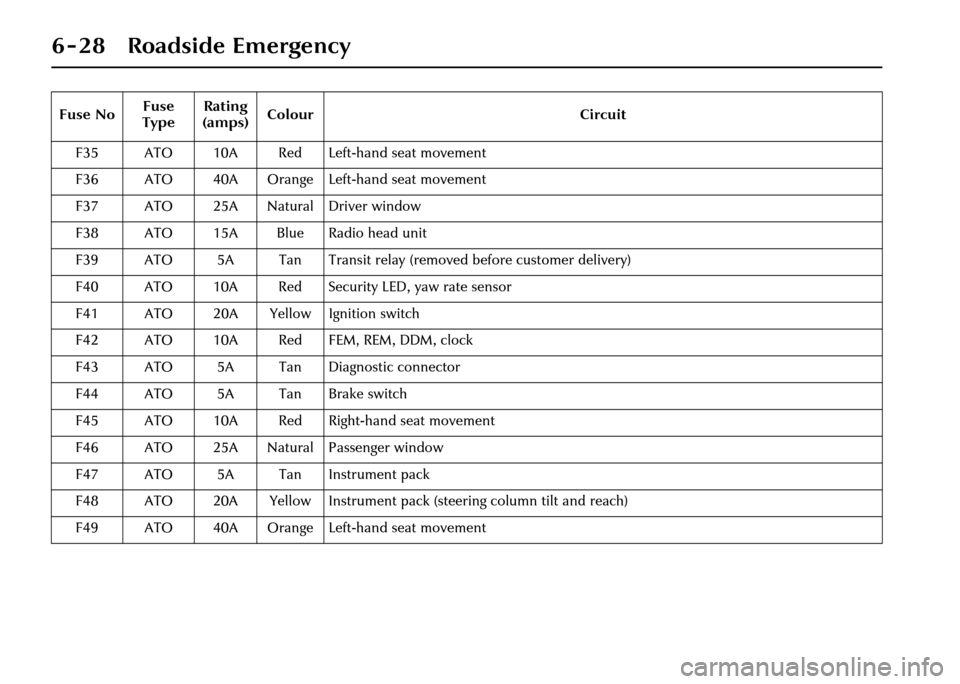
F35 ATO 10A Red Left-hand seat movement
F36 ATO 40A Orange Left-hand seat movement
F37 ATO 25A Natural Driver window
F38 ATO 15A Blue Radio head unit
F39 ATO 5A Tan Transit relay (removed before customer delivery)
F40 ATO 10A Red Security LED, yaw rate sensor
F41 ATO 20A Yellow Ignition switch
F42 ATO 10A Red FEM, REM, DDM, clock
F43 ATO 5A Tan Diagnostic connector
F44 ATO 5A Tan Brake switch
F45 ATO 10A Red Right-hand seat movement
F46 ATO 25A Natural Passenger window
F47 ATO 5A Tan Instrument pack
F48 ATO 20A Yellow Instrument pack (steering column tilt and reach)
F49 ATO 40A Orange Left-hand seat movement
Fuse No
Fuse
Type Rating
(amps) Colour
Circuit
Page 199 of 227
7-16 Maintenance
Battery lead disconnection
Caution:
1. Under no circumstances should a battery be discon nected whilst
the ignition circuit is live,
as permanent damage to the
instrument cluster may occur.
2. Disconnect the negative lead (earth terminal) first.
Fold the luggage compartment floor panel
forwards (see page 6 - 4).
Slacken the negative lead pinch bolt and
disconnect the negative (–) battery lead.
Slacken the positive lead pinch bolt and
disconnect the positive (+) battery lead. Battery lead connection
Note:
Upon battery reconnection the
security system will be armed. Opening
any protected entry will sound the alarm.
Make sure that a key or key transmitter is
available.
Caution: Do not overtighten the
pinch bolts.
Clean the battery posts and coat the post
bases with petroleum jelly.
Connect the positive (+) lead, tighten the
pinch bolt and clip the positive terminal
cover on the battery. Connect the
negative (–) lead and tighten the pinch
bolt.
After the battery ha s been reconnected
and the ignition swit ch is turned to
position ‘II’, the message centre display,
if fitted, will initially show an erroneous
reading i.e.––––––. Thiswill remain
until after the bulb check sequence, when
the correct recorded mileage will be
displayed. This is a normal function of the
instrument cluster.
After battery reconnection
After reconnecting the battery:
• Reset the electric parkbrake; refer to Parkbrake on page 4 - 34. • Reset the electrically operated
windows anti-trap function; refer to
Window Anti-trap Protection on
page 4 - 30.
• The trip computer will lose all recorded trip data and all trip
functions will be reset to zero.
The vehicle total odometer reading is
retained.
• If the battery is disconnected for more than 72 hours the radio preset
channels will need to be reset.
• Where fitted, the TV preset channels may need to be reset. Refer to the
Jaguar Touch-screen Handbook.
• Reset the clock to the correct time.
The engine electronic control system
adapts to certain characteristics of the
vehicle. These adaptations are lost if the
battery is disconnected.
On reconnection, therefore, some slightly
abnormal drive symptoms may occur and
the vehicle may need to be driven
10 miles (16 kilometres) or more while
the control system re-adapts.
Page 224 of 227
Index
Mirror
– door mirror heating . . . . . . . . . . . . . . . . . . . . . . . . . . . . 3 - 8
– door mirror power foldback . . . . . . . . . . . . . . . . . . . . . 3 - 8
– electrochromic door mirrors . . . . . . . . . . . . . . . . . . . . . 3 - 8
– interior rear view . . . . . . . . . . . . . . . . . . . . . . . . . . . . . 3 - 9
– mirror dip when reversing . . . . . . . . . . . . . . . . . . . . . . . 3 - 8
Mobile/portable telephones . . . . . . . . . . . . . . . . . . . . . . . 1 - 9
O
Occupant protection . . . . . . . . . . . . . . . . . . . . . . . . . . . . 3 - 11
– air bags . . . . . . . . . . . . . . . . . . . . . . . . . . . . . . . . . . . . 3 - 14
– beltminder . . . . . . . . . . . . . . . . . . . . . . . . . . . . . . . . . 3 - 11
– driving position . . . . . . . . . . . . . . . . . . . . . . . . . . . . . . 3 - 22
– front belt height adjustment . . . . . . . . . . . . . . . . . . . . 3 - 11
– occupancy sensing . . . . . . . . . . . . . . . . . . . . . . . . . . . . 3 - 17
– rear impact protection . . . . . . . . . . . . . . . . . . . . . . . . . 3 - 20
– seat belts . . . . . . . . . . . . . . . . . . . . . . . . . . . . . . . . . . . 3 - 11
– side protection . . . . . . . . . . . . . . . . . . . . . . . . . . . . . . 3 - 19
Oil specification . . . . . . . . . . . . . . . . . . . . . . . . . . . . . . . . 7 - 7
P
Paint chips . . . . . . . . . . . . . . . . . . . . . . . . . . . . . . . . . . . 7 - 24
Paint – polishing . . . . . . . . . . . . . . . . . . . . . . . . . . . . . . . 7 - 24
Panic alarm . . . . . . . . . . . . . . . . . . . . . . . . . . . . . . . . . . . 2 - 17
Park distance control . . . . . . . . . . . . . . . . . . . . . . . . . . . 4 - 35
Parkbrake . . . . . . . . . . . . . . . . . . . . . . . . . . . . . . . . . . . . 4 - 34
Parking the vehicle . . . . . . . . . . . . . . . . . . . . . . . . . . . . . 4 - 60
Pedal adjustment . . . . . . . . . . . . . . . . . . . . . . . . . . . . . . . 3 - 6
Power steering fluid level check . . . . . . . . . . . . . . . . . . . . 7 - 8
Powerwash system fluid level check . . . . . . . . . . . . . . . . 7 - 10
Protect the environment . . . . . . . . . . . . . . . . . . . . . . . . . . 1 - 9Rain sensitive wiper control . . . . . . . . . . . . . . . . . . . . . . 4 - 31
Rear park distance control . . . . . . . . . . . . . . . . . . . . . . . 4 - 35
Recommended engine oil . . . . . . . . . . . . . . . . . . . . . . . . . 7 - 7
Regular checks and top up . . . . . . . . . . . . . . . . . . . . . . . . 7 - 3
– brake fluid . . . . . . . . . . . . . . . . . . . . . . . . . . . . . . . . . . . 7 - 9
– engine coolant . . . . . . . . . . . . . . . . . . . . . . . . . . . . . . . 7 - 11
– engine oil . . . . . . . . . . . . . . . . . . . . . . . . . . . . . . . . . . . . 7 - 6
– power steering fluid . . . . . . . . . . . . . . . . . . . . . . . . . . . . 7 - 8
– windscreen washer fluid . . . . . . . . . . . . . . . . . . . . . . . 7 - 10
Regular servicing . . . . . . . . . . . . . . . . . . . . . . . . . . . . . . . . 1 - 8
Roof-rack . . . . . . . . . . . . . . . . . . . . . . . . . . . . . . . . . . . . 4 - 61
– capacity . . . . . . . . . . . . . . . . . . . . . . . . . . . . . . . . . . . . . 8 - 5
S
Seat belt
– fitting . . . . . . . . . . . . . . . . . . . . . . . . . . . . . . . . . . . . . . 3 - 12
– inertia reel mechanism check . . . . . . . . . . . . . . . . . . . 3 - 13
Seats
– adjustment . . . . . . . . . . . . . . . . . . . . . . . . . . . . . . . . . . 3 - 3
– heaters . . . . . . . . . . . . . . . . . . . . . . . . . . . . . . . . . . . . . 3 - 5
Security and locks
– lock the vehicle and set the alarm . . . . . . . . . . . . . . . . . 2 - 8
– luggage compartment (trunk) . . . . . . . . . . . . . . . . . . . . 2 - 12
Security features
– battery back-up sounder . . . . . . . . . . . . . . . . . . . . . . . 2 - 18
– battery reconnection . . . . . . . . . . . . . . . . . . . . . . . . . . 2 - 18
– panic alarm . . . . . . . . . . . . . . . . . . . . . . . . . . . . . . . . . 2 - 17
Smog sensor . . . . . . . . . . . . . . . . . . . . . . . . . . . . . . . . . . . 5 - 9
Snow chains . . . . . . . . . . . . . . . . . . . . . . . . . . . . . . . . . . 7 - 21
Speedometer . . . . . . . . . . . . . . . . . . . . . . . . . . . . . . . . . . . 4 - 3