wipers JEEP CHEROKEE 1994 Service User Guide
[x] Cancel search | Manufacturer: JEEP, Model Year: 1994, Model line: CHEROKEE, Model: JEEP CHEROKEE 1994Pages: 1784, PDF Size: 77.09 MB
Page 417 of 1784
(6) Install motor mounting screws. Tighten screws
to 10.5 Nzm (96 in. lbs.).
Be sure wire harness is not pinched or cut when
windshield frame is rotated to upright position.
(7) Raise windshield to upright position and install
left and right windshield holddown bolts.
(8) Install nuts attaching pivots to windshield
frame. Tighten nuts to 10 Nzm (7.5 ft. lbs.).(9) Turn wipers on to allow motor to cycle to park
position.
(10) Install left and right wiper arms (Fig. 3).
(11) Install necessary top components on wind-
shield frame.
FRONT WIPER MOTOR
REMOVAL
(1) Remove the necessary hard or soft top compo-
nents from the windshield frame.
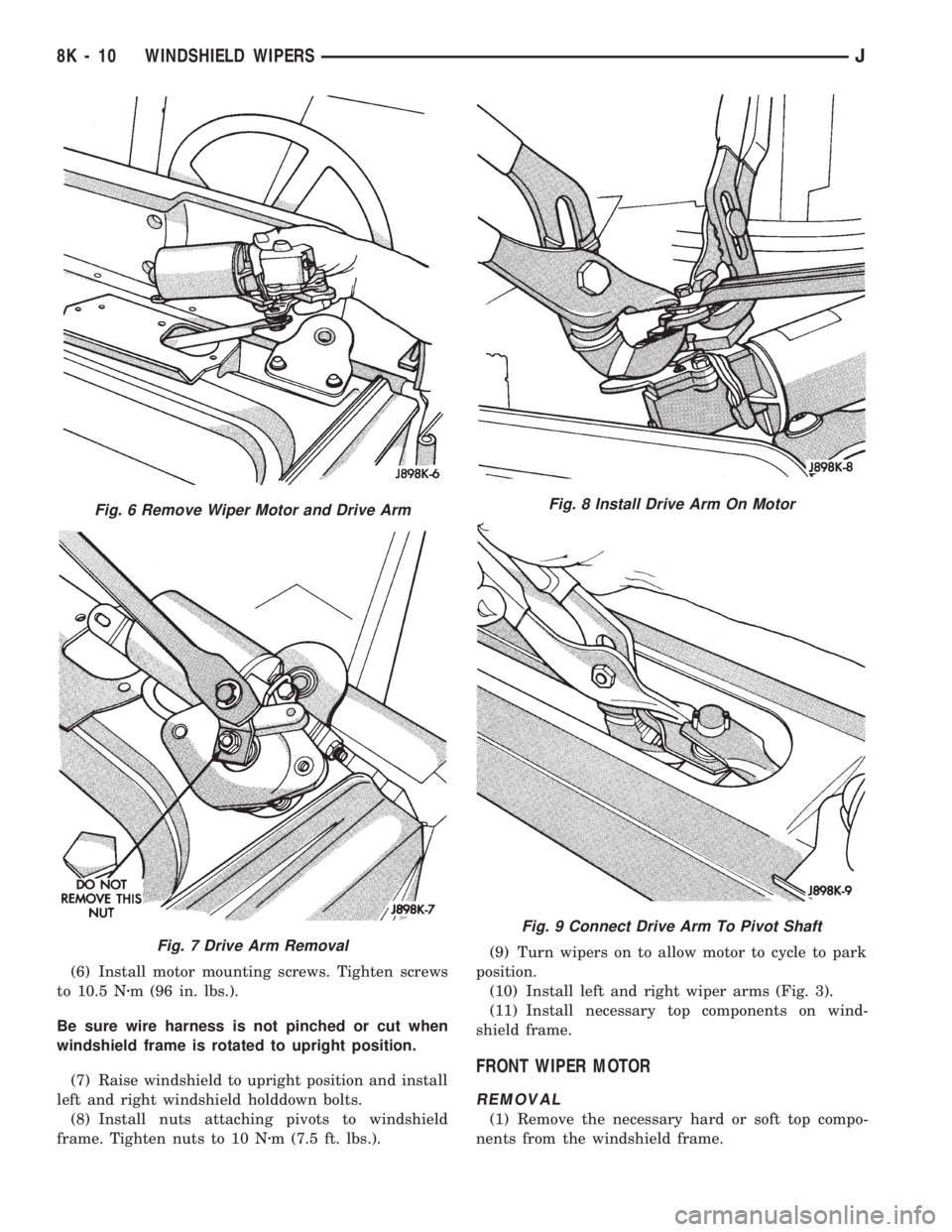
Fig. 6 Remove Wiper Motor and Drive Arm
Fig. 7 Drive Arm Removal
Fig. 8 Install Drive Arm On Motor
Fig. 9 Connect Drive Arm To Pivot Shaft
8K - 10 WINDSHIELD WIPERSJ
Page 418 of 1784
(2) Remove the windshield holddown bolts in the
lower corners of the instrument panel.
(3) Remove wiper motor mounting screws (Fig. 4).
(4) Remove wiper motor harness retaining clip lo-
cated on bottom of windshield.
(5) Disconnect the wiper linkage drive arm (Fig. 5)
(6) Grasp the motor and pull the motor and drive
arm out of the access hole (Fig. 6).
(7) Pry the drive arm off the motor pivot. DO NOT
remove the pivot attaching nut (Fig. 7).
(8) Remove 2 screws holding intermittent wipe
module bracket to bottom of instrument panel.
(9) Reach up behind instrument panel and discon-
nect wiper motor harness.
(10) Remove wiper motor.
INSTALLATION
(1) Install wire harness through hole in top of in-
strument panel.
(2) Connect wiper motor connector behind instru-
ment panel.
(3) Install intermittent wipe module bracket to
bottom of instrument panel.
(4) Turn wipers on to allow motor to cycle to park
position.
(5) Install wiper linkage drive arm onto motor
(Fig. 8).
(6) Install motor and drive arm in the windshield
frame.
(7) Connect wiper linkage drive arm to pivot shaft
(Fig. 9).
(8) Install motor mounting screws. Tighten screws
to 10.5 Nzm (96 in. lbs.).
(9) Install wire harness retaining clip on bottom of
windshield.
Be sure wire harness is not pinched or cut when
windshield frame is rotated to upright position.
(10) Raise windshield to upright position and in-
stall left and right windshield holddown bolts.
(11) Install the necessary top components on wind-
shield frame.
WASHER PUMP REPLACEMENT
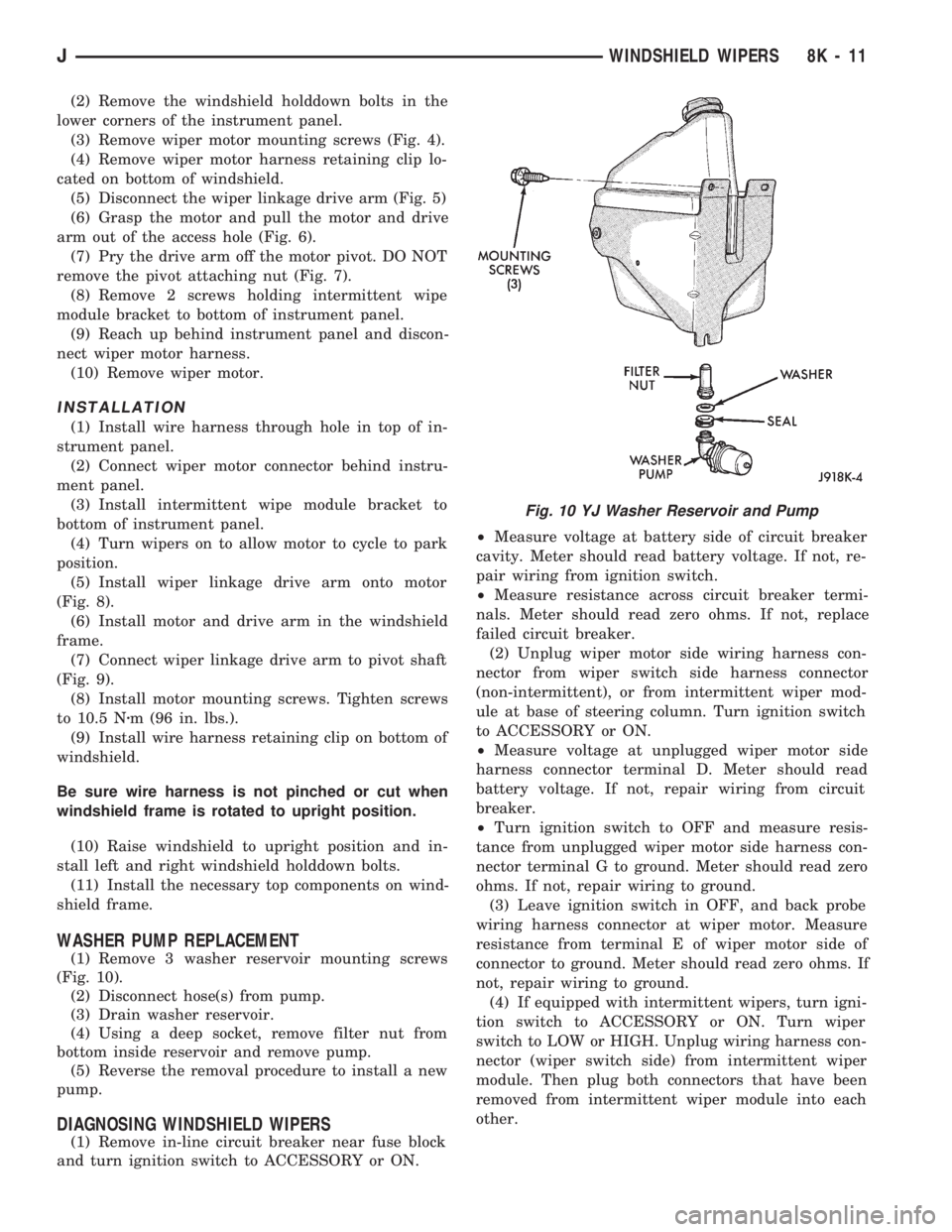
(1) Remove 3 washer reservoir mounting screws
(Fig. 10).
(2) Disconnect hose(s) from pump.
(3) Drain washer reservoir.
(4) Using a deep socket, remove filter nut from
bottom inside reservoir and remove pump.
(5) Reverse the removal procedure to install a new
pump.
DIAGNOSING WINDSHIELD WIPERS
(1) Remove in-line circuit breaker near fuse block
and turn ignition switch to ACCESSORY or ON.²Measure voltage at battery side of circuit breaker
cavity. Meter should read battery voltage. If not, re-
pair wiring from ignition switch.
²Measure resistance across circuit breaker termi-
nals. Meter should read zero ohms. If not, replace
failed circuit breaker.
(2) Unplug wiper motor side wiring harness con-
nector from wiper switch side harness connector
(non-intermittent), or from intermittent wiper mod-
ule at base of steering column. Turn ignition switch
to ACCESSORY or ON.
²Measure voltage at unplugged wiper motor side
harness connector terminal D. Meter should read
battery voltage. If not, repair wiring from circuit
breaker.
²Turn ignition switch to OFF and measure resis-
tance from unplugged wiper motor side harness con-
nector terminal G to ground. Meter should read zero
ohms. If not, repair wiring to ground.
(3) Leave ignition switch in OFF, and back probe
wiring harness connector at wiper motor. Measure
resistance from terminal E of wiper motor side of
connector to ground. Meter should read zero ohms. If
not, repair wiring to ground.
(4) If equipped with intermittent wipers, turn igni-
tion switch to ACCESSORY or ON. Turn wiper
switch to LOW or HIGH. Unplug wiring harness con-
nector (wiper switch side) from intermittent wiper
module. Then plug both connectors that have been
removed from intermittent wiper module into each
other.
Fig. 10 YJ Washer Reservoir and Pump
JWINDSHIELD WIPERS 8K - 11
Page 419 of 1784
CAUTION: DO NOT move the wiper switch to DE-
LAY with the intermittent wiper module removed
from the circuit. If the switch is moved to the DE-
LAY position during the next step, the switch will
be damaged.
²Test wiper operation in LOW and HIGH speed
modes, and test washer operation. If these modes
were inoperative, but are OK now, replace failed in-
termittent wiper module.
(4) To test the wiper/washer switch, see Wiper
Switch Testing. Turn ignition switch to OFF. Posi-
tion the wiper switch as indicated, and back probe
switch side of wiper switch connector. If switch tests
OK, go to step 5. If not, replace switch and go to step
6.
(5) To further test the wiper/washer switch, turn
ignition switch to ACCESSORY or ON. Position the
wiper switch as indicated in the tests below, and
back probe switch side of wiper switch connector.
²Measure voltage at terminal E with wiper switch
in LOW, MIST and with washer switch depressed.
Meter should read battery voltage. If not, replace
switch.
²Measure voltage at connector terminal C with
wiper switch in HIGH. Meter should read battery
voltage. If not, replace switch.
²With wiper switch in LOW or HIGH, measure
voltage at connector terminal F, then move wiper
switch to OFF. Meter shold read battery voltage un-
til wipers park and then zero volts. If OK, go to step
6. If not, check wiring to wiper motor, then go to step
6.
(6) To test the wiper motor, turn the ignition
switch to ACCESSORY or ON. Position the wiper
switch and back probe the motor connector as indi-
cated.
²Wiper switch in any position, measure voltage at
terminal B. Meter should read battery voltage. If not,
repair wiring from circuit breaker.
²Wiper switch in LOW, measure voltage at termi-
nal A. Meter should read battery voltage. If OK, but
wipers do not operate, replace failed wiper motor. If
not, repair wiring from switch or intermittent wiper
module connector.
²Wiper switch in HIGH, measure voltage at termi-
nal H. Meter should read battery voltage. If OK, but
wipers do not operate, replace failed wiper motor. If
not, repair wiring from switch or intermittent wiper
module connector.
²Wiper switch in LOW or HIGH, voltmeter con-
nected to terminal D. Turn wiper switch to OFF and
observe meter. Meter should read battery voltage
when switch goes to OFF, then zero volts after wip-
ers park. If battery voltage is present, but wipers fail
to park; or, if no battery voltage present, replace
failed wiper motor.DIAGNOSING NON-INTERMITTENT WINDSHIELD
WASHER
Refer to Group 8W - Wiring Diagrams.
(1) Measure resistance from washer pump connec-
tor terminal B to a clean chassis ground. Meter
should read zero ohms. If not, repair open between
terminal B and ground.
(2) Turn ignition switch to ON and press washer
switch.
²Measure voltage at switch connector terminal B.
Meter should read battery voltage. If not, replace
wiper/washer switch.
²Measure voltage at washer pump connector termi-
nal A. Meter should read battery voltage. If OK, re-
place pump. If not, repair open between switch
connector and pump connector.
DIAGNOSING INTERMITTENT WINDSHIELD
WASHER
Refer to Group 8W - Wiring Diagrams.
(1) Measure resistance from washer pump connec-
tor terminal B to a clean chassis ground. Meter
should read zero ohms. If not, repair open between
terminal B and ground.
(2) Turn ignition switch to ON and rotate washer
switch tab forward.
²Measure voltage at wiper/washer switch connector
terminal B located at intermittent wipe module.
Meter should read battery voltage. If not, replace
wiper switch.
²Measure voltage at intermittent wipe module con-
nector terminal B (to washer pump). Meter should
read battery voltage. If not, replace intermittent
wipe module.
²Measure voltage at washer pump connector termi-
nal A. Meter should read battery voltage. If OK, re-
place pump. If not, repair open from intermittent
wipe module connector terminal B.
REAR WIPER ARM REPLACEMENT
(1) Install wiper arm remover, Snap On A192 or
equivalent, on wiper arm (Fig. 11). Lift arm and then
remove from pivot shaft.
CAUTION: Do not use a screwdriver or other prying
tool to remove an arm. This may distort it in a way
that will allow it to come off the pivot shaft in the
future, despite how carefully it is installed. NEVER
push or bend the spring clip in the base of the arm
in an attempt to release the arm. This clip is self re-
leasing.
(2) To install, reverse the removal procedure.
(3) Wet the window and check the park position by
operating the wiper motor several times.
8K - 12 WINDSHIELD WIPERSJ
Page 420 of 1784
REAR WASHER PUMP REPLACEMENT
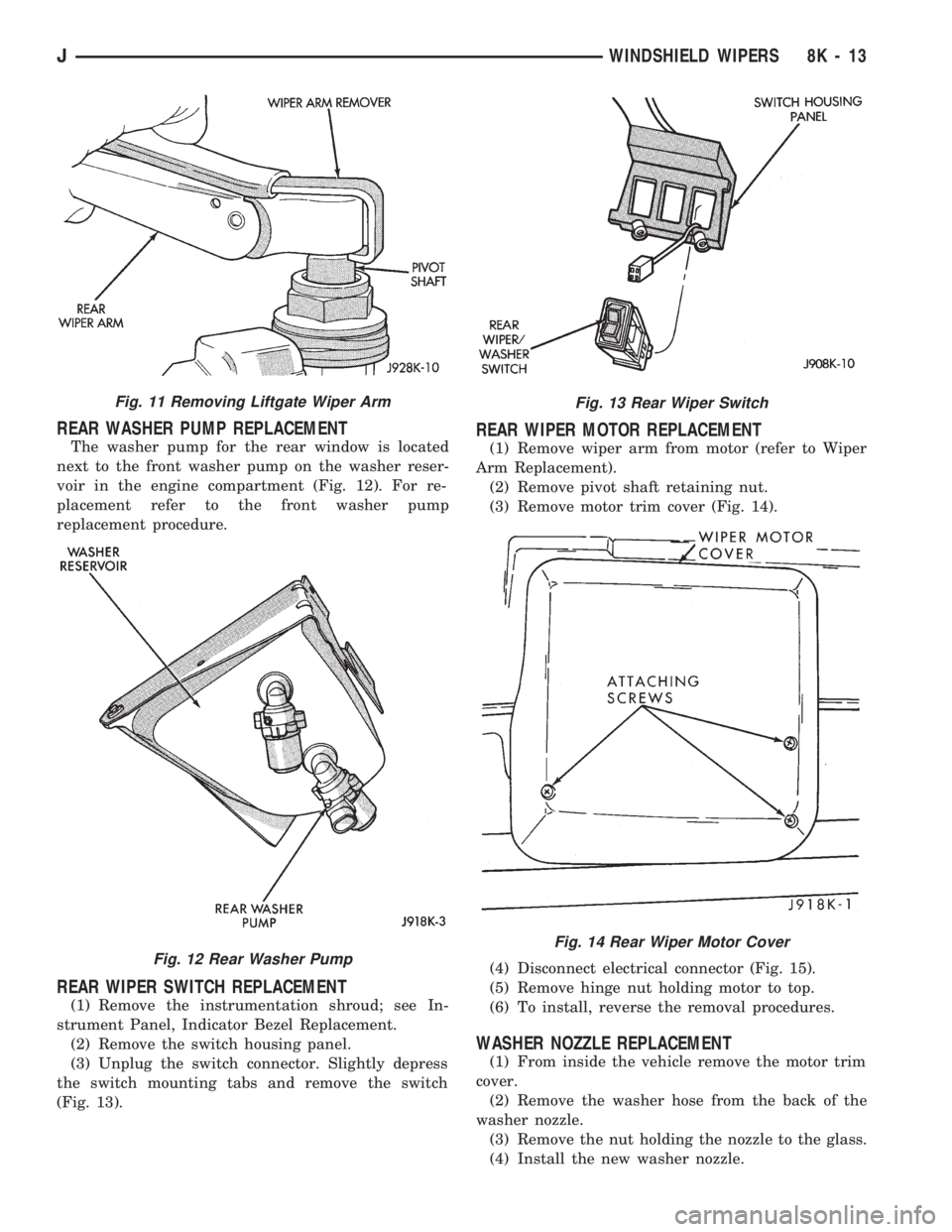
The washer pump for the rear window is located
next to the front washer pump on the washer reser-
voir in the engine compartment (Fig. 12). For re-
placement refer to the front washer pump
replacement procedure.
REAR WIPER SWITCH REPLACEMENT
(1) Remove the instrumentation shroud; see In-
strument Panel, Indicator Bezel Replacement.
(2) Remove the switch housing panel.
(3) Unplug the switch connector. Slightly depress
the switch mounting tabs and remove the switch
(Fig. 13).
REAR WIPER MOTOR REPLACEMENT
(1) Remove wiper arm from motor (refer to Wiper
Arm Replacement).
(2) Remove pivot shaft retaining nut.
(3) Remove motor trim cover (Fig. 14).
(4) Disconnect electrical connector (Fig. 15).
(5) Remove hinge nut holding motor to top.
(6) To install, reverse the removal procedures.
WASHER NOZZLE REPLACEMENT
(1) From inside the vehicle remove the motor trim
cover.
(2) Remove the washer hose from the back of the
washer nozzle.
(3) Remove the nut holding the nozzle to the glass.
(4) Install the new washer nozzle.
Fig. 11 Removing Liftgate Wiper Arm
Fig. 12 Rear Washer Pump
Fig. 13 Rear Wiper Switch
Fig. 14 Rear Wiper Motor Cover
JWINDSHIELD WIPERS 8K - 13
Page 421 of 1784
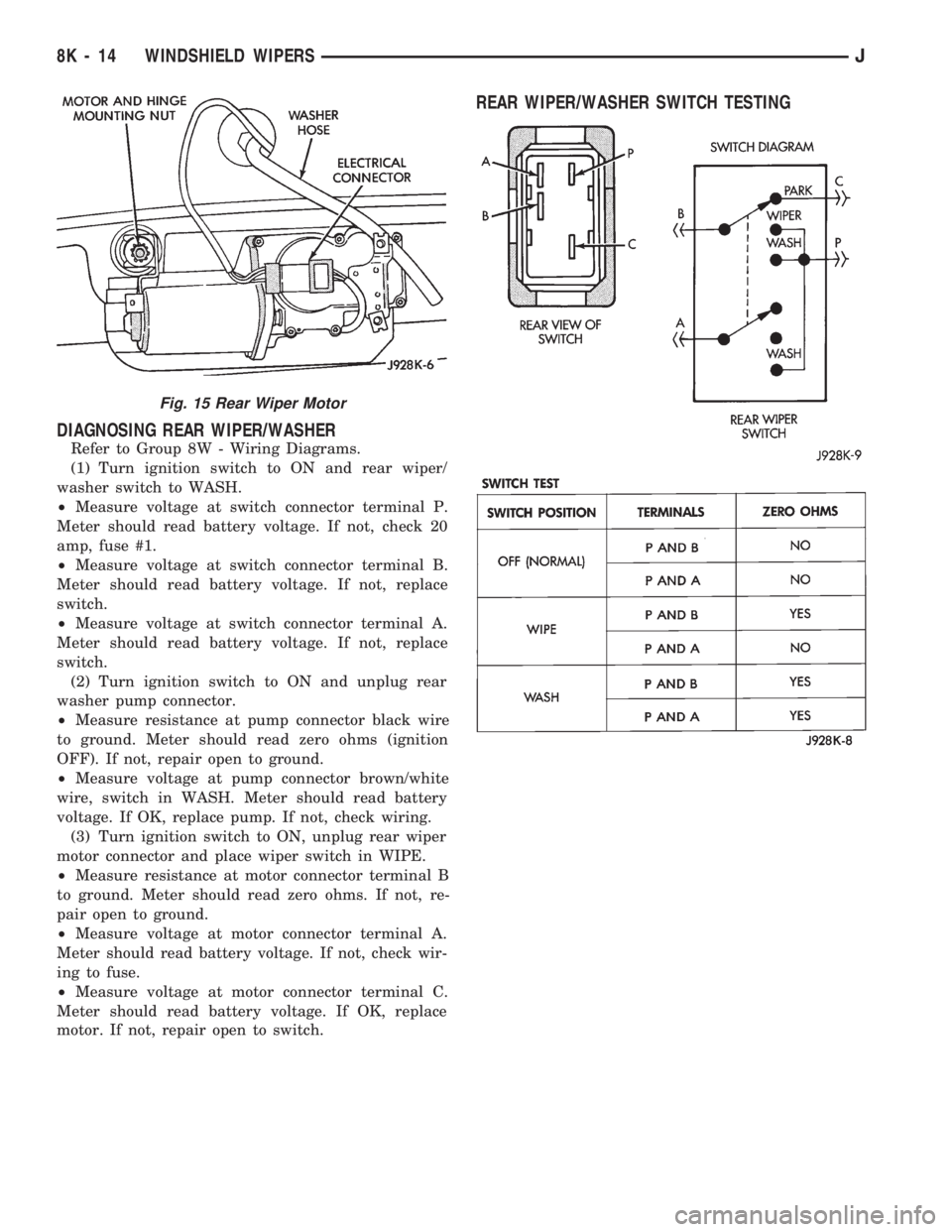
DIAGNOSING REAR WIPER/WASHER
Refer to Group 8W - Wiring Diagrams.
(1) Turn ignition switch to ON and rear wiper/
washer switch to WASH.
²Measure voltage at switch connector terminal P.
Meter should read battery voltage. If not, check 20
amp, fuse #1.
²Measure voltage at switch connector terminal B.
Meter should read battery voltage. If not, replace
switch.
²Measure voltage at switch connector terminal A.
Meter should read battery voltage. If not, replace
switch.
(2) Turn ignition switch to ON and unplug rear
washer pump connector.
²Measure resistance at pump connector black wire
to ground. Meter should read zero ohms (ignition
OFF). If not, repair open to ground.
²Measure voltage at pump connector brown/white
wire, switch in WASH. Meter should read battery
voltage. If OK, replace pump. If not, check wiring.
(3) Turn ignition switch to ON, unplug rear wiper
motor connector and place wiper switch in WIPE.
²Measure resistance at motor connector terminal B
to ground. Meter should read zero ohms. If not, re-
pair open to ground.
²Measure voltage at motor connector terminal A.
Meter should read battery voltage. If not, check wir-
ing to fuse.
²Measure voltage at motor connector terminal C.
Meter should read battery voltage. If OK, replace
motor. If not, repair open to switch.
REAR WIPER/WASHER SWITCH TESTING
Fig. 15 Rear Wiper Motor
8K - 14 WINDSHIELD WIPERSJ
Page 422 of 1784
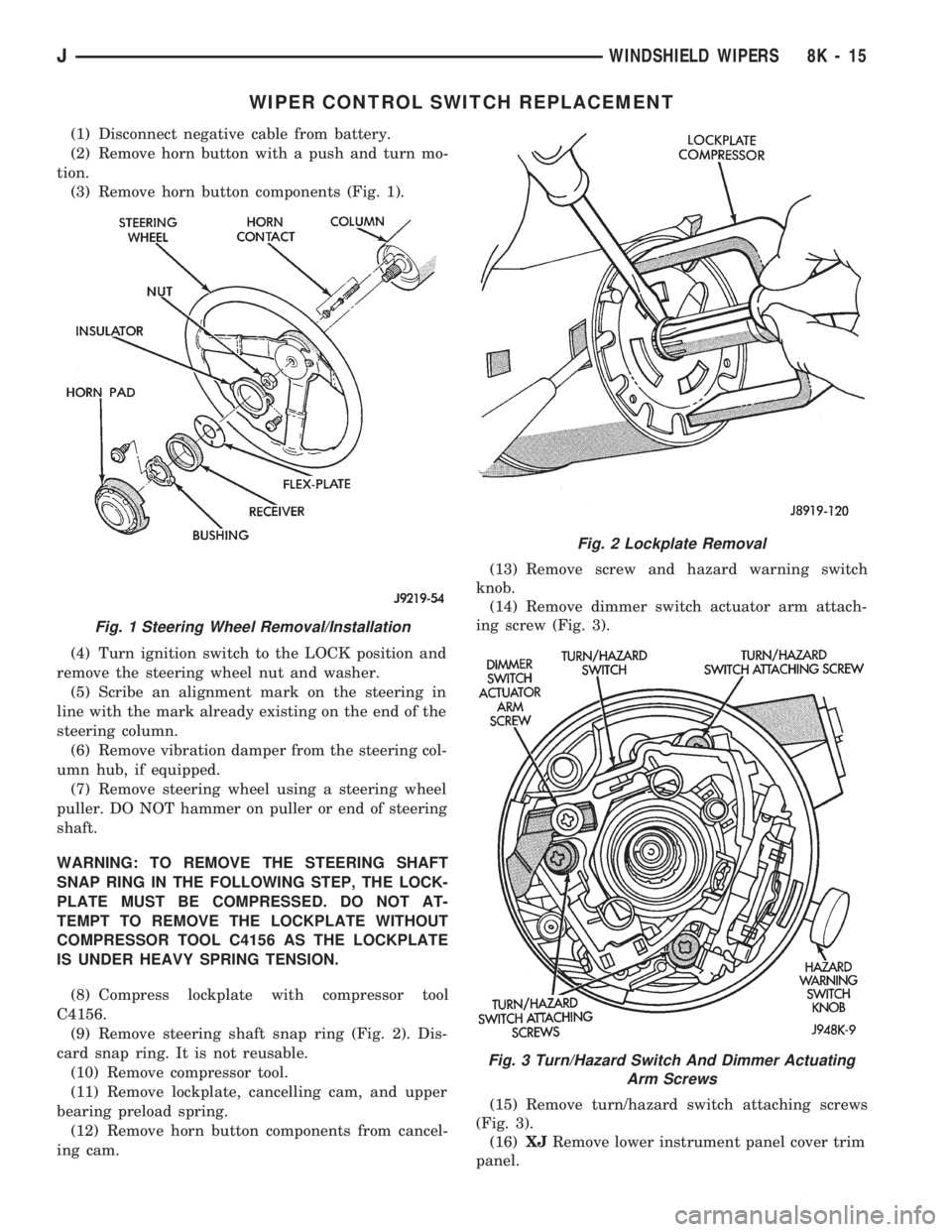
WIPER CONTROL SWITCH REPLACEMENT
(1) Disconnect negative cable from battery.
(2) Remove horn button with a push and turn mo-
tion.
(3) Remove horn button components (Fig. 1).
(4) Turn ignition switch to the LOCK position and
remove the steering wheel nut and washer.
(5) Scribe an alignment mark on the steering in
line with the mark already existing on the end of the
steering column.
(6) Remove vibration damper from the steering col-
umn hub, if equipped.
(7) Remove steering wheel using a steering wheel
puller. DO NOT hammer on puller or end of steering
shaft.
WARNING: TO REMOVE THE STEERING SHAFT
SNAP RING IN THE FOLLOWING STEP, THE LOCK-
PLATE MUST BE COMPRESSED. DO NOT AT-
TEMPT TO REMOVE THE LOCKPLATE WITHOUT
COMPRESSOR TOOL C4156 AS THE LOCKPLATE
IS UNDER HEAVY SPRING TENSION.
(8) Compress lockplate with compressor tool
C4156.
(9) Remove steering shaft snap ring (Fig. 2). Dis-
card snap ring. It is not reusable.
(10) Remove compressor tool.
(11) Remove lockplate, cancelling cam, and upper
bearing preload spring.
(12) Remove horn button components from cancel-
ing cam.(13) Remove screw and hazard warning switch
knob.
(14) Remove dimmer switch actuator arm attach-
ing screw (Fig. 3).
(15) Remove turn/hazard switch attaching screws
(Fig. 3).
(16)XJRemove lower instrument panel cover trim
panel.
Fig. 1 Steering Wheel Removal/Installation
Fig. 2 Lockplate Removal
Fig. 3 Turn/Hazard Switch And Dimmer Actuating
Arm Screws
JWINDSHIELD WIPERS 8K - 15
Page 423 of 1784
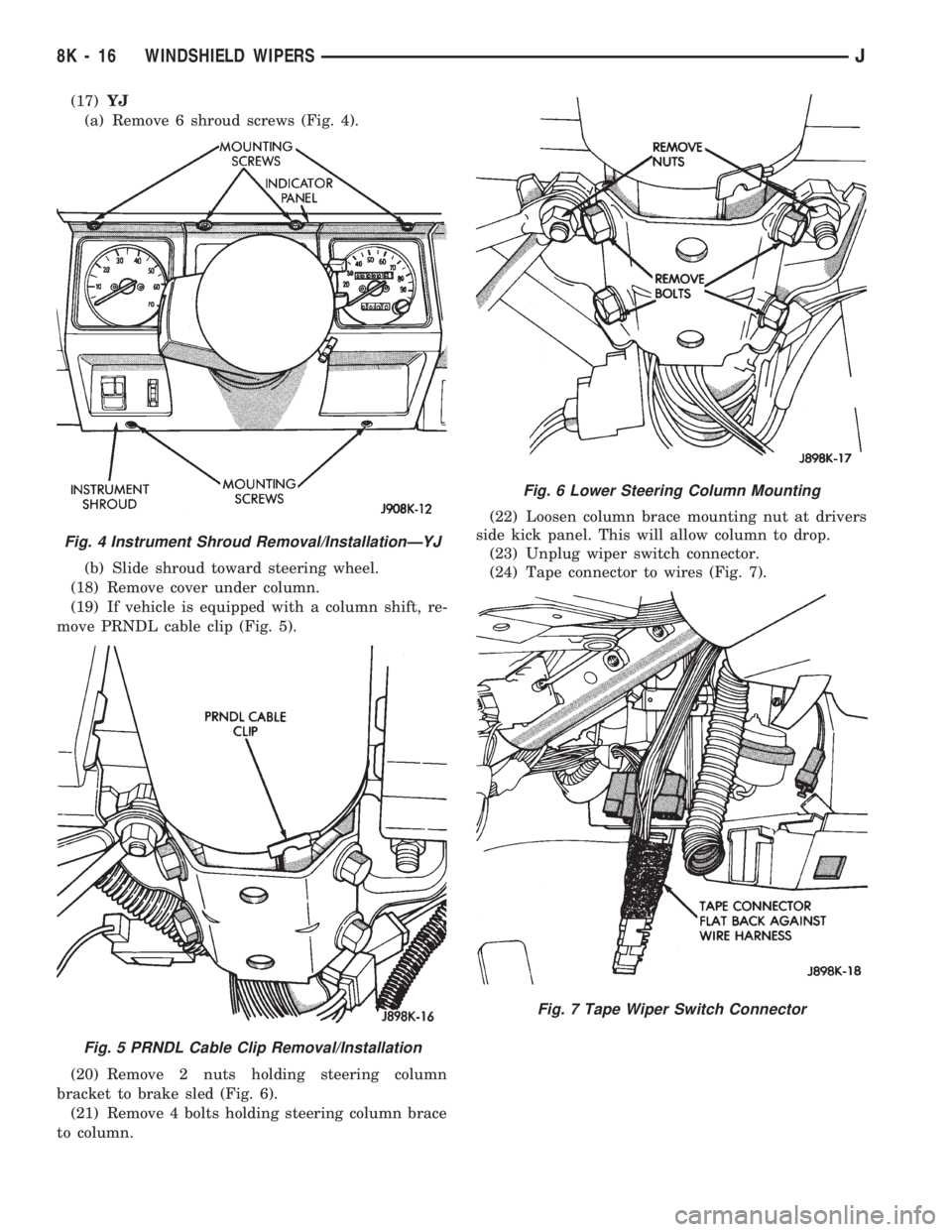
(17)YJ
(a) Remove 6 shroud screws (Fig. 4).
(b) Slide shroud toward steering wheel.
(18) Remove cover under column.
(19) If vehicle is equipped with a column shift, re-
move PRNDL cable clip (Fig. 5).
(20) Remove 2 nuts holding steering column
bracket to brake sled (Fig. 6).
(21) Remove 4 bolts holding steering column brace
to column.(22) Loosen column brace mounting nut at drivers
side kick panel. This will allow column to drop.
(23) Unplug wiper switch connector.
(24) Tape connector to wires (Fig. 7).
Fig. 4 Instrument Shroud Removal/InstallationÐYJ
Fig. 5 PRNDL Cable Clip Removal/Installation
Fig. 6 Lower Steering Column Mounting
Fig. 7 Tape Wiper Switch Connector
8K - 16 WINDSHIELD WIPERSJ
Page 424 of 1784
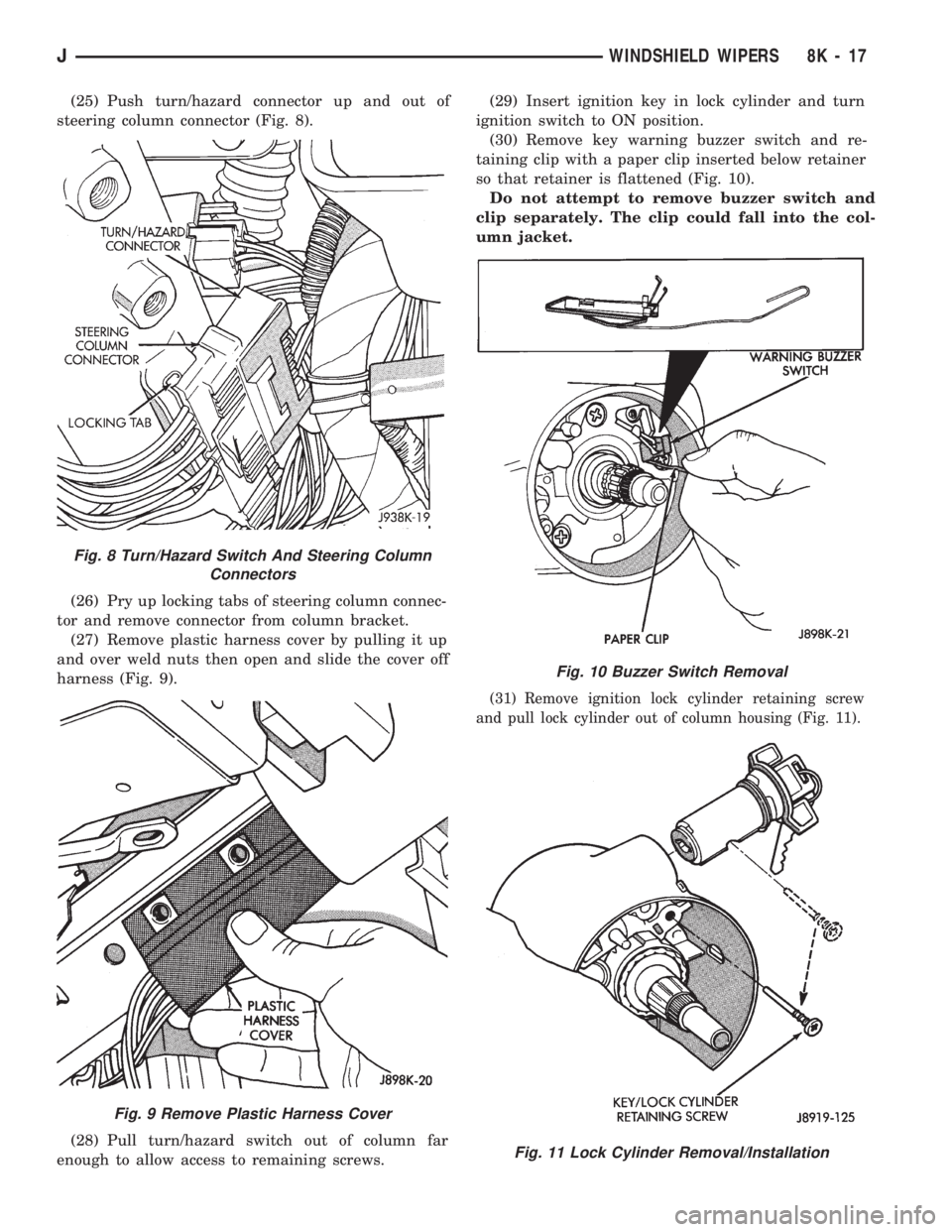
(25) Push turn/hazard connector up and out of
steering column connector (Fig. 8).
(26) Pry up locking tabs of steering column connec-
tor and remove connector from column bracket.
(27) Remove plastic harness cover by pulling it up
and over weld nuts then open and slide the cover off
harness (Fig. 9).
(28) Pull turn/hazard switch out of column far
enough to allow access to remaining screws.(29) Insert ignition key in lock cylinder and turn
ignition switch to ON position.
(30) Remove key warning buzzer switch and re-
taining clip with a paper clip inserted below retainer
so that retainer is flattened (Fig. 10).
Do not attempt to remove buzzer switch and
clip separately. The clip could fall into the col-
umn jacket.
(31) Remove ignition lock cylinder retaining screw
and pull lock cylinder out of column housing (Fig. 11).
Fig. 8 Turn/Hazard Switch And Steering Column
Connectors
Fig. 9 Remove Plastic Harness Cover
Fig. 10 Buzzer Switch Removal
Fig. 11 Lock Cylinder Removal/Installation
JWINDSHIELD WIPERS 8K - 17
Page 425 of 1784
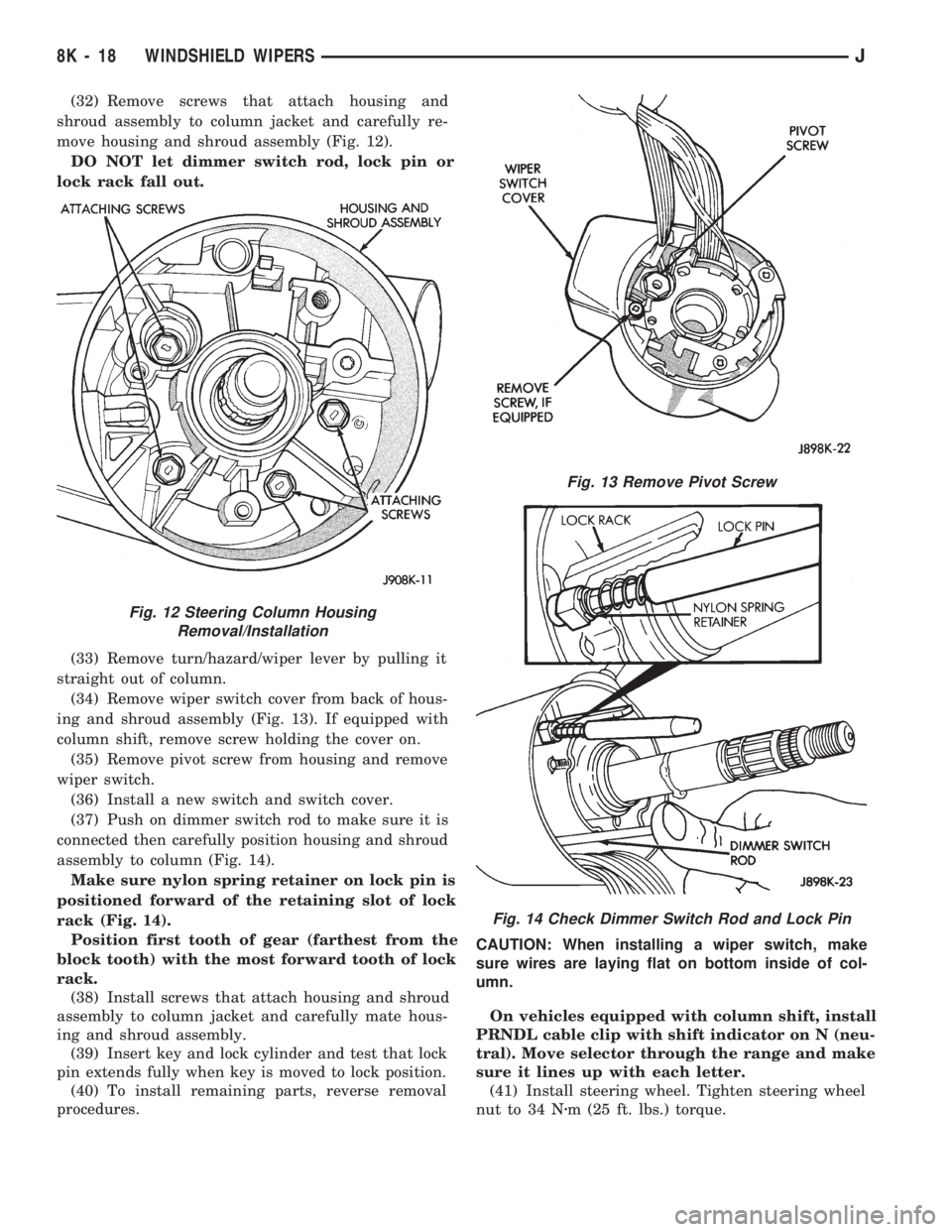
(32) Remove screws that attach housing and
shroud assembly to column jacket and carefully re-
move housing and shroud assembly (Fig. 12).
DO NOT let dimmer switch rod, lock pin or
lock rack fall out.
(33) Remove turn/hazard/wiper lever by pulling it
straight out of column.
(34) Remove wiper switch cover from back of hous-
ing and shroud assembly (Fig. 13). If equipped with
column shift, remove screw holding the cover on.
(35) Remove pivot screw from housing and remove
wiper switch.
(36) Install a new switch and switch cover.
(37) Push on dimmer switch rod to make sure it is
connected then carefully position housing and shroud
assembly to column (Fig. 14).
Make sure nylon spring retainer on lock pin is
positioned forward of the retaining slot of lock
rack (Fig. 14).
Position first tooth of gear (farthest from the
block tooth) with the most forward tooth of lock
rack.
(38) Install screws that attach housing and shroud
assembly to column jacket and carefully mate hous-
ing and shroud assembly.
(39) Insert key and lock cylinder and test that lock
pin extends fully when key is moved to lock position.
(40) To install remaining parts, reverse removal
procedures.CAUTION: When installing a wiper switch, make
sure wires are laying flat on bottom inside of col-
umn.
On vehicles equipped with column shift, install
PRNDL cable clip with shift indicator on N (neu-
tral). Move selector through the range and make
sure it lines up with each letter.
(41) Install steering wheel. Tighten steering wheel
nut to 34 Nzm (25 ft. lbs.) torque.
Fig. 12 Steering Column Housing
Removal/Installation
Fig. 13 Remove Pivot Screw
Fig. 14 Check Dimmer Switch Rod and Lock Pin
8K - 18 WINDSHIELD WIPERSJ
Page 426 of 1784
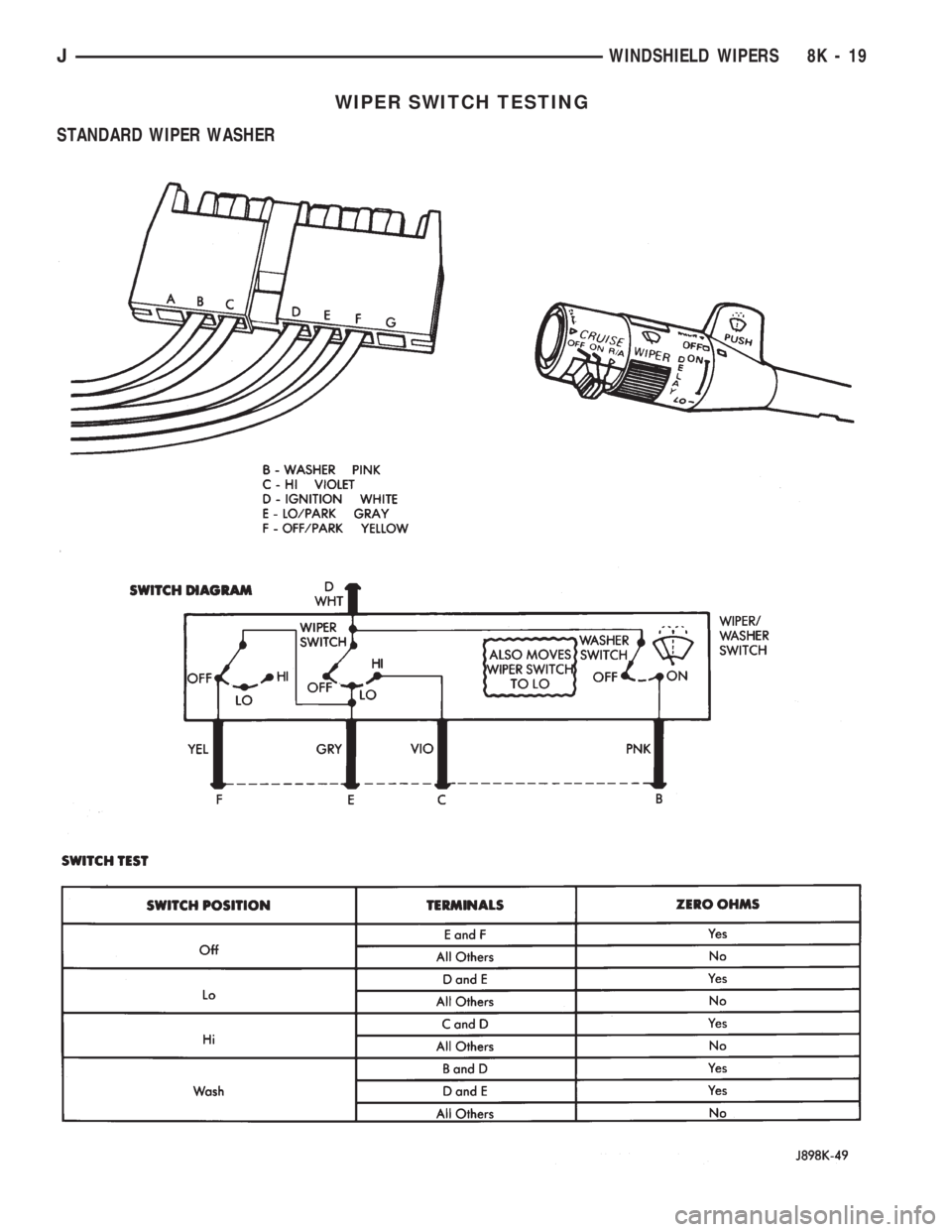
WIPER SWITCH TESTING
STANDARD WIPER WASHER
JWINDSHIELD WIPERS 8K - 19