bulb JEEP CHEROKEE 1994 Service Owner's Guide
[x] Cancel search | Manufacturer: JEEP, Model Year: 1994, Model line: CHEROKEE, Model: JEEP CHEROKEE 1994Pages: 1784, PDF Size: 77.09 MB
Page 447 of 1784
(3) Measure the voltage between the pink wire on
the switch connector and vehicle body ground. The
voltmeter should indicate battery voltage. If not OK,
repair the open circuit in the wire harness from the
splice.
(4) Connect a jumper wire from the ground side of
the switch to a good vehicle body ground. Measure
the resistance to vehicle body ground. The ohmmeter
should indicate zero ohms. If not, repair the open cir-
cuit in the wire harness to vehicle body ground.
DOME LAMP REPLACEMENT
REMOVALÐXJ VEHICLES
(1) Remove the dome lamp lens by squeezing it at
both sides. This will separate the lens retainer tabs
from the lamp housing shoulders.
(2) Pull the lens downward to remove it from the
lamp housing.
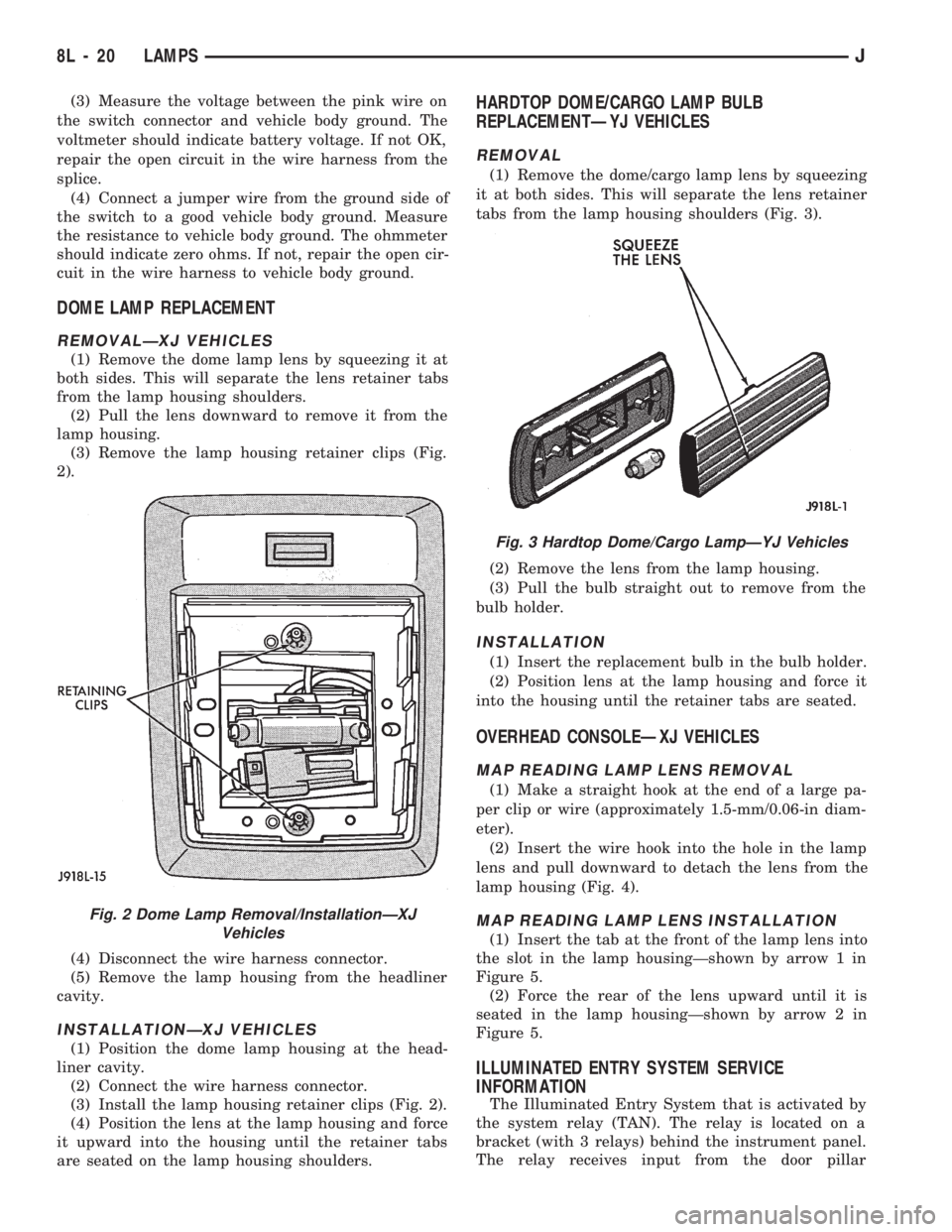
(3) Remove the lamp housing retainer clips (Fig.
2).
(4) Disconnect the wire harness connector.
(5) Remove the lamp housing from the headliner
cavity.
INSTALLATIONÐXJ VEHICLES
(1) Position the dome lamp housing at the head-
liner cavity.
(2) Connect the wire harness connector.
(3) Install the lamp housing retainer clips (Fig. 2).
(4) Position the lens at the lamp housing and force
it upward into the housing until the retainer tabs
are seated on the lamp housing shoulders.
HARDTOP DOME/CARGO LAMP BULB
REPLACEMENTÐYJ VEHICLES
REMOVAL
(1) Remove the dome/cargo lamp lens by squeezing
it at both sides. This will separate the lens retainer
tabs from the lamp housing shoulders (Fig. 3).
(2) Remove the lens from the lamp housing.
(3) Pull the bulb straight out to remove from the
bulb holder.
INSTALLATION
(1) Insert the replacement bulb in the bulb holder.
(2) Position lens at the lamp housing and force it
into the housing until the retainer tabs are seated.
OVERHEAD CONSOLEÐXJ VEHICLES
MAP READING LAMP LENS REMOVAL
(1) Make a straight hook at the end of a large pa-
per clip or wire (approximately 1.5-mm/0.06-in diam-
eter).
(2) Insert the wire hook into the hole in the lamp
lens and pull downward to detach the lens from the
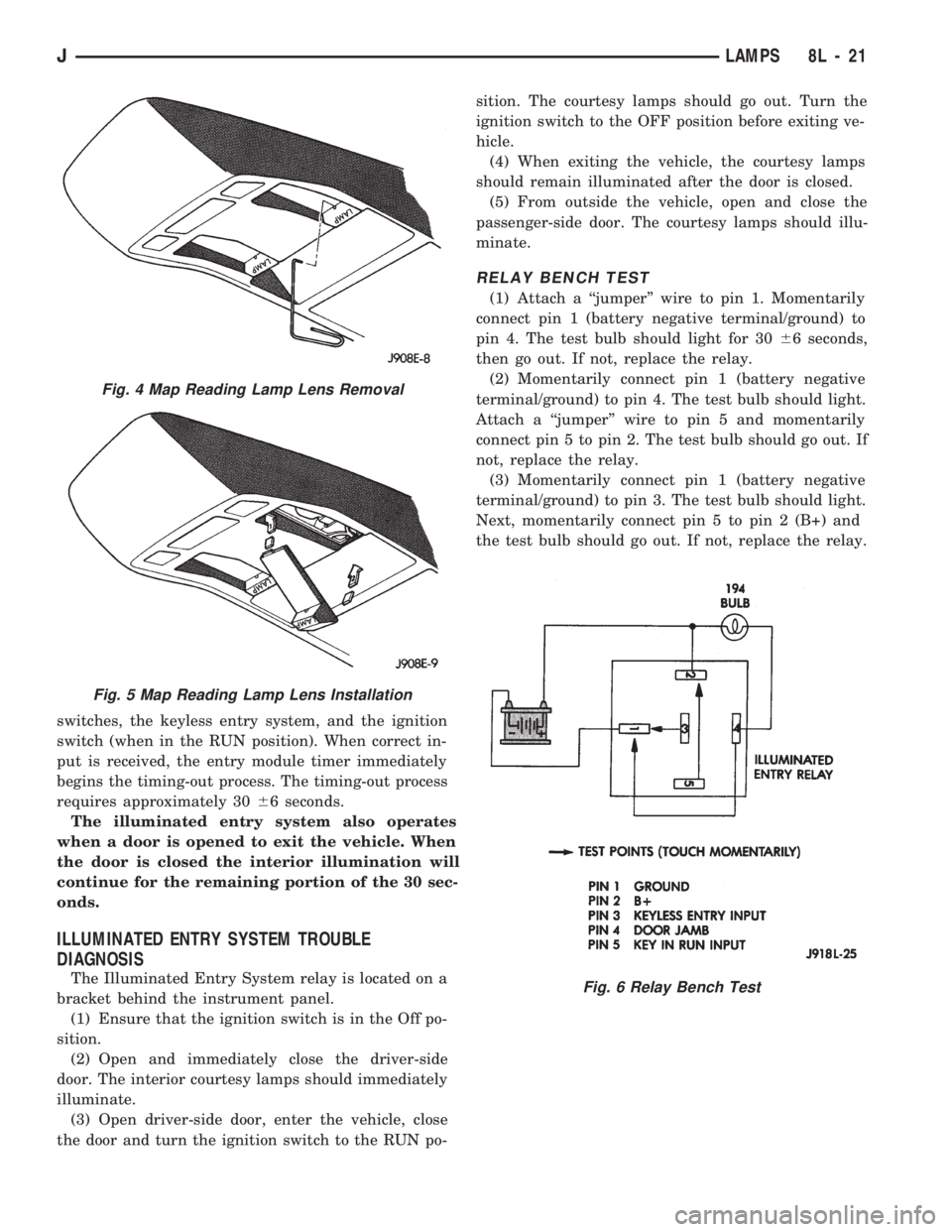
lamp housing (Fig. 4).
MAP READING LAMP LENS INSTALLATION
(1) Insert the tab at the front of the lamp lens into
the slot in the lamp housingÐshown by arrow 1 in
Figure 5.
(2) Force the rear of the lens upward until it is
seated in the lamp housingÐshown by arrow 2 in
Figure 5.
ILLUMINATED ENTRY SYSTEM SERVICE
INFORMATION
The Illuminated Entry System that is activated by
the system relay (TAN). The relay is located on a
bracket (with 3 relays) behind the instrument panel.
The relay receives input from the door pillar
Fig. 2 Dome Lamp Removal/InstallationÐXJ
Vehicles
Fig. 3 Hardtop Dome/Cargo LampÐYJ Vehicles
8L - 20 LAMPSJ
Page 448 of 1784
switches, the keyless entry system, and the ignition
switch (when in the RUN position). When correct in-
put is received, the entry module timer immediately
begins the timing-out process. The timing-out process
requires approximately 3066 seconds.
The illuminated entry system also operates
when a door is opened to exit the vehicle. When
the door is closed the interior illumination will
continue for the remaining portion of the 30 sec-
onds.
ILLUMINATED ENTRY SYSTEM TROUBLE
DIAGNOSIS
The Illuminated Entry System relay is located on a
bracket behind the instrument panel.
(1) Ensure that the ignition switch is in the Off po-
sition.
(2) Open and immediately close the driver-side
door. The interior courtesy lamps should immediately
illuminate.
(3) Open driver-side door, enter the vehicle, close
the door and turn the ignition switch to the RUN po-sition. The courtesy lamps should go out. Turn the
ignition switch to the OFF position before exiting ve-
hicle.
(4) When exiting the vehicle, the courtesy lamps
should remain illuminated after the door is closed.
(5) From outside the vehicle, open and close the
passenger-side door. The courtesy lamps should illu-
minate.
RELAY BENCH TEST
(1) Attach a ``jumper'' wire to pin 1. Momentarily
connect pin 1 (battery negative terminal/ground) to
pin 4. The test bulb should light for 3066 seconds,
then go out. If not, replace the relay.
(2) Momentarily connect pin 1 (battery negative
terminal/ground) to pin 4. The test bulb should light.
Attach a ``jumper'' wire to pin 5 and momentarily
connect pin 5 to pin 2. The test bulb should go out. If
not, replace the relay.
(3) Momentarily connect pin 1 (battery negative
terminal/ground) to pin 3. The test bulb should light.
Next, momentarily connect pin 5 to pin 2 (B+) and
the test bulb should go out. If not, replace the relay.
Fig. 4 Map Reading Lamp Lens Removal
Fig. 5 Map Reading Lamp Lens Installation
Fig. 6 Relay Bench Test
JLAMPS 8L - 21
Page 489 of 1784
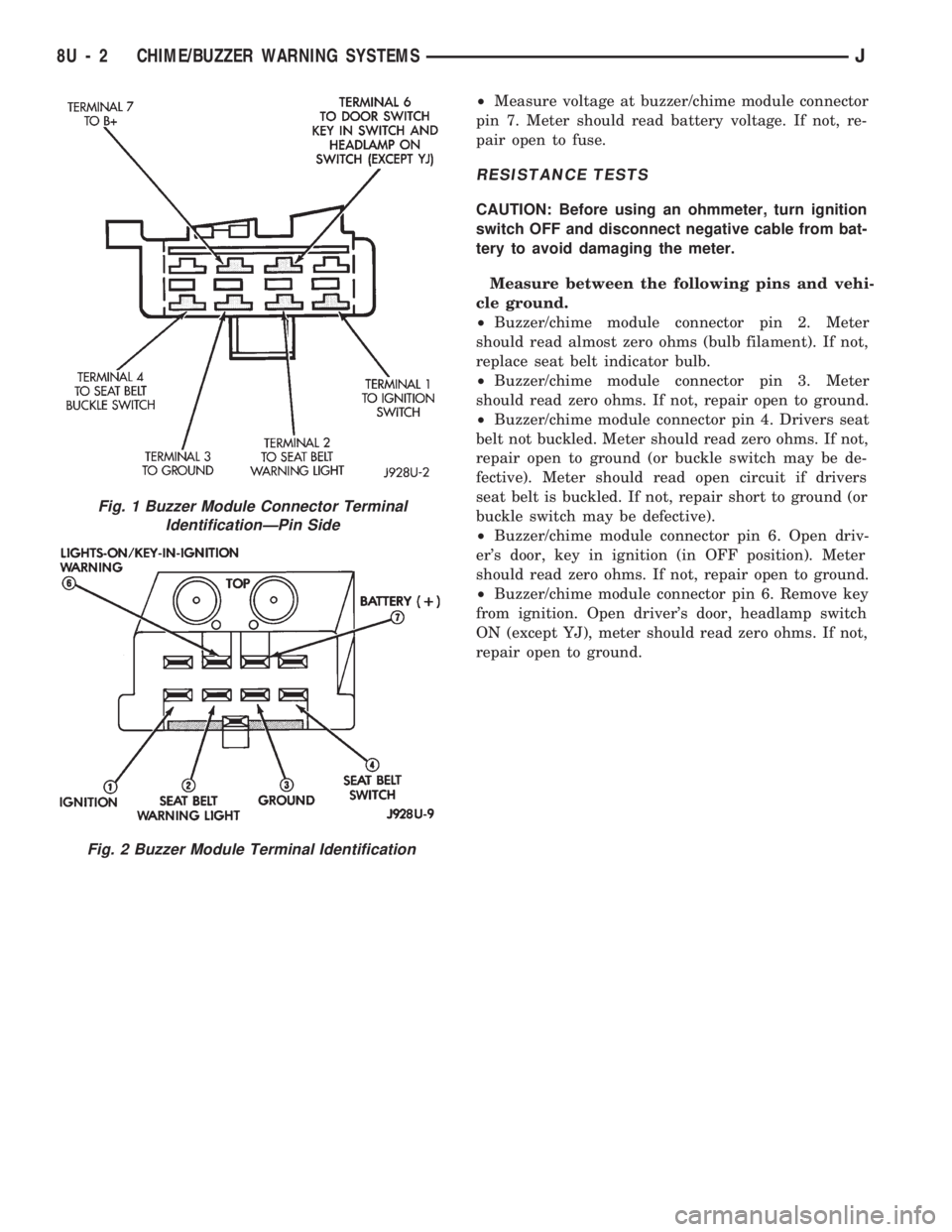
²Measure voltage at buzzer/chime module connector
pin 7. Meter should read battery voltage. If not, re-
pair open to fuse.
RESISTANCE TESTS
CAUTION: Before using an ohmmeter, turn ignition
switch OFF and disconnect negative cable from bat-
tery to avoid damaging the meter.
Measure between the following pins and vehi-
cle ground.
²Buzzer/chime module connector pin 2. Meter
should read almost zero ohms (bulb filament). If not,
replace seat belt indicator bulb.
²Buzzer/chime module connector pin 3. Meter
should read zero ohms. If not, repair open to ground.
²Buzzer/chime module connector pin 4. Drivers seat
belt not buckled. Meter should read zero ohms. If not,
repair open to ground (or buckle switch may be de-
fective). Meter should read open circuit if drivers
seat belt is buckled. If not, repair short to ground (or
buckle switch may be defective).
²Buzzer/chime module connector pin 6. Open driv-
er's door, key in ignition (in OFF position). Meter
should read zero ohms. If not, repair open to ground.
²Buzzer/chime module connector pin 6. Remove key
from ignition. Open driver's door, headlamp switch
ON (except YJ), meter should read zero ohms. If not,
repair open to ground.
Fig. 2 Buzzer Module Terminal Identification
Fig. 1 Buzzer Module Connector Terminal
IdentificationÐPin Side
8U - 2 CHIME/BUZZER WARNING SYSTEMSJ
Page 987 of 1784
ing the IAC motor pintle in and out of the air control
passage. The IAC motor is positioned when the igni-
tion key is turned to the On position.
A (factory adjusted) set screw is used to mechani-
cally limit the position of the throttle body throttle
plate.Never attempt to adjust the engine idle
speed using this screw.All idle speed functions are
controlled by the PCM.
IGNITION COILÐPCM OUTPUT
System voltage is supplied to the ignition coil pos-
itive terminal. The powertrain control module (PCM)
operates the ignition coil.Base (initial) ignition
timing is not adjustable.The PCM adjusts ignition
timing to meet changing engine operating conditions.
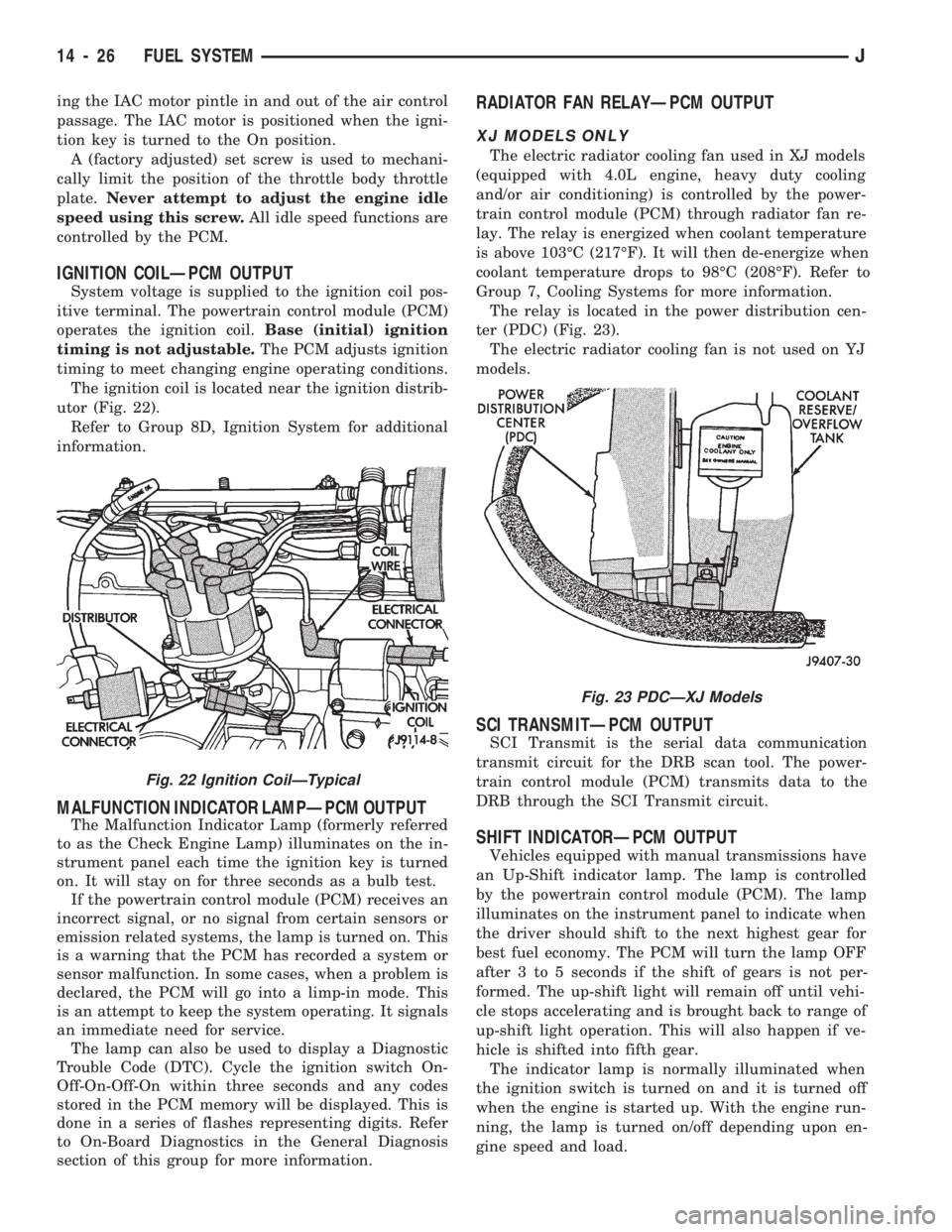
The ignition coil is located near the ignition distrib-
utor (Fig. 22).
Refer to Group 8D, Ignition System for additional
information.
MALFUNCTION INDICATOR LAMPÐPCM OUTPUT
The Malfunction Indicator Lamp (formerly referred
to as the Check Engine Lamp) illuminates on the in-
strument panel each time the ignition key is turned
on. It will stay on for three seconds as a bulb test.
If the powertrain control module (PCM) receives an
incorrect signal, or no signal from certain sensors or
emission related systems, the lamp is turned on. This
is a warning that the PCM has recorded a system or
sensor malfunction. In some cases, when a problem is
declared, the PCM will go into a limp-in mode. This
is an attempt to keep the system operating. It signals
an immediate need for service.
The lamp can also be used to display a Diagnostic
Trouble Code (DTC). Cycle the ignition switch On-
Off-On-Off-On within three seconds and any codes
stored in the PCM memory will be displayed. This is
done in a series of flashes representing digits. Refer
to On-Board Diagnostics in the General Diagnosis
section of this group for more information.
RADIATOR FAN RELAYÐPCM OUTPUT
XJ MODELS ONLY
The electric radiator cooling fan used in XJ models
(equipped with 4.0L engine, heavy duty cooling
and/or air conditioning) is controlled by the power-
train control module (PCM) through radiator fan re-
lay. The relay is energized when coolant temperature
is above 103ÉC (217ÉF). It will then de-energize when
coolant temperature drops to 98ÉC (208ÉF). Refer to
Group 7, Cooling Systems for more information.
The relay is located in the power distribution cen-
ter (PDC) (Fig. 23).
The electric radiator cooling fan is not used on YJ
models.
SCI TRANSMITÐPCM OUTPUT
SCI Transmit is the serial data communication
transmit circuit for the DRB scan tool. The power-
train control module (PCM) transmits data to the
DRB through the SCI Transmit circuit.
SHIFT INDICATORÐPCM OUTPUT
Vehicles equipped with manual transmissions have
an Up-Shift indicator lamp. The lamp is controlled
by the powertrain control module (PCM). The lamp
illuminates on the instrument panel to indicate when
the driver should shift to the next highest gear for
best fuel economy. The PCM will turn the lamp OFF
after 3 to 5 seconds if the shift of gears is not per-
formed. The up-shift light will remain off until vehi-
cle stops accelerating and is brought back to range of
up-shift light operation. This will also happen if ve-
hicle is shifted into fifth gear.
The indicator lamp is normally illuminated when
the ignition switch is turned on and it is turned off
when the engine is started up. With the engine run-
ning, the lamp is turned on/off depending upon en-
gine speed and load.
Fig. 23 PDCÐXJ Models
Fig. 22 Ignition CoilÐTypical
14 - 26 FUEL SYSTEMJ
Page 1477 of 1784
(2) Carefully pry the applique off the license plate
visor and tailgate (Fig. 62).
INSTALLATION
(1) Align the moulding with the visor and then
press the applique into place.
(2) Install the rivets to attach the outboard tabs on
applique to the tailgate.
WOODGRAIN OVERLAY
SERVICE INFORMATION
Exterior woodgrain overlay is a weather-resistant
vinyl. The adhesive backing is protected by a paper
liner until removed for installation.
OVERLAY REPAIR
Small nicks and scratches on an overlay can be
touched-up with paint.
To eliminate blisters and air bubbles, pierce them
with a needle or pin. Force the trapped air out of the
hole and press firmly on the overlay. Heat also can
be applied to remove small wrinkles.
Whenever an overlay must be stretched, do
not slit or cut it. Instead, apply heat and press
or squeegee the overlay into place.
INSTALLATION REQUIREMENTS
Overlay replacement requires metal repair and
paint refinish to be completed before the overlay is
installed.
The work area temperature should be between
18ÉC (65ÉF) and 32ÉC (90ÉF).A woodgrain overlay
should not be replaced if the work area temper-
ature is less than 18ÉC (65ÉF).
The following equipment and material are neces-
sary for overlay installation:
²a commercial woodgrain overlay removal solution;
²a commercial adhesive removal solution;
²liquid dish detergent (for wetting solution);
²a mixture of wetting solution;
²a commercial wax and silicone removal solution;
²isopropyl alcohol (rubbing alcohol);
²a squeegee (4 to 5 inches wide, plastic or hard rub-
ber);
²a water bucket and sponge;
²sandpaper (no. 360 or no. 400, wet or dry type);
²a heat gun (or infra-red heat bulb);
²clean wiping rags or paper towels;
²a pair of scissors;
²a needle or pin; and
²a wax pencil.
Using a wetting solution helps the installation of
an overlay. Prepare a solution by mixing two or three
teaspoons of dish detergent with 1 gallon of water.
Do not use soap.
Too much detergent will reduce the effective-
ness of the mixture.
OVERLAY REMOVAL
(1) Remove the adjacent moulding from panel.
(2) Start at one corner and apply heat with a heat
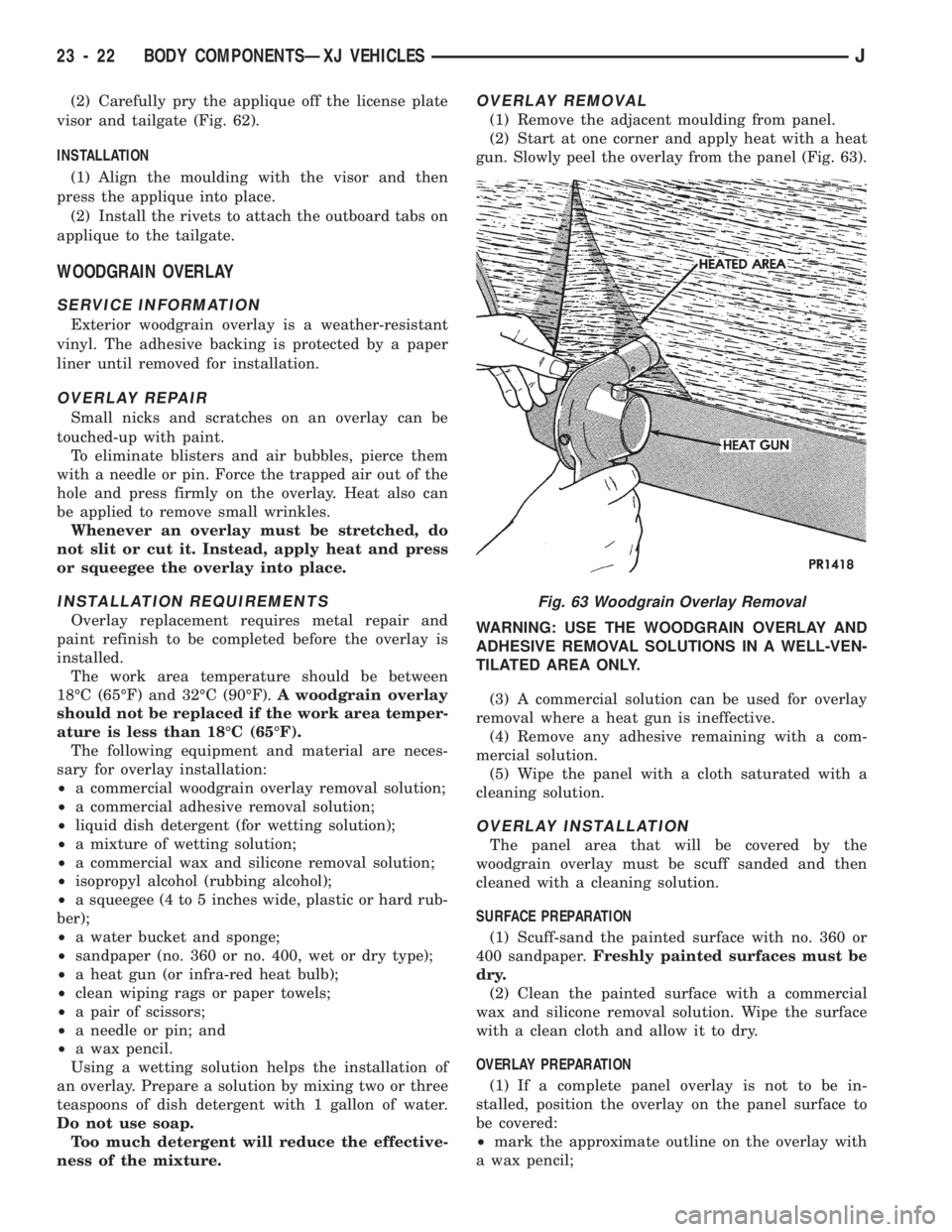
gun. Slowly peel the overlay from the panel (Fig. 63).
WARNING: USE THE WOODGRAIN OVERLAY AND
ADHESIVE REMOVAL SOLUTIONS IN A WELL-VEN-
TILATED AREA ONLY.
(3) A commercial solution can be used for overlay
removal where a heat gun is ineffective.
(4) Remove any adhesive remaining with a com-
mercial solution.
(5) Wipe the panel with a cloth saturated with a
cleaning solution.
OVERLAY INSTALLATION
The panel area that will be covered by the
woodgrain overlay must be scuff sanded and then
cleaned with a cleaning solution.
SURFACE PREPARATION
(1) Scuff-sand the painted surface with no. 360 or
400 sandpaper.Freshly painted surfaces must be
dry.
(2) Clean the painted surface with a commercial
wax and silicone removal solution. Wipe the surface
with a clean cloth and allow it to dry.
OVERLAY PREPARATION
(1) If a complete panel overlay is not to be in-
stalled, position the overlay on the panel surface to
be covered:
²mark the approximate outline on the overlay with
a wax pencil;
Fig. 63 Woodgrain Overlay Removal
23 - 22 BODY COMPONENTSÐXJ VEHICLESJ
Page 1480 of 1784
FUEL FILLER DOOR OVERLAY APPLICATION
(1) Clean the door flange with an appropriate solu-
tion.
(2) Position the top edge of the overlay at the char-
acter line and notches at door edge.
(3) Wipe the adhesive side of fuel filler door over-
lay edges with isopropyl alcohol.
(4) Heat the door overlay edges with a heat gun to
soften and make them more pliable.
CAUTION: Avoid unnecessary pulling and stretch-
ing at the ends.
(5) Fold the overlay edges over onto the door panel
flange areas and press them into place.
LIFTGATE OVERLAY APPLICATION
(1) Position the top edge of the overlay at charac-
ter line and inner edges at the license plate recess.
(2) Wipe the adhesive side of the liftgate overlay
edges with isopropyl alcohol.
(3) Heat the liftgate overlay edges with a heat gun
to soften and make them more pliable.
CAUTION: Avoid unnecessary pulling and stretch-
ing at the ends.
(4) Fold the overlay edges over onto liftgate panel
flange and press them into place.
(6) Install the liftgate moulding.
(7) Install the license plate visor applique.
BODY STRIPES/DECALS
SERVICE INFORMATION
XJ body stripes and decals are weather resistant
tape with a adhesive backing.
REPAIR
Small nicks, scratches and other surface marks in
a body stripe/decal can be touched-up with paint.To eliminate blisters and air bubbles in a body
stripe/decal, pierce them with a needle or pin.
A heat gun can also be used to remove small wrin-
kles in a stripe/decal.
REQUIREMENTS
Body stripe/decal replacement requires that the
metal repair and paint refinish be completed first.
The work area temperature should be between
18ÉC (65ÉF) and 32ÉC (90ÉF).A tape stripe/decal
should not be replaced if the work area temper-
ature is less than 18ÉC (65ÉF).
The following equipment and material are neces-
sary for removal and installation:
²a commercial tape stripe/decal removal solution;
²a commercial adhesive removal solution;
²liquid dish detergent (for the wetting solution);
²a mixture of wetting solution;
²a commercial wax and silicone removal solution;
²isopropyl (rubbing) alcohol;
²a small squeegee (plastic or hard rubber);
²a water bucket and sponge;
²clean wiping rags or paper towels;
²a heat gun (or infra-red heat bulb);
²a wax pencil;
²a sharp knife, single edge razor blade or X-acto
knife;
²a pair of scissors; and
²a needle or pin.
The use of a wetting solution aids the installation
of a tape stripe/decal on a painted panel. Prepare the
wetting solution by mixing two or three teaspoons of
dish detergent with 1 gallon of water.Do not use
soap.
Too much detergent will reduce the effective-
ness of the mixture.
REMOVAL
(1) Clean the repaired surface, adjacent panels and
door the openings as necessary.
(2) Start at one end of the tape stripe/decal and
apply heat with a heat gun. Slowly peel the stripe/
decal from the panel by pulling it back.Do not pull
the tape stripe/decal outward from panel.
WARNING: USE TAPE STRIPE/DECAL REMOVAL
SOLUTION IN A WELL-VENTILATED AREA ONLY.
(3) A tape stripe/decal removal solution can be
used for removal at areas where a heat gun is inef-
fective:
²Mask-off the body panel area surrounding the tape
stripe/decal (Fig. 71);
²move solution spray across the complete length of
stripe/decal with a steady motion;
²ensure that the complete stripe/decal is covered
with solution;
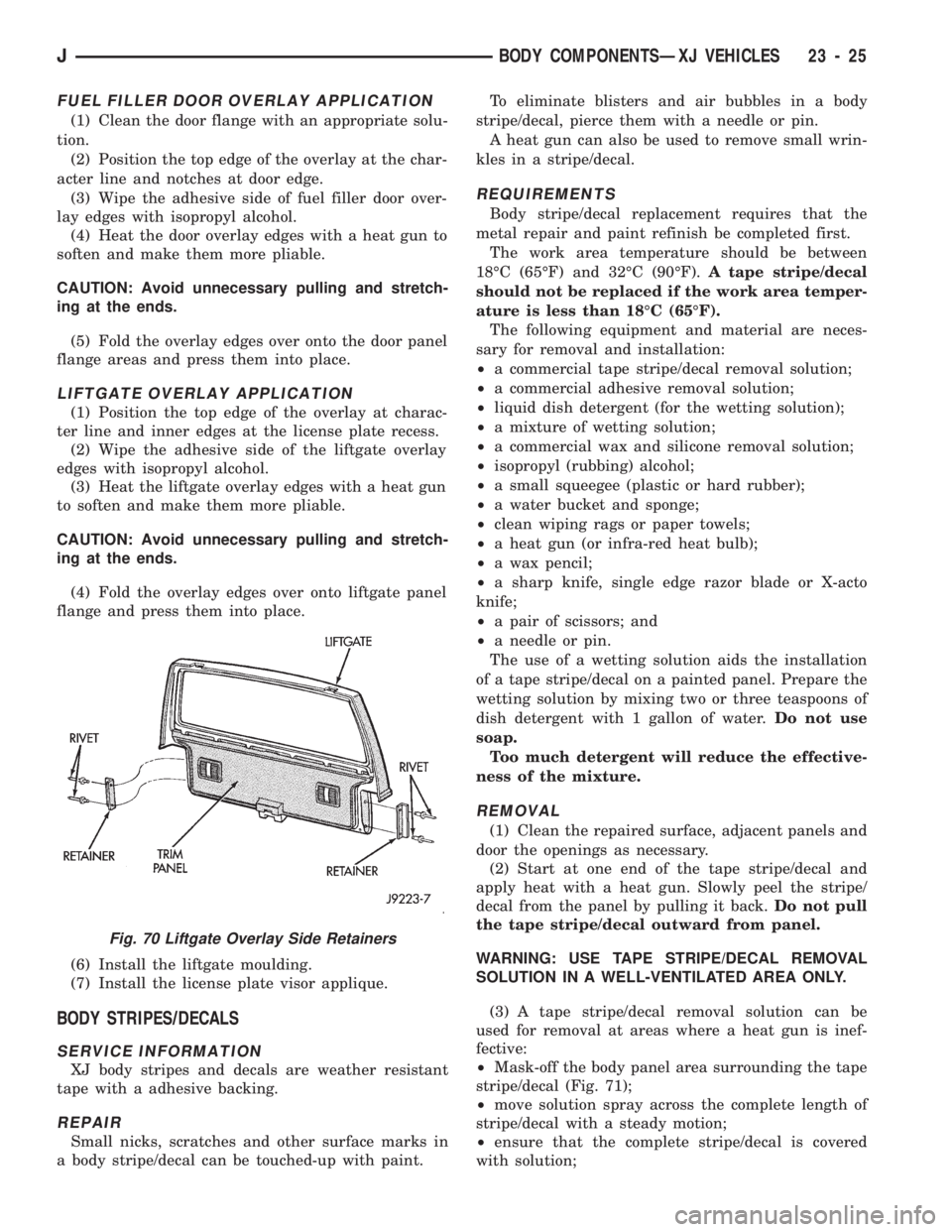
Fig. 70 Liftgate Overlay Side Retainers
JBODY COMPONENTSÐXJ VEHICLES 23 - 25
Page 1527 of 1784
LIFTGATE LICENSE PLATE LAMP HOUSING
REMOVAL
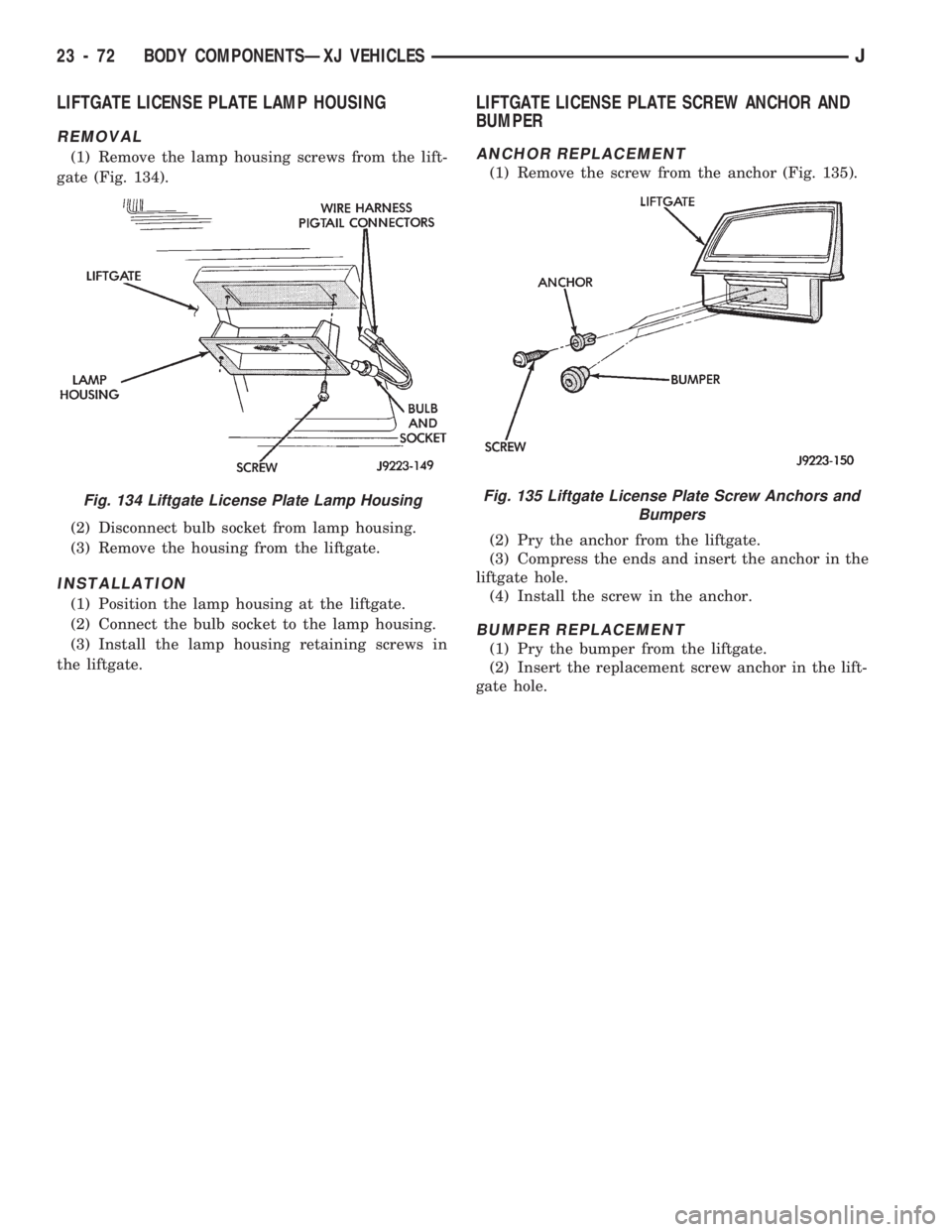
(1) Remove the lamp housing screws from the lift-
gate (Fig. 134).
(2) Disconnect bulb socket from lamp housing.
(3) Remove the housing from the liftgate.
INSTALLATION
(1) Position the lamp housing at the liftgate.
(2) Connect the bulb socket to the lamp housing.
(3) Install the lamp housing retaining screws in
the liftgate.
LIFTGATE LICENSE PLATE SCREW ANCHOR AND
BUMPER
ANCHOR REPLACEMENT
(1) Remove the screw from the anchor (Fig. 135).
(2) Pry the anchor from the liftgate.
(3) Compress the ends and insert the anchor in the
liftgate hole.
(4) Install the screw in the anchor.
BUMPER REPLACEMENT
(1) Pry the bumper from the liftgate.
(2) Insert the replacement screw anchor in the lift-
gate hole.
Fig. 134 Liftgate License Plate Lamp HousingFig. 135 Liftgate License Plate Screw Anchors and
Bumpers
23 - 72 BODY COMPONENTSÐXJ VEHICLESJ
Page 1589 of 1784
EXTERIOR COMPONENTS
INDEX
page page
Battery Tray........................... 140
Body Extension Panels and FasciasÐYJ
Renegade Vehicles..................... 147
Body Side Step Moulding................. 145
Body Stripes/Decals..................... 153
Cowl Grille and Screen................... 139
Cowl Weatherstrip Seal................... 139
Exterior Nameplates (Adhesive-Backed)....... 158
External Spare/Wheel Tire Carrier........... 172
Fender Flare........................... 144
Fender Inner Splash Shields............... 147
Fender Splash Aprons.................... 147
Fenders............................... 141
Fog LampÐYJ Renegade Vehicles.......... 150
Front Fascia and Skid PlateÐYJ Renegade
Vehicles............................. 148
Front Fender Extension PanelÐYJ Renegade
Vehicles............................. 149
Fuel Filler Protector/Nozzle................ 158
Half Metal Door Mirror (External)............ 158
Hard Top Liftgate Glass.................. 162
Hard Top Repair........................ 165
Hard Top Roof Vent..................... 165
Hard Top Service....................... 164
Hard Top Service Information.............. 164Hood................................. 137
Hood Alignment......................... 138
Hood Insulator Panel..................... 138
Hood Safety Latch....................... 139
Liftgate Glass Weatherstrip Seal Replacement . . 163
Radiator Grille Applique................... 134
Rear Fascia and Skid PlateÐYJ Renegade
Vehicles............................. 152
Rear Quarter Extension PanelÐYJ Renegade
Vehicles............................. 151
Rocker Extension PanelÐYJ Renegade
Vehicles............................. 150
Soft Top Service........................ 167
Soft Top Service Information............... 166
Sport Bar............................. 171
Tailgate Adjustment...................... 160
Tailgate Hinge.......................... 159
Tailgate Latch and Release Handle.......... 160
Tailgate Latch Striker..................... 161
Tailgate Lock Cylinder.................... 160
Tailgate Service......................... 159
Tailgate Service Information................ 159
Tailgate Weatherstrip Seal................. 161
Wheelhouse Splash Liners................ 146
RADIATOR GRILLE APPLIQUE
REMOVAL
(1) Raise the hood.
(2) Remove the headlamp bezels (Fig. 1).
(3) Remove the headlamp bulb retainer screws
(Fig. 2).
(4) Disconnect and remove the headlamps and
buckets as a unit (Fig. 2).
(5) Remove the parking lamp retaining screws
(Fig. 2).
(6) Disconnect the wire harness connectors and re-
move the parking lamps (Fig. 2).
(7) Remove the front crossmember cover.
(8) Remove the retaining screws and the bumper
inserts at the top of the grille panel (Fig. 1).
(9) Detach the grille applique from the grille panel
(Fig. 1).
(10) Remove the double faced foam adhesive tape
at the bottom of the grille applique (Fig. 1).
INSTALLATION
(1) Install double faced foam tape at the bottom,
interior side of the grille applique (Fig. 1).
(2) Position the grille applique over the grille
panel and press inward along the bottom where the
tape is located (Fig. 1).
(3) Install the grille applique retaining screws and
the bumper inserts (Fig. 1).(4) Connect the wire harness connectors and posi-
tion the headlamp buckets and headlamps in the
grille panel (Fig. 2).
(5) Install the headlamp bulb retainer and the
screws (Fig. 1). Tighten the screws to 2 Nzm (18 in-
lbs) torque.
(6) Install the headlamp bezels and the retaining
screws (Fig. 1). Tighten the screws securely.
(7) Connect the wire harness connectors and in-
stall the parking lamps (Fig. 2).
(8) Install the parking lamp retaining screws.
Tighten the screws to 2 Nzm (18 in-lbs) torque.
(9) Close the hood.
(10) Install the front crossmember cover.
23 - 134 BODY COMPONENTSÐXJ VEHICLESJ
Page 1598 of 1784
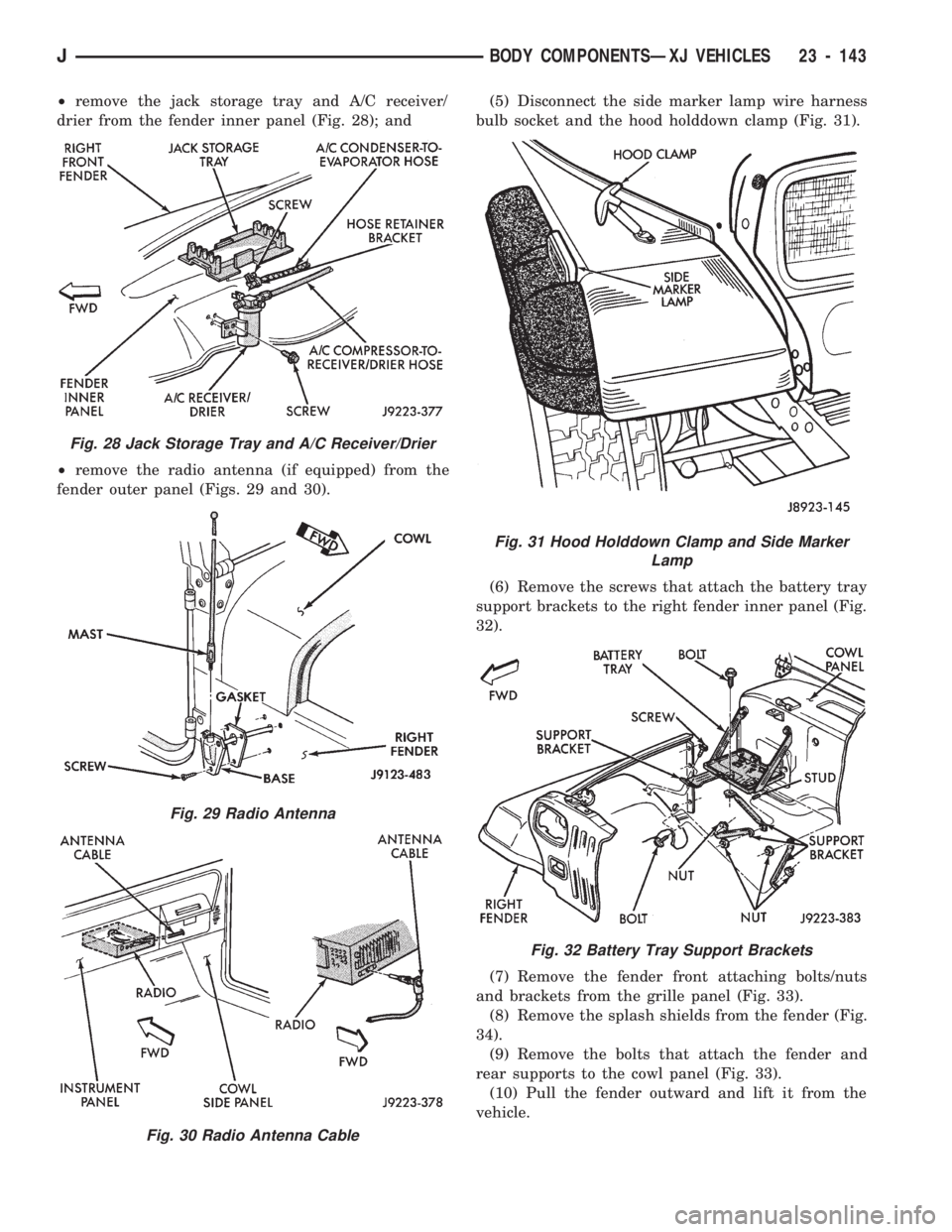
²remove the jack storage tray and A/C receiver/
drier from the fender inner panel (Fig. 28); and
²remove the radio antenna (if equipped) from the
fender outer panel (Figs. 29 and 30).(5) Disconnect the side marker lamp wire harness
bulb socket and the hood holddown clamp (Fig. 31).
(6) Remove the screws that attach the battery tray
support brackets to the right fender inner panel (Fig.
32).
(7) Remove the fender front attaching bolts/nuts
and brackets from the grille panel (Fig. 33).
(8) Remove the splash shields from the fender (Fig.
34).
(9) Remove the bolts that attach the fender and
rear supports to the cowl panel (Fig. 33).
(10) Pull the fender outward and lift it from the
vehicle.
Fig. 28 Jack Storage Tray and A/C Receiver/Drier
Fig. 29 Radio Antenna
Fig. 30 Radio Antenna Cable
Fig. 31 Hood Holddown Clamp and Side Marker
Lamp
Fig. 32 Battery Tray Support Brackets
JBODY COMPONENTSÐXJ VEHICLES 23 - 143
Page 1599 of 1784
INSTALLATION
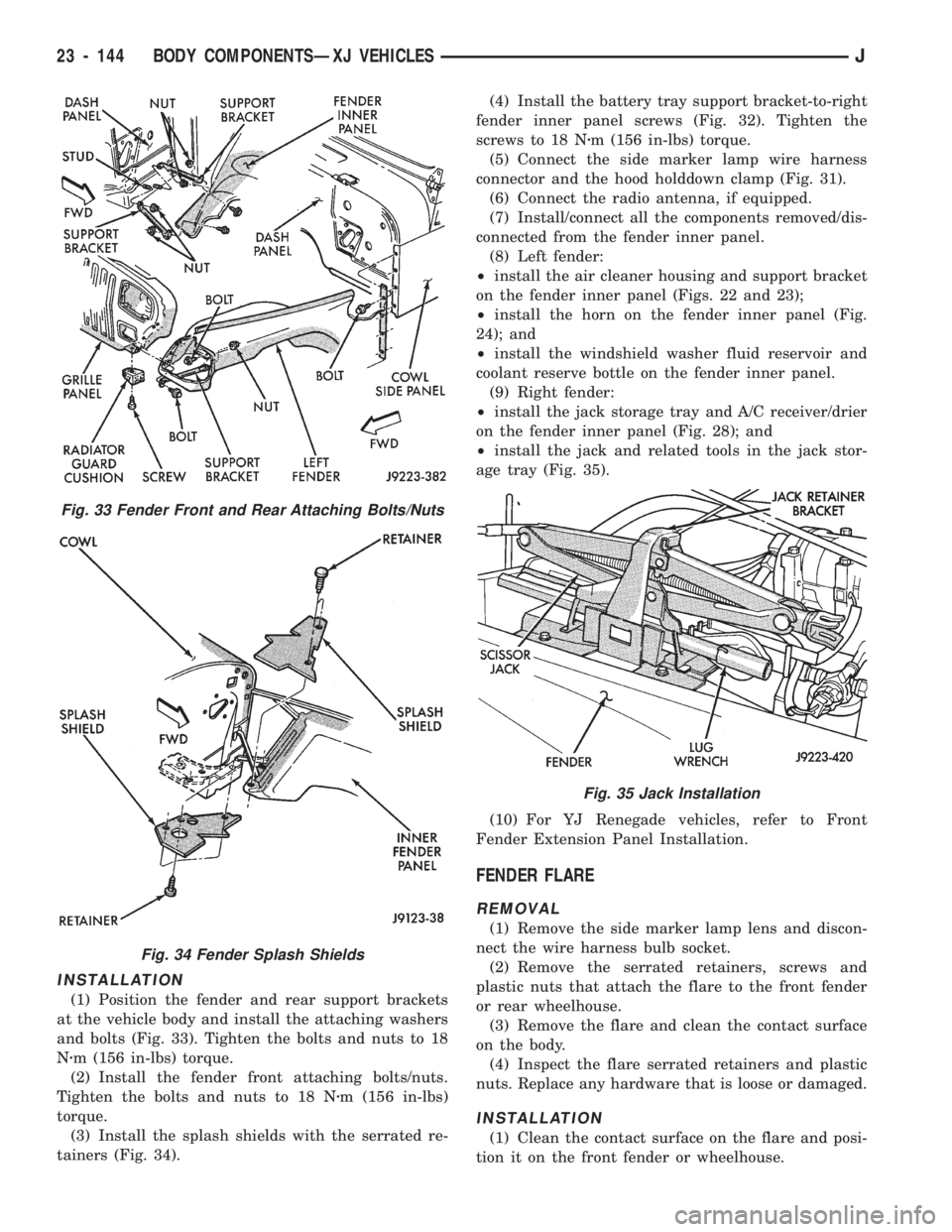
(1) Position the fender and rear support brackets
at the vehicle body and install the attaching washers
and bolts (Fig. 33). Tighten the bolts and nuts to 18
Nzm (156 in-lbs) torque.
(2) Install the fender front attaching bolts/nuts.
Tighten the bolts and nuts to 18 Nzm (156 in-lbs)
torque.
(3) Install the splash shields with the serrated re-
tainers (Fig. 34).(4) Install the battery tray support bracket-to-right
fender inner panel screws (Fig. 32). Tighten the
screws to 18 Nzm (156 in-lbs) torque.
(5) Connect the side marker lamp wire harness
connector and the hood holddown clamp (Fig. 31).
(6) Connect the radio antenna, if equipped.
(7) Install/connect all the components removed/dis-
connected from the fender inner panel.
(8) Left fender:
²install the air cleaner housing and support bracket
on the fender inner panel (Figs. 22 and 23);
²install the horn on the fender inner panel (Fig.
24); and
²install the windshield washer fluid reservoir and
coolant reserve bottle on the fender inner panel.
(9) Right fender:
²install the jack storage tray and A/C receiver/drier
on the fender inner panel (Fig. 28); and
²install the jack and related tools in the jack stor-
age tray (Fig. 35).
(10) For YJ Renegade vehicles, refer to Front
Fender Extension Panel Installation.
FENDER FLARE
REMOVAL
(1) Remove the side marker lamp lens and discon-
nect the wire harness bulb socket.
(2) Remove the serrated retainers, screws and
plastic nuts that attach the flare to the front fender
or rear wheelhouse.
(3) Remove the flare and clean the contact surface
on the body.
(4) Inspect the flare serrated retainers and plastic
nuts. Replace any hardware that is loose or damaged.
INSTALLATION
(1) Clean the contact surface on the flare and posi-
tion it on the front fender or wheelhouse.
Fig. 33 Fender Front and Rear Attaching Bolts/Nuts
Fig. 34 Fender Splash Shields
Fig. 35 Jack Installation
23 - 144 BODY COMPONENTSÐXJ VEHICLESJ