button JEEP CHEROKEE 1995 Service Owner's Guide
[x] Cancel search | Manufacturer: JEEP, Model Year: 1995, Model line: CHEROKEE, Model: JEEP CHEROKEE 1995Pages: 2198, PDF Size: 82.83 MB
Page 1572 of 2198
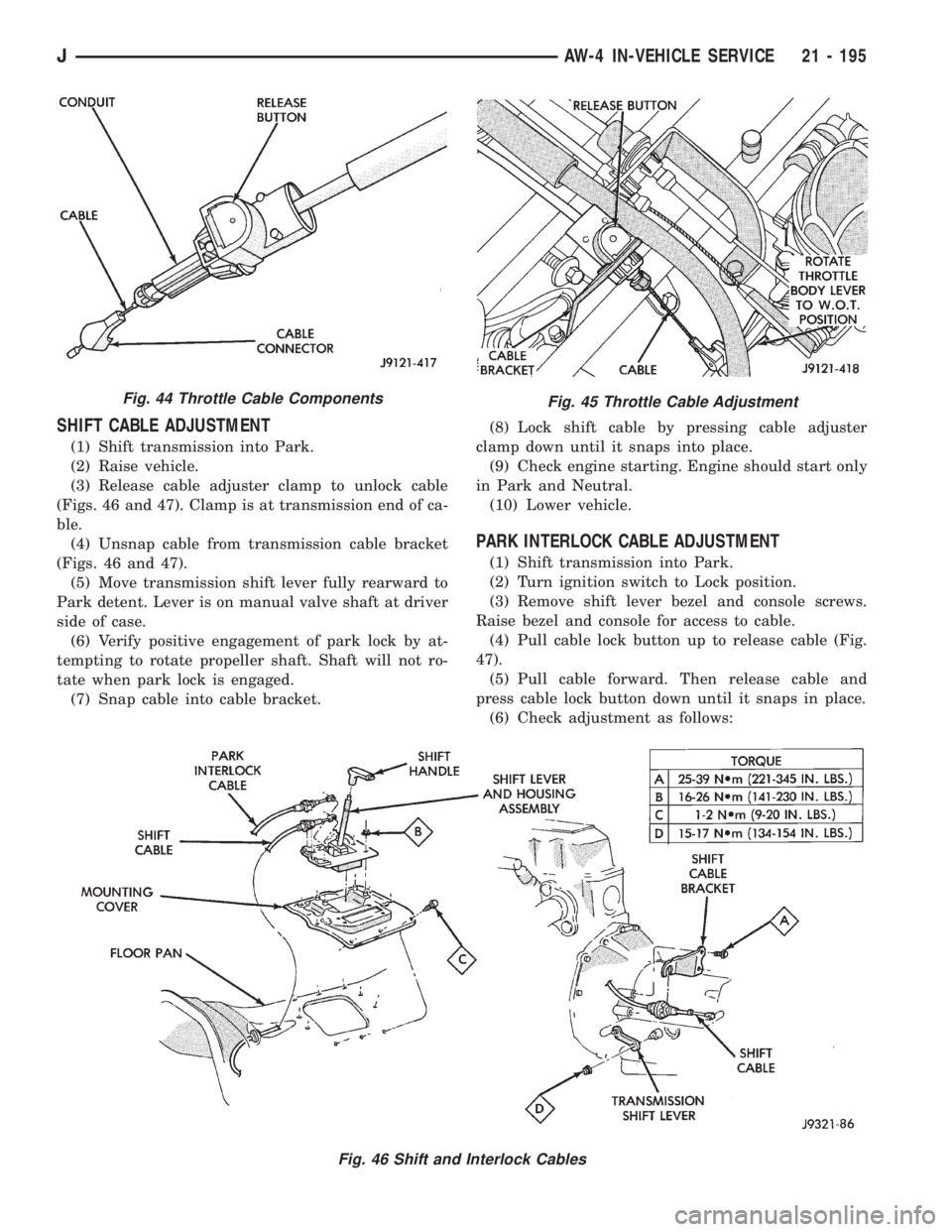
SHIFT CABLE ADJUSTMENT
(1) Shift transmission into Park.
(2) Raise vehicle.
(3) Release cable adjuster clamp to unlock cable
(Figs. 46 and 47). Clamp is at transmission end of ca-
ble.
(4) Unsnap cable from transmission cable bracket
(Figs. 46 and 47).
(5) Move transmission shift lever fully rearward to
Park detent. Lever is on manual valve shaft at driver
side of case.
(6) Verify positive engagement of park lock by at-
tempting to rotate propeller shaft. Shaft will not ro-
tate when park lock is engaged.
(7) Snap cable into cable bracket.(8) Lock shift cable by pressing cable adjuster
clamp down until it snaps into place.
(9) Check engine starting. Engine should start only
in Park and Neutral.
(10) Lower vehicle.
PARK INTERLOCK CABLE ADJUSTMENT
(1) Shift transmission into Park.
(2) Turn ignition switch to Lock position.
(3) Remove shift lever bezel and console screws.
Raise bezel and console for access to cable.
(4) Pull cable lock button up to release cable (Fig.
47).
(5) Pull cable forward. Then release cable and
press cable lock button down until it snaps in place.
(6) Check adjustment as follows:
Fig. 45 Throttle Cable Adjustment
Fig. 46 Shift and Interlock Cables
Fig. 44 Throttle Cable Components
JAW-4 IN-VEHICLE SERVICE 21 - 195
Page 1573 of 2198
(a) Check movement of release shift handle but-
ton (floor shift) or release lever (column shift). You
should not be able to press button inward or move
column lever.
(b) Turn ignition switch to On position.
(c) Press floor shift lever release button or move
column lever. Then shift into Neutral. If cable ad-
justment is correct, ignition switch can not be
turned to Lock position. Perform same check with
transmission in D range.
(7) Move shift lever back to Park and check igni-
tion switch operation. You should be able to turn
switch to Lock position and shift lever release button/
lever should not move.
TRANSMISSION COOLER SERVICE
Main Cooler
The transmission main cooler is located in the ra-
diator. The main cooler can be flushed when neces-
sary, however, the cooler is not a repairable
component. If the cooler is damaged, plugged, or
leaking, the radiator will have to be replaced.
Auxiliary Cooler
The auxiliary cooler is mounted in front of the ra-
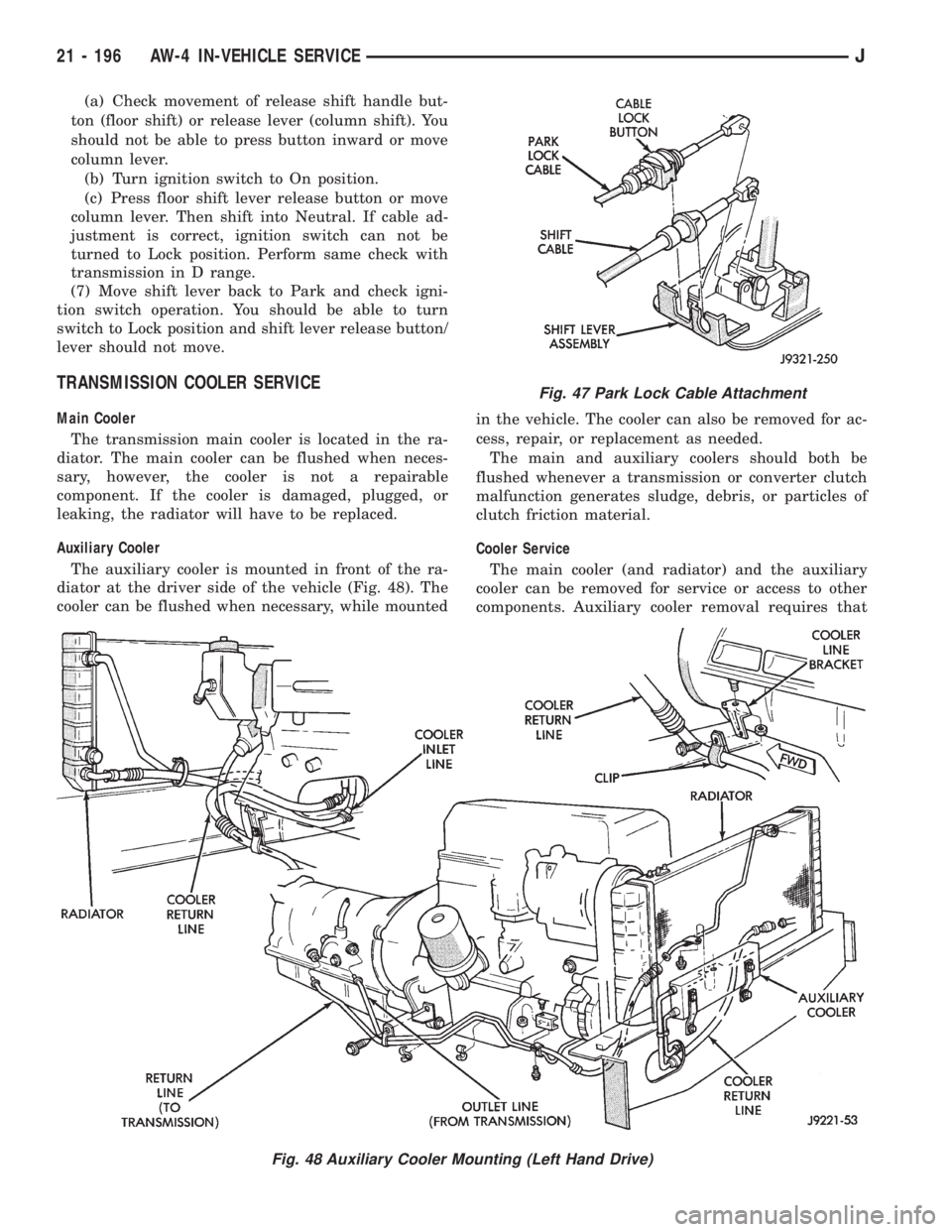
diator at the driver side of the vehicle (Fig. 48). The
cooler can be flushed when necessary, while mountedin the vehicle. The cooler can also be removed for ac-
cess, repair, or replacement as needed.
The main and auxiliary coolers should both be
flushed whenever a transmission or converter clutch
malfunction generates sludge, debris, or particles of
clutch friction material.
Cooler Service
The main cooler (and radiator) and the auxiliary
cooler can be removed for service or access to other
components. Auxiliary cooler removal requires that
Fig. 47 Park Lock Cable Attachment
Fig. 48 Auxiliary Cooler Mounting (Left Hand Drive)
21 - 196 AW-4 IN-VEHICLE SERVICEJ
Page 1781 of 2198
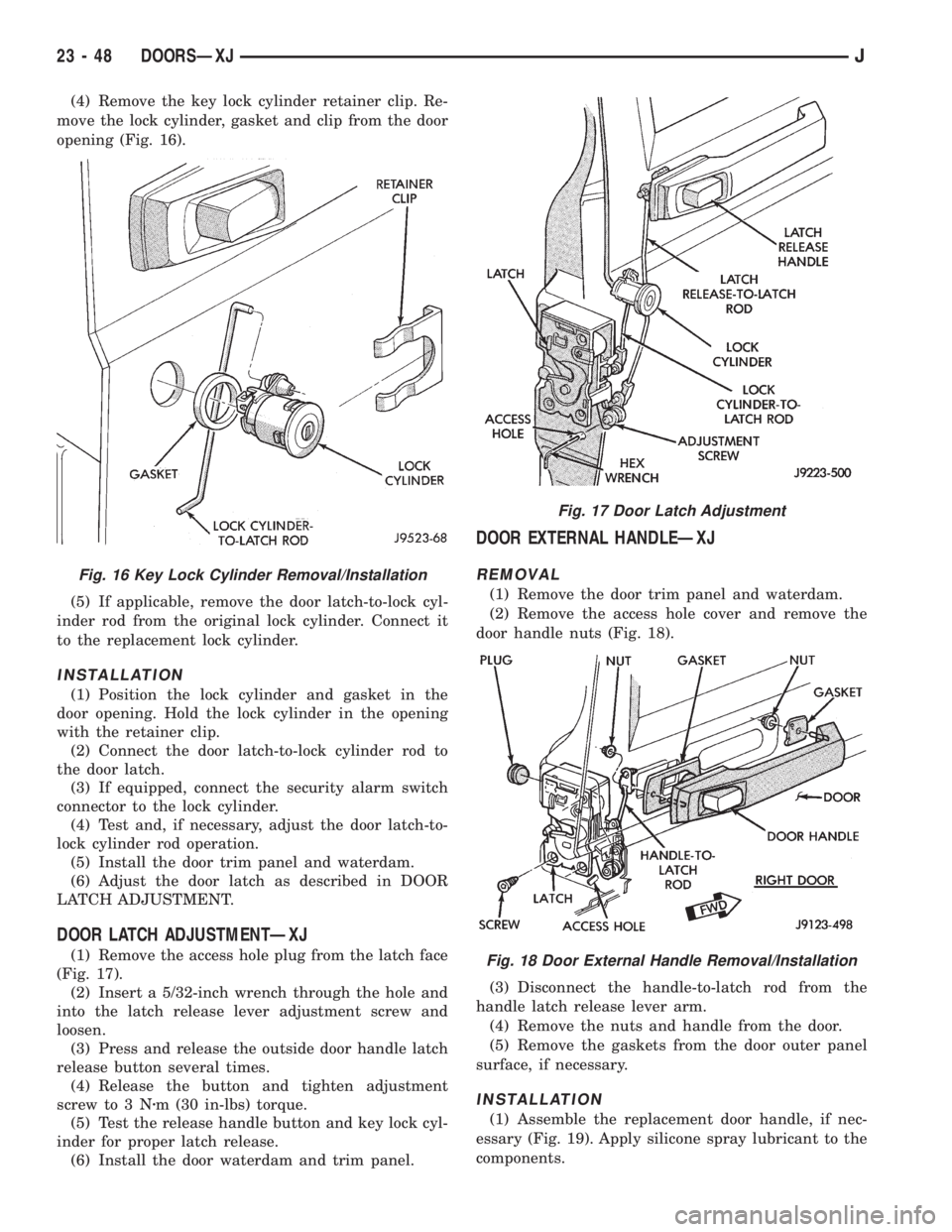
(4) Remove the key lock cylinder retainer clip. Re-
move the lock cylinder, gasket and clip from the door
opening (Fig. 16).
(5) If applicable, remove the door latch-to-lock cyl-
inder rod from the original lock cylinder. Connect it
to the replacement lock cylinder.
INSTALLATION
(1) Position the lock cylinder and gasket in the
door opening. Hold the lock cylinder in the opening
with the retainer clip.
(2) Connect the door latch-to-lock cylinder rod to
the door latch.
(3) If equipped, connect the security alarm switch
connector to the lock cylinder.
(4) Test and, if necessary, adjust the door latch-to-
lock cylinder rod operation.
(5) Install the door trim panel and waterdam.
(6) Adjust the door latch as described in DOOR
LATCH ADJUSTMENT.
DOOR LATCH ADJUSTMENTÐXJ
(1) Remove the access hole plug from the latch face
(Fig. 17).
(2) Insert a 5/32-inch wrench through the hole and
into the latch release lever adjustment screw and
loosen.
(3) Press and release the outside door handle latch
release button several times.
(4) Release the button and tighten adjustment
screw to 3 Nzm (30 in-lbs) torque.
(5) Test the release handle button and key lock cyl-
inder for proper latch release.
(6) Install the door waterdam and trim panel.
DOOR EXTERNAL HANDLEÐXJ
REMOVAL
(1) Remove the door trim panel and waterdam.
(2) Remove the access hole cover and remove the
door handle nuts (Fig. 18).
(3) Disconnect the handle-to-latch rod from the
handle latch release lever arm.
(4) Remove the nuts and handle from the door.
(5) Remove the gaskets from the door outer panel
surface, if necessary.
INSTALLATION
(1) Assemble the replacement door handle, if nec-
essary (Fig. 19). Apply silicone spray lubricant to the
components.
Fig. 16 Key Lock Cylinder Removal/Installation
Fig. 17 Door Latch Adjustment
Fig. 18 Door External Handle Removal/Installation
23 - 48 DOORSÐXJJ
Page 1870 of 2198
(3) Close the jaws on the latch.
(4) Push the lock-to-latch rod forward toward the
inside release handle. Check to ensure the lock lever
on the latch is in the unlocked position.
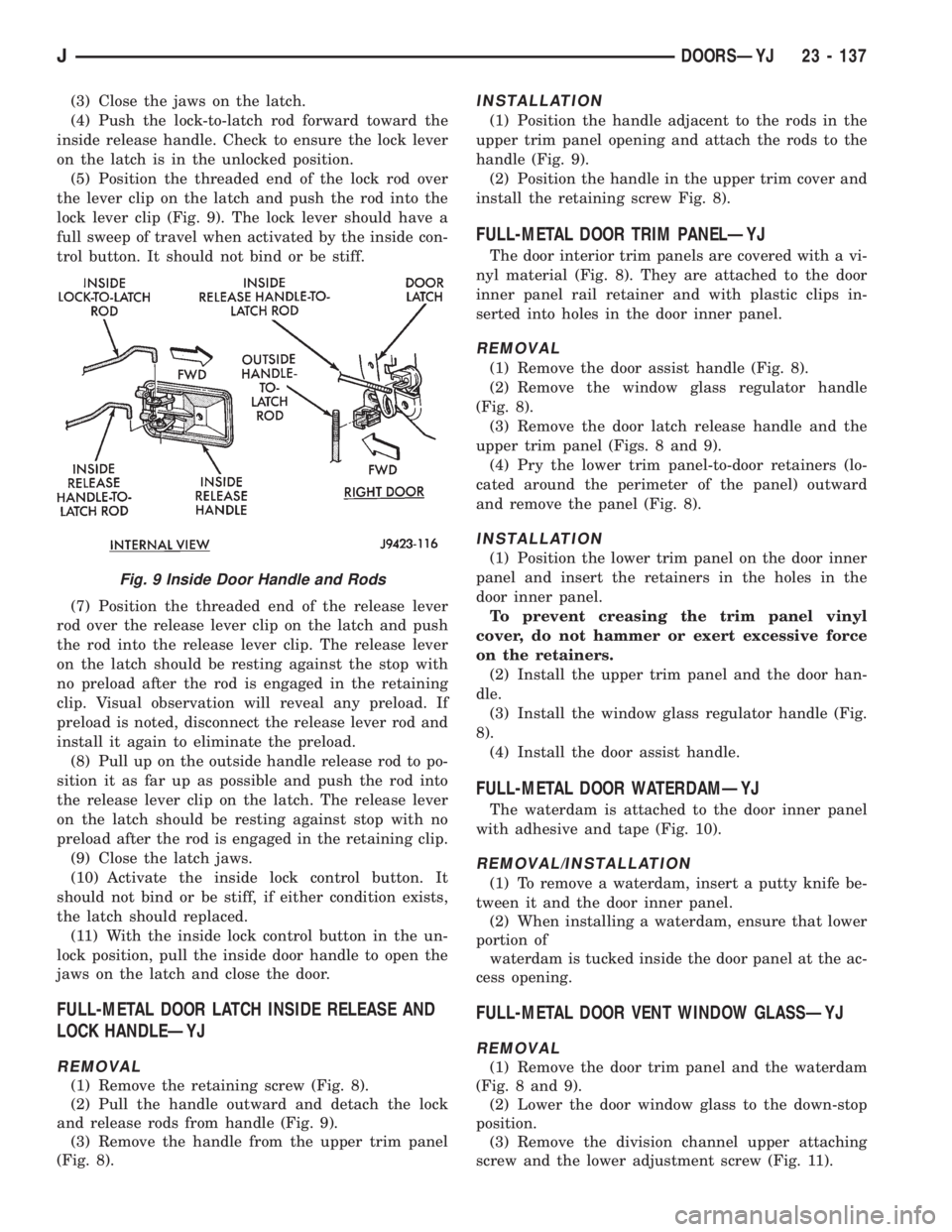
(5) Position the threaded end of the lock rod over
the lever clip on the latch and push the rod into the
lock lever clip (Fig. 9). The lock lever should have a
full sweep of travel when activated by the inside con-
trol button. It should not bind or be stiff.
(7) Position the threaded end of the release lever
rod over the release lever clip on the latch and push
the rod into the release lever clip. The release lever
on the latch should be resting against the stop with
no preload after the rod is engaged in the retaining
clip. Visual observation will reveal any preload. If
preload is noted, disconnect the release lever rod and
install it again to eliminate the preload.
(8) Pull up on the outside handle release rod to po-
sition it as far up as possible and push the rod into
the release lever clip on the latch. The release lever
on the latch should be resting against stop with no
preload after the rod is engaged in the retaining clip.
(9) Close the latch jaws.
(10) Activate the inside lock control button. It
should not bind or be stiff, if either condition exists,
the latch should replaced.
(11) With the inside lock control button in the un-
lock position, pull the inside door handle to open the
jaws on the latch and close the door.
FULL-METAL DOOR LATCH INSIDE RELEASE AND
LOCK HANDLEÐYJ
REMOVAL
(1) Remove the retaining screw (Fig. 8).
(2) Pull the handle outward and detach the lock
and release rods from handle (Fig. 9).
(3) Remove the handle from the upper trim panel
(Fig. 8).
INSTALLATION
(1) Position the handle adjacent to the rods in the
upper trim panel opening and attach the rods to the
handle (Fig. 9).
(2) Position the handle in the upper trim cover and
install the retaining screw Fig. 8).
FULL-METAL DOOR TRIM PANELÐYJ
The door interior trim panels are covered with a vi-
nyl material (Fig. 8). They are attached to the door
inner panel rail retainer and with plastic clips in-
serted into holes in the door inner panel.
REMOVAL
(1) Remove the door assist handle (Fig. 8).
(2) Remove the window glass regulator handle
(Fig. 8).
(3) Remove the door latch release handle and the
upper trim panel (Figs. 8 and 9).
(4) Pry the lower trim panel-to-door retainers (lo-
cated around the perimeter of the panel) outward
and remove the panel (Fig. 8).
INSTALLATION
(1) Position the lower trim panel on the door inner
panel and insert the retainers in the holes in the
door inner panel.
To prevent creasing the trim panel vinyl
cover, do not hammer or exert excessive force
on the retainers.
(2) Install the upper trim panel and the door han-
dle.
(3) Install the window glass regulator handle (Fig.
8).
(4) Install the door assist handle.
FULL-METAL DOOR WATERDAMÐYJ
The waterdam is attached to the door inner panel
with adhesive and tape (Fig. 10).
REMOVAL/INSTALLATION
(1) To remove a waterdam, insert a putty knife be-
tween it and the door inner panel.
(2) When installing a waterdam, ensure that lower
portion of
waterdam is tucked inside the door panel at the ac-
cess opening.
FULL-METAL DOOR VENT WINDOW GLASSÐYJ
REMOVAL
(1) Remove the door trim panel and the waterdam
(Fig. 8 and 9).
(2) Lower the door window glass to the down-stop
position.
(3) Remove the division channel upper attaching
screw and the lower adjustment screw (Fig. 11).
Fig. 9 Inside Door Handle and Rods
JDOORSÐYJ 23 - 137
Page 1876 of 2198
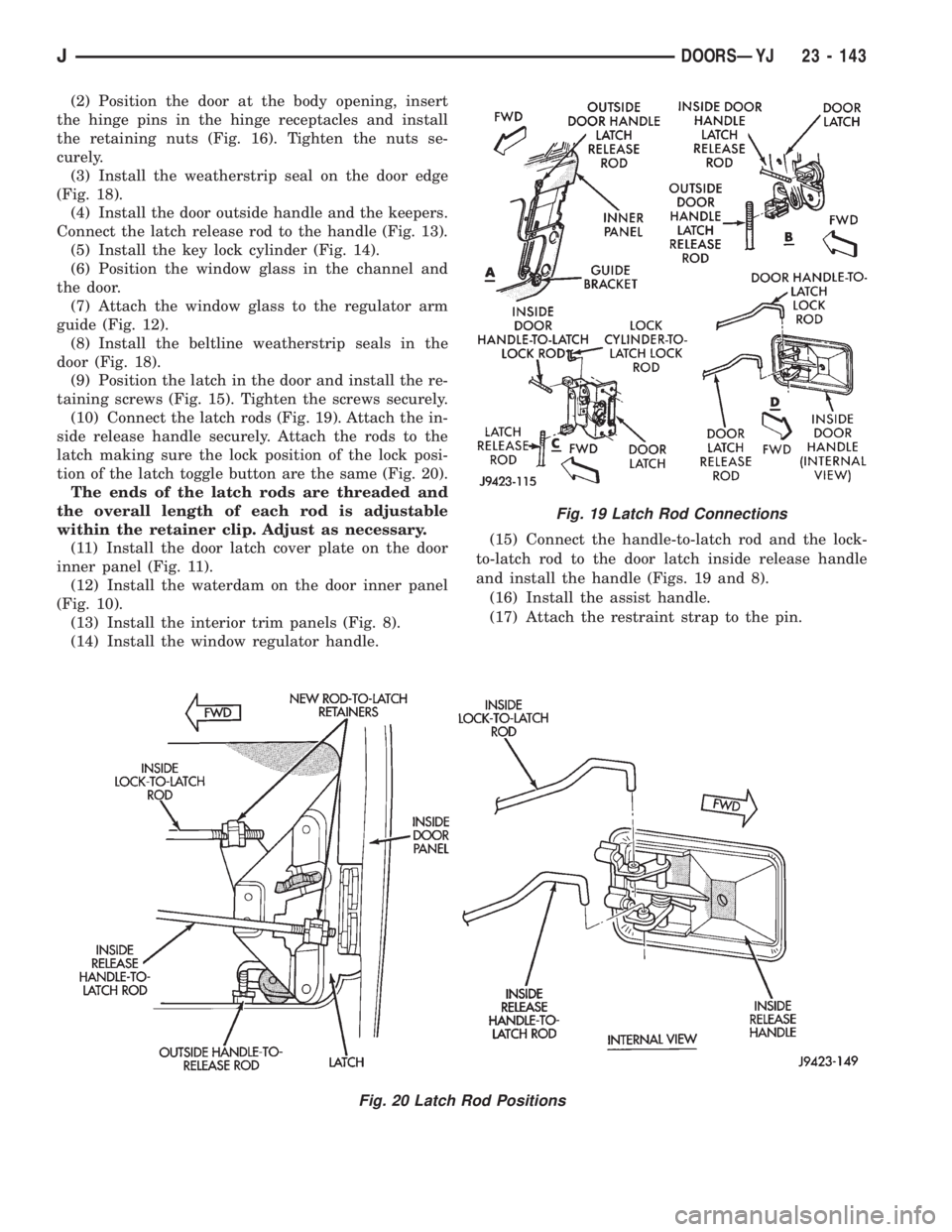
(2) Position the door at the body opening, insert
the hinge pins in the hinge receptacles and install
the retaining nuts (Fig. 16). Tighten the nuts se-
curely.
(3) Install the weatherstrip seal on the door edge
(Fig. 18).
(4) Install the door outside handle and the keepers.
Connect the latch release rod to the handle (Fig. 13).
(5) Install the key lock cylinder (Fig. 14).
(6) Position the window glass in the channel and
the door.
(7) Attach the window glass to the regulator arm
guide (Fig. 12).
(8) Install the beltline weatherstrip seals in the
door (Fig. 18).
(9) Position the latch in the door and install the re-
taining screws (Fig. 15). Tighten the screws securely.
(10) Connect the latch rods (Fig. 19). Attach the in-
side release handle securely. Attach the rods to the
latch making sure the lock position of the lock posi-
tion of the latch toggle button are the same (Fig. 20).
The ends of the latch rods are threaded and
the overall length of each rod is adjustable
within the retainer clip. Adjust as necessary.
(11) Install the door latch cover plate on the door
inner panel (Fig. 11).
(12) Install the waterdam on the door inner panel
(Fig. 10).
(13) Install the interior trim panels (Fig. 8).
(14) Install the window regulator handle.(15) Connect the handle-to-latch rod and the lock-
to-latch rod to the door latch inside release handle
and install the handle (Figs. 19 and 8).
(16) Install the assist handle.
(17) Attach the restraint strap to the pin.
Fig. 19 Latch Rod Connections
Fig. 20 Latch Rod Positions
JDOORSÐYJ 23 - 143
Page 2190 of 2198
2
1.0 Viewing A Manual In Windows98/95/NT
To view the contents of A CD-ROM, you will need to keep the CD-ROM in
the CD-ROM drive. The Acrobat Reader runs off the hard drive and
uses the CD-ROM drive to access the document content.
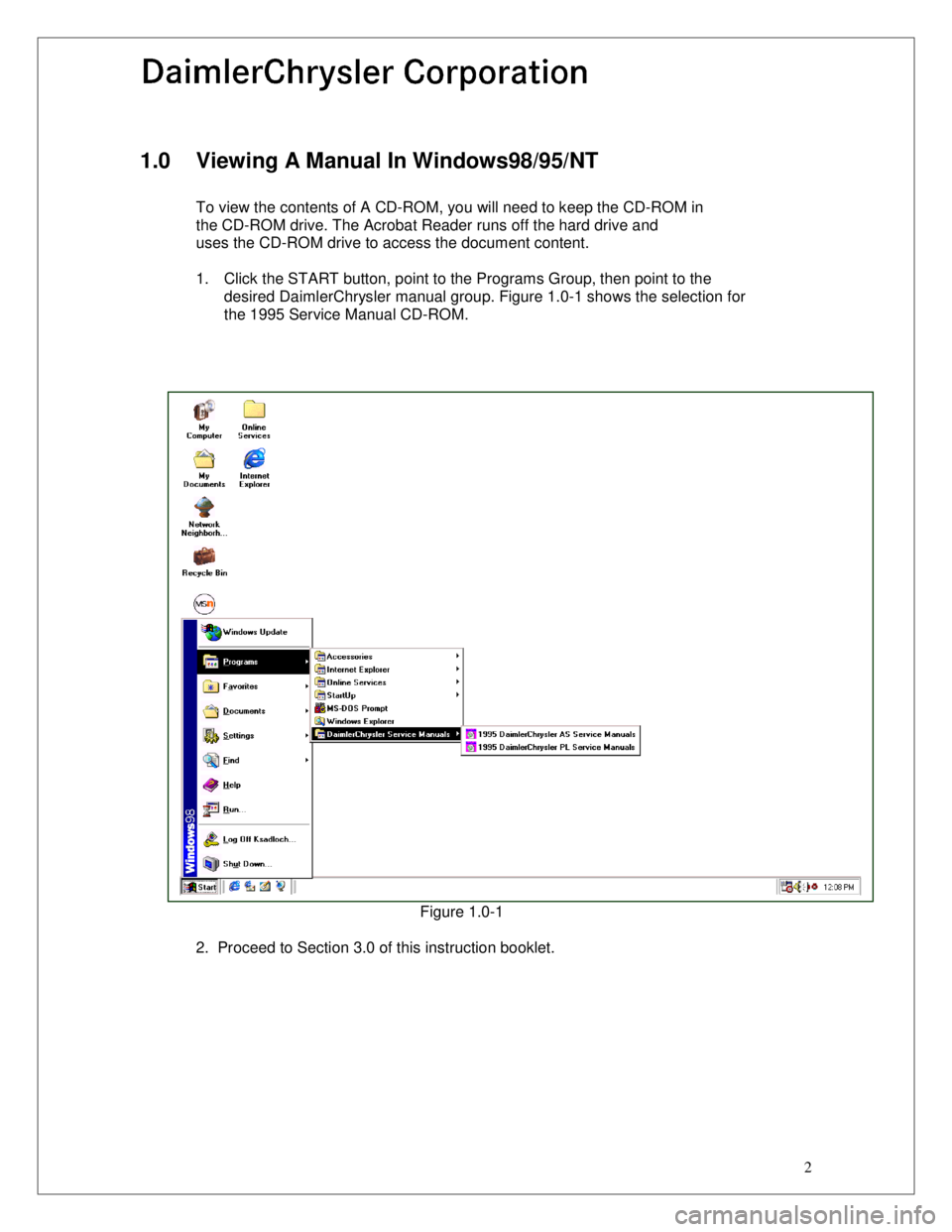
1. Click the START button, point to the Programs Group, then point to the
desired DaimlerChrysler manual group. Figure 1.0-1 shows the selection for
the 1995 Service Manual CD-ROM.
Figure 1.0-1
2. Proceed to Section 3.0 of this instruction booklet.