ad blue JEEP CHEROKEE 2014 KL / 5.G Owner's Manual
[x] Cancel search | Manufacturer: JEEP, Model Year: 2014, Model line: CHEROKEE, Model: JEEP CHEROKEE 2014 KL / 5.GPages: 204, PDF Size: 3.84 MB
Page 94 of 204
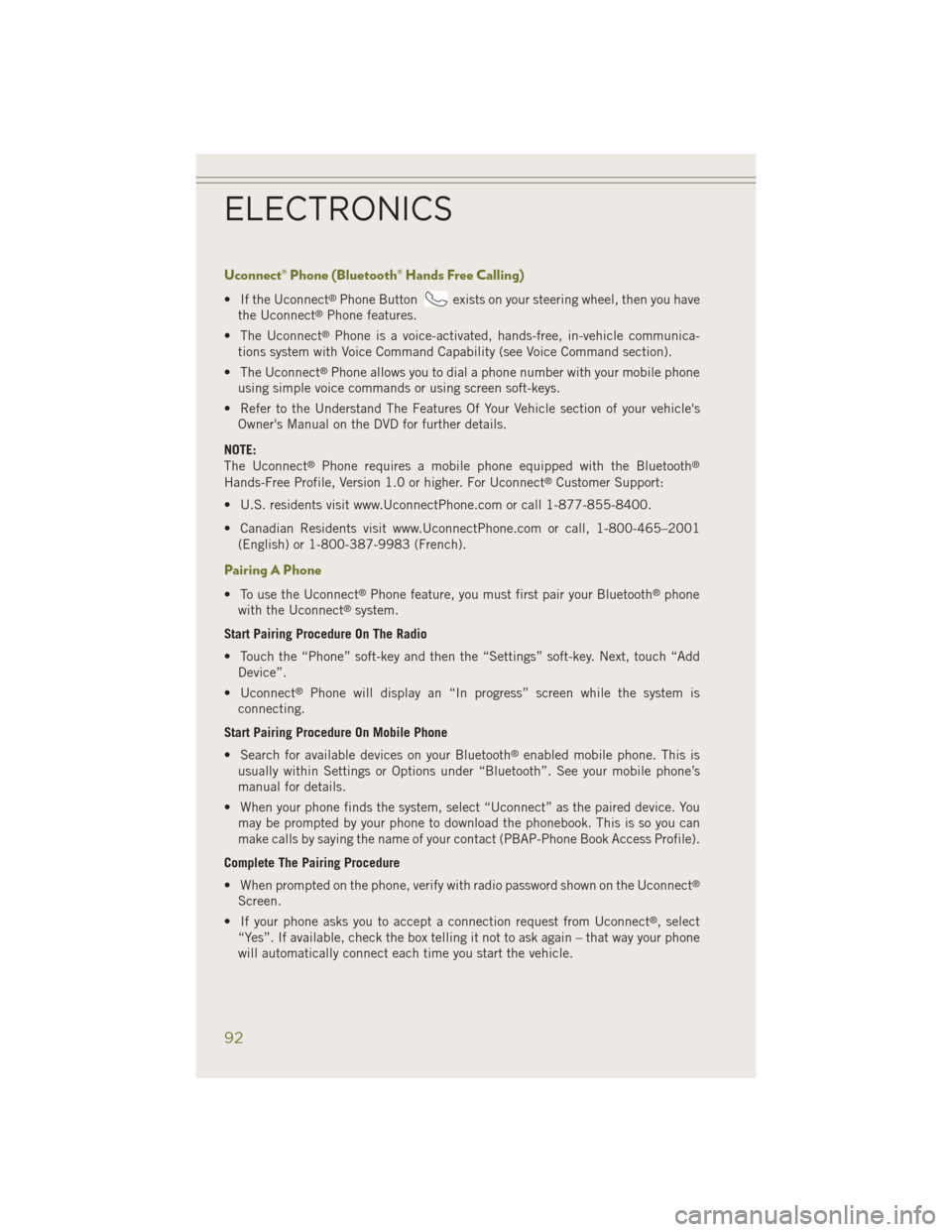
Uconnect® Phone (Bluetooth® Hands Free Calling)
• If the Uconnect®Phone Buttonexists on your steering wheel, then you have
the Uconnect®Phone features.
• The Uconnect
®Phone is a voice-activated, hands-free, in-vehicle communica-
tions system with Voice Command Capability (see Voice Command section).
• The Uconnect
®Phone allows you to dial a phone number with your mobile phone
using simple voice commands or using screen soft-keys.
• Refer to the Understand The Features Of Your Vehicle section of your vehicle's Owner's Manual on the DVD for further details.
NOTE:
The Uconnect
®Phone requires a mobile phone equipped with the Bluetooth®
Hands-Free Profile, Version 1.0 or higher. For Uconnect®Customer Support:
• U.S. residents visit www.UconnectPhone.com or call 1-877-855-8400.
• Canadian Residents visit www.UconnectPhone.com or call, 1-800-465–2001 (English) or 1-800-387-9983 (French).
Pairing A Phone
• To use the Uconnect®Phone feature, you must first pair your Bluetooth®phone
with the Uconnect®system.
Start Pairing Procedure On The Radio
• Touch the “Phone” soft-key and then the “Settings” soft-key. Next, touch “Add Device”.
• Uconnect
®Phone will display an “In progress” screen while the system is
connecting.
Start Pairing Procedure On Mobile Phone
• Search for available devices on your Bluetooth
®enabled mobile phone. This is
usually within Settings or Options under “Bluetooth”. See your mobile phone’s
manual for details.
• When your phone finds the system, select “Uconnect” as the paired device. You may be prompted by your phone to download the phonebook. This is so you can
make calls by saying the name of your contact (PBAP-Phone Book Access Profile).
Complete The Pairing Procedure
• When prompted on the phone, verify with radio password shown on the Uconnect
®
Screen.
• If your phone asks you to accept a connection request from Uconnect
®, select
“Yes”. If available, check the box telling it not to ask again – that way your phone
will automatically connect each time you start the vehicle.
ELECTRONICS
92
Page 97 of 204
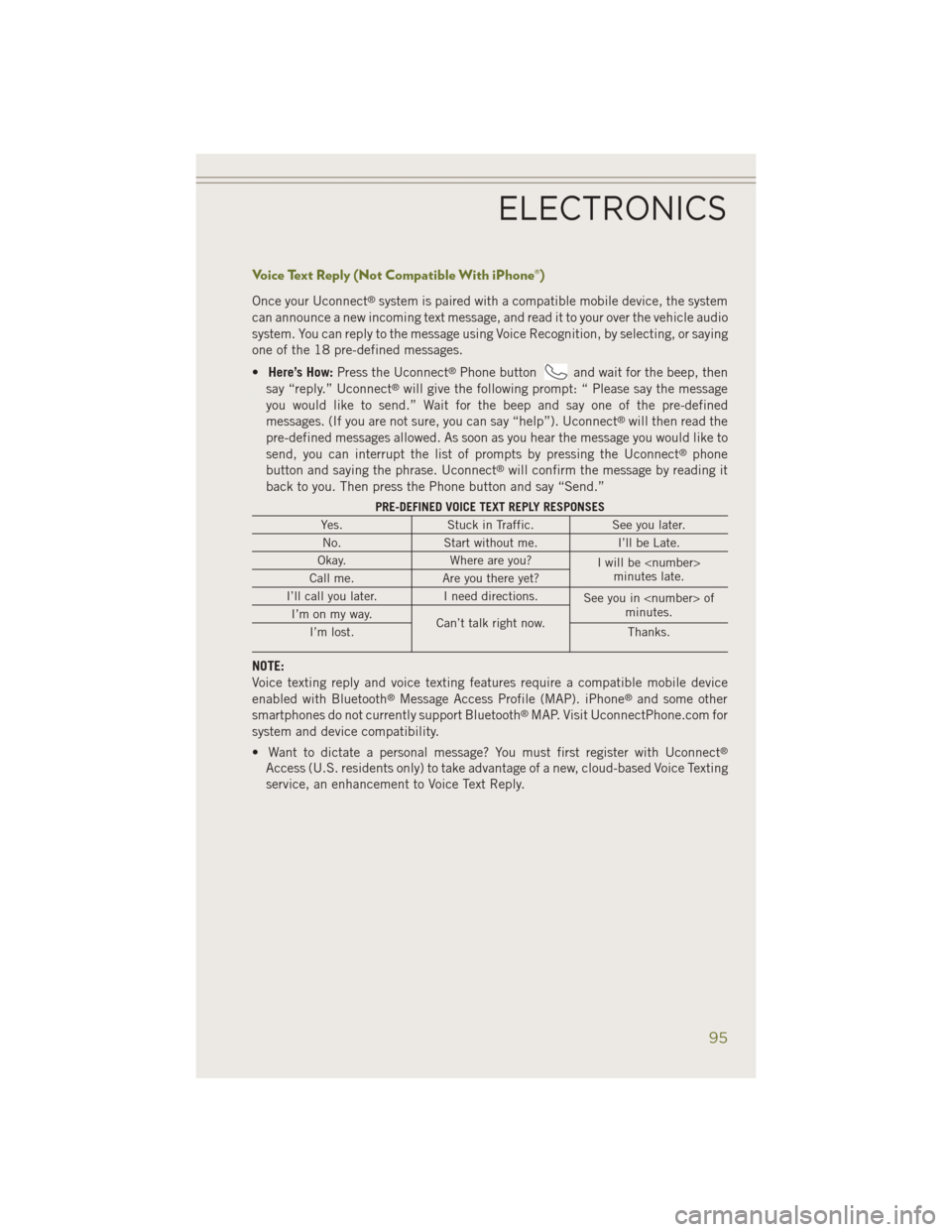
Voice Text Reply (Not Compatible With iPhone®)
Once your Uconnect®system is paired with a compatible mobile device, the system
can announce a new incoming text message, and read it to your over the vehicle audio
system. You can reply to the message using Voice Recognition, by selecting, or saying
one of the 18 pre-defined messages.
• Here’s How: Press the Uconnect
®Phone buttonand wait for the beep, then
say “reply.” Uconnect®will give the following prompt: “ Please say the message
you would like to send.” Wait for the beep and say one of the pre-defined
messages. (If you are not sure, you can say “help”). Uconnect
®will then read the
pre-defined messages allowed. As soon as you hear the message you would like to
send, you can interrupt the list of prompts by pressing the Uconnect
®phone
button and saying the phrase. Uconnect®will confirm the message by reading it
back to you. Then press the Phone button and say “Send.”
PRE-DEFINED VOICE TEXT REPLY RESPONSES
Yes. Stuck in Traffic. See you later.
No. Start without me. I’ll be Late.
Okay. Where are you?
I will be
minutes late.
Call me. Are you there yet?
I’ll call you later. I need directions.
See you in
minutes.
I’m on my way.
Can’t talk right now.
I’m lost. Thanks.
NOTE:
Voice texting reply and voice texting features require a compatible mobile device
enabled with Bluetooth
®Message Access Profile (MAP). iPhone®and some other
smartphones do not currently support Bluetooth®MAP. Visit UconnectPhone.com for
system and device compatibility.
• Want to dictate a personal message? You must first register with Uconnect
®
Access (U.S. residents only) to take advantage of a new, cloud-based Voice Texting
service, an enhancement to Voice Text Reply.
ELECTRONICS
95
Page 100 of 204
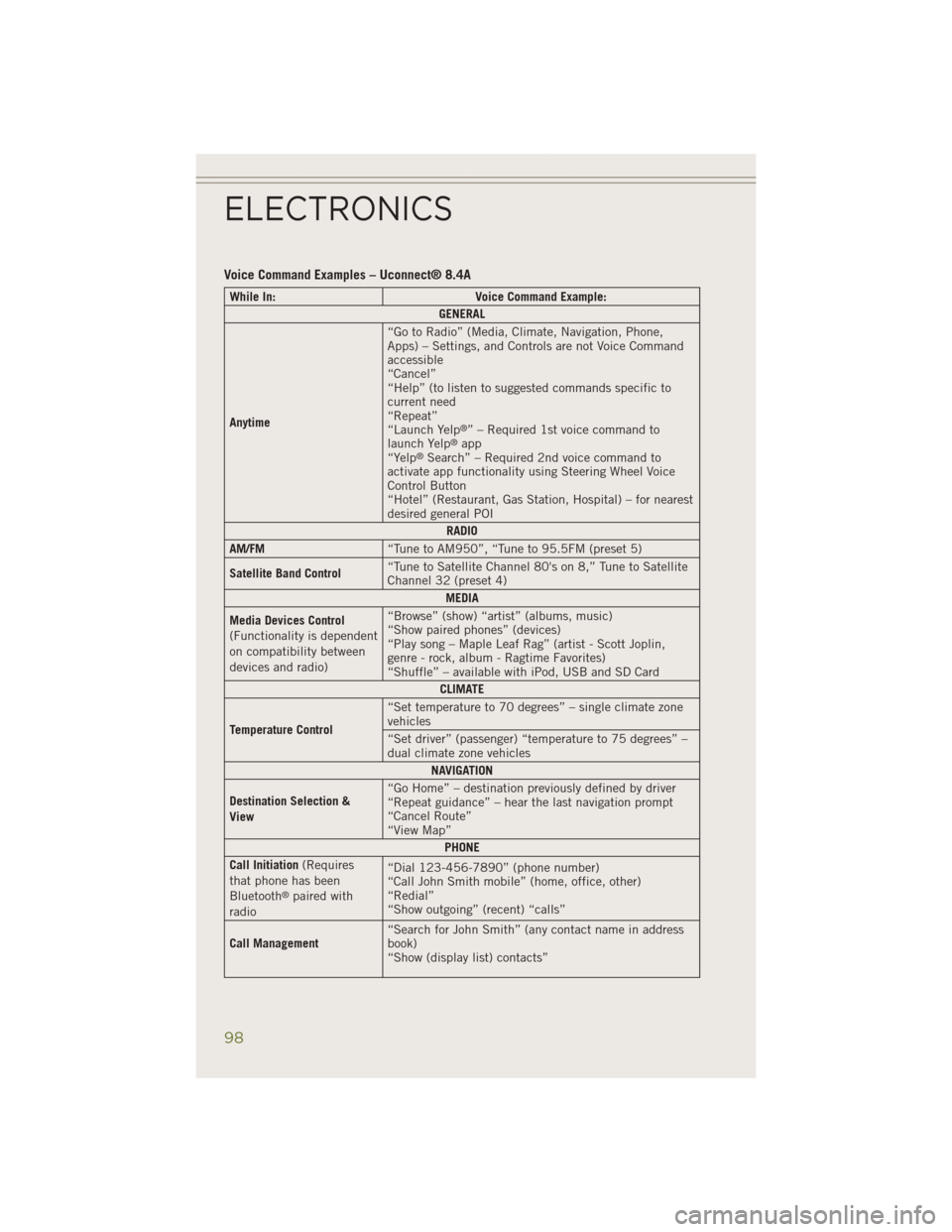
Voice Command Examples – Uconnect® 8.4A
While In:Voice Command Example:
GENERAL
Anytime “Go to Radio” (Media, Climate, Navigation, Phone,
Apps) – Settings, and Controls are not Voice Command
accessible
“Cancel”
“Help” (to listen to suggested commands specific to
current need
“Repeat”
“Launch Yelp
®” – Required 1st voice command to
launch Yelp®app
“Yelp®Search” – Required 2nd voice command to
activate app functionality using Steering Wheel Voice
Control Button
“Hotel” (Restaurant, Gas Station, Hospital) – for nearest
desired general POI
RADIO
AM/FM “Tune to AM950”, “Tune to 95.5FM (preset 5)
Satellite Band Control “Tune to Satellite Channel 80's on 8,” Tune to Satellite
Channel 32 (preset 4)
MEDIA
Media Devices Control
(Functionality is dependent
on compatibility between
devices and radio) “Browse” (show) “artist” (albums, music)
“Show paired phones” (devices)
“Play song – Maple Leaf Rag” (artist - Scott Joplin,
genre - rock, album - Ragtime Favorites)
“Shuffle” – available with iPod, USB and SD Card
CLIMATE
Temperature Control “Set temperature to 70 degrees” – single climate zone
vehicles
“Set driver” (passenger) “temperature to 75 degrees” –
dual climate zone vehicles
NAVIGATION
Destination Selection &
View “Go Home” – destination previously defined by driver
“Repeat guidance” – hear the last navigation prompt
“Cancel Route”
“View Map”
PHONE
Call Initiation (Requires
that phone has been
Bluetooth
®paired with
radio “Dial 123-456-7890” (phone number)
“Call John Smith mobile” (home, office, other)
“Redial”
“Show outgoing” (recent) “calls”
Call Management “Search for John Smith” (any contact name in address
book)
“Show (display list) contacts”
ELECTRONICS
98
Page 101 of 204
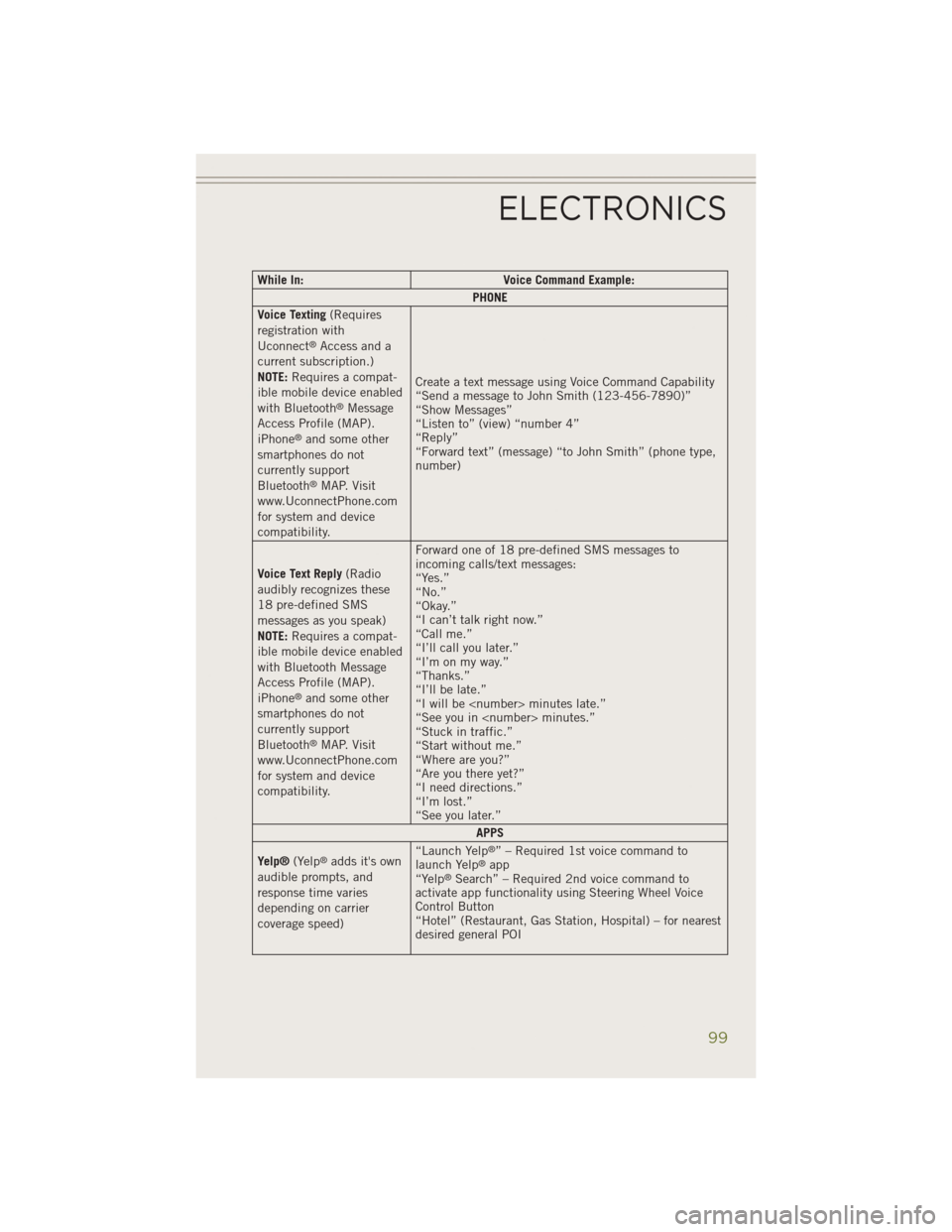
While In:Voice Command Example:
PHONE
Voice Texting (Requires
registration with
Uconnect
®Access and a
current subscription.)
NOTE: Requires a compat-
ible mobile device enabled
with Bluetooth
®Message
Access Profile (MAP).
iPhone
®and some other
smartphones do not
currently support
Bluetooth
®MAP. Visit
www.UconnectPhone.com
for system and device
compatibility. Create a text message using Voice Command Capability
“Send a message to John Smith (123-456-7890)”
“Show Messages”
“Listen to” (view) “number 4”
“Reply”
“Forward text” (message) “to John Smith” (phone type,
number)
Voice Text Reply (Radio
audibly recognizes these
18 pre-defined SMS
messages as you speak)
NOTE: Requires a compat-
ible mobile device enabled
with Bluetooth Message
Access Profile (MAP).
iPhone
®and some other
smartphones do not
currently support
Bluetooth
®MAP. Visit
www.UconnectPhone.com
for system and device
compatibility. Forward one of 18 pre-defined SMS messages to
incoming calls/text messages:
“Yes.”
“No.”
“Okay.”
“I can’t talk right now.”
“Call me.”
“I’ll call you later.”
“I’m on my way.”
“Thanks.”
“I’ll be late.”
“I will be
“See you in
“Stuck in traffic.”
“Start without me.”
“Where are you?”
“Are you there yet?”
“I need directions.”
“I’m lost.”
“See you later.”
APPS
Yelp® (Yelp
®adds it's own
audible prompts, and
response time varies
depending on carrier
coverage speed) “Launch Yelp®” – Required 1st voice command to
launch Yelp®app
“Yelp®Search” – Required 2nd voice command to
activate app functionality using Steering Wheel Voice
Control Button
“Hotel” (Restaurant, Gas Station, Hospital) – for nearest
desired general POI
ELECTRONICS
99
Page 109 of 204
• To route the audio cable out of the center console, use the access cut out in thefront of the console.
Bluetooth® Streaming Audio
•
If using a Bluetooth®- equipped device, you may also be able to stream music to your
vehicle's sound system. Your connected device must be Bluetooth-compatible, and
paired with your system (see Uconnect
®Phone for pairing instructions). You can
access the music from your connected Bluetooth®device by touching the
“Bluetooth®” soft-key while in Media mode.
Uconnect®
8.4A & 8.4AN Media Hub
(USB, AUX Ports) Media Hub
(SD, USB, AUX Ports) Remote USB
Port (Fully
Functional) Remote USB
Port (Charging Only)
-SSO
S = Standard Equipment
O = Optional Equipment
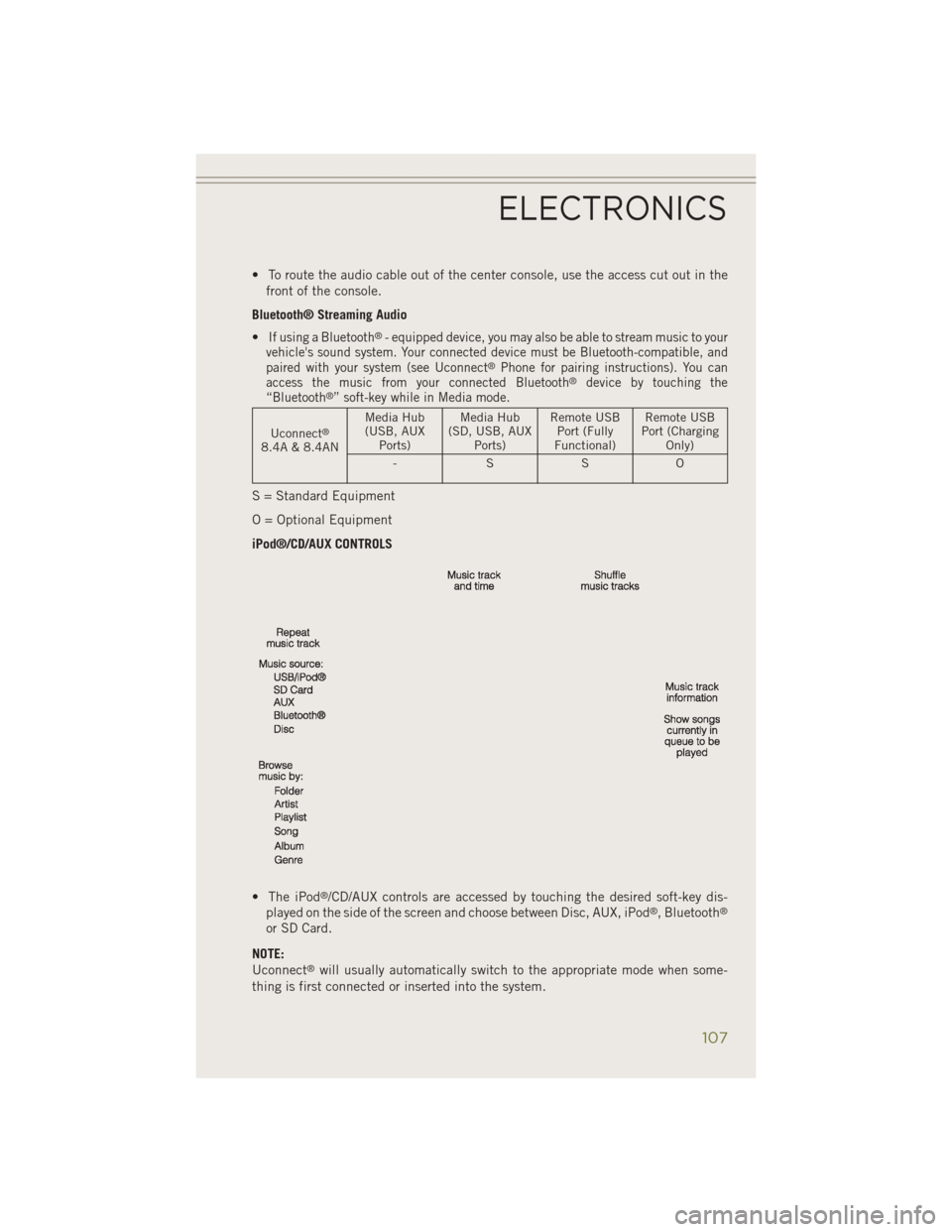
iPod®/CD/AUX CONTROLS
• The iPod
®/CD/AUX controls are accessed by touching the desired soft-key dis-
played on the side of the screen and choose between Disc, AUX, iPod®, Bluetooth®
or SD Card.
NOTE:
Uconnect
®will usually automatically switch to the appropriate mode when some-
thing is first connected or inserted into the system.
ELECTRONICS
107
Page 112 of 204
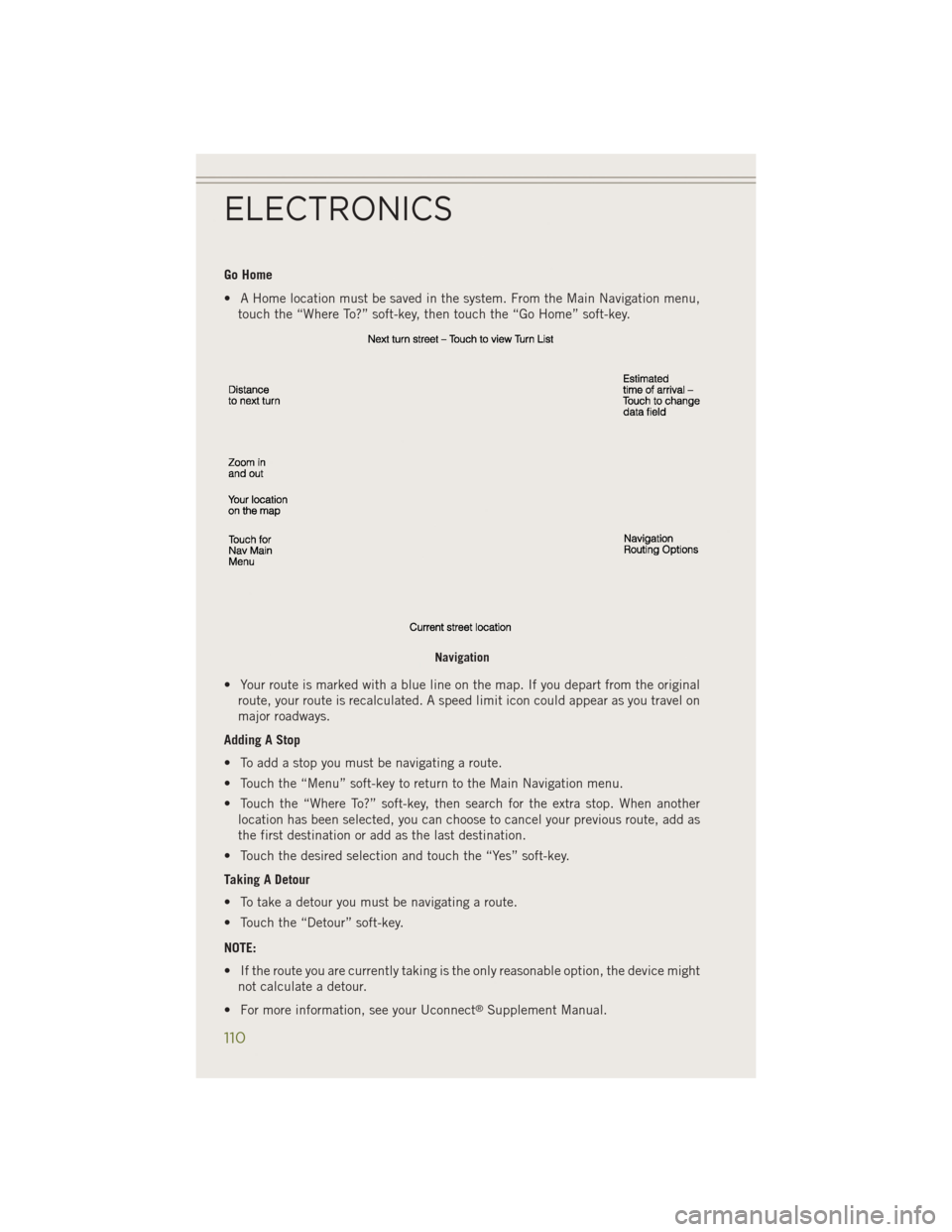
Go Home
• A Home location must be saved in the system. From the Main Navigation menu,touch the “Where To?” soft-key, then touch the “Go Home” soft-key.
• Your route is marked with a blue line on the map. If you depart from the original route, your route is recalculated. A speed limit icon could appear as you travel on
major roadways.
Adding A Stop
• To add a stop you must be navigating a route.
• Touch the “Menu” soft-key to return to the Main Navigation menu.
• Touch the “Where To?” soft-key, then search for the extra stop. When another location has been selected, you can choose to cancel your previous route, add as
the first destination or add as the last destination.
• Touch the desired selection and touch the “Yes” soft-key.
Taking A Detour
• To take a detour you must be navigating a route.
• Touch the “Detour” soft-key.
NOTE:
• If the route you are currently taking is the only reasonable option, the device might not calculate a detour.
• For more information, see your Uconnect
®Supplement Manual.
Navigation
ELECTRONICS
110
Page 114 of 204
Fuel PricesCheck local gas and diesel prices in your area and route to the station
of your choice.
Movie Listings Check local movie theatres and listings in your area and route to the
theater of your choice.
Sports Scores In-game and final scores as well as weekly schedules.
Weather Check variety of local and national weather information from radar
maps to current and 5-day forecast.
Uconnect® Phone (Bluetooth® Hands Free Calling)
• If the Uconnect®Phone Buttonexists on your steering wheel, then you have
the Uconnect®Phone features.
• The Uconnect
®Phone is a voice-activated, hands-free, in-vehicle communica-
tions system with Voice Command Capability (see Voice Command section).
• The Uconnect
®Phone allows you to dial a phone number with your mobile phone
using simple voice commands or using screen soft-keys.
• Refer to the Understand The Features Of Your Vehicle section of your vehicle's Owner's Manual on the DVD for further details.
NOTE:
The Uconnect
®Phone requires a mobile phone equipped with the Bluetooth®
Hands-Free Profile, Version 1.0 or higher. For Uconnect®Customer Support:
• U.S. residents visit www.UconnectPhone.com or call 1-877-855-8400.
• Canadian Residents visit www.UconnectPhone.com or call, 1-800-465–2001 (English) or 1-800-387-9983 (French).
Pairing A Phone
• To use the Uconnect®Phone feature, you must first pair your Bluetooth®phone
with the Uconnect®system.
Start Pairing Procedure On The Radio
• Touch the “Phone” soft-key and then the “Settings” soft-key. Next, touch “Add Device”.
• Uconnect
®Phone will display an “In progress” screen while the system is
connecting.
Start Pairing Procedure On Mobile Phone
• Search for available devices on your Bluetooth
®enabled mobile phone. This is
usually within Settings or Options under “Bluetooth”. See your mobile phone’s
manual for details.
• When your phone finds the system, select “Uconnect” as the paired device. You may be prompted by your phone to download the phonebook. This is so you can
make calls by saying the name of your contact (PBAP-Phone Book Access Profile).
ELECTRONICS
112
Page 117 of 204
Voice Text Reply (Not Compatible With iPhone®)
Once your Uconnect®system is paired with a compatible mobile device, the system
can announce a new incoming text message, and read it to your over the vehicle audio
system. You can reply to the message using Voice Recognition, by selecting, or saying
one of the 18 pre-defined messages.
• Here’s How: Press the Uconnect
®Phone buttonand wait for the beep, then
say “reply.” Uconnect®will give the following prompt: “ Please say the message
you would like to send.” Wait for the beep and say one of the pre-defined
messages. (If you are not sure, you can say “help”). Uconnect
®will then read the
pre-defined messages allowed. As soon as you hear the message you would like to
send, you can interrupt the list of prompts by pressing the Uconnect
®phone
button and saying the phrase. Uconnect®will confirm the message by reading it
back to you. Then press the Phone button and say “Send.”
PRE-DEFINED VOICE TEXT REPLY RESPONSES
Yes. Stuck in Traffic. See you later.
No. Start without me. I’ll be Late.
Okay. Where are you?
I will be
minutes late.
Call me. Are you there yet?
I’ll call you later. I need directions.
See you in
minutes.
I’m on my way.
Can’t talk right now.
I’m lost. Thanks.
NOTE:
Voice texting reply and voice texting features require a compatible mobile device
enabled with Bluetooth
®Message Access Profile (MAP). iPhone®and some other
smartphones do not currently support Bluetooth®MAP. Visit UconnectPhone.com for
system and device compatibility.
• Want to dictate a personal message? You must first register with Uconnect
®
Access (U.S. residents only) to take advantage of a new, cloud-based Voice Texting
service, an enhancement to Voice Text Reply.
ELECTRONICS
115
Page 121 of 204
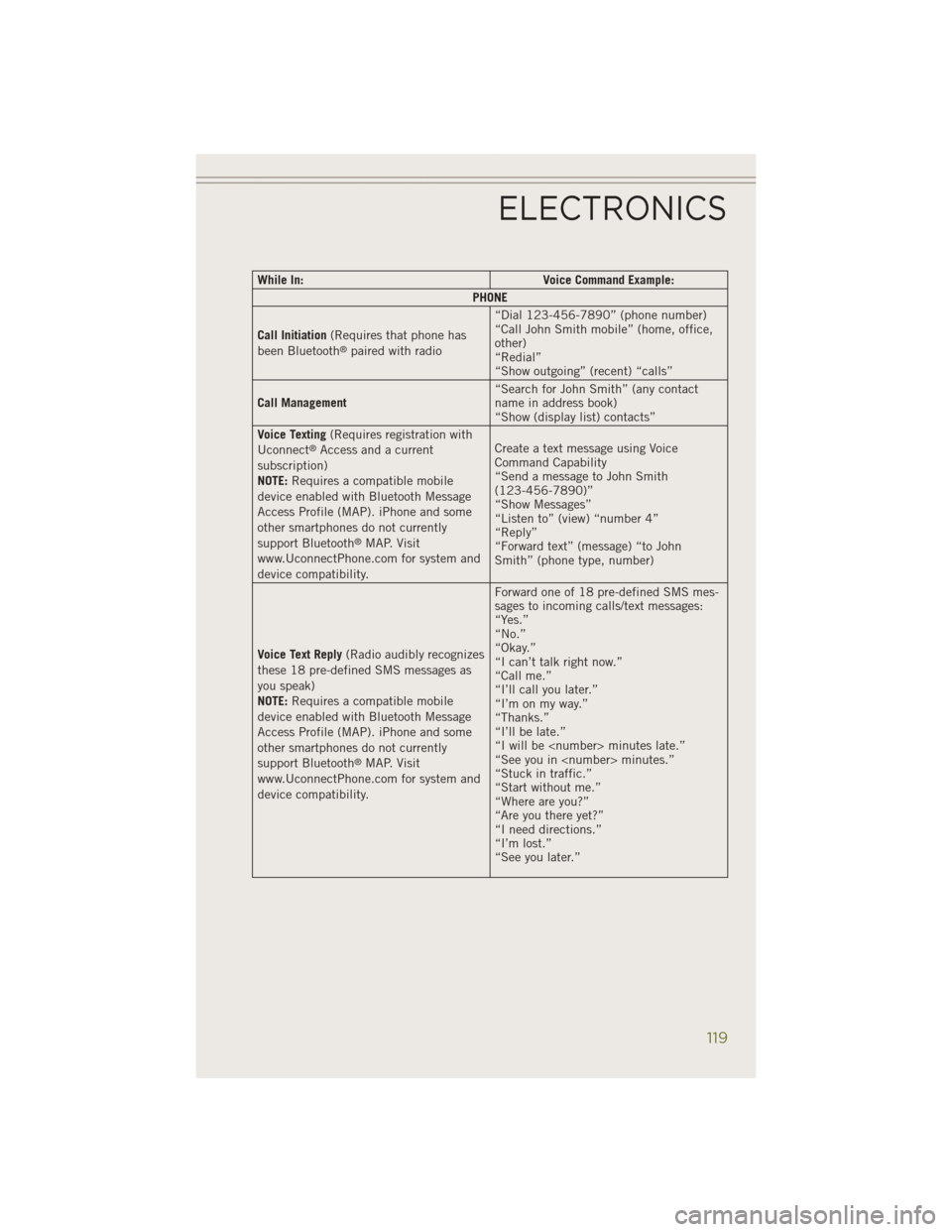
While In:Voice Command Example:
PHONE
Call Initiation (Requires that phone has
been Bluetooth
®paired with radio “Dial 123-456-7890” (phone number)
“Call John Smith mobile” (home, office,
other)
“Redial”
“Show outgoing” (recent) “calls”
Call Management “Search for John Smith” (any contact
name in address book)
“Show (display list) contacts”
Voice Texting (Requires registration with
Uconnect
®Access and a current
subscription)
NOTE: Requires a compatible mobile
device enabled with Bluetooth Message
Access Profile (MAP). iPhone and some
other smartphones do not currently
support Bluetooth
®MAP. Visit
www.UconnectPhone.com for system and
device compatibility. Create a text message using Voice
Command Capability
“Send a message to John Smith
(123-456-7890)”
“Show Messages”
“Listen to” (view) “number 4”
“Reply”
“Forward text” (message) “to John
Smith” (phone type, number)
Voice Text Reply (Radio audibly recognizes
these 18 pre-defined SMS messages as
you speak)
NOTE: Requires a compatible mobile
device enabled with Bluetooth Message
Access Profile (MAP). iPhone and some
other smartphones do not currently
support Bluetooth
®MAP. Visit
www.UconnectPhone.com for system and
device compatibility. Forward one of 18 pre-defined SMS mes-
sages to incoming calls/text messages:
“Yes.”
“No.”
“Okay.”
“I can’t talk right now.”
“Call me.”
“I’ll call you later.”
“I’m on my way.”
“Thanks.”
“I’ll be late.”
“I will be
“See you in
“Stuck in traffic.”
“Start without me.”
“Where are you?”
“Are you there yet?”
“I need directions.”
“I’m lost.”
“See you later.”
ELECTRONICS
119
Page 124 of 204
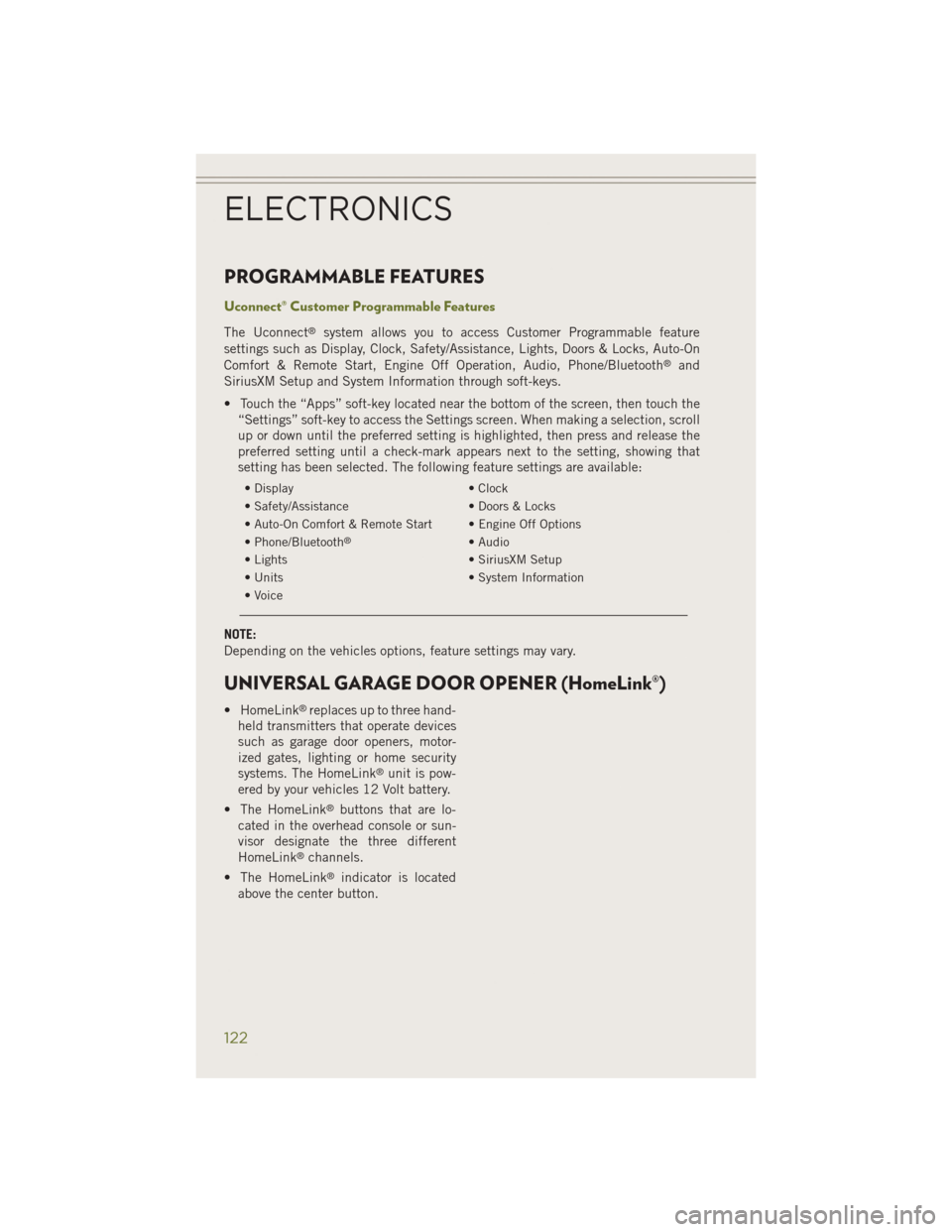
PROGRAMMABLE FEATURES
Uconnect® Customer Programmable Features
The Uconnect®system allows you to access Customer Programmable feature
settings such as Display, Clock, Safety/Assistance, Lights, Doors & Locks, Auto-On
Comfort & Remote Start, Engine Off Operation, Audio, Phone/Bluetooth
®and
SiriusXM Setup and System Information through soft-keys.
• Touch the “Apps” soft-key located near the bottom of the screen, then touch the “Settings” soft-key to access the Settings screen. When making a selection, scroll
up or down until the preferred setting is highlighted, then press and release the
preferred setting until a check-mark appears next to the setting, showing that
setting has been selected. The following feature settings are available:
• Display • Clock
• Safety/Assistance • Doors & Locks
• Auto-On Comfort & Remote Start • Engine Off Options
• Phone/Bluetooth
®• Audio
• Lights • SiriusXM Setup
• Units • System Information
• Voice
NOTE:
Depending on the vehicles options, feature settings may vary.
UNIVERSAL GARAGE DOOR OPENER (HomeLink®)
• HomeLink®replaces up to three hand-
held transmitters that operate devices
such as garage door openers, motor-
ized gates, lighting or home security
systems. The HomeLink
®unit is pow-
ered by your vehicles 12 Volt battery.
• The HomeLink
®buttons that are lo-
cated in the overhead console or sun-
visor designate the three different
HomeLink
®channels.
• The HomeLink
®indicator is located
above the center button.
ELECTRONICS
122