light JEEP CHEROKEE 2015 KL / 5.G Owners Manual
[x] Cancel search | Manufacturer: JEEP, Model Year: 2015, Model line: CHEROKEE, Model: JEEP CHEROKEE 2015 KL / 5.GPages: 772, PDF Size: 18.21 MB
Page 481 of 772
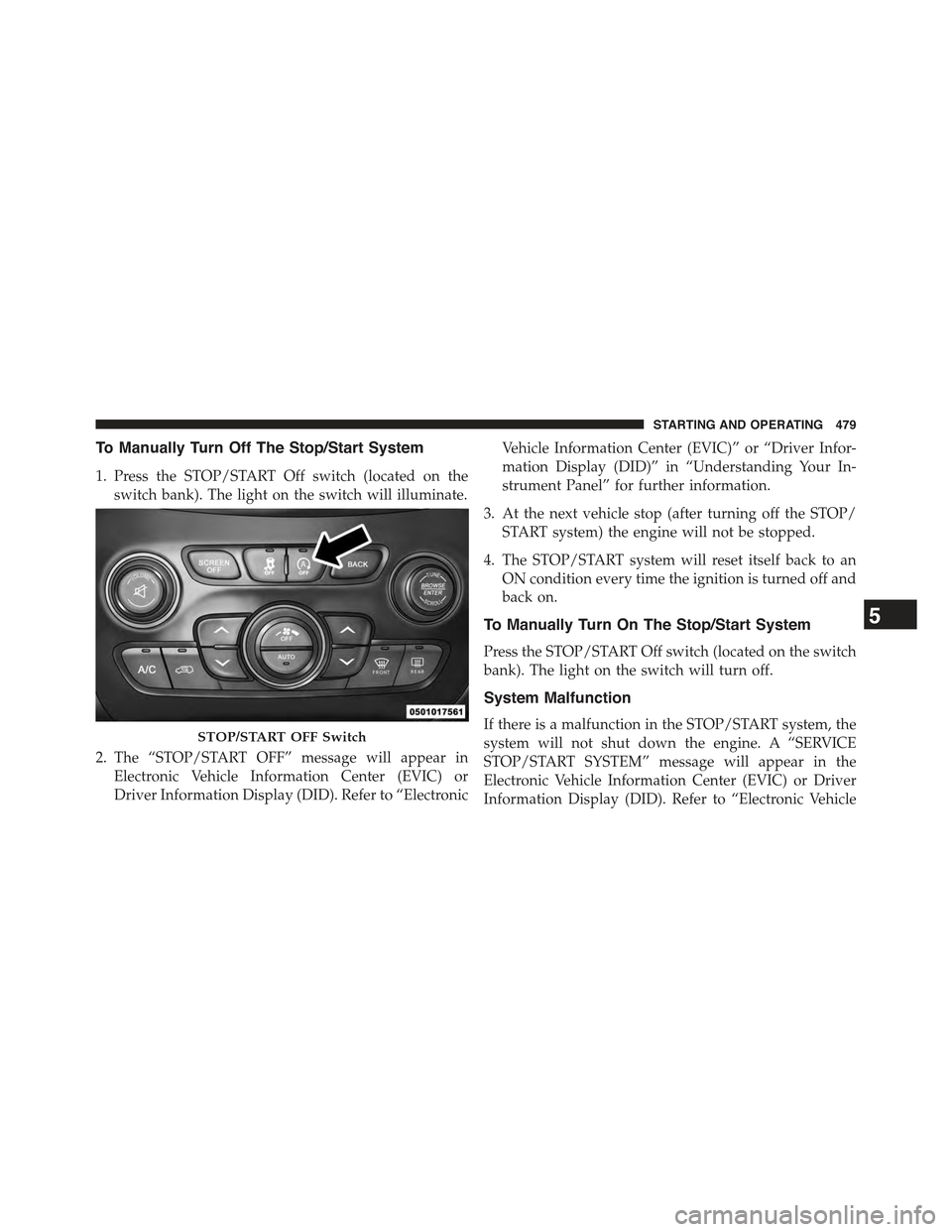
To Manually Turn Off The Stop/Start System
1. Press the STOP/START Off switch (located on the
switch bank). The light on the switch will illuminate.
2. The “STOP/START OFF” message will appear in
Electronic Vehicle Information Center (EVIC) or
Driver Information Display (DID). Refer to “Electronic
Vehicle Information Center (EVIC)” or “Driver Infor-
mation Display (DID)” in “Understanding Your In-
strument Panel” for further information.
3. At the next vehicle stop (after turning off the STOP/
START system) the engine will not be stopped.
4. The STOP/START system will reset itself back to an
ON condition every time the ignition is turned off and
back on.
To Manually Turn On The Stop/Start System
Press the STOP/START Off switch (located on the switch
bank). The light on the switch will turn off.
System Malfunction
If there is a malfunction in the STOP/START system, the
system will not shut down the engine. A “SERVICE
STOP/START SYSTEM” message will appear in the
Electronic Vehicle Information Center (EVIC) or Driver
Information Display (DID). Refer to “Electronic Vehicle
STOP/START OFF Switch
5
STARTING AND OPERATING 479
Page 486 of 772
Fuel Economy (ECO) Mode
The Fuel Economy (ECO) mode can improve the vehi-
cle’s overall fuel economy during normal driving condi-
tions. To activate ECO mode press the “Controls” button
on the touchscreen and then press the “ECO” button on
the touchscreen. When ECO mode is engaged a green
light in the center stack of the instrument panel will be
illuminated and a green ECO light will also illuminate in
the Electronic Vehicle Information Center (EVIC) or
Driver Information Display (DID). In 4WD models, ECO
mode is only active in ’4WD Auto’ driving mode. If you
switch to another driving mode the ECO button will turn
grey and the ECO light in the instrument panel will
disappear indicating it is no longer in ECO mode. It will
automatically re-enable ECO mode when you switch
back into 4WD Auto.
Nine-Speed Automatic Transmission
The transmission gear range (PRND) is displayed both
beside the shift lever and in the Electronic Vehicle Infor-
mation Center (EVIC)/Driver Information Display
(DID). To select a gear range, press the lock button on the
shift lever and move the lever rearward or forward. You
must also press the brake pedal to shift the transmission
out of PARK, or to shift from NEUTRAL into DRIVE or
REVERSE when the vehicle is stopped or moving at low
speeds (refer to#Brake/Transmission Shift Interlock Sys-
tem#in this section). Select the DRIVE range for normal
driving.
The electronically-controlled transmission provides a
precise shift schedule. The transmission electronics are
self-calibrating; therefore, the first few shifts on a new
vehicle may be somewhat abrupt. This is a normal
condition, and precision shifts will develop within a few
hundred miles (kilometers).
484 STARTING AND OPERATING
Page 493 of 772
If the transmission temperature exceeds normal operat-
ing limits, the transmission controller may modify the
transmission shift schedule, reduce engine torque,
and/or expand the range of torque converter clutch
engagement. This is done to prevent transmission dam-
age due to overheating.
If the transmission becomes extremely hot, the “Trans-
mission Temperature Warning Light” may illuminate and
the transmission may operate differently until the trans-
mission cools down.
During cold temperatures, transmission operation may
be modified depending on engine and transmission
temperature as well as vehicle speed. This feature im-
proves warm up time of the engine and transmission to
achieve maximum efficiency. Engagement of the torque
converter clutch, and shifts into 8th or 9th gear, are
inhibited until the transmission fluid is warm (refer to the
“Note” under “Torque Converter Clutch” in this section).
Normal operation will resume once the transmission
temperature has risen to a suitable level.
SPORT — IF EQUIPPED
This mode alters the transmission’s automatic shift
schedule for sportier driving. Upshift speeds are in-
creased to make full use of available engine power.
SPORT mode is activated using the rotary switch on the
center console. Refer to#Selec-Terrain#in this section for
further information.
Transmission Limp Home Mode
Transmission function is monitored electronically for
abnormal conditions. If a condition is detected that could
result in transmission damage, Transmission Limp Home
Mode is activated. In this mode, the transmission remains
in fourth gear regardless of which forward gear is
selected. PARK, REVERSE, and NEUTRAL will continue
5
STARTING AND OPERATING 491
Page 494 of 772
to operate. The Malfunction Indicator Light (MIL) may be
illuminated. Limp Home Mode allows the vehicle to be
driven to an authorized dealer for service without dam-
aging the transmission.
In the event of a momentary problem, the transmission
can be reset to regain all forward gears by performing the
following steps:
1. Stop the vehicle.
2. Shift the transmission into PARK.
3. Turn the ignition switch to the OFF position.
4. Wait approximately 10 seconds.
5. Restart the engine.
6. Shift into the desired gear range. If the problem is no
longer detected, the transmission will return to normal
operation.
NOTE:Even if the transmission can be reset, we recom-
mend that you visit your authorized dealer at your
earliest possible convenience. Your authorized dealer has
diagnostic equipment to determine if the problem could
recur. If the transmission cannot be reset, authorized
dealer service is required.
Electronic Range Select (ERS) Operation
The Electronic Range Select (ERS) shift control allows the
driver to limit the highest available gear. For example, if
you shift the transmission into 5 (fifth gear), the trans-
mission will not shift above fifth gear, but will shift
through the lower gears normally.
You can switch between DRIVE and ERS mode at any
vehicle speed. When the shift lever is in the DRIVE
position, the transmission will operate automatically,
shifting between all available gears.
492 STARTING AND OPERATING
Page 495 of 772
Moving the shift lever to the ERS position (beside
DRIVE) will activate ERS mode, display the current gear
in the instrument cluster, and maintain that gear as the
top available gear. Once in ERS mode, moving the shift
lever forward (-) or rearward (+) will change the top
available gear.
To exit ERS mode, simply return the shift lever to the
DRIVE position.
WARNING!
Do not downshift for additional engine braking on a
slippery surface. The drive wheels could lose their
grip and the vehicle could skid, causing a collision or
personal injury.
NOTE:To select the proper gear position for maximum
deceleration (engine braking), move the shift lever into
the ERS position, then simply press and hold it forward
(-). The transmission will shift to the range from which
the vehicle can best be slowed down.
Torque Converter Clutch
A feature designed to improve fuel economy has been
included in the automatic transmission on your vehicle.
A clutch within the torque converter engages automati-
cally at calibrated speeds. This may result in a slightly
different feeling or response during normal operation in
the upper gears. When the vehicle speed drops or during
some accelerations, the clutch automatically disengages.
5
STARTING AND OPERATING 493
Page 500 of 772
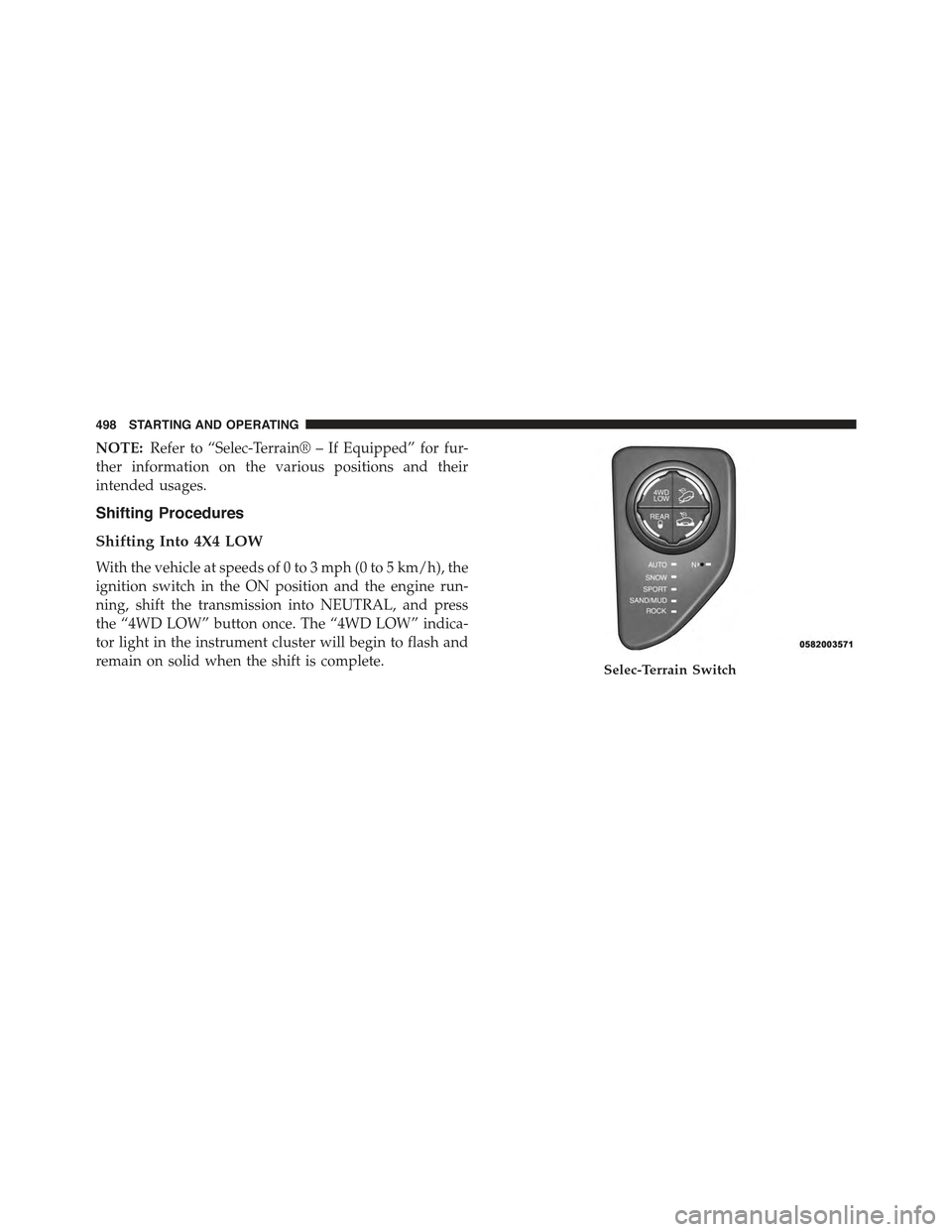
NOTE:Refer to “Selec-Terrain® – If Equipped” for fur-
ther information on the various positions and their
intended usages.
Shifting Procedures
Shifting Into 4X4 LOW
With the vehicle at speeds of 0 to 3 mph (0 to 5 km/h), the
ignition switch in the ON position and the engine run-
ning, shift the transmission into NEUTRAL, and press
the “4WD LOW” button once. The “4WD LOW” indica-
tor light in the instrument cluster will begin to flash and
remain on solid when the shift is complete.Selec-Terrain Switch
498 STARTING AND OPERATING
Page 501 of 772
NOTE:If shift conditions/interlocks are not met a mes-
sage will flash from the Electronic Vehicle Information
Center (EVIC)/Driver Information Display (DID) with
instructions on how to complete the requested shift.
Refer to “Electronic Vehicle Information Center (EVIC)/
Driver Information Display (DID) in “Understanding
Your Instrument Panel” for further information.
Shifting Out Of 4X4 LOW
With the vehicle at speeds of 0 to 3 mph (0 to 5 km/h), the
ignition switch in the ON position and the engine run-
ning, shift the transmission into NEUTRAL, and press
the “4WD LOW” button once. The “4WD LOW” indica-
tor light in the instrument cluster will flash and go out
when the shift is complete.
NOTE:
•If shift conditions/interlocks are not met, a message
will flash from the Electronic Vehicle Information
Center (EVIC)/Driver Information Display (DID) with
instructions on how to complete the requested shift.
Refer to “Electronic Vehicle Information Center
(EVIC)/Driver Information Display (DID) in “Under-
standing Your Instrument Panel” for further informa-
tion.
•Shifting into or out of 4WD LOW is possible with the
vehicle completely stopped; however, difficulty may
occur due to the mating clutch teeth not being prop-
erly aligned. Several attempts may be required for
clutch teeth alignment and shift completion to occur.
The preferred method is with the vehicle rolling 0 to
3 mph (0 to 5 km/h). If the vehicle is moving faster
than 3 mph (5 km/h), the 4WD system will not allow
the shift.
5
STARTING AND OPERATING 499
Page 502 of 772
NEUTRAL Shift Procedure
WARNING!
You or others could be injured or killed if you leave
the vehicle unattended with the power transfer unit
in the NEUTRAL (N) position without first fully
engaging the parking brake. The NEUTRAL (N)
position disengages both the front and rear drive
shafts from the powertrain and will allow the vehicle
to roll, even if the transmission is in PARK. The
parking brake should always be applied when the
driver is not in the vehicle.
1. Bring the vehicle to a complete stop and shift the
transmission to PARK.
2. Turn the engine OFF.
3. Turn the ignition switch to the ON/RUN position, but
do not start the engine.
4. Press and hold the brake pedal.
5. Shift the transmission into NEUTRAL.
6. Using a ballpoint pen or similar object, press and hold
the recessed power transfer unit NEUTRAL (N) button
(located by the selector switch) for four seconds. The
light behind the NEUTRAL (N) symbol will blink,
indicating shift in progress. The light will stop blink-
ing (stay on solid) when the shift to NEUTRAL (N) is
complete.
500 STARTING AND OPERATING
Page 503 of 772
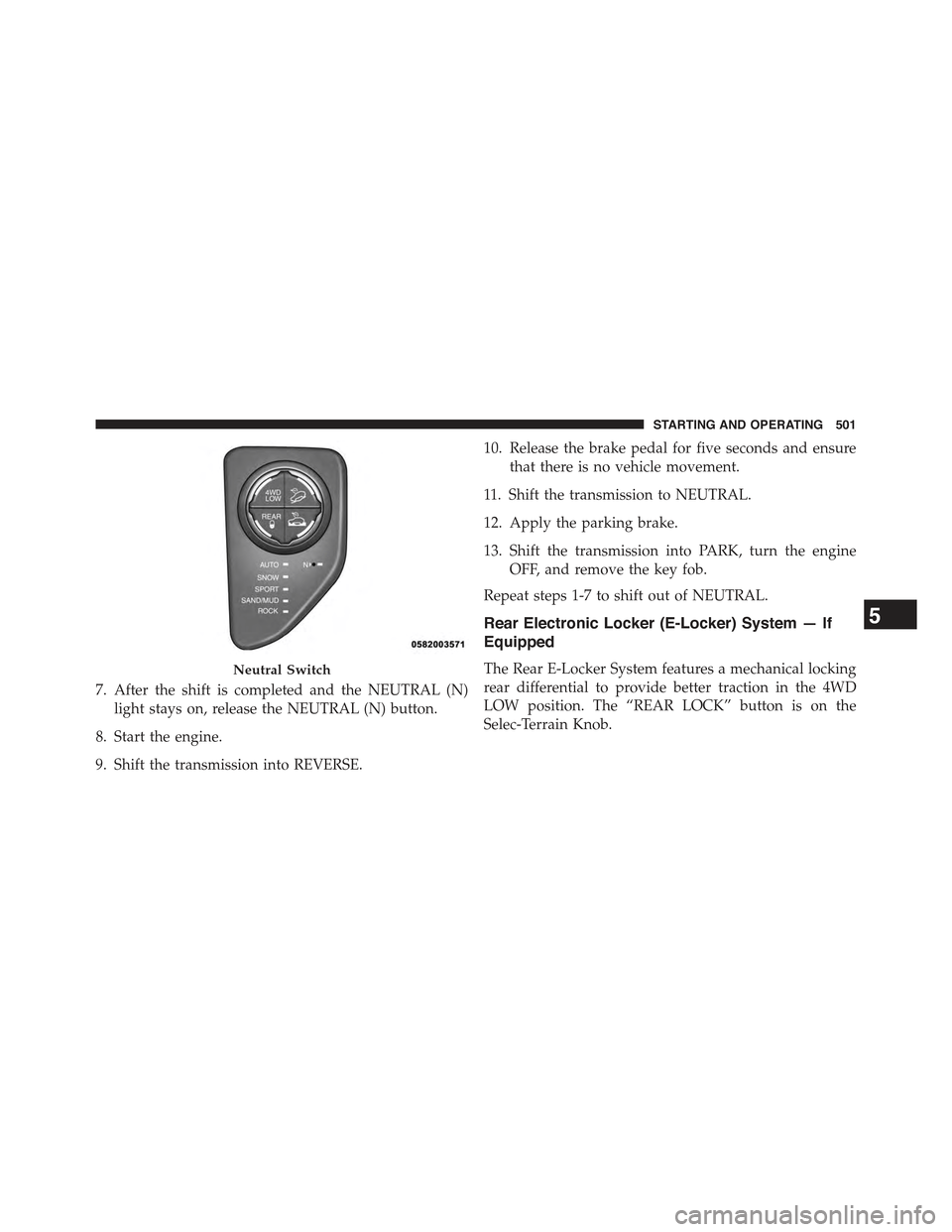
7. After the shift is completed and the NEUTRAL (N)
light stays on, release the NEUTRAL (N) button.
8. Start the engine.
9. Shift the transmission into REVERSE.
10. Release the brake pedal for five seconds and ensure
that there is no vehicle movement.
11. Shift the transmission to NEUTRAL.
12. Apply the parking brake.
13. Shift the transmission into PARK, turn the engine
OFF, and remove the key fob.
Repeat steps 1-7 to shift out of NEUTRAL.
Rear Electronic Locker (E-Locker) System — If
Equipped
The Rear E-Locker System features a mechanical locking
rear differential to provide better traction in the 4WD
LOW position. The “REAR LOCK” button is on the
Selec-Terrain Knob.
Neutral Switch
5
STARTING AND OPERATING 501
Page 504 of 772
Activating The Rear E-Locker
To activate the Rear E-Locker System, the following
conditions must be met:
1. The 4WD system must be in 4WD LOW.
2. The ignition switch in the ON position and the engine
running.
3. Vehicle speed must be below 15 MPH (24 km/h).
4. To engage Rear E-Locker, press the REAR LOCK
button once.
Deactivating The Rear E-Locker System
To deactivate the Rear E-Locker System, the following
conditions must be met:
1. Rear E-Locker must be engaged, and the REAR LOCK
indicator light on.
2. The ignition switch in the ON position and the engine
running.
3. To disengage Rear E-Locker, press the REAR LOCK
button once.
NOTE:
•It may also be necessary to drive slowly steering back
and forth to complete engagement and disengagement
of the E-Locker.
•When engaging Rear E-Locker, the indicator lights in
the instrument cluster and on the REAR LOCK button
will begin to flash. When the shift is complete the
REAR LOCK indicator lights will remain on.
•When disengaging Rear E-Locker, the indicator lights
in the instrument cluster and on the REAR LOCK
button will begin to flash. When the shift is complete
the REAR LOCK indicator lights will remain off.
502 STARTING AND OPERATING