Location JEEP CHEROKEE 2015 KL / 5.G User Guide
[x] Cancel search | Manufacturer: JEEP, Model Year: 2015, Model line: CHEROKEE, Model: JEEP CHEROKEE 2015 KL / 5.GPages: 772, PDF Size: 18.21 MB
Page 107 of 772
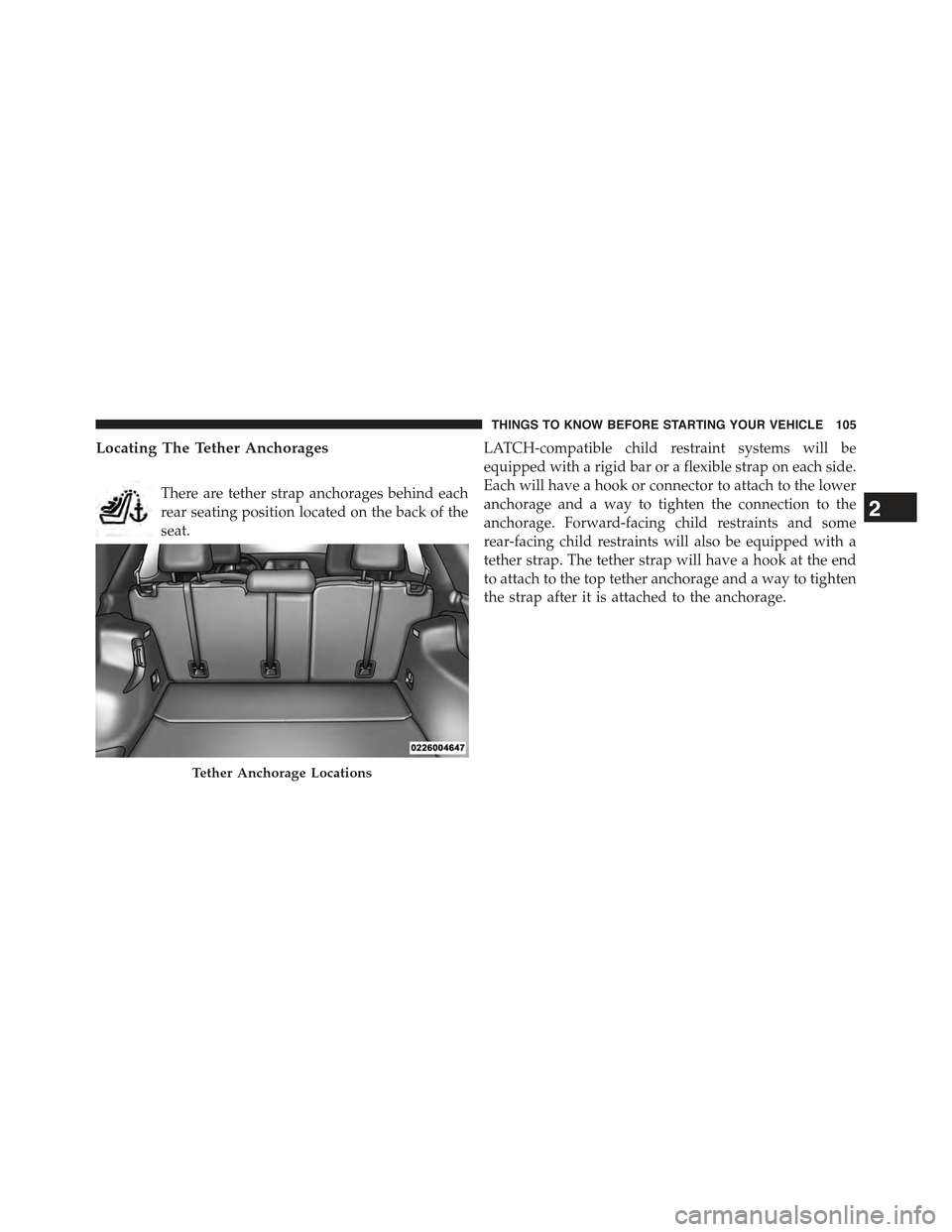
Locating The Tether Anchorages
There are tether strap anchorages behind each
rear seating position located on the back of the
seat.
LATCH-compatible child restraint systems will be
equipped with a rigid bar or a flexible strap on each side.
Each will have a hook or connector to attach to the lower
anchorage and a way to tighten the connection to the
anchorage. Forward-facing child restraints and some
rear-facing child restraints will also be equipped with a
tether strap. The tether strap will have a hook at the end
to attach to the top tether anchorage and a way to tighten
the strap after it is attached to the anchorage.
Tether Anchorage Locations
2
THINGS TO KNOW BEFORE STARTING YOUR VEHICLE 105
Page 117 of 772
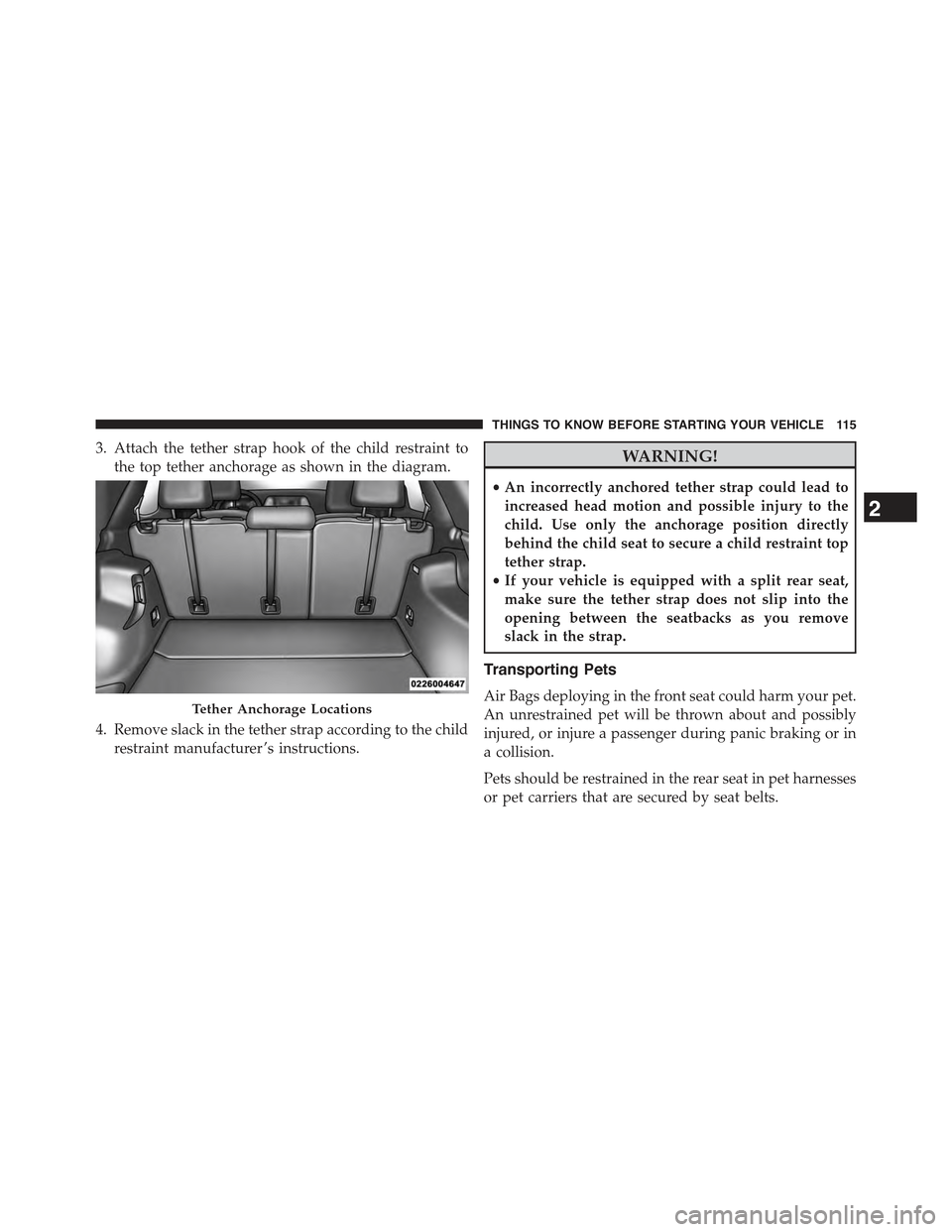
3. Attach the tether strap hook of the child restraint to
the top tether anchorage as shown in the diagram.
4. Remove slack in the tether strap according to the child
restraint manufacturer ’s instructions.
WARNING!
•An incorrectly anchored tether strap could lead to
increased head motion and possible injury to the
child. Use only the anchorage position directly
behind the child seat to secure a child restraint top
tether strap.
•If your vehicle is equipped with a split rear seat,
make sure the tether strap does not slip into the
opening between the seatbacks as you remove
slack in the strap.
Transporting Pets
Air Bags deploying in the front seat could harm your pet.
An unrestrained pet will be thrown about and possibly
injured, or injure a passenger during panic braking or in
a collision.
Pets should be restrained in the rear seat in pet harnesses
or pet carriers that are secured by seat belts.
Tether Anchorage Locations
2
THINGS TO KNOW BEFORE STARTING YOUR VEHICLE 115
Page 134 of 772
NOTE:The ASSIST and 9–1–1 features operate through
the Uconnect® Access service. These buttons will only
operate as long as your Uconnect® Access service is
active. Refer to your “Uconnect® System supplement
manual” for further information.
ASSIST Call
The ASSIST Button is used to automatically connect you
to any one of the following support centers:
•Roadside Assistance – If you get a flat tire, or need a
tow, just press the Assist button and you’ll be con-
nected to someone who can help. Roadside Assistance
will know what vehicle you’re driving and its location.
Additional fees may apply for roadside Assistance.
•Uconnect® Access Customer Care – In-vehicle support
for Uconnect® Access and Uconnect® Access Via
Mobile features.
•Vehicle Customer Care – Total support for all other
vehicle issues.
9-1-1 Call
1. Press the 9-1-1 Call button on the Rearview Mirror.
NOTE:In case the 9-1-1 Call button is pushed in error,
there will be a 10 second delay before the 9-1-1 Call
system initiates a call to a 9-1-1 operator. To cancel the
9-1-1 Call connection, press the 9-1-1 Call button on the
Rearview Mirror or press the cancellation button on the
Phone Screen. Termination of the 9-1-1 Call will turn the
green LED light on the Rearview Mirror off.
2. The LED light located between the Assist and 9-1-1
buttons on the Rearview Mirror will turn green once a
connection to a 9-1-1 operator has been made.
132 UNDERSTANDING THE FEATURES OF YOUR VEHICLE
Page 136 of 772
WARNING!
•If anyone in the vehicle could be in danger (e.g.,
fire or smoke is visible, dangerous road conditions
or location), do not wait for voice contact from a
9-1-1 operator. All occupants should exit the vehicle
immediately and move to a safe location.
(Continued)
WARNING!(Continued)
•The 9-1-1 Call system is embedded into the vehi-
cle’s electrical system. Do not add aftermarket
electrical equipment to the vehicle’s electrical sys-
tem. This may prevent your vehicle from sending a
signal to initiate an emergency call. To avoid inter-
ference that can cause the 9-1-1 Call system to fail,
never add aftermarket equipment (e.g., two-way
mobile radio, CB radio, data recorder, etc.) to your
vehicle’s electrical system or modify the antennas
on your vehicle. IF YOUR VEHICLE LOSES BAT-
TERY POWER FOR ANY REASON (INCLUDING
DURING OR AFTER AN ACCIDENT), THE
UCONNECT FEATURES, APPS AND SERVICES,
AMONG OTHERS, WILL NOT OPERATE.
(Continued)
134 UNDERSTANDING THE FEATURES OF YOUR VEHICLE
Page 145 of 772
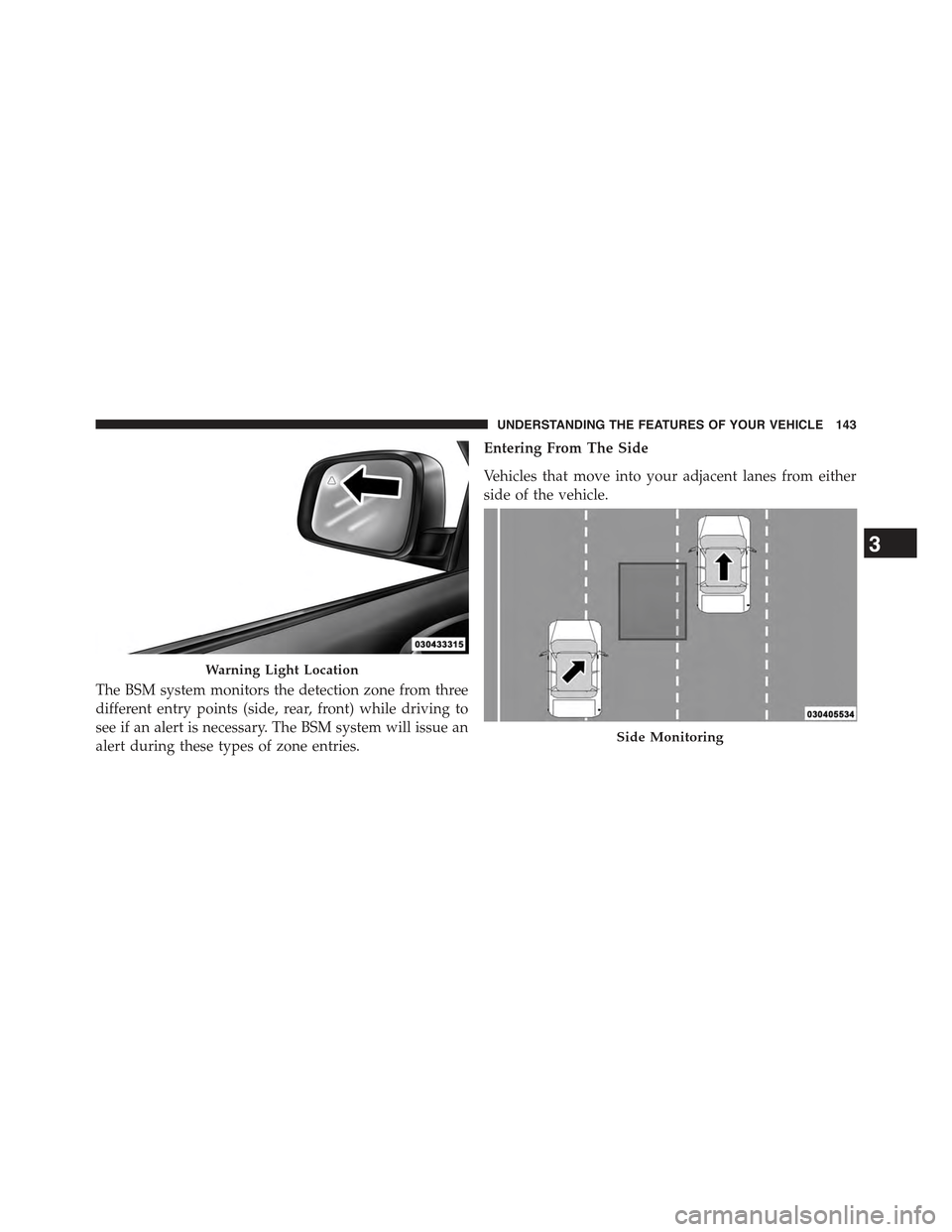
The BSM system monitors the detection zone from three
different entry points (side, rear, front) while driving to
see if an alert is necessary. The BSM system will issue an
alert during these types of zone entries.
Entering From The Side
Vehicles that move into your adjacent lanes from either
side of the vehicle.
Warning Light Location
Side Monitoring
3
UNDERSTANDING THE FEATURES OF YOUR VEHICLE 143
Page 169 of 772
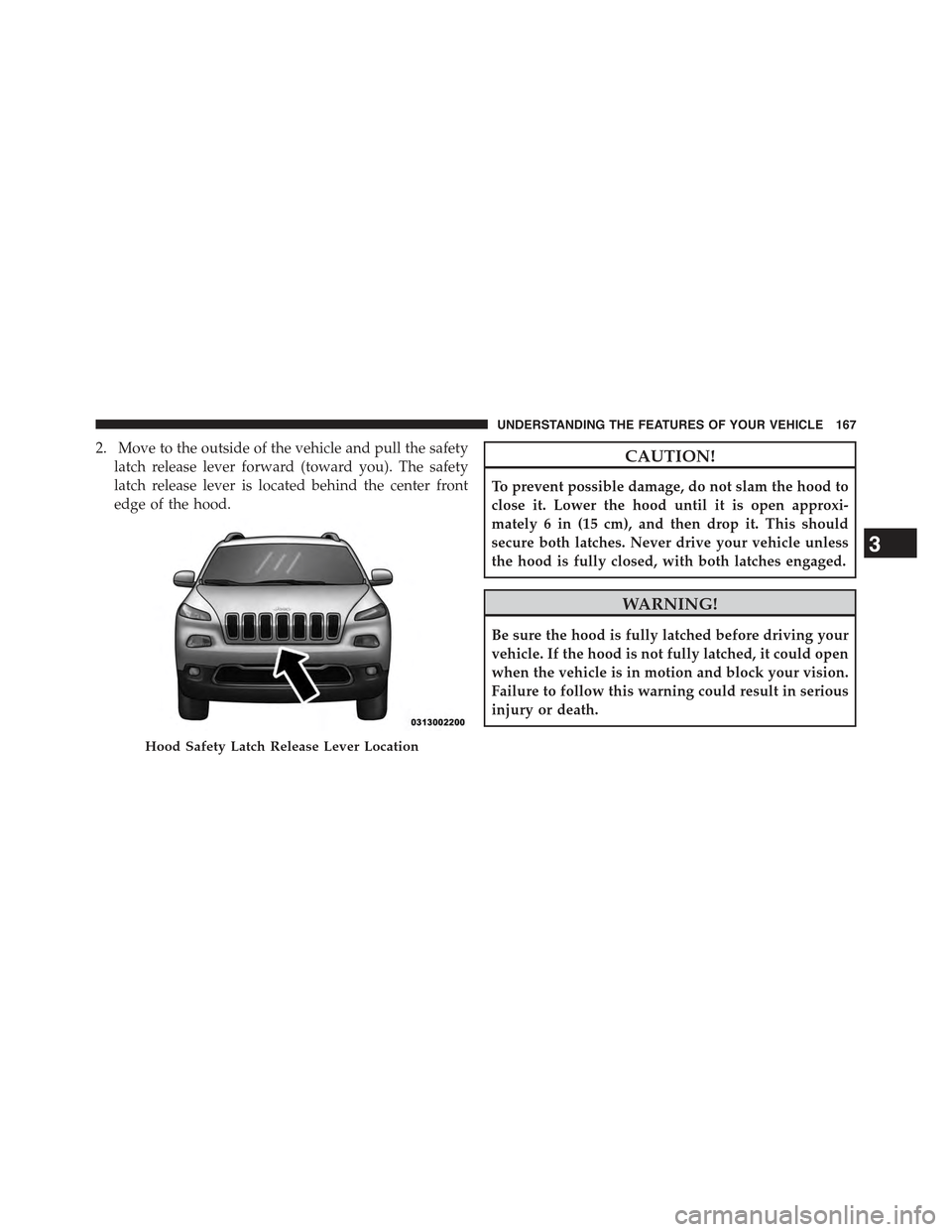
2. Move to the outside of the vehicle and pull the safety
latch release lever forward (toward you). The safety
latch release lever is located behind the center front
edge of the hood.
CAUTION!
To prevent possible damage, do not slam the hood to
close it. Lower the hood until it is open approxi-
mately 6 in (15 cm), and then drop it. This should
secure both latches. Never drive your vehicle unless
the hood is fully closed, with both latches engaged.
WARNING!
Be sure the hood is fully latched before driving your
vehicle. If the hood is not fully latched, it could open
when the vehicle is in motion and block your vision.
Failure to follow this warning could result in serious
injury or death.
Hood Safety Latch Release Lever Location
3
UNDERSTANDING THE FEATURES OF YOUR VEHICLE 167
Page 207 of 772
Overtake Aid
When driving with ACC engaged and following a target
vehicle, the system will provide an additional accelera-
tion to assist in passing vehicles in front. This additional
acceleration is triggered when the driver utilizes the left
turn signal. In locations with left hand drive traffic,
Overtake Aid is active only when passing on the left
hand side of the Target vehicles.
When a vehicle goes from a location with left hand drive
traffic to a location with right hand drive traffic, the ACC
system will automatically detect traffic direction. In this
condition, Overtake Aid is active only when passing on
the right side of the Target vehicle. This additional
acceleration is triggered when the driver utilizes the right
turn signal. In this condition the ACC system will no
longer provide Overtake Aid on the left side until it
determines that the vehicle has moved back to a location
with left hand drive traffic.
ACC Operation At Stop
In the event that the ACC system brings your vehicle to
a standstill while following a target vehicle, if the target
vehicle starts moving within two seconds of your vehicle
coming to a standstill, your vehicle will resume motion
without the need for any driver action.
If the target vehicle does not start moving within two
seconds of your vehicle coming to a standstill, the driver
will either have to press the RES (resume) button, or
apply the accelerator pedal to reengage the ACC to the
existing Set Speed.
NOTE:After the ACC system holds your vehicle at a
standstill for approximately 3 consecutive minutes, the
parking brake will be activated, and the ACC system will
be cancelled.
While ACC is holding your vehicle at a standstill, if the
driver seatbelt is unbuckled or the driver door is opened,
3
UNDERSTANDING THE FEATURES OF YOUR VEHICLE 205
Page 237 of 772
(EVIC) or Driver Information Display (DID) indicating
the vehicle speed is too fast. The system will become
active again if the vehicle speed is decreased to speeds
less than approximately 6 mph (9 km/h).
ParkSense® Sensors
The four ParkSense® sensors, located in the rear fascia/
bumper, monitor the area behind the vehicle that is
within the sensors’ field of view. The sensors can detect
obstacles from approximately 12 in (30 cm) up to 79 in
(200 cm) from the rear fascia/bumper in the horizontal
direction, depending on the location, type and orienta-
tion of the obstacle.
ParkSense® Warning Display
The ParkSense® Warning screen will only be displayed if
Sound and Display is selected from the Customer -
Programmable Features section of the Uconnect® Sys-
tem. Refer to#Uconnect® Settings” in “Understanding
Your Instrument Panel” for further information.
The ParkSense® Warning screen is located within the
EVIC/DID. It provides visual warnings to indicate the
distance between the rear fascia/bumper and the de-
tected obstacle. Refer to “Electronic Vehicle Information
Center (EVIC) or Driver Information Display (DID)” for
further information.
ParkSense® Display
When the vehicle is in REVERSE, the EVIC/DID will
display the park assist ready system status.
The system will indicate a detected obstacle by showing
a single arc in one or more regions based on the obstacle’s
distance and location relative to the vehicle.
If an obstacle is detected in the center rear region, the
display will show a single solid arc in the center rear
region and will produce a one-half second tone. As the
vehicle moves closer to the obstacle, the display will
show the single arc moving closer to the vehicle and the
sound tone will change from slow, to fast, to continuous.
3
UNDERSTANDING THE FEATURES OF YOUR VEHICLE 235
Page 248 of 772
ParkSense® can be active only when the shift lever is in
REVERSE or DRIVE (NON-REVERSE for manual trans-
mission). If ParkSense® is enabled at one of these shift
lever positions, the system will remain active until the
vehicle speed is increased to approximately 7 mph
(11 km/h) or above. When in REVERSE and above the
system’s operating speed, a warning will appear in the
EVIC/DID indicating the vehicle speed is too fast. The
system will become active again if the vehicle speed is
decreased to speeds less than approximately 6 mph
(9 km/h).
ParkSense® Sensors
The four ParkSense® sensors, located in the rear fascia/
bumper, monitor the area behind the vehicle that is
within the sensors’ field of view. The sensors can detect
obstacles from approximately 12 in (30 cm) up to 79 in
(200 cm) from the rear fascia/bumper in the horizontal
direction, depending on the location, type and orienta-
tion of the obstacle.
NOTE:If your vehicle is equipped with the ParkSense®
Active Park Assist system, six sensors will be located in
the rear fascia/bumper. Refer to the#ParkSense® Active
Park Assist System#section for further information.
The six ParkSense® sensors, located in the front fascia/
bumper, monitor the area in front of the vehicle that is
within the sensors’ field of view. The sensors can detect
obstacles from approximately 12 in (30 cm) up to 47 in
(120 cm) from the front fascia/bumper in the horizontal
direction, depending on the location, type and orienta-
tion of the obstacle.
246 UNDERSTANDING THE FEATURES OF YOUR VEHICLE
Page 249 of 772
ParkSense® Warning Display
The ParkSense® Warning screen will only be displayed if
Sound and Display is selected from the Customer -
Programmable Features section of the Uconnect® Sys-
tem. Refer to#Uconnect® Settings” in “Understanding
Your Instrument Panel” for further information.
The ParkSense® Warning screen is located within the
Electronic Vehicle Information Center (EVIC) or Driver
Information Display (DID). It provides visual warnings
to indicate the distance between the rear fascia/bumper
and/or front fascia/bumper and the detected obstacle.
Refer to “Electronic Vehicle Information Center (EVIC) or
7#Driver Information Display (DID)” for further infor-
mation.
ParkSense® Display
Rear Park Assist
When the vehicle is in REVERSE, the EVIC/DID will
display the park assist ready system status.
The system will indicate a detected obstacle by showing
a single arc in one or more regions based on the obstacle’s
distance and location relative to the vehicle.
If an obstacle is detected in the center rear region, the
display will show a single solid arc in the center rear
region and will produce a one-half second tone. As the
vehicle moves closer to the obstacle, the display will
show the single arc moving closer to the vehicle and the
sound tone will change from slow, to fast, to continuous.
If an obstacle is detected in the left and/or right rear
region, the display will show a single flashing arc in the
left and/or right rear region and will produce a fast
sound tone. As the vehicle moves closer to the obstacle,
3
UNDERSTANDING THE FEATURES OF YOUR VEHICLE 247