Transmission JEEP CHEROKEE 2015 KL / 5.G User Guide
[x] Cancel search | Manufacturer: JEEP, Model Year: 2015, Model line: CHEROKEE, Model: JEEP CHEROKEE 2015 KL / 5.GPages: 772, PDF Size: 18.21 MB
Page 247 of 772
•The automatic braking function may only be applied if
the vehicle deceleration is not enough to avoid collid-
ing with a detected obstacle.
•The automatic braking function may not be applied
fast enough for obstacles that move toward the rear of
the vehicle from the left and/or right sides.
•The automatic braking function can be enabled/
disabled from the Customer-Programmable Features
section of the Uconnect® System.
•ParkSense® will retain its last known configuration
state for the automatic braking function through igni-
tion cycles.
The automatic braking function is intended to assist the
driver in avoiding possible collisions with detected ob-
stacles when backing up in REVERSE gear.
If your vehicle is equipped with a Manual Transmission,
the automatic braking function in REVERSE gear is not
available.
NOTE:
•The driver is always responsible for controlling the
vehicle.
•The system is provided to assist the driver and not to
substitute the driver.
•The driver must stay in full control of the vehicle’s
acceleration and braking and is responsible for the
vehicle’s movements.
Refer to ParkSense® System Usage Precautions for limi-
tations of this system and recommendations.
ParkSense® will retain the last system state (enabled or
disabled) from the last ignition cycle when the ignition is
changed to the ON/RUN position.
3
UNDERSTANDING THE FEATURES OF YOUR VEHICLE 245
Page 254 of 772
NOTE:ParkSense® will reduce the volume of the radio,
if on, when the system is sounding an audio tone.
Front Park Assist
When the vehicle is in DRIVE or NON-REVERSE for
manual transmission, the ParkSense® Warning screen
will be displayed when an obstacle is detected.
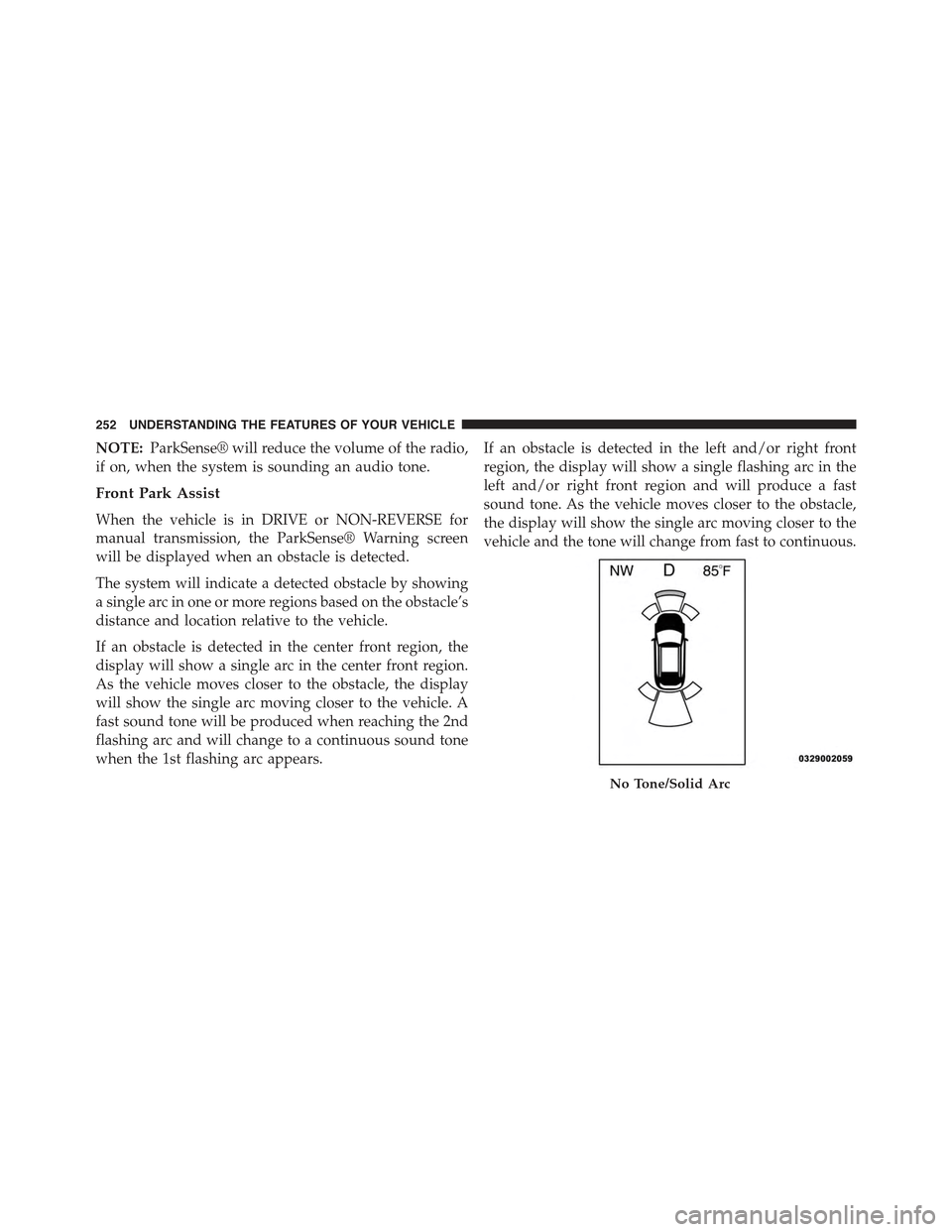
The system will indicate a detected obstacle by showing
a single arc in one or more regions based on the obstacle’s
distance and location relative to the vehicle.
If an obstacle is detected in the center front region, the
display will show a single arc in the center front region.
As the vehicle moves closer to the obstacle, the display
will show the single arc moving closer to the vehicle. A
fast sound tone will be produced when reaching the 2nd
flashing arc and will change to a continuous sound tone
when the 1st flashing arc appears.
If an obstacle is detected in the left and/or right front
region, the display will show a single flashing arc in the
left and/or right front region and will produce a fast
sound tone. As the vehicle moves closer to the obstacle,
the display will show the single arc moving closer to the
vehicle and the tone will change from fast to continuous.
No Tone/Solid Arc
252 UNDERSTANDING THE FEATURES OF YOUR VEHICLE
Page 265 of 772
To enable the ParkSense® Active Park Assist system,
press the ParkSense® Active Park Assist switch once
(LED turns on).
To disable the ParkSense® Active Park Assist system,
press the ParkSense® Active Park Assist switch again
(LED turns off).
The ParkSense® Active Park Assist system will turn off
automatically for any of the following conditions:
•The parking maneuver is completed.
•Vehicle speed greater than 18 mph (30 km/h) when
searching for a parking space.
•Vehicle speed greater than 5 mph (7 km/h) during
active steering guidance into the parking space.
•Touching the steering wheel during active steering
guidance into the parking space.
•Pressing the ParkSense® Front and Rear Park Assist
switch.
•Driver’s door is opened.
•Rear liftgate is opened.
•Electronic Stability Control/Anti-lock Braking System
intervention.
•The ParkSense® Active Park Assist system will allow a
maximum of six shifts between DRIVE (automatic
transmission) or forward gear (manual transmission)
and REVERSE. If the maneuver cannot be completed
within six shifts, the system will cancel and the EVIC/
DID will instruct the driver to complete the maneuver
manually.
3
UNDERSTANDING THE FEATURES OF YOUR VEHICLE 263
Page 266 of 772
The ParkSense® Active Park Assist system will only
operate and search for a parking space when the follow-
ing conditions are present:
•Gear position is in DRIVE (automatic transmission) or
in a forward gear (manual transmission).
•Ignition is in the RUN position.
•ParkSense® Active Park Assist switch is activated.
•Driver’s door is closed.
•Rear liftgate is closed.
•Vehicle speed is less than 15 mph (25 km/h).
NOTE:If the vehicle is driven above approximately
15 mph (25 km/h), the EVIC/DID will instruct the driver
to slow down. If the vehicle is driven above approxi-
mately 18 mph (30 km/h), the system will cancel. The
driver must then reactivate the system by pressing the
ParkSense® Active Park Assist switch.
•The outer surface and the underside of the front and
rear fascias/bumpers are clean and clear of snow, ice,
mud, dirt or other obstruction.
When pressed, the LED on the ParkSense® Active Park
Assist switch will blink momentarily, and then the LED
will turn OFF if any of the above conditions are not
present.
Parallel Parking Space Assistance Operation/
Display
When the ParkSense® Active Park Assist system is
enabled the “Active ParkSense Searching - Press OK to
Switch to Perpendicular” message will appear in the
EVIC/DID display. You may switch to perpendicular
parking if you desire. Push the OK button on the left side
steering wheel switch to change your parking space
setting.
264 UNDERSTANDING THE FEATURES OF YOUR VEHICLE
Page 271 of 772
•When the system instructs the driver to remove their
hands from the steering wheel, the driver should check
their surroundings and begin to back up slowly.
•The ParkSense® Active Park Assist system will allow a
maximum of six shifts between DRIVE (automatic
transmission) or forward gear (manual transmission)
and REVERSE. If the maneuver cannot be completed
within six shifts, the system will cancel and the EVIC/
DID will instruct the driver to complete the maneuver
manually.
•The system will cancel the maneuver if the vehicle
speed exceeds 5 mph (7 km/h) during active steering
guidance into the parking space. The system will
provide a warning to the driver at 3 mph (5 km/h) that
tells them to slow down. The driver is then responsible
for completing the maneuver if the system is canceled.
•If the system is canceled during the maneuver for any
reason, the driver must take control of the vehicle.
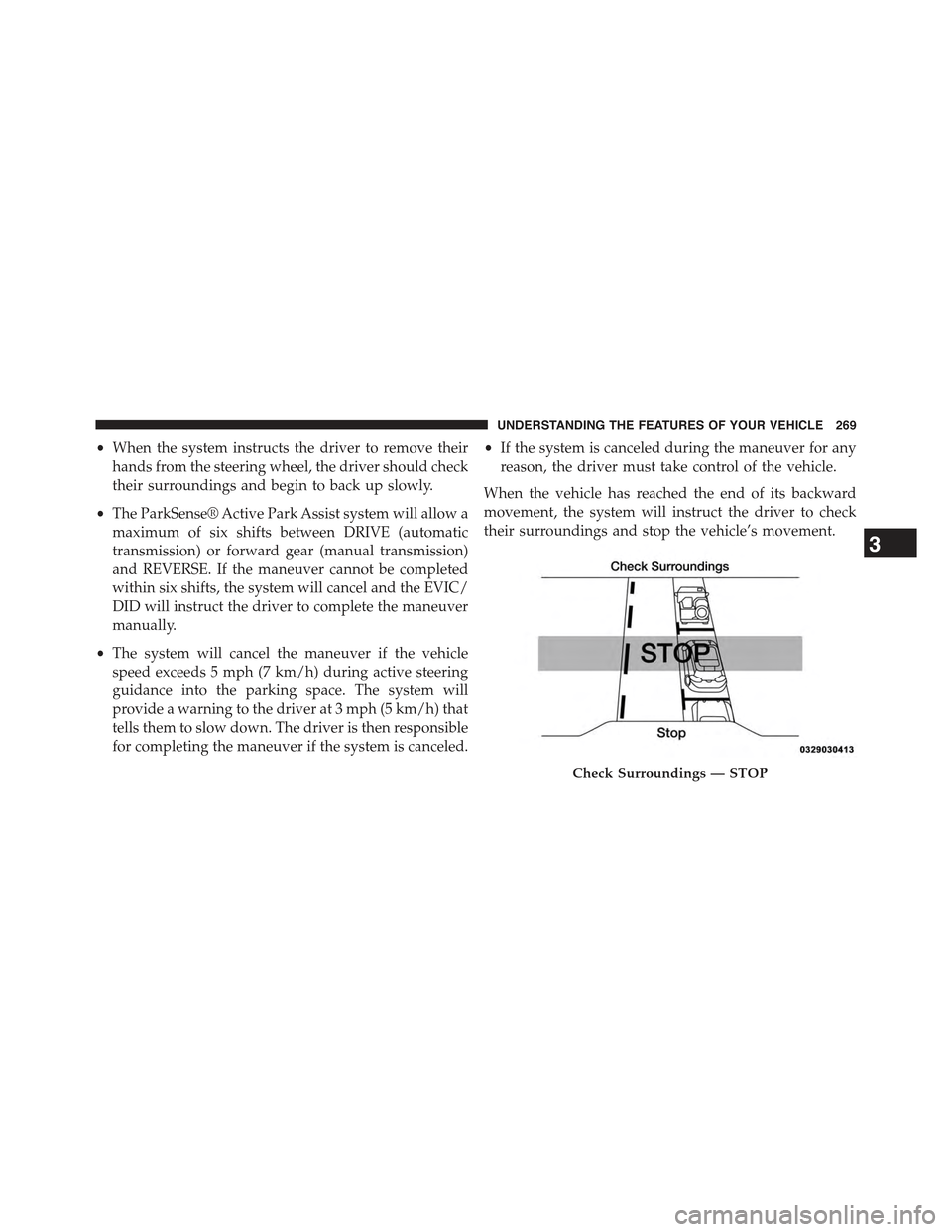
When the vehicle has reached the end of its backward
movement, the system will instruct the driver to check
their surroundings and stop the vehicle’s movement.
Check Surroundings — STOP
3
UNDERSTANDING THE FEATURES OF YOUR VEHICLE 269
Page 281 of 772
NOTE:
•It is the drivers responsibility to use the brake and
accelerator during the semi-automatic parking maneu-
ver.
•When the system instructs the driver to remove their
hands from the steering wheel, the driver should check
their surroundings and begin to back up slowly.
•The ParkSense® Active Park Assist system will allow a
maximum of six shifts between DRIVE (automatic
transmission) or forward gear (manual transmission)
and REVERSE. If the maneuver cannot be completed
within six shifts, the system will cancel and the EVIC/
DID will instruct the driver to complete the maneuver
manually.
•The system will cancel the maneuver if the vehicle
speed exceeds 5 mph (7 km/h) during active steering
guidance into the parking space. The system will
provide a warning to the driver at 3 mph (5 km/h) that
tells them to slow down. The driver is then responsible
for completing the maneuver if the system is canceled.
•If the system is canceled during the maneuver for any
reason, the driver must take control of the vehicle.
When the vehicle has reached the end of its backward
movement, the system will instruct the driver to check
their surroundings and stop the vehicle’s movement.
3
UNDERSTANDING THE FEATURES OF YOUR VEHICLE 279
Page 295 of 772
•If the indicator light stays on constantly, program-
ming is complete and the garage door/device should
activate when the HomeLink® button is pressed.
•To program the remaining two HomeLink® buttons,
repeat each step for each remaining button. DO NOT
erase the channels.
Reprogramming A Single HomeLink® Button
(Non — Rolling Code)
To reprogram a channel that has been previously trained,
follow these steps:
1. Cycle the ignition to the ON/RUN position.
For vehicle’s equipped with Keyless Enter-N-Go, place
the ignition in the RUN position with the Engine ON.
2. Push and hold the desired HomeLink® button until
the indicator light begins to flash after 20 seconds.Do
not release the button.
3.Without releasing the buttonproceed with “Program-
ming A Non-Rolling Code” step 2 and follow all
remaining steps.
Canadian/Gate Operator Programming
For programming transmitters in Canada/United States
that require the transmitter signals to “time-out” after
several seconds of transmission.
Canadian radio frequency laws require transmitter sig-
nals to time-out (or quit) after several seconds of trans-
mission – which may not be long enough for HomeLink®
to pick up the signal during programming. Similar to this
Canadian law, some U.S. gate operators are designed to
time-out in the same manner.
It may be helpful to unplug the device during the cycling
process to prevent possible overheating of the garage
door or gate motor.
1. Cycle the ignition to the ON/RUN position.
3
UNDERSTANDING THE FEATURES OF YOUR VEHICLE 293
Page 341 of 772
WARNING!(Continued)
Vehicle”. Follow the warnings under the Cooling
System Pressure Cap paragraph.
18. Malfunction Indicator Light (MIL)
The Malfunction Indicator Light (MIL) is part of
an Onboard Diagnostic system called OBD II that
monitors engine and automatic transmission con-
trol systems. The light will illuminate when the key is in
the ON/RUN position before engine start. If the bulb
does not come on when turning the key from OFF to
ON/RUN, have the condition checked promptly.
Certain conditions, such as a loose or missing gas cap,
poor fuel quality, etc., may illuminate the light after
engine start. The vehicle should be serviced if the light
stays on through several of your typical driving cycles. In
most situations, the vehicle will drive normally and will
not require towing.
CAUTION!
Prolonged driving with the Malfunction Indicator
Light (MIL) on could cause damage to the engine
control system. It also could affect fuel economy and
driveability. If the MIL is flashing, severe catalytic
converter damage and power loss will soon occur.
Immediate service is required.
WARNING!
A malfunctioning catalytic converter, as referenced
above, can reach higher temperatures than in normal
operating conditions. This can cause a fire if you
drive slowly or park over flammable substances such
as dry plants, wood, cardboard, etc. This could result
in death or serious injury to the driver, occupants or
others.
4
UNDERSTANDING YOUR INSTRUMENT PANEL 339
Page 344 of 772
WARNING!
Driving a vehicle with the red brake light on is
dangerous. Part of the brake system may have failed.
It will take longer to stop the vehicle. You could have
a collision. Have the vehicle checked immediately.
Vehicles equipped with the Anti-Lock Brake System
(ABS), are also equipped with Electronic Brake Force
Distribution (EBD). In the event of an EBD failure, the
Brake Warning Light will turn on along with the ABS
Light. Immediate repair to the ABS system is required.
Operation of the Brake Warning Light can be checked by
turning the ignition switch from the OFF position to the
ON/RUN position. The light should illuminate for ap-
proximately two seconds. The light should then turn off
unless the parking brake is applied or a brake fault is
detected. If the light does not illuminate, have the light
inspected by an authorized dealer.
The light also will turn on when the parking brake is
applied with the ignition switch in the ON/RUN posi-
tion.
NOTE:This light shows only that the parking brake is
applied. It does not show the degree of brake application.
3. Engine Temperature Warning Light
This light warns of an overheated engine condi-
tion. As temperatures rise and the gauge ap-
proachesH,this indicator will illuminate and a single
chime will sound after reaching a set threshold.
If the light turns on while driving, safely pull over and
stop the vehicle. If the A/C system is on, turn it off. Also,
shift the transmission into NEUTRAL and idle the ve-
hicle. If the temperature reading does not return to
normal, turn the engine off immediately and call for
service. Refer to “If Your Engine Overheats” in “What To
Do In Emergencies” for more information.
342 UNDERSTANDING YOUR INSTRUMENT PANEL
Page 346 of 772
5. LaneSense — If Equipped
The LaneSense system provides the driver with
visual and steering torque warnings when the
vehicle starts to drift out of its lane uninten-
tionally without the use of a turn signal.
•When the LaneSense system is ON and ready the
lane lines and LaneSense indicator are the color gray.
•When the LaneSense system is armed, the lane lines
change to white and the LaneSense indicator
changes to green.
•When the LaneSense system senses a lane cross
situation, the approaching lane line and the La-
neSense indicator change from white to yellow.
For further information, refer to “Lanesense — If
Equipped” in “Understanding The Features Of Your
Vehicle”.
6. Fuel Gauge
Fuel Gauge displays the level of fuel in the fuel tank
when the ignition switch is in the ON/RUN position.
7. Low Fuel Telltale
When the fuel level reaches approximately 3.0 gal
(11.0 L) this light will turn on, and remain on until
fuel is added.
8. Rear Axle Lock Indicator — If Equipped
This light indicates when the rear axle lock has
been activated.
9. Reconfigurable Yellow Telltale Display
•Transmission Temperature Warning Light
This light indicates that there is excessive
transmission fluid temperature that might
occur with severe usage such as trailer
towing. It may also occur when operating
344 UNDERSTANDING YOUR INSTRUMENT PANEL