ECO mode JEEP CHEROKEE 2015 KL / 5.G Owner's Manual
[x] Cancel search | Manufacturer: JEEP, Model Year: 2015, Model line: CHEROKEE, Model: JEEP CHEROKEE 2015 KL / 5.GPages: 772, PDF Size: 18.21 MB
Page 302 of 772
Closing Sunroof — Express
Press the switch forward and release it within one-half
second and the sunroof will close automatically from any
position. The sunroof will close fully and stop automati-
cally. This is called “Express Close”. During Express
Close operation, any movement of the switch will stop
the sunroof.
Closing Sunroof — Manual Mode
To close the sunroof, press and hold the switch in the
forward position. Any release of the switch will stop the
movement and the sunroof will remain in a partially
closed condition until the switch is pushed and held
forward again.
Venting Sunroof — Express
Press and release the#Vent#button within one-half sec-
ond and the sunroof will open to the vent position. This
is called “Express Vent”, and it will occur regardless of
sunroof position. During Express Vent operation, any
movement of the switch will stop the sunroof.
NOTE:If the sunshade is in the closed position when the
vent switch is pressed, the sunshade will automatically
cycle to the halfway open position prior to the sunroof
opening to the Vent position.
Opening Power Shade — Express
Press the shade switch rearward and release it within
one-half second and the shade will automatically open to
the halfway position and stop automatically. Press the
switch a second time from the halfway position and the
shade will automatically open to the full open position
and stop automatically. This is called “Express Open”.
During Express Open operation, any movement of the
shade switch will stop the shade.
300 UNDERSTANDING THE FEATURES OF YOUR VEHICLE
Page 303 of 772
Opening Power Shade — Manual Mode
To open the shade, press and hold the switch rearward.
The shade will open and stop automatically at the
half-open position. Press and hold the shade switch
rearward again and the shade will open automatically to
the full-open position. Any release of the switch will stop
the movement and the shade will remain in a partially
opened condition until the switch is pushed and held
rearward again.
Closing Power Shade — Express
Press the switch forward and release it within one-half
second and the shade will close automatically from any
position. If the sunroof is completely closed the shade
will close fully and stop automatically. This is called
“Express Close”. During Express Close operation, any
movement of the switch will stop the shade.
NOTE:If the sunroof is open, the shade will close to the
half-open position. Pressing the shade close button again
will automatically close both the sunroof and shade
completely.
Closing Power Shade — Manual Mode
To close the shade, press and hold the switch in the
forward position. Any release of the switch will stop the
movement and the shade will remain in a partially closed
condition until the switch is pushed and held forward
again.
Pinch Protect Feature
This feature will detect an obstruction in the opening of
the sunroof during Express Close operation. If an ob-
struction in the path of the sunroof is detected, the
sunroof will automatically retract. Remove the obstruc-
tion if this occurs. Next, press the switch forward and
release to Express Close.
3
UNDERSTANDING THE FEATURES OF YOUR VEHICLE 301
Page 348 of 772
•LaneSense Service — If Equipped
This telltale will turn on to indicate that the
Lane Sense Departure has detected a
failure.
•Loose Fuel Filler Cap Message Indicator
This telltale will turn on to indicate the fuel
filler cap is loose.
10. Manual Speed Assist (MSA) Speed Warning Telltale
— If Equipped
This area displays the Manual Speed Assist
(MSA) speed warning telltale.
11. Speed For Electronic Cruise Control Setting
This displays the set speed of the Electronic
Speed Control.
12. Reconfigurable Telltale Area
•Hill Descent Indicator — If Equipped
The symbol illuminates (is armed) when
the 4WD Low switch is activated and the
transmission range indicator is in LOW or
REVERSE position (Off-Road Mode).
•Selec Speed Control Indicator — If Equipped
The symbol illuminates and is active only
in 4WD Low range when either the HDC
switch on the instrument panel is selected
or ROCK mode for Selec-Terrain is selected.
If the T-case is not in 4WD Low range, the following
message is displayed “Selec-Speed Unavailable”.
346 UNDERSTANDING YOUR INSTRUMENT PANEL
Page 351 of 772
•Electronic Throttle Control (ETC) Light
This light informs you of a problem with
the Electronic Throttle Control (ETC) sys-
tem. The light will come on when the
ignition is first turned ON and remain on
briefly as a bulb check. If the light does not come on
during starting, have the system checked by an
authorized dealer.
If a problem is detected, the light will come on while
the engine is running. Cycle the ignition key when
the vehicle has completely stopped and the shift lever
is placed in the PARK position. The light should turn
off.
If the light remains lit with the engine running, your
vehicle will usually be drivable. However, see an
authorized dealer for service as soon as possible. If
the light is flashing when the engine is running,
immediate service is required. You may experience
reduced performance, an elevated/rough idle or en-
gine stall and your vehicle may require towing.
•Oil Temperature Warning Light
This telltale indicates engine oil tempera-
ture is high. If the light turns on while
driving, stop the vehicle and shut off the
engine as soon as possible.
•Secondary Air Bag Warning Light
If the light turns on while driving, have the
system inspected at an authorized dealer as
soon as possible. Refer to “Occupant Re-
straints” in “Things To Know Before Start-
ing Your Vehicle” for further information.
14. 4WD LOW Indicator Light — If Equipped
This light alerts the driver that the vehicle is in the
four-wheel drive LOW mode. The front and rear drive-
shafts are mechanically locked together forcing the front
4
UNDERSTANDING YOUR INSTRUMENT PANEL 349
Page 368 of 772
•Five Second Unstored Messages
When the appropriate conditions occur, this type of
message takes control of the main display area for
five seconds and then returns to the previous screen.
An example of this message type is “Automatic High
Beams On”.
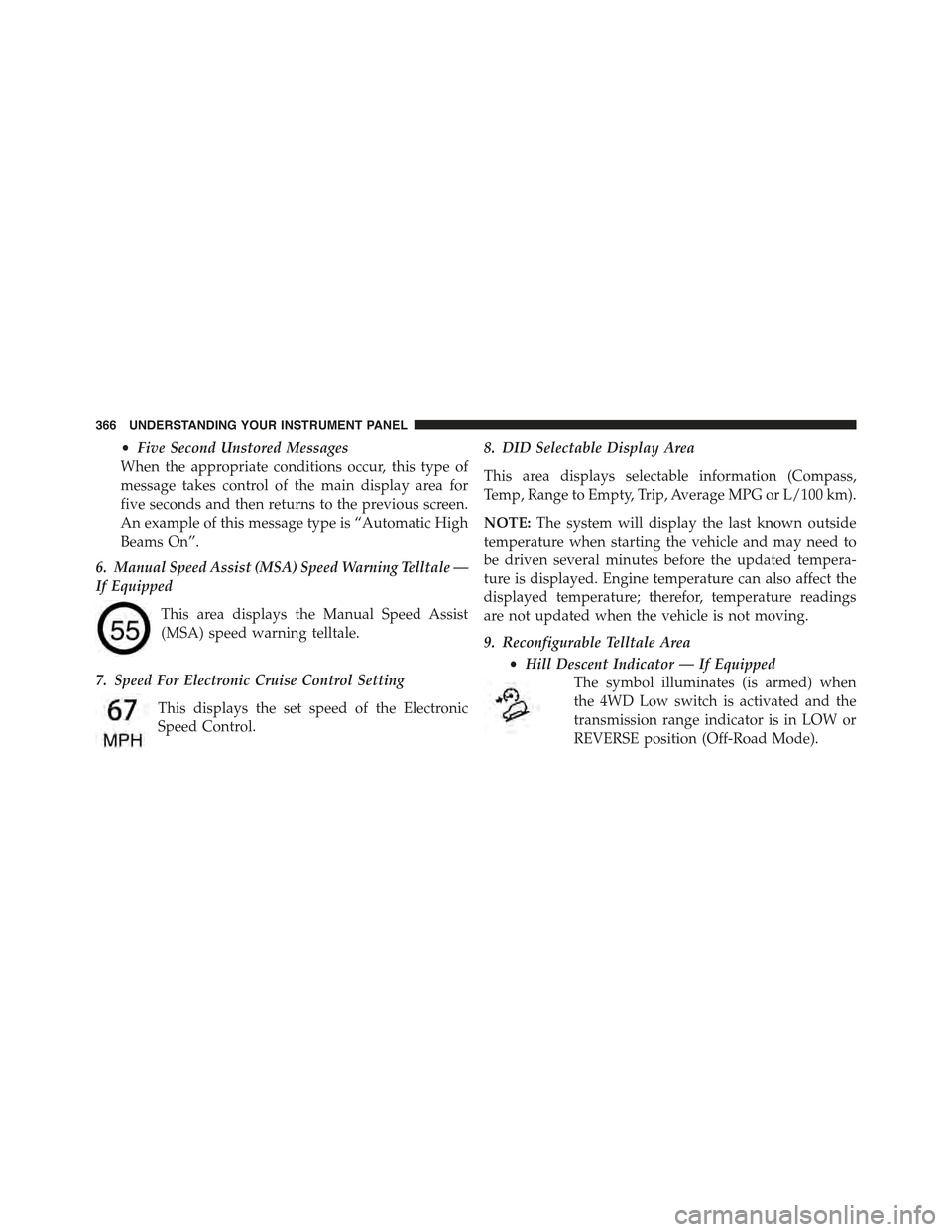
6. Manual Speed Assist (MSA) Speed Warning Telltale —
If Equipped
This area displays the Manual Speed Assist
(MSA) speed warning telltale.
7. Speed For Electronic Cruise Control Setting
This displays the set speed of the Electronic
Speed Control.
8. DID Selectable Display Area
This area displays selectable information (Compass,
Temp, Range to Empty, Trip, Average MPG or L/100 km).
NOTE:The system will display the last known outside
temperature when starting the vehicle and may need to
be driven several minutes before the updated tempera-
ture is displayed. Engine temperature can also affect the
displayed temperature; therefor, temperature readings
are not updated when the vehicle is not moving.
9. Reconfigurable Telltale Area
•Hill Descent Indicator — If Equipped
The symbol illuminates (is armed) when
the 4WD Low switch is activated and the
transmission range indicator is in LOW or
REVERSE position (Off-Road Mode).
366 UNDERSTANDING YOUR INSTRUMENT PANEL
Page 388 of 772
side of the Climate Controls in the center of the instru-
ment panel. Turn the control knob to scroll through
menus and change settings (i.e., 30, 60, 90), push the
center of the control knob one or more times to select or
change a setting (i.e., ON, OFF).
Your Uconnect® system may also have a Screen Off and
Back buttons located below the system.
Push the Screen Off button to turn off the Uconnect®
screen. Push the Screen Off button a second time to turn
the screen on.
Push the Back button to exit out of a Menu or certain
option on the Uconnect® system.
Buttons On The Touchscreen
Buttons on the touchscreen are accessible on the
Uconnect® display.
Customer Programmable Features/Personal
Settings — Uconnect® 5.0 Settings
Push the MORE button on the faceplate to display the
menu setting screen. In this mode the Uconnect® system
allows you to access programmable features that may be
equipped such as Display, Voice, Clock & Date, Safety &
Assistance, Lights, Doors & Locks, Auto-On Comfort,
Engine Off Options, Compass Settings, Audio, Phone/
Bluetooth®, Sirius Setup, Restore Settings, and Clear
Personal Data.
NOTE:Only one category may be selected at a time.
When making a selection, press the button on the touch-
screen to enter the desired mode. Once in the desired
mode, press and release the preferred setting and make
your selection. Once the setting is complete, either press
the Back Arrow/Done button on the touchscreen or the
Back button on the faceplate to return to the previous
menu or press the “X” button on the touchscreen to close
386 UNDERSTANDING YOUR INSTRUMENT PANEL
Page 393 of 772
entire surroundings” across the top of the screen. After
five seconds, this note will disappear. To make your
selection, press the “ParkView® Backup Camera Active
Guidelines” button on the touchscreen and make your
selection. Press arrow button on the touchscreen to return
to the previous menu.
•ParkView® Backup Camera Delay
When the vehicle is shifted out of REVERSE (with camera
delay turned OFF), the rear camera mode is exited and
the navigation or audio screen appears again. When the
vehicle is shifted out of REVERSE (with camera delay
turned ON), the rear view image with dynamic grid lines
will be displayed for up to 10 seconds after shifting out of
“REVERSE” unless the forward vehicle speed exceeds
8 mph (12 km/h), the transmission is shifted into PARK
or the ignition is switched to the OFF position. To set the
ParkView® Backup Camera Delay push the MORE but-
ton on the faceplate, the “settings” button on the touch-
screen, then the “Safety & Driving Assistance” button on
the touchscreen. Press the “Parkview Backup camera
Delay” button on the touchscreen to turn the ParkView®
Delay ON or OFF.
•Rain Sensing Auto Wipers
When this feature is selected, the system will automati-
cally activate the windshield wipers if it senses moisture
on the windshield. To make your selection, press the
“Rain Sensing” button on the touchscreen and make your
selection. Press the back arrow button on the touchscreen
to return to the previous menu.
•Hill Start Assist — If Equipped
When this feature is selected, the Hill Start Assist (HSA)
system is active. Refer to “Electronic Brake Control
System” in “Starting And Operating” for system function
and operating information. To make your selection, press
4
UNDERSTANDING YOUR INSTRUMENT PANEL 391
Page 411 of 772
arrow button on the touchscreen to return to the previous
menu. ParkSense® will retain its last known configura-
tion state through ignition cycles.
•Tilt Side Mirrors In Reverse
When this feature is selected, the exterior side view
mirrors will tilt downward when the ignition is in the
RUN position and the transmission shift lever is in the
REVERSE position. The mirrors will move back to their
previous position when the transmission is shifted out of
REVERSE. To make your selection, press the “Tilt Side
Mirrors In Reverse” button on the touchscreen, until a
check-mark appears next to setting, indicating that the
setting had been selected. Press the back arrow button on
the touchscreen to return to the previous menu.
•Blind Spot Alert
When this feature is selected, the Blind Spot Alert feature
Provides alerts, visual and/or audible, to indicate objects
in your blind spot. The Blind Spot Alert feature can be
activated in “Lights” mode. When this mode is selected,
the Blind Spot Monitor (BSM) system is activated and
will only show a visual alert in the exterior mirrors.
When “Lights & Chime” mode is activated, the Blind
Spot Monitor (BSM) will show a visual alert in the
exterior mirrors as well as an audible alert when the turn
signal is on. When “Off” is selected, the Blind Spot
Monitor (BSM) system is deactivated. To change the
Blind Spot Alert status, press the “Off,” “Lights” or
“Lights & Chime” button on the touchscreen. Then press
the back arrow button on the touchscreen.
NOTE:If your vehicle has experienced any damage in
the area where the sensor is located, even if the fascia is
not damaged, the sensor may have become misaligned.
Take your vehicle to an authorized dealer to verify sensor
alignment. Having a sensor that is misaligned will result
in the BSM not operating to specification.
4
UNDERSTANDING YOUR INSTRUMENT PANEL 409
Page 412 of 772
•ParkView® Backup Camera Active Guidelines
Your vehicle may be equipped with the ParkView® Rear
Back Up Camera Active Guidelines that allows you to see
active guidelines over the ParkView Back up camera
display whenever the shift lever is put into REVERSE.
The image will be displayed on the radio touchscreen
display along with a caution note to “check entire sur-
roundings” across the top of the screen. After five sec-
onds, this note will disappear. To change the mode status,
press the “ParkView Backup Camera Active Guidelines”
button on the touchscreen, until a check-mark appears
next to setting, indicating that the setting had been
selected. Press the back arrow button on the touchscreen
to return to the previous menu.
•ParkView® Backup Camera Delay
When the vehicle is shifted out of REVERSE (with camera
delay turned OFF), the rear camera mode is exited and
the navigation or audio screen appears again. When the
vehicle is shifted out of REVERSE (with camera delay
turned ON), the rear view image with dynamic grid lines
will be displayed for up to 10 seconds after shifting out of
“REVERSE” unless the forward vehicle speed exceeds
8 mph (12 km/h), the transmission is shifted into
“PARK” or the ignition is switched to the OFF position.
To set the ParkView® Backup Camera Delay press the
“Controls” button on the touchscreen, the “settings”
button on the touchscreen, then the “Safety & Driving
Assistance” button on the touchscreen. Press the
“Parkview Backup camera Delay” button on the touch-
screen to turn the ParkView® Delay ON or OFF.
•Rain Sensing Auto Wipers
When this feature is selected, the system will automati-
cally activate the windshield wipers if it senses moisture
on the windshield. To make your selection, press the
“Rain Sensing” button on the touchscreen, until a check-
mark appears next to setting, indicating that the setting
410 UNDERSTANDING YOUR INSTRUMENT PANEL
Page 428 of 772
CLIMATE CONTROLS
The air conditioning and heating system is designed to
make you comfortable in all types of weather. This
system can be operated through either the controls on the
instrument panel or through the Uconnect® system dis-
play.
When the Uconnect® system is in different modes (Ra-
dio, Player, Settings, More, etc.) the driver and passenger
temperature settings will be indicated at the top of the
display.
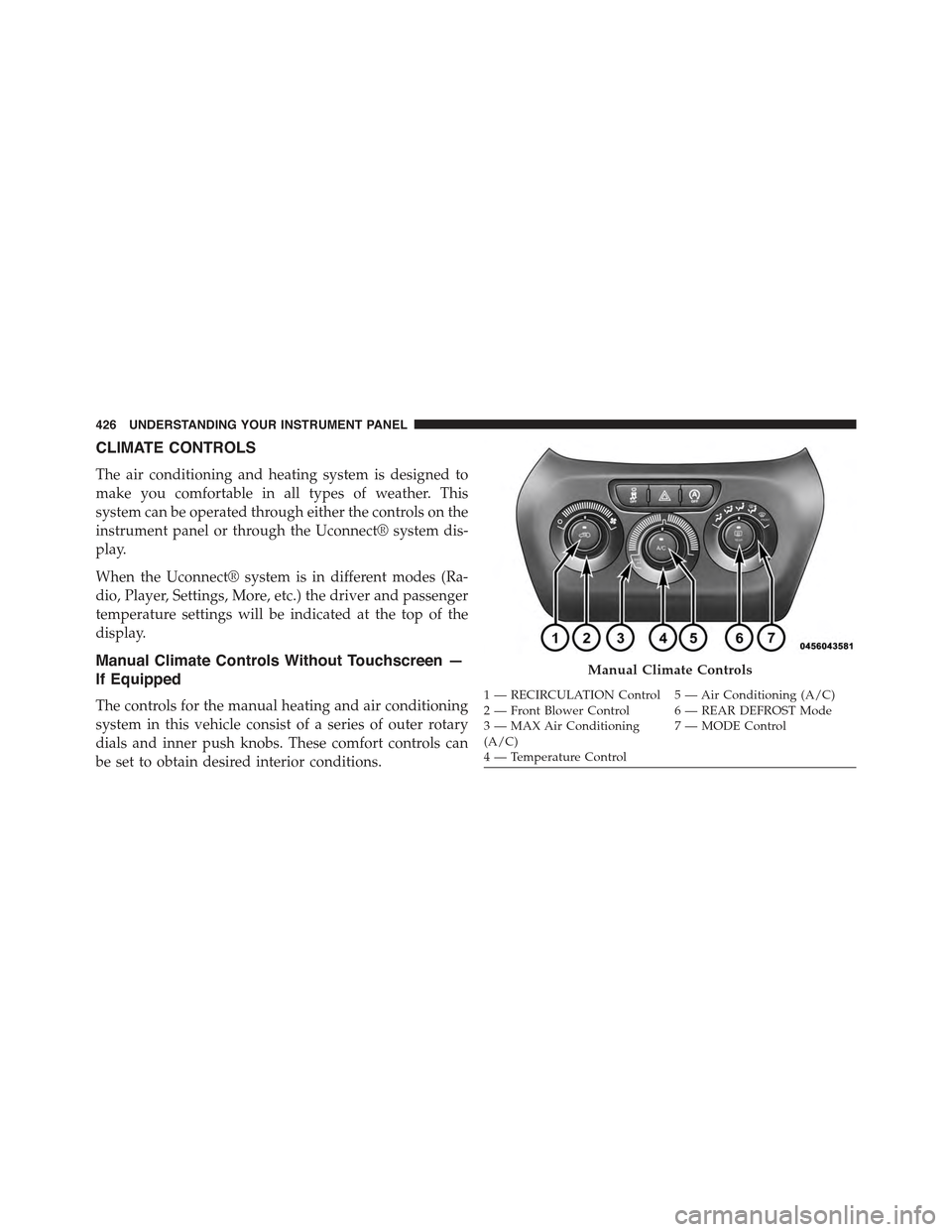
Manual Climate Controls Without Touchscreen —
If Equipped
The controls for the manual heating and air conditioning
system in this vehicle consist of a series of outer rotary
dials and inner push knobs. These comfort controls can
be set to obtain desired interior conditions.
Manual Climate Controls
1—RECIRCULATIONControl 5—AirConditioning(A/C)2—FrontBlowerControl 6—REARDEFROSTMode3—MAXAirConditioning(A/C)7—MODEControl
4—TemperatureControl
426 UNDERSTANDING YOUR INSTRUMENT PANEL