steering JEEP CHEROKEE 2015 KL / 5.G Service Manual
[x] Cancel search | Manufacturer: JEEP, Model Year: 2015, Model line: CHEROKEE, Model: JEEP CHEROKEE 2015 KL / 5.GPages: 772, PDF Size: 18.21 MB
Page 283 of 772
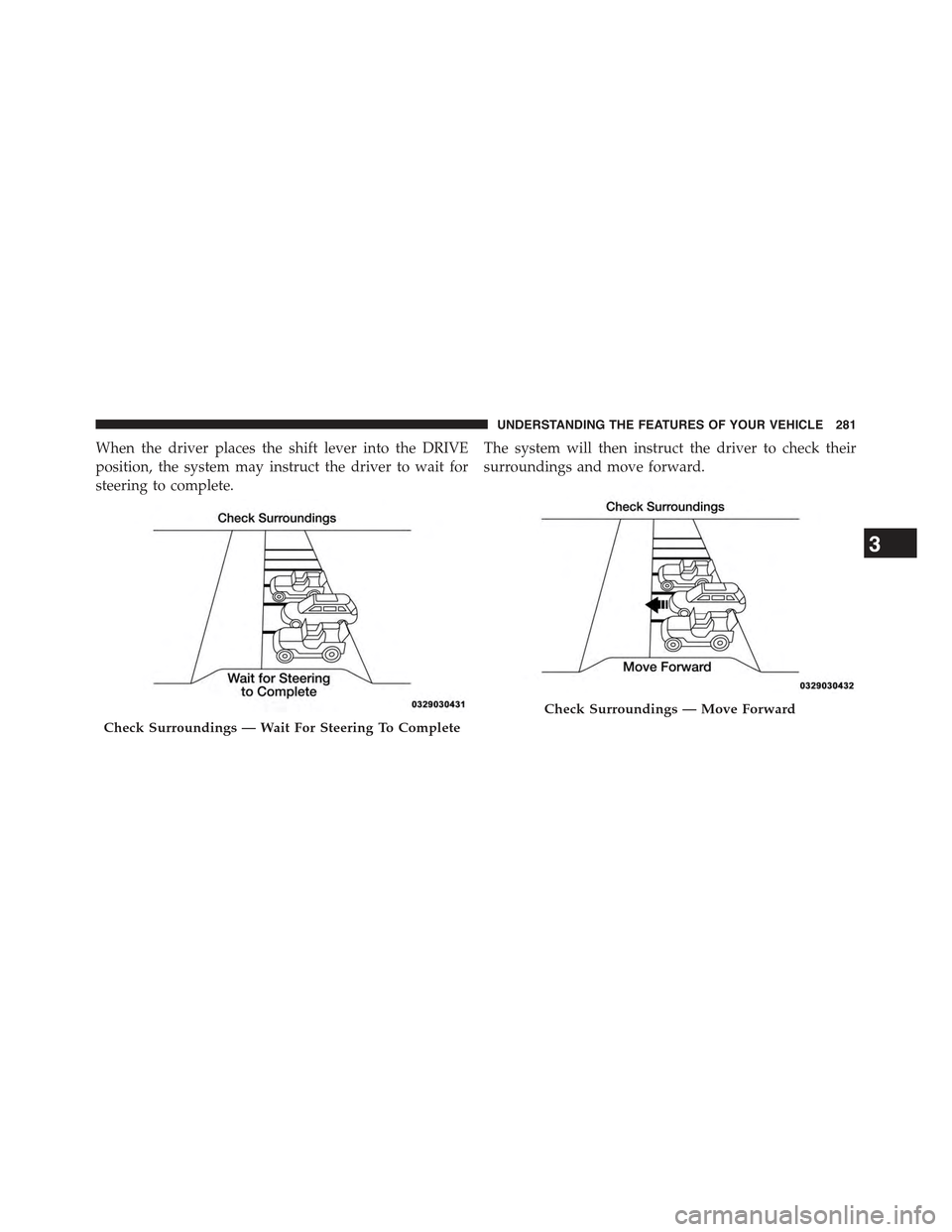
When the driver places the shift lever into the DRIVE
position, the system may instruct the driver to wait for
steering to complete.
The system will then instruct the driver to check their
surroundings and move forward.
Check Surroundings — Wait For Steering To Complete
Check Surroundings — Move Forward
3
UNDERSTANDING THE FEATURES OF YOUR VEHICLE 281
Page 285 of 772
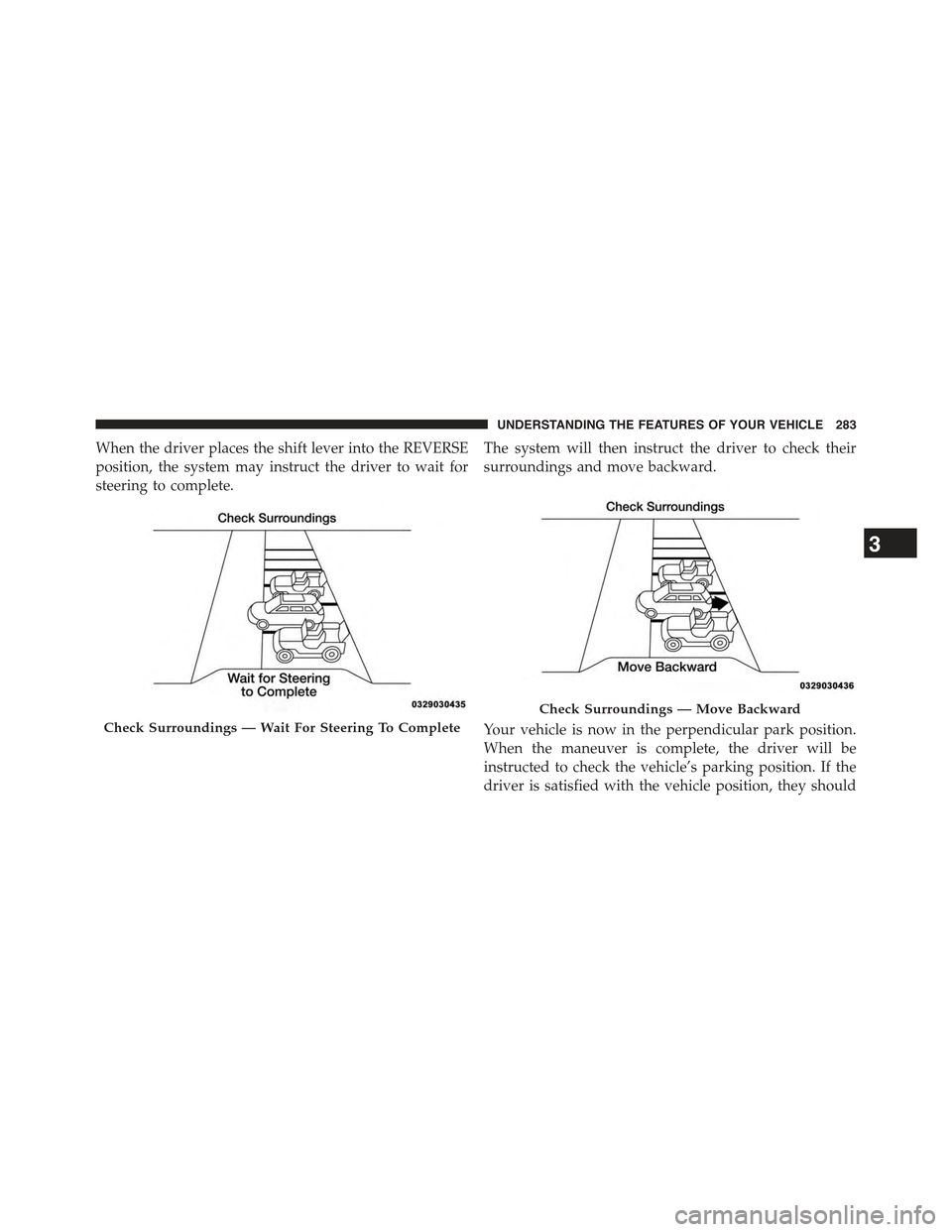
When the driver places the shift lever into the REVERSE
position, the system may instruct the driver to wait for
steering to complete.
The system will then instruct the driver to check their
surroundings and move backward.
Your vehicle is now in the perpendicular park position.
When the maneuver is complete, the driver will be
instructed to check the vehicle’s parking position. If the
driver is satisfied with the vehicle position, they should
Check Surroundings — Wait For Steering To Complete
Check Surroundings — Move Backward
3
UNDERSTANDING THE FEATURES OF YOUR VEHICLE 283
Page 288 of 772
PARKVIEW® REAR BACK UP CAMERA — IF
EQUIPPED
Your vehicle may be equipped with the ParkView® Rear
Back Up Camera that allows you to see an on-screen
image of the rear surroundings of your vehicle whenever
the shift lever is put into REVERSE. The image will be
displayed in the touchscreen display along with a caution
note to “check entire surroundings” across the top of the
screen. After five seconds this note will disappear. The
ParkView® camera is located on the rear of the vehicle
above the rear License plate.
NOTE:The ParkView® Rear Back Up Camera has pro-
grammable modes of operation that may be selected
through the Uconnect® System. Refer to “Uconnect®
Settings” in “Understanding Your Instrument Panel” for
further information.
When the vehicle is shifted out of REVERSE (with camera
delay turned OFF), the rear camera mode is exited and
the navigation or audio screen appears again. When the
vehicle is shifted out of REVERSE (with camera delay
turned ON), the camera image will continue to be
displayed for up to 10 seconds after shifting out of
REVERSE unless the vehicle speed exceeds 8 mph
(13 km/h), the vehicle is shifted into PARK or the
vehicles ignition is cycled to the OFF position.
When enabled, active guide lines are overlaid on the
image to illustrate the width of the vehicle and its
projected backup path based on the steering wheel
position. A dashed center line overlay indicates the center
of the vehicle to assist with parking or aligning to a
hitch/receiver.
When enabled, fixed guide lines are overlaid on the
image to illustrate the width of the vehicle.
Different colored zones indicate the distance to the rear of
the vehicle.
286 UNDERSTANDING THE FEATURES OF YOUR VEHICLE
Page 322 of 772
REAR WINDOW FEATURES
Rear Window Wiper/Washer
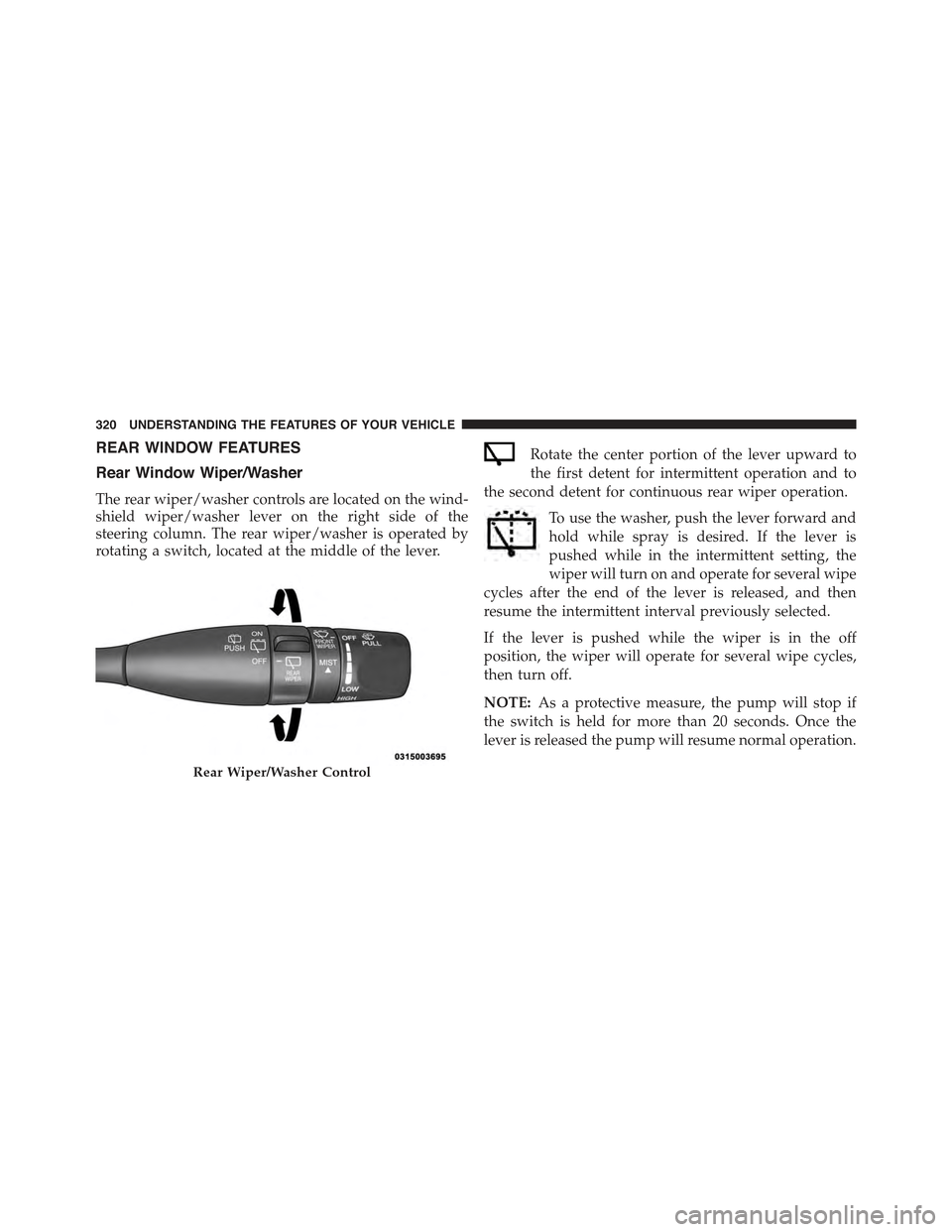
The rear wiper/washer controls are located on the wind-
shield wiper/washer lever on the right side of the
steering column. The rear wiper/washer is operated by
rotating a switch, located at the middle of the lever.
Rotate the center portion of the lever upward to
the first detent for intermittent operation and to
the second detent for continuous rear wiper operation.
To use the washer, push the lever forward and
hold while spray is desired. If the lever is
pushed while in the intermittent setting, the
wiper will turn on and operate for several wipe
cycles after the end of the lever is released, and then
resume the intermittent interval previously selected.
If the lever is pushed while the wiper is in the off
position, the wiper will operate for several wipe cycles,
then turn off.
NOTE:As a protective measure, the pump will stop if
the switch is held for more than 20 seconds. Once the
lever is released the pump will resume normal operation.
Rear Wiper/Washer Control
320 UNDERSTANDING THE FEATURES OF YOUR VEHICLE
Page 328 of 772
▫Customer Programmable Features — Uconnect®
8.4 Personal Settings...................401
!Uconnect® RADIOS — IF EQUIPPED........421
!iPod®/USB/MP3 CONTROL — IF EQUIPPED . .422
!STEERING WHEEL AUDIO CONTROLS — IF
EQUIPPED...........................422
▫Radio Operation......................423
▫CD Player...........................424
!CD/DVD DISC MAINTENANCE...........424
!RADIO OPERATION AND MOBILE PHONES . .425
▫General Information...................425
!CLIMATE CONTROLS...................426
▫Manual Climate Controls Without Touchscreen —
If Equipped.........................426
▫Manual Climate Controls With Touchscreen — If
Equipped...........................431
▫Dual Zone Automatic Climate Controls With
Touchscreen — If Equipped..............436
▫Climate Control Functions...............443
▫Automatic Temperature Control (ATC)......445
▫Operating Tips.......................447
!Uconnect® VOICE RECOGNITION QUICK
TIPS................................450
▫Introducing Uconnect®.................450
▫Get Started..........................451
▫Basic Voice Commands..................452
▫Radio..............................454
▫Media..............................455
326 UNDERSTANDING YOUR INSTRUMENT PANEL
Page 346 of 772
5. LaneSense — If Equipped
The LaneSense system provides the driver with
visual and steering torque warnings when the
vehicle starts to drift out of its lane uninten-
tionally without the use of a turn signal.
•When the LaneSense system is ON and ready the
lane lines and LaneSense indicator are the color gray.
•When the LaneSense system is armed, the lane lines
change to white and the LaneSense indicator
changes to green.
•When the LaneSense system senses a lane cross
situation, the approaching lane line and the La-
neSense indicator change from white to yellow.
For further information, refer to “Lanesense — If
Equipped” in “Understanding The Features Of Your
Vehicle”.
6. Fuel Gauge
Fuel Gauge displays the level of fuel in the fuel tank
when the ignition switch is in the ON/RUN position.
7. Low Fuel Telltale
When the fuel level reaches approximately 3.0 gal
(11.0 L) this light will turn on, and remain on until
fuel is added.
8. Rear Axle Lock Indicator — If Equipped
This light indicates when the rear axle lock has
been activated.
9. Reconfigurable Yellow Telltale Display
•Transmission Temperature Warning Light
This light indicates that there is excessive
transmission fluid temperature that might
occur with severe usage such as trailer
towing. It may also occur when operating
344 UNDERSTANDING YOUR INSTRUMENT PANEL
Page 349 of 772
•Electronic Speed Control ON
This light will turn on when the electronic
speed control is ON. For further informa-
tion, refer to “Electronic Speed Control” in
“Understanding The Features Of Your
Vehicle”.
•Electronic Speed Control SET
This light will turn on when the electronic
speed control is SET. For further information,
refer to “Electronic Speed Control” in “Un-
derstanding The Features Of Your Vehicle”.
13. Reconfigurable Red Telltale Display
•Power Steering System Over Temperature — If
Equipped
If the “POWER STEERING SYSTEM OVER
TEMP” message and a icon are displayed
on the EVIC screen, it indicates that ex-
treme steering maneuvers may have oc-
curred, which caused an over temperature condition
in the power steering system. You will lose power
steering assistance momentarily until the over tem-
perature condition no longer exists. Once driving
conditions are safe, then pull over and let vehicle idle.
After five minutes, the system will cool and return to
normal operation. Refer to “Power Steering” in
“Starting and Operating” for further information.
NOTE:
•Even if power steering assistance is no longer opera-
tional, it is still possible to steer the vehicle. Under
these conditions there will be a substantial increase
in steering effort, especially at very low vehicle
speeds and during parking maneuvers.
•If the condition persists, see your authorized dealer
for service.
4
UNDERSTANDING YOUR INSTRUMENT PANEL 347
Page 356 of 772
•Electric Power Steering Malfunction Warning Light
This telltale is on when the Electric Power
Steering is not operating and needs service.
•Air Bag Warning Light
This light will turn on for four to eight seconds
as a bulb check when the ignition switch is first
turned to ON/RUN. If the light is either not on
during starting, stays on, or turns on while
driving, have the system inspected at an authorized
dealer as soon as possible. Refer to “Occupant Restraints”
in “Things To Know Before Starting Your Vehicle” for
further information.
•Oil Temperature Warning Light
This telltale indicates engine oil temperature is
high. If the light turns on while driving, stop
the vehicle and shut off the engine as soon as
possible.
•Liftgate Open Warning Light
This telltale is on when the Trailer Brake has
been disconnected.
EVIC Yellow Telltales
This area will show reconfigurable yellow caution tell-
tales. These telltales include:
•Forward Collision Telltale
This telltale will turn on warn you of a possible
collision with the vehicle in front of you.
•Service Stop/Start System Telltale — If Equipped
This telltale will turn on to indicate the Stop/
Start system is not functioning properly and
service is required.
354 UNDERSTANDING YOUR INSTRUMENT PANEL
Page 360 of 772
Refer to “Tire Pressure Monitoring System (TPMS)”
under “Starting and Operating” for further information.
Coolant Temperature
Transmission Temp
Oil Temp
Oil Life
Battery Voltage
Driver Assist
Adaptive Cruise Control (ACC) Menu
The EVIC displays the current ACC system settings. The
information displayed depends on ACC system status.
Push the ADAPTIVE CRUISE CONTROL (ACC) ON/
OFF button (located on the steering wheel) until one of
the following displays in the EVIC:
Adaptive Cruise Control Off
When ACC is deactivated, the display will read “Adap-
tive Cruise Control Off.”
Adaptive Cruise Control Ready
When ACC is activated but the vehicle speed setting has
not been selected, the display will read “Adaptive Cruise
Control Ready.”
Push and release the SET + or the SET- button (located on
the steering wheel) and the following will display in the
EVIC:
ACC SET
When ACC is set, the set speed will display in the
instrument cluster.
358 UNDERSTANDING YOUR INSTRUMENT PANEL
Page 364 of 772
•Trip B
•Audio Information
•None
Restore To Defaults (Restores All Settings To Default
Settings)
•OK
•Cancel
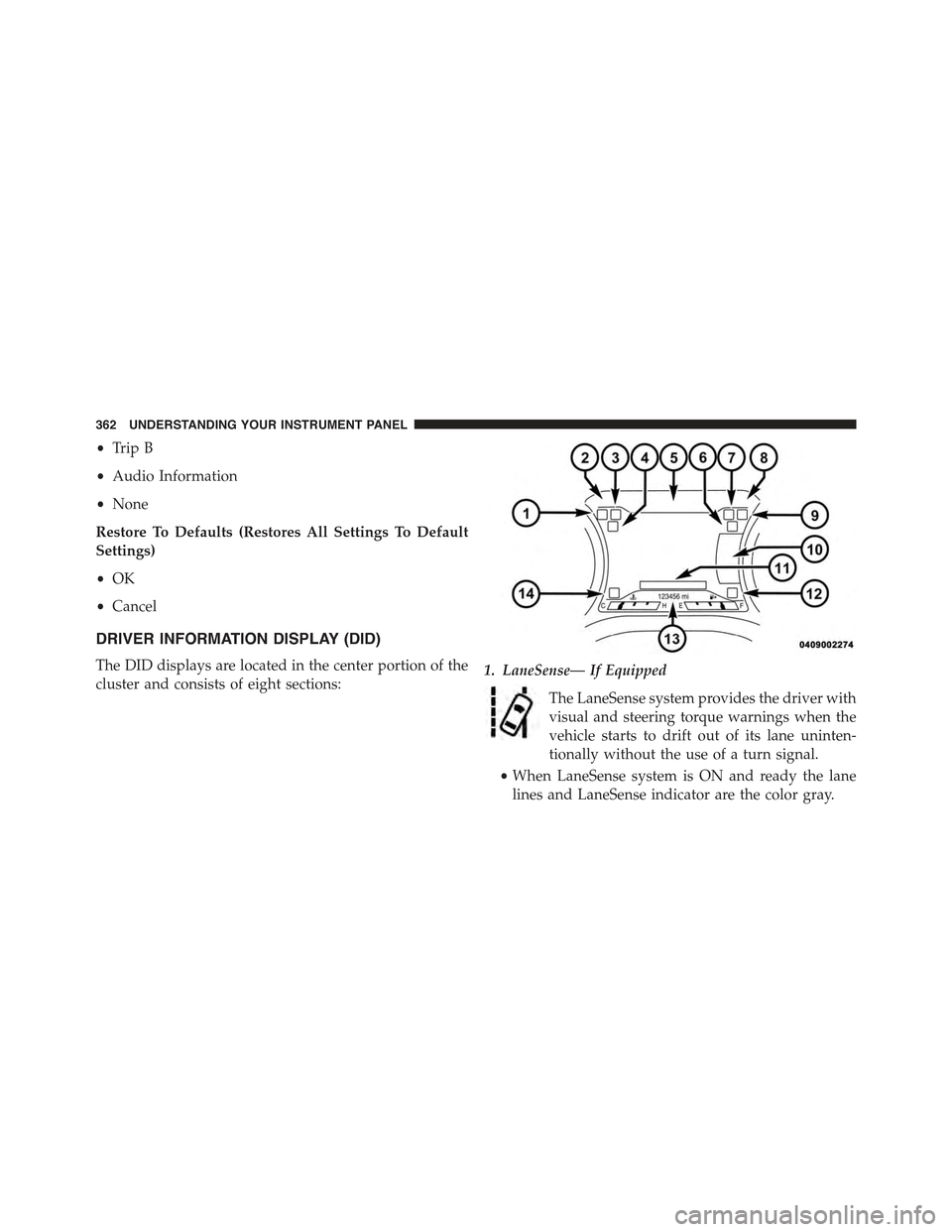
DRIVER INFORMATION DISPLAY (DID)
The DID displays are located in the center portion of the
cluster and consists of eight sections:1. LaneSense— If Equipped
The LaneSense system provides the driver with
visual and steering torque warnings when the
vehicle starts to drift out of its lane uninten-
tionally without the use of a turn signal.
•When LaneSense system is ON and ready the lane
lines and LaneSense indicator are the color gray.
362 UNDERSTANDING YOUR INSTRUMENT PANEL