ignition JEEP CHEROKEE 2015 KL / 5.G Workshop Manual
[x] Cancel search | Manufacturer: JEEP, Model Year: 2015, Model line: CHEROKEE, Model: JEEP CHEROKEE 2015 KL / 5.GPages: 772, PDF Size: 18.21 MB
Page 244 of 772
•Jackhammers, large trucks, and other vibrations could
affect the performance of ParkSense®.
•When you turn ParkSense® OFF, the instrument clus-
ter will display “PARKSENSE OFF” Furthermore, once
you turn ParkSense® off, it remains off until you turn
it on again, even if you cycle the ignition key.
•When you move the shift lever to the REVERSE
position and ParkSense® is turned OFF, the EVIC/
DID will display “PARKSENSE OFF” message for as
long as the vehicle is in REVERSE.
•ParkSense®, when on, will reduce the volume of the
radio when it is sounding a tone.
•Clean the ParkSense® sensors regularly, taking care
not to scratch or damage them. The sensors must not
be covered with ice, snow, slush, mud, dirt or debris.
Failure to do so can result in the system not working
properly. The ParkSense® system might not detect an
obstacle behind the fascia/bumper, or it could provide
a false indication that an obstacle is behind the fascia/
bumper.
•Use the ParkSense® switch to turn the ParkSense®
system OFF if objects such as bicycle carriers, trailer
hitches, etc. are placed within 12 in (30 cm) from the
rear fascia/bumper. Failure to do so can result in the
system misinterpreting a close object as a sensor
problem, causing the “PARKSENSE UNAVAILABLE
SERVICE REQUIRED” message to be displayed in the
EVIC/DID.
•ParkSense® should be disabled when the liftgate is in
the open position and the vehicle is in REVERSE. An
open liftgate could provide a false indication that an
obstacle is behind the vehicle.
242 UNDERSTANDING THE FEATURES OF YOUR VEHICLE
Page 247 of 772
•The automatic braking function may only be applied if
the vehicle deceleration is not enough to avoid collid-
ing with a detected obstacle.
•The automatic braking function may not be applied
fast enough for obstacles that move toward the rear of
the vehicle from the left and/or right sides.
•The automatic braking function can be enabled/
disabled from the Customer-Programmable Features
section of the Uconnect® System.
•ParkSense® will retain its last known configuration
state for the automatic braking function through igni-
tion cycles.
The automatic braking function is intended to assist the
driver in avoiding possible collisions with detected ob-
stacles when backing up in REVERSE gear.
If your vehicle is equipped with a Manual Transmission,
the automatic braking function in REVERSE gear is not
available.
NOTE:
•The driver is always responsible for controlling the
vehicle.
•The system is provided to assist the driver and not to
substitute the driver.
•The driver must stay in full control of the vehicle’s
acceleration and braking and is responsible for the
vehicle’s movements.
Refer to ParkSense® System Usage Precautions for limi-
tations of this system and recommendations.
ParkSense® will retain the last system state (enabled or
disabled) from the last ignition cycle when the ignition is
changed to the ON/RUN position.
3
UNDERSTANDING THE FEATURES OF YOUR VEHICLE 245
Page 258 of 772
Front Park Assist Audible Alerts
ParkSense® will turn off the Front Park Assist audible
alert (chime) after approximately three seconds when an
obstacle has been detected, the vehicle is stationary, and
brake pedal is applied.
Adjustable Chime Volume Settings
Front and Rear chime volume settings can be selected
from the Customer-Programmable Features section of the
Uconnect® System, refer to “Uconnect Settings” in “Un-
derstanding Your Instrument Panel” for further informa-
tion.
If the Uconnect® System is equipped, chime volume
settings will not be accessible from the EVIC/DID.
The chime volume settings include LOW, MEDIUM, and
HIGH. The factory default volume setting is MEDIUM.
ParkSense® will retain its last known configuration state
through ignition cycles.
Enabling And Disabling ParkSense®
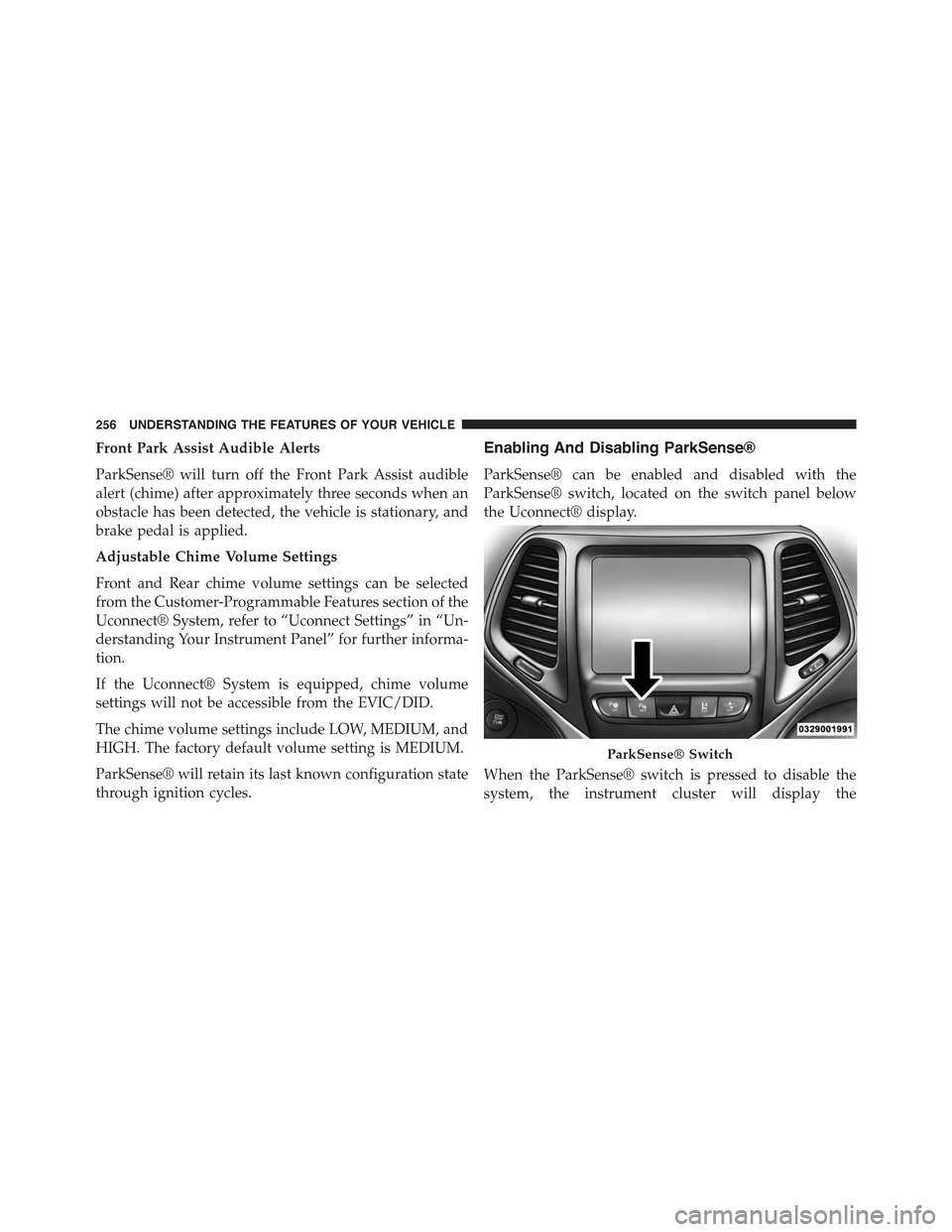
ParkSense® can be enabled and disabled with the
ParkSense® switch, located on the switch panel below
the Uconnect® display.
When the ParkSense® switch is pressed to disable the
system, the instrument cluster will display the
ParkSense® Switch
256 UNDERSTANDING THE FEATURES OF YOUR VEHICLE
Page 259 of 772
“PARKSENSE OFF” message for approximately five sec-
onds. Refer to “Electronic Vehicle Information Center
(EVIC)” in “Understanding Your Instrument Panel” or
“Driver Information Display (DID)” for further informa-
tion. When the shift lever is moved to REVERSE and the
system is disabled, the EVIC/DID will display the
“PARKSENSE OFF” message for as long as the vehicle is
in REVERSE.
The ParkSense® switch LED will be ON when
ParkSense® is disabled or requires service. The
ParkSense® switch LED will be OFF when the system is
enabled. If the ParkSense® switch is pressed, and re-
quires service, the ParkSense® switch LED will blink
momentarily, and then the LED will be ON.
Service The ParkSense® Park Assist System
During vehicle start up, when the ParkSense® System
has detected a faulted condition, the instrument cluster
will actuate a single chime, once per ignition cycle, and it
will display the#PARKSENSE UNAVAILABLE WIPE
REAR SENSORS#,#PARKSENSE UNAVAILABLE WIPE
FRONT SENSORS#,orthe#PARKSENSE UNAVAIL-
ABLE SERVICE REQUIRED#message for five seconds.
When the shift lever is moved to Reverse and the system
has detected a faulted condition, the Electronic Vehicle
Information Center (EVIC) or Driver Information Display
(DID) will display a#PARKSENSE UNAVAILABLE WIPE
REAR SENSORS#,#PARKSENSE UNAVAILABLE WIPE
FRONT SENSORS#or#PARKSENSE UNAVAILABLE
SERVICE REQUIRED#pop up message for five seconds.
After five seconds, a car graphic will be displayed with
#UNAVAILABLE#at either the front or rear sensor loca-
tion depending on where the fault is detected. The
system will continue to provide arc alerts for the side that
is functioning properly. These arc alerts will interrupt the
#PARKSENSE UNAVAILABLE WIPE REAR SENSORS#,
3
UNDERSTANDING THE FEATURES OF YOUR VEHICLE 257
Page 260 of 772
#PARKSENSE UNAVAILABLE WIPE FRONT SEN-
SORS#,or#PARKSENSE UNAVAILABLE SERVICE RE-
QUIRED#messages if an object is detected within the five
second pop-up duration. The car graphic will remain
displayed for as long as the vehicle is in REVERSE. Refer
to “Electronic Vehicle Information Center (EVIC) or#
Driver Information Display (DID)” for further informa-
tion.
If#PARKSENSE UNAVAILABLE WIPE REAR SENSORS#
or#PARKSENSE UNAVAILABLE WIPE FRONT SEN-
SORS#appears in the Electronic Vehicle Information
Center (EVIC) or Driver Information Display (DID) make
sure the outer surface and the underside of the rear
fascia/bumper and/or front fascia/bumper is clean and
clear of snow, ice, mud, dirt or other obstruction and then
cycle the ignition. If the message continues to appear see
an authorized dealer.
If the#PARKSENSE UNAVAILABLE SERVICE RE-
QUIRED#message appears in the EVIC/DID, see an
authorized dealer.
Cleaning The ParkSense® System
Clean the ParkSense® sensors with water, car wash soap
and a soft cloth. Do not use rough or hard cloths. Do not
scratch or poke the sensors. Otherwise, you could dam-
age the sensors.
ParkSense® System Usage Precautions
NOTE:
•Ensure that the front and rear bumper are free of snow,
ice, mud, dirt and debris to keep the ParkSense®
system operating properly.
•Jackhammers, large trucks, and other vibrations could
affect the performance of ParkSense®.
258 UNDERSTANDING THE FEATURES OF YOUR VEHICLE
Page 261 of 772
•When you turn ParkSense® off, the instrument cluster
will display “PARKSENSE OFF.” Furthermore, once
you turn ParkSense® off, it remains off until you turn
it on again, even if you cycle the ignition key.
•When you move the shift lever to the REVERSE
position and ParkSense® is turned off, the instrument
cluster will display “PARKSENSE OFF” for as long as
the vehicle is in REVERSE.
•ParkSense®, when on, will reduce the volume of the
radio when it is sounding a tone.
•Clean the ParkSense® sensors regularly, taking care
not to scratch or damage them. The sensors must not
be covered with ice, snow, slush, mud, dirt or debris.
Failure to do so can result in the system not working
properly. The ParkSense® system might not detect an
obstacle behind or in front of the fascia/bumper, or it
could provide a false indication that an obstacle is
behind or in front of the fascia/bumper.
•Use the ParkSense® switch to turn the ParkSense®
system off if objects such as bicycle carriers, trailer
hitches, etc. are placed within 12 in (30 cm) from the
rear fascia/bumper. Failure to do so can result in the
system misinterpreting a close object as a sensor
problem, causing the “PARKSENSE UNAVAILABLE
SERVICE REQUIRED” message to be displayed in the
instrument cluster.
•ParkSense® should be disabled when the liftgate is in
the open position. An opened liftgate could provide a
false indication that an obstacle is behind the vehicle.
•There may be a delay in the object detection rate if the
object is moving. This will cause the automatic braking
application to be delayed.
3
UNDERSTANDING THE FEATURES OF YOUR VEHICLE 259
Page 266 of 772
The ParkSense® Active Park Assist system will only
operate and search for a parking space when the follow-
ing conditions are present:
•Gear position is in DRIVE (automatic transmission) or
in a forward gear (manual transmission).
•Ignition is in the RUN position.
•ParkSense® Active Park Assist switch is activated.
•Driver’s door is closed.
•Rear liftgate is closed.
•Vehicle speed is less than 15 mph (25 km/h).
NOTE:If the vehicle is driven above approximately
15 mph (25 km/h), the EVIC/DID will instruct the driver
to slow down. If the vehicle is driven above approxi-
mately 18 mph (30 km/h), the system will cancel. The
driver must then reactivate the system by pressing the
ParkSense® Active Park Assist switch.
•The outer surface and the underside of the front and
rear fascias/bumpers are clean and clear of snow, ice,
mud, dirt or other obstruction.
When pressed, the LED on the ParkSense® Active Park
Assist switch will blink momentarily, and then the LED
will turn OFF if any of the above conditions are not
present.
Parallel Parking Space Assistance Operation/
Display
When the ParkSense® Active Park Assist system is
enabled the “Active ParkSense Searching - Press OK to
Switch to Perpendicular” message will appear in the
EVIC/DID display. You may switch to perpendicular
parking if you desire. Push the OK button on the left side
steering wheel switch to change your parking space
setting.
264 UNDERSTANDING THE FEATURES OF YOUR VEHICLE
Page 288 of 772
PARKVIEW® REAR BACK UP CAMERA — IF
EQUIPPED
Your vehicle may be equipped with the ParkView® Rear
Back Up Camera that allows you to see an on-screen
image of the rear surroundings of your vehicle whenever
the shift lever is put into REVERSE. The image will be
displayed in the touchscreen display along with a caution
note to “check entire surroundings” across the top of the
screen. After five seconds this note will disappear. The
ParkView® camera is located on the rear of the vehicle
above the rear License plate.
NOTE:The ParkView® Rear Back Up Camera has pro-
grammable modes of operation that may be selected
through the Uconnect® System. Refer to “Uconnect®
Settings” in “Understanding Your Instrument Panel” for
further information.
When the vehicle is shifted out of REVERSE (with camera
delay turned OFF), the rear camera mode is exited and
the navigation or audio screen appears again. When the
vehicle is shifted out of REVERSE (with camera delay
turned ON), the camera image will continue to be
displayed for up to 10 seconds after shifting out of
REVERSE unless the vehicle speed exceeds 8 mph
(13 km/h), the vehicle is shifted into PARK or the
vehicles ignition is cycled to the OFF position.
When enabled, active guide lines are overlaid on the
image to illustrate the width of the vehicle and its
projected backup path based on the steering wheel
position. A dashed center line overlay indicates the center
of the vehicle to assist with parking or aligning to a
hitch/receiver.
When enabled, fixed guide lines are overlaid on the
image to illustrate the width of the vehicle.
Different colored zones indicate the distance to the rear of
the vehicle.
286 UNDERSTANDING THE FEATURES OF YOUR VEHICLE
Page 291 of 772
NOTE:HomeLink® is disabled when the Vehicle Secu-
rity Alarm is active.
Before You Begin Programming HomeLink®
Ensure your vehicle is parked outside of the garage
before you begin programming.
For more efficient programming and accurate transmis-
sion of the radio-frequency signal it is recommended that
a new battery be placed in the hand-held transmitter of
the device that is being programmed to the HomeLink®
system.
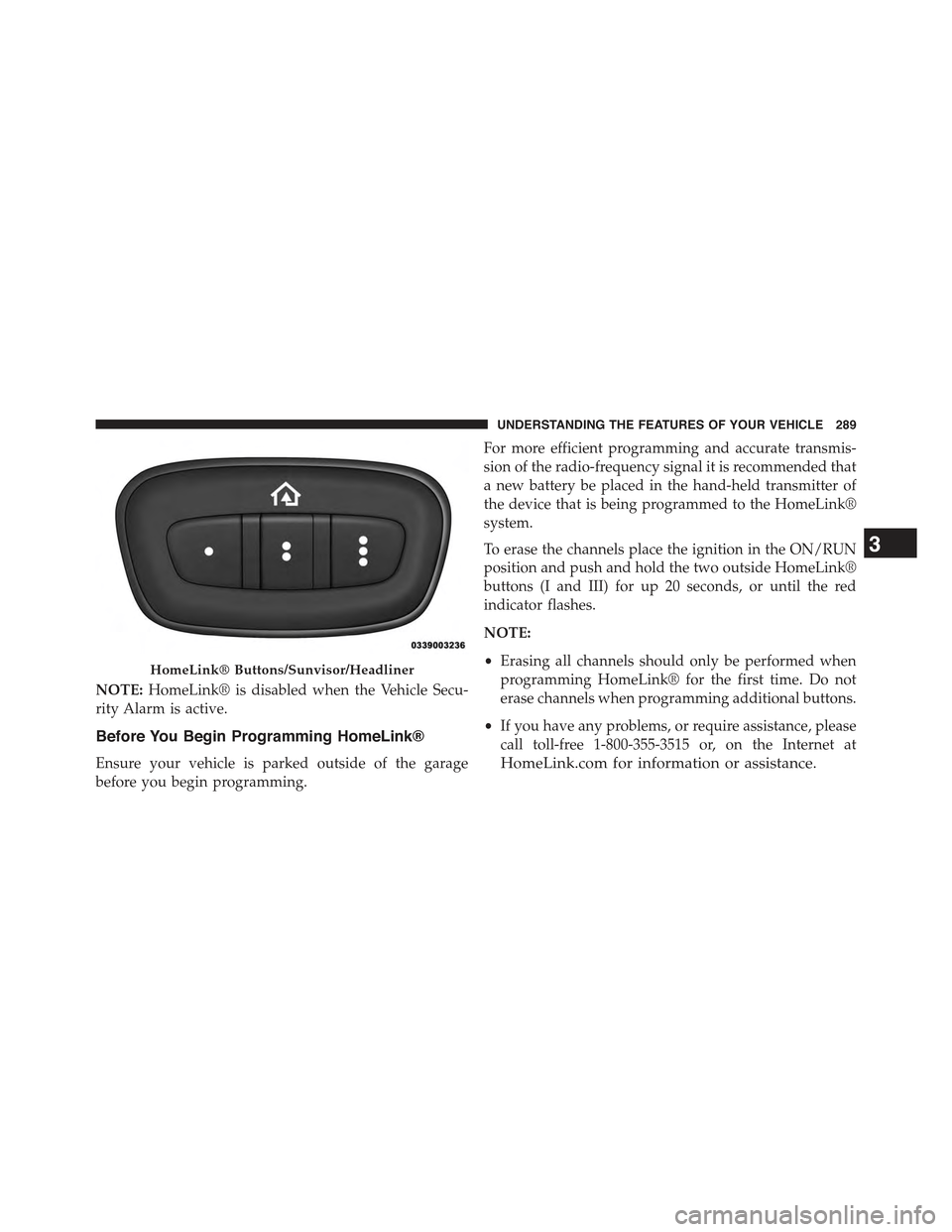
To erase the channels place the ignition in the ON/RUN
position and push and hold the two outside HomeLink®
buttons (I and III) for up 20 seconds, or until the red
indicator flashes.
NOTE:
•Erasing all channels should only be performed when
programming HomeLink® for the first time. Do not
erase channels when programming additional buttons.
•If you have any problems, or require assistance, please
call toll-free 1-800-355-3515 or, on the Internet at
HomeLink.com for information or assistance.
HomeLink® Buttons/Sunvisor/Headliner
3
UNDERSTANDING THE FEATURES OF YOUR VEHICLE 289
Page 292 of 772
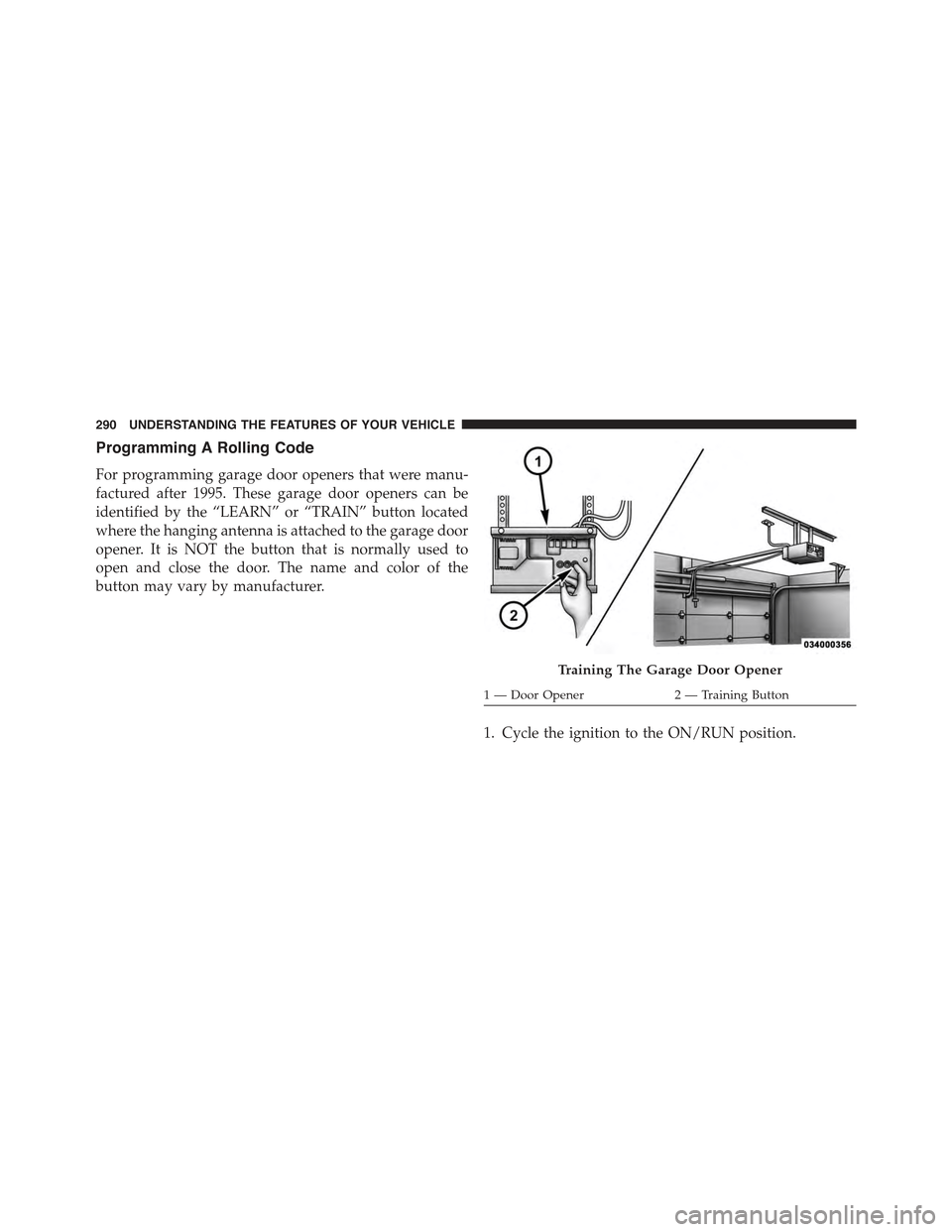
Programming A Rolling Code
For programming garage door openers that were manu-
factured after 1995. These garage door openers can be
identified by the “LEARN” or “TRAIN” button located
where the hanging antenna is attached to the garage door
opener. It is NOT the button that is normally used to
open and close the door. The name and color of the
button may vary by manufacturer.
1. Cycle the ignition to the ON/RUN position.
Training The Garage Door Opener
1—DoorOpener2—TrainingButton
290 UNDERSTANDING THE FEATURES OF YOUR VEHICLE