brake JEEP CHEROKEE 2016 KL / 5.G Owner's Manual
[x] Cancel search | Manufacturer: JEEP, Model Year: 2016, Model line: CHEROKEE, Model: JEEP CHEROKEE 2016 KL / 5.GPages: 770, PDF Size: 5.48 MB
Page 219 of 770
•Changing the FCW status to “Off” prevents the system
from warning you of a possible collision with the
vehicle in front of you.
• Changing the FCW sensitivity - Near vs. Far. Far warns
the driver of a possible collision earlier and Near
warns the driver later.
• Changing the Active Braking status to “Off” prevents
the system from providing limited active braking, or
additional brake support if the driver is not braking
adequately in the event of a potential frontal collision,
but maintains the audible and visual warnings.
NOTE: The FCW system state is kept in memory from
one key cycle to the next. If the system is turned OFF, it
will remain off when the vehicle is restarted.Changing FCW And Active Braking Status
The FCW Sensitivity And Active Braking Settings are
programmable through the Uconnect System. Refer to
“Uconnect Settings” in “Understanding Your Instrument
Panel” for further information.
The default status of FCW is the “Far” setting and the
Active Braking is the “On” setting, this allows the system
to warn you of a possible collision with the vehicle in
front of you when you are farther away and it applies
limited braking. This gives you the most reaction time to
avoid a possible collision.
Changing the FCW status to the “Near” setting, allows
the system to warn you of a possible collision with the
vehicle in front of you when you are much closer. This
setting provides less reaction time than the “Far” setting,
which allows for a more dynamic driving experience.
3
UNDERSTANDING THE FEATURES OF YOUR VEHICLE 217
Page 231 of 770
Changing LaneSense Status
The LaneSense system has settings to adjust the intensity
of the torque warning and the warning zone sensitivity
(early/late) that you can configure through the Uconnect
system screen. Refer to “Uconnect Settings” in “Under-
standing Your Instrument Panel” for further information.
NOTE:
•When enabled the system operates above 37 mph
(60 km/h) and below 112 mph (180 km/h).
• Use of the turn signal suppresses the warnings.
• The system will not apply torque to the steering wheel
whenever a safety system engages. (anti-lock brakes,
traction control system, electronic stability control,
forward collision warning, etc.).
PARKSENSE REAR PARK ASSIST — IF
EQUIPPED
The ParkSense Rear Park Assist system provides visual
and audible indications of the distance between the rear
fascia and a detected obstacle when backing up, e.g.
during a parking maneuver. Refer to ParkSense System
Usage Precautions for limitations of this system and
recommendations.
ParkSense will retain the last system state (enabled or
disabled) from the last ignition cycle when the ignition is
changed to the ON/RUN position.
3
UNDERSTANDING THE FEATURES OF YOUR VEHICLE 229
Page 241 of 770
WARNING!(Continued)
•Before using ParkSense, it is strongly recom-
mended that the ball mount and hitch ball assem-
bly is disconnected from the vehicle when the
vehicle is not used for towing. Failure to do so can
result in injury or damage to vehicles or obstacles
because the hitch ball will be much closer to the
obstacle than the rear fascia when the loudspeaker
sounds the continuous tone. Also, the sensors
could detect the ball mount and hitch ball assem-
bly, depending on its size and shape, giving a false
indication that an obstacle is behind the vehicle.
PARKSENSE FRONT AND REAR PARK ASSIST —
IF EQUIPPED
The ParkSense Park Assist system provides visual and
audible indications of the distance between the rear
and/or front fascia and a detected obstacle when backing up or moving forward, e.g. during a parking maneuver.
If your vehicle is equipped with an Automatic Transmis-
sion, the vehicle brakes may be automatically applied
and released when performing a reverse parking maneu-
ver if the system detects a possible collision with an
obstacle.
NOTE:
•
The driver can override the automatic braking func-
tion by pushing the gas pedal, turning ParkSense off
via ParkSense switch, or changing the gear while the
automatic brakes are being applied.
• Automatic brakes will not be available if ESC is not
available.
• Automatic brakes will not be available if there is a
faulted condition detected with the ParkSense Park
Assist system or the Braking System Module.
3
UNDERSTANDING THE FEATURES OF YOUR VEHICLE 239
Page 252 of 770
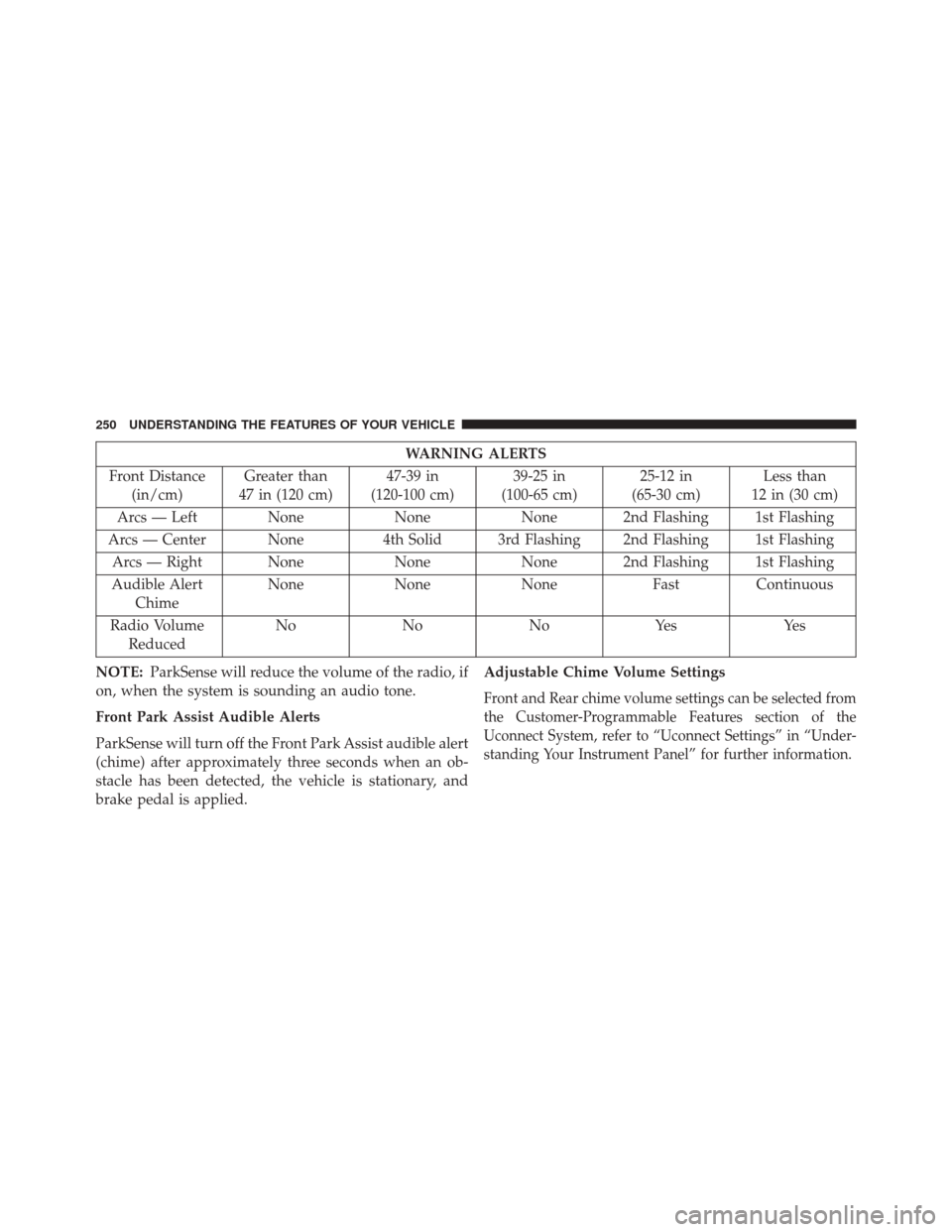
WARNING ALERTS
Front Distance (in/cm) Greater than
47 in (120 cm) 47-39 in
(120-100 cm) 39-25 in
(100-65 cm) 25-12 in
(65-30 cm) Less than
12 in (30 cm)
Arcs — Left None NoneNone 2nd Flashing 1st Flashing
Arcs — Center None 4th Solid 3rd Flashing 2nd Flashing 1st Flashing
Arcs — Right None NoneNone 2nd Flashing 1st Flashing
Audible Alert Chime None
NoneNone FastContinuous
Radio Volume Reduced No
NoNoYes Yes
NOTE: ParkSense will reduce the volume of the radio, if
on, when the system is sounding an audio tone.
Front Park Assist Audible Alerts
ParkSense will turn off the Front Park Assist audible alert
(chime) after approximately three seconds when an ob-
stacle has been detected, the vehicle is stationary, and
brake pedal is applied. Adjustable Chime Volume Settings
Front and Rear chime volume settings can be selected from
the Customer-Programmable Features section of the
Uconnect System, refer to “Uconnect Settings” in “Under-
standing Your Instrument Panel” for further information.
250 UNDERSTANDING THE FEATURES OF YOUR VEHICLE
Page 258 of 770
PARKSENSE ACTIVE PARK ASSIST SYSTEM —
IF EQUIPPED
The ParkSense Active Park Assist system is intended to
assist the driver during parallel and perpendicular park-
ing maneuvers by identifying a proper parking space,
providing audible/visual instructions, and controlling
the steering wheel. The ParkSense Active Park Assist
system is defined as “semi-automatic” since the driver
maintains control of the accelerator, shift lever and
brakes. Depending on the driver’s parking maneuver
selection, the ParkSense Active Park Assist system is
capable of maneuvering a vehicle into a parallel or a
perpendicular parking space on either side (i.e., driver
side or passenger side).
NOTE:
•The driver is always responsible for controlling the
vehicle, responsible for any surrounding objects, and
must intervene as required. •
The system is provided to assist the driver and not to
substitute the driver.
• During a semi-automatic maneuver, if the driver
touches the steering wheel after being instructed to
remove their hands from the steering wheel, the sys-
tem will cancel, and the driver will be required to
manually complete the parking maneuver.
• The system may not work in all conditions (e.g.
environmental conditions such as heavy rain, snow,
etc., or if searching for a parking space that has
surfaces that will absorb the ultrasonic sensor waves).
• New vehicles from the dealership must have at least 30
miles accumulated before the ParkSense Active Park
Assist system is fully calibrated and performs accu-
rately. This is due to the system’s dynamic vehicle
calibration to improve the performance of the feature.
256 UNDERSTANDING THE FEATURES OF YOUR VEHICLE
Page 265 of 770
NOTE:
•
It is the drivers responsibility to use the brake and
accelerator during the semi-automatic parking maneuver.
• When the system instructs the driver to remove their
hands from the steering wheel, the driver should check
their surroundings and begin to back up slowly.
• The ParkSense Active Park Assist system will allow a
maximum of six shifts between DRIVE and REVERSE.
If the maneuver cannot be completed within six shifts,
the system will cancel and the EVIC/DID will instruct
the driver to complete the maneuver manually.
• The system will cancel the maneuver if the vehicle
speed exceeds 5 mph (7 km/h) during active steering
guidance into the parking space. The system will
provide a warning to the driver at 3 mph (5 km/h) that
tells them to slow down. The driver is then responsible
for completing the maneuver if the system is canceled.
• If the system is canceled during the maneuver for any
reason, the driver must take control of the vehicle.
Check Surroundings — Move Backward
3
UNDERSTANDING THE FEATURES OF YOUR VEHICLE 263
Page 266 of 770
When the vehicle has reached the end of its backward
movement, the system will instruct the driver to check
their surroundings and stop the vehicle’s movement.NOTE:
It is the drivers responsibility to use the brake
and stop the vehicle. The driver should check their
surroundings and be prepared to stop the vehicle either
when instructed to, or when driver intervention is re-
quired.
Once the vehicle is in a standstill condition, the driver
will be instructed to place the shift lever into the DRIVE
position.
Check Surroundings — STOP
264 UNDERSTANDING THE FEATURES OF YOUR VEHICLE
Page 268 of 770
When the vehicle has reached the end of its forward
movement, the system will instruct the driver to check
their surroundings and stop the vehicle’s movement.NOTE:
It is the drivers responsibility to use the brake
and stop the vehicle. The driver should check their
surroundings and be prepared to stop the vehicle either
when instructed to, or when driver intervention is re-
quired.
Check Surroundings — Move ForwardCheck Surroundings — STOP
266 UNDERSTANDING THE FEATURES OF YOUR VEHICLE
Page 275 of 770
NOTE:
•
It is the drivers responsibility to use the brake and
accelerator during the semi-automatic parking maneuver.
• When the system instructs the driver to remove their
hands from the steering wheel, the driver should check
their surroundings and begin to back up slowly.
• The ParkSense Active Park Assist system will allow a
maximum of six shifts between DRIVE and REVERSE.
If the maneuver cannot be completed within six shifts,
the system will cancel and the EVIC/DID will instruct
the driver to complete the maneuver manually.
• The system will cancel the maneuver if the vehicle
speed exceeds 5 mph (7 km/h) during active steering
guidance into the parking space. The system will
provide a warning to the driver at 3 mph (5 km/h) that
tells them to slow down. The driver is then responsible
for completing the maneuver if the system is canceled.
• If the system is canceled during the maneuver for any
reason, the driver must take control of the vehicle.
Check Surroundings — Move Backward
3
UNDERSTANDING THE FEATURES OF YOUR VEHICLE 273
Page 276 of 770
When the vehicle has reached the end of its backward
movement, the system will instruct the driver to check
their surroundings and stop the vehicle’s movement.NOTE:
It is the drivers responsibility to use the brake
and stop the vehicle. The driver should check their
surroundings and be prepared to stop the vehicle either
when instructed to, or when driver intervention is re-
quired.
Once the vehicle is in a standstill condition, the driver
will be instructed to place the shift lever into the DRIVE
position.
Check Surroundings — STOP
274 UNDERSTANDING THE FEATURES OF YOUR VEHICLE