buttons JEEP CHEROKEE 2016 KL / 5.G Service Manual
[x] Cancel search | Manufacturer: JEEP, Model Year: 2016, Model line: CHEROKEE, Model: JEEP CHEROKEE 2016 KL / 5.GPages: 770, PDF Size: 5.48 MB
Page 428 of 770
•Activation By Rear Defrost
The wiper de-icer activates automatically when the Rear
Defrost is operating and the ambient temperature is
below 33° F (0.6° C).
• Activation By Remote Start Operation
When the Remote Start is activated and the outside
ambient temperature is less than 33° F (0.6° C) the
windshield wiper de-icer is activated. Upon exiting Re-
mote Start, the climate control functions will resume their
previous operation except, if the de-icer is active, the
de-icer timer and operation will continue.
Manual Climate Controls With Touchscreen — If
Equipped
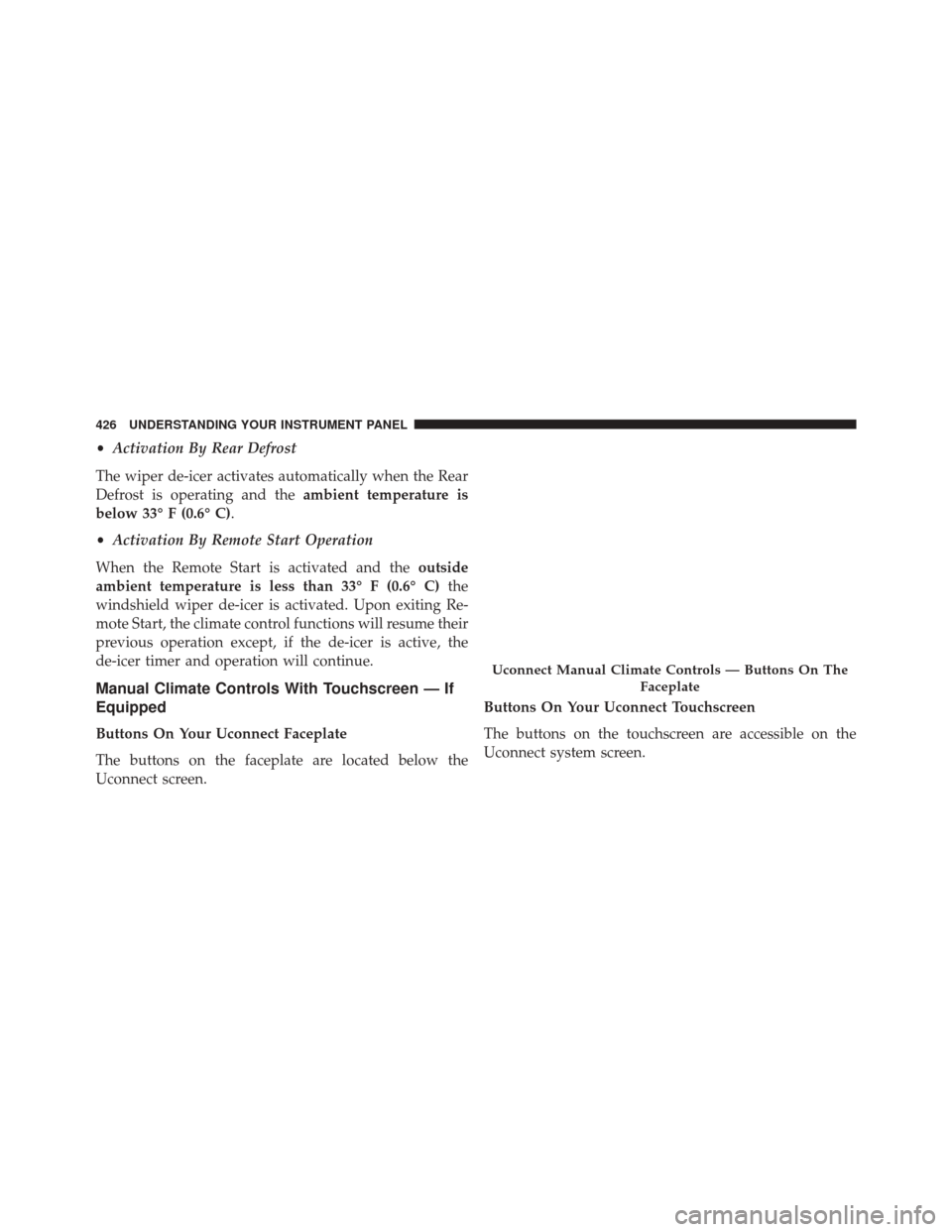
Buttons On Your Uconnect Faceplate
The buttons on the faceplate are located below the
Uconnect screen. Buttons On Your Uconnect Touchscreen
The buttons on the touchscreen are accessible on the
Uconnect system screen.
Uconnect Manual Climate Controls — Buttons On The
Faceplate
426 UNDERSTANDING YOUR INSTRUMENT PANEL
Page 429 of 770
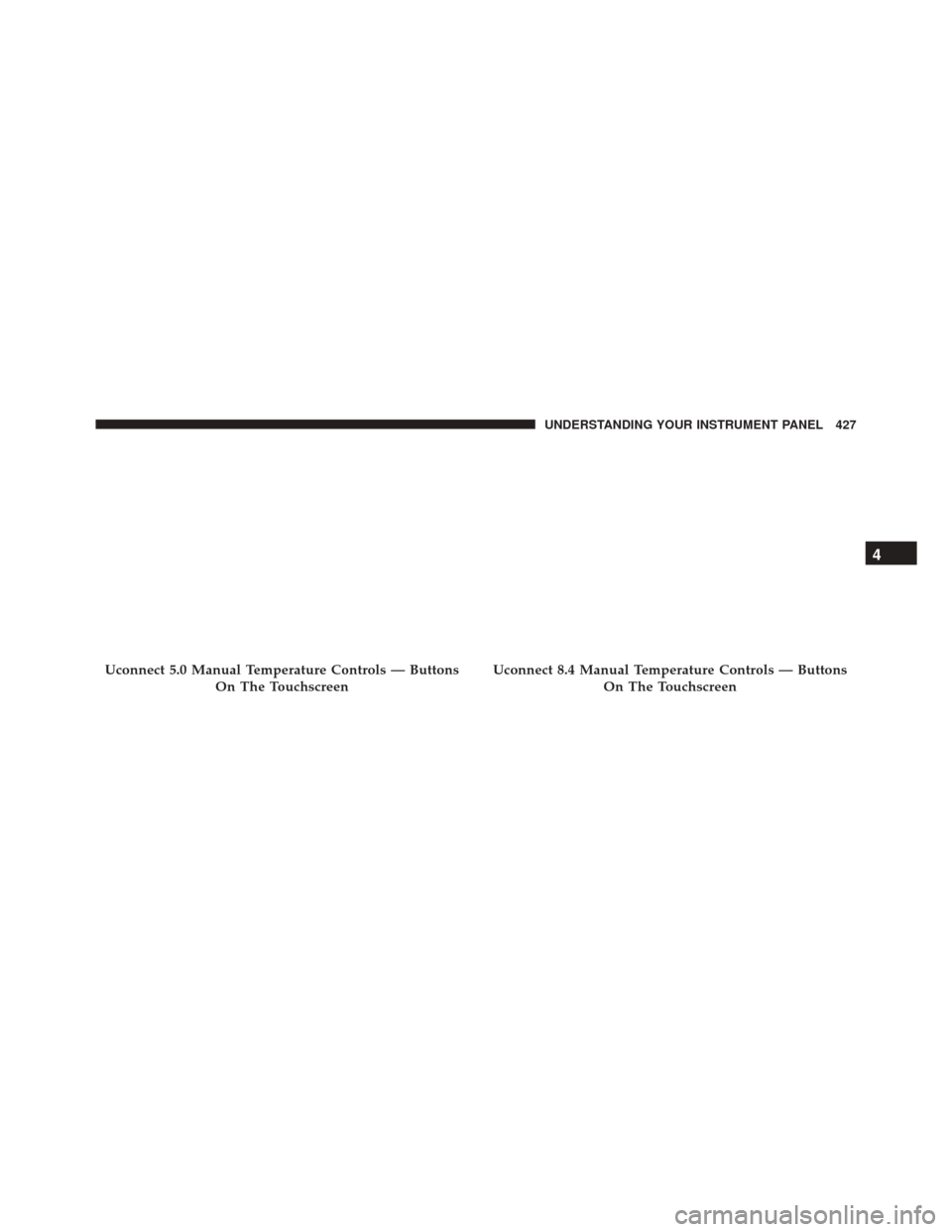
Uconnect 5.0 Manual Temperature Controls — ButtonsOn The TouchscreenUconnect 8.4 Manual Temperature Controls — ButtonsOn The Touchscreen
4
UNDERSTANDING YOUR INSTRUMENT PANEL 427
Page 430 of 770
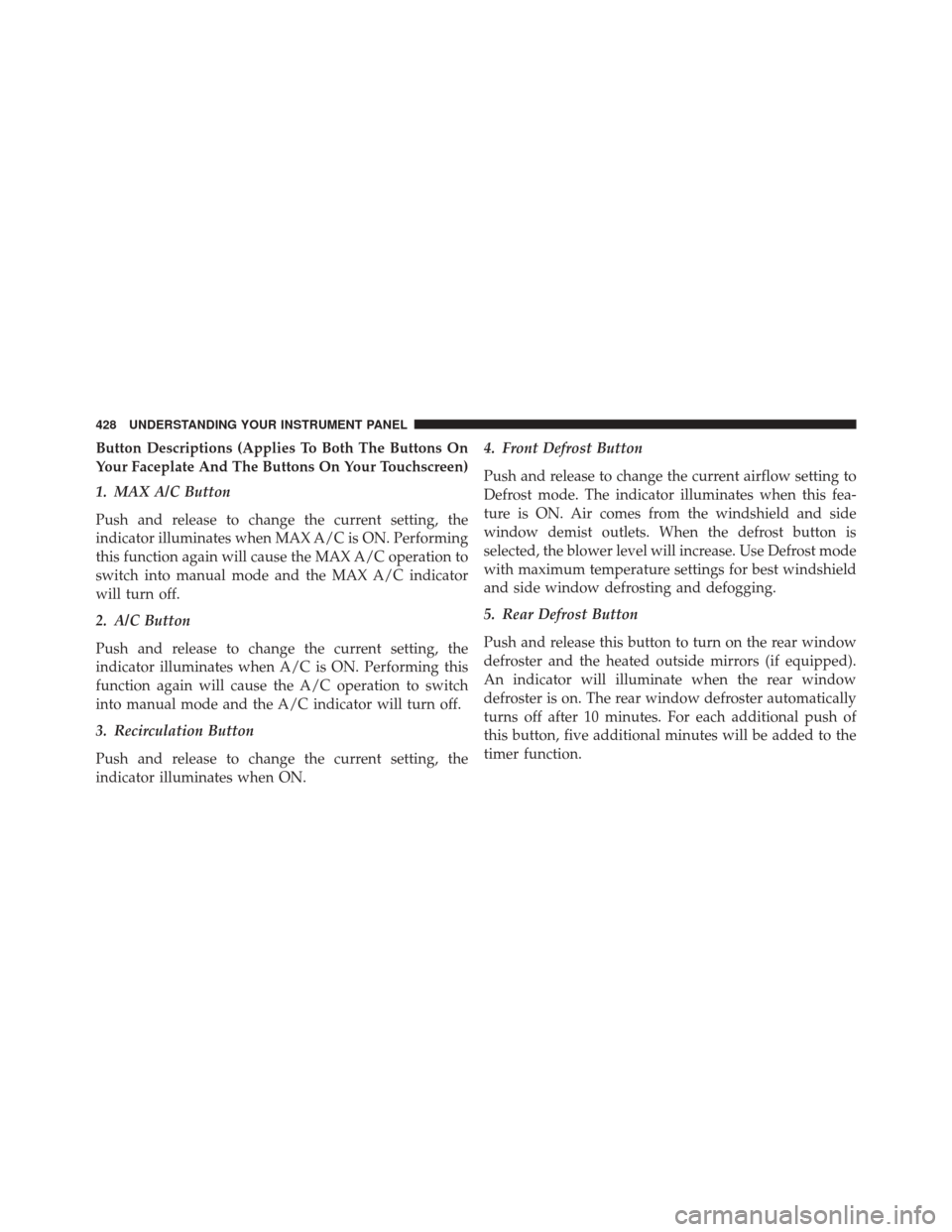
Button Descriptions (Applies To Both The Buttons On
Your Faceplate And The Buttons On Your Touchscreen)
1. MAX A/C Button
Push and release to change the current setting, the
indicator illuminates when MAX A/C is ON. Performing
this function again will cause the MAX A/C operation to
switch into manual mode and the MAX A/C indicator
will turn off.
2. A/C Button
Push and release to change the current setting, the
indicator illuminates when A/C is ON. Performing this
function again will cause the A/C operation to switch
into manual mode and the A/C indicator will turn off.
3. Recirculation Button
Push and release to change the current setting, the
indicator illuminates when ON.4. Front Defrost Button
Push and release to change the current airflow setting to
Defrost mode. The indicator illuminates when this fea-
ture is ON. Air comes from the windshield and side
window demist outlets. When the defrost button is
selected, the blower level will increase. Use Defrost mode
with maximum temperature settings for best windshield
and side window defrosting and defogging.
5. Rear Defrost Button
Push and release this button to turn on the rear window
defroster and the heated outside mirrors (if equipped).
An indicator will illuminate when the rear window
defroster is on. The rear window defroster automatically
turns off after 10 minutes. For each additional push of
this button, five additional minutes will be added to the
timer function.
428 UNDERSTANDING YOUR INSTRUMENT PANEL
Page 431 of 770
CAUTION!
Failure to follow these cautions can cause damage to
the heating elements:
•Use care when washing the inside of the rear
window. Do not use abrasive window cleaners on
the interior surface of the window. Use a soft cloth
and a mild washing solution, wiping parallel to the
heating elements. Labels can be peeled off after
soaking with warm water.
• Do not use scrapers, sharp instruments, or abrasive
window cleaners on the interior surface of the
window.
• Keep all objects a safe distance from the window.
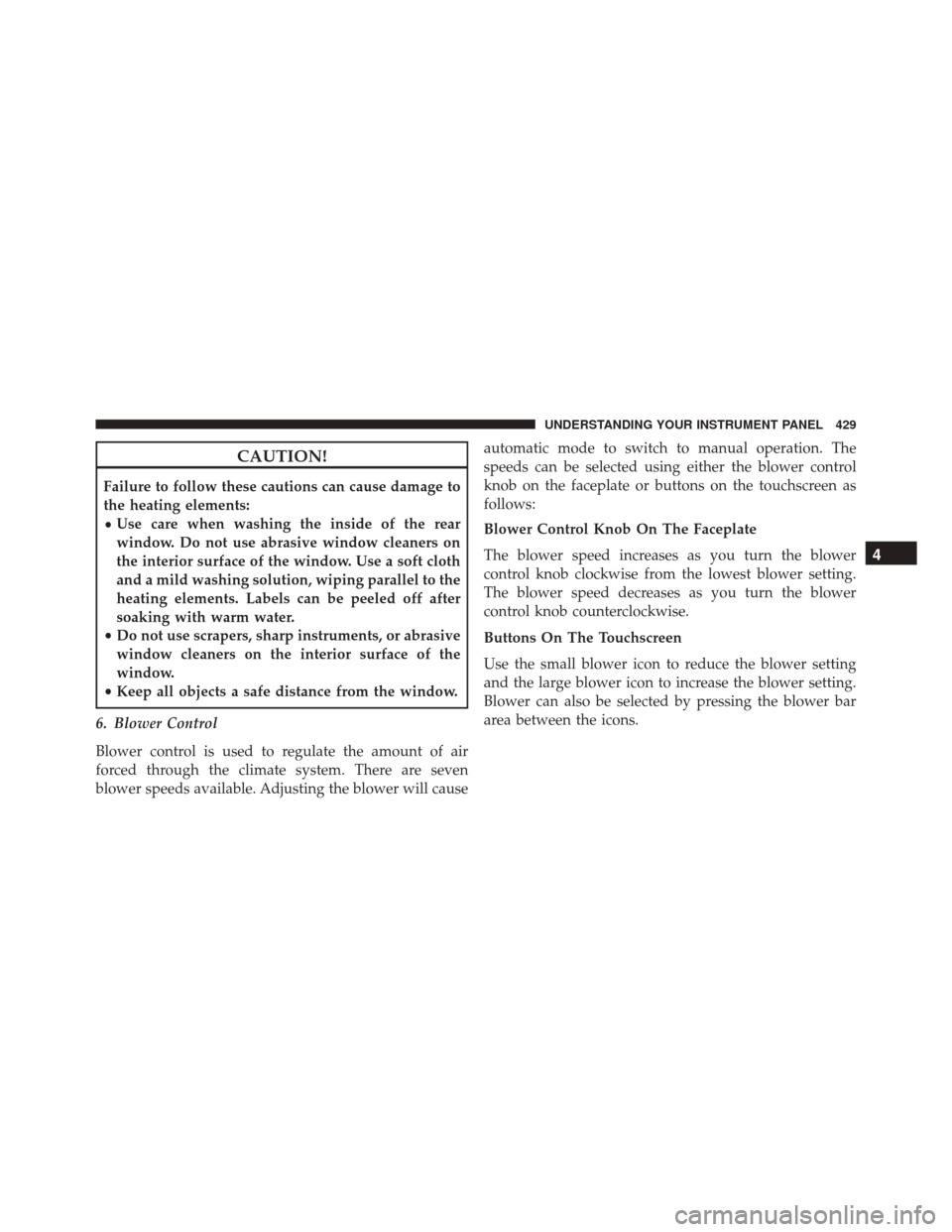
6. Blower Control
Blower control is used to regulate the amount of air
forced through the climate system. There are seven
blower speeds available. Adjusting the blower will cause automatic mode to switch to manual operation. The
speeds can be selected using either the blower control
knob on the faceplate or buttons on the touchscreen as
follows:
Blower Control Knob On The Faceplate
The blower speed increases as you turn the blower
control knob clockwise from the lowest blower setting.
The blower speed decreases as you turn the blower
control knob counterclockwise.
Buttons On The Touchscreen
Use the small blower icon to reduce the blower setting
and the large blower icon to increase the blower setting.
Blower can also be selected by pressing the blower bar
area between the icons.
4
UNDERSTANDING YOUR INSTRUMENT PANEL 429
Page 434 of 770
•Activation By Rear Defrost
The wiper de-icer activates automatically when the Rear
Defrost is operating and the ambient temperature is
below 33° F (0.6° C).
• Activation By Remote Start Operation
When the Remote Start is activated and the outside
ambient temperature is less than 33° F (0.6° C) the
windshield wiper de-icer is activated. Upon exiting Re-
mote Start, the climate control functions will resume their
previous operation except, if the de-icer is active, the
de-icer timer and operation will continue.
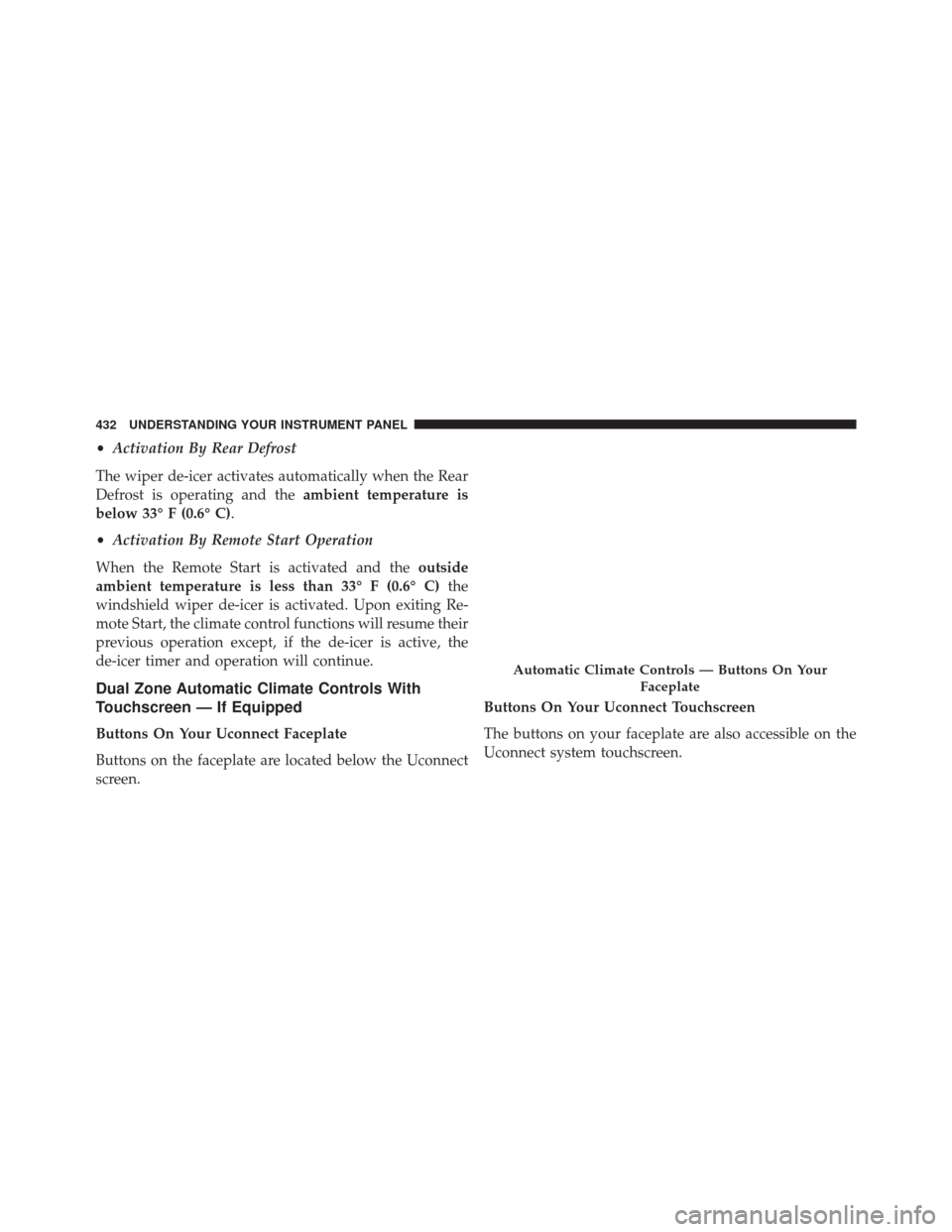
Dual Zone Automatic Climate Controls With
Touchscreen — If Equipped
Buttons On Your Uconnect Faceplate
Buttons on the faceplate are located below the Uconnect
screen. Buttons On Your Uconnect Touchscreen
The buttons on your faceplate are also accessible on the
Uconnect system touchscreen.
Automatic Climate Controls — Buttons On Your
Faceplate
432 UNDERSTANDING YOUR INSTRUMENT PANEL
Page 435 of 770
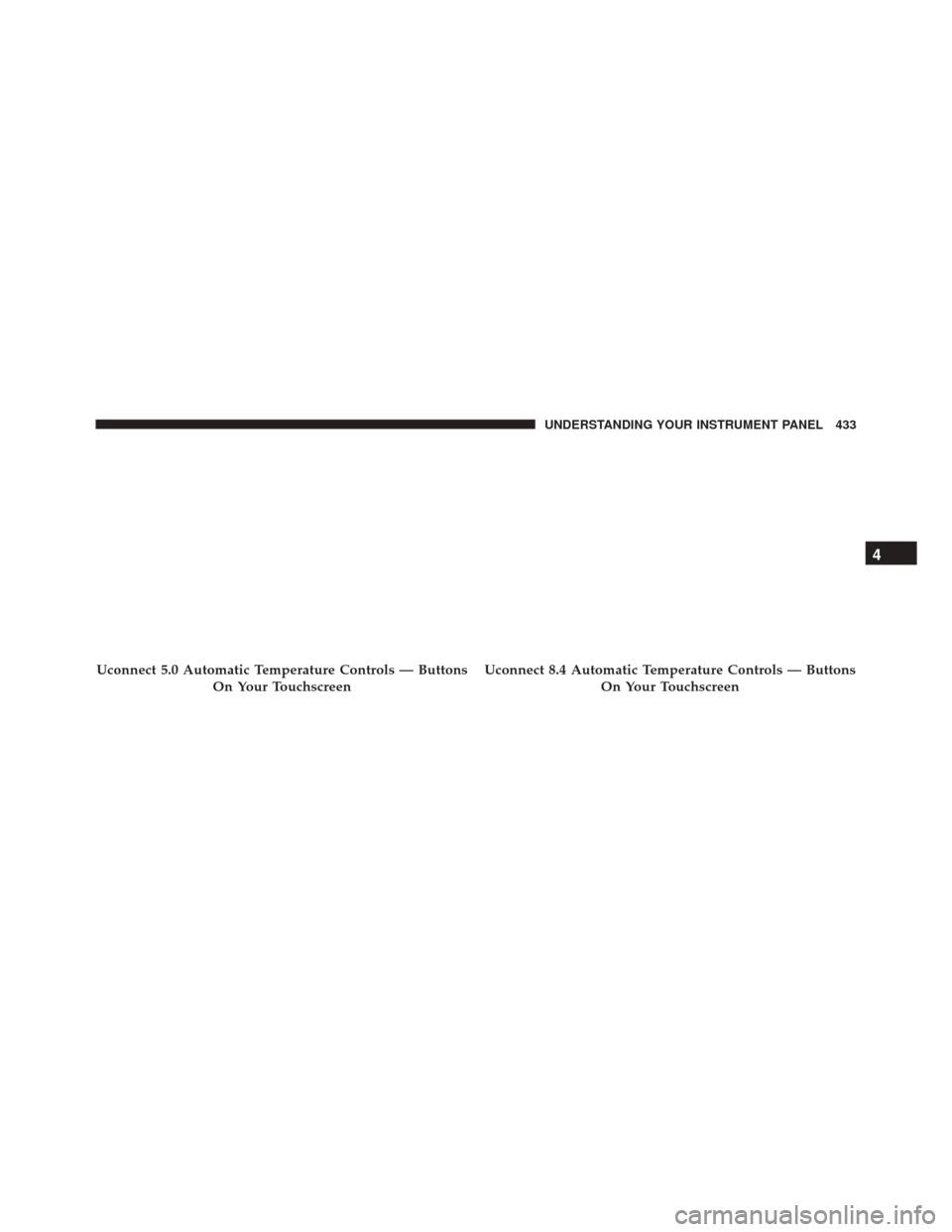
Uconnect 5.0 Automatic Temperature Controls — ButtonsOn Your TouchscreenUconnect 8.4 Automatic Temperature Controls — ButtonsOn Your Touchscreen
4
UNDERSTANDING YOUR INSTRUMENT PANEL 433
Page 436 of 770
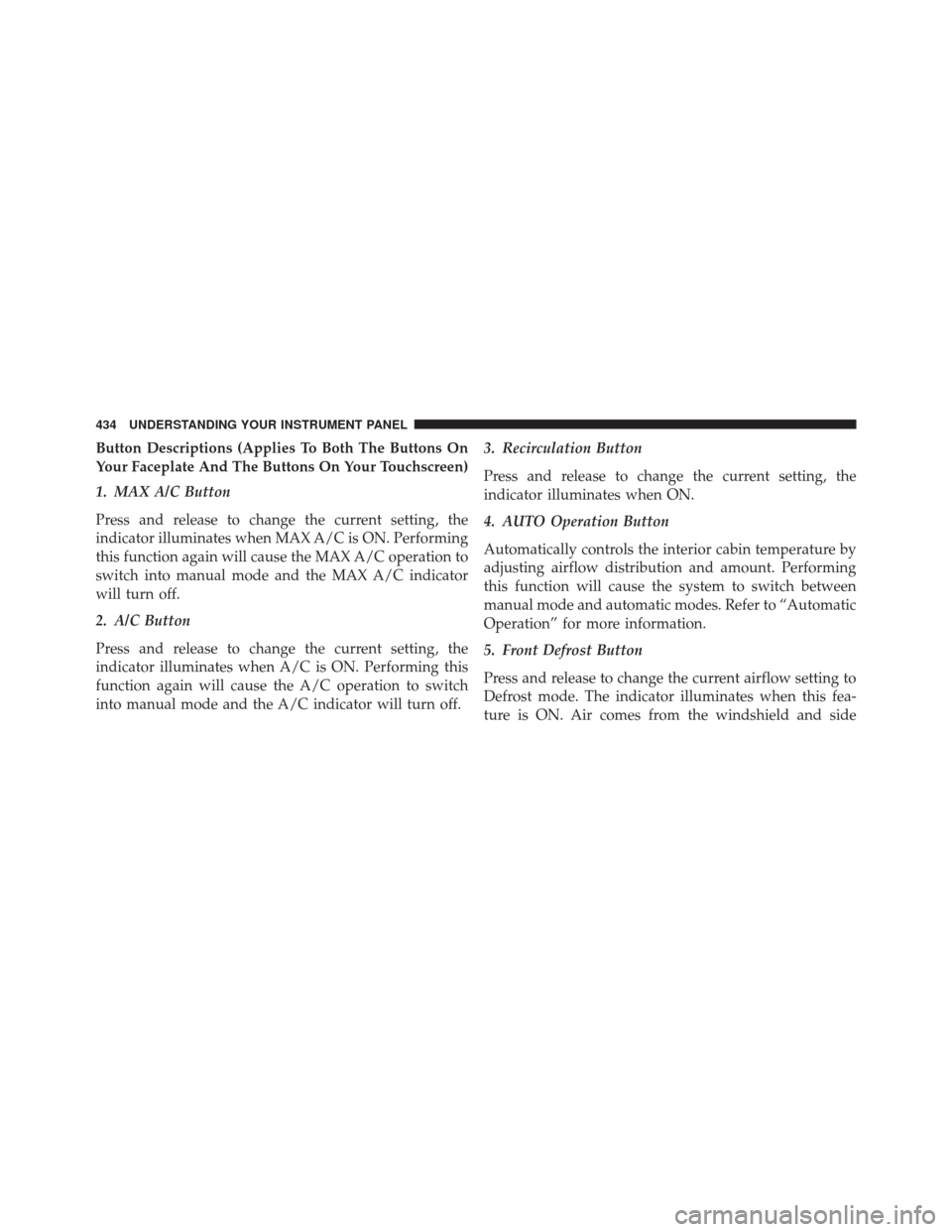
Button Descriptions (Applies To Both The Buttons On
Your Faceplate And The Buttons On Your Touchscreen)
1. MAX A/C Button
Press and release to change the current setting, the
indicator illuminates when MAX A/C is ON. Performing
this function again will cause the MAX A/C operation to
switch into manual mode and the MAX A/C indicator
will turn off.
2. A/C Button
Press and release to change the current setting, the
indicator illuminates when A/C is ON. Performing this
function again will cause the A/C operation to switch
into manual mode and the A/C indicator will turn off.3. Recirculation Button
Press and release to change the current setting, the
indicator illuminates when ON.
4. AUTO Operation Button
Automatically controls the interior cabin temperature by
adjusting airflow distribution and amount. Performing
this function will cause the system to switch between
manual mode and automatic modes. Refer to “Automatic
Operation” for more information.
5. Front Defrost Button
Press and release to change the current airflow setting to
Defrost mode. The indicator illuminates when this fea-
ture is ON. Air comes from the windshield and side
434 UNDERSTANDING YOUR INSTRUMENT PANEL
Page 439 of 770
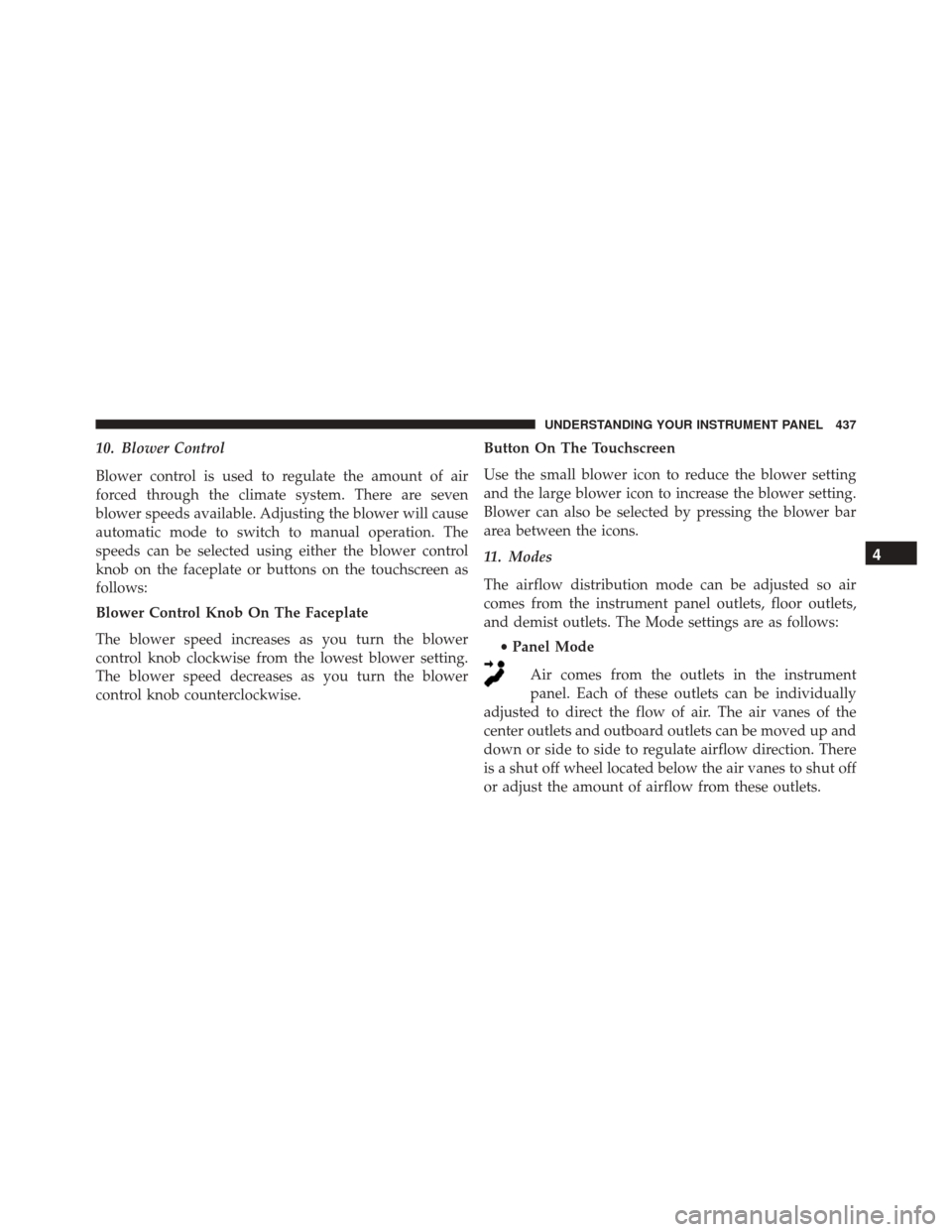
10. Blower Control
Blower control is used to regulate the amount of air
forced through the climate system. There are seven
blower speeds available. Adjusting the blower will cause
automatic mode to switch to manual operation. The
speeds can be selected using either the blower control
knob on the faceplate or buttons on the touchscreen as
follows:
Blower Control Knob On The Faceplate
The blower speed increases as you turn the blower
control knob clockwise from the lowest blower setting.
The blower speed decreases as you turn the blower
control knob counterclockwise.Button On The Touchscreen
Use the small blower icon to reduce the blower setting
and the large blower icon to increase the blower setting.
Blower can also be selected by pressing the blower bar
area between the icons.
11. Modes
The airflow distribution mode can be adjusted so air
comes from the instrument panel outlets, floor outlets,
and demist outlets. The Mode settings are as follows:
•Panel Mode
Air comes from the outlets in the instrument
panel. Each of these outlets can be individually
adjusted to direct the flow of air. The air vanes of the
center outlets and outboard outlets can be moved up and
down or side to side to regulate airflow direction. There
is a shut off wheel located below the air vanes to shut off
or adjust the amount of airflow from these outlets.
4
UNDERSTANDING YOUR INSTRUMENT PANEL 437
Page 443 of 770
Recirculation will be disabled automatically if this mode
is selected. Attempting to use Recirculation while in this
mode will cause the LED in the control button to blink
and then turn off.
Automatic Temperature Control (ATC)
Automatic Operation
1. Push the AUTO button on the faceplate or press the“AUTO” button on the touchscreen.
2. Adjust the temperature you would like the system to maintain by adjusting the driver and passenger tem-
perature buttons on the faceplate or buttons on the
touchscreen. Once the desired temperature is dis-
played, the system will achieve and automatically
maintain that comfort level. 3. When the system is set up for your comfort level, it is
not necessary to change the temperature. You will
experience the greatest efficiency by simply allowing
the system to function automatically.
NOTE:
• It is not necessary to move the temperature settings.
The system automatically adjusts the temperature,
mode, and blower speed to provide comfort as quickly
as possible.
• The temperature can be displayed in U.S. or Metric
units by selecting the Uconnect customer-
programmable feature. Refer to the “Uconnect System
Settings” in this section of the manual.
To provide you with maximum comfort in the Automatic
mode, during cold start-ups the blower fan will remain
on low until the engine warms up. The blower will
increase in speed and transition into Auto mode.
4
UNDERSTANDING YOUR INSTRUMENT PANEL 441
Page 449 of 770
Key Features:
•5” touchscreen
• Three buttons on either side of the display If you see theicon on your touchscreen, you have
the Uconnect 8.4AN system. If not, you have a
Uconnect 8.4A system.
Get Started
All you need to control your Uconnect system with your
voice are the buttons on your steering wheel.
Uconnect 5.0Uconnect 8.4AN
4
UNDERSTANDING YOUR INSTRUMENT PANEL 447