mirror JEEP CHEROKEE 2019 Owner handbook (in English)
[x] Cancel search | Manufacturer: JEEP, Model Year: 2019, Model line: CHEROKEE, Model: JEEP CHEROKEE 2019Pages: 344, PDF Size: 6.35 MB
Page 142 of 344
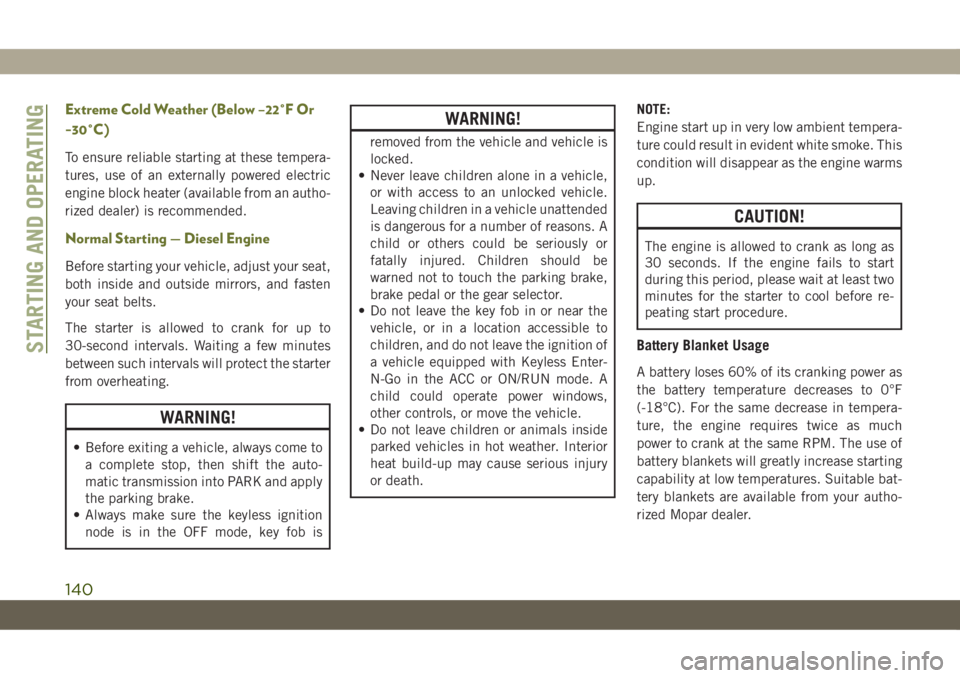
Extreme Cold Weather (Below –22°F Or
−30°C)
To ensure reliable starting at these tempera-
tures, use of an externally powered electric
engine block heater (available from an autho-
rized dealer) is recommended.
Normal Starting — Diesel Engine
Before starting your vehicle, adjust your seat,
both inside and outside mirrors, and fasten
your seat belts.
The starter is allowed to crank for up to
30-second intervals. Waiting a few minutes
between such intervals will protect the starter
from overheating.
WARNING!
• Before exiting a vehicle, always come to
a complete stop, then shift the auto-
matic transmission into PARK and apply
the parking brake.
• Always make sure the keyless ignition
node is in the OFF mode, key fob is
WARNING!
removed from the vehicle and vehicle is
locked.
• Never leave children alone in a vehicle,
or with access to an unlocked vehicle.
Leaving children in a vehicle unattended
is dangerous for a number of reasons. A
child or others could be seriously or
fatally injured. Children should be
warned not to touch the parking brake,
brake pedal or the gear selector.
• Do not leave the key fob in or near the
vehicle, or in a location accessible to
children, and do not leave the ignition of
a vehicle equipped with Keyless Enter-
N-Go in the ACC or ON/RUN mode. A
child could operate power windows,
other controls, or move the vehicle.
• Do not leave children or animals inside
parked vehicles in hot weather. Interior
heat build-up may cause serious injury
or death.NOTE:
Engine start up in very low ambient tempera-
ture could result in evident white smoke. This
condition will disappear as the engine warms
up.
CAUTION!
The engine is allowed to crank as long as
30 seconds. If the engine fails to start
during this period, please wait at least two
minutes for the starter to cool before re-
peating start procedure.
Battery Blanket Usage
A battery loses 60% of its cranking power as
the battery temperature decreases to 0°F
(-18°C). For the same decrease in tempera-
ture, the engine requires twice as much
power to crank at the same RPM. The use of
battery blankets will greatly increase starting
capability at low temperatures. Suitable bat-
tery blankets are available from your autho-
rized Mopar dealer.
STARTING AND OPERATING
140
Page 193 of 344
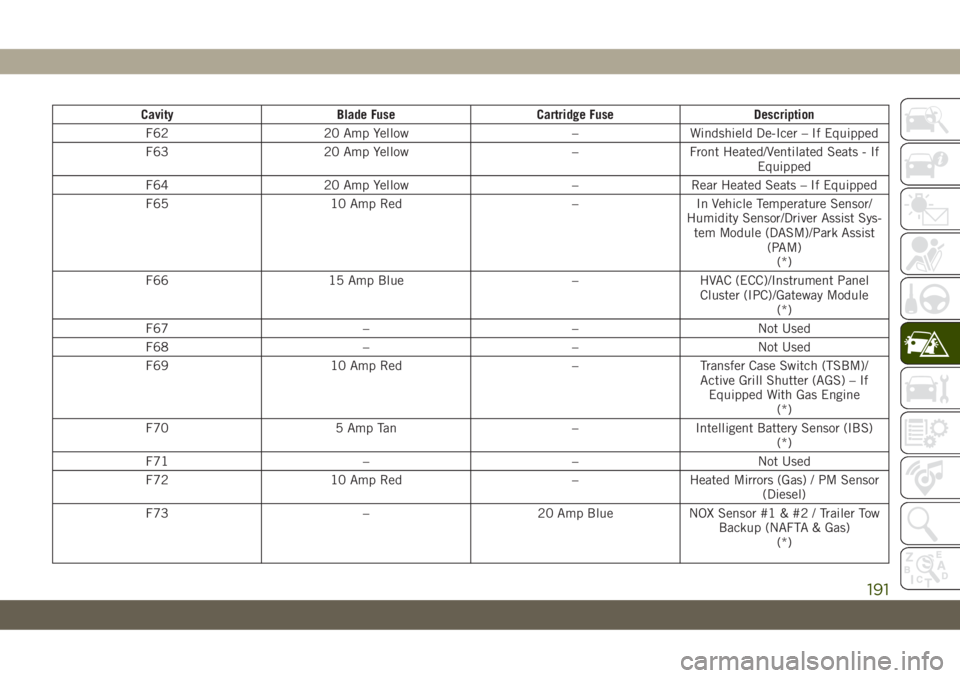
Cavity Blade Fuse Cartridge Fuse Description
F62 20 Amp Yellow – Windshield De-Icer – If Equipped
F63 20 Amp Yellow – Front Heated/Ventilated Seats - If
Equipped
F64 20 Amp Yellow – Rear Heated Seats – If Equipped
F65 10 Amp Red – In Vehicle Temperature Sensor/
Humidity Sensor/Driver Assist Sys-
tem Module (DASM)/Park Assist
(PAM)
(*)
F66 15 Amp Blue – HVAC (ECC)/Instrument Panel
Cluster (IPC)/Gateway Module
(*)
F67 – – Not Used
F68 – – Not Used
F69 10 Amp Red – Transfer Case Switch (TSBM)/
Active Grill Shutter (AGS) – If
Equipped With Gas Engine
(*)
F70 5 Amp Tan – Intelligent Battery Sensor (IBS)
(*)
F71 – – Not Used
F72 10 Amp Red – Heated Mirrors (Gas) / PM Sensor
(Diesel)
F73 – 20 Amp Blue NOX Sensor #1 & #2 / Trailer Tow
Backup (NAFTA & Gas)
(*)
191
Page 195 of 344
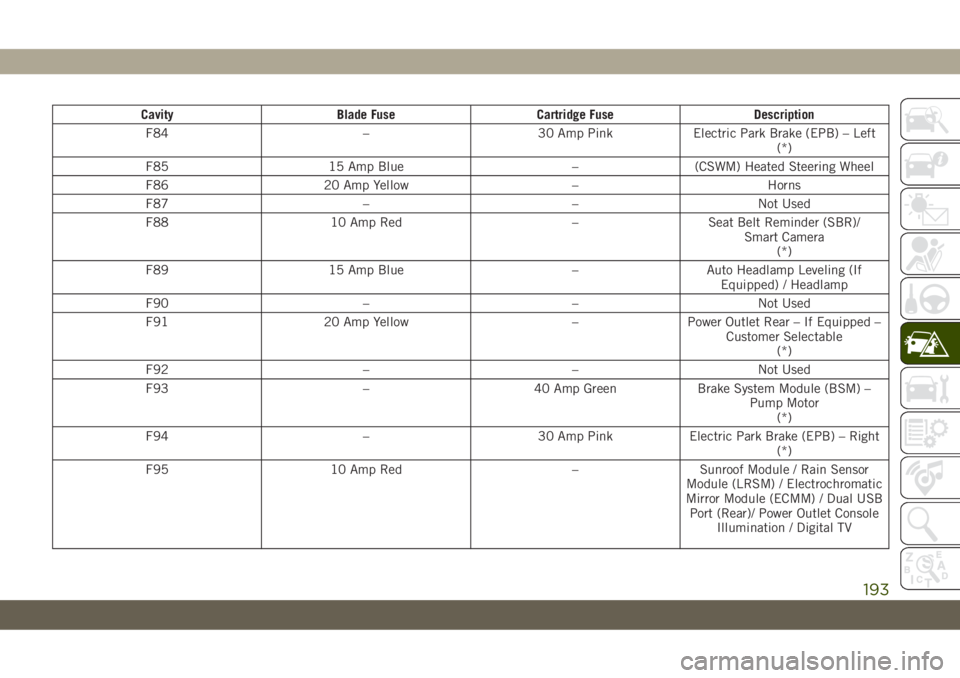
Cavity Blade Fuse Cartridge Fuse Description
F84 – 30 Amp Pink Electric Park Brake (EPB) – Left
(*)
F85 15 Amp Blue – (CSWM) Heated Steering Wheel
F86 20 Amp Yellow – Horns
F87 – – Not Used
F88 10 Amp Red – Seat Belt Reminder (SBR)/
Smart Camera
(*)
F89 15 Amp Blue – Auto Headlamp Leveling (If
Equipped) / Headlamp
F90 – – Not Used
F91 20 Amp Yellow – Power Outlet Rear – If Equipped –
Customer Selectable
(*)
F92 – – Not Used
F93 – 40 Amp Green Brake System Module (BSM) –
Pump Motor
(*)
F94 – 30 Amp Pink Electric Park Brake (EPB) – Right
(*)
F95 10 Amp Red – Sunroof Module / Rain Sensor
Module (LRSM) / Electrochromatic
Mirror Module (ECMM) / Dual USB
Port (Rear)/ Power Outlet Console
Illumination / Digital TV
193
Page 197 of 344
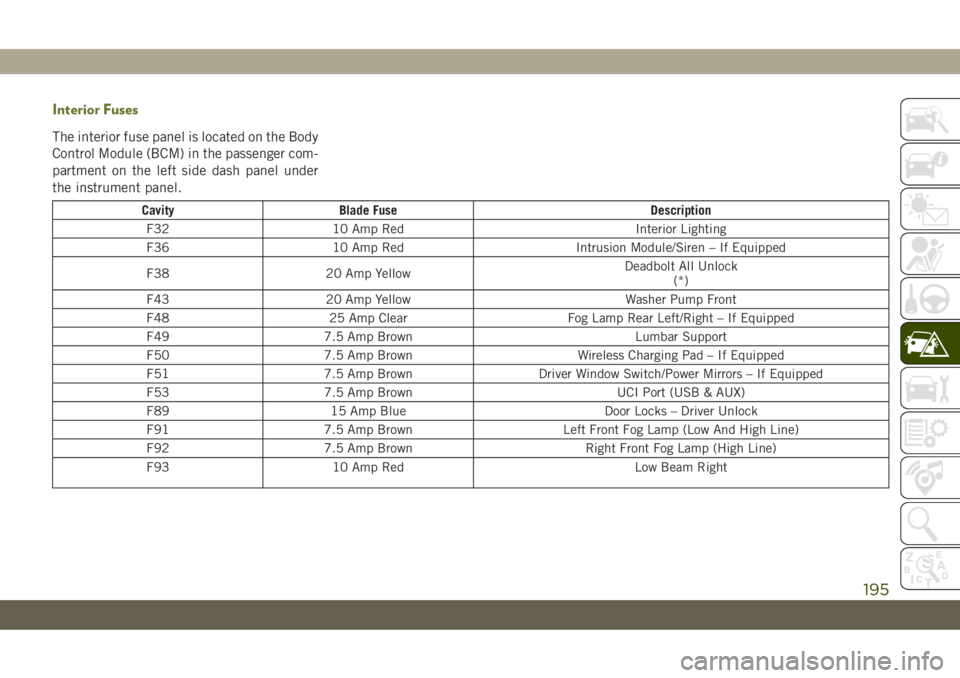
Interior Fuses
The interior fuse panel is located on the Body
Control Module (BCM) in the passenger com-
partment on the left side dash panel under
the instrument panel.
Cavity Blade Fuse Description
F32 10 Amp Red Interior Lighting
F36 10 Amp Red Intrusion Module/Siren – If Equipped
F38 20 Amp YellowDeadbolt All Unlock
(*)
F43 20 Amp Yellow Washer Pump Front
F48 25 Amp Clear Fog Lamp Rear Left/Right – If Equipped
F49 7.5 Amp Brown Lumbar Support
F50 7.5 Amp Brown Wireless Charging Pad – If Equipped
F51 7.5 Amp Brown Driver Window Switch/Power Mirrors – If Equipped
F53 7.5 Amp Brown UCI Port (USB & AUX)
F89 15 Amp Blue Door Locks – Driver Unlock
F91 7.5 Amp Brown Left Front Fog Lamp (Low And High Line)
F92 7.5 Amp Brown Right Front Fog Lamp (High Line)
F93 10 Amp Red Low Beam Right
195
Page 254 of 344
Leather Parts
Your leather upholstery can be best preserved
by regular cleaning with a damp soft cloth.
Small particles of dirt can act as an abrasive
and damage the leather upholstery and
should be removed promptly with a damp
cloth. Care should be taken to avoid soaking
your leather upholstery with any liquid.
Please do not use polishes, oils, cleaning
fluids, solvents, detergents, or ammonia-
based cleaners to clean your leather uphol-
stery. Application of a leather conditioner is
not required to maintain the original condi-
tion.NOTE:
If equipped with light colored leather, it
tends to show any foreign material, dirt, and
fabric dye transfer more so than darker col-
ors. The leather is designed for easy cleaning.
CAUTION!
Do not use Alcohol and Alcohol-based
and/or Ketone based cleaning products to
clean leather seats, as damage to the seat
may result.
Glass Surfaces
All glass surfaces should be cleaned on a
regular basis with any commercial
household-type glass cleaner. Never use an
abrasive type cleaner. Use caution when
cleaning the inside rear window equipped
with electric defrosters or windows equipped
with radio antennas. Do not use scrapers or
other sharp instruments that may scratch the
elements.
When cleaning the rear view mirror, spray
cleaner on the towel or cloth that you are
using. Do not spray cleaner directly on the
mirror.
SERVICING AND MAINTENANCE
252
Page 268 of 344
• For the full line of Authentic Jeep Accesso-
ries by Mopar, visit your local dealership or
online at mopar.com for U.S. residents and
mopar.ca for Canadian residents.NOTE:
All parts are subject to availability.
EXTERIOR:
• Rock Rails • Front End Cover • Hood Decal
• Wheels • Splash Guards • Skid Plates
• Wheel Locks • Locking Gas Cap • Spare Tire Kit
• License Plate Frames • Side Window Air Deflectors • Camping Tent
• Valve Stem Caps • Vehicle Cover • Chrome Mirror Cover
INTERIOR:
• Premium Floor Mats • Emergency Roadside Kit • Molded Cargo Tray
• Security Cover • Bright Pedal Kit • Katzkin Leather Interiors
• All-Weather Mats • Door Sill Guards • Carpet Cargo Mat
ELECTRONICS:
• Remote Start • Speaker Upgrades • Electronic Vehicle Tracking System
CARRIERS:
• Hitch Receiver • Sport Utility Bars • Roof-mount Bike Carrier
• Hitch Balls • Roof Top Cargo Basket • Roof Cargo Box Carrier
• Ball Mounts • Roof-mount Ski and Snowboard Carrier • Roof-Mount Kayak Carrier
• Hitch Receiver Wiring Harness • Roof-Mount Canoe Carrier • Roof-Mount Surfboard Carrier
TECHNICAL SPECIFICATIONS
266
Page 290 of 344
UCONNECT SETTINGS
The Uconnect system allows you to access
Customer Programmable feature settings
such as Display, Voice, Clock, Safety & Driv-
ing Assistance, Lights, Doors & Locks,
Auto-On Comfort, Engine Off Options, Sus-
pension, Compass Settings, Audio, Phone/
Bluetooth, Radio Setup, Restore Settings,
Clear Personal Data, and System Information
through buttons on the touchscreen.
Push the SETTINGS button (Uconnect 3), or
press the “Apps” button (Uconnect 4 or
4C/4C NAV) located near the bottom of the
touchscreen, then press the “Settings” but-
ton on the touchscreen to access the Settings
screen. When making a selection, scroll up or
down until the preferred setting is high-
lighted, then press the preferred setting until
a check-mark appears next to the setting,
showing that setting has been selected. The
following feature settings are available:
• Language • Engine Off Options
• Display • Compass — If
Equipped
• Units • Audio• Voice • Phone/Bluetooth
• Clock • Suspension — If
Equipped
• Camera — If
Equipped• AUX Switches
• Safety & Driving
Assistance• Restore Settings
• Brakes • Clear Personal Data
• Mirrors & Wipers —
If Equipped• System Information
• Lights • Radio Setup
• Doors & Locks
• Auto-On Comfort
NOTE:
Depending on the vehicles options, feature
settings may vary.
Refer to “Uconnect Settings” in “Multime-
dia” in your Owner’s Manual for further infor-
mation.
TIPS CONTROLS AND
GENERAL INFORMATION
Steering Wheel Audio Controls
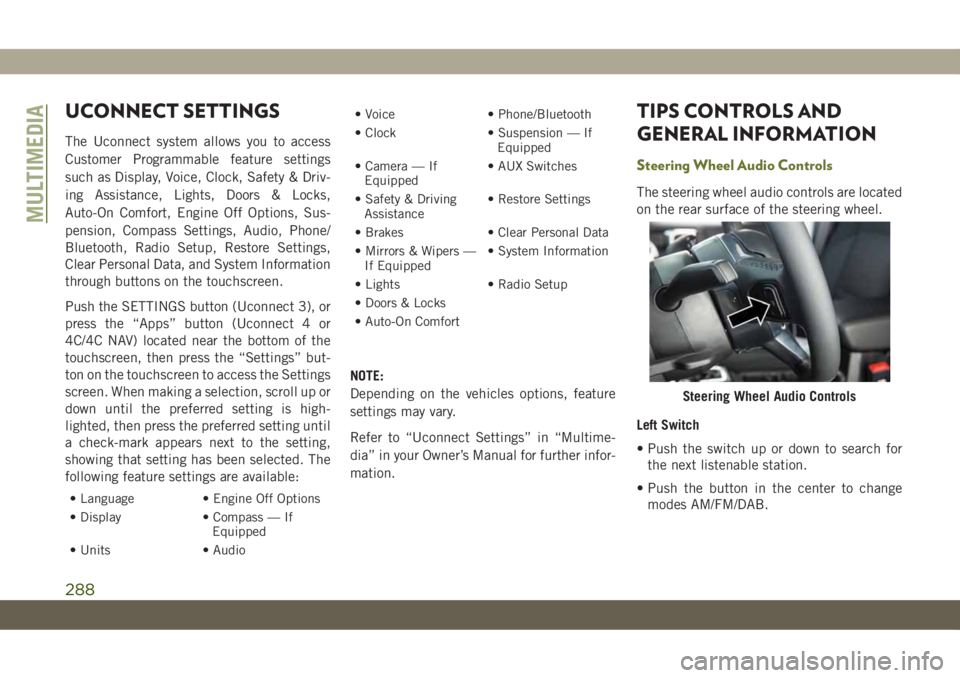
The steering wheel audio controls are located
on the rear surface of the steering wheel.
Left Switch
• Push the switch up or down to search for
the next listenable station.
• Push the button in the center to change
modes AM/FM/DAB.
Steering Wheel Audio Controls
MULTIMEDIA
288
Page 308 of 344
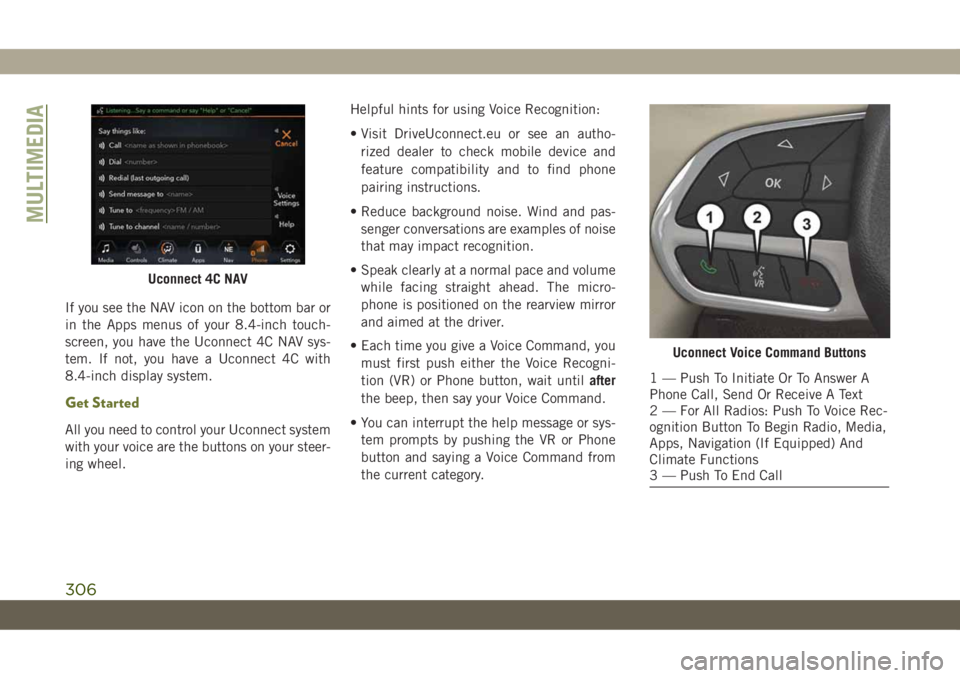
If you see the NAV icon on the bottom bar or
in the Apps menus of your 8.4-inch touch-
screen, you have the Uconnect 4C NAV sys-
tem. If not, you have a Uconnect 4C with
8.4-inch display system.
Get Started
All you need to control your Uconnect system
with your voice are the buttons on your steer-
ing wheel.Helpful hints for using Voice Recognition:
• Visit DriveUconnect.eu or see an autho-
rized dealer to check mobile device and
feature compatibility and to find phone
pairing instructions.
• Reduce background noise. Wind and pas-
senger conversations are examples of noise
that may impact recognition.
• Speak clearly at a normal pace and volume
while facing straight ahead. The micro-
phone is positioned on the rearview mirror
and aimed at the driver.
• Each time you give a Voice Command, you
must first push either the Voice Recogni-
tion (VR) or Phone button, wait untilafter
the beep, then say your Voice Command.
• You can interrupt the help message or sys-
tem prompts by pushing the VR or Phone
button and saying a Voice Command from
the current category.
Uconnect 4C NAV
Uconnect Voice Command Buttons
1 — Push To Initiate Or To Answer A
Phone Call, Send Or Receive A Text
2 — For All Radios: Push To Voice Rec-
ognition Button To Begin Radio, Media,
Apps, Navigation (If Equipped) And
Climate Functions
3 — Push To End Call
MULTIMEDIA
306
Page 338 of 344

Introduction...................1
Inverter
Power....................60
Jacking And Tire Changing........196
Jack Location................196
Jack Operation............196, 239
Jump Starting................209
Key Fob
Arm The System.............19
Disarm The System............19
Keyless Enter-N-Go..............20
Passive Entry...............20
Keys.......................13
Replacement...............15
LaneSense..................170
Lap/Shoulder Belts.............101
Latches....................138
Hood....................53
Leaks, Fluid.................138
Life Of Tires.................242
Liftgate.....................54
Closing...................56
Hands-Free................56
Opening..................54Light Bulbs..................138
Lights.....................138
AirBag ............64, 109, 137
Automatic Headlights..........34
Automatic High Beam..........34
Brake Assist Warning...........83
Brake Warning...............65
Bulb Replacement...........184
Cruise...............73, 74, 75
Daytime Running.............33
Engine Temperature Warning......66
Exterior..................138
Fog ...................36, 72
High Beam..............32, 34
High Beam/Low Beam Select......34
Hill Descent Control Indicator.....85
Lights On Reminder...........35
Low Fuel..................69
Malfunction Indicator
(Check Engine)..............69
Park
..................34, 73
Passing...................34
Seat Belt Reminder...........64
Security Alarm..............68
Service..................184
Tire Pressure Monitoring (TPMS)....94
Traction Control..............83Turn Signals..........36, 73, 138
Warning Instrument Cluster
Descriptions.............66, 73
Low Tire Pressure System..........94
Luggage Carrier................60
Lug Nuts...................253
Maintenance Free Battery.........234
Maintenance Schedule...........218
Malfunction Indicator Light
(Check Engine)...............69
Manual Transmission........144, 233
Fluid Level Check............233
Lubricant Selection...........265
Shift Speeds...............145
Media Hub..................289
Memory Feature (Memory Seats) . . .23, 25
Memory Seat..................23
Memory Seats And Radio..........23
Methanol...................255
Methanol Fuel................255
Mirrors.....................32
Modifications/Alterations
Vehicle....................4
Monitor, Tire Pressure System.......94
Mopar Accessories.............265
MP3 Control.................289
INDEX
336