phone JEEP CHEROKEE 2020 Owner handbook (in English)
[x] Cancel search | Manufacturer: JEEP, Model Year: 2020, Model line: CHEROKEE, Model: JEEP CHEROKEE 2020Pages: 332, PDF Size: 8.87 MB
Page 294 of 332
MULTIMEDIA
292
Pairing (Wirelessly Connecting) Your
Mobile Phone To The Uconnect System
Mobile phone pairing is the process of estab-
lishing a wireless connection between a
cellular phone and the Uconnect system.
NOTE:
To use the Uconnect Phone feature, you
first must determine if your mobile phone
and software are compatible with the
Uconnect system. Please visit
www.DriveUconnect.eu or an authorized
dealer for complete mobile phone compat -
ibility information.
Mobile phone pairing is not available while
the vehicle is in motion.
A maximum of ten mobile phones can be
paired to the Uconnect system. Start Pairing Procedure On The Radio
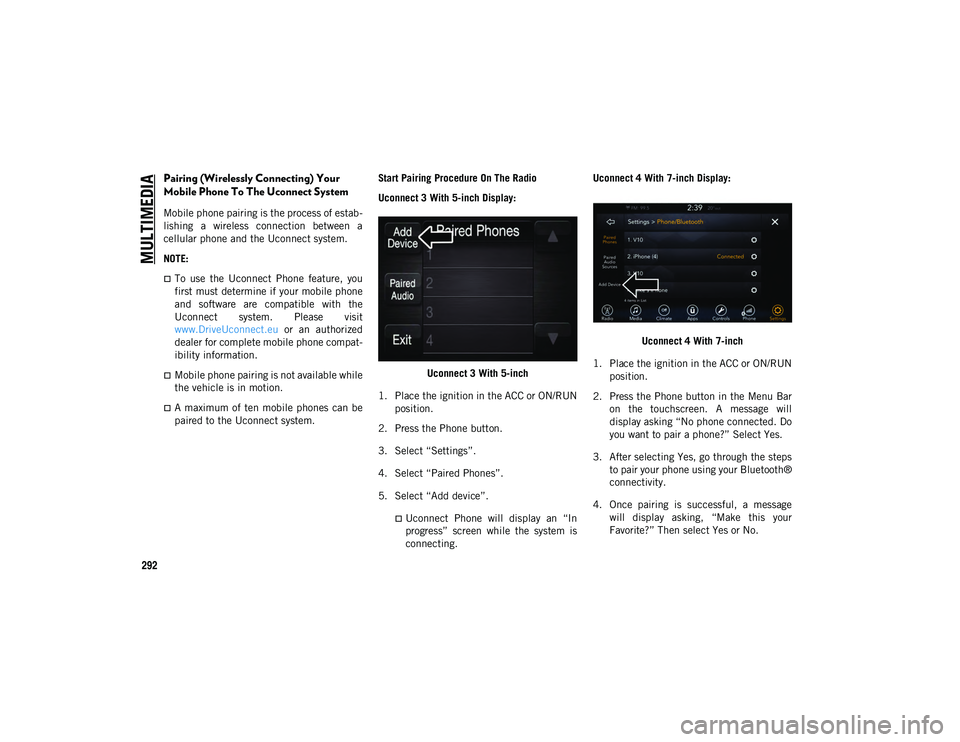
Uconnect 3 With 5-inch Display:
Uconnect 3 With 5-inch
1. Place the ignition in the ACC or ON/RUN position.
2. Press the Phone button.
3. Select “Settings”.
4. Select “Paired Phones”.
5. Select “Add device”.
Uconnect Phone will display an “In
progress” screen while the system is
connecting. Uconnect 4 With 7-inch Display:
Uconnect 4 With 7-inch
1. Place the ignition in the ACC or ON/RUN position.
2. Press the Phone button in the Menu Bar on the touchscreen. A message will
display asking “No phone connected. Do
you want to pair a phone?” Select Yes.
3. After selecting Yes, go through the steps to pair your phone using your Bluetooth®
connectivity.
4. Once pairing is successful, a message will display asking, “Make this your
Favorite?” Then select Yes or No.
2020_JEEP_CHEROKEE_UG_RHD_UK.book Page 292
Page 295 of 332
293
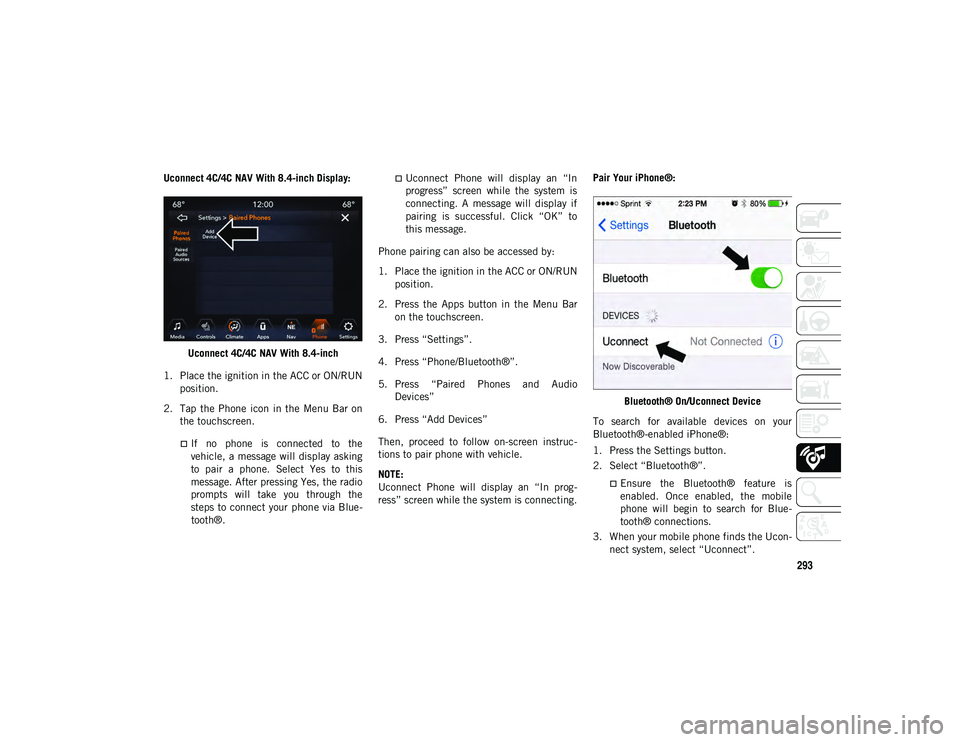
Uconnect 4C/4C NAV With 8.4-inch Display:Uconnect 4C/4C NAV With 8.4-inch
1. Place the ignition in the ACC or ON/RUN position.
2. Tap the Phone icon in the Menu Bar on the touchscreen.
If no phone is connected to thevehicle, a message will display asking
to pair a phone. Select Yes to this message. After pressing Yes, the radio prompts will take you through thesteps to connect your phone via Blue- tooth®.
Uconnect Phone will display an “In
progress” screen while the system is
connecting. A message will display ifpairing is successful. Click “OK” to
this message.
Phone pairing can also be accessed by:
1. Place the ignition in the ACC or ON/RUN position.
2. Press the Apps button in the Menu Bar on the touchscreen.
3. Press “Settings”.
4. Press “Phone/Bluetooth®”.
5. Press “Paired Phones and Audio Devices”
6. Press “Add Devices”
Then, proceed to follow on-screen instruc -
tions to pair phone with vehicle.
NOTE:
Uconnect Phone will display an “In prog -
ress” screen while the system is connecting. Pair Your iPhone®:
Bluetooth® On/Uconnect Device
To search for available devices on your
Bluetooth®-enabled iPhone®:
1. Press the Settings button.
2. Select “Bluetooth®”.
Ensure the Bluetooth® feature is
enabled. Once enabled, the mobile
phone will begin to sear ch for Blue-
t o
oth® connections.
3. When your mobile phone finds the Ucon -
nect system, select “Uconnect”.
2020_JEEP_CHEROKEE_UG_RHD_UK.book Page 293
Page 296 of 332
MULTIMEDIA
294
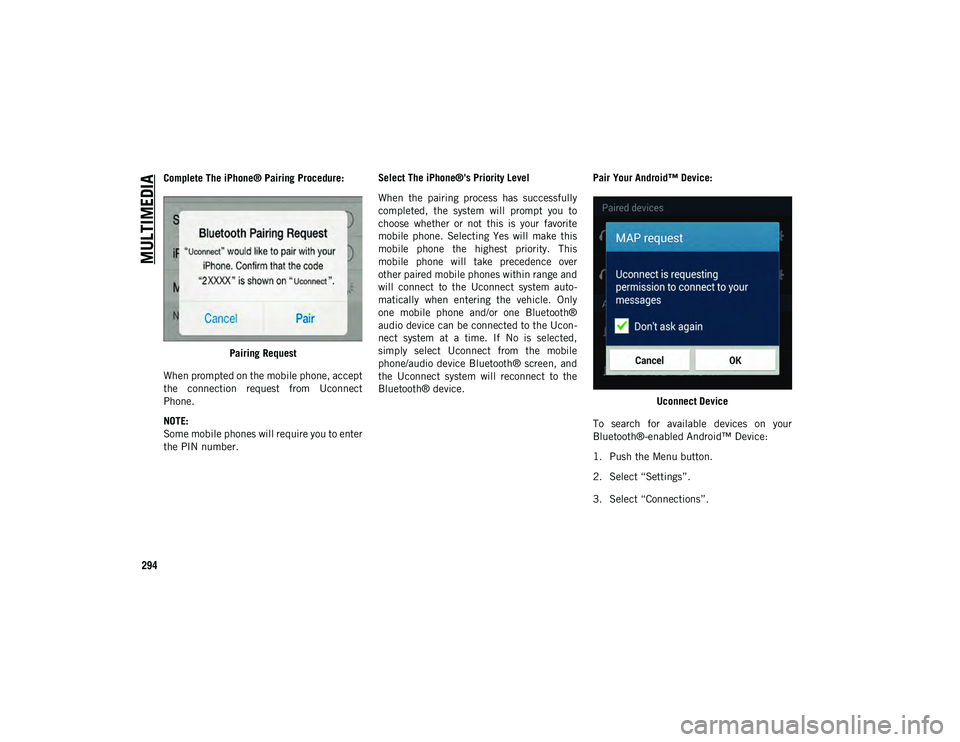
Complete The iPhone® Pairing Procedure:Pairing Request
When prompted on the mobile phone, accept
the connection request from Uconnect
Phone.
NOTE:
Some mobile phones will require you to enter
the PIN number. Select The iPhone®'s Priority Level
When the pairing process has successfully
completed, the system will prompt you to
choose whether or not this is your favorite
mobile phone. Selecting Yes will make this
mobile phone the highest priority. This
mobile phone will take precedence over
other paired mobile phones within range and
will connect to the Uconnect system auto
-
matically when entering the vehicle. Only
one mobile phone and/or one Bluetooth®
audio device can be connected to the Ucon -
nect system at a time. If No is selected,
simply select Uconnect from the mobile
phone/audio device Bluetooth® screen, and
the Uconnect system will reconnect to the
Bluetooth® device. Pair Your Android™ Device:
Uconnect Device
To search for available devices on your
Bluetooth®-enabled Android™ Device:
1. Push the Menu button.
2. Select “Settings”.
3. Select “Connections”.
2020_JEEP_CHEROKEE_UG_RHD_UK.book Page 294
Page 297 of 332
295
4. Turn “Bluetooth®” setting to On.
Ensure the Bluetooth® feature is
enabled. Once enabled, the mobile
phone will begin to search for Blue-
tooth® connections.
5. Once your mobile phone finds the Ucon -
nect system, select “Uconnect”.
You may be prompted by your mobile
phone to download the phonebook,
check “Do Not Ask Again” to automat -
ically download the phonebook. This is
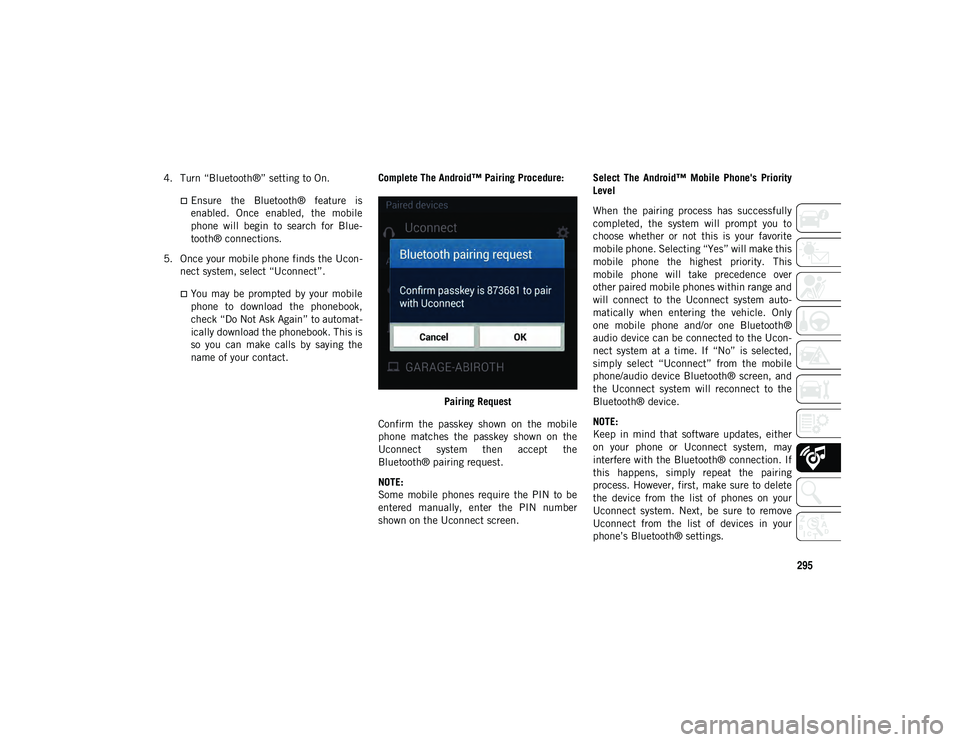
so you can make calls by saying the name of your contact. Complete The Android™ Pairing Procedure:
Pairing Request
Confirm the passkey shown on the mobile
phone matches the passkey shown on the
Uconnect system then accept the
Bluetooth® pairing request.
NOTE:
Some mobile phones require the PIN to be
entered manually, enter the PIN number
shown on the Uconnect screen. Select The Android™ Mobile Phone's Priority
Level
When the pairing process has successfully
completed, the system will prompt you to
choose whether or not this is your favorite
mobile phone. Selecting “Yes” will make this
mobile phone the highest priority. This
mobile phone will take precedence over
other paired mobile phones within range and
will connect to the Uconnect system auto
-
matically when entering the vehicle. Only
one mobile phone and/or one Bluetooth®
audio device can be connected to the Ucon -
nect system at a time. If “No” is selected,
simply select “Uconnect” from the mobile
phone/audio device Bluetooth® screen, and
the Uconnect system will reconnect to the
Bluetooth® device.
NOTE:
Keep in mind that software updates, either
on your phone or Uconnect system, may
interfere with the Bluetooth® connection. If
this happens, simply repeat the pairing
process. However, first, make sure to delete
the device from the list of phones on your
Uconnect system. Next, be sure to remove
Uconnect from the list of devices in your
phone’s Bluetooth® settings.
2020_JEEP_CHEROKEE_UG_RHD_UK.book Page 295
Page 298 of 332
MULTIMEDIA
296
You are now ready to make hands-free calls.
Press the Uconnect Phone button on your
steering wheel to begin.
NOTE:
Refer to www.DriveUconnect.eu or an autho-
rized dealership for additional information on
mobile phone pairing and for a list of
compatible phones.
Common Phone Commands (Examples)
“Call John Smith”
“Call John Smith mobile”
“Dial 1 248 555 1212”
“Redial”
Mute (Or Unmute) Microphone During
Call
During a call, press the Mute button on the
Phone main screen, that appears only
when a call is in progress, to mute and
unmute the call.
Transfer Ongoing Call Between Handset
And Vehicle
During an on-going call, press the Transfer
button on the Phone main screen to
transfer an on-going call between handset
and vehicle.
Phonebook
The Uconnect system will automatically sync
your phonebook from your paired phone, if
this feature is supported by your phone.
Phonebook contacts are updated each time
that the phone is connected. Phonebook
entries are displayed in the Contacts menu.
If your phone book entries do not appear,
check the settings on your phone. Some
phones require you to enable this feature
manually.
Your phonebook can be browsed on the
Uconnect system touchscreen, but editing
can only be done on your phone. To browse,
press the Phone button on the touchscreen,
then the Phonebook button on the touch -
screen.
Favorite phonebook entries can be saved as
Favorites for quicker access. Favorites are
shown in the Favorites menu.
Voice Command Tips
Speaking complete names (i.e; Call John
Doe vs. Call John) will result in greater
system accuracy.
You can “link” commands together for
faster results. Say “Call John Doe,
mobile,” for example.
If you are listening to available voice
command options, you do not have to
listen to the entire list. When you hear the
command that you need, push the VR
button on the steering wheel, wait for
the beep and say your command.
Changing The Volume
Start a dialogue by pushing the VR button
, then say a command. For example,
"Help".
Use the radio VOLUME/MUTE rotary knob
to adjust the volume to a comfortable level
while the Uconnect system is speaking.
NOTE:
The volume setting for Uconnect is different
than the audio system.
2020_JEEP_CHEROKEE_UG_RHD_UK.book Page 296
Page 299 of 332
297
NOTE:
To access help, push the VR button on
the steering wheel and say "help." Push the
VR button and say "cancel" to cancel the
help session.
Using Do Not Disturb
With Do Not Disturb, you can disable notifi-
cations from incoming calls and texts,
allowing you to keep your eyes on the road
and hands on the wheel. For your conve -
nience, there is a counter display to keep
track of your missed calls and text messages
while you were using Do Not Disturb.
To activate Do Not Disturb, select Pairing on
the phone menu bar, and select Do Not
Disturb from the Settings menu. You can
also activate it using the Do Not Disturb
button at the top of every Phone screen.
Do Not Disturb can automatically reply with
a text message, a call or both, when
declining an incoming call and send it to
voicemail. Automatic reply messages can be:
“I am driving right now, I will get back to
you shortly.”
Create a custom auto reply message up to
160 characters.
While in Do Not Disturb, Conference Call can
be selected so you can still place a second
call without being interrupted by incoming
calls.
NOTE:
Only the beginning of your custom
message will be seen on the touchscreen.
Reply with text message is not compatible
with iPhones®.
Auto reply with text message is only avail -
able on phones that support Bluetooth®
MAP.
Incoming Text Messages
After pairing your Uconnect system with a
Bluetooth®-enabled mobile device with the
Message Access Profile (MAP), the Uconnect
system can announce a new incoming text
message and read it to you over the vehicle’s
audio system.
To listen to incoming text messages, or any
messages currently on the mobile phone,
select the Messages menu and press the
Listen button next to the message you want
to listen to.
NOTE:
Only incoming text messages received during
the current ignition cycle can be viewed/
read.
To Enable Incoming Text Messaging:
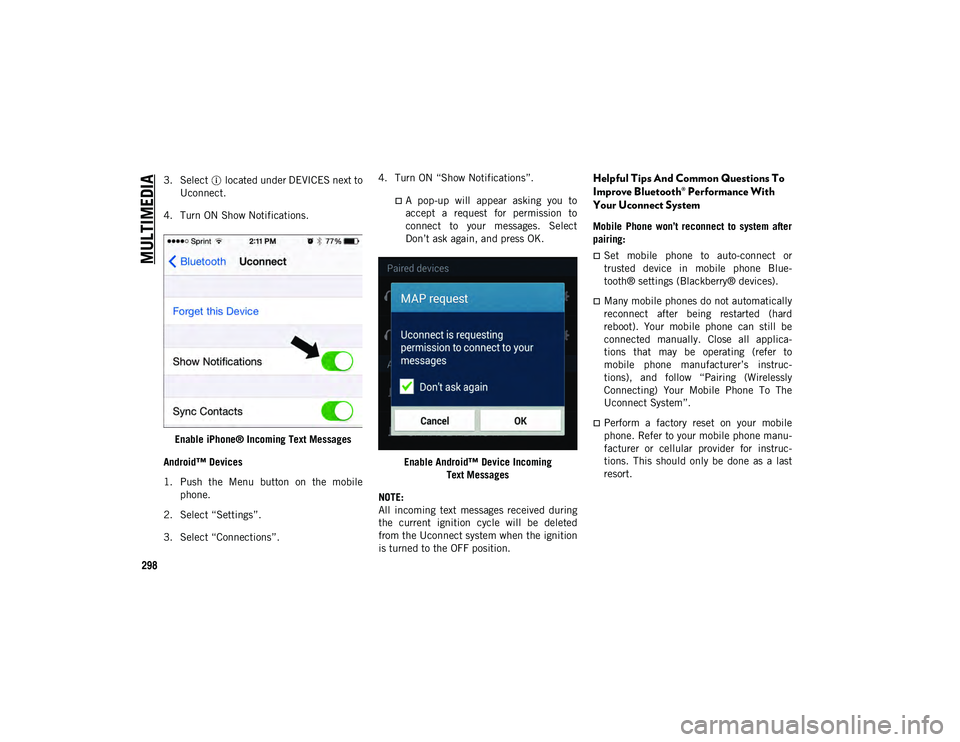
iPhone®
1. Press the settings button on the mobile phone.
2. Select “Bluetooth®”.
Ensure Bluetooth® is enabled, and the
mobile phone is paired to the Ucon-
nect system.
2020_JEEP_CHEROKEE_UG_RHD_UK.book Page 297
Page 300 of 332
MULTIMEDIA
298
3. Select located under DEVICES next toUconnect.
4. Turn ON Show Notifications.
Enable iPhone® Incoming Text Messages
Android™ Devices
1. Push the Menu button on the mobile phone.
2. Select “Settings”.
3. Select “Connections”. 4. Turn ON “Show Notifications”.
A pop-up will appear asking you to
accept a request for permission toconnect to your messages. SelectDon’t ask again, and press OK.
Enable Android™ Device Incoming Text Messages
NOTE:
All incoming text messages received during
the current ignition cycle will be deleted
from the Uconnect system when the ignition
is turned to the OFF position.
Helpful Tips And Common Questions To
Improve Bluetooth® Performance With
Your Uconnect System
Mobile Phone won’t reconnect to system after
pairing:
Set mobile phone to auto-connect or
trusted device in mobile phone Blue-
tooth® settings (Blackberry® devices).
Many mobile phones do not automatically
reconnect after being restarted (hard
reboot). Your mobile phone can still be
connected manually. Close all applica-
tions that may be operating (refer to
mobile phone manufacturer’s instruc-
tions), and follow “Pairing (Wirelessly
Connecting) Your Mobile Phone To The
Uconnect System”.
Perform a factory reset on your mobile
phone. Refer to your mobile phone manu -
facturer or cellular provider for instruc-
tions. This should only be done as a last
resort.
2020_JEEP_CHEROKEE_UG_RHD_UK.book Page 298
Page 301 of 332
299
Mobile Phone won’t pair to system:
Delete pairing history in mobile phone and
Uconnect system; usually found in
phone’s Bluetooth® connection settings.
Verify you are selecting “Uconnect” in the
discovered Bluetooth® devices on your
mobile phone.
If your vehicle system generates a pin
code the default is 0000.
Perform a hard reset in the mobile phone
by removing the battery (if removable —
see your mobile phone’s owner’s manual).
This should only be done as a last resort.
Mobile Phonebook didn’t download:
Check “Do not ask again,” then accept the
“phonebook download” request on your
mobile phone.
Up to 5,000 contact names with four
numbers per contact will transfer to the
Uconnect 4C/4C NAV system phonebook.
Up to 2,000 contact names with six
numbers per contact will transfer to the
Uconnect 4 system phonebook. Can’t make a conference call:
Code-Division Multiple Access (CDMA)
carriers do not support conference calling.
Refer to your mobile phone user’s manual
for further information.
Making calls while connected to AUX:
Plugging in your mobile phone to AUX
while connected to Bluetooth® will
disable Hands-Free Calling. Do not make
calls while your mobile phone is plugged
into the AUX jack.
UCONNECT VOICE
RECOGNITION QUICK TIPS
Introducing Uconnect
Start using Uconnect Voice Recognition with
these helpful quick tips. It provides the key
Voice Commands and tips you need to know
to control your Uconnect 3, Uconnect 4, or
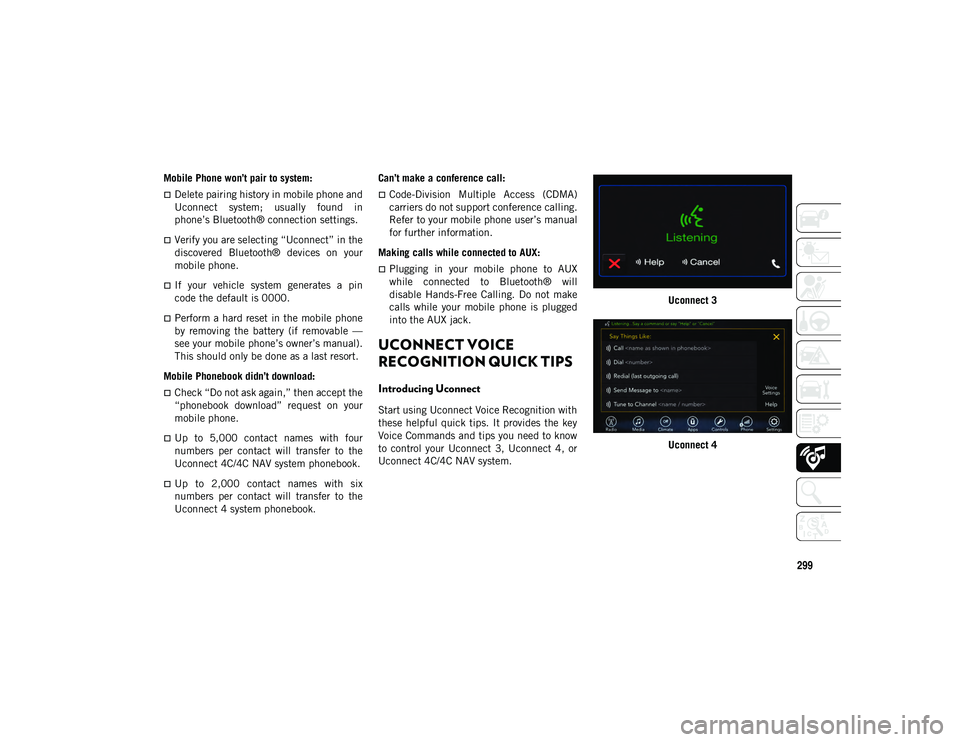
Uconnect 4C/4C NAV system. Uconnect 3
Uconnect 4
2020_JEEP_CHEROKEE_UG_RHD_UK.book Page 299
Page 302 of 332
MULTIMEDIA
300
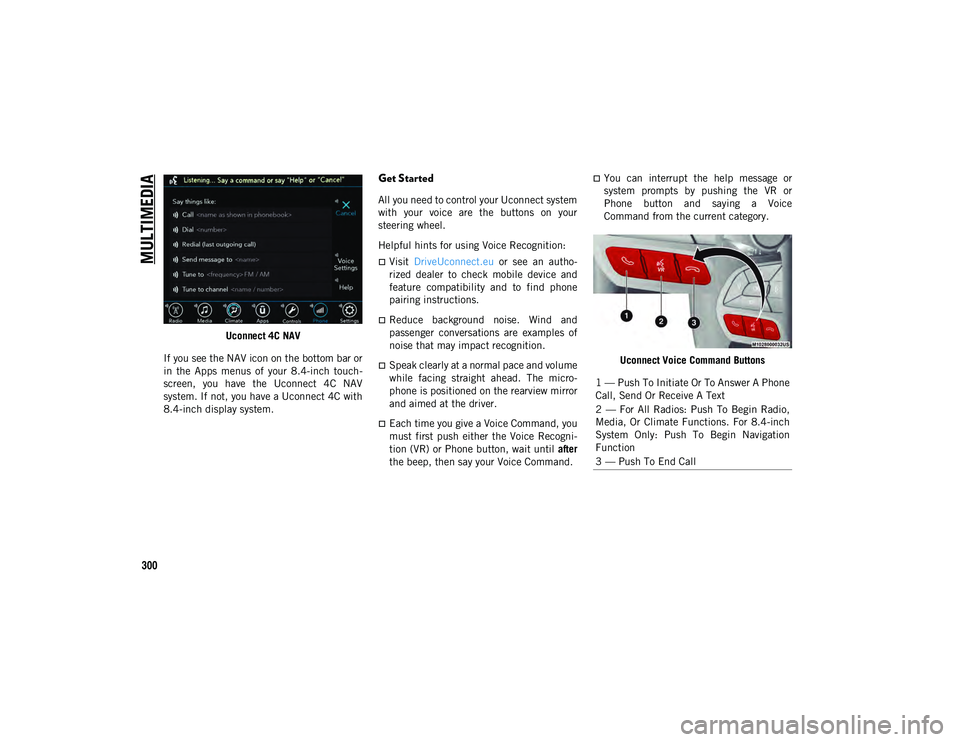
Uconnect 4C NAV
If you see the NAV icon on the bottom bar or
in the Apps menus of your 8.4-inch touch -
screen, you have the Uconnect 4C NAV
system. If not, you have a Uconnect 4C with
8.4-inch display system.
Get Started
All you need to control your Uconnect system
with your voice are the buttons on your
steering wheel.
Helpful hints for using Voice Recognition:
Visit DriveUconnect.eu or see an autho -
rized dealer to check mobile device and
feature compatibility and to find phone
pairing instructions.
Reduce background noise. Wind and
passenger conversations are examples of
noise that may impact recognition.
Speak clearly at a normal pace and volume
while facing straight ahead. The micro-
phone is positioned on the rearview mirror
and aimed at the driver.
Each time you give a Voice Command, you
must first push either the Voice Recogni -
tion (VR) or Phone button, wait until after
the beep, then say your Voice Command.
You can interrupt the help message or
system prompts by pushing the VR or
Phone button and saying a Voice
Command from the current category.
Uconnect Voice Command Buttons
1 — Push To Initiate Or To Answer A Phone
Call, Send Or Receive A Text
2 — For All Radios: Push To Begin Radio,
Media, Or Climate Functions. For 8.4-inch
System Only: Push To Begin Navigation
Function
3 — Push To End Call
2020_JEEP_CHEROKEE_UG_RHD_UK.book Page 300
Page 305 of 332
303
Phone
Making and answering hands-free phone
calls is easy with Uconnect. When the
Phonebook button is illuminated on your
touchscreen, your system is ready. Check
www.driveuconnect.eu or contact an autho-
rized dealer for mobile phone compatibility
and pairing instructions.
Push the VR button or Phone button .
After the beep, say one of the following
commands:
“Call John Smith”.
“Dial 123-456-7890 and follow the
system prompts”.
“Redial (call previous outgoing phone
number)”.
“Call back (call previous incoming phone
number)”.
TIP:
When providing a Voice Command, push the
VR button or Phone button and say
“Call ,” then pronounce the name exactly as
it appears in your phone book. When a
contact has multiple phone numbers, you
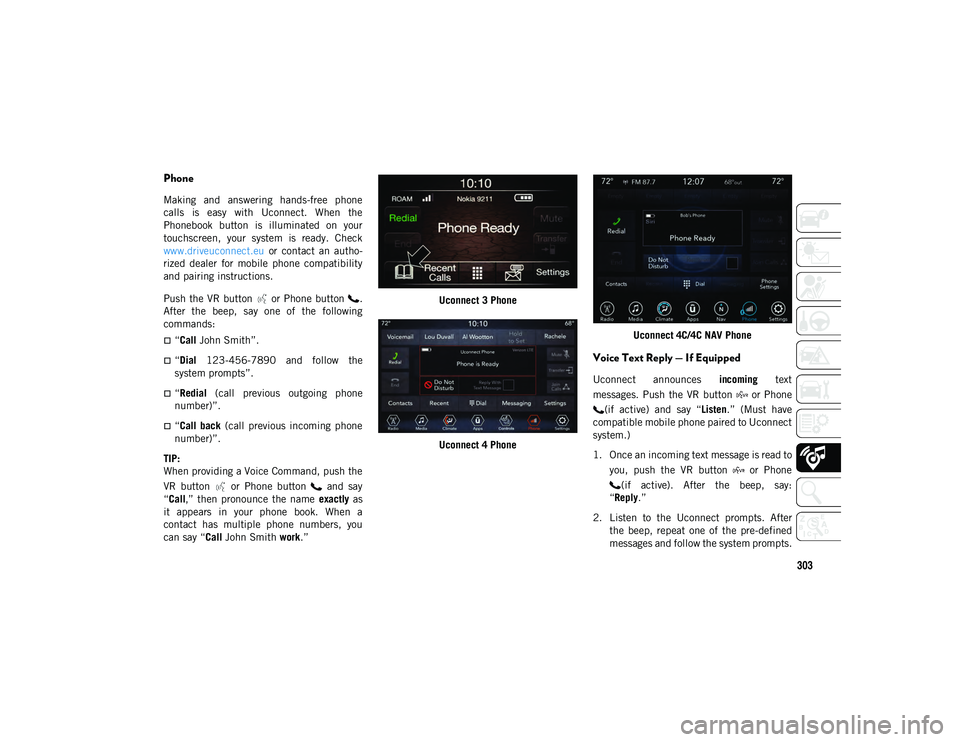
can say “ Call John Smith work.” Uconnect 3 Phone
Uconnect 4 Phone Uconnect 4C/4C NAV Phone
Voice Text Reply — If Equipped
Uconnect announces
incoming text
messages. Push the VR button or Phone (if active) and say “ Listen.” (Must have
compatible mobile phone paired to Uconnect
system.)
1. Once an incoming text message is read to
you, push the VR button or Phone(if active). After the beep, say:
“Reply .”
2. Listen to the Uconnect prompts. After the beep, repeat one of the pre-defined
messages and follow the system prompts.
2020_JEEP_CHEROKEE_UG_RHD_UK.book Page 303