door lock JEEP COMMANDER 2008 1.G Owner's Manual
[x] Cancel search | Manufacturer: JEEP, Model Year: 2008, Model line: COMMANDER, Model: JEEP COMMANDER 2008 1.GPages: 478, PDF Size: 6.97 MB
Page 121 of 478

To recall the memory settings for driver one, press
memory button number 1 on the driver's door or the
ªUnlockº button on the Remote Keyless Entry transmit-
ter linked to memory position 1.
To recall the memory setting for driver two, press
memory button number 2 on the driver's door or the
ªUnlockº button on the Remote Keyless Entry transmit-
ter linked to memory position 2.
A recall can be cancelled by pressing any of the memory
buttons on the drivers door during a recall (S, 1, or 2).
When a recall is cancelled, the driver's seat, driver's
mirror, and the pedals stop moving. A delay of one
second will occur before another recall can be selected.To Disable A Transmitter Linked to Memory
1. Turn the ignition switch to the OFF position and
remove the key.
2. Press and release memory button number 1. The
system will recall any memory settings stored in position
1. Wait for the system to complete the memory recall
before continuing to step 3.
3. Press and release the memory SET (S) button located
on the driver's door.
4. Within 5 seconds, press and release memory button 1
on the driver's door.
5. Within 5 seconds, press and release the ªUnlockº
button on the Remote Keyless Entry transmitter.
To disable another transmitter linked to either memory
position, repeat steps 1-5 for each transmitter.
UNDERSTANDING THE FEATURES OF YOUR VEHICLE 121
3
Page 163 of 478

Gate Operator/Canadian Programming
Canadian radio-frequency laws require transmitter sig-
nals to ªtime-outº (or quit) after several seconds of
transmission ± which may not be long enough for
HomeLinktto pick up the signal during programming.
Similar to this Canadian law, some U.S. gate operators are
designed to ªtime-outº in the same manner.
It may be helpful to unplug the device during the cycling
process to prevent possible overheating of the garage
door or gate motor.
If you are having difficulties programming a garage door
opener or a gate operator, replace ªProgramming
HomeLinkº Step 3 with the following:
3. Continue to press and hold the HomeLinktbutton
while you press and release - every two seconds
(ªcycleº) your hand-held transmitter until HomeLinkthas successfully accepted the frequency signal. The
EVIC display will change from ªCHANNEL # TRAIN-
INGº to ªCHANNEL # TRAINED.º
If you unplugged the device for training, plug it back in
at this time.
Then proceed with Step 4 under ªProgramming
HomeLink.º earlier in this section.
Using HomeLinkT
To operate, simply press and release the programmed
HomeLinktbutton. Activation will now occur for the
trained device (i.e. garage door opener, gate operator,
security system, entry door lock, home/office lighting,
etc. The hand-held transmitter of the device may also be
used at any time.
UNDERSTANDING THE FEATURES OF YOUR VEHICLE 163
3
Page 168 of 478

Sunroof Maintenance
Use only a non-abrasive cleaner and a soft cloth to clean
the glass panel.
Ignition Off Operation
The power sunroof switches remain active for 10 minutes
after the ignition switch has been turned off. Opening
either front door will cancel this feature.
Sunroof Fully Closed
Press the switch forward and release to ensure that the
sunroof is fully closed.
COMMAND-VIEWŸ SKYLIGHTS Ð IF EQUIPPED
The two fixed skylights are above the second row seats.
The glass is tinted to shield the second row occupants
from the sun and glare. Each skylight includes a roller
shade that is concealed in the assembly to block out more
light when desired.NOTE:Hold onto shade handle until shade is com-
pletely open or closed.
Roller Shade
168 UNDERSTANDING THE FEATURES OF YOUR VEHICLE
Page 206 of 478

Use the SCROLL button to display one of the following
choices:
Language
When in this display you may select one of three lan-
guages for all display nomenclature, including the trip
functions and the navigation system (if equipped). Press
the FUNCTION SELECT button while in this display to
select English, Espanol, or Francais. Then, as you con-
tinue, the information will display in the selected lan-
guage.
NOTE:The EVIC will not change the UConnectŸ
language selection. Please refer to ªLanguage Selectionº
in the HANDS±FREE COMMUNICATION (UConnectŸ)
section of this manual for details.
Auto Door Locks
When Y (YES) is selected, all of the doors will lock
automatically when the vehicle reaches a speed of 15mph (24 km/h). To make your selection, press and
release the FUNCTION SELECT button until ªY (YES)º
or ªN (NO)º appears.
Auto Unlock On Exit
When Y (YES) is selected, all of the doors will unlock
when the vehicle is stopped and the transmission is in the
P (Park) or N (Neutral) position and the driver's door is
opened. To make your selection, press and release the
FUNCTION SELECT button until ªY (YES)º or ªN (NO)º
appears.
Remote Key Unlock
WhenDriver Door 1st Pressis selected, only the driver's
door will unlock on the first press of the remote keyless
entry unlock button. When Driver Door 1st Press is
selected, you must press of the remote keyless entry
unlock button twice to unlock the passenger's doors.
WhenAll Doors 1st Pressis selected, all of the doors will
unlock on the first press of the remote keyless entry
206 UNDERSTANDING YOUR INSTRUMENT PANEL
Page 207 of 478

unlock button. To make your selection, press and release
the FUNCTION SELECT button until ªDriver Door 1st
Pressº or ªAll Doors 1st Pressº appears.
Sound Horn with Lock
When Y (YES) is selected, a short horn sound will occur
when the remote keyless entry ªLockº button is pressed.
This feature may be selected with or without the flash
lights on lock/unlock feature. To make your selection,
press and release the FUNCTION SELECT button until
ªY (YES)º or ªN (NO)º appears.
Flash Lamps with Lock
When Y (YES) is selected, the front and rear turn signals
will flash when the doors are locked or unlocked with the
remote keyless entry transmitter. This feature may be
selected with or without the sound horn on lock feature
selected. To make your selection, press and release the
FUNCTION SELECT button until ªY (YES)º or ªN (NO)º
appears.
Headlamp Off Delay
When this feature is selected, the driver can choose to
have the headlights remain on for 0, 30, 60, or 90 seconds
when exiting the vehicle. To make your selection, press
and release the FUNCTION SELECT button until ª0,º
ª30,º ª60,º or ª90º appears.
Automatic High Beams (Available with SmartBeam
Only)
When this feature is selected, the high beam headlights
will deactivate automatically under certain conditions. To
make your selection, press and release the FUNCTION
SELECT button until ªY (YES)º or ªN (NO)º appears.
Refer to ªLights/SmartBeams Ð If Equippedº in Section
3 of this manual for more information.
UNDERSTANDING YOUR INSTRUMENT PANEL 207
4
Page 208 of 478

Headlights On with Wipers (Available with Auto
Headlights Only)
When Y (YES) is selected, and the headlight switch is in
the AUTO position, the headlights will turn on approxi-
mately 10 seconds after the wipers are turned on. The
headlights will also turn off when the wipers are turned
off if they were turned on by this feature. To make your
selection, press and release the FUNCTION SELECT
button until ªY (YES)º or ªN (NO)º appears.
NOTE:Turning the headlights on during the daytime
causes the instrument panel lights to dim. To increase the
brightness, refer to ªLightsº in Section 3 of this manual.
Rain Sensing Intermittent Wipers Ð If Equipped
When Y (YES) is selected, the system will automatically
activate the windshield wipers if it senses moisture on
the windshield. To make your selection, press and release
the FUNCTION SELECT button until ªY (YES)º or ªN(NO)º appears. When N (NO) is selected, the system
reverts to the standard intermittent wiper operation.
Easy Entry/Exit Seat (Available with Memory Seat
Only)
This feature provides automatic driver seat positioning to
enhance driver mobility when entering and exiting the
vehicle. To make your selection, press and release the
FUNCTION SELECT button until ªY (YES)º or ªN (NO)º
appears.
NOTE:The seat will return to the memorized seat
location (if Recall Memory with Remote Key Unlock is set
to ON) when the remote keyless entry transmitter is used
to unlock the door. Refer to ªEasy Entry/Exit Seatº under
ªDriver Memory Seatº in Section 3 of this manual for
more information.
208 UNDERSTANDING YOUR INSTRUMENT PANEL
Page 209 of 478

Key Off Power Delay
When this feature is selected, the power window
switches, radio, hands±free system (if equipped), DVD
video system (if equipped), power sunroof (if equipped),
and power outlets will remain active for up to 60 minutes
after the ignition switch is turned off. Opening a vehicle
door will cancel this feature. To make your selection,
press and release the FUNCTION SELECT button until
ªOff,º ª45 sec.,º ª5 min.,º or ª10 min.º appears.
Illuminated Approach
When this feature is selected, the headlights will activate
and remain on for up to 90 seconds when the doors are
unlocked with the remote keyless entry transmitter. To
make your selection, press and release the FUNCTION
SELECT button until ªOFF,º ª30 sec.,º ª60 sec.,º or ª90
sec.º appears.
Hill Start Assist
To make your selection, press and release the FUNC-
TION SELECT button until ªY (YES)º or ªN (NO)º
appears.
Display Units of Measure in
The EVIC, odometer, and navigation system (if
equipped) can be changed between English and Metric
units of measure. To make your selection, press and
release the FUNCTION SELECT button until ªUSº or
ªMETRICº appears.
System Status
Press and release the MENU button until one of the
following System Status messages displays in the EVIC:
²System OK
²System Warnings Displayed (Will display all currently
active System Warnings.)
UNDERSTANDING YOUR INSTRUMENT PANEL 209
4
Page 265 of 478

NOTE:Regardless of the type of operation, when a
temperature knob is set to the full clockwise or full
counterclockwise position, the system will deliver full
hot or full cold air out of the ducts, respectively.
The operator can override the AUTO mode setting and
select the direction of the air by rotating the right mode
knob to one of the following positions. When the Mode is
set to any position other than AUTO, The automatic
control of air temperature is disabled. The user must
adjust the temperature knobs to obtain the desired tem-
perature.
²Defrost
Air is directed to the windshield through the
outlets at the base of the windshield. Air is also
directed to the front door windows through the side
window demister grilles. Some airflow is delivered to
the floor while in defrost so that comfort can be
maintained.NOTE:The defrost mode is not automatically selected.
It must be manually selected, when desired.
²Defrost/Floor
Air flows through the front and rear floor outlets
and the outlets at the base of the windshield. Air
is also directed to the front door windows
through the side window demister grilles. Some air-
flow is delivered to the floor while in defrost so that
comfort can be maintained.
²Floor
Air flows through the floor outlets located under
the instrument panel and into the rear seating
area through vents under the front seats. Some airflow
is delivered to defrost while in floor mode, so that
comfort can be maintained.
²Bi-Level
Air flows both through the outlets located in the
instrument panel and those located on the floor.
UNDERSTANDING YOUR INSTRUMENT PANEL 265
4
Page 268 of 478
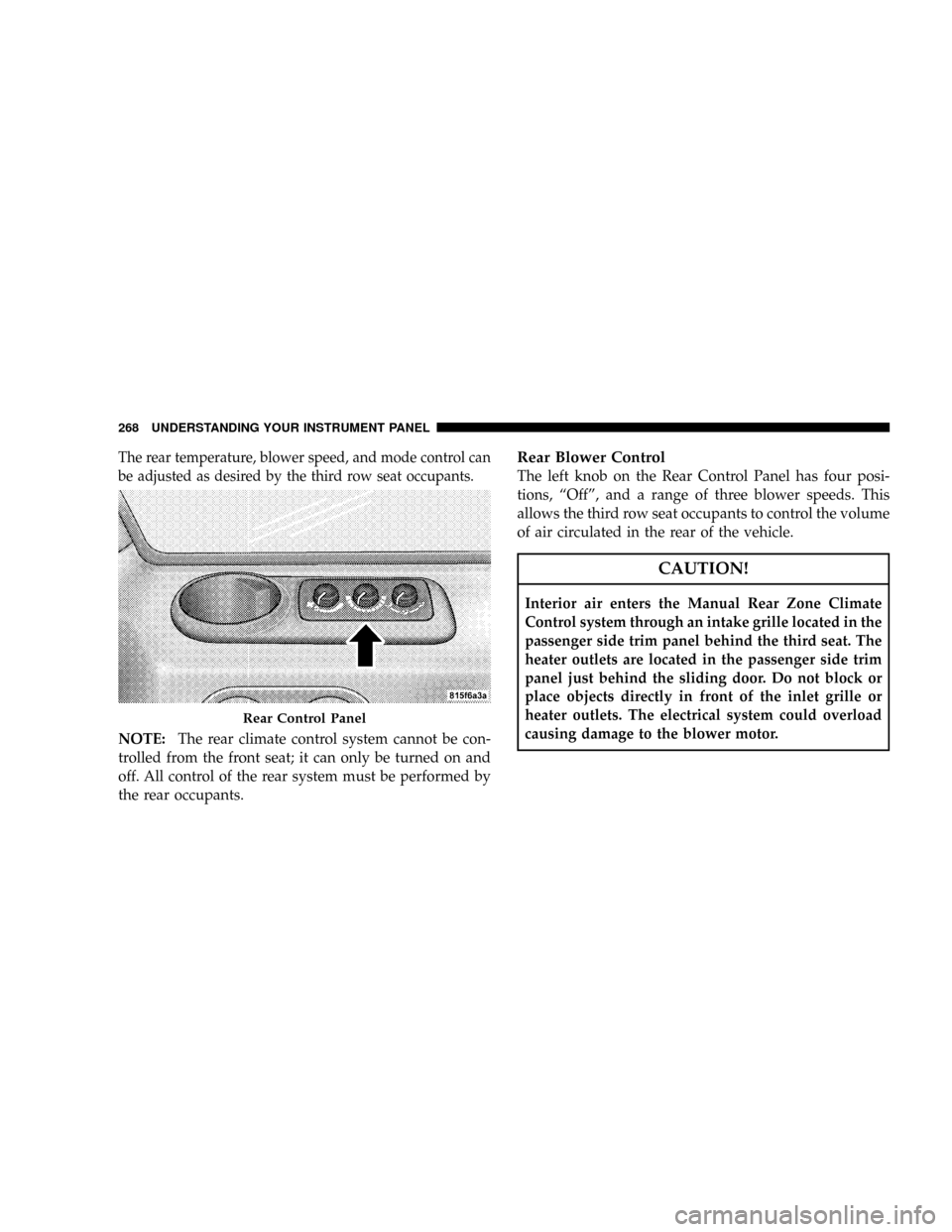
The rear temperature, blower speed, and mode control can
be adjusted as desired by the third row seat occupants.
NOTE:The rear climate control system cannot be con-
trolled from the front seat; it can only be turned on and
off. All control of the rear system must be performed by
the rear occupants.
Rear Blower Control
The left knob on the Rear Control Panel has four posi-
tions, ªOffº, and a range of three blower speeds. This
allows the third row seat occupants to control the volume
of air circulated in the rear of the vehicle.
CAUTION!
Interior air enters the Manual Rear Zone Climate
Control system through an intake grille located in the
passenger side trim panel behind the third seat. The
heater outlets are located in the passenger side trim
panel just behind the sliding door. Do not block or
place objects directly in front of the inlet grille or
heater outlets. The electrical system could overload
causing damage to the blower motor.
Rear Control Panel
268 UNDERSTANDING YOUR INSTRUMENT PANEL
Page 399 of 478
WARNING!
Fluid level should be checked on a level surface with
the engine off to prevent injury from moving parts,
and to insure accurate fluid level reading. Do not
overfill. Use only the manufacturer's recommended
fluid.
If necessary, add fluid to restore to the proper indicated
level. With a clean cloth, wipe any spilled fluid from all
surfaces. Refer to Fluids, Lubricants, and Genuine Parts
for correct fluid type.
NOTE:Upon initial start-up in cold weather, the power
steering pump may make noise for a short period of time.
This is due to the cold, thick fluid in the steering system.
This noise should be considered normal, and does not in
any way damage the steering system.
Body Lubrication
Locks and all body pivot points, including such items as
seat tracks, doors, tailgate and hood hinges, should be
lubricated periodically to assure quiet, easy operation
and to protect against rust and wear. Prior to the appli-
cation of any lubricant, the parts concerned should be
wiped clean to remove dust and grit; after lubricating
excess oil and grease should be removed. Particular
attention should also be given to hood latching compo-
nents to insure proper function. When performing other
underhood services, the hood latch, release mechanism
and safety catch should be cleaned and lubricated.
The external lock cylinders should be lubricated twice a
year, preferably in the fall and spring. Apply a small
amount of a high quality lubricant such as MopartLock
Cylinder Lubricant directly into the lock cylinder.
MAINTAINING YOUR VEHICLE 399
7