door lock JEEP COMMANDER 2008 1.G User Guide
[x] Cancel search | Manufacturer: JEEP, Model Year: 2008, Model line: COMMANDER, Model: JEEP COMMANDER 2008 1.GPages: 478, PDF Size: 6.97 MB
Page 28 of 478

The vehicle can be started remotely up to a maximum of
two times. The vehicle is also allowed a maximum of one
failed start, where the remote start sequence was initiated
but the engine stopped cranking without starting. After
either of these conditions, or if the Vehicle Theft Alarm is
alarming, or if the PANIC button was pressed, the vehicle
must be reset by inserting a valid key into the ignition
and moving it to the RUN position, then back to LOCK.
DOOR LOCKS
Manual Door Locks
Use the manual door lock plunger to lock the doors from
inside the vehicle. If the plunger is down when the door
is closed, the door will lock. Therefore, make sure the
keys are not inside the vehicle before closing the door.
WARNING!
²For personal security and safety in the event of an
accident, lock the vehicle doors when you drive as
well as when you park and leave the vehicle.
²When leaving the vehicle always remove the key
from the ignition lock, and lock your vehicle. Do
not leave children unattended in the vehicle, or
with access to an unlocked vehicle. Unsupervised
use of vehicle equipment may cause severe per-
sonal injuries and death.
28 THINGS TO KNOW BEFORE STARTING YOUR VEHICLE
Page 29 of 478

Power Door Locks
The power door lock switch is located on each front door
panel. Press the switch to lock or unlock the doors.
If the plunger is down when the door is closed, the door
will lock. Therefore, make sure the keys are not inside the
vehicle before closing the door.If you press the door lock switch while the keys are in the
ignition switch, and the driver's door is open, the doors
will not lock.
The rear doors cannot be opened from inside the vehicle
until you pull up the lock plungers.
Automatic Door Locks
If this feature is selected your door locks will lock
automatically if the vehicle speed is above 15 mph (24
km/h) and all doors are closed. It will reset whenever a
door is opened.
This feature is selectable and can be turned on or off.
Refer to ªElectronic Vehicle Information Center (EVIC) Ð
Customer Programmable Featuresº in Section 4 of this
manual or see your authorized dealer.
Power Door Lock Switch
THINGS TO KNOW BEFORE STARTING YOUR VEHICLE 29
2
Page 30 of 478

Automatic Unlock on Exit Feature Ð Only
Available if Auto Lock is Enabled
This feature will unlock all the doors when the driver's
door is opened if the vehicle is stopped and in P (Park) or
N (Neutral). Refer to ªElectronic Vehicle Information
Center (EVIC) Ð Customer Programmable Featuresº in
Section 4 of this manual or see your authorized dealer.
Child Protection Door Lock
The rear doors of your vehicle are equipped with child
protection locks. If you push up on the lever on the open
edge of the door it cannot be opened from the inside of
the vehicle. Push the lever down to disengage the child
protection locks.
WARNING!
Avoid trapping anyone in the vehicle in a collision.
Remember that the rear doors can only be opened
from the outside when the child protection locks are
engaged.
Child Protection Door Lock
30 THINGS TO KNOW BEFORE STARTING YOUR VEHICLE
Page 33 of 478
WARNING!
There is no anti-pinch protection when the window
is almost closed. Be sure to clear all objects from the
window before closing.
Resetting the Auto-Up Feature
Should the Auto-Up feature stop working the window
probably needs to be reset. To reset Auto-Up:
Pull the window switch up and close the window com-
pletely, then pull and hold the switch for 1 second.
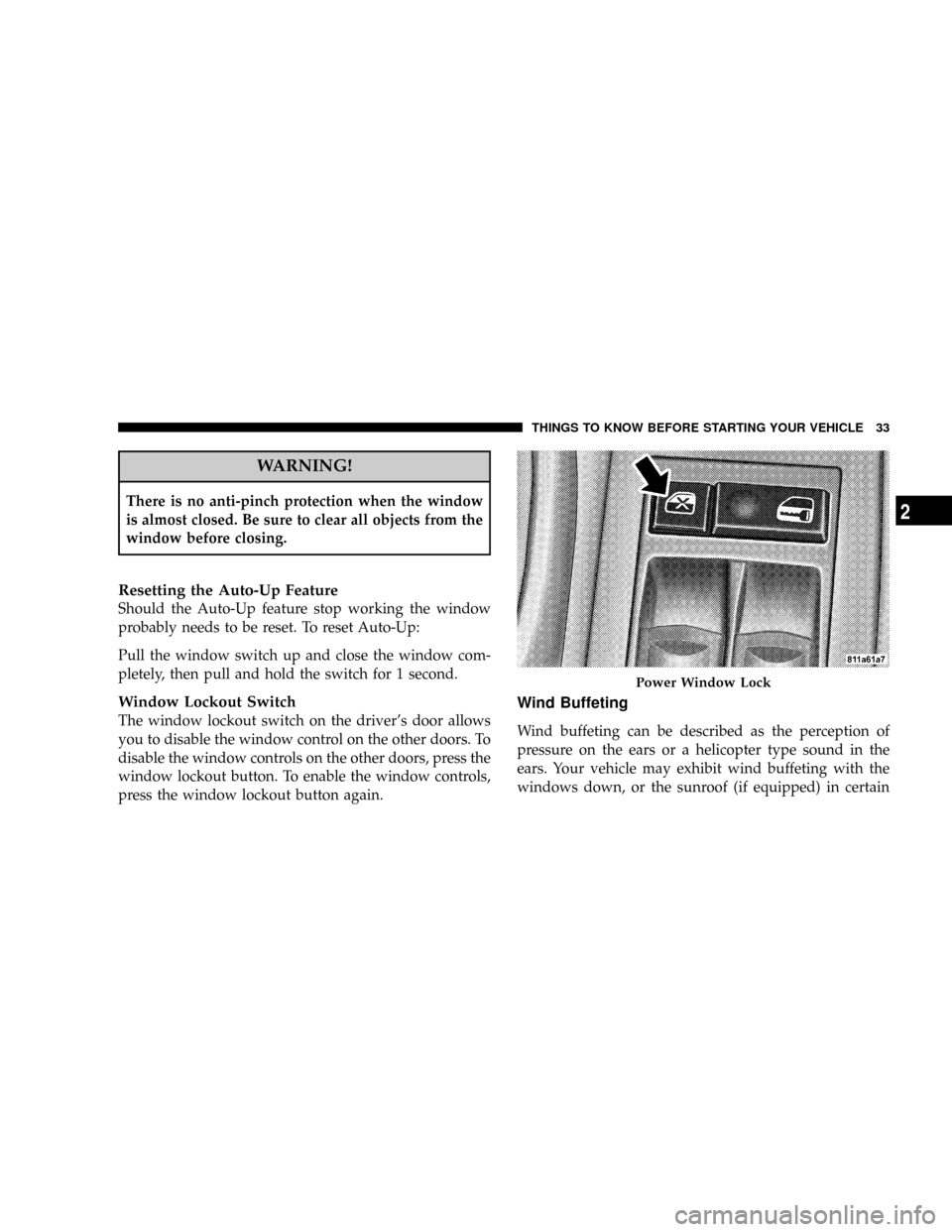
Window Lockout Switch
The window lockout switch on the driver's door allows
you to disable the window control on the other doors. To
disable the window controls on the other doors, press the
window lockout button. To enable the window controls,
press the window lockout button again.
Wind Buffeting
Wind buffeting can be described as the perception of
pressure on the ears or a helicopter type sound in the
ears. Your vehicle may exhibit wind buffeting with the
windows down, or the sunroof (if equipped) in certain
Power Window Lock
THINGS TO KNOW BEFORE STARTING YOUR VEHICLE 33
2
Page 34 of 478

open or partially open positions. This is a normal occur-
rence and can be minimized. If the buffeting occurs with
the sunroof open, adjust the sunroof opening to minimize
the buffeting.
LIFTGATE
To open the liftgate, pull up (squeeze) on the handle and
lift. Manually unlocking the vehicle doors with the
plunger or a key in the lock cylinder will not unlock the
liftgate.
WARNING!
Driving with the liftgate open can allow poisonous
exhaust gases into your vehicle. You and your pas-
sengers could be injured by these fumes. Keep the
liftgate closed when you are operating the vehicle.
Liftgate Release
34 THINGS TO KNOW BEFORE STARTING YOUR VEHICLE
Page 56 of 478

²It is not advisable to drive your vehicle after the
airbags have deployed. If you are involved in another
collision, the airbags will not be in place to protect you.
WARNING!
Deployed airbags and seat belt pretensioners cannot
protect you in another collision. Have the airbags,
seat belt pretensioners, and seat belt retractor assem-
bly, replaced by an authorized dealer as soon as
possible.
Enhanced Accident Response Feature
If the airbags deploy after an impact and the electrical
system remains functional, vehicles equipped with
power door locks will unlock automatically. The hazard
lights will flash and the fuel will be cut off to the engine.
In addition, after the vehicle has stopped moving, the
interior lights will illuminate to aid visibility and remain
lit until the ignition switch is turned off.
NOTE:The interior lights can only be deactivated if the
key is removed from the ignition switch or the vehicle is
driven.
56 THINGS TO KNOW BEFORE STARTING YOUR VEHICLE
Page 76 of 478

mElectronic Brake Control System............139
NABS (Anti-Lock Brake System)............139
NTCS (Traction Control System)............140
NBAS (Brake Assist System)...............141
NERM (Electronic Roll Mitigation)..........142
NESP (Electronic Stability Program).........143
NTSC (Trailer Sway Control)..............147
NHSA (Hill Start Assist) (4WD Models With
NV245 Two±Speed Transfer Case Only)......148
NHDC (Hill Descent Control) (4WD Models
With NV245 Two±Speed Transfer Case Only) . . 150
NESP/BAS Warning Lamp And ESP/TCS
Indicator Light.......................152
mRear Park Assist SystemÐ If Equipped.......153NRear Park Assist Sensors................154
NRear Park Assist Warning Display.........154
NEnable/Disable The Rear Park Assist System . . 156
NService The Rear Park Assist System........156
NCleaning The Rear Park Assist System......157
mRear Camera Ð If Equipped...............157
NTurning The Rear Camera On............157
NTurning The Rear Camera Off............158
mOverhead Console Ð If Equipped...........158
mGarage Door Opener Ð If Equipped.........159
NProgramming HomeLinkt...............160
NGate Operator/Canadian Programming.....163
NUsing HomeLinkt.....................163
76 UNDERSTANDING THE FEATURES OF YOUR VEHICLE
Page 80 of 478

Exterior Mirrors Folding Feature
All exterior mirrors are hinged and may be moved either
forward or rearward to resist damage. The hinges have
three detent positions; full forward, full rearward, and
normal.
Driver's and Front Passenger Outside Automatic
Dimming Mirror Ð If Equipped
If your vehicle is equipped with outside automatic dim-
ming mirrors, they will operate when the inside auto-
matic dimming mirror is on. The outside mirrors operate
off the inside mirror switch and will automatically adjust
for annoying headlight glare when the inside mirror
does.
Power Remote Control Outside Mirrors Ð If
Equipped
The power mirror switch is located on the driver's door
trim panel next to the power door lock switch. A rotary
knob selects the left mirror, right mirror, or off position.After selecting a mirror move the knob in the same
direction you want the mirror to move. Use the center off
position to guard against accidentally moving a mirror
position.Power Mirror Switches
80 UNDERSTANDING THE FEATURES OF YOUR VEHICLE
Page 118 of 478

To Raise Rear Seat
1. Open the tailgate.
2. Detach pull strap from back of seat, and pull seatback
upward until it locks into place. Reattach strap.
3. Close the tailgate.
WARNING!
The cargo area in the rear of the vehicle (with the rear
seatbacks in the locked-up or folded down position)
should not be used as a play area by children when
the vehicle is in motion. They could be seriously
injured in an accident. Children should be seated
and using the proper restraint system.
DRIVER MEMORY SEAT Ð IF EQUIPPED
Once programmed, the memory buttons 1 and 2 on the
driver's door panel can be used to recall the driver's seat,
driver's outside mirror, adjustable brake and accelerator
pedals, and radio station preset settings. Your Remote
Keyless Entry transmitters can also be programmed to
recall the same positions when the ªUnlockº button is
pressed.
Pull Strap
118 UNDERSTANDING THE FEATURES OF YOUR VEHICLE
Page 120 of 478

5. Turn on the radio and set the radio station presets (up
to 10 AM and 10 FM stations can be set).
6. Turn the ignition switch to the OFF position and
remove the key.
7. Press and release the SET (S) button located on the
driver's door.
8. Within 5 seconds, press and release memory button 1
or 2 on the driver's door. The next step must be per-
formed within 5 seconds if you desire to also use a
Remote Keyless Entry transmitter to recall memory po-
sitions.
9. Press and release the ªLockº button on one of the
transmitters.
10. Insert the ignition key and turn the ignition switch to
the ON position.11. Select9Remote Linked to Memory9in the Electronic
Vehicle Information Center (EVIC) and enter9Ye s9or
select9Use Factory Settings9from the EVIC and enter
9Ye s9. Refer to ªElectronic Vehicle Information Center
(EVIC) Ð Customer Programmable Featuresº in Section
4 for more information.
12. Repeat the above steps to set the next memory
position using the other numbered memory button or to
link another Remote Keyless Entry transmitter to
memory.
Memory Position Recall
NOTE:The vehicle must be in Park to recall memory
positions. If a recall is attempted when the vehicle is not
in Park, a message will be displayed in the Electronic
Vehicle Information Center (EVIC).
120 UNDERSTANDING THE FEATURES OF YOUR VEHICLE