wheel JEEP COMMANDER 2008 1.G Owner's Manual
[x] Cancel search | Manufacturer: JEEP, Model Year: 2008, Model line: COMMANDER, Model: JEEP COMMANDER 2008 1.GPages: 478, PDF Size: 6.97 MB
Page 193 of 478

16. Electronic Stability Program (ESP) Warning
Light/Brake Assist System (BAS) Warning Light
The ESP/BAS warning light in the instrument
cluster comes on when the ignition switch is
turned to the ªONº position. The light should
go out with the engine running. If the ESP/
BAS warning light comes on continuously with the
engine running, a malfunction has been detected in either
the ESP or the BAS system. If this light stays illuminated,
have the ESP and BAS checked at your authorized dealer
as soon as possible.
17. 4WD LOW Mode Indicator Light Ð If Equipped
This light alerts the driver that the vehicle is in
the 4WD LOW mode. The front and rear drive-
shafts are mechanically locked together forcing
the front and rear wheels to rotate at the same
speed.18. Seat Belt Reminder Light
When the ignition switch is first turned ON, this
light will turn on for 5 to 8 seconds as a bulb check.
During the bulb check, if the driver's seat belt is
unbuckled, a chime will sound. After the bulb check or
when driving, if the driver or front passenger seat belt
remains unbuckled, the Seat Belt Warning Light will flash
or remain on continuously. Refer to9Enhanced Driver
Seat Belt Reminder System (BeltAlert)9in the Occupant
Restraints section for more information.
19. Cruise Indicator Light
This indicator lights when the speed control
system is turned ON.
20. Odometer
The odometer shows the total distance the vehicle has
been driven.
UNDERSTANDING YOUR INSTRUMENT PANEL 193
4
Page 196 of 478

²Vehicle Information Warning Message Displays
²Personal Settings (Customer Programmable Features)
²Compass Display
²Outside Temperature Display
²Trip Computer Functions
The system allows the driver to select information by
pressing the following buttons mounted on the steering
wheel:
MENU Button
Press and release the MENU button and the
mode displayed will change between Trip
Functions, Personal Settings, and System Sta-
tus.FUNCTION SELECT Button
Press the FUNCTION SELECT button to select
the displayed function (YES (Y) or NO (N).
SCROLL Button
Press the SCROLL button to scroll through Trip
Functions, Personal Settings (Customer Pro-
grammable Features), and System Status Mes-
sages.
COMPASS/TEMPERATURE Button
Press and release the COMPASS/
TEMPERATURE button to display one of eight
compass readings and the outside temperature.
196 UNDERSTANDING YOUR INSTRUMENT PANEL
Page 211 of 478

Two Types of Signals
There are two basic types of radio signals... AM or
Amplitude Modulation, in which the transmitted sound
causes the amplitude, or height, of the radio waves to
vary... and FM or Frequency Modulation, in which the
frequency of the wave is varied to carry the sound.
Electrical Disturbances
Radio waves may pick up electrical disturbances during
transmission. They mainly affect the wave amplitude,
and thus remain a part of the AM reception. They
interfere very little with the frequency variations that
carry the FM signal.
AM Reception
AM sound is based on wave amplitude, so AM reception
can be disrupted by such things as lightning, power lines
and neon signs.
FM Reception
Because FM transmission is based on frequency varia-
tions, interference that consists of amplitude variations
can be filtered out, leaving the reception relatively clear,
which is the major feature of FM radio.
NOTE:The radio, steering wheel radio controls (if
equipped), and 6 disc CD/DVD changer (if equipped)
will remain active for up to 10 minutes after the ignition
switch has been turned off. Opening a vehicle front door
will cancel this feature.
UNDERSTANDING YOUR INSTRUMENT PANEL 211
4
Page 245 of 478

Connecting the iPodT
Use the optional connection cable to connect an iPodtto
the vehicle's UCI connector (which is located in the glove
box on some vehicles. This location may vary with
vehicle). Once the iPodtis connected and synchronized
to the vehicle system (this may take a few seconds to
connect), the vehicle brand logo appears on the iPodt
display, and it starts charging and is ready for use by
pressing radio switches as described below.
Controlling the iPodTusing Radio Buttons
To get into the UCI (iPodt) mode and access a connected
iPodt, press the ªAUXº button on the radio faceplate.
Once in the UCI (iPodt) mode, the iPodtaudio track (if
available from iPodt) will start playing over the vehicle
audio system.
Play Mode
When switched to UCI mode the iPodtwill be inPlay
mode. In thisPlay mode, you may use the following
buttons on the radio faceplate to control the iPodtand
display data:
TUNE/SCROLL Knob
Use the ªTUNE/SCROLLº knob to go to the next or
previous track.
The ªTUNE/SCROLLº knob functions similar to the
scroll wheel on the iPodt.
Turning it clockwise (forward) by one click while playing
a track skips to the next track.
Turning it counterclockwise (backward) by one click
during the first 2 seconds of the track will jump to the
previous track in the list and turning this button at any
other time in the track will jump to the beginning of the
current track.
UNDERSTANDING YOUR INSTRUMENT PANEL 245
4
Page 247 of 478

SCAN Button
Pressing the ªSCANº button will play the first 5 seconds
of each track in the current list and then forward to the
next song. To stop the SCAN mode and start playing the
desired track, press the ªSCANº button again.
During the SCAN mode, you can also press the SEEK
button to the left or right to go to the previous or next
tracks.
RND (Random) Button (RES Radios Only)
Pressing the ªRNDº button will switch between the
shuffle on and shuffle off modes of the iPodt.Ifthe
ªRNDº icon is showing on the radio display then the
shuffle mode is on.List or Browse Mode
DuringPlaymode, pressing any of the following buttons
will take you toListmode.Listmode enables you to
scroll through the list of menus and tracks on the iPodt.
TUNE/SCROLL Knob
In theListmode, the ªTUNE/SCROLLº knob functions
in a similar manner as the scroll wheel on the iPodt.
Turning the ªTUNE/SCROLLº knob clockwise (forward)
and counter-clockwise (backward) scrolls through lists,
displaying the track detail on the radio display. Once you
have the track to be played highlighted on the radio
display, press the ªTUNE/SCROLLº knob to select and
start playing the track. By turning the ªTUNE/SCROLLº
knob fast, you can jump through the list faster. During
fast scroll, you may notice a slight delay in updating the
information on the radio display.
UNDERSTANDING YOUR INSTRUMENT PANEL 247
4
Page 254 of 478

REMOTE SOUND SYSTEM CONTROLS Ð IF
EQUIPPED
The remote sound system controls are located on the rear
surface of the steering wheel. Reach behind the wheel to
access the switches.
Remote Control Location
254 UNDERSTANDING YOUR INSTRUMENT PANEL
Page 273 of 478

STARTING AND OPERATING
CONTENTS
mStarting Procedures.....................277
NNormal Starting......................278
NExtremely Cold Weather (Below220ÉF Or
229ÉC).............................278
NIf Engine Fails To Start.................279
NAfter Starting........................280
mEngine Block Heater Ð If Equipped.........280
mAutomatic Transmission..................281
NShift Lock Manual Override Ð If Equipped . . . 281NBrake/Transmission Interlock System.......283
N5±Speed Automatic Transmission..........283
NGear Ranges.........................283
NRocking The Vehicle...................289
mFour-Wheel Drive Operation...............290
NQuadra-Trac ItOperating Instructions/
Precautions Ð If Equipped..............290
NQuadra-Trac IItOperating
Instructions/Precautions Ð If Equipped.....291
NShift Positions........................292
5
Page 285 of 478
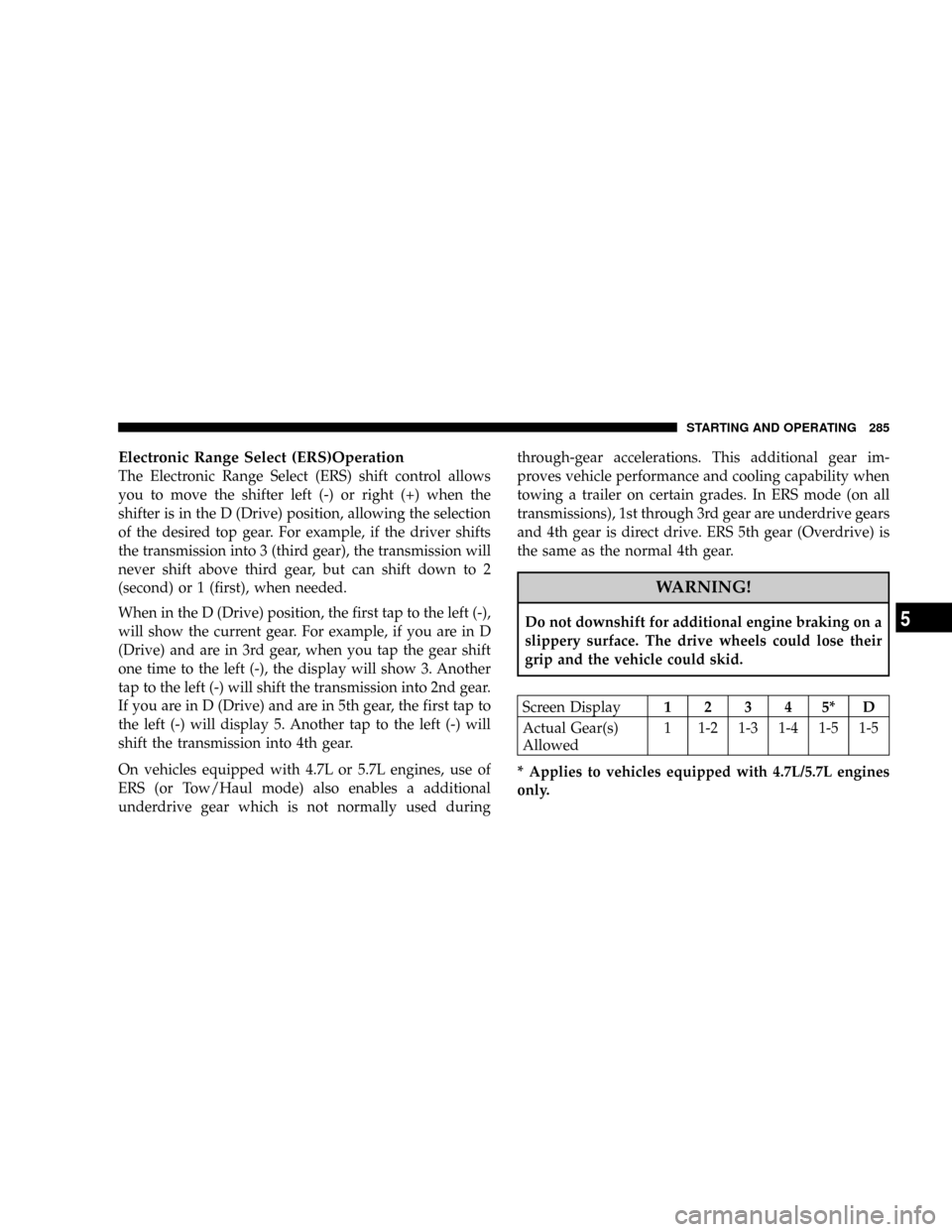
Electronic Range Select (ERS)Operation
The Electronic Range Select (ERS) shift control allows
you to move the shifter left (-) or right (+) when the
shifter is in the D (Drive) position, allowing the selection
of the desired top gear. For example, if the driver shifts
the transmission into 3 (third gear), the transmission will
never shift above third gear, but can shift down to 2
(second) or 1 (first), when needed.
When in the D (Drive) position, the first tap to the left (-),
will show the current gear. For example, if you are in D
(Drive) and are in 3rd gear, when you tap the gear shift
one time to the left (-), the display will show 3. Another
tap to the left (-) will shift the transmission into 2nd gear.
If you are in D (Drive) and are in 5th gear, the first tap to
the left (-) will display 5. Another tap to the left (-) will
shift the transmission into 4th gear.
On vehicles equipped with 4.7L or 5.7L engines, use of
ERS (or Tow/Haul mode) also enables a additional
underdrive gear which is not normally used duringthrough-gear accelerations. This additional gear im-
proves vehicle performance and cooling capability when
towing a trailer on certain grades. In ERS mode (on all
transmissions), 1st through 3rd gear are underdrive gears
and 4th gear is direct drive. ERS 5th gear (Overdrive) is
the same as the normal 4th gear.
WARNING!
Do not downshift for additional engine braking on a
slippery surface. The drive wheels could lose their
grip and the vehicle could skid.
Screen Display12345*D
Actual Gear(s)
Allowed1 1-2 1-3 1-4 1-5 1-5
* Applies to vehicles equipped with 4.7L/5.7L engines
only.
STARTING AND OPERATING 285
5
Page 289 of 478

drops below a calibrated speed, or during acceleration,
the clutch automatically and smoothly disengages. The
feature is operational in Overdrive and in Drive.
NOTE:The torque converter clutch will not engage
until the transmission fluid and engine coolant are warm
[usually after 1-3 miles (1.6 - 4.8 km) of driving]. Because
the engine speed is higher when the torque converter
clutch is not engaged, it may seem as if the transmission
is not shifting into Overdrive when cold. This is normal.
Manually shifting (using the ERS shift control) between 4
(direct gear) and 5/D (Overdrive gear) positions will
demonstrate that the transmission is able to shift into and
out of Overdrive.
NOTE:If the vehicle has not been driven in several
days, the first few seconds of operation after shifting the
transmission into gear may seem sluggish. This is due to
the fluid partially draining from the torque converter into
the transmission. This condition is normal and will notcause damage to the transmission. The torque converter
will refill within five seconds of shifting from Park into
any other gear position.
Rocking the Vehicle
If the vehicle becomes stuck in snow, sand, or mud, it can
often be moved by a rocking motion. Move the gear
selector rhythmically between D (Drive) and R (Reverse),
while applying slight pressure to the accelerator.
NOTE:The Electronic Stability Program (ESP) and
Traction Control (if equipped) should be turned OFF
before attempting to rock the vehicle. Refer to ªElectronic
Brake Control Systemº in Section 3 of this manual.
The least amount of accelerator pedal pressure to main-
tain the rocking motion without spinning the wheels or
racing the engine is most effective. Racing the engine or
spinning the wheels, due to the frustration of not freeing
the vehicle, may lead to transmission overheating and
failure. Allow the engine to idle with the transmission
STARTING AND OPERATING 289
5
Page 290 of 478

selector in N (Neutral) for at least one minute after every
five rocking-motion cycles. This will minimize overheat-
ing and reduce the risk of transmission failure during
prolonged efforts to free a stuck vehicle.
CAUTION!
When ªrockingº a stuck vehicle by moving between
ªFirstº and R (Reverse), do not spin the wheels faster
than 15 mph (24 km/h), or drivetrain damage may
result.
FOUR-WHEEL DRIVE OPERATION
Quadra-Trac ITOperating
Instructions/Precautions Ð If Equipped
The Quadra-Trac Itis a single speed (HI range only)
transfer case which provides convenient full-time
4±wheel drive. No driver interaction is required. This
transfer case divides engine torque almost evenly with 48
percent of engine torque to the front axle and 52 percent
of engine torque to the rear axle. The Brake Traction
Control System (BTC), which combines standard ABS
and Traction Control, provides resistance to any wheel
that is slipping to allow additional torque transfer to
wheels with traction.
NOTE:The Quadra-Trac Itsystem is not appropriate
for conditions where LOW range is recommended. Refer
to ªOff-Road Driving Tipsº in this section.
290 STARTING AND OPERATING