radio JEEP COMPASS 2008 1.G User Guide
[x] Cancel search | Manufacturer: JEEP, Model Year: 2008, Model line: COMPASS, Model: JEEP COMPASS 2008 1.GPages: 399, PDF Size: 6.59 MB
Page 107 of 399
Heated Seats Ð If Equipped
WARNING!
Persons who are unable to feel pain to the skin
because of advanced age, chronic illness, diabetes,
spinal cord injury, medication, alcohol use, exhaus-
tion or other physical condition must exercise care
when using the seat heater. It may cause burns even
at low temperatures, especially if used for long
periods of time. Do not place anything on the seat
that insulates against heat, such as a blanket or
cushion. This may cause the seat heater to overheat.
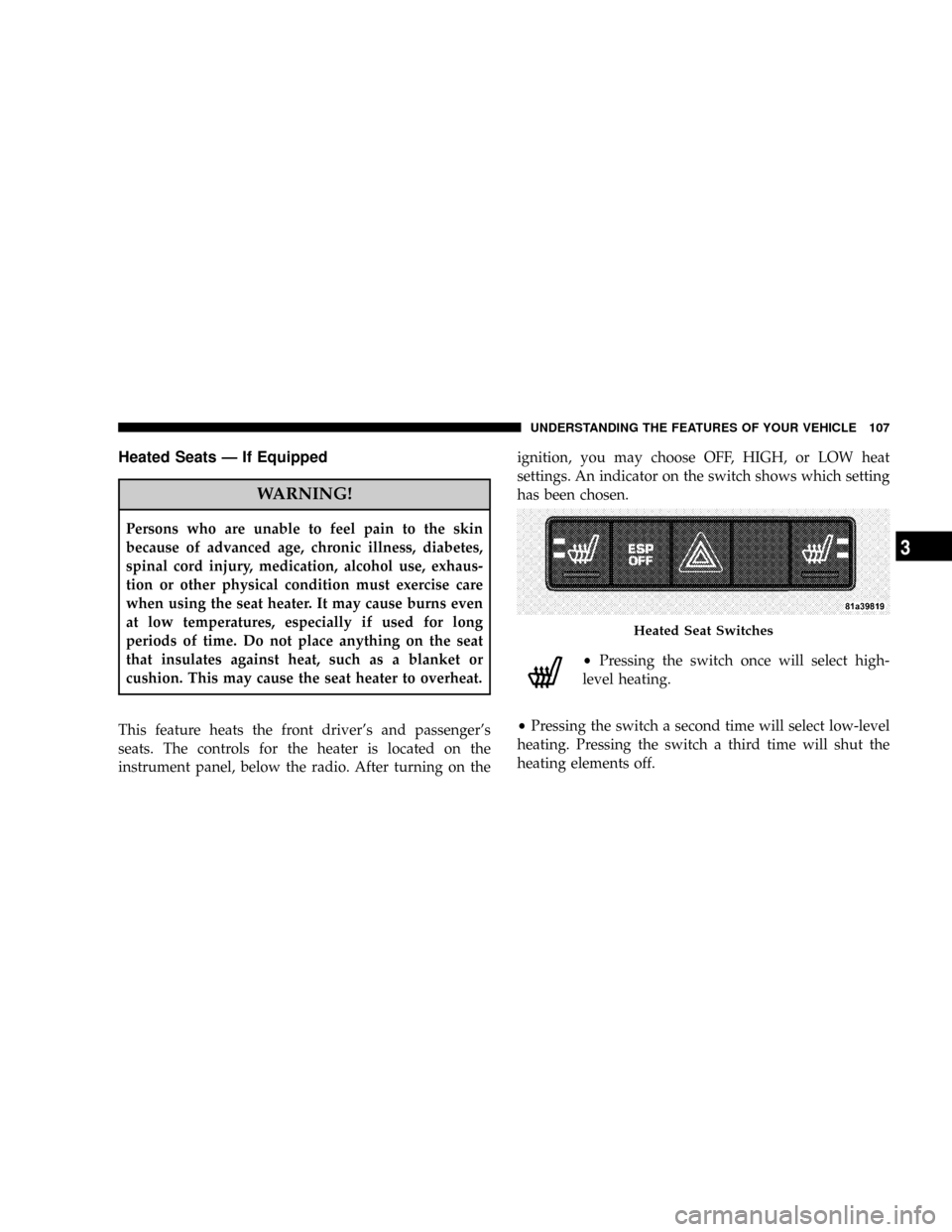
This feature heats the front driver's and passenger's
seats. The controls for the heater is located on the
instrument panel, below the radio. After turning on theignition, you may choose OFF, HIGH, or LOW heat
settings. An indicator on the switch shows which setting
has been chosen.
²Pressing the switch once will select high-
level heating.
²Pressing the switch a second time will select low-level
heating. Pressing the switch a third time will shut the
heating elements off.
Heated Seat Switches
UNDERSTANDING THE FEATURES OF YOUR VEHICLE 107
3
Page 135 of 399
WARNING!
Your motorized door or gate will open and close
while you are training the Universal Transceiver. Do
not train the transceiver if people or pets are in the
path of the door or gate. Only use this transceiver
with a garage door opener that has a ªstop and
reverseº feature as required by federal safety stan-
dards. This includes most garage door opener models
manufactured after 1982. Do not use a garage door
opener without these safety features. Call toll-free
1±800±355±3515 or, on the Internet at
www.HomeLink.com for safety information or
assistance.
WARNING!
Vehicle exhaust contains carbon monoxide, a danger-
ous gas. Do not run your vehicle in the garage while
training the transceiver. Exhaust gas can cause seri-
ous injury or death.
Programming HomeLinkT
Before You Begin
If you have not trained any of the HomeLinktbuttons,
erase all channels before you begin training.
To do this, press and hold the two outside buttons for 20
seconds until the red indicator flashes.
It is recommended that a new battery be placed in the
hand-held transmitter of the device being programmed
to HomeLinktfor more efficient training and accurate
transmission of the radio-frequency signal.
UNDERSTANDING THE FEATURES OF YOUR VEHICLE 135
3
Page 138 of 399

7. Return to the vehicle and press the programmed
HomeLinktbutton twice (holding the button for 2 sec-
onds each time). If the device is plugged in and activates,
programming is complete.
If the device does not activate, press the button a third
time (for 2 seconds) to complete the training.
If you are have any problems, or require assistance,
please call toll-free 1±800±355±3515 or, on the Internet at
www.HomeLink.com for information or assistance.
To program the remaining two HomeLinktbuttons,
repeat each step for each remaining button. DO NOT
erase the channels.
Gate Operator/Canadian Programming
Canadian radio-frequency laws require transmitter sig-
nals to ªtime-outº (or quit) after several seconds of
transmission ± which may not be long enough for
HomeLinktto pick up the signal during programming.Similar to this Canadian law, some U.S. gate operators are
designed to ªtime-outº in the same manner.
It may be helpful to unplug the device during the cycling
process to prevent possible overheating of the garage
door or gate motor.
If you are having difficulties programming a garage door
opener or a gate operator, replace ªProgramming
HomeLinkº Step 3 with the following:
3. Continue to press and hold the HomeLinktbutton
while you press and release - every two seconds
(ªcycleº) your hand-held transmitter until HomeLinkt
has successfully accepted the frequency signal. The
indicator light will flash slowly and then rapidly when
fully trained.
If you unplugged the device for training, plug it back in
at this time.
Then proceed with Step 4 under ªProgramming
HomeLink.º earlier in this section.
138 UNDERSTANDING THE FEATURES OF YOUR VEHICLE
Page 155 of 399

UNDERSTANDING YOUR INSTRUMENT PANEL
CONTENTS
mInstrument Panel Features.................158
mInstrument ClusterÐPremium..............159
mInstrument Cluster Descriptions............160
mElectronic Vehicle Information Center (EVIC) ±
If Equipped...........................171
NEngine Oil Change Indicator System........172
NEVIC Functions.......................173
NCompass/Temperature/Audio............174
NAverage Fuel Economy.................174NDistance To Empty (DTE)...............175
NElapsed Time........................175
NTire Pressure Monitor (TPM).............175
NPersonal Settings (Customer Programmable
Features)...........................175
mRadio General Information................181
NRadio Broadcast Signals.................181
NTwo Types Of Signals..................181
NElectrical Disturbances..................1814
Page 156 of 399

NAM Reception.......................181
NFM Reception........................181
mElectronic Digital Clock..................182
NClock Setting Procedure.................182
mSales Code REF Ð AM/FM/CD (Single Disc)
Radio With Optional Satellite Radio And Hands
Free Phone Capability...................183
NOperating Instructions - Radio Mode.......183
NOperation Instructions - CD Mode.........187
NOperation Instructions - Auxiliary Mode.....189
NOperating Instructions - Hands Free Phone Ð
If Equipped.........................190
NOperating Instructions - Satellite Radio Ð
If Equipped.........................190mSales Code RAQ ± AM/FM/CD (6-Disc) Radio
With Optional Satellite Radio, Hands Free Phone,
And Vehicle Entertainment Systems (VES)
Capabilities...........................190
NOperating Instructions - Radio Mode.......191
NOperation Instructions - (CD Mode For CD
Audio Play).........................196
NLoad/Eject Button (CD Mode For CD Audio
Play)..............................197
NNotes On Playing MP3 Files.............199
NOperation Instructions - (CD Mode For MP3
Audio Play).........................202
NLoad/Eject Button (CD Mode For MP3 Play) . . 202
mSales Code REC Ð AM/FM/CD (6±Disc) Radio
With Navigation System..................204
156 UNDERSTANDING YOUR INSTRUMENT PANEL
Page 157 of 399

NOperating Instructions Ð Satellite Radio
(If Equipped)........................205
NREC Setting The Clock.................205
NAudio Clock Display...................207
mSatellite Radio Ð If Equipped..............208
NSystem Activation.....................208
NElectronic Serial Number/Sirius Identification
Number (ESN/SID)....................209
NSelecting Satellite Mode In REF, And RAQ,
Radios.............................209
NSelecting a Channel....................210
NStoring And Selecting Pre-Set Channels......210
NUsing The PTY (Program Type) Button
(If Equipped)........................211
NPTY Button9Scan9.....................211NPTY Button9Seek9.....................211
NSatellite Antenna......................211
NReception Quality.....................212
mRemote Sound System Controls Ð If Equipped . . 212
NRadio Operation......................213
NCD Player..........................213
mCD/DVD Disc Maintenance...............214
mRadio Operation And Cellular Phones........214
mClimate Controls.......................214
NClimate Controls......................214
NAir Conditioning.....................218
NAir Filtration System ± If Equipped........219
NOperating Tips.......................220
UNDERSTANDING YOUR INSTRUMENT PANEL 157
4
Page 158 of 399

INSTRUMENT PANEL FEATURES
1 Ð Air Outlet 5 Ð Glove Box 9 Ð Hazard Warning Flasher
2 ÐDemisters 6 Ð Storage Bin 10 Ð ESP OFF Switch Ð If Equipped
3 Ð Instrument Cluster 7 Ð Climate Controls
4 Ð Radio 8 Ð Heated Seat Switches Ð If Equipped 158 UNDERSTANDING YOUR INSTRUMENT PANEL
Page 174 of 399

²Distance To Empty (DTE)
²Elapsed Time
²Tire Pressure Monitor (TPM)
²Personal Settings
To Reset The Display
Pressing and holding the EVIC button once will clear the
function currently being displayed. Reset will only occur
if a resettable function is currently being displayed. To
reset all resettable functions, press and release the EVIC
button a second time within 3 seconds of resetting the
currently displayed function (Reset ALL will be dis-
played during this 3 second window).
Compass/Temperature/Audio
Press and release the EVIC button to display one of eight
compass headings to indicate the direction the vehicle is
facing, the outside temperature and the current radio
station.
For additional information regarding the compass, refer
to Personal Settings (Customer Programmable Features)
in this section.
Average Fuel Economy
Shows the average fuel economy since the last reset.
When the fuel economy is reset, the display will read
ªRESETº or show dashes for two seconds. Then, the
history information will be erased, and the averaging will
continue from the last fuel reading before the reset.
174 UNDERSTANDING YOUR INSTRUMENT PANEL
Page 177 of 399

Sound Horn with Remote Key Lock
When ON is selected a short horn sound will occur when
the remote keyless entry ªLockº button is pressed. This
feature may be selected with or without the flash lights
on lock/unlock feature. Press and hold the EVIC button
when in this display until ªONº or ªOFFº appears to
make your selection.
Flash Lights with Remote Key Lock
When ON is selected, the front and rear turn signals will
flash when the doors are locked or unlocked using the
remote keyless entry transmitter. This feature may be
selected with or without the sound horn on lock feature
selected. Press and hold the EVIC button when in this
display until ªONº or ªOFFº appears to make your
selection.
Delay Turning Headlamps Off
When this feature is selected the driver can choose to
have the headlamps remain on for 0, 30, 60, or 90 secondswhen exiting the vehicle. Press and hold the EVIC button
when in this display until 0, 30, 60, or 90 appears to make
your selection.
Headlamps On With Wipers (Available with Auto
Headlights Only)
When ON is selected and the headlight switch is in the
AUTO position, the headlights will turn on approxi-
mately 10 seconds after the wipers are turned on. The
headlights will also turn off when the wipers are turned
off if they were turned on by this feature. Press and hold
the EVIC button when in this display until ªONº or
ªOFFº appears to make your selection.
NOTE:Turning the headlights on during the daytime
causes the instrument panel lights to dim. To increase the
brightness, refer to ªLightsº in this section.
Delay Power Off to Accessories Until Exit
When this feature is selected, the power window
switches, radio, hands±free system, power sunroof, and
UNDERSTANDING YOUR INSTRUMENT PANEL 177
4
Page 181 of 399

RADIO GENERAL INFORMATION
Radio Broadcast Signals
Your new radio will provide excellent reception under
most operating conditions. Like any system, however, car
radios have performance limitations, due to mobile op-
eration and natural phenomena, which might lead you to
believe your sound system is malfunctioning. To help
you understand and save you concern about these ªap-
parentº malfunctions, you must understand a point or
two about the transmission and reception of radio sig-
nals.
Two Types of Signals
There are two basic types of radio signals... AM or
Amplitude Modulation, in which the transmitted sound
causes the amplitude, or height, of the radio waves to
vary... and FM or Frequency Modulation, in which the
frequency of the wave is varied to carry the sound.
Electrical Disturbances
Radio waves may pick up electrical disturbances during
transmission. They mainly affect the wave amplitude,
and thus remain a part of the AM reception. They
interfere very little with the frequency variations that
carry the FM signal.
AM Reception
AM sound is based on wave amplitude, so AM reception
can be disrupted by such things as lightning, power lines
and neon signs.
FM Reception
Because FM transmission is based on frequency varia-
tions, interference that consists of amplitude variations
can be filtered out, leaving the reception relatively clear,
which is the major feature of FM radio.
NOTE:The radio, steering wheel radio controls (if
equipped), and 6 disc CD/DVD changer (if equipped)
UNDERSTANDING YOUR INSTRUMENT PANEL 181
4