ignition JEEP COMPASS 2008 1.G Owner's Manual
[x] Cancel search | Manufacturer: JEEP, Model Year: 2008, Model line: COMPASS, Model: JEEP COMPASS 2008 1.GPages: 399, PDF Size: 6.59 MB
Page 53 of 399

However, if you haven't healed significantly within a
few days, or if you have any blistering, see your doctor
immediately.
²As the airbags deflate, you may see some smoke-like
particles. The particles are a normal by-product of the
process that generates the nontoxic gas used for airbag
inflation. These airborne particles may irritate the skin,
eyes, nose, or throat. If you have skin or eye irritation,
rinse the area with cool water. For nose or throat
irritation, move to fresh air. If the irritation continues,
see your doctor. If these particles settle on your
clothing, follow the garment manufacturer's instruc-
tions for cleaning.
²It is not advisable to drive your vehicle after the
airbags have been deployed. If you are involved in
another collision, the airbags will not be in place to
protect you.
WARNING!
Deployed airbags can't protect you in another colli-
sion. Have the airbags replaced by an authorized
dealer as soon as possible.
Enhanced Accident Response System
In the event of an impact that causes airbag deployment,
with the vehicle stopped, and the vehicle communication
network intact, and the power intact, the Enhanced
Accident Response System performs the following func-
tions:
²Cuts off fuel to the engine.
²Flashes hazard lights.
²Turns on the interior lamps which remain on as long as
the battery has power or until the ignition key is
removed.
²Unlocks the doors automatically
THINGS TO KNOW BEFORE STARTING YOUR VEHICLE 53
2
Page 54 of 399

Maintaining Your Airbag System
WARNING!
²Modifications to any part of the airbag system
could cause it to fail when you need it. You could
be injured because the airbags are not there to
protect you. Do not modify the components or
wiring, including adding any kind of badges or
stickers to the steering wheel hub trim cover or the
upper passenger side of the instrument panel. Do
not modify the front bumper, vehicle body struc-
ture, or frame.
²You need proper knee impact protection in a
collision. Do not mount or locate any aftermarket
equipment on or behind the knee impact bolster.
²It is dangerous to try to repair any part of the
airbag system yourself. Be sure to tell anyone who
works on your vehicle that it has airbags.
Airbag Warning Light
You will want to have the airbags ready to
inflate for your protection in an impact. While
the airbag system is designed to be mainte-
nance free, if any of the following occurs, have
an authorized dealer service the system
promptly:
²The Airbag Warning Light does not come on or flickers
during the 6 to 8 seconds when the ignition switch is
first turned on.
²The light remains on or flickers after the 6 to 8 second
interval.
²The light flickers or comes on and remains on while
driving.
54 THINGS TO KNOW BEFORE STARTING YOUR VEHICLE
Page 56 of 399

custodial entity upon request. General data that does not
identify particular vehicles or crashes may be released for
incorporation in aggregate crash databases, such as those
maintained by the US government and various states.
Data of a potentially sensitive nature, such as would
identify a particular driver, vehicle, or crash, will be
treated confidentially. Confidential data will not be dis-
closed by DaimlerChrysler to any third party except
when:
1. Used for research purposes, such as to match data
with a particular crash record in an aggregate database,
provided confidentiality of personal data is thereafter
preserved
2. Used in defense of litigation involving a
DaimlerChrysler product
3. Requested by police under a legal warrant
4. Otherwise required by lawData Parameters that May Be Recorded:
²Diagnostic trouble code(s) and warning lamp status
for electronically-controlled safety systems, including
the airbag system
²Airbag disable lamp status (if equipped)
²9Time9of airbag deployment (in terms of ignition
cycles and vehicle mileage)
²Airbag deployment level (if applicable)
²Impact acceleration and angle
²Seatbelt status
²Brake status (service and parking brakes)
²Accelerator status (including vehicle speed)
²Engine control status (including engine speed)
²Transmission gear selection
56 THINGS TO KNOW BEFORE STARTING YOUR VEHICLE
Page 67 of 399

Front seat belt assemblies must be replaced after a
collision. Rear seat belt assemblies must be replaced after
a collision if they have been damaged (bent retractor, torn
webbing, etc. If there is any question regarding belt or
retractor condition, replace the belt.
Airbag Light
The light should come on and remain on for 6 to 8
seconds as a bulb check when the ignition switch is first
turned ON. If the LED is not lit during starting, have it
checked. If the light stays on or comes on while driving,
have the system checked by an authorized dealer.
Defroster
Check operation by selecting the defrost mode and place
the blower control on high speed. You should be able to
feel the air directed against the windshield.
Periodic Safety Checks You Should Make Outside
The Vehicle
Tires
Examine tires for excessive tread wear or uneven wear
patterns. Check for stones, nails, glass, or other objects
lodged in the tread. Inspect tread and sidewall for cuts or
cracks. Check wheel nuts for tightness, and tires (includ-
ing spare) for proper pressure.
Lights
Have someone observe the operation of exterior lights
while you work the controls. Check turn signal and high
beam indicator lights on the instrument panel.
Fluid Leaks
Check area under vehicle after overnight parking for fuel,
engine coolant, oil or other fluid leaks. Also, if gasoline
fumes are detected or fuel, power steering fluid, trans-
mission fluid or brake fluid leaks are suspected, the cause
should be located and corrected immediately.
THINGS TO KNOW BEFORE STARTING YOUR VEHICLE 67
2
Page 72 of 399

NTroubleshooting Tips...................140
NGeneral Information...................140
mPower Sunroof Ð If Equipped.............141
NOpening The Sunroof..................142
NClosing The Sunroof...................142
NPinch Protect Feature...................143
NPinch Protect Override.................143
NVenting Sunroof ± Express...............143
NSunshade Operation...................143
NWind Buffeting.......................143
NSunroof Maintenance...................144
NIgnition Off Operation..................144
mElectrical Power Outlets Ð If Equipped.......144NElectrical Outlet Use With Engine Off.......146
mConsole Features.......................147
mCargo Area Features.....................148
NCargo Light/Removable Self Recharging
Flashlight ± If Equipped................148
NCargo Cover Ð If Equipped..............150
NRemovable Load Floor..................150
NCargo Tie-Down Loops.................151
NFold Down Speakers ± If Equipped.........152
mRear Window Features...................152
NRear Window Wiper/Washer.............152
NRear Window Defroster.................153
mRoof Luggage Rack Ð If Equipped..........154
72 UNDERSTANDING THE FEATURES OF YOUR VEHICLE
Page 88 of 399

Call Continuation
Call continuation is progression of a phone call on
UConnectŸ system after the vehicle ignition key has
been switched to off. Call continuation functionality
available on the vehicle can be any one of three types:
²After ignition key is switched off, a call can continue
on the UConnectŸ system either until the call ends or
until the vehicle battery condition dictates cessation of
the call on the UConnectŸ system and transfer of the
call to the mobile phone.
²After ignition key is switched to off, a call can continue
on the UConnectŸ system for certain duration, after
which the call is automatically transferred from the
UConnectŸ system to the mobile phone.
²An active call is automatically transferred to the
mobile phone after ignition key is switched to off.
UConnectŸ System Features
Language Selection
To change the language that the UConnectŸ system is
using,
²Press the ªPhoneº button to begin.
²After the9Ready9prompt and the following beep, say
the name of the language you wish to switch to
(English, Espanol, or Francais, if so equipped).
²Continue to follow the system prompts to complete
language selection.
After selecting one of the languages, all prompts and
voice commands will be in that language.
NOTE:After every UConnectŸ language change op-
eration, only the language specific 32-name phone book
is usable. The paired phone name is not language specific
and usable across all languages.
88 UNDERSTANDING THE FEATURES OF YOUR VEHICLE
Page 97 of 399

Far End Audio Performance
²
Audio quality is maximized under:
²low-to-medium blower setting,
²low-to-medium vehicle speed,
²low road noise,
²smooth road surface,
²fully closed windows, and
²dry weather condition.
²operation from driver seat.
²Performance, such as audio clarity, echo, and loudness
to a large degree rely on the phone and network, and
not the UConnectŸ system.
²Echo at far end can sometime be reduced by lowering
the in-vehicle audio volume.
²In a convertible vehicle, system performance may be
compromised with the convertible top down.
Bluetooth Communication Link
Cellular phones have been found to lose connection to
the UConnectŸ system. When this happens, the connec-
tion can generally be re-established by switching the
phone off/on. Your cell phone is recommended to remain
in Bluetooth9on9mode.
Power-Up
After switching the ignition key from OFF to either ON
or ACC position, or after a language change, you must
wait at least five (5) seconds prior to using the system.
UNDERSTANDING THE FEATURES OF YOUR VEHICLE 97
3
Page 107 of 399
Heated Seats Ð If Equipped
WARNING!
Persons who are unable to feel pain to the skin
because of advanced age, chronic illness, diabetes,
spinal cord injury, medication, alcohol use, exhaus-
tion or other physical condition must exercise care
when using the seat heater. It may cause burns even
at low temperatures, especially if used for long
periods of time. Do not place anything on the seat
that insulates against heat, such as a blanket or
cushion. This may cause the seat heater to overheat.
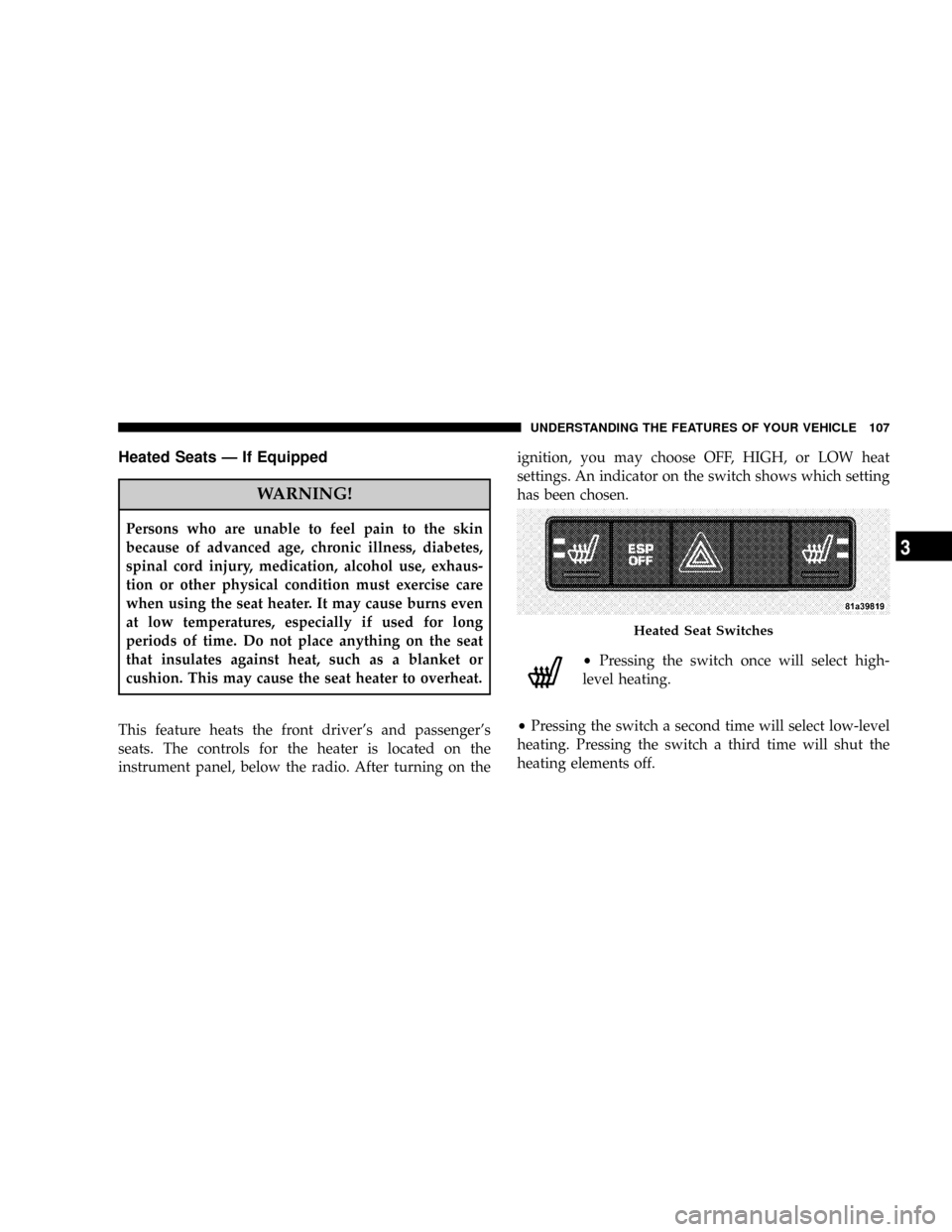
This feature heats the front driver's and passenger's
seats. The controls for the heater is located on the
instrument panel, below the radio. After turning on theignition, you may choose OFF, HIGH, or LOW heat
settings. An indicator on the switch shows which setting
has been chosen.
²Pressing the switch once will select high-
level heating.
²Pressing the switch a second time will select low-level
heating. Pressing the switch a third time will shut the
heating elements off.
Heated Seat Switches
UNDERSTANDING THE FEATURES OF YOUR VEHICLE 107
3
Page 115 of 399

Daytime Running Lights (DRL) Ð If Equipped
The high beam lights will come on as Daytime Running
Lights (DRL) at DRL intensity (lower), whenever the
ignition is on, the engine is running, the headlight switch
is off, the parking brake is off, the turn signal is off, and
the gear shift is in any position except park.
Lights-On Reminder
If the headlights or parking lights are on after the ignition
is turned OFF, a chime will sound to alert the driver
when the driver's door is opened.
Dimmer Control
UNDERSTANDING THE FEATURES OF YOUR VEHICLE 115
3
Page 124 of 399

WARNING!
Leaving the Electronic Speed Control system on
when not in use is dangerous. You could accidentally
set the system or cause it to go faster than you want.
You could lose control and have an accident. Always
leave the system OFF when you are not using it.
To Set At A Desired Speed
When the vehicle has reached the desired speed, press
down on the lever and release. Release the accelerator
and the vehicle will operate at the selected speed.
NOTE:The vehicle should be traveling at a steady
speed and on level ground before pressing the SET lever.
To Deactivate
A soft tap on the brake pedal, pulling the speed control
lever towards you ªCANCELº, or normal brake or clutch
pressure while slowing the vehicle will deactivate speed
control without erasing the set speed memory. Pressing
the ON/OFF button or turning off the ignition switch
erases the set speed memory.
To Resume Speed
To resume a previously set speed, push the ªRESUME
ACCELº lever up and release. Resume can be used at any
speed above 20 mph (32 km/h).
To Vary The Speed Setting
When the speed control is ON, speed can be increased by
pushing up and holding ªRESUME ACCELº. Release the
lever when the desired speed is reached, and the new
speed will be set.
124 UNDERSTANDING THE FEATURES OF YOUR VEHICLE