tow JEEP COMPASS 2009 1.G User Guide
[x] Cancel search | Manufacturer: JEEP, Model Year: 2009, Model line: COMPASS, Model: JEEP COMPASS 2009 1.GPages: 439, PDF Size: 12.51 MB
Page 122 of 439
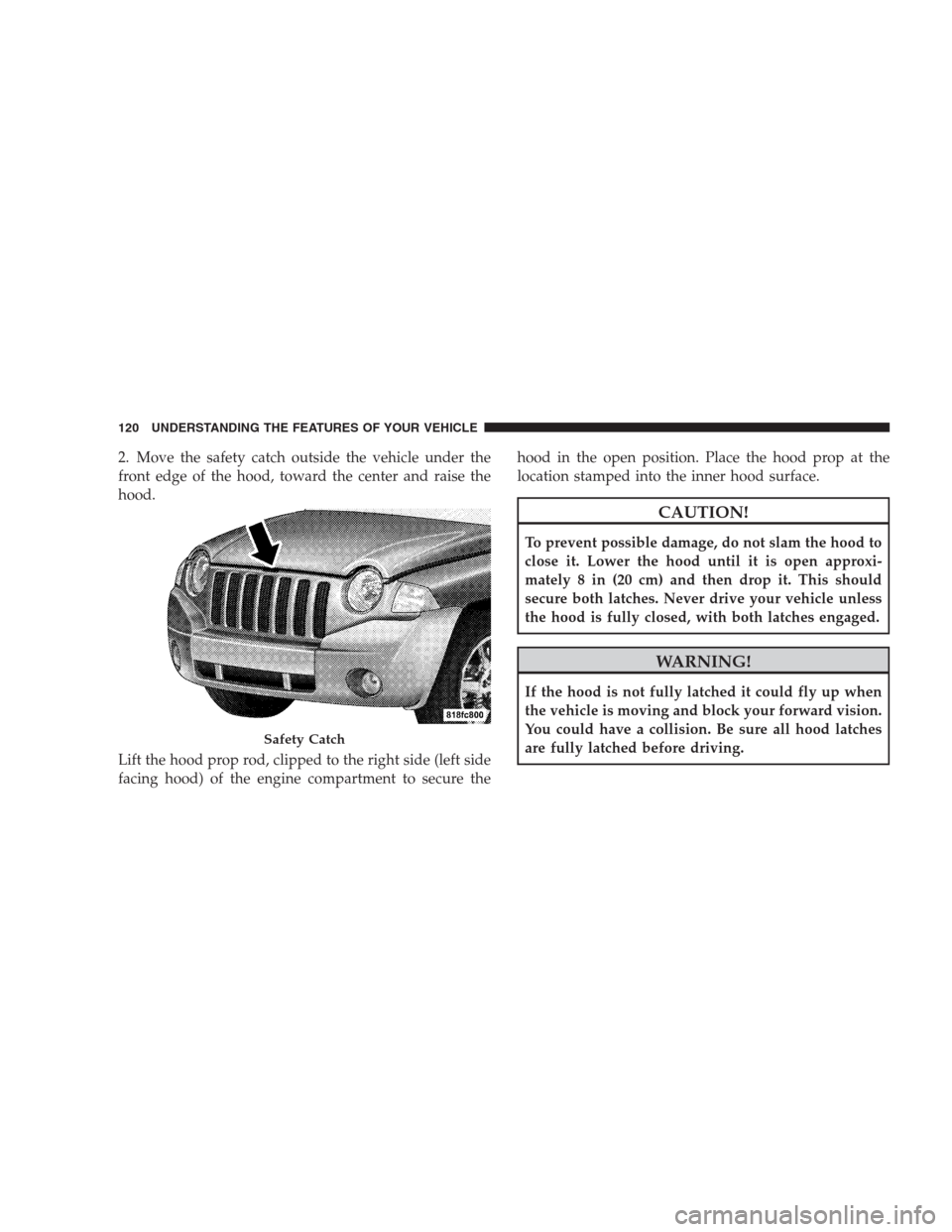
2. Move the safety catch outside the vehicle under the
front edge of the hood, toward the center and raise the
hood.
Lift the hood prop rod, clipped to the right side (left side
facing hood) of the engine compartment to secure thehood in the open position. Place the hood prop at the
location stamped into the inner hood surface.
CAUTION!
To prevent possible damage, do not slam the hood to
close it. Lower the hood until it is open approxi-
mately 8 in (20 cm) and then drop it. This should
secure both latches. Never drive your vehicle unless
the hood is fully closed, with both latches engaged.
WARNING!
If the hood is not fully latched it could fly up when
the vehicle is moving and block your forward vision.
You could have a collision. Be sure all hood latches
are fully latched before driving.
Safety Catch
120 UNDERSTANDING THE FEATURES OF YOUR VEHICLE
Page 126 of 439
High Beam/Low Beam Select Switch
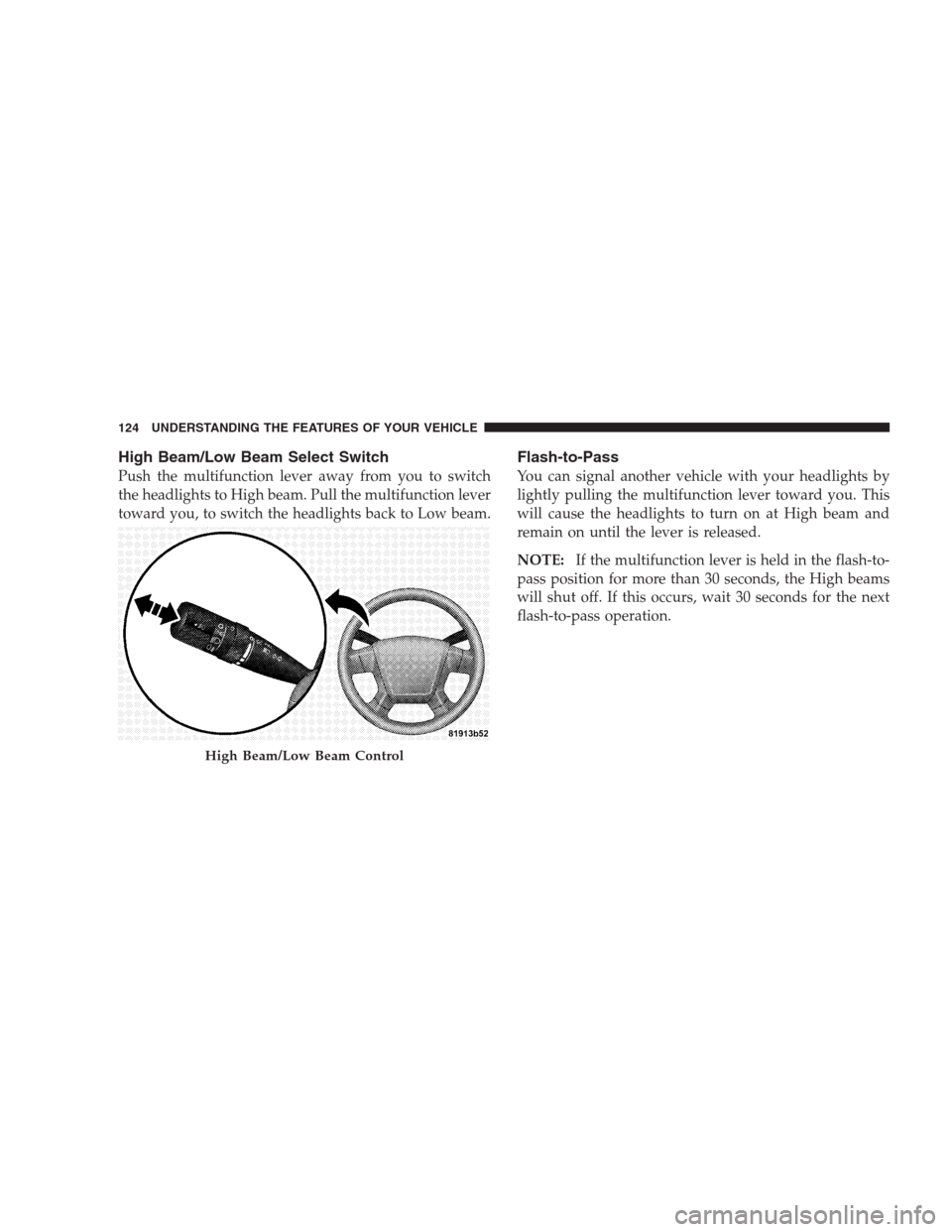
Push the multifunction lever away from you to switch
the headlights to High beam. Pull the multifunction lever
toward you, to switch the headlights back to Low beam.
Flash-to-Pass
You can signal another vehicle with your headlights by
lightly pulling the multifunction lever toward you. This
will cause the headlights to turn on at High beam and
remain on until the lever is released.
NOTE:If the multifunction lever is held in the flash-to-
pass position for more than 30 seconds, the High beams
will shut off. If this occurs, wait 30 seconds for the next
flash-to-pass operation.
High Beam/Low Beam Control
124 UNDERSTANDING THE FEATURES OF YOUR VEHICLE
Page 130 of 439
Intermittent Wiper System
Use the intermittent wiper when weather conditions
make a single wiping cycle, with a variable pause be-
tween cycles, desirable. Select the delay interval by
turning the end of the lever. Rotate the knob upward
(clockwise) to decrease the delay time and downward
(counterclockwise) to increase the delay time. The delay
can be regulated from a maximum of approximately
18 seconds between cycles, to a cycle every second.
Windshield Washers
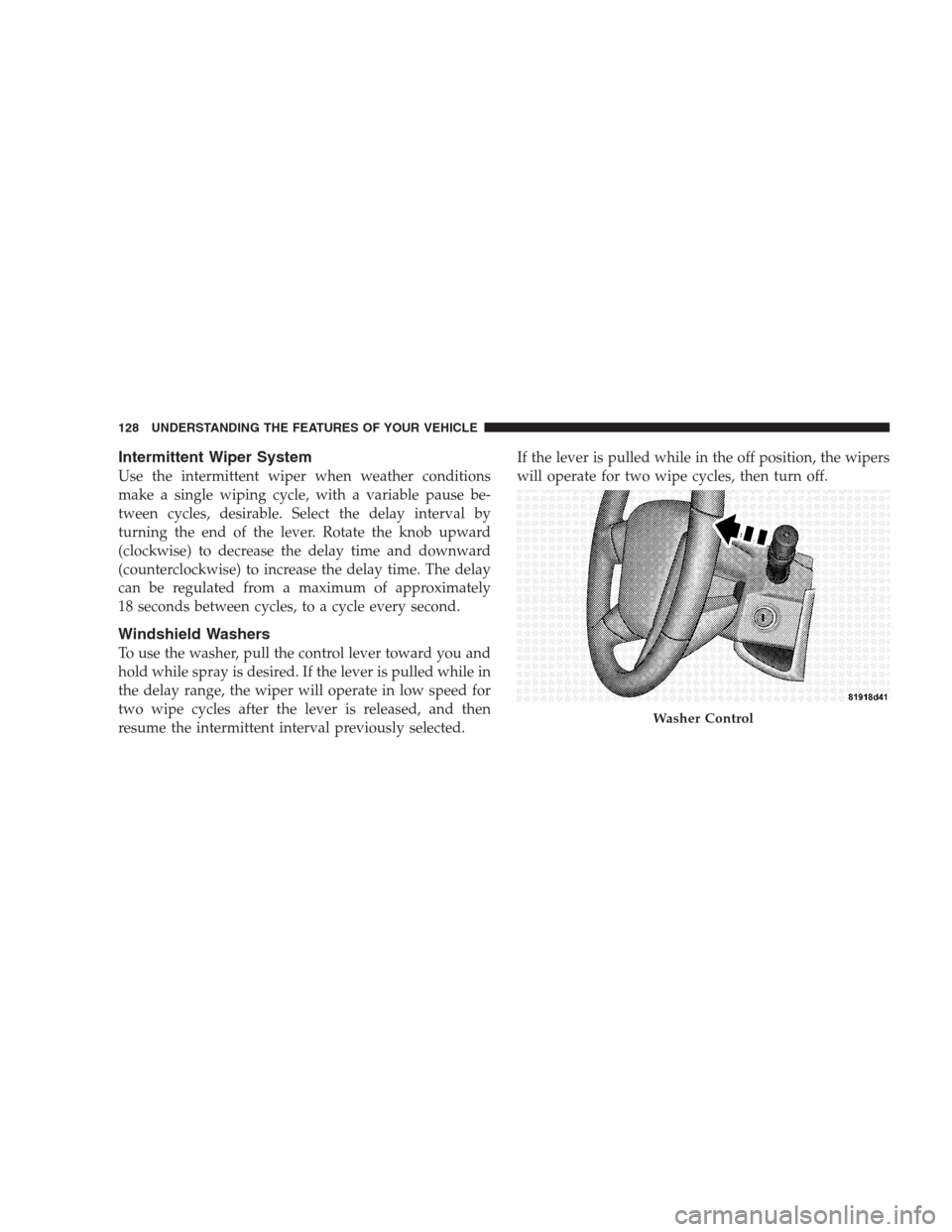
To use the washer, pull the control lever toward you and
hold while spray is desired. If the lever is pulled while in
the delay range, the wiper will operate in low speed for
two wipe cycles after the lever is released, and then
resume the intermittent interval previously selected.If the lever is pulled while in the off position, the wipers
will operate for two wipe cycles, then turn off.
Washer Control
128 UNDERSTANDING THE FEATURES OF YOUR VEHICLE
Page 134 of 439
NOTE:The vehicle should be traveling at a steady
speed and on level ground before pressing the SET lever.
To Deactivate
A soft tap on the brake pedal, pulling the speed control
lever toward you “CANCEL”, normal braking, or clutch
pressure while slowing the vehicle, will deactivate speed
control without erasing the set speed memory. Pressing
the ON/OFF button or turning off the ignition switch
erases the set speed memory.
To Resume Speed
To resume a previously set speed, push the RESUME
ACCEL lever up and release. Resume can be used at any
speed above 20 mph (32 km/h).
To Vary The Speed Setting
When the Electronic Speed Control is on, speed can be
increased by pushing up and holding RESUME ACCEL.
Release the lever when the desired speed is reached, and
the new speed will be set.Tapping RESUME ACCEL once will result ina1mph
(1.6 km/h) speed increase. Each time the lever is tapped,
speed increases so that tapping the lever three times will
increase speed by 3 mph (4.8 km/h), etc.
To decrease speed while speed control is ON, push down
and hold SET DECEL. Release the lever when the desired
speed is reached, and the new speed will be set.
Tapping the SET DECEL button once will result in a
1 mph (1.6 km/h) speed decrease. Each time the button is
tapped, speed decreases.
NOTE:The Electronic Speed Control system has been
designed to shut down if multiple speed control switch
functions are operated simultaneously in order to ensure
proper operation. If this occurs, the system can be
reactivated by pushing the Electronic Speed Control
switch ON/OFF button and resetting the desired vehicle
set speed.
132 UNDERSTANDING THE FEATURES OF YOUR VEHICLE
Page 144 of 439
Closing the Sunroof
Manual Mode
To close the sunroof, press and hold the switch in the
forward position. Again, any release of the switch will
stop the movement and the sunroof will remain in a
partial close condition until the switch is pushed and
held forward again. To ensure sunroof is fully closed,
press and hold switch until sunroof has completely
stopped moving.
Express Mode
Press the switch forward and release, and the sunroof
will close automatically from any position. The sunroof
will close fully, and stop automatically, this is called
“express close”. During express close operation, any
movement of the switch will stop the sunroof.
Pinch Protect Feature
This feature will detect an obstruction in the opening of
the sunroof during express close operation. If an obstruc-
tion in the path of the sunroof is detected, the sunroof
will automatically retract. Remove obstruction and press
the switch forward and release to express close.
Pinch Protect Override
If a known obstruction (ice, debris, etc.) prevents closing,
press the switch forward and hold for two seconds after
the reversal occurs. This allows the sunroof to move
towards the close position.
NOTE:Pinch protection is disabled while the switch is
pressed.
142 UNDERSTANDING THE FEATURES OF YOUR VEHICLE
Page 153 of 439
WARNING!
Do not operate this vehicle with a console compart-
ment lid in the open position. Cell phones, music
players, and other handheld electronic devices
should be stowed while driving. Use of these devices
while driving can cause an accident due to distrac-
tion, resulting in death or injury.
CARGO AREA FEATURES
Cargo Light/Removable Self-Recharging
Flashlight — If Equipped
The dual-function light is mounted in the headliner
above the cargo area to illuminate the cargo area, and
part of it snaps out of the bezel to serve as a flashlight
when needed. The flashlight features two bright LED
light bulbs and is powered by rechargeable lithiumbatteries that recharge when snapped back into place for
convenience.
Press in on the flashlight to release it.
Press And Release
UNDERSTANDING THE FEATURES OF YOUR VEHICLE 151
3
Page 165 of 439
INSTRUMENT CLUSTER DESCRIPTIONS
1. Fuel Gauge / Fuel Door Reminder
When the ignition switch is in the ON position,
the pointer will show the level of fuel remain-
ing in the fuel tank. The fuel pump symbol
points to the side of the vehicle where the fuel
door is located.
2. Charging System Light
This light shows the status of the electrical charg-
ing system. The light should come on when the
ignition switch is first turned ON and remain on briefly
as a bulb check. If the light stays on or comes on while
driving, turn off some of the vehicle’s non-essential
electrical devices or increase engine speed (if at idle). If
the charging system light remains on, it means that the
vehicle is experiencing a problem with the charging
system. Obtain SERVICE IMMEDIATELY. See an autho-
rized dealer.3. Electronic Throttle Control (ETC) Light
This light informs you of a problem with the
Electronic Throttle Control (ETC) system. If a
problem is detected, the light will come on
while the engine is running. Cycle the ignition
key when the vehicle has completely stopped and the
shift lever is placed in the PARK position. The light
should turn off. If the light remains lit with the engine
running your vehicle will usually be drivable, however,
see an authorized dealer for service as soon as possible. If
the light is flashing when the engine is running, imme-
diate service is required and you may experience reduced
performance, an elevated/rough idle or engine stall and
your vehicle may require towing. The light will come on
when the ignition is first turned ON and remain on
briefly as a bulb check. If the light does not come on
during starting, have the system checked by an autho-
rized dealer.
UNDERSTANDING YOUR INSTRUMENT PANEL 163
4
Page 167 of 439
9. High Beam Indicator
This indicator shows that the headlights are on
high beam. Push the multifunction lever forward
to switch the headlights to high beam, and pull toward
yourself (normal position) to return to low beam.
10. Anti-Lock Brake (ABS) Light
This light monitors the Anti-Lock Brake System
(ABS). The light will turn on when the ignition
switch is turned to the ON position and may
stay on for as long as four seconds.
If the ABS light remains on or turns on while driving, it
indicates that the Anti-Lock portion of the brake system
is not functioning and that service is required. However,
the conventional brake system will continue to operate
normally if the BRAKE warning light is not on.
If the ABS light is on, the brake system should be serviced
as soon as possible to restore the benefits of Anti-Lockbrakes. If the ABS light does not turn on when the
ignition switch is turned to the ON position, have the
light inspected by an authorized dealer.
11. Seat Belt Reminder Light
When the ignition switch is first turned ON, this
light will turn on for five to eight seconds as a bulb
check. During the bulb check, if the driver’s seat
belt is unbuckled, a chime will sound. After the bulb
check or when driving, if the driver’s seat belt remains
unbuckled, the Seat Belt Reminder Light will illuminate
and the chime will sound. Refer to “Occupant Restraints”
in Section 2 for more information.
12. Tachometer
The white area of the scale shows the permissible engine
revolutions-per-minute (RPM x 1000) for each gear range.
Before reaching the red area, ease up on the accelerator to
prevent engine damage.
UNDERSTANDING YOUR INSTRUMENT PANEL 165
4
Page 170 of 439
The light also will turn on when the parking brake is
applied with the ignition switch in the ON position.
NOTE:This light shows only that the parking brake is
applied. It does not show the degree of brake application.
15. Transmission Temperature Indicator
During sustained high speed driving on hot
days, the automatic transmission oil may be-
come too hot. If this happens, the transmission
overheat indicator light will come on and the
vehicle will slow slightly until the automatic transmis-
sion cools down enough to allow a return to the re-
quested speed. If the high speed is maintained, the
overheating will reoccur as before in a cyclic fashion.
16. Vehicle Security Light — If Equipped
This light will flash at a fast rate for approxi-
mately 16 seconds, when the vehicle security
alarm is arming, and then will flash slowly
until the vehicle is disarmed.17. Temperature Gauge
The temperature gauge shows engine coolant tempera-
ture. Any reading within the normal range indicates that
the engine cooling system is operating satisfactorily.
The gauge pointer will likely indicate a higher tempera-
ture when driving in hot weather, up mountain grades,
or when towing a trailer. It should not be allowed to
exceed the upper limits of the normal operating range.
CAUTION!
Driving with a hot engine cooling system could
damage your vehicle. If temperature gauge reads “H”
pull over and stop the vehicle. Idle the vehicle with
the air conditioner turned off until the pointer drops
back into the normal range. If the pointer remains on
the “H” and you hear continuous chimes, turn the
engine off immediately, and call an authorized deal-
ership for service.
168 UNDERSTANDING YOUR INSTRUMENT PANEL
Page 175 of 439
Certain conditions such as a loose or missing gas cap,
poor fuel quality, etc. may illuminate the light after
engine start. The vehicle should be serviced if the light
stays on through several of your typical driving cycles. In
most situations the vehicle will drive normally and will
not require towing.
If the MIL flashes when the engine is running, serious
conditions may exist that could lead to immediate loss of
power or severe catalytic converter damage. The vehicle
should be serviced as soon as possible if this occurs.
NOTE:If this indicator comes on, it will brighten to
FULL DAYTIME INTENSITY and will not be dimmable.
26. Front Fog Light Indicator — If Equipped
This light shows when the front fog lights are ON.27.Electronic Stability Program (ESP) Indicator Light /
Traction Control System (TCS) Indicator Light — If
Equipped
If this indicator light flashes during accelera-
tion, apply as little throttle as possible. While
driving, ease up on the accelerator. Adapt your
speed and driving to the prevailing road con-
ditions, and do not switch off the Electronic Stability
Program (ESP), or Traction Control System (TCS).
28. Electronic Stability Program (ESP) Indicator Light
The malfunction lamp for the Electronic Stabil-
ity Program (ESP) is combined with Brake
Assist System (BAS). The yellow “ESP/BAS
Warning Lamp” comes on when the ignition
switch is turned to the “ON” position. They should go
out with the engine running. If the “ESP/BAS Warning
Lamp” comes on continuously with the engine running,
a malfunction has been detected in either the ESP or the
BAS system. If this light remains on after several ignition
UNDERSTANDING YOUR INSTRUMENT PANEL 173
4