lock JEEP COMPASS 2012 1.G Owner's Manual
[x] Cancel search | Manufacturer: JEEP, Model Year: 2012, Model line: COMPASS, Model: JEEP COMPASS 2012 1.GPages: 497, PDF Size: 7.95 MB
Page 33 of 497
WARNING! (Continued)
•Do not leave the key fob in or near the vehicle, and
do not leave the ignition in the ACC or ON/RUN
position. A child could operate power windows,
other controls, or move the vehicle.
CAUTION!
An unlocked vehicle is an invitation to thieves.
Always remove the key from the ignition and lock all
of the doors when leaving the vehicle unattended.
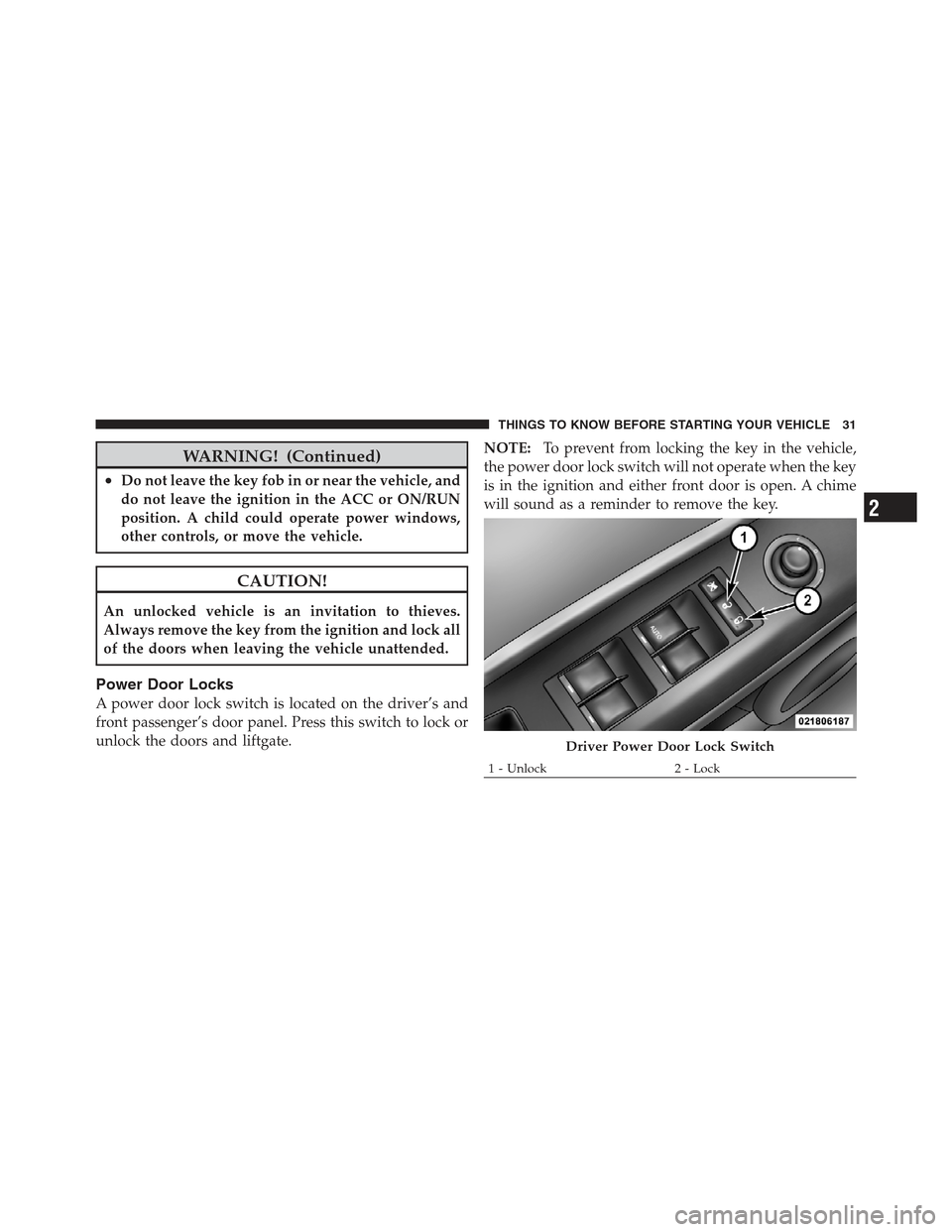
Power Door Locks
A power door lock switch is located on the driver’s and
front passenger’s door panel. Press this switch to lock or
unlock the doors and liftgate.NOTE:
To prevent from locking the key in the vehicle,
the power door lock switch will not operate when the key
is in the ignition and either front door is open. A chime
will sound as a reminder to remove the key.
Driver Power Door Lock Switch
1 - Unlock 2 - Lock
2
THINGS TO KNOW BEFORE STARTING YOUR VEHICLE 31
Page 34 of 497
Auto Lock Doors — If Equipped
The auto door lock feature default condition is enabled.
When enabled, the door locks will lock automatically
when the vehicle’s speed exceeds 15 mph (24 km/h). The
auto door lock feature can be enabled or disabled by your
authorized dealer. Please see your authorized dealer for
service.
Auto Lock Doors Programming
The Automatic Door Locks feature can be enabled or
disabled as follows:
•For vehicles equipped with the Electronic Vehicle
Information Center (EVIC), refer to “Electronic Vehicle
Information Center (EVIC) — If Equipped/Personal
Settings (Customer Programmable Features)” in “Un-
derstanding Your Instrument Panel” for further infor-
mation.
•For vehicles not equipped with the EVIC, perform the
following procedure:
1. Close all doors and place the key in the ignition
switch.
2. Within 15 seconds, cycle the ignition switch between
LOCK and ON/RUN and then back to LOCK four times
ending up in the LOCK position (do not start the engine).
3. Within 30 seconds, press the power door LOCK switch
to lock the doors.
4. A single chime will indicate the completion of the
programming.
5. Repeat these steps if you want to return this feature to
its previous setting.
32 THINGS TO KNOW BEFORE STARTING YOUR VEHICLE
Page 35 of 497
NOTE:
•If you do not hear the chime it means that the system
did not enter the programming mode and you will
need to repeat the procedure.
•Use the Automatic Door Lock feature in accordance
with local laws.
Automatic Unlock Doors On Exit
The doors will unlock automatically if:
1. The Automatic Unlock Doors On Exit feature is en-
abled.
2. The transmission was in gear and the vehicle speed
returned to 0 mph (0 km/h).
3. The transmission is in NEUTRAL or PARK.
4. The driver’s door is opened.
5. The doors were not previously unlocked.
Automatic Unlock Doors On Exit Programming
The Automatic Unlock Doors On Exit feature can be
enabled or disabled as follows:
•For vehicles equipped with the EVIC, refer to “Elec-
tronic Vehicle Information Center (EVIC) — If
Equipped/Personal Settings (Customer-Program-
mable Features)” in “Understanding Your Instrument
Panel” for further information.
•For vehicles not equipped with the EVIC, perform the
following procedure:
1. Close all doors and place the key in the ignition.
2. Within 15 seconds, cycle the ignition switch between
LOCK and ON/RUN and then back to LOCK five times
ending up in the ON/RUN position (do not start the
engine).
3. Within 30 seconds, press the power door UNLOCK
switch to unlock the doors.
2
THINGS TO KNOW BEFORE STARTING YOUR VEHICLE 33
Page 36 of 497
4. A single chime will indicate the completion of the
programming.
5. Repeat these steps if you want to return this feature to
its previous setting.
NOTE:
•If you do not hear the chime it means that the system
did not enter the programming mode and you will
need to repeat the procedure.
•Use the Automatic Unlock Doors On Exit feature in
accordance with local laws.
Child-Protection Door Lock System — Rear
Doors
To provide a safer environment for small children riding
in the rear seats, the rear doors are equipped with
Child-Protection Door Lock system.
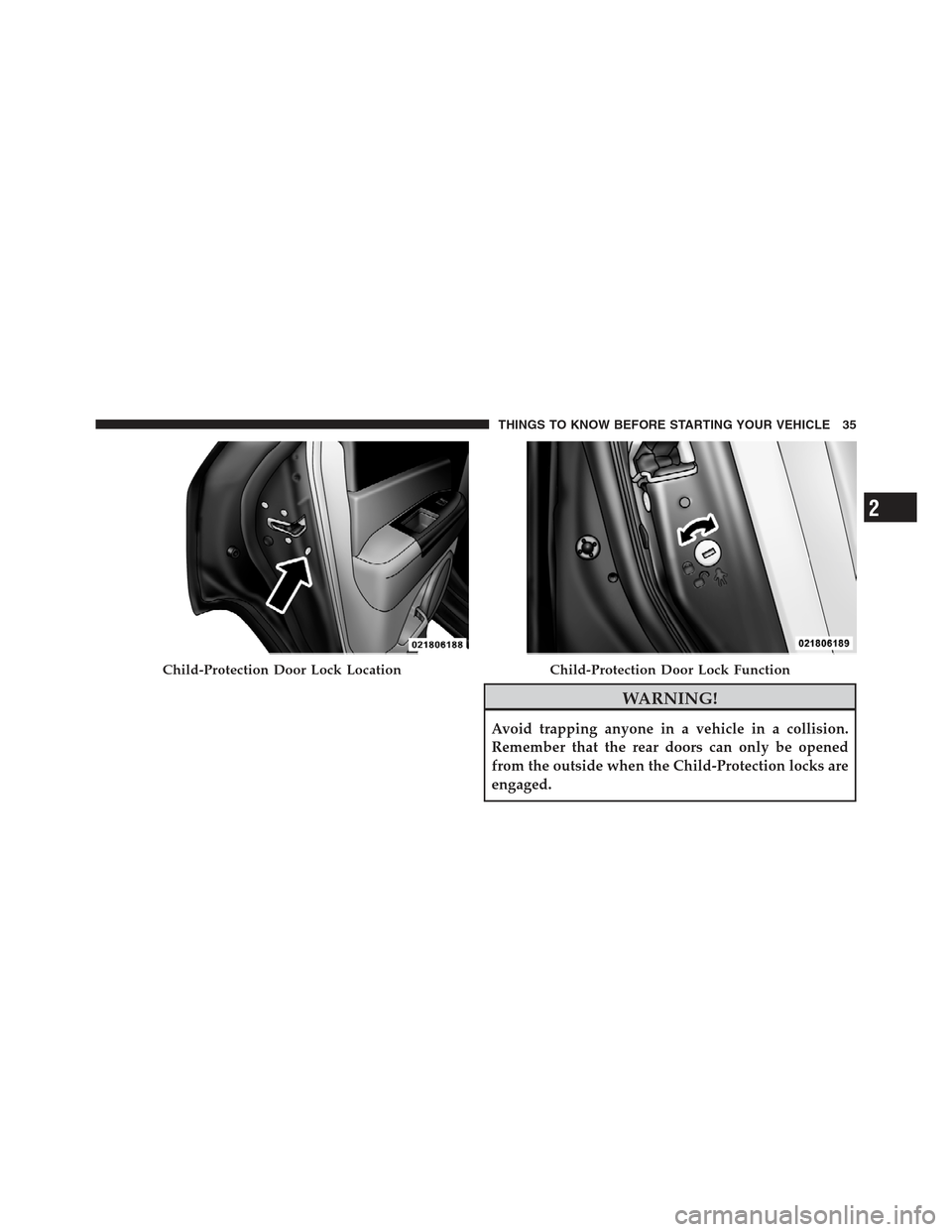
To Engage Or Disengage The Child-Protection
Door Lock System
1. Open the rear door.
2. Insert the tip of the ignition key into the lock and
rotate to the LOCK or UNLOCK position.
3. Repeat steps 1 and 2 for the opposite rear door.
34 THINGS TO KNOW BEFORE STARTING YOUR VEHICLE
Page 37 of 497
WARNING!
Avoid trapping anyone in a vehicle in a collision.
Remember that the rear doors can only be opened
from the outside when the Child-Protection locks are
engaged.
Child-Protection Door Lock LocationChild-Protection Door Lock Function
2
THINGS TO KNOW BEFORE STARTING YOUR VEHICLE 35
Page 38 of 497
NOTE:For emergency exit with the system engaged,
move the lock knob up (unlocked position), roll down the
window and open the door with the outside door handle.
POWER WINDOWS — IF EQUIPPED
Power Window Switches
The window controls on the driver ’s door trim panel
control all the door windows. There are single window
controls on each passenger door trim panel, which oper-
ate the passenger door windows. The window controls
will operate when the ignition switch is in the ON/RUN
or ACC position.
NOTE:
•For vehicles not equipped with the Electronic Vehicle
Information Center (EVIC), the power window
switches will remain active for 45 seconds after the
ignition switch is turned to the LOCK position. Open-
ing either front door will cancel this feature.
•For vehicles equipped with the EVIC, the power
window switches will remain active for up to 10 min-
utes after the ignition switch is turned to the LOCK
position. Opening either front door will cancel this
feature. The time for this feature is programmable.
Refer to “Electronic Vehicle Information Center
(EVIC)/Personal Settings (Customer-Programmable
Features)” in “Understanding Your Instrument Panel”
for further information.
WARNING!
Never leave children in a vehicle with the key in the
ignition switch. Occupants, particularly unattended
children, can become entrapped by the windows
while operating the power window switches. Such
entrapment may result in serious injury or death.
36 THINGS TO KNOW BEFORE STARTING YOUR VEHICLE
Page 39 of 497
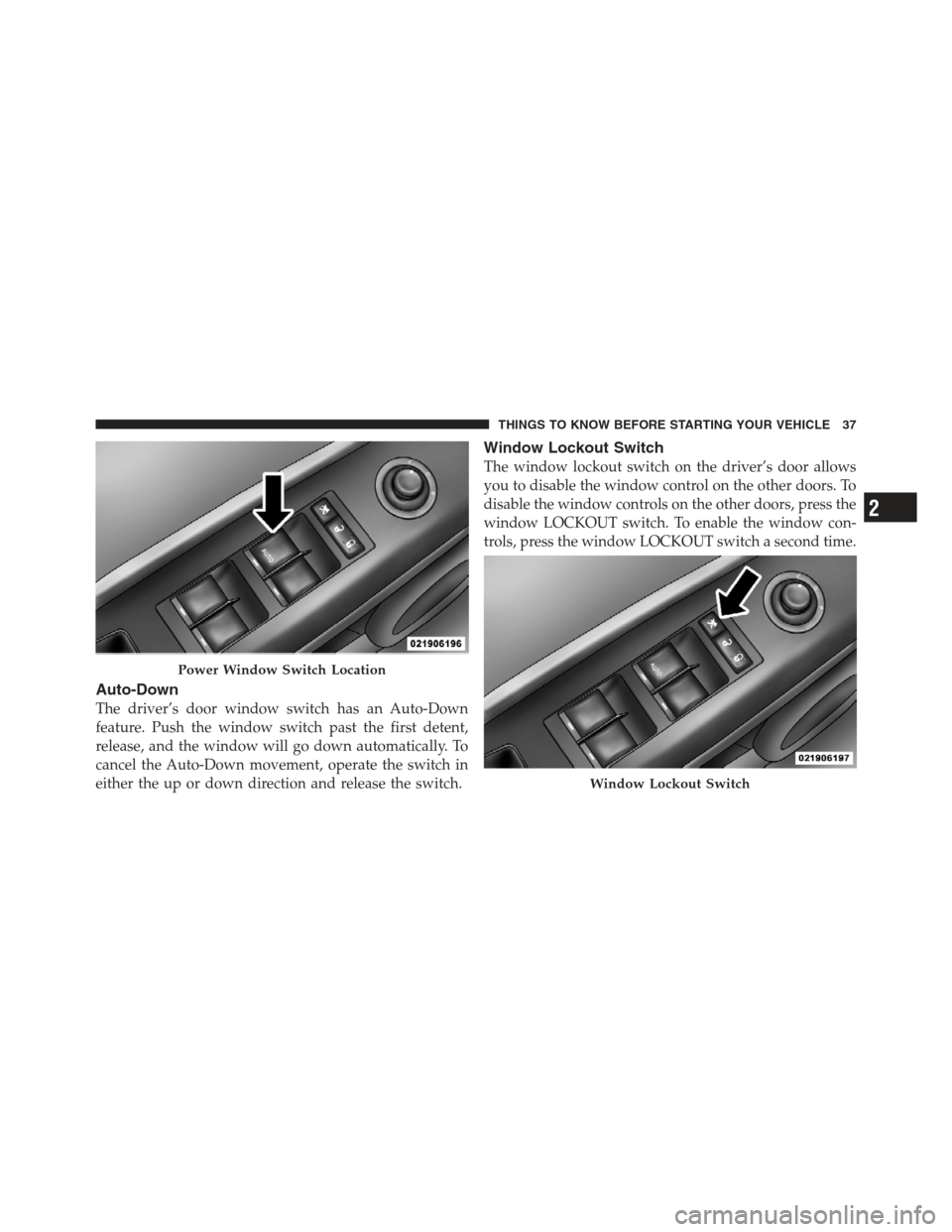
Auto-Down
The driver’s door window switch has an Auto-Down
feature. Push the window switch past the first detent,
release, and the window will go down automatically. To
cancel the Auto-Down movement, operate the switch in
either the up or down direction and release the switch.
Window Lockout Switch
The window lockout switch on the driver’s door allows
you to disable the window control on the other doors. To
disable the window controls on the other doors, press the
window LOCKOUT switch. To enable the window con-
trols, press the window LOCKOUT switch a second time.
Power Window Switch Location
Window Lockout Switch
2
THINGS TO KNOW BEFORE STARTING YOUR VEHICLE 37
Page 40 of 497
LIFTGATE
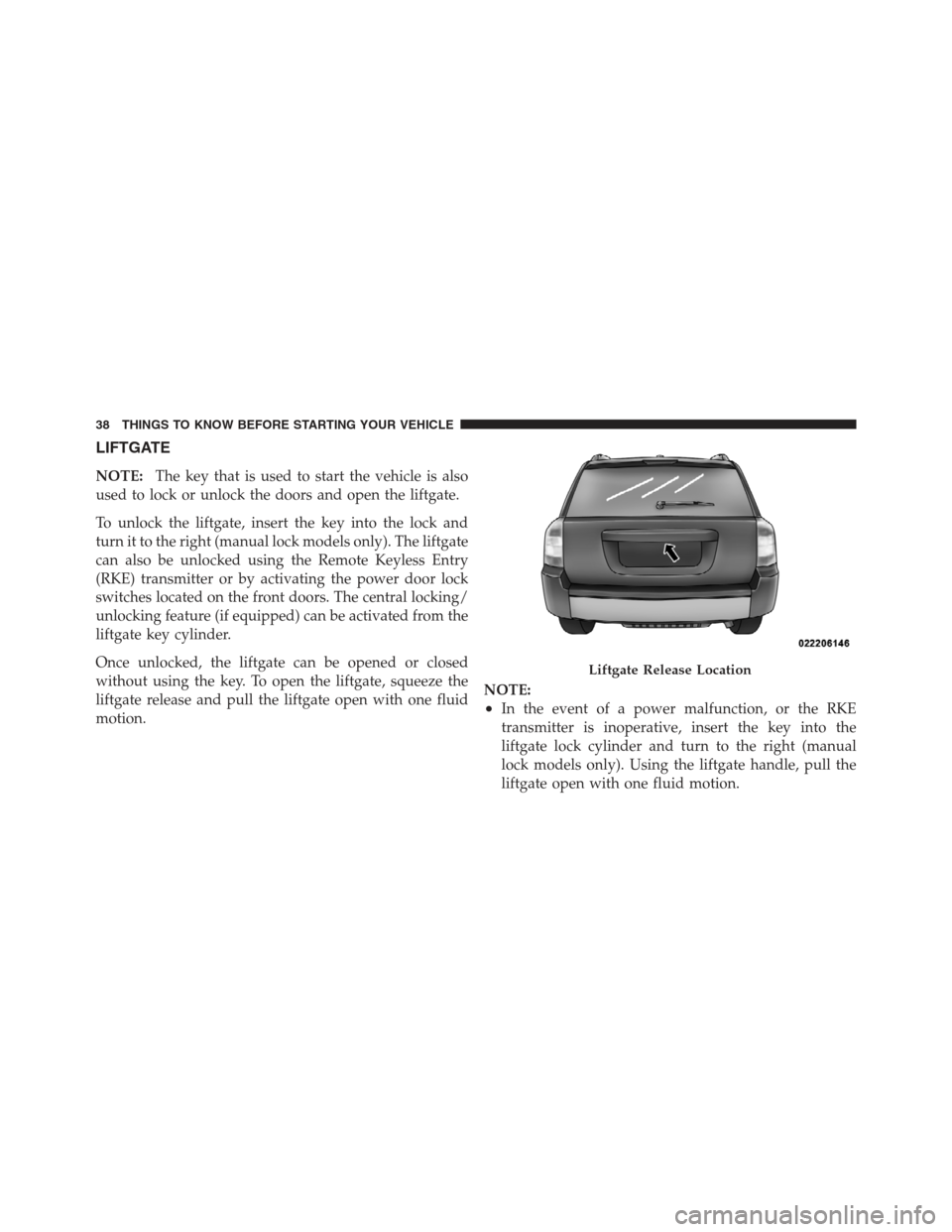
NOTE:The key that is used to start the vehicle is also
used to lock or unlock the doors and open the liftgate.
To unlock the liftgate, insert the key into the lock and
turn it to the right (manual lock models only). The liftgate
can also be unlocked using the Remote Keyless Entry
(RKE) transmitter or by activating the power door lock
switches located on the front doors. The central locking/
unlocking feature (if equipped) can be activated from the
liftgate key cylinder.
Once unlocked, the liftgate can be opened or closed
without using the key. To open the liftgate, squeeze the
liftgate release and pull the liftgate open with one fluid
motion. NOTE:
•In the event of a power malfunction, or the RKE
transmitter is inoperative, insert the key into the
liftgate lock cylinder and turn to the right (manual
lock models only). Using the liftgate handle, pull the
liftgate open with one fluid motion.
Liftgate Release Location
38 THINGS TO KNOW BEFORE STARTING YOUR VEHICLE
Page 42 of 497
•Supplemental Side Air Bag Inflatable Curtains (SABIC)
for the driver and passengers seated next to a window
•Supplemental Seat-Mounted Side Air Bags (SAB) — if
equipped
•An energy-absorbing steering column and steering
wheel
•Knee bolsters for front seat occupants
•Front seat belts incorporate pretensioners that may
enhance occupant protection by managing occupant
energy during an impact event
•All seat belt systems (except the driver’s) include
Automatic Locking Retractors (ALRs), which lock the
seat belt webbing into position by extending the belt
all the way out and then adjusting the belt to the
desired length to restrain a child seat or secure a large
item in a seat — if equipped
Please pay close attention to the information in this section.
It tells you how to use your restraint system properly, to
keep you and your passengers as safe as possible.
If you will be carrying children too small for adult-sized
seat belts, the seat belts or the Lower Anchors and Tether
for CHildren (LATCH) feature also can be used to hold
infant and child restraint systems. For more information
on LATCH, see Lower Anchors and Tether for CHildren
(LATCH).
NOTE:The Advanced Front Air Bags have a multistage
inflator design. This allows the air bag to have different
rates of inflation based on several factors, including the
severity and type of collision.
Here are some simple steps you can take to minimize the
risk of harm from a deploying air bag:
1. Children 12 years old and under should always ride
buckled up in a rear seat.
40 THINGS TO KNOW BEFORE STARTING YOUR VEHICLE
Page 45 of 497
Research has shown that seat belts save lives, and they
can reduce the seriousness of injuries in a collision. Some
of the worst injuries happen when people are thrown
from the vehicle. Seat belts reduce the possibility of
ejection and the risk of injury caused by striking the
inside of the vehicle. Everyone in a motor vehicle should
be belted at all times.
Lap/Shoulder Belts
All seating positions in your vehicle are equipped with
lap/shoulder belts.
The belt webbing retractor is designed to lock during
very sudden stops or collisions. This feature allows the
shoulder part of the belt to move freely with you under
normal conditions. However, in a collision the belt will
lock and reduce the risk of you striking the inside of the
vehicle or being thrown out.
WARNING!
•It is dangerous to ride in a cargo area, inside or
outside of a vehicle. In a collision, people riding in
these areas are more likely to be seriously injured
or killed.
•Do not allow people to ride in any area of your
vehicle that is not equipped with seats and seat
belts.
•Be sure everyone in your vehicle is in a seat and
using a seat belt properly.
•Wearing a seat belt incorrectly is dangerous. Seat
belts are designed to go around the large bones of
your body. These are the strongest parts of your
body and can take the forces of a collision the best.(Continued)
2
THINGS TO KNOW BEFORE STARTING YOUR VEHICLE 43