buttons JEEP COMPASS 2015 1.G User Guide
[x] Cancel search | Manufacturer: JEEP, Model Year: 2015, Model line: COMPASS, Model: JEEP COMPASS 2015 1.GPages: 560, PDF Size: 11.51 MB
Page 183 of 560
1. Cycle the ignition to the ON/RUN position.
2.Place the hand-held transmitter 1 to 3 inch (3 to 8 cm)
away from the HomeLink® button you wish to program
while keeping the HomeLink® indicator light in view.
3. Push and hold the HomeLink® button you want to
program while you push and hold the hand-held
transmitter button.
4. Continue to hold both buttons and observe the indi-
cator light. The HomeLink® indicator will flash slowly
and then rapidly after HomeLink® has received the
frequency signal from the hand-held transmitter. Re-
lease both buttons after the indicator light changes
from slow to rapid.
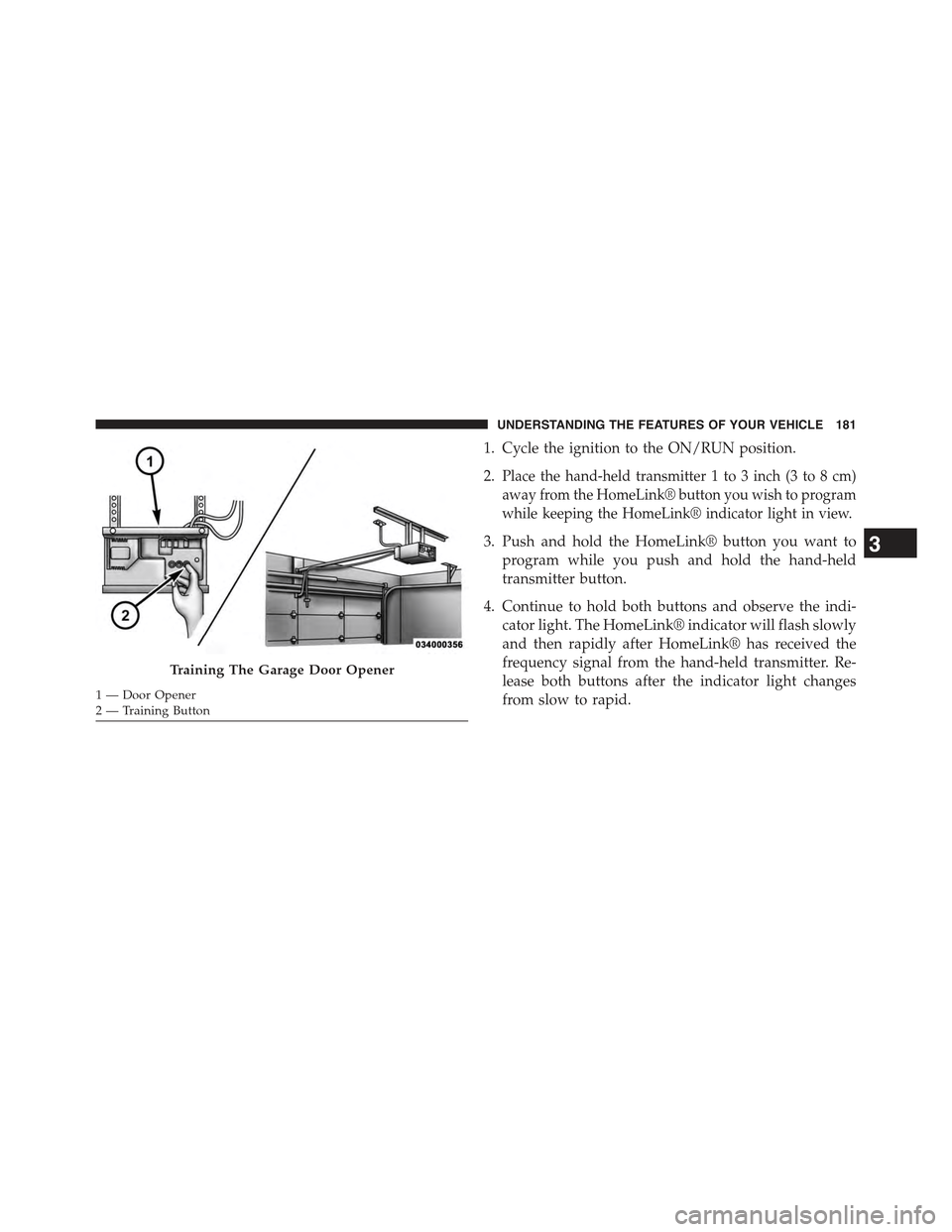
Training The Garage Door Opener
1—DoorOpener2—TrainingButton
3
UNDERSTANDING THE FEATURES OF YOUR VEHICLE 181
Page 184 of 560
5. At the garage door opener motor (in the garage),
locate the “LEARN” or “TRAINING” button. This can
usually be found where the hanging antenna wire is
attached to the garage door opener/device motor.
Firmly push and release the “LEARN” or “TRAIN-
ING” button. On some garage door openers/devices
there may be a light that blinks when the garage door
opener/device is in the LEARN/TRAIN mode.
NOTE:You have 30 seconds in which to initiate the next
step after the LEARN button has been pushed.
6. Return to the vehicle and push the programmed
HomeLink® button twice (holding the button for two
seconds each time). If the garage door opener/device
activates, programming is complete.
NOTE:If the garage door opener/device does not acti-
vate, push the button a third time (for two seconds) to
complete the training.
To program the remaining two HomeLink® buttons,
repeat each step for each remaining button. DO NOT
erase the channels.
Reprogramming A Single HomeLink® Button
(Rolling Code)
To reprogram a channel that has been previously trained,
follow these steps:
1. Cycle the ignition to the ON/RUN position.
2. Push and hold the desired HomeLink® button until
the indicator light begins to flash after 20 seconds.
Do not release the button.
3.Without releasing the buttonproceed with “Program-
ming A Rolling Code” step 2 and follow all remaining
steps.
182 UNDERSTANDING THE FEATURES OF YOUR VEHICLE
Page 185 of 560
Programming A Non-Rolling Code
For programming Garage Door Openers manufactured
before 1995.
1. Turn the ignition switch to the ON/RUN position.
2.Place the hand-held transmitter 1 to 3 inches (3 to 8 cm)
away from the HomeLink® button you wish to program
while keeping the HomeLink® indicator light in view.
3. Push and hold the Homelink® button you want to
program while you push and hold the hand-held
transmitter button.
4. Continue to hold both buttons and observe the indi-
cator light. The Homelink® indicator will flash slowly
and then rapidly after HomeLink® has received the
frequency signal from the hand-held transmitter. Re-
lease both buttons after the indicator light changes
from slow to rapid.
5. Push and hold the programmed HomeLink® button
and observe the indicator light.
•If the indicator light stays on constantly, program-
ming is complete and the garage door/device should
activate when the HomeLink® button is pushed.
•To program the two remaining HomeLink® buttons,
repeat each step for each remaining button. DO NOT
erase the channels.
Reprogramming A Single HomeLink® Button
(Non-Rolling Code)
To reprogram a channel that has been previously trained,
follow these steps:
1. Cycle the ignition to the ON/RUN position.
2. Push and hold the desired HomeLink® button until
the indicator light begins to flash after 20 seconds.
Do not release the button.
3
UNDERSTANDING THE FEATURES OF YOUR VEHICLE 183
Page 187 of 560
4. Watch for the HomeLink® indicator to change flash
rates. When it changes, it is programmed. It may take
up to 30 seconds or longer in rare cases. The garage
door may open and close while you are programming.
5. Push and hold the programmed HomeLink® button
and observe the indicator light.
•If the indicator light stays on constantly, program-
ming is complete and the garage door/device should
activate when the HomeLink® button is pushed.
•To program the two remaining HomeLink® buttons,
repeat each step for each remaining button. DO NOT
erase the channels.
If you unplugged the garage door opener/device for
programming, plug it back in at this time.
Reprogramming A Single HomeLink® Button
(Canadian/Gate Operator)
To reprogram a channel that has been previously trained,
follow these steps:
1. Cycle the ignition to the ON/RUN position.
2. Push and hold the desired HomeLink® button until
the indicator light begins to flash after 20 seconds.Do
not release the button.
3.Without releasing the buttonproceed with
“Canadian/Gate Operator Programming” step 2 and
follow all remaining steps.
3
UNDERSTANDING THE FEATURES OF YOUR VEHICLE 185
Page 188 of 560
Using HomeLink®
To operate, push and release the programmed HomeLink®
button. Activation will now occur for the programmed
device (i.e., garage door opener, gate operator, security
system, entry door lock, home/office lighting, etc.,). The
hand-held transmitter of the device may also be used at
any time.
Security
It is advised to erase all channels before you sell or turn
in your vehicle.
To do this, push and hold the two outside buttons for
20 seconds until the red indicator flashes. Note that all
channels will be erased. Individual channels cannot be
erased.
The HomeLink® Universal Transceiver is disabled when
the Vehicle Security Alarm is active.
Troubleshooting Tips
If you are having trouble programming HomeLink®,
here are some of the most common solutions:
•Replace the battery in the original hand-held transmitter.
•Push the LEARN button on the Garage Door Opener
to complete the training for a Rolling Code.
•Did you unplug the device for programming and
remember to plug it back in?
If you have any problems, or require assistance,
please call toll-free 1-800-355-3515 or, on the Internet at
HomeLink.com for information or assistance.
WARNING!
Vehicle exhaust contains carbon monoxide, a danger-
ous gas. Do not run your vehicle in the garage while
programming the transceiver. Exhaust gas can cause
serious injury or death.
186 UNDERSTANDING THE FEATURES OF YOUR VEHICLE
Page 211 of 560
UNDERSTANDING YOUR INSTRUMENT PANEL
CONTENTS
!INSTRUMENT PANEL FEATURES..........212
!INSTRUMENT CLUSTER.................213
!INSTRUMENT CLUSTER DESCRIPTIONS.....214
!MINI-TRIP COMPUTER — IF EQUIPPED.....228
▫Control Buttons.......................228
!ELECTRONIC VEHICLE INFORMATION
CENTER (EVIC) — IF EQUIPPED...........230
▫Engine Oil Change Indicator System —
If Equipped.........................233
▫EVIC Functions.......................234
▫Compass/Temperature/Audio............234
▫Average Fuel Economy..................234
▫Distance To Empty (DTE)................235
▫Tire Pressure Monitor (TPM)..............235
▫Elapsed Time........................235
▫Display Units Of Measure In.............236
▫Personal Settings (Customer-Programmable
Features)...........................236
!Uconnect® 230 – AM/FM STEREO RADIO
AND 6-DISC CD/DVD CHANGER
(MP3/WMA AUX JACK).................241
▫Operating Instructions — Radio Mode.......241
4
Page 213 of 560
▫Using This Feature.....................288
▫Controlling The iPod® Or External USB Device
Using Radio Buttons....................289
▫Play Mode..........................289
▫List Or Browse Mode...................291
▫Bluetooth® Streaming Audio (BTSA).......293
!STEERING WHEEL AUDIO CONTROLS......294
▫Radio Operation......................295
▫CD Player...........................295
!CD/DVD DISC MAINTENANCE...........296
!RADIO OPERATION AND MOBILE PHONES . . .296
!CLIMATE CONTROLS...................297
▫Manual Heating And Air Conditioning......297
▫Automatic Temperature Control (ATC) —
If Equipped.........................301
▫Operating Tips.......................306
4
UNDERSTANDING YOUR INSTRUMENT PANEL 211
Page 230 of 560
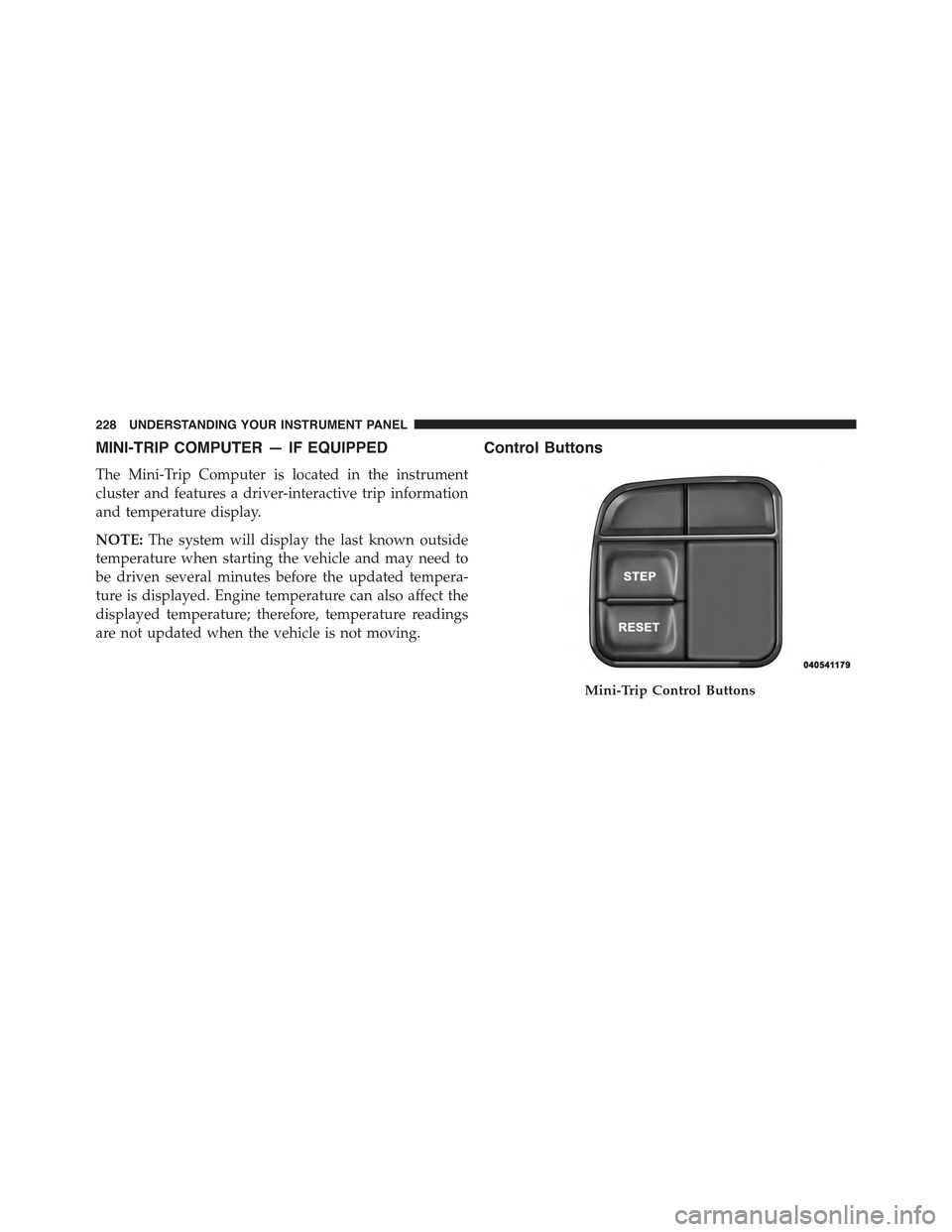
MINI-TRIP COMPUTER — IF EQUIPPED
The Mini-Trip Computer is located in the instrument
cluster and features a driver-interactive trip information
and temperature display.
NOTE:The system will display the last known outside
temperature when starting the vehicle and may need to
be driven several minutes before the updated tempera-
ture is displayed. Engine temperature can also affect the
displayed temperature; therefore, temperature readings
are not updated when the vehicle is not moving.
Control Buttons
Mini-Trip Control Buttons
228 UNDERSTANDING YOUR INSTRUMENT PANEL
Page 233 of 560
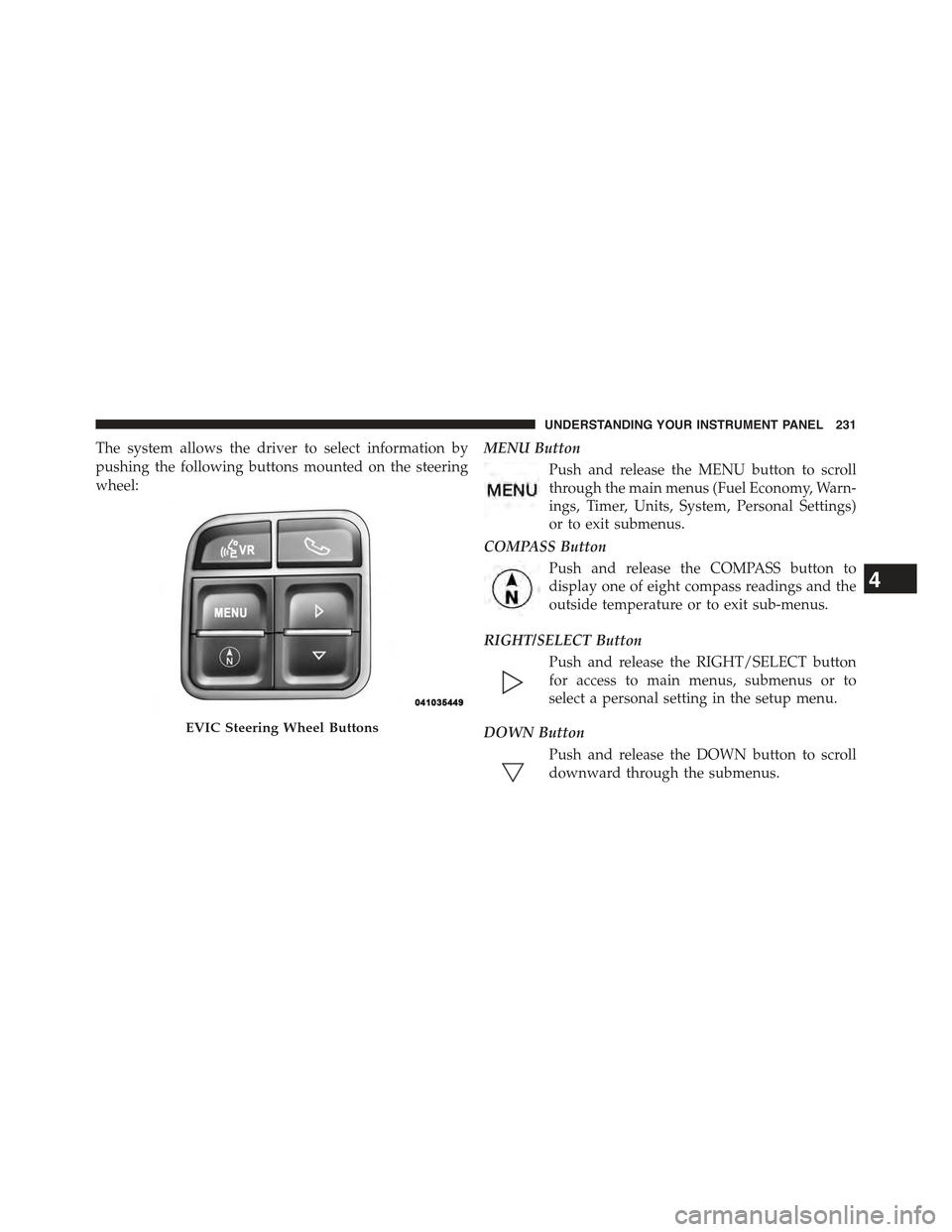
The system allows the driver to select information by
pushing the following buttons mounted on the steering
wheel:
MENU Button
Push and release the MENU button to scroll
through the main menus (Fuel Economy, Warn-
ings, Timer, Units, System, Personal Settings)
or to exit submenus.
COMPASS Button
Push and release the COMPASS button to
display one of eight compass readings and the
outside temperature or to exit sub-menus.
RIGHT/SELECT Button
Push and release the RIGHT/SELECT button
for access to main menus, submenus or to
select a personal setting in the setup menu.
DOWN Button
Push and release the DOWN button to scroll
downward through the submenus.
EVIC Steering Wheel Buttons
4
UNDERSTANDING YOUR INSTRUMENT PANEL 231
Page 238 of 560
Display Units Of Measure In
To make your selection, push and release the RIGHT/
SELECT arrow button until “US” or “METRIC” appears.
Personal Settings (Customer-Programmable
Features)
This allows the driver to set and recall features when the
transmission is in PARK (automatic transmission) or the
vehicle is stopped (manual transmission).
Push and release the MENU or DOWN buttons until
“Personal Settings” is displayed in the EVIC then push
and release the RIGHT/SELECT button.
Use the SELECT button to display one of the following
choices:
Language
When in this display you may select different languages
for all display nomenclature, including the trip functions.
Pushing the RIGHT/SELECT button while in this display
selects English, Espanol, Deutsch, Italiano, Francais or
NL depending on availability. As you continue, the
displayed information will be shown in the selected
language.
NOTE:Uconnect® language will not change using the
EVIC. Please refer to “Language Selection” in Uconnect®
phone — If Equipped for details.
Auto Lock Doors
When ON is selected, all doors lock automatically when
the speed of the vehicle reaches 15 mph (24 km/h). Push
and hold the SELECT button when in this display until
“ON” or “OFF” appears to make your selection.
Auto Unlock On Exit
When ON is selected, all the vehicle’s doors will unlock
when the driver’s door is opened, if the vehicle is
stopped (manual transmission) or the vehicle is stopped
236 UNDERSTANDING YOUR INSTRUMENT PANEL