ignition JEEP COMPASS 2015 1.G Workshop Manual
[x] Cancel search | Manufacturer: JEEP, Model Year: 2015, Model line: COMPASS, Model: JEEP COMPASS 2015 1.GPages: 560, PDF Size: 11.51 MB
Page 234 of 560
When the appropriate conditions exist, the EVIC displays
the following messages:
•Turn Signal On (with a continuous warning chime
after 1 mile (1.6 km) of distance travelled)
•Left Front Turn Signal Lamp Out (with a single chime)
•Left Rear Turn Signal Lamp Out (with a single chime)
•Right Front Turn Signal Lamp Out (with a single chime)
•Right Rear Turn Signal Lamp Out (with a single chime)
•RKE Battery Low (with a single chime)
•Personal Settings Not Avail. — Vehicle not in PARK
(automatic transmission) or vehicle is in motion
(manual transmission).
•Door Ajar (with vehicle graphic showing which door is
open. A single chime sounds if the vehicle is in motion).
•Doors Ajar (with vehicle graphic showing which
doors are open. A single chime sounds if the vehicle is
in motion).
•Gate (with vehicle graphic showing the Liftgate open
and A single chime)
•Headlamps or Park Lamps On
•Remote Start Aborted — Door Ajar
•Remote Start Aborted — Hood Ajar
•Remote Start Aborted — L/Gate Ajar
•Remote Start Aborted — Fuel Low
•Remote Start Aborted — System Fault
•Key In Ignition
232 UNDERSTANDING YOUR INSTRUMENT PANEL
Page 235 of 560
•Low Tire
•Low Tire Pressure Display for Premium TPM System
•Service TPM System
Engine Oil Change Indicator System —
If Equipped
Oil Change Required
Your vehicle is equipped with an engine oil change
indicator system. The “Oil Change Required” message
will display in the EVIC display for approximately five
seconds after a single chime has sounded, to indicate the
next scheduled oil change interval. The engine oil change
indicator system is duty-cycle based, which means the
engine oil change interval may fluctuate dependent upon
your personal driving style.
Unless reset, this message will continue to display each
time you turn the ignition switch to the ON/RUN
position. To turn off the message temporarily, push and
release the Trip Odometer button on the instrument
cluster. To reset the oil change indicator system (after
performing the scheduled maintenance) refer to the fol-
lowing procedure.
1. Turn the ignition switch to the ON position.Do not
start the engine.
2. Fully push the accelerator pedal, slowly, three times
within 10 seconds.
3. Turn the ignition switch to the OFF/LOCK position.
NOTE:If the indicator message illuminates when you
start the vehicle, the oil change indicator system did not
reset. If necessary repeat this procedure.
4
UNDERSTANDING YOUR INSTRUMENT PANEL 233
Page 237 of 560
Distance To Empty (DTE)
Shows the estimated distance that can be traveled with
the fuel remaining in the tank. This estimated distance is
determined by a weighted average of the instantaneous
and average fuel economy, according to the current fuel
tank level. This is not resettable.
NOTE:Significant changes in driving style or vehicle
loading will greatly affect the actual drivable distance of
the vehicle, regardless of the DTE displayed value.
When the DTE value is less than 30 miles (48 km)
estimated driving distance, the DTE display will change
to a text display of#LOW FUEL#. This display will
continue until the vehicle runs out of fuel. Adding a
significant amount of fuel to the vehicle will turn off the
#LOW FUEL#text and a new DTE value will be dis-
played, based on the current values in the DTE calcula-
tion and the current fuel tank level.
Tire Pressure Monitor (TPM)
Refer to “Starting And Operating”, “Tire Pressure Moni-
toring System (TPMS)” for system operation.
Elapsed Time
Shows the total elapsed time of travel since the last reset.
Elapsed time will increment when the ignition switch is
in the RUN/START position.
Elapsed time is displayed as follows:
hours:minutes:seconds
Elapsed time can be reset by pushing and holding the
SELECT button (as prompted in the EVIC display). Upon
reset all digits will change to zeros and time will start
incrementing again if the ignition switch is in RUN or
START.
4
UNDERSTANDING YOUR INSTRUMENT PANEL 235
Page 240 of 560
Key Off Power Delay
When this feature is selected the power window
switches, radio, Uconnect® phone, power sunroof, and
power outlets will remain active for up to 10 minutes
after the ignition switch has been turned OFF. Opening
either front vehicle door will cancel this feature. Push and
hold the SELECT button when in this display until
“OFF”, “45 sec.”, “5 min.”, or “10 min.” appears to make
your selection.
Illuminated Approach
When this feature is selected the headlights will activate
and remain on for up to 90 seconds when the doors are
unlocked using the RKE transmitter. Push and hold the
SELECT button when in this display until “OFF”,
“30 sec.”, “60 sec.”, or “90 sec.” appears to make your
selection.
Hill Start Assist (HSA) — If Equipped
When on is selected, the HSA system is active. Refer to
“Electronic Brake Control System” in “Starting And
Operating” for system function and operating informa-
tion. To make your selection, push and release the
SELECT button until “On” or “Off” appears.
Display Units In
The EVIC, odometer, and Uconnect® gps system units
can be changed between English and Metric.
Push and hold the SELECT button when in this display
until “ENGLISH” or “METRIC” appears to make your
selection.
Automatic Compass Calibration
This compass is self-calibrating, which eliminates the
need to set the compass manually. When the vehicle is
new, the compass may appear erratic and the EVIC will
238 UNDERSTANDING YOUR INSTRUMENT PANEL
Page 242 of 560
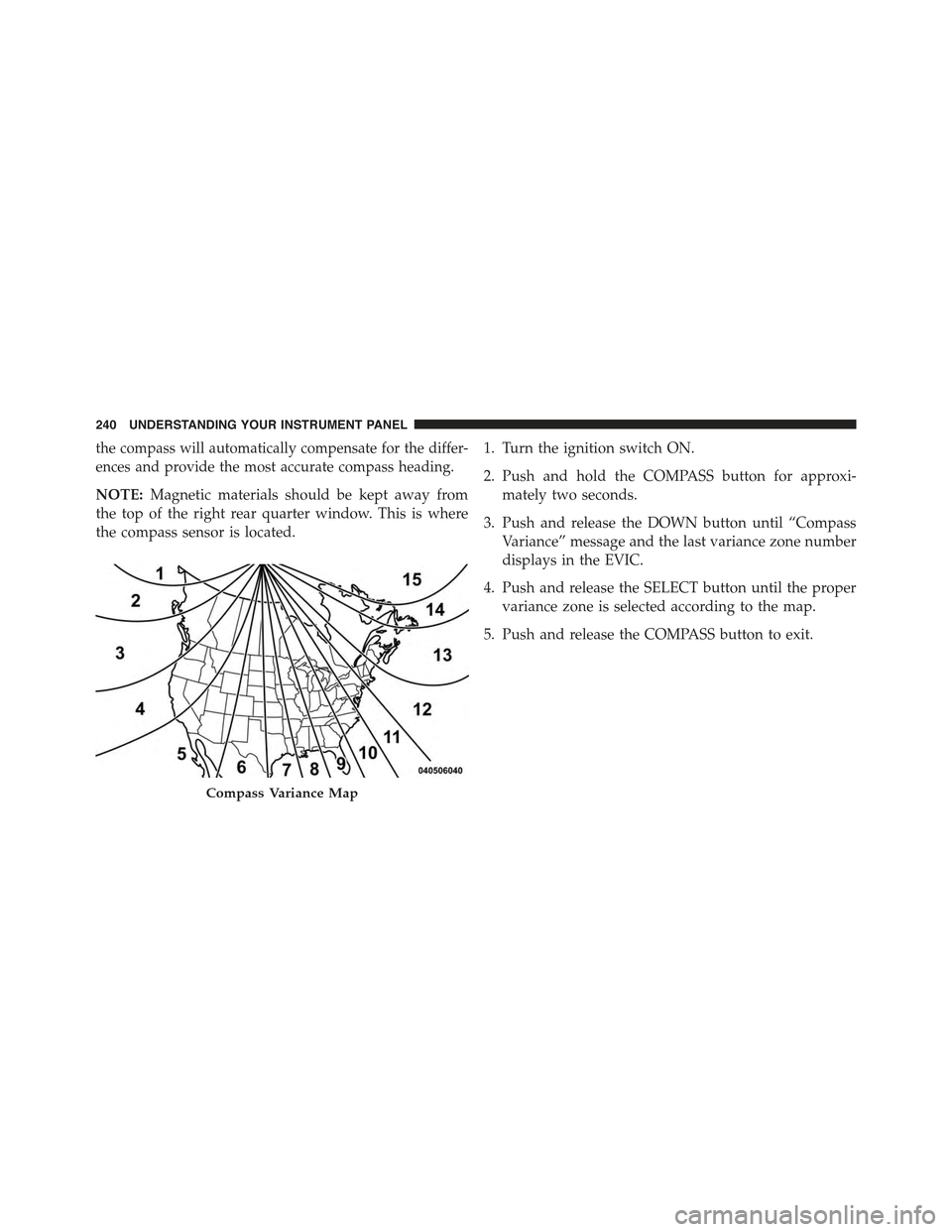
the compass will automatically compensate for the differ-
ences and provide the most accurate compass heading.
NOTE:Magnetic materials should be kept away from
the top of the right rear quarter window. This is where
the compass sensor is located.
1. Turn the ignition switch ON.
2. Push and hold the COMPASS button for approxi-
mately two seconds.
3. Push and release the DOWN button until “Compass
Variance” message and the last variance zone number
displays in the EVIC.
4. Push and release the SELECT button until the proper
variance zone is selected according to the map.
5. Push and release the COMPASS button to exit.
Compass Variance Map
240 UNDERSTANDING YOUR INSTRUMENT PANEL
Page 243 of 560
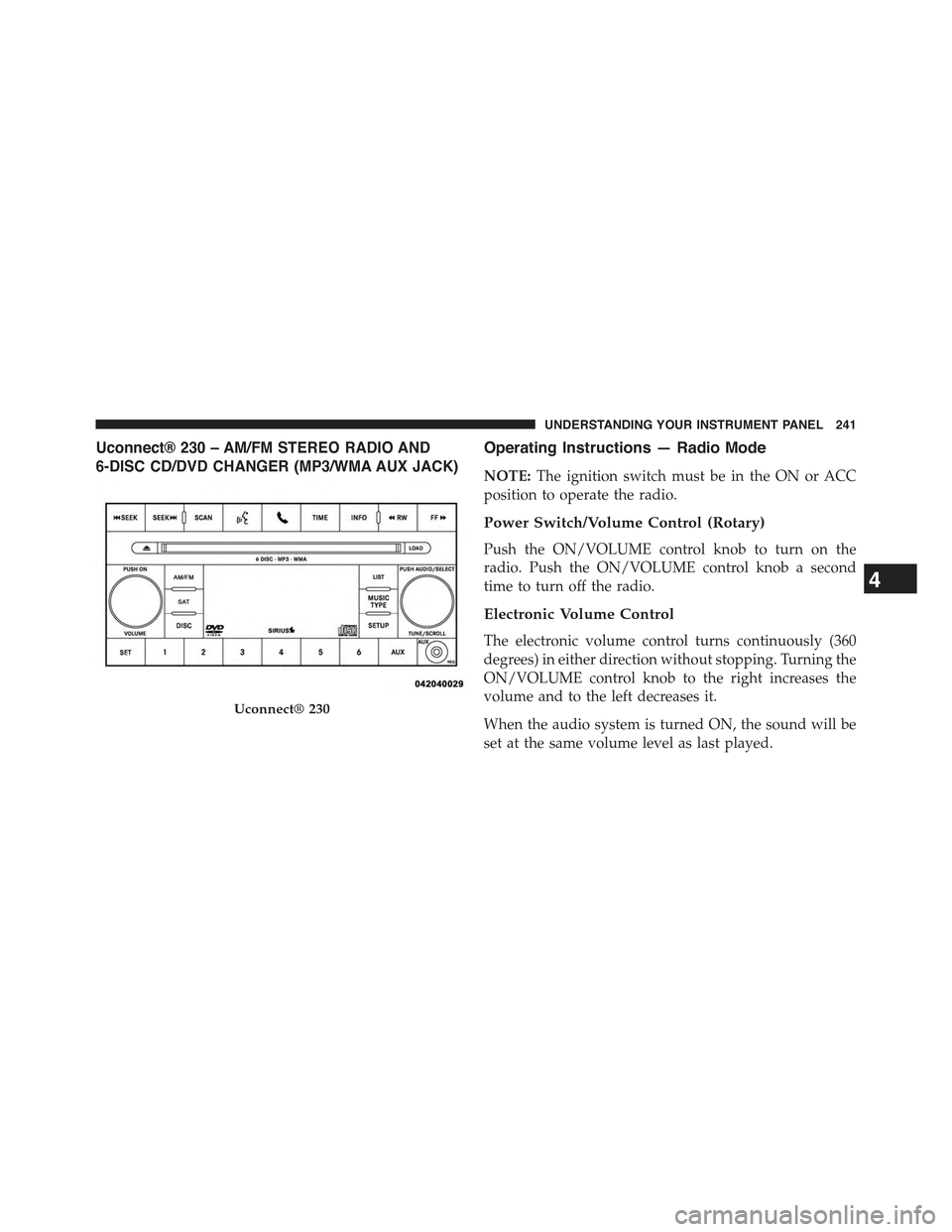
Uconnect® 230 – AM/FM STEREO RADIO AND
6-DISC CD/DVD CHANGER (MP3/WMA AUX JACK)
Operating Instructions — Radio Mode
NOTE:The ignition switch must be in the ON or ACC
position to operate the radio.
Power Switch/Volume Control (Rotary)
Push the ON/VOLUME control knob to turn on the
radio. Push the ON/VOLUME control knob a second
time to turn off the radio.
Electronic Volume Control
The electronic volume control turns continuously (360
degrees) in either direction without stopping. Turning the
ON/VOLUME control knob to the right increases the
volume and to the left decreases it.
When the audio system is turned ON, the sound will be
set at the same volume level as last played.
Uconnect® 230
4
UNDERSTANDING YOUR INSTRUMENT PANEL 241
Page 252 of 560
Operation Instructions — DISC Mode For CD And
MP3/WMA Audio Play, DVD – Video
The radio DVD player and many DVD discs are coded by
geographic region. These region codes must match for
the disc to play. If the region code for the DVD disc does
not match the region code for the radio DVD player, it
will not play the disc. Customers may take their vehicle
to an authorized dealer to change the region code of the
player a maximum of five times.
CAUTION!
The radio may shut down during extremely hot
conditions. When this occurs, the radio will indicate
“Disc Hot” and shut off until a safe temperature is
reached. This shutdown is necessary to protect the
optics of the DVD player and other radio internal
components.
NOTE:The ignition switch must be in the ON or ACC
position to operate the radio.
LOAD Button — Loading Compact Disc(s)
Push the LOAD button and the pushbutton with the
corresponding number (1-6) where the CD is being
loaded. The radio will display PLEASE WAIT and
prompt when to INSERT DISC. After the radio displays
#INSERT DISC,#insert the CD into the player.
Radio display will show#LOADING DISC#when the disc
is loading and “READING DISC” when the radio is
reading the disc.
CAUTION!
This CD player will accept 4–3/4 in (12 cm) discs only.
The use of other sized discs may damage the CD
player mechanism.
250 UNDERSTANDING YOUR INSTRUMENT PANEL
Page 253 of 560
Eject Button — Ejecting Compact Disc(s)
Push the EJECT button and the pushbutton
with the corresponding number (1-6) where the
CD was loaded and the disc will unload and
move to the entrance for easy removal. Radio
display will show#EJECTING DISC#when the disc is
being ejected and prompt the user to remove the disc.
Push and hold the EJECT button for five seconds and all
CDs will be ejected from the radio.
The disc can be ejected with the radio and ignition OFF.
SEEK Button (CD MODE)
Push the right SEEK button for the next selection on the
CD. Push the left SEEK button to return to the beginning
of the current selection, or return to the beginning of the
previous selection if the CD is within the first second of
the current selection. Pushing and holding the SEEK
button will allow you to scroll through the tracks faster in
CD and MP3/MWA modes.
SCAN Button (CD MODE)
Push the SCAN button to scan through each track on the
CD currently playing.
TIME Button (CD MODE)
Push this button to change the display from a large CD
playing time display to a small CD playing time display.
RW/FF (CD MODE)
Push and hold FF (Fast Forward) and the CD player will
begin to fast forward until FF is released, or RW or
another CD button is pushed. The RW (Rewind) button
works in a similar manner.
4
UNDERSTANDING YOUR INSTRUMENT PANEL 251
Page 259 of 560
Uconnect® (Satellite Radio) — If Equipped
Satellite radio uses direct satellite-to-receiver broadcast-
ing technology to provide clear digital sound, coast to
coast. The subscription service provider is Sirius Satellite
Radio. This service offers over 130 channels of music,
sports, news, entertainment, and programming for chil-
dren, directly from its satellites and broadcasting studios.
NOTE:Sirius service is not available in Hawaii and has
limited coverage in Alaska.
System Activation
Sirius Satellite Radio service is pre-activated, and you
may begin listening immediately to the one year of audio
service that is included with the factory-installed satellite
radio system in your vehicle. Sirius will supply a wel-
come kit that contains general information, including
how to setup your on-line listening account. For further
information, call the toll-free number 888-539-7474, or
visit the Sirius web site atwww.siriusxm.com, or at
www.siriusxm.ca for Canadian residents.
Electronic Serial Number/Sirius Identification
Number (ESN/SID)
Please have the following information available when
calling:
1. The Electronic Serial Number/Sirius Identification
Number (ESN/SID).
2. Your Vehicle Identification Number.
To access the ESN/SID, refer to the following steps:
ESN/SID Access
With the ignition switch in the ON/RUN or ACC posi-
tion and the radio on, push the SETUP button and scroll
using the TUNE/SCROLL control knob until Sirius ID is
4
UNDERSTANDING YOUR INSTRUMENT PANEL 257
Page 260 of 560
selected. Push the TUNE/SCROLL control knob and the
Sirius ID number will display. The Sirius ID number
display will time out in two minutes. Push any button on
the radio to exit this screen.
Selecting Uconnect® (Satellite) Mode
Push the SAT button until#SAT#appears in the display. A
CD may remain in the radio while in the Satellite radio
mode.
Satellite Antenna
To ensure optimum reception, do not place items on the
roof around the rooftop antenna location. Metal objects
placed within the line of sight of the antenna will cause
decreased performance. Larger luggage items such as
bikes should be placed as far rearward as possible, within
the loading design of the rack. Do not place items directly
on or above the antenna.
Reception Quality
Satellite reception may be interrupted due to one of the
following reasons:
•The vehicle is parked in an underground parking
structure or under a physical obstacle.
•Dense tree coverage may interrupt reception in the
form of short audio mutes.
•Driving under wide bridges or along tall buildings can
cause intermittent reception.
•Placing objects over or too close to the antenna can
cause signal blockage.
Operating Instructions — Uconnect® (Satellite)
Mode
NOTE:The ignition switch must be in the ON/RUN or
ACC position to operate the radio.
258 UNDERSTANDING YOUR INSTRUMENT PANEL