lock JEEP COMPASS 2015 1.G Workshop Manual
[x] Cancel search | Manufacturer: JEEP, Model Year: 2015, Model line: COMPASS, Model: JEEP COMPASS 2015 1.GPages: 560, PDF Size: 11.51 MB
Page 193 of 560
For Vehicles Equipped With The EVIC
The power sunroof switch will remain active for up to
approximately ten minutes after the ignition switch is
turned to the LOCK position. Opening either front door
will cancel this feature.
ELECTRICAL POWER OUTLETS
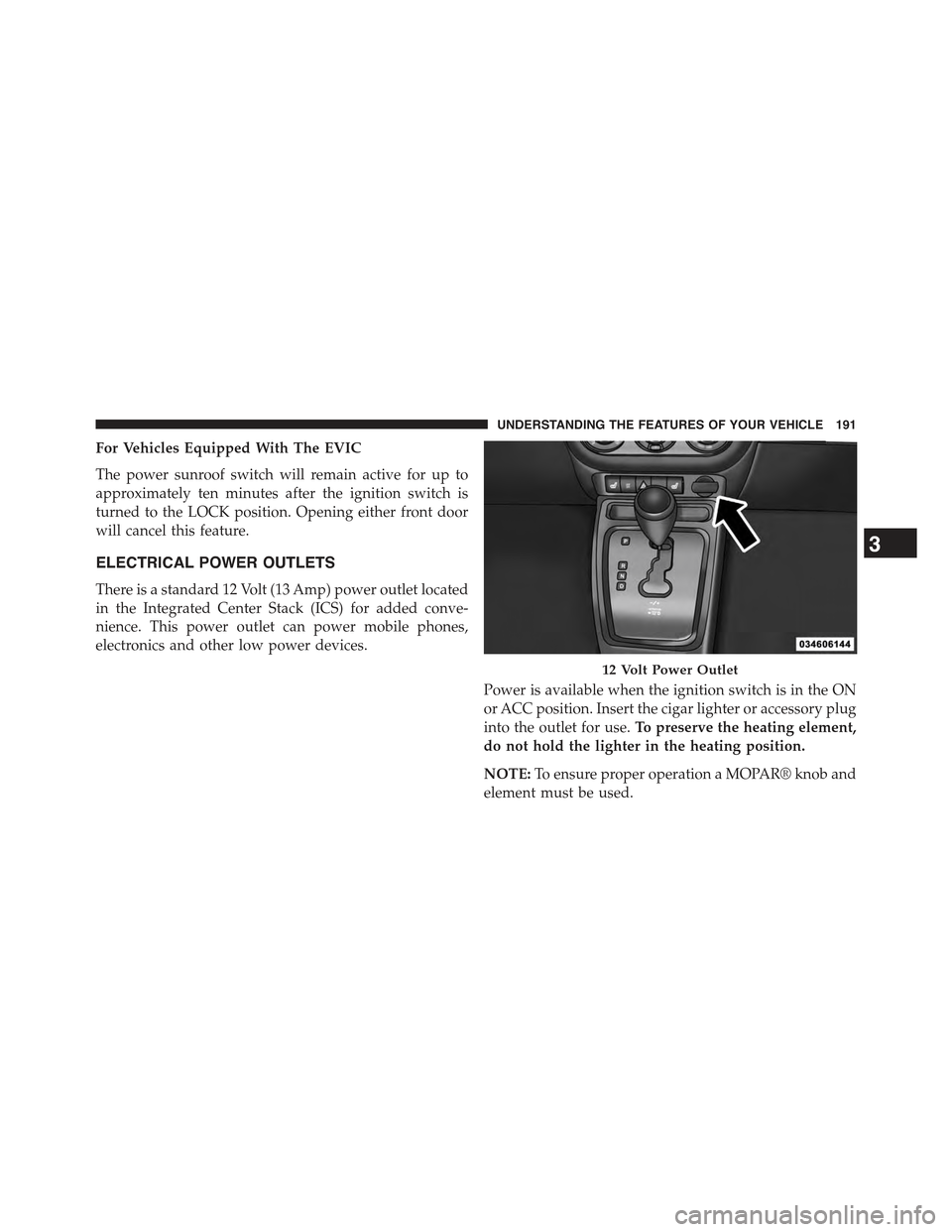
There is a standard 12 Volt (13 Amp) power outlet located
in the Integrated Center Stack (ICS) for added conve-
nience. This power outlet can power mobile phones,
electronics and other low power devices.
Power is available when the ignition switch is in the ON
or ACC position. Insert the cigar lighter or accessory plug
into the outlet for use.To preserve the heating element,
do not hold the lighter in the heating position.
NOTE:To ensure proper operation a MOPAR® knob and
element must be used.
12 Volt Power Outlet
3
UNDERSTANDING THE FEATURES OF YOUR VEHICLE 191
Page 209 of 560
approximately eight turns, then move the crossbar to the
desired position, keeping the crossbars perpendicular to
the luggage rack side rails. Once the crossbar is in one of
the seven detent positions, retighten the thumb screws to
lock the crossbar into position.
NOTE:
•To help control wind noise when the crossbars are not
in use, place the front crossbar in the first detent from
the front of the vehicle and the rear crossbar in the
second detent from the rear of the vehicle.
•If the rear crossbar (or any metallic object) is placed
over the satellite radio antenna (if equipped), you may
experience interruption of satellite radio reception. For
improved satellite radio reception, place the rear cross-
bar in the second detent from the rear of the vehicle
when not in use.
•The grab handles on the back of the vehicle (if
equipped) are not to be used as a towing feature.
CAUTION!
•To prevent damage to the roof of your vehicle, DO
NOT carry any loads on the luggage rack without
crossbars installed. The load should be secured and
placed on top of the crossbars, not directly on the
roof. If it is necessary to place the load on the roof,
place a blanket or some other protection between
the load and the roof surface.
•To avoid damage to the luggage rack and vehicle,
do not exceed the maximum luggage rack load
capacity of 150 lb (68 kg). Always distribute heavy
loads as evenly as possible and secure the load
appropriately.
•Long loads which extend over the windshield, such
as wood panels or surfboards, or loads with large
frontal area should be secured to both the front and
rear of the vehicle.
(Continued)
3
UNDERSTANDING THE FEATURES OF YOUR VEHICLE 207
Page 218 of 560
If the vehicle is driven more than 1 mile (1.6 km) with
either turn signal on, a continuous chime will sound to
alert you to turn the signals off. If either indicator flashes
at a rapid rate, check for a defective outside light bulb.
9. High Beam Indicator
This indicator shows that the high beam head-
lights are on. Push the multifunction lever for-
ward to switch the headlights to high beam, and pull
toward yourself (normal position) to return to low beam.
10. Anti-Lock Brake (ABS) Light
This light monitors the Anti-Lock Brake System
(ABS). The light will turn on when the ignition
switch is turned to the ON/RUN position and
may stay on for as long as four seconds.
If the ABS light remains on or turns on while driving, it
indicates that the Anti-Lock portion of the brake system
is not functioning and that service is required. However,
the conventional brake system will continue to operate
normally if the BRAKE warning light is not on.
If the ABS light is on, the brake system should be serviced
as soon as possible to restore the benefits of Anti-Lock
brakes. If the ABS light does not turn on when the
ignition switch is turned to the ON/RUN position, have
the light inspected by an authorized dealer.
11. Seat Belt Reminder Light
When the ignition switch is first turned to ON/
RUN, this light will turn on for four to eight
seconds as a bulb check. During the bulb check, if
the driver’s seat belt is unbuckled, a chime will sound.
After the bulb check or when driving, if the driver’s seat
belt remains unbuckled, the Seat Belt Reminder Light
will illuminate and the chime will sound. Refer to
“Occupant Restraints” in “Things To Know Before Start-
ing Your Vehicle” for further information.
216 UNDERSTANDING YOUR INSTRUMENT PANEL
Page 219 of 560
12. Tachometer
The white area of the scale shows the permissible engine
revolutions-per-minute (RPM x 1000) for each gear range.
Before reaching the red area, ease up on the accelerator to
prevent engine damage.
13. Engine Temperature Warning Light
This light warns of an overheated engine condi-
tion. As engine coolant temperatures rise and the
gauge approachesH,this indicator will illuminate and a
single chime will sound after reaching a set threshold.
Further overheating will cause the temperature gauge to
passH,a continuous chime will occur until the engine is
allowed to cool or the 4 minutes duration is expired,
whichever come first.
If the light turns on while driving, safely pull over and
stop the vehicle. If the A/C system is on, turn it off.
Also, shift the transmission into NEUTRAL and idle the
vehicle. If the temperature reading does not return to
normal, turn the engine off immediately and call for
service. Refer to “If Your Engine Overheats” in “What To
Do In Emergencies” for further information.
14. Brake Warning Light
This light monitors various brake functions,
including brake fluid level and parking brake
application. If the brake light turns on it may
indicate that the parking brake is applied, that
the brake fluid level is low, or that there is a problem with
the anti-lock brake system reservoir.
If the light remains on when the parking brake has been
disengaged, and the fluid level is at the full mark on the
master cylinder reservoir, it indicates a possible brake
hydraulic system malfunction or that a problem with the
Brake Booster has been detected by the Anti-Lock Brake
System (ABS) / Electronic Stability Control (ESC) system.
4
UNDERSTANDING YOUR INSTRUMENT PANEL 217
Page 220 of 560
In this case, the light will remain on until the condition
has been corrected. If the problem is related to the brake
booster, the ABS pump will run when applying the brake
and a brake pedal pulsation may be felt during each stop.
The dual brake system provides a reserve braking capac-
ity in the event of a failure to a portion of the hydraulic
system. A leak in either half of the dual brake system is
indicated by the Brake Warning Light, which will turn on
when the brake fluid level in the master cylinder has
dropped below a specified level.
The light will remain on until the cause is corrected.
NOTE:The light may flash momentarily during sharp
cornering maneuvers, which change fluid level condi-
tions. The vehicle should have service performed, and
the brake fluid level checked.
If brake failure is indicated, immediate repair is necessary.
WARNING!
Driving a vehicle with the red brake light on is
dangerous. Part of the brake system may have failed.
It will take longer to stop the vehicle. You could have
a collision. Have the vehicle checked immediately.
Vehicles equipped with the Anti-Lock Brake System
(ABS), are also equipped with Electronic Brake Force
Distribution (EBD). In the event of an EBD failure, the
Brake Warning Light will turn on along with the ABS
Light. Immediate repair to the ABS system is required.
Operation of the Brake Warning Light can be checked by
turning the ignition switch from the OFF position to the
ON/RUN position. The light should illuminate for ap-
proximately two seconds. The light should then turn off
unless the parking brake is applied or a brake fault is
detected. If the light does not illuminate, have the light
inspected by an authorized dealer.
218 UNDERSTANDING YOUR INSTRUMENT PANEL
Page 227 of 560
oil change indicator system (after performing the sched-
uled maintenance), refer to the following procedure:
1. Turn the ignition switch to the ON/RUN position (do
not start the engine).
2. Fully depress the accelerator pedal, slowly, three times
within 10 seconds.
3. Turn the ignition switch to the OFF/LOCK position.
NOTE:If the indicator message illuminates when you
start the engine, the oil change indicator system did not
reset. If necessary, repeat this procedure.
24. Malfunction Indicator Light (MIL)
The Malfunction Indicator Light (MIL) is part of
an Onboard Diagnostic system called OBD II that
monitors emissions, engine, and automatic trans-
mission control systems. The light will illuminate when
the key is in the ON/RUN position before engine start.
If the bulb does not come on when turning the key from
OFF to ON/RUN, have the condition checked promptly.
Certain conditions, such as a loose or missing gas cap,
poor fuel quality, etc., may illuminate the light after
engine start. The vehicle should be serviced if the light
stays on through several of your typical driving cycles. In
most situations, the vehicle will drive normally and will
not require towing.
CAUTION!
Prolonged driving with the Malfunction Indicator
Light (MIL) on could cause damage to the engine
control system. It also could affect fuel economy and
driveability. If the MIL is flashing, severe catalytic
converter damage and power loss will soon occur.
Immediate service is required.
4
UNDERSTANDING YOUR INSTRUMENT PANEL 225
Page 229 of 560
•Each time the ignition is turned to ON/RUN, the
ESC system will be ON, even if it was turned off
previously.
•The ESC system will make buzzing or clicking
sounds when it is active. This is normal; the sounds
will stop when ESC becomes inactive following the
maneuver that caused the ESC activation.
28. 4WD! Warning Light — If Equipped
This light monitors the 4-Wheel Drive (4WD)
system. The light will come on, for a bulb
check, when the ignition key is turned to the
ON/RUN position and may stay on for as long
as three seconds.
When lit solid:There is a 4WD system fault. 4WD
performance will be at a reduced level. Service the 4WD
system soon.
When blinking:The 4WD system is temporarily dis-
abled due to overload condition.
29. Electronic Vehicle Information Center (EVIC)
Display — If Equipped
When the appropriate conditions exist, this display
shows the EVIC messages.
For further information, refer to “Electronic Vehicle In-
formation Center (EVIC)”.
30. Hill Descent Indicator — If Equipped
The symbol illuminates (is armed) when the
4WD Lock switch is activated and the trans-
mission range indicator is in LOW or REVERSE
position (Off-Road Mode).
4
UNDERSTANDING YOUR INSTRUMENT PANEL 227
Page 235 of 560
•Low Tire
•Low Tire Pressure Display for Premium TPM System
•Service TPM System
Engine Oil Change Indicator System —
If Equipped
Oil Change Required
Your vehicle is equipped with an engine oil change
indicator system. The “Oil Change Required” message
will display in the EVIC display for approximately five
seconds after a single chime has sounded, to indicate the
next scheduled oil change interval. The engine oil change
indicator system is duty-cycle based, which means the
engine oil change interval may fluctuate dependent upon
your personal driving style.
Unless reset, this message will continue to display each
time you turn the ignition switch to the ON/RUN
position. To turn off the message temporarily, push and
release the Trip Odometer button on the instrument
cluster. To reset the oil change indicator system (after
performing the scheduled maintenance) refer to the fol-
lowing procedure.
1. Turn the ignition switch to the ON position.Do not
start the engine.
2. Fully push the accelerator pedal, slowly, three times
within 10 seconds.
3. Turn the ignition switch to the OFF/LOCK position.
NOTE:If the indicator message illuminates when you
start the vehicle, the oil change indicator system did not
reset. If necessary repeat this procedure.
4
UNDERSTANDING YOUR INSTRUMENT PANEL 233
Page 238 of 560
Display Units Of Measure In
To make your selection, push and release the RIGHT/
SELECT arrow button until “US” or “METRIC” appears.
Personal Settings (Customer-Programmable
Features)
This allows the driver to set and recall features when the
transmission is in PARK (automatic transmission) or the
vehicle is stopped (manual transmission).
Push and release the MENU or DOWN buttons until
“Personal Settings” is displayed in the EVIC then push
and release the RIGHT/SELECT button.
Use the SELECT button to display one of the following
choices:
Language
When in this display you may select different languages
for all display nomenclature, including the trip functions.
Pushing the RIGHT/SELECT button while in this display
selects English, Espanol, Deutsch, Italiano, Francais or
NL depending on availability. As you continue, the
displayed information will be shown in the selected
language.
NOTE:Uconnect® language will not change using the
EVIC. Please refer to “Language Selection” in Uconnect®
phone — If Equipped for details.
Auto Lock Doors
When ON is selected, all doors lock automatically when
the speed of the vehicle reaches 15 mph (24 km/h). Push
and hold the SELECT button when in this display until
“ON” or “OFF” appears to make your selection.
Auto Unlock On Exit
When ON is selected, all the vehicle’s doors will unlock
when the driver’s door is opened, if the vehicle is
stopped (manual transmission) or the vehicle is stopped
236 UNDERSTANDING YOUR INSTRUMENT PANEL
Page 239 of 560
and the transmission is in the PARK or NEUTRAL
position (automatic transmission). Push and hold the
SELECT button when in this display until “ON” or
“OFF” appears to make your selection.
RKE Unlock
When Driver’s Door 1st is selected only the driver’s door
will unlock on the first push of the Remote Keyless Entry
(RKE) transmitter UNLOCK button and require a second
push to unlock the remaining locked doors. When Re-
mote Unlock All Doors is selected, all of the doors will
unlock at the first push of the RKE transmitter UNLOCK
button. Push and hold the SELECT button when in this
display until “Driver’s Door 1st” or “All Doors” appears
to make your selection.
Flash Lamps With Lock
When ON is selected, the front and rear turn signals will
flash when the doors are locked or unlocked using the
RKE transmitter. This feature may be selected with or
without the sound horn with lock feature selected. Push
and hold the SELECT button when in this display until
“ON” or “OFF” appears to make your selection.
Sound Horn With Lock
When ON is selected, a short horn sound will occur when
the RKE transmitter LOCK button is pushed. This feature
may be selected with or without the Flash Lights with
Lock feature. Push and hold the SELECT button when in
this display until “ON” or “OFF” appears to make your
selection.
Headlamp Off Delay
When this feature is selected the driver can choose to
have the headlights remain on for 0, 30, 60, or 90 seconds
when exiting the vehicle. Push and hold the SELECT
button when in this display until 0, 30, 60, or 90 appears
to make your selection.
4
UNDERSTANDING YOUR INSTRUMENT PANEL 237