reset JEEP COMPASS 2015 1.G Owners Manual
[x] Cancel search | Manufacturer: JEEP, Model Year: 2015, Model line: COMPASS, Model: JEEP COMPASS 2015 1.GPages: 560, PDF Size: 11.51 MB
Page 60 of 560
CAUTION!
All occupants, including the driver, should not oper-
ate a vehicle or sit in a vehicle’s seat until the head
restraints are placed in their proper positions in order
to minimize the risk of neck injury in the event of a
collision.
NOTE:For more information on properly adjusting and
positioning the head restraint, refer to “Adjusting Active
Head Restraints” in “Understanding The Features Of
Your Vehicle”.
Resetting Active Head Restraints (AHR)
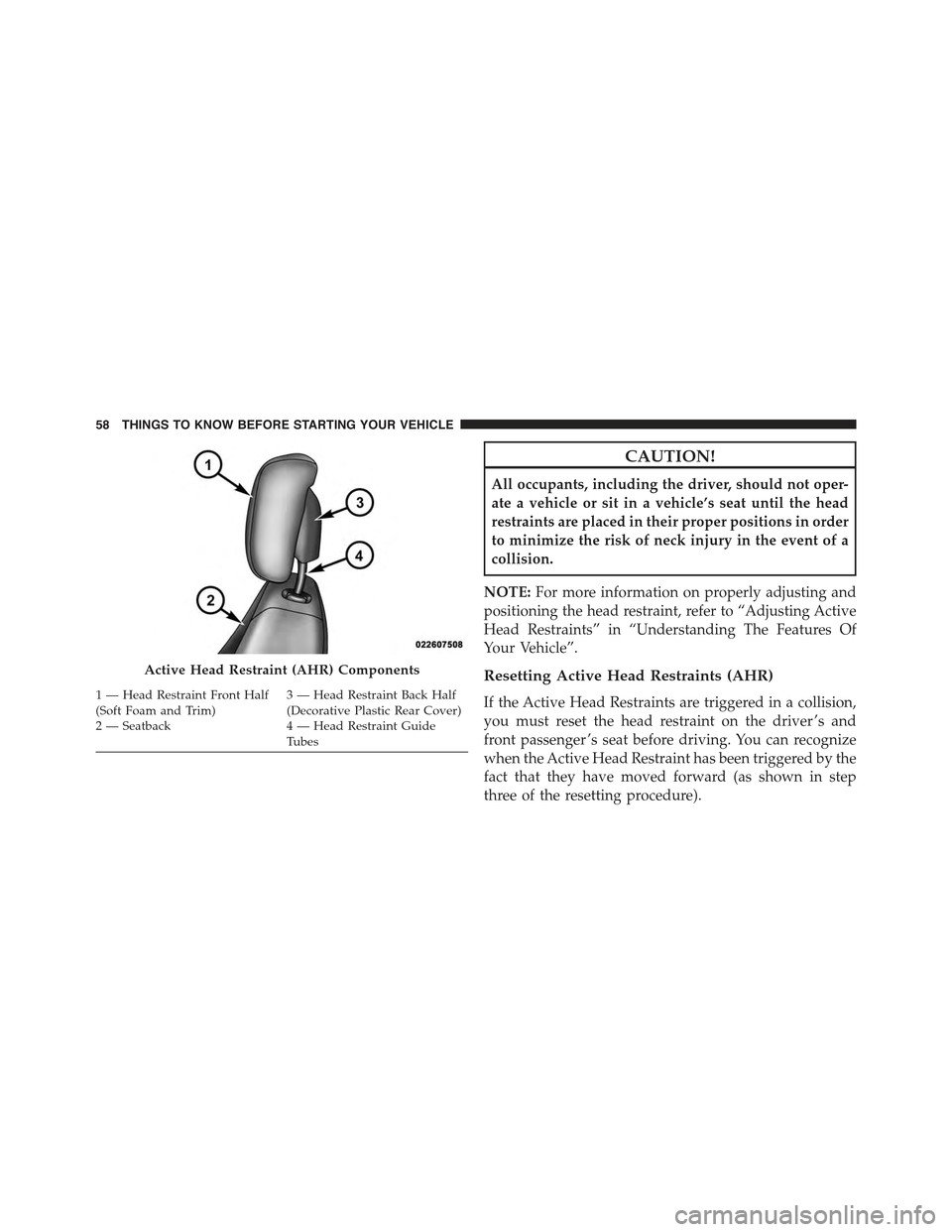
If the Active Head Restraints are triggered in a collision,
you must reset the head restraint on the driver ’s and
front passenger ’s seat before driving. You can recognize
when the Active Head Restraint has been triggered by the
fact that they have moved forward (as shown in step
three of the resetting procedure).
Active Head Restraint (AHR) Components
1 — Head Restraint Front Half(Soft Foam and Trim)3 — Head Restraint Back Half(Decorative Plastic Rear Cover)2 — Seatback 4 — Head Restraint GuideTu b e s
58 THINGS TO KNOW BEFORE STARTING YOUR VEHICLE
Page 62 of 560
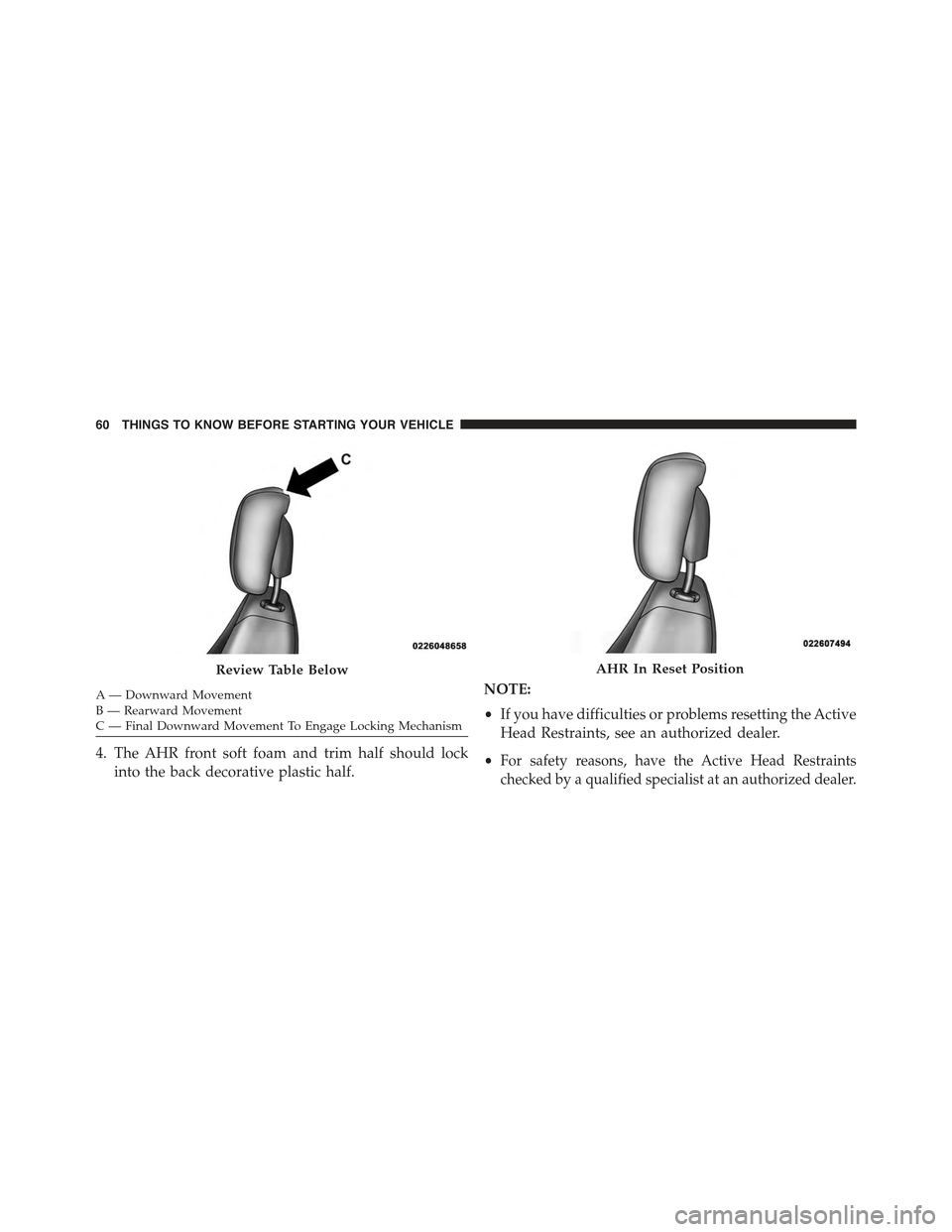
A— Downward MovementB—RearwardMovementC—FinalDownwardMovementToEngageLockingMechanism
4. The AHR front soft foam and trim half should lock
into the back decorative plastic half.
NOTE:
•If you have difficulties or problems resetting the Active
Head Restraints, see an authorized dealer.
•For safety reasons, have the Active Head Restraints
checked by a qualified specialist at an authorized dealer.
Review Table BelowAHR In Reset Position
60 THINGS TO KNOW BEFORE STARTING YOUR VEHICLE
Page 74 of 560
System Reset Procedure
In order to reset the Enhanced Accident Response System
functions after an event, the ignition switch must be
changed from ignition START or ON/RUN to ignition OFF.
Air Bag Warning Light
The air bags must be ready to inflate for your protection
in a collision. The Occupant Restraint Control-
ler (ORC) monitors the internal circuits and
interconnecting wiring associated with air bag
system electrical components.
The ORC monitors the readiness of the electronic parts of
the air bag system whenever the ignition switch is in the
START or ON/RUN position. If the ignition switch is in
the OFF position or in the ACC position, the air bag
system is not on and the air bags will not inflate.
The ORC contains a backup power supply system that
may deploy the air bags even if the battery loses power or
it becomes disconnected prior to deployment.
The ORC turns on the Air Bag Warning Light in the
instrument panel for approximately four to eight seconds
for a self-check when the ignition switch is first turned to
the ON/RUN position. After the self-check, the Air Bag
Warning Light will turn off. If the ORC detects a mal-
function in any part of the system, it turns on the Air Bag
Warning Light, either momentarily or continuously. A
single chime will sound to alert you if the light comes on
again after initial startup.
The ORC also includes diagnostics that will illuminate
the instrument panel Air Bag Warning Light if a malfunc-
tion is detected that could affect the air bag system. The
diagnostics also record the nature of the malfunction.
72 THINGS TO KNOW BEFORE STARTING YOUR VEHICLE
Page 133 of 560
Voice Training
For users experiencing difficulty with the system recog-
nizing their voice commands or numbers, the Uconnect®
Phone Voice Training feature may be used. To enter this
training mode, follow one of the two following proce-
dures:
•From outside the Uconnect® Phone mode (e.g., from
radio mode), push and hold thebutton for five
seconds until the session begins, or,
•Push thebutton and say the “Voice Training,”
“System Training,” or “Start Voice Training” com-
mand.
You can either push the Uconnect® Phone button to
restore the factory setting or repeat the words and
phrases when prompted by the Uconnect® Phone. For
best results, the Voice Training session should be com-
pleted when the vehicle is parked with the engine
running, all windows closed, and the blower fan
switched off.
This procedure may be repeated with a new user. The
system will adapt to the last trained voice only.
Reset
•Push thebutton.
•After the “Ready” prompt and the following beep, say
“Setup,” then “Reset.”
This will delete all phone pairing, phone book entries,
and other settings in all language modes. The System will
prompt you before resetting to factory settings.
3
UNDERSTANDING THE FEATURES OF YOUR VEHICLE 131
Page 136 of 560
Voice Text Reply
Uconnect® Phone can read or send new messages on
your phone.
Read Messages:
If you receive a new text message while your phone is
connected to Uconnect® Phone, an announcement will
be made to notify you that you have a new text message.
If you wish to hear the new message:
1. Push thebutton.
2. After the “Ready” prompt and the following beep, say
“SMS Read” or “Read Messages.”
3. Uconnect® Phone will play the new text message for
you.
After reading a message, you can “Reply” or “Forward”
the message using Uconnect® Phone.
Send Messages:
You can send messages using Uconnect® Phone. To send
a new message:
1. Push thebutton.
2. After the “Ready” prompt and the following beep, say
“SMS Send” or “Send Message.”
3. You can either say the message you wish to send or
say “List Messages.” There are 20 preset messages.
To send a message, push thebutton while the
system is listing the message and say “Send.”
Uconnect® Phone will prompt you to say the name
or number of the person you wish to send the mes-
sage to.
134 UNDERSTANDING THE FEATURES OF YOUR VEHICLE
Page 137 of 560
List of Preset Messages:
1. Yes.
2. No.
3. Where are you?
4. I need more direction.
5. L O L.
6. Why?
7. I love you.
8. Call me.
9. Call me later.
10. Thanks.
11. See you in 15 minutes.
12. I am on my way.
13. I’ll be late.
14. Are you there yet?
15. Where are we meeting?
16. Can this wait?
17. Bye for now.
18. When can we meet?
19. Send number to call.
20. Start without me.
3
UNDERSTANDING THE FEATURES OF YOUR VEHICLE 135
Page 160 of 560
NOTE:
•The head restraints should only be removed by quali-
fied technicians, for service purposes only. If either of
the head restraints require removal, see your autho-
rized dealer.
•In the event of deployment of an Active Head Re-
straint, refer to “Occupant Restraints/Resetting Active
Head Restraints (AHR)” in “Things To Know Before
Starting Your Vehicle” for further information.
WARNING!
•Do not place items over the top of the Active Head
Restraint, such as coats, seat covers or portable
DVD players. These items may interfere with the
operation of the Active Head Restraint in the event
of a collision and could result in serious injury or
death.
(Continued)
WARNING!(Continued)
•Active Head Restraints may be deployed if they are
struck by an object such as a hand, foot or loose
cargo. To avoid accidental deployment of the Ac-
tive Head Restraint ensure that all cargo is secured,
as loose cargo could contact the Active Head Re-
straint during sudden stops. Failure to follow this
warning could cause personal injury if the Active
Head Restraint is deployed.
Rear Head Restraints
The head restraints in the rear are non adjustable. Refer to
“Occupant Restraints” in “Things To Know Before Start-
ing Your Vehicle” for information on Tether routing.
158 UNDERSTANDING THE FEATURES OF YOUR VEHICLE
Page 175 of 560
NOTE:In order to ensure proper operation, the Elec-
tronic Speed Control System has been designed to shut
down if multiple Speed Control functions are operated at
the same time. If this occurs, the Electronic Speed Control
System can be reactivated by pushing the Electronic
Speed Control ON/OFF button and resetting the desired
vehicle set speed.
To Activate
Push the ON/OFF button. The Cruise Indicator Light in
the instrument cluster will illuminate. To turn the system
off, push the ON/OFF button a second time. The Cruise
Indicator Light will turn off. The system should be
turned off when not in use.
WARNING!
Leaving the Electronic Speed Control system on
when not in use is dangerous. You could accidentally
set the system or cause it to go faster than you want.
You could lose control and have an accident. Always
leave the system OFF when you are not using it.
To Set A Desired Speed
Turn the Electronic Speed Control ON. When the vehicle
has reached the desired speed, press the SET (-) button
and release. Release the accelerator and the vehicle will
operate at the selected speed.
NOTE:The vehicle should be traveling at a steady speed
and on level ground before pressing the SET (-) button.
3
UNDERSTANDING THE FEATURES OF YOUR VEHICLE 173
Page 196 of 560
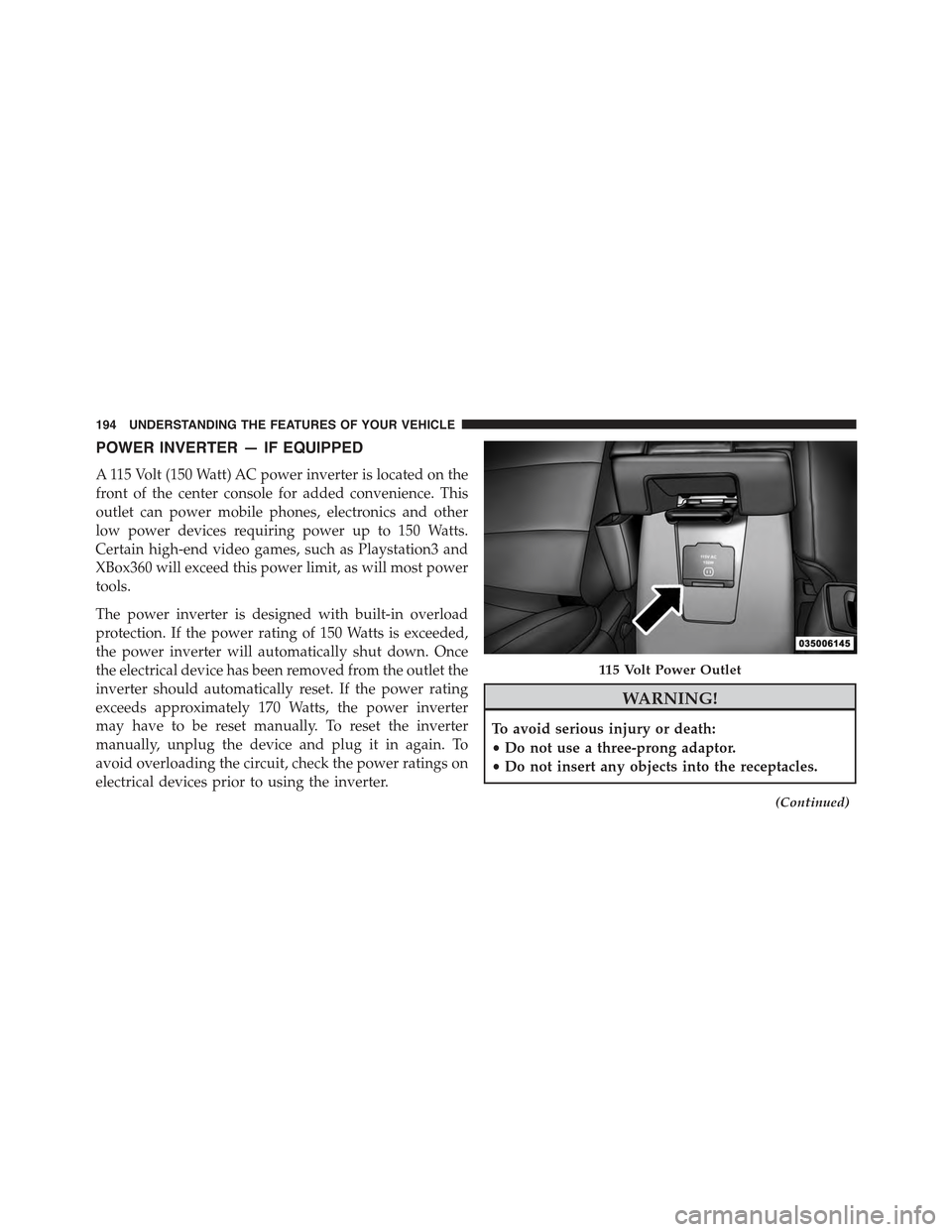
POWER INVERTER — IF EQUIPPED
A 115 Volt (150 Watt) AC power inverter is located on the
front of the center console for added convenience. This
outlet can power mobile phones, electronics and other
low power devices requiring power up to 150 Watts.
Certain high-end video games, such as Playstation3 and
XBox360 will exceed this power limit, as will most power
tools.
The power inverter is designed with built-in overload
protection. If the power rating of 150 Watts is exceeded,
the power inverter will automatically shut down. Once
the electrical device has been removed from the outlet the
inverter should automatically reset. If the power rating
exceeds approximately 170 Watts, the power inverter
may have to be reset manually. To reset the inverter
manually, unplug the device and plug it in again. To
avoid overloading the circuit, check the power ratings on
electrical devices prior to using the inverter.
WARNING!
To avoid serious injury or death:
•Do not use a three-prong adaptor.
•Do not insert any objects into the receptacles.
(Continued)
115 Volt Power Outlet
194 UNDERSTANDING THE FEATURES OF YOUR VEHICLE
Page 223 of 560
20. Shift Lever Indicator
The Shift Lever Indicator is self-contained within the
instrument cluster. It displays the gear position of the
automatic transmission.
NOTE:You must apply the brakes before shifting from
PARK.
21. Odometer/Trip Odometer Reset Button
Press this button to change the display from odometer to
either of the two trip odometer settings. Trip A or Trip B
will appear when in the trip odometer mode. Push in and
hold the button for two seconds to reset the trip odometer
to 0 miles or kilometers. The odometer must be in Trip
mode to reset.
22. Tire Pressure Monitoring Telltale Light
Each tire, including the spare (if provided),
should be checked monthly when cold and in-
flated to the inflation pressure recommended by
the vehicle manufacturer on the vehicle placard or tire
inflation pressure label. (If your vehicle has tires of a
different size than the size indicated on the vehicle placard
or tire inflation pressure label, you should determine the
proper tire inflation pressure for those tires.)
As an added safety feature, your vehicle has been
equipped with a Tire Pressure Monitoring System
(TPMS) that illuminates a low tire pressure telltale when
one or more of your tires is significantly under-inflated.
Accordingly, when the low tire pressure telltale illumi-
nates, you should stop and check your tires as soon as
possible, and inflate them to the proper pressure. Driving
on a significantly under-inflated tire causes the tire to
overheat and can lead to tire failure. Under-inflation also
reduces fuel efficiency and tire tread life, and may affect
the vehicle’s handling and stopping ability.
Please note that the TPMS is not a substitute for proper
tire maintenance, and it is the driver ’s responsibility to
4
UNDERSTANDING YOUR INSTRUMENT PANEL 221