key fob JEEP COMPASS 2017 2.G User Guide
[x] Cancel search | Manufacturer: JEEP, Model Year: 2017, Model line: COMPASS, Model: JEEP COMPASS 2017 2.GPages: 429, PDF Size: 3.46 MB
Page 30 of 429
Remote Start Abort Message Display
The following messages will display if the vehicle fails to
remote start or exits remote start prematurely:
•Remote Start Aborted — Door Open
• Remote Start Aborted — Hood Open
• Remote Start Aborted — L/Gate Open
• Remote Start Aborted — Fuel Low
• Remote Start Aborted — System Fault
The message stays active until the ignition is placed in the
ON/RUN position.
To Enter Remote Start
Push and release the Remote Startbutton on the key
fob twice within five seconds. The vehicle doors will
lock, the parking lights will flash, and the horn will
chirp twice (if programmed). Then, the engine will start
and the vehicle will remain in the Remote Start mode for
a 15-minute cycle.
NOTE:
• The park lamps will turn on and remain on during
Remote Start mode.
• For security, power window and power sunroof opera-
tion (if equipped) are disabled when the vehicle is in the
Remote Start mode.
• If your power door locks were unlocked, Remote Start
will automatically lock the doors.
• The engine can be started two consecutive times (two
15-minute cycles) with the key fob. However, the igni-
tion must be placed in the ON/RUN position before you
can repeat the start sequence for a third cycle.
Remote Start will also cancel if any of the following occur:
• The engine stalls or RPM exceeds 2500.
• Any engine warning lamps come on.
• Low Fuel Light turns on.
• The hood is opened.
• The hazard switch is pushed.
• The transmission is moved out of PARK.
• The brake pedal is pushed.
28 GETTING TO KNOW YOUR VEHICLE
Page 31 of 429
To Exit Remote Start Mode Without Driving The
Vehicle
Push and release the Remote Startbutton one time or
allow the engine to run for the entire 15-minute cycle.
NOTE: To avoid unintentional shut downs, the system will
disable the one time push of the Remote Start
button
for two seconds after receiving a valid Remote Start
request.
To Exit Remote Start Mode And Drive The Vehicle
Before the end of the 15-minute cycle, push and release the
unlock
button on the key fob to unlock the doors and
disarm the Vehicle Security Alarm (if equipped). Then,
insert the key into the ignition and place the ignition in
the ON/RUN position.
NOTE: The ignition must be placed in the ON/RUN
position in order to drive the vehicle.
DOOR LOCKS
Manual Door Locks
Use the manual door lock knob to lock the doors from
inside the vehicle. If the lock knob is down when the door is closed, the door will lock. Make sure the keys are not
inside the vehicle before closing the door.
WARNING!
•
For personal security and safety in the event of an
collision, lock the vehicle doors as you drive as well
as when you park and leave the vehicle.
• Never leave children alone in a vehicle, or with
access to an unlocked vehicle. Allowing children to
be in a vehicle unattended is dangerous for a number
(Continued)
Manual Door Lock Knob
3
GETTING TO KNOW YOUR VEHICLE 29
Page 32 of 429
WARNING!(Continued)
of reasons. A child or others could be seriously or
fatally injured. Children should be warned not to
touch the parking brake, brake pedal or the gear
selector.
• Do not leave the key fob in or near the vehicle, or in
a location accessible to children. A child could oper-
ate power windows, other controls, or move the
vehicle.
CAUTION!
Always remove the key fobs from the vehicle and lock
all doors when leaving the vehicle unattended.
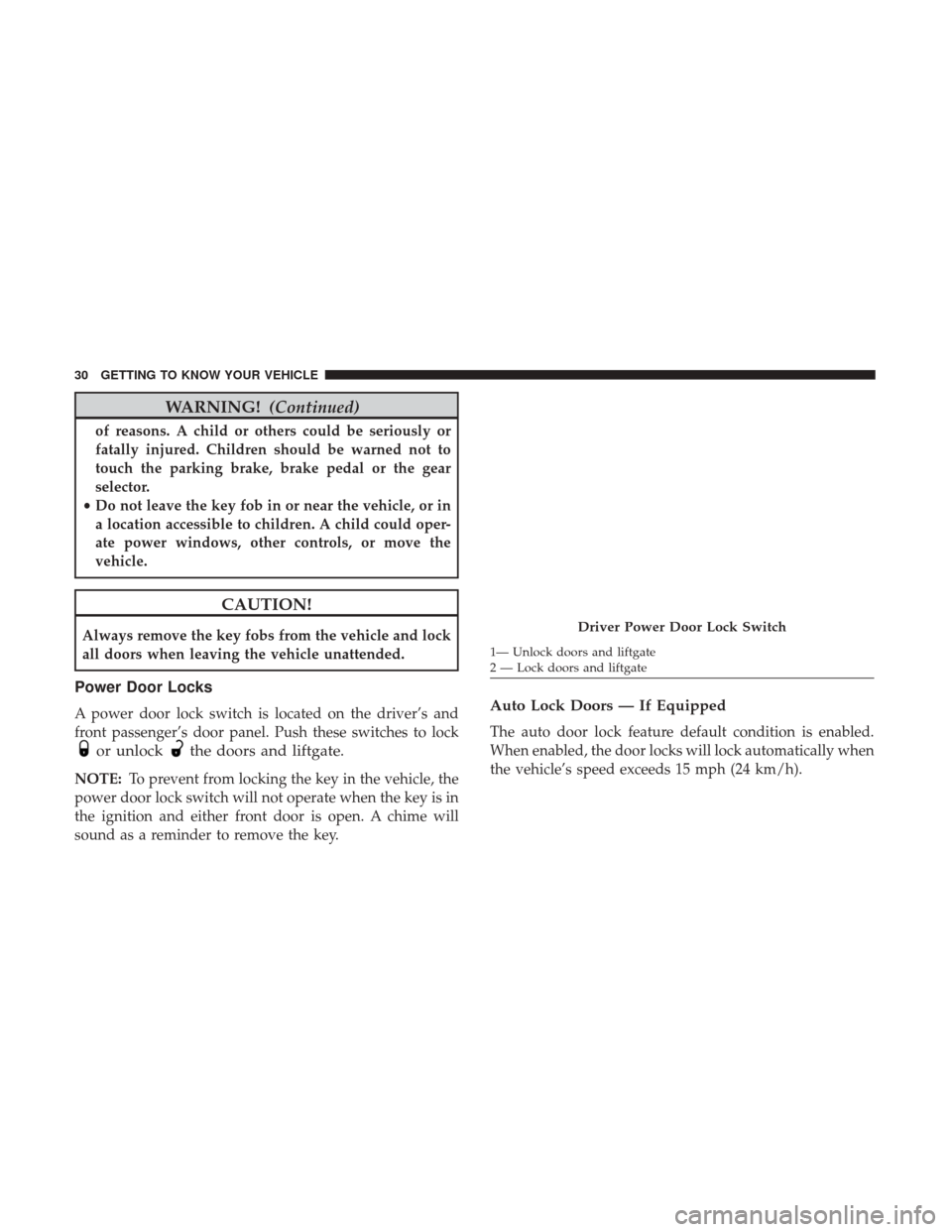
Power Door Locks
A power door lock switch is located on the driver’s and
front passenger’s door panel. Push these switches to lock
or unlockthe doors and liftgate.
NOTE: To prevent from locking the key in the vehicle, the
power door lock switch will not operate when the key is in
the ignition and either front door is open. A chime will
sound as a reminder to remove the key.
Auto Lock Doors — If Equipped
The auto door lock feature default condition is enabled.
When enabled, the door locks will lock automatically when
the vehicle’s speed exceeds 15 mph (24 km/h).
Driver Power Door Lock Switch
1— Unlock doors and liftgate
2 — Lock doors and liftgate
30 GETTING TO KNOW YOUR VEHICLE
Page 70 of 429
POWER WINDOWS — IF EQUIPPED
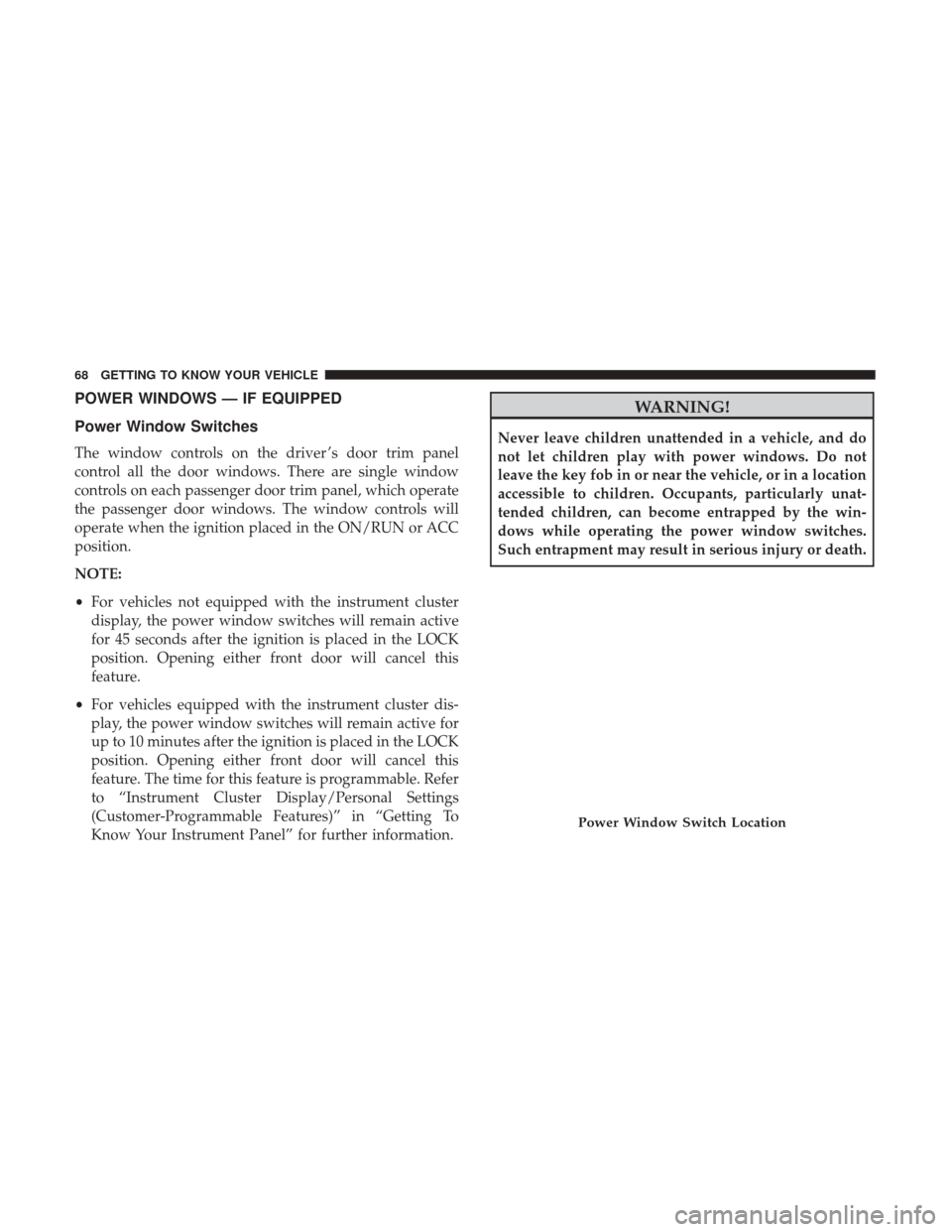
Power Window Switches
The window controls on the driver ’s door trim panel
control all the door windows. There are single window
controls on each passenger door trim panel, which operate
the passenger door windows. The window controls will
operate when the ignition placed in the ON/RUN or ACC
position.
NOTE:
•For vehicles not equipped with the instrument cluster
display, the power window switches will remain active
for 45 seconds after the ignition is placed in the LOCK
position. Opening either front door will cancel this
feature.
• For vehicles equipped with the instrument cluster dis-
play, the power window switches will remain active for
up to 10 minutes after the ignition is placed in the LOCK
position. Opening either front door will cancel this
feature. The time for this feature is programmable. Refer
to “Instrument Cluster Display/Personal Settings
(Customer-Programmable Features)” in “Getting To
Know Your Instrument Panel” for further information.
WARNING!
Never leave children unattended in a vehicle, and do
not let children play with power windows. Do not
leave the key fob in or near the vehicle, or in a location
accessible to children. Occupants, particularly unat-
tended children, can become entrapped by the win-
dows while operating the power window switches.
Such entrapment may result in serious injury or death.
Power Window Switch Location
68 GETTING TO KNOW YOUR VEHICLE
Page 72 of 429
POWER SUNROOF — IF EQUIPPED
The power sunroof switch is located on the overhead
console.
WARNING!
•Never leave children alone in a vehicle, or with
access to an unlocked vehicle. Never leave the key
fob in or near the vehicle, or in a location accessible
(Continued)
WARNING! (Continued)
to children. Occupants, particularly unattended chil-
dren, can become entrapped by the power sunroof
while operating the power sunroof switch. Such
entrapment may result in serious injury or death.
• In a collision, there is a greater risk of being thrown
from a vehicle with an open sunroof. You could also
be seriously injured or killed. Always fasten your
seat belt properly and make sure all passengers are
properly secured.
• Do not allow small children to operate the sunroof.
Never allow your fingers, other body parts, or any
object to project through the sunroof opening. Injury
may result.
Opening Sunroof
Opening Sunroof — Express
Push the switch rearward and release it within one-half
second. The sunroof and sunshade will open automatically
and stop when the full open position is reached. This is
called “Express Open.” During Express Open operation,
any other actuation of the sunroof switch will stop the
sunroof.
Power Sunroof Switch
70 GETTING TO KNOW YOUR VEHICLE
Page 76 of 429
CAUTION!
To prevent possible damage:
•Before closing hood, make sure the hood prop rod is
fully seated into its storage retaining clips.
• Do not slam the hood to close it. Use a firm down-
ward push at the center front edge of the hood to
ensure that both latches engage. Never drive your
vehicle unless the hood is fully closed, with both
latches engaged.
LIFTGATE
NOTE: The key that is used to start the vehicle is also used
to lock or unlock the doors and open the liftgate.
To unlock the liftgate, insert the key into the lock and turn
it to the right (manual lock models only). The liftgate can
also be unlocked
using the key fob or by activating
the power door lock
switches located on the front
doors. The central locking/unlocking feature (if
equipped) can also be activated from the liftgate key
cylinder.
Once unlocked, the liftgate can be opened or closed
without using the key fob. To open the liftgate, squeeze the
liftgate release and pull the liftgate open with one fluid
motion.
NOTE:
• In the event of a power malfunction, or the key fob is
inoperative, insert the key fob into the liftgate lock
cylinder and turn to the right (manual lock models
only). Using the liftgate handle, pull the liftgate open
with one fluid motion.
Liftgate Handle Location
74 GETTING TO KNOW YOUR VEHICLE
Page 108 of 429
Key Fob Unlock
When Driver’s Door 1st is selected, only the driver’s door
will unlock on the first push of the key fob unlock button
and require a second push to unlock the remaining locked
doors. When Remote Unlock All Doors is selected, all of the
doors will unlock at the first push of the key fob unlock
button. Push and hold theright
arrow button when in
this display until “Driver’s Door 1st” or “All Doors”
appears to make your selection.
Flash Lamps With Lock
When ON is selected, the front and rear turn signals will
flash when the doors are locked or unlocked using the key
fob. This feature may be selected with or without the sound
horn with lock feature selected. Push and hold the right
arrow button when in this display until “ON” or
“OFF” appears to make your selection.
Sound Horn With Lock
When ON is selected, a short horn sound will occur when
the key fob lock button is pushed. This feature may be
selected with or without the Flash Lights with Lock feature.
Push and hold the right
arrow button when in this
display until “ON” or “OFF” appears to make your
selection. Headlamp Off Delay
When this feature is selected the driver can choose to have
the headlights remain on for 0, 30, 60, or 90 seconds when
exiting the vehicle. Push and hold the
right
arrow
button when in this display until 0, 30, 60, or 90 appears
to make your selection.
Headlamps with Wipers (Available with Auto
Headlights Only)
When on is selected, and the headlight switch is in the
AUTO position, the headlights will turn on approximately
10 seconds after the wipers are turned on. If the headlights
were turned on by this feature, they will also turn off when
the wipers are turned off. To make your selection, push and
release the right
arrow button until “ON” or “OFF”
appears.
NOTE: Turning the headlights on during the daytime
causes the instrument panel lights to dim. To increase the
brightness, refer to “Lights” in “Getting To Know Your
Vehicle.”
Key Off Power Delay
When this feature is selected the power window switches,
radio, Uconnect phone, power sunroof, and power outlets
will remain active for up to 10 minutes after the ignition
106 GETTING TO KNOW YOUR INSTRUMENT PANEL
Page 109 of 429
switch has been turned OFF. Opening either front vehicle
door will cancel this feature. Push and hold theright
arrow button when in this display until “OFF,” “45
sec.”, “5 min.”, or “10 min.” appears to make your
selection.
Illuminated Approach
When this feature is selected, the headlights will activate
and remain on for up to 90 seconds when the doors are
unlocked using the key fob. Push and hold the right
arrow button when in this display until “OFF,” “30
sec,” “60 sec,” or “90 sec.” appears to make your
selection.
Hill Start Assist (HSA) — If Equipped
When “On” is selected, the HSA system is active. Refer to
“Electronic Brake Control System” in “Safety” for system
function and operating information. To make your selec-
tion, push and release the right
arrow button until
“On” or “Off” appears. Display Units In
The instrument cluster display, odometer, and Uconnect
GPS system units can be changed between US and Metric.
Push and hold the
right
arrow button when in this
display until “US” or “METRIC” appears to make your
selection.
Automatic Compass Calibration
This compass is self-calibrating, which eliminates the need
to set the compass manually. When the vehicle is new, the
compass may appear erratic, and the instrument cluster
display will display “CAL” until the compass is calibrated.
You may also calibrate the compass by completing one or
more 360 – degree turns (in an area free from large metal or
metallic objects) until the “CAL” message displayed in the
instrument cluster display turns off. The compass will now
function normally.
NOTE: A good calibration requires a level surface and an
environment free from large metallic objects such as build-
ings, bridges, underground cables, railroad tracks, etc.
4
GETTING TO KNOW YOUR INSTRUMENT PANEL 107
Page 199 of 429
STARTING PROCEDURES
Before starting your vehicle, adjust your seat, adjust both
inside and outside mirrors, and fasten your seat belts.
WARNING!
•Before exiting a vehicle, always shift the transmis-
sion into PARK, apply the parking brake and remove
the key fob from the ignition. When leaving the
vehicle, always lock your vehicle.
• Never leave children alone in a vehicle, or with
access to an unlocked vehicle.
• Allowing children to be in a vehicle unattended is
dangerous for a number of reasons. A child or others
could be seriously or fatally injured. Children
should be warned not to touch the parking brake,
brake pedal or the gear selector.
• Do not leave the key fob in or near the vehicle, or in
a location accessible to children. A child could oper-
ate power windows, other controls, or move the
vehicle.
Manual Transmission — If Equipped
Before starting the engine fully apply the parking brake,
press the clutch pedal to the floor, and place the gear
selector in NEUTRAL.
NOTE:
• The engine will not start unless the clutch pedal is
pressed to the floor.
• If the key will not turn and the steering wheel is locked,
rotate the wheel in either direction to relieve pressure on
the locking mechanism and then turn the key.
Automatic Transmission — If Equipped
The gear selector must be in the PARK or NEUTRAL
position before you can start the engine. Press the brake
pedal before shifting to any driving gear.
NOTE: You must press the brake pedal before shifting out
of PARK.
Tip Start
Do not press the accelerator. Turn the ignition switch to the
START position and release it as soon as the starter
engages. The starter motor will continue to run, and it will
disengage automatically when the engine is running. If the
6
STARTING AND OPERATING 197
Page 203 of 429
When parking on a hill, it is important to turn the front
wheels toward the curb on a downhill grade and away
from the curb on an uphill grade. For vehicles equipped
with an automatic transmission, apply the parking brake
before placing the gear selector in PARK, otherwise the
load on the transmission locking mechanism may make it
difficult to move the gear selector out of PARK. The
parking brake should always be applied whenever the
driver is not in the vehicle.
WARNING!
•When leaving the vehicle, always remove the key fob
from the ignition and lock your vehicle.
• Never leave children alone in a vehicle, or with
access to an unlocked vehicle.
• Allowing children to be in a vehicle unattended is
dangerous for a number of reasons. A child or others
could be seriously or fatally injured. Children
should be warned not to touch the parking brake,
brake pedal or the gear selector.
• Do not leave the key fob in or near the vehicle, or in
a location accessible to children. A child could oper-
ate power windows, other controls, or move the
vehicle.
(Continued)
WARNING! (Continued)
•Be sure the parking brake is fully disengaged before
driving; failure to do so can lead to brake failure and
a collision.
• Always fully apply the parking brake when leaving
your vehicle or it may roll and cause damage or
injury. Also, be certain to leave an automatic trans-
mission in PARK, a manual transmission in RE-
VERSE or first gear. Failure to do so may cause the
vehicle to roll and cause damage or injury.
CAUTION!
If the Brake System Warning Light remains on with the
parking brake released, a brake system malfunction is
indicated. Have the brake system serviced by an au-
thorized dealer immediately.
6
STARTING AND OPERATING 201