door lock JEEP COMPASS 2017 2.G Owner's Manual
[x] Cancel search | Manufacturer: JEEP, Model Year: 2017, Model line: COMPASS, Model: JEEP COMPASS 2017 2.GPages: 429, PDF Size: 3.46 MB
Page 85 of 429
NOTE:•If the indicator light stays on constantly, programming
is complete and the garage door/device should acti-
vate when the HomeLink button is pushed.
• To program the two remaining HomeLink buttons,
repeat each step for each remaining button. DO NOT
erase the channels.
If you unplugged the garage door opener/device for
programming, plug it back in at this time.
Reprogramming A Single HomeLink Button
(Canadian/Gate Operator)
To reprogram a channel that has been previously trained,
follow these steps:
1. Cycle the ignition to the ON/RUN position.
NOTE: For vehicles equipped with Keyless Enter-N-Go,
place the ignition in the RUN position with the engine ON.
Make sure while programming HomeLink with the engine
ON that your vehicle is outside of your garage, or that the
garage door remains open at all times.
2. Push and hold the desired HomeLink button until the indicator light begins to flash after 20 seconds. Do not
release the button. 3.
Without releasing the button, proceed with
“Canadian/Gate Operator Programming” step 2 and
follow all remaining steps.
Using HomeLink
To operate, push and release the programmed HomeLink
button. Activation will now occur for the programmed
device (i.e. garage door opener, gate operator, security
system, entry door lock, home/office lighting, etc.) The
hand-held transmitter of the device may also be used at
any time.
Security
It is advised to erase all channels before you sell or turn in
your vehicle.
To do this, push and hold the two outside buttons for 20
seconds until the red indicator flashes.
NOTE: All channels will be erased. Individual channels
cannot be erased.
The HomeLink Universal Transceiver is disabled when the
Vehicle Security Alarm is active.
3
GETTING TO KNOW YOUR VEHICLE 83
Page 107 of 429
Elapsed Time
Shows the total elapsed time of travel since the last reset.
Elapsed time will increment when the ignition is placed in
the RUN/START position.
Elapsed time is displayed as follows:
hours: minutes: seconds
Elapsed time can be reset by pushing and holding theright
arrow button (as prompted in the display). Upon reset,
all digits will change to zeros, and time will start again if
the ignition is in the RUN or START position.
Display Units Of Measure In
To make your selection, push and release the rightar-
row button until “US” or “METRIC” appears.
Personal Settings (Customer-Programmable
Features)
This allows the driver to set and recall features when the
transmission is in PARK (automatic transmission) or the
vehicle is stopped (manual transmission).
Push and release the MENUordown
arrow button
until “Personal Settings” is displayed in the instrument
cluster display then push and release the right
arrow
button.
Use the rightarrow button to highlight your MENU/
SUBMENU choices:
Language
When in this display, you may select different languages
for all display nomenclature, including the trip functions.
Pushing the right
arrow button while in this display
selects English, Espanol, Deutsch, Italiano, Francais, or
NL depending on availability. As you continue, the
displayed information will be shown in the selected
language.
Auto Lock Doors — If Equipped
When ON is selected, all doors lock automatically when
the speed of the vehicle reaches 15 MPH (24 km/h). Push
and hold the right
arrow button when in this display
until “ON” or “OFF” appears to make your selection.
Auto Unlock On Exit
When ON is selected, all the vehicle’s doors will unlock
when the driver’s door is opened, if the vehicle is stopped
(manual transmission) or the vehicle is stopped and the
transmission is in the PARK or NEUTRAL position (auto-
matic transmission). Push and hold the right
arrow
button when in this display until “ON” or “OFF”
appears to make your selection. 4
GETTING TO KNOW YOUR INSTRUMENT PANEL 105
Page 108 of 429
Key Fob Unlock
When Driver’s Door 1st is selected, only the driver’s door
will unlock on the first push of the key fob unlock button
and require a second push to unlock the remaining locked
doors. When Remote Unlock All Doors is selected, all of the
doors will unlock at the first push of the key fob unlock
button. Push and hold theright
arrow button when in
this display until “Driver’s Door 1st” or “All Doors”
appears to make your selection.
Flash Lamps With Lock
When ON is selected, the front and rear turn signals will
flash when the doors are locked or unlocked using the key
fob. This feature may be selected with or without the sound
horn with lock feature selected. Push and hold the right
arrow button when in this display until “ON” or
“OFF” appears to make your selection.
Sound Horn With Lock
When ON is selected, a short horn sound will occur when
the key fob lock button is pushed. This feature may be
selected with or without the Flash Lights with Lock feature.
Push and hold the right
arrow button when in this
display until “ON” or “OFF” appears to make your
selection. Headlamp Off Delay
When this feature is selected the driver can choose to have
the headlights remain on for 0, 30, 60, or 90 seconds when
exiting the vehicle. Push and hold the
right
arrow
button when in this display until 0, 30, 60, or 90 appears
to make your selection.
Headlamps with Wipers (Available with Auto
Headlights Only)
When on is selected, and the headlight switch is in the
AUTO position, the headlights will turn on approximately
10 seconds after the wipers are turned on. If the headlights
were turned on by this feature, they will also turn off when
the wipers are turned off. To make your selection, push and
release the right
arrow button until “ON” or “OFF”
appears.
NOTE: Turning the headlights on during the daytime
causes the instrument panel lights to dim. To increase the
brightness, refer to “Lights” in “Getting To Know Your
Vehicle.”
Key Off Power Delay
When this feature is selected the power window switches,
radio, Uconnect phone, power sunroof, and power outlets
will remain active for up to 10 minutes after the ignition
106 GETTING TO KNOW YOUR INSTRUMENT PANEL
Page 109 of 429
switch has been turned OFF. Opening either front vehicle
door will cancel this feature. Push and hold theright
arrow button when in this display until “OFF,” “45
sec.”, “5 min.”, or “10 min.” appears to make your
selection.
Illuminated Approach
When this feature is selected, the headlights will activate
and remain on for up to 90 seconds when the doors are
unlocked using the key fob. Push and hold the right
arrow button when in this display until “OFF,” “30
sec,” “60 sec,” or “90 sec.” appears to make your
selection.
Hill Start Assist (HSA) — If Equipped
When “On” is selected, the HSA system is active. Refer to
“Electronic Brake Control System” in “Safety” for system
function and operating information. To make your selec-
tion, push and release the right
arrow button until
“On” or “Off” appears. Display Units In
The instrument cluster display, odometer, and Uconnect
GPS system units can be changed between US and Metric.
Push and hold the
right
arrow button when in this
display until “US” or “METRIC” appears to make your
selection.
Automatic Compass Calibration
This compass is self-calibrating, which eliminates the need
to set the compass manually. When the vehicle is new, the
compass may appear erratic, and the instrument cluster
display will display “CAL” until the compass is calibrated.
You may also calibrate the compass by completing one or
more 360 – degree turns (in an area free from large metal or
metallic objects) until the “CAL” message displayed in the
instrument cluster display turns off. The compass will now
function normally.
NOTE: A good calibration requires a level surface and an
environment free from large metallic objects such as build-
ings, bridges, underground cables, railroad tracks, etc.
4
GETTING TO KNOW YOUR INSTRUMENT PANEL 107
Page 175 of 429
Enhanced Accident Response System
In the event of an impact, if the communication network
remains intact, and the power remains intact, depending
on the nature of the event, the ORC will determine whether
to have the Enhanced Accident Response System perform
the following functions:
•Cut off fuel to the engine.
• Flash hazard lights as long as the battery has power or
until the hazard light button is pressed. The hazard
lights can be deactivated by pressing the hazard light
button.
• Turn on the interior lights, which remain on as long as
the battery has power.
• Unlock the power door locks.
Enhanced Accident Response System Reset
Procedure
In order to reset the Enhanced Accident Response System
functions after an event, the ignition switch must be
changed from ignition START or ON/RUN to ignition OFF.
Carefully check the vehicle for fuel leaks in the engine compartment and on the ground near the engine compart-
ment and fuel tank before resetting the system and starting
the engine.
Maintaining Your Air Bag System
WARNING!
•
Modifications to any part of the air bag system could
cause it to fail when you need it. You could be
injured if the air bag system is not there to protect
you. Do not modify the components or wiring, in-
cluding adding any kind of badges or stickers to the
steering wheel hub trim cover or the upper right side
of the instrument panel. Do not modify the front
bumper, vehicle body structure, or add aftermarket
side steps or running boards.
• It is dangerous to try to repair any part of the air bag
system yourself. Be sure to tell anyone who works on
your vehicle that it has an air bag system.
• Do not attempt to modify any part of your air bag
system. The air bag may inflate accidentally or may
not function properly if modifications are made.
Take your vehicle to an authorized dealer for any air
bag system service. If your seat, including your trim
(Continued)
5
SAFETY 173
Page 196 of 429
WARNING!(Continued)
position of the floor mat and may cause interference
with the accelerator, brake, or clutch pedals.
• If the vehicle carpet has been removed and re-
installed, always properly attach carpet to the floor
and check the floor mat fasteners are secure to the
vehicle carpet. Fully depress each pedal to check for
interference with the accelerator, brake, or clutch
pedals then re-install the floor mats.
• It is recommended to only use mild soap and water
to clean your floor mats. After cleaning, always check
your floor mat has been properly installed and is
secured to your vehicle using the floor mat fasteners
by lightly pulling mat.
Periodic Safety Checks You Should Make Outside
The Vehicle
Tires
Examine tires for excessive tread wear and uneven wear
patterns. Check for stones, nails, glass, or other objects
lodged in the tread or sidewall. Inspect the tread for cuts
and cracks. Inspect sidewalls for cuts, cracks, and bulges.
Check the wheel nuts for tightness. Check the tires (includ-
ing spare) for proper cold inflation pressure.
Lights
Have someone observe the operation of brake lights and
exterior lights while you work the controls. Check turn
signal and high beam indicator lights on the instrument
panel.
Door Latches
Check for proper closing, latching, and locking.
Fluid Leaks
Check area under vehicle after overnight parking for fuel,
engine coolant, oil, or other fluid leaks. Also, if gasoline
fumes are detected or if fuel, power steering fluid (if
equipped), or brake fluid leaks are suspected. The cause
should be located and corrected immediately.
194 SAFETY
Page 294 of 429
WARNING!(Continued)
backfire. Do not remove the air induction system (air
cleaner, hoses, etc.) unless such removal is necessary
for repair or maintenance. Make sure that no one is
near the engine compartment before starting the ve-
hicle with the air induction system (air cleaner, hoses,
etc.) removed. Failure to do so can result in serious
personal injury.
Engine Air Cleaner Filter Selection
The quality of replacement engine air cleaner filters varies
considerably. Only high quality filters should be used to
assure most efficient service. MOPAR engine air cleaner
filters are a high quality filter and are recommended.
Body Lubrication
Locks and all body pivot points, including such items as
seat tracks, door hinge pivot points and rollers, liftgate,
tailgate, decklid, sliding doors and hood hinges, should be
lubricated periodically with a lithium based grease, such as
MOPAR Spray White Lube to assure quiet, easy operation
and to protect against rust and wear. Prior to the applica-
tion of any lubricant, the parts concerned should be wiped
clean to remove dust and grit; after lubricating excess oil
and grease should be removed. Particular attention should also be given to hood latching components to ensure
proper function. When performing other underhood ser-
vices, the hood latch, release mechanism and safety catch
should be cleaned and lubricated.
The external lock cylinders should be lubricated twice a
year, preferably in the Fall and Spring. Apply a small
amount of a high quality lubricant, such as MOPAR Lock
Cylinder Lubricant directly into the lock cylinder.
Windshield Wiper Blades
Clean the rubber edges of the wiper blades and the
windshield periodically with a sponge or soft cloth and a
mild nonabrasive cleaner. This will remove accumulations
of salt or road film.
Operation of the wipers on dry glass for long periods may
cause deterioration of the wiper blades. Always use washer
fluid when using the wipers to remove salt or dirt from a
dry windshield.
Avoid using the wiper blades to remove frost or ice from
the windshield. Keep the blade rubber out of contact with
petroleum products such as engine oil, gasoline, etc.
292 SERVICING AND MAINTENANCE
Page 414 of 429
Adding Engine Coolant (Antifreeze).............296
Adding Fuel ............................. .221
Adding Washer Fluid ........................287
Additives, Fuel ............................337
Adjust Down .................................37
Forward ................................37
Rearward ...............................37
Up....................................37
AirBag ................................ .165
Air Bag Operation ........................167
Air Bag Warning Light .....................164
Enhanced Accident Response .............173, 276
Event Data Recorder (EDR) .................276
If A Deployment Occurs ....................172
Knee Impact Bolsters ..................... .167
Maintaining Your Air Bag System .............173
Side Air Bags .......................... .168
Transporting Pets ........................191
Air Bag Light .......................111, 164, 192
Air Bag Maintenance ........................173
Air Cleaner, Engine (Engine Air Cleaner Filter) ......291
Air Conditioner Maintenance ..................289
Air Conditioning ............................55
Air Conditioning Controls .....................55 Air Conditioning Filter
....................66, 290
Air Conditioning, Operating Tips .............65, 67
Air Conditioning Refrigerant ...............289, 290
Air Conditioning System ................55, 64, 289
Air Pressure, Tires ..........................314
Alarm (Security Alarm) ......................113
Alarm System (Security Alarm) .................25
Alterations/Modifications, Vehicle ................7
Antenna, Satellite Radio ..................... .361
Antifreeze (Engine Coolant) ................295, 339
Capacities ............................. .339
Disposal ...............................298
Anti-Lock Brake System (ABS) .................130
Anti-Lock Warning Light .....................120
Assistance T owing.........................
.382
Assist, Hill Start .......................... .132
Automatic Dimming Mirror ....................44
Automatic Door Locks .....................30, 31
Automatic Temperature Control (ATC) ............64
Automatic Transaxle .........................21
Fluid Level Check ........................303
Automatic Transmission ............204, 205, 301, 302
Fluid And Filter Changes ...................303
Fluid Level Check ........................302
Fluid Type .......................301, 302, 342
412 INDEX
Page 417 of 429
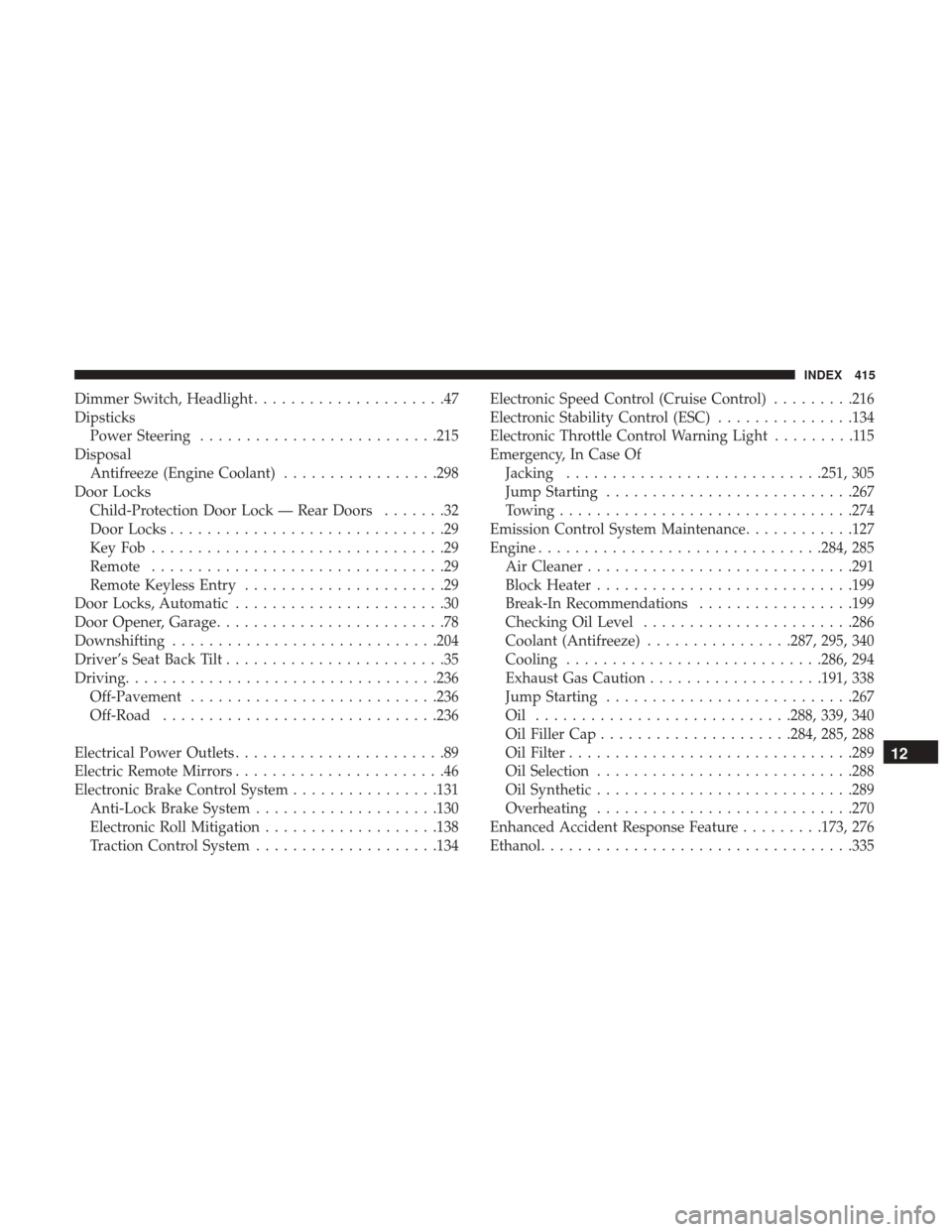
Dimmer Switch, Headlight.....................47
Dipsticks Power Steering ..........................215
Disposal Antifreeze (Engine Coolant) .................298
Door Locks Child-Protection Door Lock — Rear Doors .......32
Door Locks ..............................29
KeyFob................................29
Remote ................................29
Remote Keyless Entry ......................29
Door Locks, Automatic .......................30
Door Opener, Garage .........................78
Downshifting ............................ .204
Driver’s Seat Back Tilt ........................35
Driving ................................. .236
Off-Pavement .......................... .236
Off-Road ............................. .236
Electrical Power Outlets .......................89
Electric Remote Mirrors .......................46
Electronic Brake Control System ................131
Anti-Lock Brake System ....................130
Electronic Roll Mitigation ...................138
Traction Control System ....................134 Electronic Speed Control (Cruise Control)
.........216
Electronic Stability Control (ESC) ...............134
Electronic Throttle Control Warning Light .........115
Emergency, In Case Of Jacking ............................251, 305
Jump Starting .......................... .267
Towing ............................... .274
Emission Control System Maintenance ............127
Engine ...............................284, 285
Air Cleaner ............................ .291
Block Heater ............................199
Break-In Recommendations .................199
Checking Oil Level .......................286
Coolant (Antifreeze) ................287, 295, 340
Cooling ............................286, 294
Exhaust Gas Caution ...................191, 338
Jump Starting .......................... .267
Oil ............................288, 339, 340
Oil
Filler Cap .....................284, 285, 288
Oil Filter ...............................289
Oil Selection ............................288
Oil Synthetic ............................289
Overheating ............................270
Enhanced Accident Response Feature .........173, 276
Ethanol ................................. .335
12
INDEX 415
Page 419 of 429
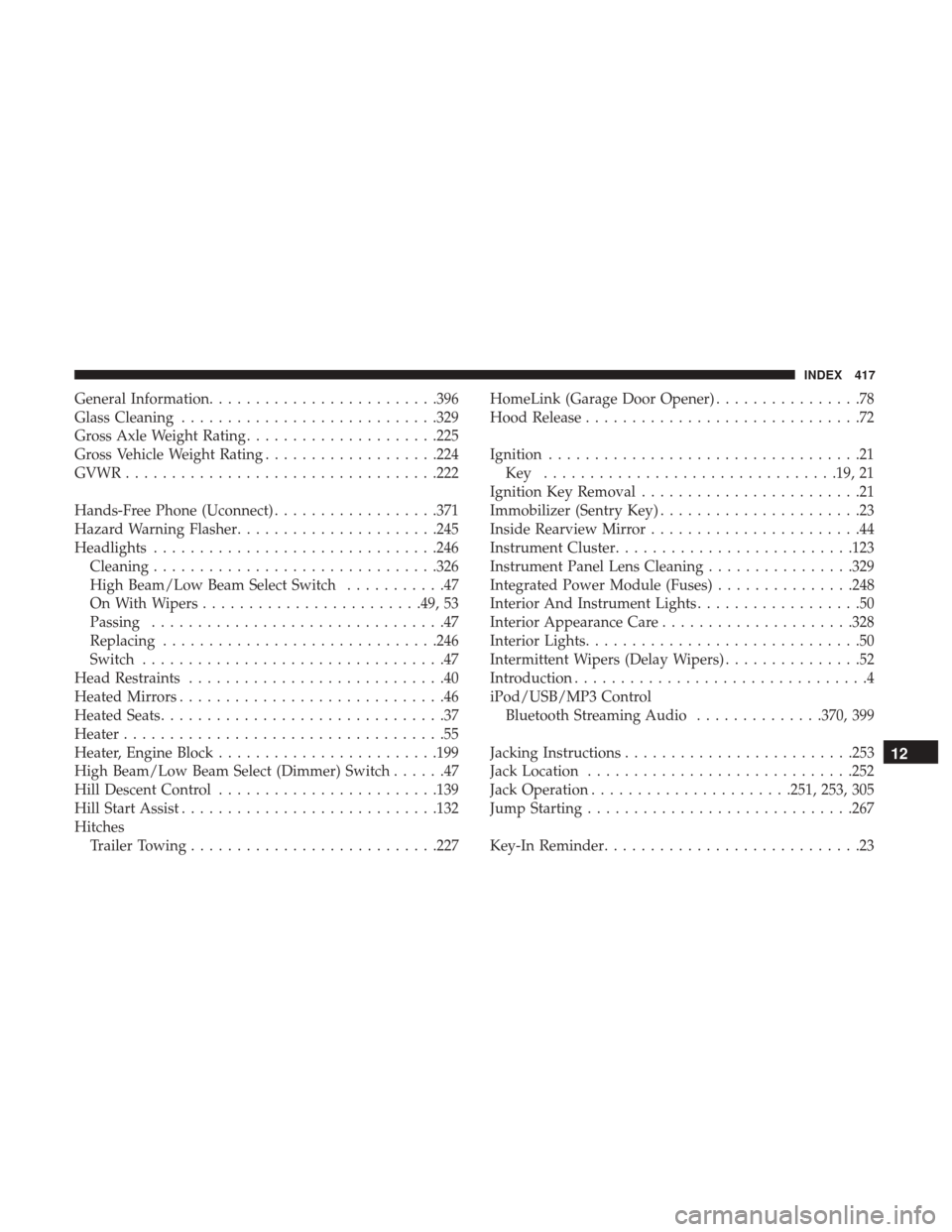
General Information........................ .396
Glass Cleaning ............................329
Gross Axle Weight Rating .....................225
Gross Vehicle Weight Rating ...................224
GVWR ................................. .222
Hands-Free Phone (Uconnect) ..................371
Hazard Warning Flasher ..................... .245
Headlights ...............................246
Cleaning ...............................326
High Beam/Low Beam Select Switch ...........47
On With Wipers ........................49, 53
Passing ................................47
Replacing ............................. .246
Switch .................................47
Head Restraints ............................40
Heated Mirrors .............................46
Heated Seats ...............................37
Heater ...................................55
Heater, Engine Block ........................199
High Beam/Low Beam Select (Dimmer) Switch ......47
Hill Descent Control ........................139
Hill Start Assist ............................132
Hitches Trailer Towing .......................... .227HomeLink (Garage Door Opener)
................78
Hood Release ..............................72
Ignition ..................................21
Key ................................19, 21
Ignition Key Removal ........................21
Immobilizer (Sentry Key) ......................23
Inside Rearview Mirror .......................44
Instrument Cluster ..........................123
Instrument Panel Lens Cleaning ................329
Integrated Power Module (Fuses) ...............248
Interior And Instrument Lights ..................50
Interior Appearance Care .....................328
Interior Lights ..............................50
Intermittent Wipers (Delay Wipers) ...............52
Introduction ................................4
iPod/USB/MP3 Control Bluetooth Streaming Audio ..............370, 399
Jacking Instructions ........................ .253
Jack Location ............................ .252
Jack Operation ..................... .251,
253, 305
Jump Starting ............................ .267
Key-In Reminder ............................2312
INDEX 417