ECU JEEP COMPASS 2018 Owner handbook (in English)
[x] Cancel search | Manufacturer: JEEP, Model Year: 2018, Model line: COMPASS, Model: JEEP COMPASS 2018Pages: 348, PDF Size: 6.03 MB
Page 13 of 348
GETTING TO KNOW YOUR VEHICLE
KEYS .....................13
Key Fobs....................13
IGNITION SWITCH............14
Keyless Enter-N-Go — Ignition.......14
Integrated/Manual Ignition — If
Equipped....................15
Vehicle On Message.............16
Mechanical Steering Wheel Lock — If
Equipped....................16
Electronic Steering Wheel Lock — If
Equipped....................17
REMOTE STARTING SYSTEM — IF
EQUIPPED.................17
How To Use Remote Start — If
Equipped....................17
To Enter Remote Start Mode........18
To Exit Remote Start Mode Without
Driving The Vehicle.............18
To Exit Remote Start Mode And Drive
The Vehicle...................18
SENTRY KEY................19
Replacement Keys..............19Customer Key Programming........19
VEHICLE SECURITY ALARM — IF
EQUIPPED.................19
Rearming Of The System..........20
To Arm The System.............20
To Disarm The System............20
Security System Manual Override.....21
PREMIUM VEHICLE SECURITY
ALARM — IF EQUIPPED........21
To Arm The System..............21
To Disarm The System............22
Security System Manual Override.....22
DOORS...................22
Keyless Enter-N-Go — Passive Entry . . .22
Child-Protection Door Lock System —
Rear Doors...................25
SEATS ....................25
Driver Memory Seat — If Equipped....25
Front Heated Seats — If Equipped....28
Front Ventilated Seats — If Equipped. . .2860/40 Split Folding Rear Seat With
Fold-Flat Feature...............29
40/20/40 Rear Seat Armrest— If
Equipped....................30
HEAD RESTRAINTS...........30
Front Head Restraint Adjustment.....31
Rear Head Restraints.............32
STEERING WHEEL...........33
Tilt/Telescoping Steering Column.....33
Heated Steering Wheel............33
MIRRORS..................34
Folding Mirrors................34
Heated Mirrors — If Equipped.......34
EXTERIOR LIGHTS...........34
Headlight Switch...............34
Daytime Running Lights (DRL) — If
Equipped...................35
High/Low Beam Switch...........35
Flash-To-Pass.................35
Automatic Headlights — If Equipped . .35
Headlight Time Delay............36
GETTING TO KNOW YOUR VEHICLE
11
Page 19 of 348
Electronic Steering Wheel Lock — If
Equipped
Your vehicle may be equipped with a passive
electronic steering wheel lock. This lock pre-
vents steering the vehicle with the ignition
OFF. The steering wheel lock releases with
the ignition ON. If the lock does not disen-
gage and the vehicle does not start, turn the
wheel to the left and right to disengage the
lock.
REMOTE STARTING
SYSTEM — IF EQUIPPED
• Push the remote start button
on the key fob twice within five
seconds. Pushing the remote
start button a third time shuts
the engine off.
• To drive the vehicle, push the START/STOP
button to turn the ignition to the ON/RUN
mode.
• With remote start, the engine will only run
for 15 minutes (timeout) unless the igni-
tion is placed in the ON/RUN mode.• The vehicle must be started with the key
after two consecutive timeouts.
WARNING!
• Do not start or run an engine in a closed
garage or confined area. Exhaust gas
contains Carbon Monoxide (CO) which is
odorless and colorless. Carbon Monox-
ide is poisonous and can cause serious
injury or death when inhaled.
• Keep key fobs away from children. Op-
eration of the Remote Start System, win-
dows, door locks or other controls could
cause serious injury or death.
How To Use Remote Start — If Equipped
Push remote start button on the key fob twice
within five seconds. Pushing the remote start
button a third time shuts the engine off.
To drive the vehicle, push unlock button,
insert the key in the ignition and turn to the
ON/RUN position.NOTE:
•With remote start, the engine will only run
for 15 minutes (timeout) unless the igni-
tion key is placed in the ON/RUN position.
•The vehicle must be started with the key
after two consecutive timeouts.
All of the following conditions must be met
before the engine will remote start:
•Gear selector in PARK
•Doors closed
•Hood closed
•Liftgate closed
•Hazard switch off
•Brake switch inactive (brake pedal not
pushed)
•Battery at an acceptable charge level
•Check engine light shall not be present
•System not disabled from previous remote
start event
•Vehicle alarm system indicator flashing
•Ignition in STOP/OFF position
•Fuel level meets minimum requirement
• Vehicle security alarm is not signaling an
intrusion
17
Page 20 of 348
WARNING!
• Do not start or run an engine in a closed
garage or confined area. Exhaust gas
contains Carbon Monoxide (CO) which is
odorless and colorless. Carbon Monox-
ide is poisonous and can cause serious
injury or death when inhaled.
• Keep key fobs away from children. Op-
eration of the Remote Start System, win-
dows, door locks or other controls could
cause serious injury or death.
To Enter Remote Start Mode
Push and release the remote start button on
the key fob twice within five seconds. The
vehicle doors will lock, the parking lights will
flash, and the horn will chirp twice (if pro-
grammed). Then, the engine will start, and
the vehicle will remain in the Remote Start
mode for a 15-minute cycle.
NOTE:
• If an engine fault is present or fuel level is
low, the vehicle will start and then shut
down in 10 seconds.• The park lamps will turn on and remain on
during Remote Start mode.
• For security, power window and power sun-
roof operation (if equipped) are disabled
when the vehicle is in the Remote Start
mode.
• The engine can be started two consecutive
times with the key fob. However, the igni-
tion must be cycled by pushing the START/
STOP button twice (or the ignition switch
must be cycled to the ON/RUN position)
before you can repeat the start sequence
for a third cycle.
To Exit Remote Start Mode Without
Driving The Vehicle
Push and release the remote start button one
time or allow the engine to run for the entire
15-minute cycle.
NOTE:
To avoid unintentional shutdowns, the sys-
tem will disable with a one time push of the
remote start button for two seconds after
receiving a valid remote start request.
To Exit Remote Start Mode And Drive The
Vehicle
Before the end of 15-minute cycle, push and
release the unlock button on the key fob to
unlock the doors and disarm the vehicle se-
curity alarm (if equipped). Then, prior to the
end of the 15-minute cycle, push and release
the START/STOP button. If the START/STOP
button is not present, insert the key fob into
the ignition switch and turn the switch to the
ON/RUN position.
NOTE:
• For vehicles not equipped with the Keyless
Enter-N-Go — Passive Entry feature, the
ignition switch must be in the ON/RUN
position in order to drive the vehicle.
• For vehicles not equipped with the Keyless
Enter-N-Go — Passive Entry feature, the
message “Remote Start Active — Insert
Key and Turn To Run” will show in the
instrument cluster display until you insert
the key.
GETTING TO KNOW YOUR VEHICLE
18
Page 21 of 348
• For vehicles equipped with the Keyless
Enter-N-Go — Passive Entry feature, the
message “Remote Start Active — Push
Start Button” will will show in the instru-
ment cluster display until you push the
START button.
SENTRY KEY
The Sentry Key Immobilizer system prevents
unauthorized vehicle operation by disabling
the engine. The system does not need to be
armed or activated. Operation is automatic,
regardless of whether the vehicle is locked or
unlocked.
CAUTION!
The Sentry Key Immobilizer system is not
compatible with some aftermarket remote
starting systems. Use of these systems
may result in vehicle starting problems
and loss of security protection.
All of the key fobs provided with your new
vehicle have been programmed to the vehicle
electronics.
Replacement Keys
NOTE:
Only key fobs that are programmed to the
vehicle electronics can be used to start and
operate the vehicle. Once a key fob is pro-
grammed to a vehicle, it cannot be pro-
grammed to any other vehicle.
CAUTION!
• Always remove the key fobs from the
vehicle and lock all doors when leaving
the vehicle unattended.
• For vehicles equipped with Keyless
Enter-N-Go — Ignition, always remem-
ber to place the ignition in the OFF
position.
NOTE:
Duplication of key fobs may be performed at
an authorized dealer. This procedure consists
of programming a blank key fob to the vehicle
electronics. A blank key fob is one that has
never been programmed.
When having the Sentry Key Immobilizer Sys-
tem serviced, bring all vehicle keys with you
to an authorized dealer.
Customer Key Programming
Programming key fobs may be performed at
your authorized dealer.
VEHICLE SECURITY ALARM
— IF EQUIPPED
The vehicle security alarm monitors the ve-
hicle doors, hood, liftgate, and the Keyless
Enter-N-Go — Ignition for unauthorized op-
eration. While the vehicle security alarm is
armed, interior switches for door locks and
liftgate release are disabled. If something
triggers the alarm, the vehicle security alarm
will provide the following audible and visible
signals:
• The horn will pulse
• The turn signals will flash
• The vehicle security light in the instrument
cluster will flash
19
Page 22 of 348
Rearming Of The System
If something triggers the alarm, and no action
is taken to disarm it, the vehicle security
alarm will turn the horn off after approxi-
mately 90 seconds, and then the vehicle
security alarm will rearm itself.
To Arm The System
Follow these steps to arm the vehicle security
alarm:
1. Make sure the vehicle’s ignition is placed
in the “OFF” mode.
• For vehicles equipped with Keyless En-
try, make sure the vehicle’s keyless
ignition system is OFF.
2. Perform one of the following methods to
lock the vehicle:
• Push the lock button on the interior
power door lock switch with the driver
and/or passenger door open.
• Push the lock button on the exterior
Passive Entry Door Handle with a valid
key fob available in the same exteriorzone, refer to "Doors" in "Getting To
Know Your Vehicle" in the Owner’s
Manual at for further information.
• Push the lock button on the exterior
Passive Entry Door Handle with a valid
key fob available in the same exterior
zone.
• Push the lock button on the key fob.
3. If any doors are open, close them.
To Disarm The System
The vehicle security alarm can be disarmed
using any of the following methods:
• Push the unlock button on the key fob.
• Grasp the passive entry door handle to
unlock the door, refer to "Doors" in "Getting
To Know Your Vehicle" in the Owner’s
Manual at for further information.
• Cycle the ignition out of the off mode to
disarm the system.
NOTE:
• The driver's door key cylinder and the lift-
gate button on the key fob cannot arm or
disarm the vehicle security alarm.• The vehicle security alarm remains armed
during power liftgate entry. Pushing the
liftgate button will not disarm the vehicle
security alarm. If someone enters the ve-
hicle through the liftgate and opens any
door, the alarm will sound.
• When the vehicle security alarm is armed,
the interior power door lock switches will
not unlock the doors.
The vehicle security alarm is designed to
protect your vehicle. However, you can create
conditions where the system will give you a
false alarm. If one of the previously described
arming sequences has occurred, the vehicle
security alarm will arm regardless of whether
you are in the vehicle or not. If you remain in
the vehicle and open a door, the alarm will
sound. If this occurs, disarm the vehicle
security alarm.
If the vehicle security alarm is armed and the
battery becomes disconnected, the vehicle
security alarm will remain armed when the
battery is reconnected; the exterior lights will
flash, and the horn will sound. If this occurs,
disarm the vehicle security alarm.
GETTING TO KNOW YOUR VEHICLE
20
Page 23 of 348
Security System Manual Override
The vehicle security alarm will not arm if you
lock the doors using the manual door lock
plunger.
PREMIUM VEHICLE
SECURITY ALARM — IF
EQUIPPED
The premium vehicle security alarm system
monitors the doors, hood latch, and liftgate
for unauthorized entry and the ignition switch
for unauthorized operation. The system also
includes a dual function intrusion sensor and
vehicle tilt sensor. The intrusion sensor moni-
tors the vehicle interior for motion. The ve-
hicle tilt sensor monitors the vehicle for any
tilting actions (tow away, tire removal, ferry
transport, etc). A siren with battery backup
which senses interruptions of power and
communications is also included.
If a perimeter violation triggers the security
system, the siren will sound for 29 seconds
and the exterior lights will flash followed byapproximately five seconds of no activity.
This will continue for eight cycles if no action
is taken to disarm the system.
To Arm The System
Follow these steps to arm the security alarm:
1. Remove the key from the ignition system,
refer to "Starting The Engine" in "Starting
And Operating" in your Owner’s manual
for further information.
• For vehicles equipped with Keyless
Enter-N-Go — Passive Entry, make
sure the vehicle ignition system is
"OFF."
• For vehicles not equipped with Keyless
Enter-N-Go — Passive Entry, make
sure the vehicle ignition system is
"OFF" and the key is physically re-
moved from the ignition.
2. Perform one of the following methods to
lock the vehicle:
• Push lock on the interior power door
lock switch with the driver and/or pas-
senger door open.• Push the lock button on the exterior
passive entry door handle with a key
fob available in the same exterior zone,
refer to "Doors" in "Getting To Know
Your Vehicle" in your Owner’s Manua
for further information.
• Push the lock button on the key fob.
3. If any doors are open, close them.
NOTE:
• Once the security system is armed, it re-
mains in that state until you disarm it by
following either of the disarming proce-
dures described. If a power loss occurs
after arming the system, you must disarm
the system after restoring power to prevent
alarm activation.
• The ultrasonic intrusion sensor (motion de-
tector) actively monitors your vehicle every
time you arm the security system. If you
prefer, you can turn off the ultrasonic intru-
sion sensor when arming the security sys-
tem. To do so, push the lock button on the
key fob five times within five seconds of
arming the system (while the Vehicle Secu-
rity Light is flashing rapidly).
21
Page 24 of 348
To Disarm The System
The vehicle security alarm can be disarmed
using any of the following methods:
• Push the unlock button on the key fob.
• Grasp the passive entry door handle to
unlock the door, refer to "Doors" in "Getting
To Know Your Vehicle" in your Owner’s
Manual for further information).
• Cycle the vehicle ignition system out of the
OFF position.
– For vehicles equipped with Keyless
Enter-N-Go — Passive Entry, push the
Start/Stop ignition button (requires at
least one valid key fob in the vehicle).
– For vehicles not equipped with Keyless
Enter-N-Go — Passive Entry, insert a
valid Integrated Vehicle Key into the
ignition switch and turn the key to the
ON position.
NOTE:
• The driver's door key cylinder and the lift-
gate button on the key fob cannot arm or
disarm the vehicle security alarm.
• The vehicle security alarm remains armed
during power liftgate entry. Pushing theliftgate button will not disarm the vehicle
security alarm. If someone enters the ve-
hicle through the liftgate and opens any
door the alarm will sound.
• When the vehicle security alarm is armed,
the interior power door lock switches will
not unlock the doors.
• The ultrasonic intrusion sensor (motion de-
tector) actively monitors your vehicle every
time you arm the security system. If you
prefer, you can turn off the ultrasonic intru-
sion sensor when arming the security sys-
tem. To do so, push the lock button on the
key fob five times within five seconds of
arming the system (while the vehicle secu-
rity light is flashing rapidly).
The vehicle security alarm is designed to
protect your vehicle; however, you can create
conditions where the system will give you a
false alarm. If one of the previously described
arming sequences has occurred, the vehicle
security alarm will arm regardless of whether
you are in the vehicle or not. If you remain in
the vehicle and open a door, the alarm will
sound. If this occurs, disarm the vehicle
security alarm.If the vehicle security alarm is armed and the
battery becomes disconnected, the vehicle
security alarm will remain armed when the
battery is reconnected; the exterior lights will
flash, the horn will sound. If this occurs,
disarm the vehicle security alarm.
Security System Manual Override
The system will not arm if you lock the doors
using the manual door lock plunger.
DOORS
Keyless Enter-N-Go — Passive Entry
The Passive Entry system is an enhancement
to the vehicle’s Remote Keyless Entry system
and a feature of Keyless Enter-N-Go — Pas-
sive Entry. This feature allows you to lock and
unlock the vehicle’s door(s) and fuel door
without having to push the key fob lock or
unlock buttons.
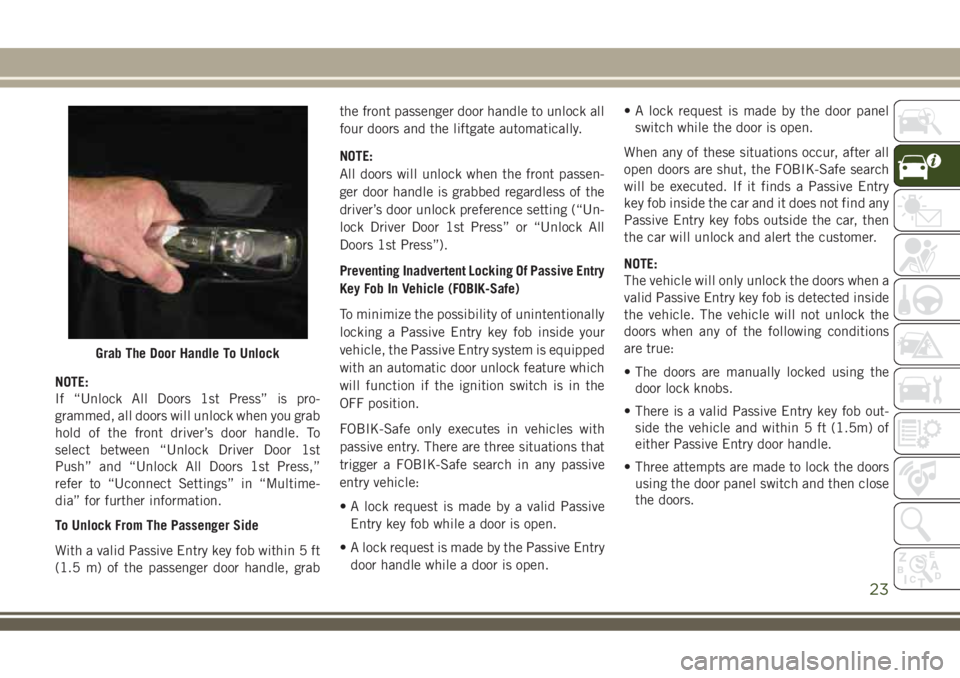
To Unlock From The Driver's Side
With a valid Passive Entry key fob within 5 ft
(1.5 m) of the driver's door handle, grab the
front driver door handle to unlock the driver's
door automatically.
GETTING TO KNOW YOUR VEHICLE
22
Page 25 of 348
NOTE:
If “Unlock All Doors 1st Press” is pro-
grammed, all doors will unlock when you grab
hold of the front driver’s door handle. To
select between “Unlock Driver Door 1st
Push” and “Unlock All Doors 1st Press,”
refer to “Uconnect Settings” in “Multime-
dia” for further information.
To Unlock From The Passenger Side
With a valid Passive Entry key fob within 5 ft
(1.5 m) of the passenger door handle, grabthe front passenger door handle to unlock all
four doors and the liftgate automatically.
NOTE:
All doors will unlock when the front passen-
ger door handle is grabbed regardless of the
driver’s door unlock preference setting (“Un-
lock Driver Door 1st Press” or “Unlock All
Doors 1st Press”).
Preventing Inadvertent Locking Of Passive Entry
Key Fob In Vehicle (FOBIK-Safe)
To minimize the possibility of unintentionally
locking a Passive Entry key fob inside your
vehicle, the Passive Entry system is equipped
with an automatic door unlock feature which
will function if the ignition switch is in the
OFF position.
FOBIK-Safe only executes in vehicles with
passive entry. There are three situations that
trigger a FOBIK-Safe search in any passive
entry vehicle:
• A lock request is made by a valid Passive
Entry key fob while a door is open.
• A lock request is made by the Passive Entry
door handle while a door is open.• A lock request is made by the door panel
switch while the door is open.
When any of these situations occur, after all
open doors are shut, the FOBIK-Safe search
will be executed. If it finds a Passive Entry
key fob inside the car and it does not find any
Passive Entry key fobs outside the car, then
the car will unlock and alert the customer.
NOTE:
The vehicle will only unlock the doors when a
valid Passive Entry key fob is detected inside
the vehicle. The vehicle will not unlock the
doors when any of the following conditions
are true:
• The doors are manually locked using the
door lock knobs.
• There is a valid Passive Entry key fob out-
side the vehicle and within 5 ft (1.5m) of
either Passive Entry door handle.
• Three attempts are made to lock the doors
using the door panel switch and then close
the doors.
Grab The Door Handle To Unlock
23
Page 32 of 348
To Lower The Rear Seat
1. Pull the seatback release lever located on
either side of the upper outer edge of the
seat.
2. Fold that side of the rear seatback com-
pletely forward.
To Raise The Rear Seat
NOTE:
If interference from the cargo area prevents
the seatback from fully locking, you will have
difficulty returning the seat to its proper
position.
Raise the seatback and lock it into place.
The release lever will show a red indicator
while in the unlocked position. Once the seat
is locked in, the red indicator will no longer
be visible.
WARNING!
Be certain that the seatback is securely
locked into position. If the seatback is not
WARNING!
securely locked into position the seat will
not provide the proper stability for child
seats and/or passengers. An improperly
latched seat could cause serious injury.
40/20/40 Rear Seat Armrest— If Equipped
The center part of the rear seat can also be
used as a rear armrest with cup holders, pull
the rear armrest tab to release it from the seat
and pull forward.
WARNING!
Be certain that the seatback is securely
locked into position. If the seatback is not
securely locked into position the seat will
not provide the proper stability for child
seats and/or passengers. An improperly
latched seat could cause serious injury.
HEAD RESTRAINTS
Head restraints are designed to reduce the
risk of injury by restricting head movement inthe event of a rear impact. Head restraints
should be adjusted so that the top of the head
restraint is located above the top of your ear.
WARNING!
• All occupants, including the driver,
should not operate a vehicle or sit in a
vehicle’s seat until the head restraints
are placed in their proper positions in
order to minimize the risk of neck injury
in the event of a crash.
• Head restraints should never be ad-
justed while the vehicle is in motion.
Driving a vehicle with the head restraints
improperly adjusted or removed could
cause serious injury or death in the
event of a collision.
NOTE:
Do not reverse the head restraints (making
the rear of the head restraint face forward) in
an attempt to gain additional clearance to the
back of your head.
GETTING TO KNOW YOUR VEHICLE
30
Page 54 of 348
Closing Power Shade — Express
Pull the switch and release it within one-half
second and the shade will close automati-
cally from any position. If the sunroof is
completely closed the shade will close fully
and stop automatically. This is called “Ex-
press Close”. During Express Close opera-
tion, any movement of the switch will stop
the shade.
NOTE:
If the sunroof is open, the shade will close to
the half-open position. Pulling the shade
close button again will automatically close
both the sunroof and shade completely.
Closing Power Shade — Manual Mode
To close the shade, pull and hold the switch
in the close position. Any release of the
switch will stop the movement and the shade
will remain in a partially closed condition
until the switch is pulled again.
Pinch Protection Feature
This feature will detect an obstruction in the
opening of the sunroof during Express Close
operation. If an obstruction in the path of the
sunroof is detected, the sunroof will auto-
matically retract. Remove the obstruction if
this occurs. Next, push the switch forward
and release to Express Close.
NOTE:
If three consecutive sunroof close attempts
result in Pinch Protect reversals, the fourth
close attempt will be a Manual Close move-
ment with Pinch Protect disabled.
WARNING!
• Do not let children play with the sunroof.
Never leave children unattended in a
vehicle, or with access to an unlocked
vehicle. Do not leave the key fob in or
near the vehicle, and do not leave the
ignition of a vehicle equipped with Key-
WARNING!
less Enter-N-Go in the ACC or ON/RUN
mode. Occupants, particularly unat-
tended children, can become entrapped
by the power sunroof while operating the
power sunroof switch. Such entrapment
may result in serious injury or death.
• In a collision, there is a greater risk of
being thrown from a vehicle with an
open sunroof. You could also be severely
injured or killed. Always fasten your seat
belt properly and make sure all passen-
gers are properly secured.
• Do not allow small children to operate
the sunroof. Never allow your fingers,
other body parts, or any object to project
through the sunroof opening. Injury may
result.
Sunroof Maintenance
Use only a non-abrasive cleaner and a soft
cloth to clean the glass panel.
GETTING TO KNOW YOUR VEHICLE
52