door lock JEEP COMPASS 2019 Owner handbook (in English)
[x] Cancel search | Manufacturer: JEEP, Model Year: 2019, Model line: COMPASS, Model: JEEP COMPASS 2019Pages: 362, PDF Size: 6.23 MB
Page 145 of 362
2. Push the ENGINE START/STOP button a
second time to change the ignition switch
to the OFF mode.
Stopping The Engine
Vehicles Equipped With A Mechanical Key Fob:
To turn off the engine, proceed as follows:
1. Park the car in a position that does not
cause a traffic hazard.
2. Place the transmission in gear (models
with a manual transmission) or place the
transmission in PARK (P) (models with
automatic transmission).
3. With the engine idling, place the ignition
in the STOP/OFF position.
4. Remove the key from the ignition when
the engine is shut off.
Vehicles Equipped With Electronic Key
(Keyless Ignition):
To shut off the engine with vehicle speed
greater than 5 mph (8 km/h), you must push
and hold the START/STOP button or push theSTART/STOP button three times consecu-
tively within a few seconds. The engine will
shut down, and the ignition will be placed in
the RUN position.
Turning Off the car (placing the ignition from
the RUN position to the STOP position), the
power supply to the accessories are main-
tained for a period of three minutes.
Opening the driver side door with the ignition
in RUN will sound a short chime that reminds
the driver to place the ignition to STOP.
When the ignition is in the STOP/OFF posi-
tion, the window switches remains active for
three minutes. Opening a front door will can-
cel this function.
After severe driving, idle the engine to allow
the temperature inside the engine compart-
ment to cool before shutting off the engine.
Normal Starting — Diesel Engine
Before starting your vehicle, adjust your seat,
both inside and outside mirrors, and fasten
your seat belts.The starter is allowed to crank for up to
30-second intervals. Waiting a few minutes
between such intervals will protect the starter
from overheating.
WARNING!
• Before exiting a vehicle, always come to
a complete stop, then shift the auto-
matic transmission into PARK and apply
the parking brake.
• Always make sure the keyless ignition
node is in the OFF mode, key fob is
removed from the vehicle and vehicle is
locked.
• Never leave children alone in a vehicle,
or with access to an unlocked vehicle.
Leaving children in a vehicle unattended
is dangerous for a number of reasons. A
child or others could be seriously or
fatally injured. Children should be
warned not to touch the parking brake,
brake pedal or the gear selector.
• Do not leave the key fob in or near the
vehicle, or in a location accessible to
children, and do not leave the ignition of
a vehicle equipped with Keyless Enter-
143
Page 176 of 362
To disable the ParkSense Active Park Assist
system, push the ParkSense Active Park As-
sist switch again (LED turns off).
The ParkSense Active Park Assist system will
turn off automatically for any of the following
conditions:
• The parking maneuver is completed.
• Vehicle speed greater than 18 mph
(30 km/h) when searching for a parking
space.
• Vehicle speed greater than 5 mph (7 km/h)
during active steering guidance into the
parking space.
• Touching the steering wheel during active
steering guidance into the parking space.
• Pushing the ParkSense Front and Rear Park
Assist switch.
• Driver's door is opened.
• Rear liftgate is opened.
• Electronic Stability Control/Anti-lock Brak-
ing System intervention.• The ParkSense Active Park Assist system
will allow a maximum number of shifts
between DRIVE and REVERSE. If the ma-
neuver cannot be completed within the
maximum amount of shifts, the system will
cancel and the instrument cluster display
will instruct the driver to complete the
maneuver manually.
The ParkSense Active Park Assist system will
only operate and search for a parking space
when the following conditions are present:
• Gear position is in DRIVE.
• Ignition is in the RUN position.
• ParkSense Active Park Assist switch is ac-
tivated.
• Driver's door is closed.
• Rear liftgate is closed.
• Vehicle speed is less than 15 mph
(25 km/h).NOTE:
If the vehicle is driven above approximately
15 mph (25 km/h), the instrument cluster
display will instruct the driver to slow down.
If the vehicle is driven above approximately
18 mph (30 km/h), the system will cancel.
The driver must then reactivate the system
by pushing the ParkSense Active Park As-
sist switch.
• The outer surface and the underside of the
front and rear fascias/bumpers are clean
and clear of snow, ice, mud, dirt or other
obstruction.
When pushed, the LED on the ParkSense
Active Park Assist switch will blink momen-
tarily, and then the LED will turn off if any of
the above conditions are not present.
Exiting The Parking Space
NOTE:
The function does not work for exiting a
perpendicular parking space, but only exiting
parallel parking spaces.
STARTING AND OPERATING
174
Page 182 of 362
REFUELING THE VEHICLE
The Capless Fuel System uses a flapper
placed at the filler pipe of the fuel tank; it
opens and closes automatically upon
insertion/extraction of the fuel nozzle. In cer-
tain countries, the Capless Fuel System is
designed so that it prevents the filling of an
incorrect type of fuel.
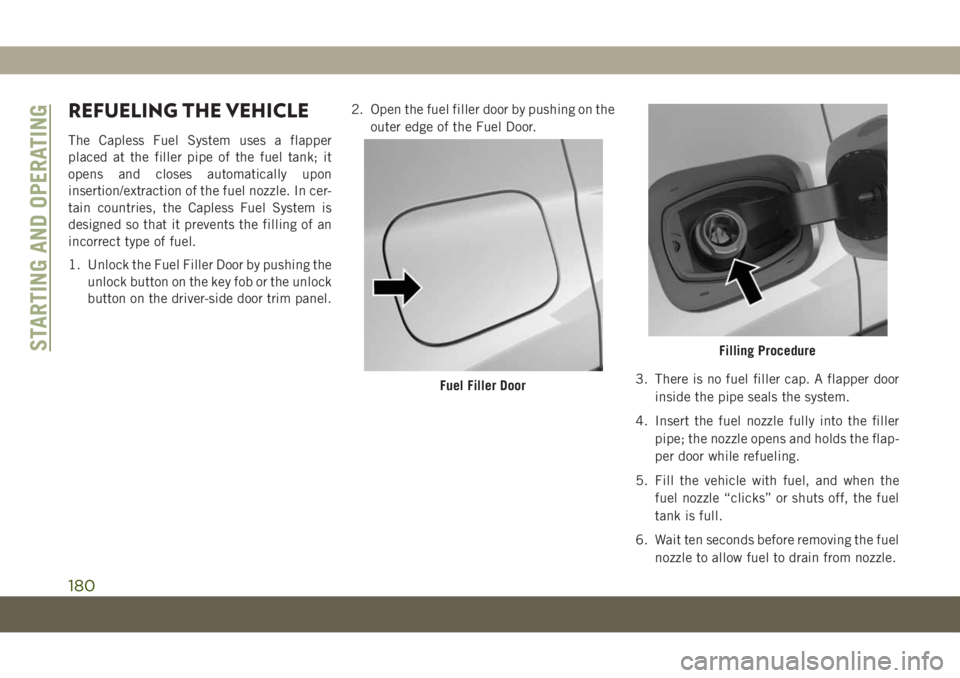
1. Unlock the Fuel Filler Door by pushing the
unlock button on the key fob or the unlock
button on the driver-side door trim panel.2. Open the fuel filler door by pushing on the
outer edge of the Fuel Door.
3. There is no fuel filler cap. A flapper door
inside the pipe seals the system.
4. Insert the fuel nozzle fully into the filler
pipe; the nozzle opens and holds the flap-
per door while refueling.
5. Fill the vehicle with fuel, and when the
fuel nozzle “clicks” or shuts off, the fuel
tank is full.
6. Wait ten seconds before removing the fuel
nozzle to allow fuel to drain from nozzle.
Fuel Filler Door
Filling ProcedureSTARTING AND OPERATING
180
Page 184 of 362
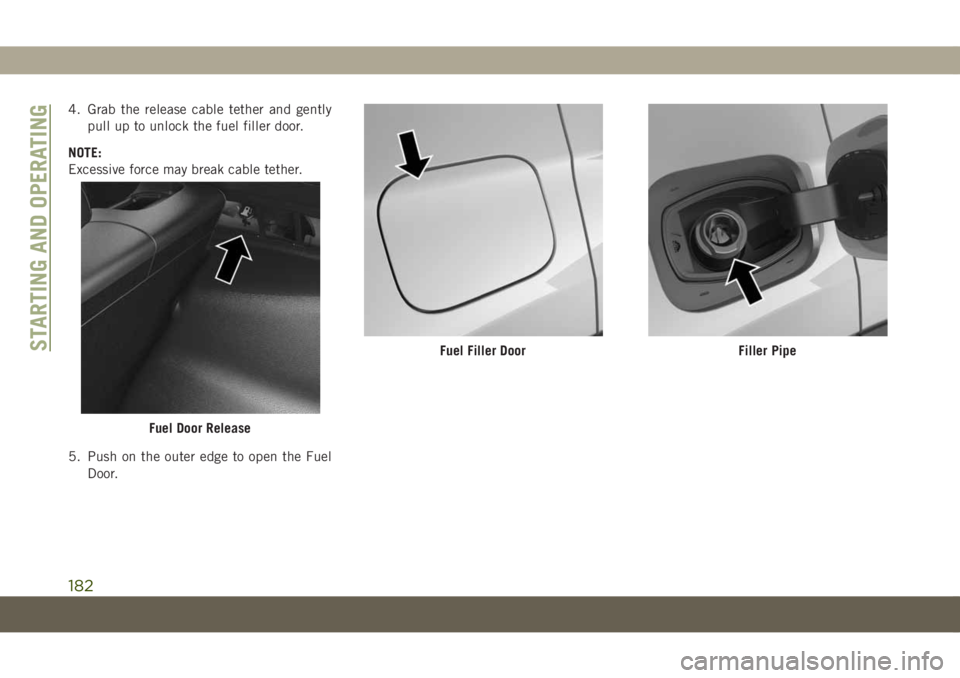
4. Grab the release cable tether and gently
pull up to unlock the fuel filler door.
NOTE:
Excessive force may break cable tether.
5. Push on the outer edge to open the Fuel
Door.
Fuel Door Release
Fuel Filler DoorFiller PipeSTARTING AND OPERATING
182
Page 185 of 362
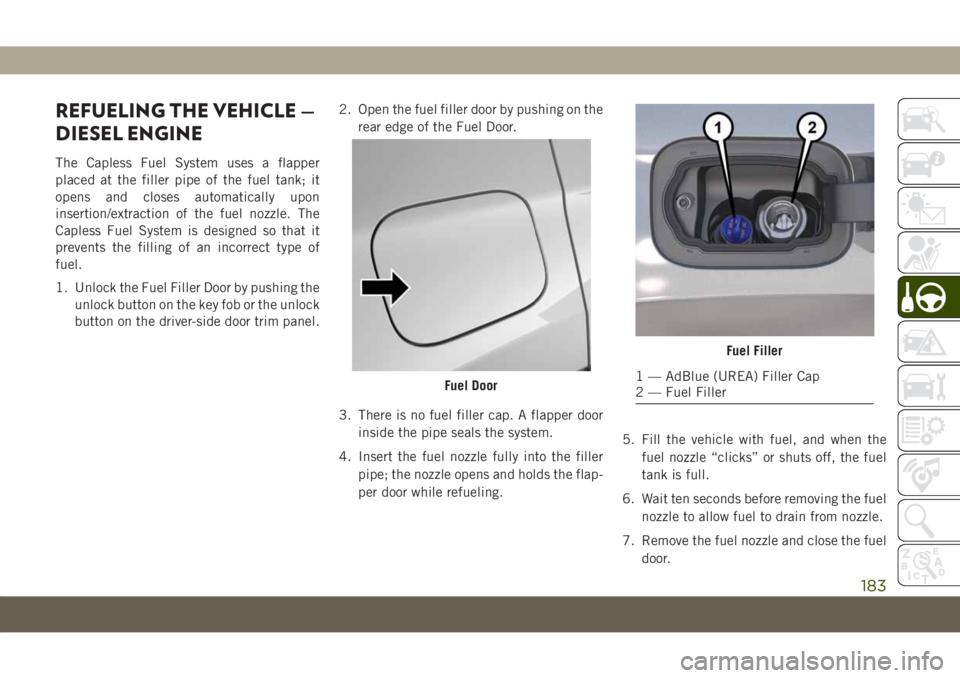
REFUELING THE VEHICLE —
DIESEL ENGINE
The Capless Fuel System uses a flapper
placed at the filler pipe of the fuel tank; it
opens and closes automatically upon
insertion/extraction of the fuel nozzle. The
Capless Fuel System is designed so that it
prevents the filling of an incorrect type of
fuel.
1. Unlock the Fuel Filler Door by pushing the
unlock button on the key fob or the unlock
button on the driver-side door trim panel.2. Open the fuel filler door by pushing on the
rear edge of the Fuel Door.
3. There is no fuel filler cap. A flapper door
inside the pipe seals the system.
4. Insert the fuel nozzle fully into the filler
pipe; the nozzle opens and holds the flap-
per door while refueling.5. Fill the vehicle with fuel, and when the
fuel nozzle “clicks” or shuts off, the fuel
tank is full.
6. Wait ten seconds before removing the fuel
nozzle to allow fuel to drain from nozzle.
7. Remove the fuel nozzle and close the fuel
door.
Fuel Door
Fuel Filler
1 — AdBlue (UREA) Filler Cap
2 — Fuel Filler
183
Page 207 of 362
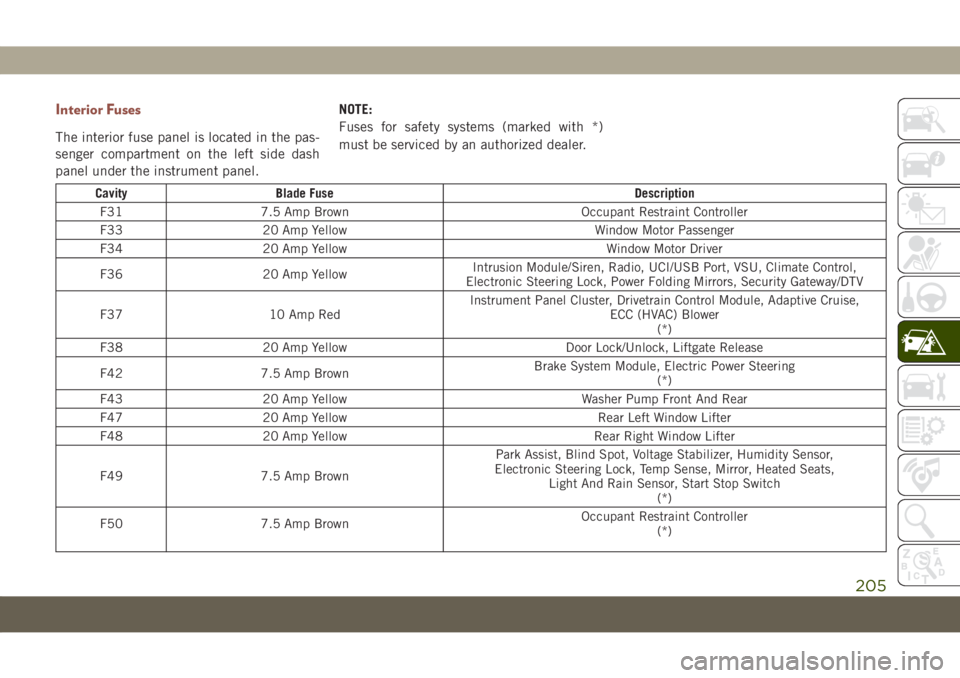
Interior Fuses
The interior fuse panel is located in the pas-
senger compartment on the left side dash
panel under the instrument panel.NOTE:
Fuses for safety systems (marked with *)
must be serviced by an authorized dealer.
Cavity Blade Fuse Description
F31 7.5 Amp Brown Occupant Restraint Controller
F33 20 Amp Yellow Window Motor Passenger
F34 20 Amp Yellow Window Motor Driver
F36 20 Amp YellowIntrusion Module/Siren, Radio, UCI/USB Port, VSU, Climate Control,
Electronic Steering Lock, Power Folding Mirrors, Security Gateway/DTV
F37 10 Amp RedInstrument Panel Cluster, Drivetrain Control Module, Adaptive Cruise,
ECC (HVAC) Blower
(*)
F38 20 Amp Yellow Door Lock/Unlock, Liftgate Release
F42 7.5 Amp BrownBrake System Module, Electric Power Steering
(*)
F43 20 Amp Yellow Washer Pump Front And Rear
F47 20 Amp Yellow Rear Left Window Lifter
F48 20 Amp Yellow Rear Right Window Lifter
F49 7.5 Amp BrownPark Assist, Blind Spot, Voltage Stabilizer, Humidity Sensor,
Electronic Steering Lock, Temp Sense, Mirror, Heated Seats,
Light And Rain Sensor, Start Stop Switch
(*)
F50 7.5 Amp BrownOccupant Restraint Controller
(*)
205
Page 230 of 362
CAUTION!
• Towing this vehicle in violation of the
above requirements can cause severe
transmission and/or transfer case dam-
age. Damage from improper towing is
not covered under the New Vehicle Lim-
ited Warranty.
• Proper towing or lifting equipment is
required to prevent damage to your ve-
hicle. Use only tow bars and other equip-
ment designed for this purpose, following
equipment manufacturer's instructions.
• Use of safety chains in mandatory. At-
tach a tow bar or other towing devices to
main structural members of the vehicle,
not to bumpers or associated brackets.
Emergency Tow Hooks
If your vehicle is equipped with tow hooks,
there will be one in the rear and two mounted
on the front of the vehicle. The rear hook will
be located on the driver's side of the vehicle.
NOTE:
For off-road recovery, it is recommended to
use both of the front tow hooks to minimize
the risk of damage to the vehicle.
Vehicles Equipped With Key Fob With
An Integrated Vehicle Key
Turn the ignition key to the ON/RUN and then
the OFF/LOCK position, without removing it.
By extracting the key this will automatically
engage the steering wheel lock. Place the
transmission into NEUTRAL.Vehicles With Keyless Enter-N-Go
Place the ignition in the ON/RUN position,
and subsequently in OFF/LOCK, without
opening the door. During towing, remember
that not having the aid of the power brakes
and the electromechanical power steering
will require greater force when applying the
brakes and steering of the vehicle.
WARNING!
• Do not use a chain for freeing a stuck
vehicle. Chains may break, causing seri-
ous injury or death.
• Stand clear of vehicles when pulling
with tow hooks. Tow straps may become
disengaged, causing serious injury.
CAUTION!
Tow hooks are for emergency use only, to
rescue a vehicle stranded off road. Do not
use tow hooks for tow truck hookup or
highway towing. You could damage your
vehicle.
IN CASE OF EMERGENCY
228
Page 290 of 362
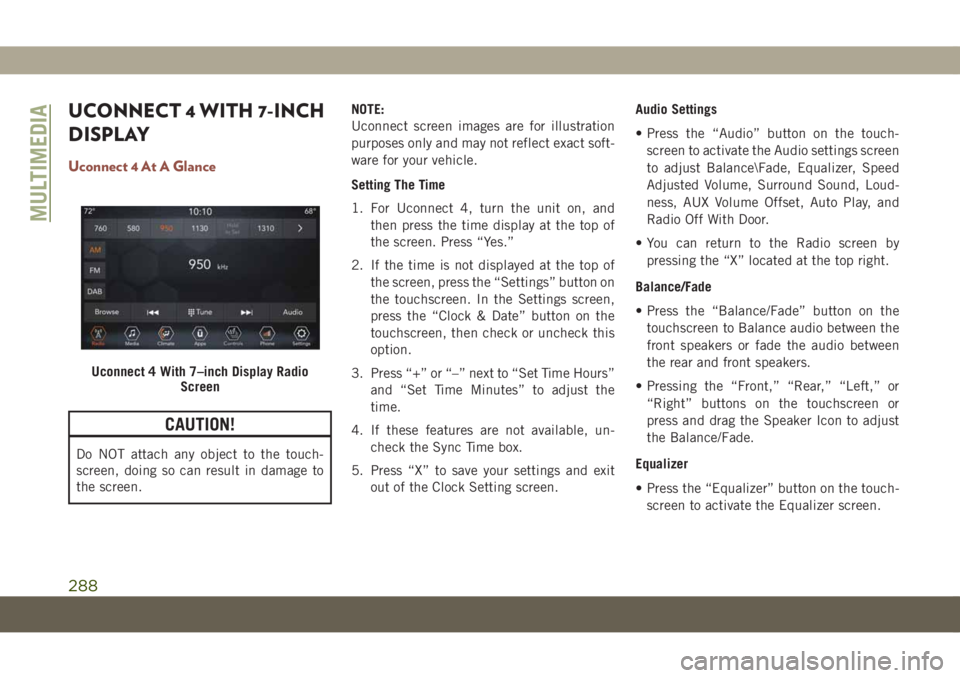
UCONNECT 4 WITH 7-INCH
DISPLAY
Uconnect 4 At A Glance
CAUTION!
Do NOT attach any object to the touch-
screen, doing so can result in damage to
the screen.NOTE:
Uconnect screen images are for illustration
purposes only and may not reflect exact soft-
ware for your vehicle.
Setting The Time
1. For Uconnect 4, turn the unit on, and
then press the time display at the top of
the screen. Press “Yes.”
2. If the time is not displayed at the top of
the screen, press the “Settings” button on
the touchscreen. In the Settings screen,
press the “Clock & Date” button on the
touchscreen, then check or uncheck this
option.
3. Press “+” or “–” next to “Set Time Hours”
and “Set Time Minutes” to adjust the
time.
4. If these features are not available, un-
check the Sync Time box.
5. Press “X” to save your settings and exit
out of the Clock Setting screen.Audio Settings
• Press the “Audio” button on the touch-
screen to activate the Audio settings screen
to adjust Balance\Fade, Equalizer, Speed
Adjusted Volume, Surround Sound, Loud-
ness, AUX Volume Offset, Auto Play, and
Radio Off With Door.
• You can return to the Radio screen by
pressing the “X” located at the top right.
Balance/Fade
• Press the “Balance/Fade” button on the
touchscreen to Balance audio between the
front speakers or fade the audio between
the rear and front speakers.
• Pressing the “Front,” “Rear,” “Left,” or
“Right” buttons on the touchscreen or
press and drag the Speaker Icon to adjust
the Balance/Fade.
Equalizer
• Press the “Equalizer” button on the touch-
screen to activate the Equalizer screen.
Uconnect 4 With 7–inch Display Radio
Screen
MULTIMEDIA
288
Page 309 of 362
UCONNECT SETTINGS
The Uconnect system allows you to access
Customer Programmable feature settings
such as Display, Units, Voice, Clock, Safety &
Driving Assistance, Lights, Doors & Locks,
Auto-On Comfort, Engine Off Options, Audio,
Phone/Bluetooth, Restore Settings, Clear
Personal Data, and System Information
through buttons on the touchscreen.
Push the SETTINGS button (Uconnect
3 With 5–inch Display and Uconnect 4 With
7–inch Display), or press the “Apps” button
(Uconnect 4C/4C NAV With 8.4–inch Dis-
play) located near the bottom of the touch-
screen, then press the “Settings” button on
the touchscreen to access the Settings
screen. When making a selection, scroll up or
down until the preferred setting is high-
lighted, then press the preferred setting until
a check-mark appears next to the setting,
showing that setting has been selected.The following feature settings are available:• Language • Auto-On Comfort
& Remote Start
— If Equipped
• Display • Engine Off
Options
• Units • Audio
• Voice • Radio Setup
• Clock or
Time & Date• Phone/Bluetooth
• Safety & Driving
Assistance• Restore Settings
• Brakes • Clear Personal
Data
• Lights • System
Information
• Doors & Locks
NOTE:
Depending on the vehicles options, feature
settings may vary.
Refer to “Uconnect Settings” in “Multimedia”
in the Owner’s Manual for further information.
TIPS CONTROLS AND
GENERAL INFORMATION
Steering Wheel Audio Controls
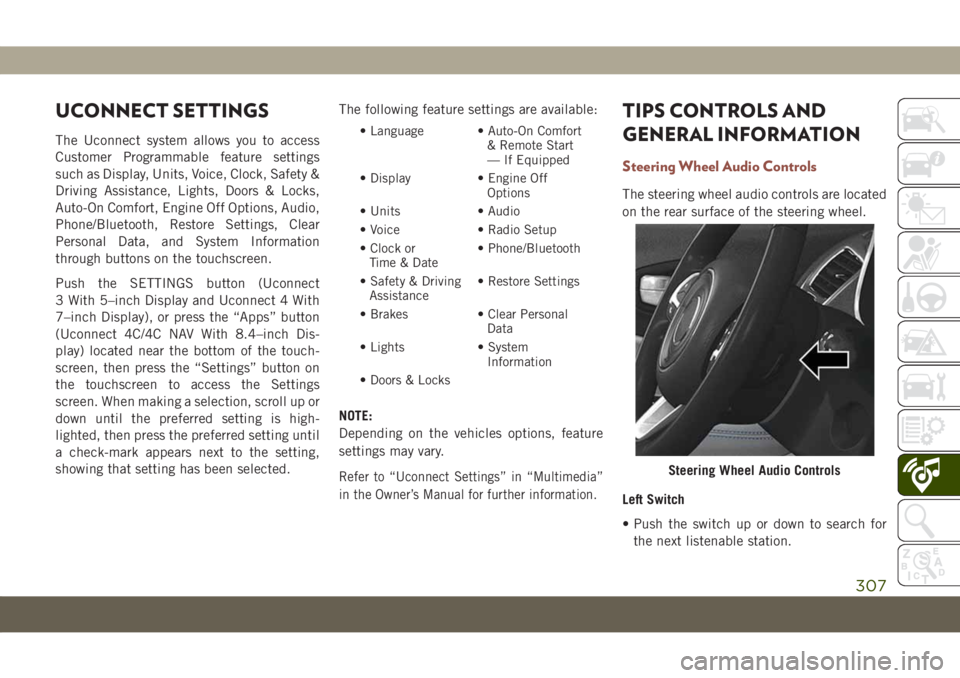
The steering wheel audio controls are located
on the rear surface of the steering wheel.
Left Switch
• Push the switch up or down to search for
the next listenable station.
Steering Wheel Audio Controls
307
Page 352 of 362
Bulbs, Light.................140
Camera, Rear................179
Capacities, Fluid..............274
Caps, Filler
Fuel....................180
Oil (Engine)...............240
Radiator (Coolant Pressure)......247
Carbon Monoxide Warning.....138, 272
Car Washes..................260
Chains, Tire..................257
Change Oil Indicator.............61
Changing A Flat Tire.........208, 250
Check Engine Light (Malfunction
Indicator Light)..............77
Checking Your Vehicle For Safety. . . .138
Checks, Safety................138
Child Safety Locks..............23
Cleaning
Windshield Wiper Blades.......245
Climate Control................39
Clock Settings................284
Compact Spare Tire.............256
Computer, Trip/Travel.............64
Cooling Pressure Cap (Radiator Cap) . .247
Cooling System...............247
Coolant Level..............247Cooling Capacity............274
Pressure Cap...............247
Radiator Cap...............247
Selection Of Coolant
(Antifreeze)............274, 276
Cruise Light.............74, 75, 76
Customer Assistance............332
Customer Programmable Features. . . .307
Cybersecurity.................282
Daytime Running Lights........33, 34
Dealer Service................245
Defroster, Windshield............139
Diagnostic System, Onboard........76
Diesel Fuel.................
.272
Diesel Fuel Requirements
.........272
Dimmer Switch
Headlight...............33, 34
Dipsticks
Oil (Engine)...............243
Disabled Vehicle Towing..........226
Do Not Disturb............320, 329
Door Ajar.................66, 67
Door Ajar Light..............66, 67
Drag And Drop Menu............289
Driver’s Seat Back Tilt............24Easy Entry Seats...............27
Electrical Outlet, Auxiliary
(Power Outlet)...............56
Electric Brake Control System.......80
Anti-Lock Brake System.........79
Traction Control System.........80
Electric Parking Brake...........145
Electronic Speed Control
(Cruise Control)..............163
Electronic Stability Control (ESC).....82
Electronic Throttle Control
Warning Light...............66
Emergency, In Case Of
Hazard Warning Flasher........193
Jacking...............208, 250
Jump Starting..............220
Tow Hooks................228
Towing...................226
Emission Control System
Maintenance................77
Emissions...................280
Engine.....................240
Checking Oil Level...........243
Coolant (Antifreeze)..........276
Cooling..................247
Exhaust Gas Caution.......138, 272
Jump Starting..............220
INDEX
350