reset JEEP COMPASS 2019 Owner handbook (in English)
[x] Cancel search | Manufacturer: JEEP, Model Year: 2019, Model line: COMPASS, Model: JEEP COMPASS 2019Pages: 362, PDF Size: 6.23 MB
Page 312 of 362
Finding Points Of Interest
1. From the main Navigation menu, press
the “Where To?” button on the touch-
screen, then press the “Points of Interest”
button on the touchscreen.
2. Select a category and then a subcategory,
if necessary.
3. Select your destination and then select
“Route To” and then press the “GO!”
button on the touchscreen.
Finding A Place By Spelling The Name
• From the Main Navigation Menu press the
“Where to?” button on the touchscreen,
press the “POI” button on the touchscreen,
then press the “Spell Name” button on the
touchscreen.
• Enter the name of your destination.
• Press the “List” button on the touchscreen.
• Select your destination and then select
“Route To” and then press the “GO!” but-
ton on the touchscreen.
One-Step Voice Destination Entry
• Enter a navigation destination without tak-
ing your hands off the wheel.
• Just push the Uconnect Voice Command
button on the steering wheel, wait for
the beep and say something like, "Find
Address," followed by the address.
NOTE:
Destination entry is not available while your
vehicle is in motion. However, you can also
use Voice Commands to enter an address
while moving. Refer to “Uconnect Voice Rec-
ognition Quick Tips” in this section for fur-
ther information.
Setting Your Home Location
• To add a Home location, press the “Nav”
button on the touchscreen in the menu bar
to access the Navigation system and the
Main Navigation menu.• Press the “Home” button on the touch-
screen. You can add a Home location by
either selecting “Spell City,” “Spell
Street,” or “Select Country.” Select County
is automatically filled out based on your
state.
• Once you have entered your Home location,
select the “Save Home” button located on
the lower left-hand side of your touch-
screen.
• To delete a saved Home location (or other
saved locations), so you can save a new
Home location, press the “Nav” button on
the touchscreen, and in the “Where To”
screen, press “Edit Where To” and then
press the “Home” button on the touch-
screen. Under the Manage screen press the
“Reset Location” button. A confirmation
screen will appear asking if you “Are you
sure you want to reset this location?” Press
“Reset” to confirm the deletion. Set a new
Home location by following the previous
instructions.
MULTIMEDIA
310
Page 324 of 362
2. Select Settings.
3. Select Connections.
4. Turn “Show Notifications” to on.
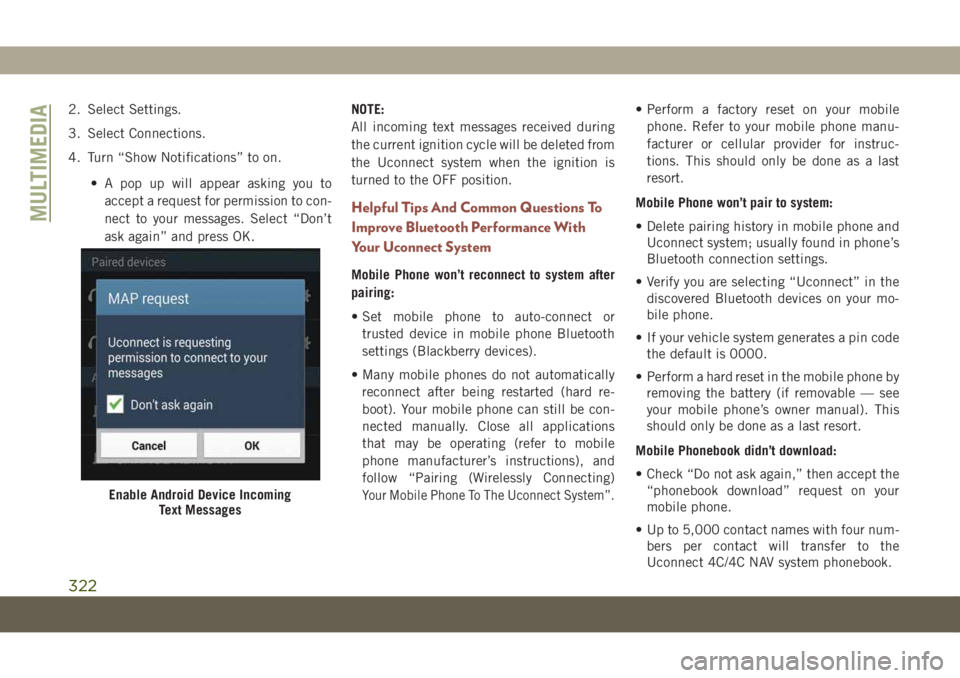
• A pop up will appear asking you to
accept a request for permission to con-
nect to your messages. Select “Don’t
ask again” and press OK.NOTE:
All incoming text messages received during
the current ignition cycle will be deleted from
the Uconnect system when the ignition is
turned to the OFF position.
Helpful Tips And Common Questions To
Improve Bluetooth Performance With
Your Uconnect System
Mobile Phone won’t reconnect to system after
pairing:
• Set mobile phone to auto-connect or
trusted device in mobile phone Bluetooth
settings (Blackberry devices).
• Many mobile phones do not automatically
reconnect after being restarted (hard re-
boot). Your mobile phone can still be con-
nected manually. Close all applications
that may be operating (refer to mobile
phone manufacturer’s instructions), and
follow “Pairing (Wirelessly Connecting)
Your Mobile Phone To The Uconnect System”.
• Perform a factory reset on your mobile
phone. Refer to your mobile phone manu-
facturer or cellular provider for instruc-
tions. This should only be done as a last
resort.
Mobile Phone won’t pair to system:
• Delete pairing history in mobile phone and
Uconnect system; usually found in phone’s
Bluetooth connection settings.
• Verify you are selecting “Uconnect” in the
discovered Bluetooth devices on your mo-
bile phone.
• If your vehicle system generates a pin code
the default is 0000.
• Perform a hard reset in the mobile phone by
removing the battery (if removable — see
your mobile phone’s owner manual). This
should only be done as a last resort.
Mobile Phonebook didn’t download:
• Check “Do not ask again,” then accept the
“phonebook download” request on your
mobile phone.
• Up to 5,000 contact names with four num-
bers per contact will transfer to the
Uconnect 4C/4C NAV system phonebook.
Enable Android Device Incoming
Text Messages
MULTIMEDIA
322
Page 355 of 362
Memory Feature (Memory Seats)......26
Memory Seat..................26
Mini-Trip Computer..............64
Monitor, Tire Pressure System.......94
Mopar Accessories.............280
Multi-Function Control Lever........33
Navigation..................308
Occupant Restraints.............98
Octane Rating, Gasoline (Fuel) . .269, 276
Oil, Engine..................276
Capacity.................274
Checking.................243
Dipstick..................243
Filter....................276
Pressure Warning Light.........67
Recommendation............274
Viscosity.................274
Oil Pressure Light...............67
Onboard Diagnostic System.........76
Operating Precautions............76
Overheating, Engine............223
Paddle Shifters...............156
Parking Brake................145ParkSense
Front And Rear.............170
ParkSense Active Park Assist.......173
ParkSense System, Rear..........168
Passenger Airbag Disable OFF......110
Passenger Airbag Disable ON.......110
Personalized Main Menu..........289
Pets......................137
Phonebook..................320
Phone (Uconnect)..............313
Pairing..................316
Power
Inverter...................58
Liftgate...................54
Outlet (Auxiliary Electrical Outlet) . . .56
Sunroof...................50
Windows..................48
Pregnant Women And Seat Belts.....106
Preparation For Jacking.........
.209
Radial Ply Tires...............252
Radiator Cap (Coolant Pressure Cap) . .247
Radio
Presets...........285, 290, 298
Radio Operation...........283, 288
Radio Screens.............288, 296Rain Sensitive Wiper System........38
Rear Camera.................179
Rear Cross Path................90
Rear ParkSense System.......168, 170
Rear Seats, Folding..............25
Rear Wiper/Washer..............39
Recreational Towing.............191
Release, Hood.................53
Reminder, Lights On..........33, 35
Reminder, Seat Belt.............99
Remote Control
Starting System..............17
Remote Keyless Entry............13
Arm The Alarm..............18
Disarm The Alarm.............19
Remote Starting System...........17
Replacement Keys..............14
Replacement Tires.............254
Restraints, Head...............29
Roll Over Warning................2
Roof Type Carrier...............59
Rotation, Tires................258
Safety Checks Inside Vehicle.......138
Safety Checks Outside Vehicle......140
353