4WD JEEP COMPASS 2023 User Guide
[x] Cancel search | Manufacturer: JEEP, Model Year: 2023, Model line: COMPASS, Model: JEEP COMPASS 2023Pages: 344, PDF Size: 18.8 MB
Page 123 of 344
STARTING AND OPERATING121
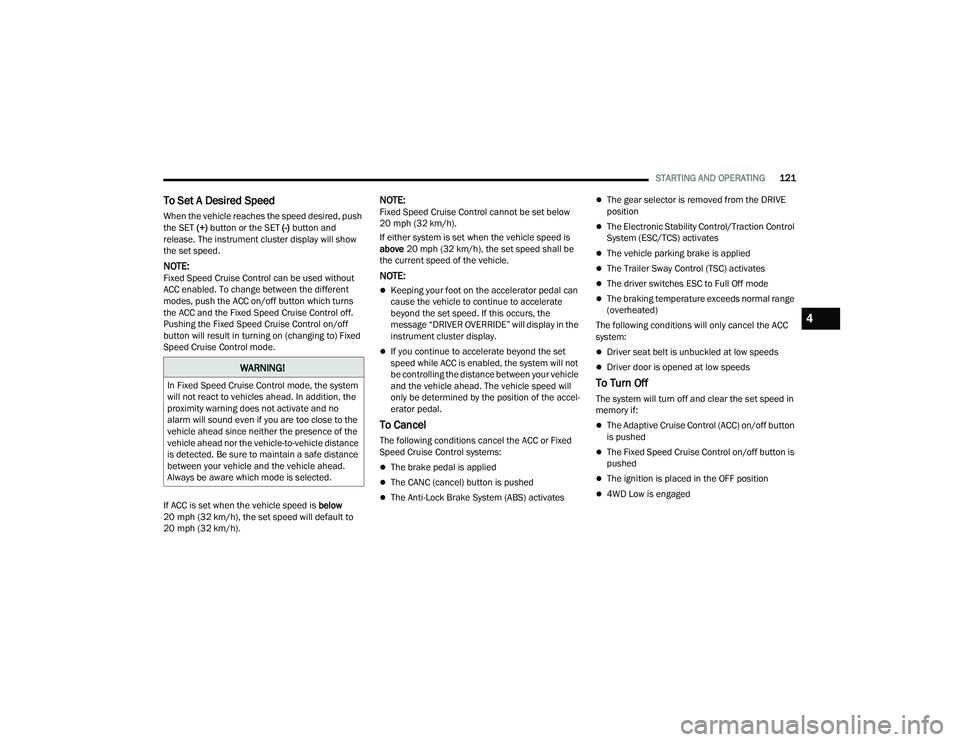
To Set A Desired Speed
When the vehicle reaches the speed desired, push
the SET (+) button or the SET (-) button and
release. The instrument cluster display will show
the set speed.
NOTE:Fixed Speed Cruise Control can be used without
ACC enabled. To change between the different
modes, push the ACC on/off button which turns
the ACC and the Fixed Speed Cruise Control off.
Pushing the Fixed Speed Cruise Control on/off
button will result in turning on (changing to) Fixed
Speed Cruise Control mode.
If ACC is set when the vehicle speed is below
20 mph (32 km/h), the set speed will default to
20 mph (32 km/h).
NOTE:Fixed Speed Cruise Control cannot be set below
20 mph (32 km/h).
If either system is set when the vehicle speed is
above 20 mph (32 km/h), the set speed shall be
the current speed of the vehicle.
NOTE:
Keeping your foot on the accelerator pedal can
cause the vehicle to continue to accelerate
beyond the set speed. If this occurs, the
message “DRIVER OVERRIDE” will display in the
instrument cluster display.
If you continue to accelerate beyond the set
speed while ACC is enabled, the system will not
be controlling the distance between your vehicle
and the vehicle ahead. The vehicle speed will
only be determined by the position of the accel-
erator pedal.
To Cancel
The following conditions cancel the ACC or Fixed
Speed Cruise Control systems:
The brake pedal is applied
The CANC (cancel) button is pushed
The Anti-Lock Brake System (ABS) activates
The gear selector is removed from the DRIVE
position
The Electronic Stability Control/Traction Control
System (ESC/TCS) activates
The vehicle parking brake is applied
The Trailer Sway Control (TSC) activates
The driver switches ESC to Full Off mode
The braking temperature exceeds normal range
(overheated)
The following conditions will only cancel the ACC
system:
Driver seat belt is unbuckled at low speeds
Driver door is opened at low speeds
To Turn Off
The system will turn off and clear the set speed in
memory if:
The Adaptive Cruise Control (ACC) on/off button
is pushed
The Fixed Speed Cruise Control on/off button is
pushed
The ignition is placed in the OFF position
4WD Low is engaged
WARNING!
In Fixed Speed Cruise Control mode, the system
will not react to vehicles ahead. In addition, the
proximity warning does not activate and no
alarm will sound even if you are too close to the
vehicle ahead since neither the presence of the
vehicle ahead nor the vehicle-to-vehicle distance
is detected. Be sure to maintain a safe distance
between your vehicle and the vehicle ahead.
Always be aware which mode is selected.
4
22_MP_OM_EN_USC_t.book Page 121
Page 157 of 344
STARTING AND OPERATING155
Trailer Sway Control (TSC)
The TSC can be a mechanical telescoping link that
can be installed between the hitch receiver and the
trailer tongue that typically provides adjustable
friction associated with the telescoping motion to
dampen any unwanted trailer swaying motions
while traveling.
If equipped, the electronic TSC recognizes a
swaying trailer and automatically applies individual
wheel brakes and/or reduces engine power to
attempt to eliminate the trailer sway.
Weight-Carrying Hitch
A weight-carrying hitch supports the trailer tongue
weight, just as if it were luggage located at a hitch
ball or some other connecting point of the vehicle. These kinds of hitches are commonly used to tow
small and medium sized trailers.
Weight-Distributing Hitch
A Weight-Distributing system works by applying
leverage through spring (load) bars. They are
typically used for heavier loads to distribute trailer
tongue weight to the tow vehicle's front axle and
the trailer axle(s). When used in accordance with
the manufacturer's directions, it provides for a
more level ride, offering more consistent steering
and brake control thereby enhancing towing
safety. The addition of a friction/hydraulic sway
control also dampens sway caused by traffic and
crosswinds and contributes positively to tow
vehicle and trailer stability. Trailer sway control and
a Weight-Distributing (load equalizing) Hitch are recommended for heavier Tongue Weights (TW)
and may be required depending on vehicle and
trailer configuration/loading to comply with Gross
Axle Weight Rating (GAWR) requirements.
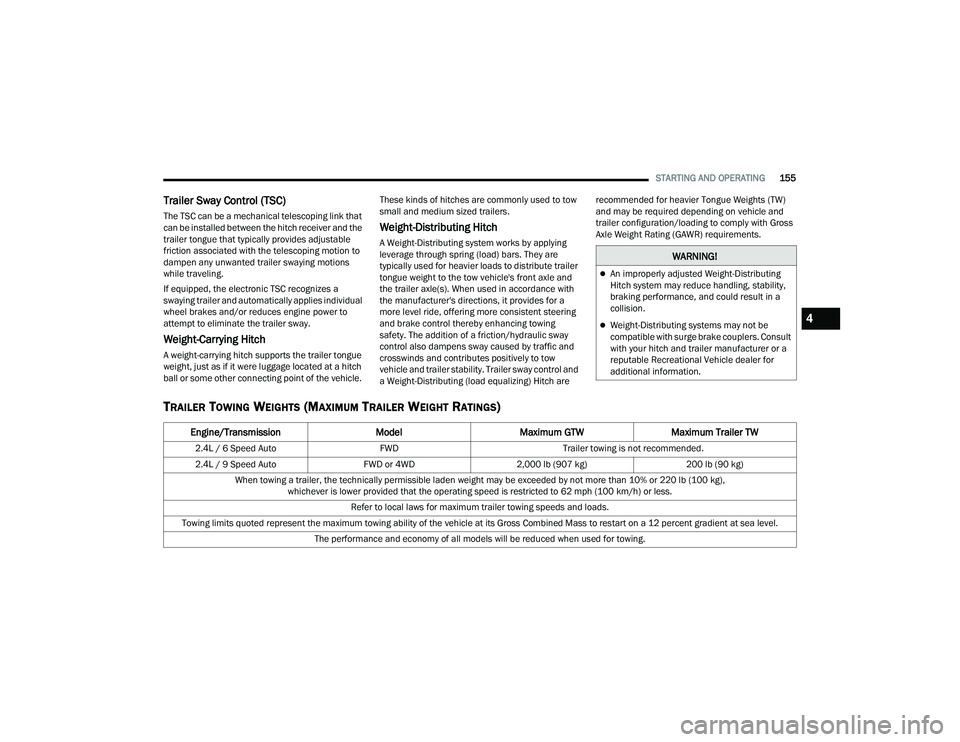
TRAILER TOWING WEIGHTS (MAXIMUM TRAILER WEIGHT RATINGS)
WARNING!
An improperly adjusted Weight-Distributing
Hitch system may reduce handling, stability,
braking performance, and could result in a
collision.
Weight-Distributing systems may not be
compatible with surge brake couplers. Consult
with your hitch and trailer manufacturer or a
reputable Recreational Vehicle dealer for
additional information.
Engine/Transmission
ModelMaximum GTW Maximum Trailer TW
2.4L / 6 Speed Auto FWDTrailer towing is not recommended.
2.4L / 9 Speed Auto FWD or 4WD2,000 lb (907 kg) 200 lb (90 kg)
When towing a trailer, the technically permissible laden weight may be exceeded by not more than 10% or 220 lb (100 kg), whichever is lower provided that the operating speed is restricted to 62 mph (100 km/h) or less.
Refer to local laws for maximum trailer towing speeds and loads.
Towing limits quoted represent the maximum towing ability of the vehicle at its Gross Combined Mass to restart on a 12 percent gradient at sea level. The performance and economy of all models will be reduced when used for towing.
4
22_MP_OM_EN_USC_t.book Page 155
Page 162 of 344
160STARTING AND OPERATING
RECREATIONAL TOWING (BEHIND MOTORHOME)
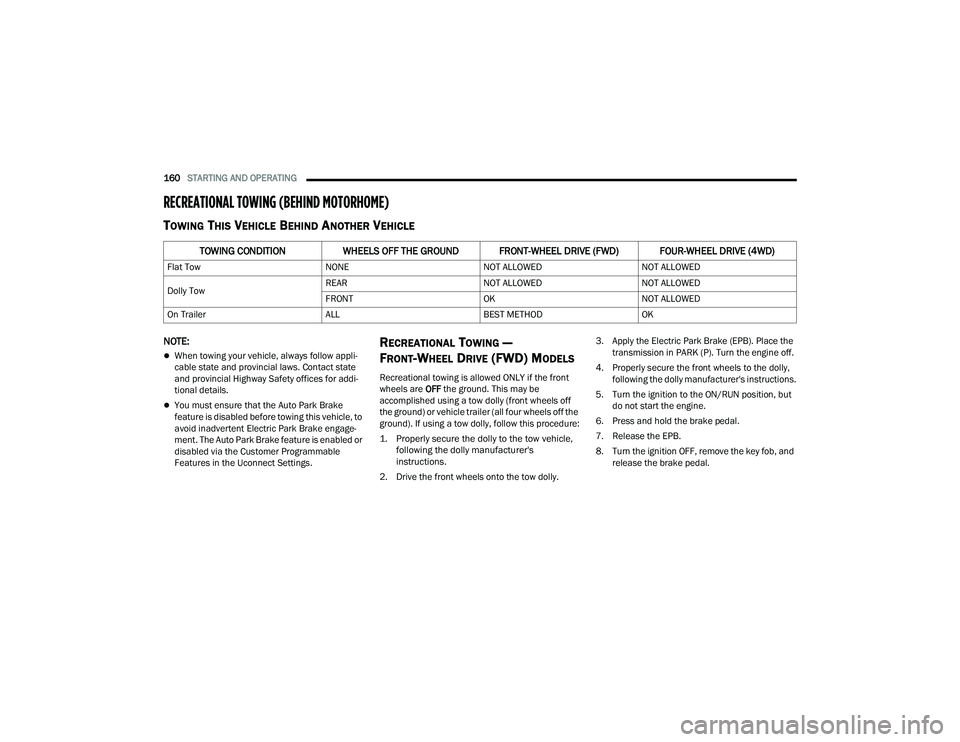
TOWING THIS VEHICLE BEHIND ANOTHER VEHICLE
NOTE:
When towing your vehicle, always follow appli -
cable state and provincial laws. Contact state
and provincial Highway Safety offices for addi -
tional details.
You must ensure that the Auto Park Brake
feature is disabled before towing this vehicle, to
avoid inadvertent Electric Park Brake engage -
ment. The Auto Park Brake feature is enabled or
disabled via the Customer Programmable
Features in the Uconnect Settings.
RECREATIONAL TOWING —
F
RONT-WHEEL DRIVE (FWD) MODELS
Recreational towing is allowed ONLY if the front
wheels are OFF the ground. This may be
accomplished using a tow dolly (front wheels off
the ground) or vehicle trailer (all four wheels off the
ground). If using a tow dolly, follow this procedure:
1. Properly secure the dolly to the tow vehicle, following the dolly manufacturer's
instructions.
2. Drive the front wheels onto the tow dolly. 3. Apply the Electric Park Brake (EPB). Place the
transmission in PARK (P). Turn the engine off.
4. Properly secure the front wheels to the dolly, following the dolly manufacturer's instructions.
5. Turn the ignition to the ON/RUN position, but do not start the engine.
6. Press and hold the brake pedal.
7. Release the EPB.
8. Turn the ignition OFF, remove the key fob, and release the brake pedal.
TOWING CONDITION WHEELS OFF THE GROUND FRONT-WHEEL DRIVE (FWD) FOUR-WHEEL DRIVE (4WD)
Flat Tow NONENOT ALLOWEDNOT ALLOWED
Dolly Tow REAR
NOT ALLOWEDNOT ALLOWED
FRONT OKNOT ALLOWED
On Trailer ALLBEST METHODOK
22_MP_OM_EN_USC_t.book Page 160
Page 163 of 344
STARTING AND OPERATING161
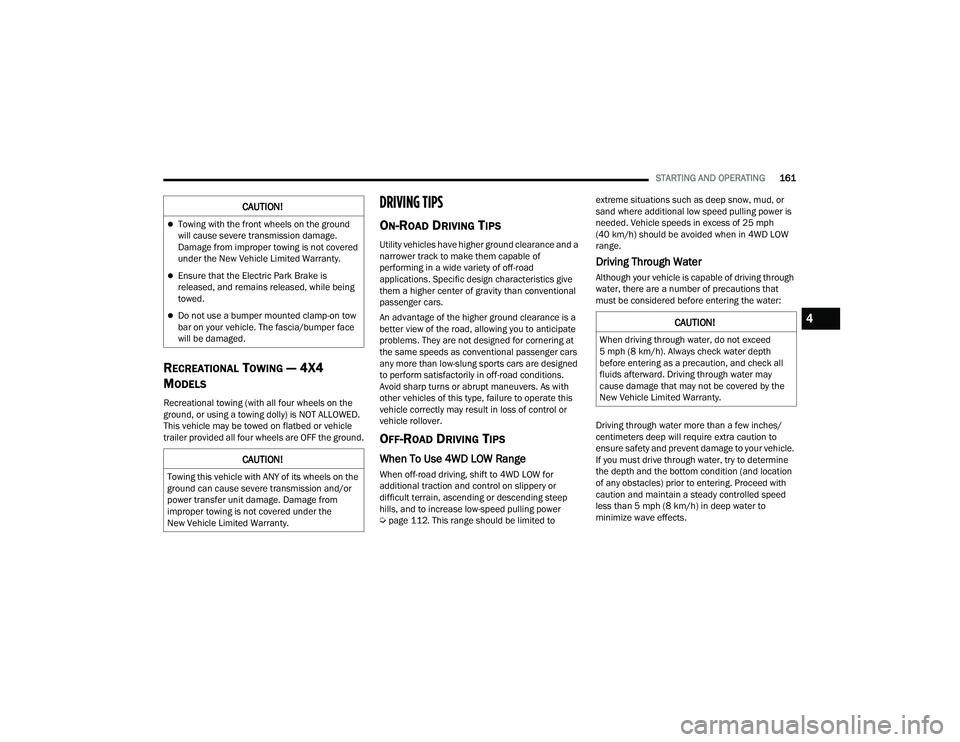
RECREATIONAL TOWING — 4X4
M
ODELS
Recreational towing (with all four wheels on the
ground, or using a towing dolly) is NOT ALLOWED.
This vehicle may be towed on flatbed or vehicle
trailer provided all four wheels are OFF the ground.
DRIVING TIPS
ON-ROAD DRIVING TIPS
Utility vehicles have higher ground clearance and a
narrower track to make them capable of
performing in a wide variety of off-road
applications. Specific design characteristics give
them a higher center of gravity than conventional
passenger cars.
An advantage of the higher ground clearance is a
better view of the road, allowing you to anticipate
problems. They are not designed for cornering at
the same speeds as conventional passenger cars
any more than low-slung sports cars are designed
to perform satisfactorily in off-road conditions.
Avoid sharp turns or abrupt maneuvers. As with
other vehicles of this type, failure to operate this
vehicle correctly may result in loss of control or
vehicle rollover.
OFF-ROAD DRIVING TIPS
When To Use 4WD LOW Range
When off-road driving, shift to 4WD LOW for
additional traction and control on slippery or
difficult terrain, ascending or descending steep
hills, and to increase low-speed pulling power
Ú page 112. This range should be limited to extreme situations such as deep snow, mud, or
sand where additional low speed pulling power is
needed. Vehicle speeds in excess of 25 mph
(40 km/h) should be avoided when in 4WD LOW
range.
Driving Through Water
Although your vehicle is capable of driving through
water, there are a number of precautions that
must be considered before entering the water:
Driving through water more than a few inches/
centimeters deep will require extra caution to
ensure safety and prevent damage to your vehicle.
If you must drive through water, try to determine
the depth and the bottom condition (and location
of any obstacles) prior to entering. Proceed with
caution and maintain a steady controlled speed
less than 5 mph (8 km/h) in deep water to
minimize wave effects.
CAUTION!
Towing with the front wheels on the ground
will cause severe transmission damage.
Damage from improper towing is not covered
under the New Vehicle Limited Warranty.
Ensure that the Electric Park Brake is
released, and remains released, while being
towed.
Do not use a bumper mounted clamp-on tow
bar on your vehicle. The fascia/bumper face
will be damaged.
CAUTION!
Towing this vehicle with ANY of its wheels on the
ground can cause severe transmission and/or
power transfer unit damage. Damage from
improper towing is not covered under the
New Vehicle Limited Warranty.
CAUTION!
When driving through water, do not exceed
5 mph (8 km/h). Always check water depth
before entering as a precaution, and check all
fluids afterward. Driving through water may
cause damage that may not be covered by the
New Vehicle Limited Warranty.
4
22_MP_OM_EN_USC_t.book Page 161
Page 164 of 344
162STARTING AND OPERATING
Flowing Water
If the water is swift flowing and rising (as in storm
run-off) avoid crossing until the water level recedes
and/or the flow rate is reduced. If you must cross
flowing-water, avoid depths in excess of 9 inches
(22 cm). The flowing water can erode the
streambed causing your vehicle to sink into deeper
water. Determine exit point(s) that are downstream
of your entry point to allow for drifting.
Standing Water
Avoid driving in standing water deeper than
16 inches (40.5 cm), and reduce speed
appropriately to minimize wave effects. Maximum
speed in 16 inches (40.5 cm) of water is less than
5 mph (8 km/h).
(Trailhawk only): Avoid driving in standing water
deeper than 19 inches (48 cm), and reduce speed
appropriately to minimize wave effects. Maximum
speed in 19 inches (48 cm) of water is less than
5 mph (8 km/h).
Maintenance
After driving through deep water, inspect your
vehicle fluids and lubricants (engine, transmission,
Power Transfer Unit, and Rear Drive Module) to
ensure they have not been contaminated.
Contaminated fluids and lubricants (milky, foamy
in appearance) should be flushed/changed as
soon as possible to prevent component damage.
Driving In Snow, Mud And Sand
In heavy snow, when pulling a load, or for
additional control at slower speeds, shift the
transmission to a low gear and shift the 4WD
system to the appropriate terrain mode, using
4WD LOW if necessary Úpage 112. Do not shift to
a lower gear than necessary to maintain headway.
Over-revving the engine can spin the wheels and
traction will be lost.
Avoid abrupt downshifts on icy or slippery roads
because engine braking may cause skidding and
loss of control.
Hill Climbing
NOTE:Before attempting to climb a hill, determine the
conditions at the crest and/or on the other side.
Before climbing a steep hill, shift the transmission
to a lower gear and shift the 4WD System to 4WD
LOW. Use FIRST gear and 4WD LOW for very steep
hills.
NOTE:Brakes should be applied at increased slippage,
but before coming to a stop to avoid digging into
the loose surface and rendering the operator of the
vehicle stuck/immobile. If you stall or begin to lose headway
while climbing
a steep hill, allow your vehicle to come to a stop
and immediately apply the brakes. Once stopped,
shift to REVERSE. Back slowly down the hill
allowing the compression braking of the engine to
help regulate your speed. If the brakes are
required to control vehicle speed, apply them
lightly and avoid locking or skidding the tires.
NOTE:Remember, never drive diagonally across a hill -
drive straight up or down.
If the wheels start to slip as you approach the crest
of a hill, ease off the accelerator and maintain
headway by turning the front wheels slowly left and
right. This may provide a fresh “bite” into the
surface and may provide traction to complete the
climb.
WARNING!
If the engine stalls or you lose headway or
cannot make it to the top of a steep hill or grade,
never attempt to turn around. To do so may
result in tipping and rolling the vehicle. Always
back straight down a hill in REVERSE gear
carefully. Never back down a hill in NEUTRAL
using only the brake.
22_MP_OM_EN_USC_t.book Page 162
Page 165 of 344
STARTING AND OPERATING163
Traction Downhill
Shift the transmission into a low gear and the 4WD
System to 4WD LOW range or select Hill Descent
Control (if equipped) Úpage 191. Let the vehicle
go slowly down the hill with all four wheels turning
against engine compression drag. This will permit
you to control the vehicle speed and direction.
When descending mountains or hills, repeated
braking can cause brake fade with loss of braking
control. Avoid repeated heavy braking by
downshifting the transmission whenever possible.
After Driving Off-Road
Off-road operation puts more stress on your
vehicle than does most on-road driving. After going
off-road, it is always a good idea to check for
damage.
Completely inspect the underbody of your
vehicle. Check tires, body structure, steering,
suspension, and exhaust system for damage.
Inspect the radiator for mud and debris and
clean as required.
Check threaded fasteners for looseness, partic -
ularly on the chassis, drivetrain components,
steering, and suspension. Retighten them, if
required, and torque to the values specified in
the Service Manual.
Check for accumulations of plants or brush.
These things could be a fire hazard. They might
hide damage to fuel lines, brake hoses, axle
pinion seals, and propeller shafts.
After extended operation in mud, sand, water, or
similar dirty conditions, have the radiator, fan,
brake rotors, wheels, brake linings, and axle
yokes inspected and cleaned as soon as
possible.
Impacted material can cause wheel imbalance.
Freeing the wheels of impacted material will
likely rectify imbalance condition.
WARNING!
Abrasive material in any part of the braking
system may cause excessive wear or
unpredictable braking performance. Full braking
power may not be available to prevent a
collision. If you have been operating your vehicle
in dirty conditions, inspect and clean the braking
components as soon as possible.
4
22_MP_OM_EN_USC_t.book Page 163
Page 193 of 344
SAFETY191
To turn ESC on again, momentarily push the ESC
OFF button. This will restore the “ESC On” mode of
operation.
NOTE:The “ESC OFF” message will display and an audible
chime will sound when the gear selector is placed
into the PARK position from any other position, and
then moved out of the PARK position. This will
occur even if the message was previously cleared.
ESC Activation/Malfunction Indicator Light
And ESC OFF Indicator Light
The ESC Activation/Malfunction Indicator
Light in the instrument cluster will come
on when the ignition is placed in the ON
mode. It should go out with the engine
running. If the ESC Activation/Malfunction
Indicator Light comes on continuously with the
engine running, a malfunction has been detected
in the ESC system. If this light remains on after
several ignition cycles, and the vehicle has been driven several miles (km) at speeds greater than
30 mph (48 km/h), see an authorized dealer as
soon as possible to have the problem diagnosed
and corrected.
The ESC Activation/Malfunction Indicator Light
starts to flash as soon as the tires lose traction and
the ESC system becomes active. The ESC
Activation/Malfunction Indicator Light also flashes
when Traction Control System (TCS) is active. If the
ESC Activation/Malfunction Indicator Light begins
to flash during acceleration, ease up on the
accelerator and apply as little throttle as possible.
Be sure to adapt your speed and driving to the
prevailing road conditions.
The ESC OFF Indicator Light indicates the
customer has elected to have the
Electronic Stability Control (ESC) in a
reduced mode.
NOTE:
The ESC Activation/Malfunction Indicator Light
and the ESC OFF Indicator Light come on
momentarily each time the ignition is placed in
the ON/RUN position.
Each time the ignition is placed in the ON/RUN
position, the ESC system will be on even if it was
turned off previously.
The ESC system will make buzzing or clicking
sounds when it is active. This is normal; the
sounds will stop when ESC becomes inactive
following the maneuver that caused the ESC
activation.
Emergency Stop Signal (ESS) —
If Equipped
The ESS activates the hazard lights at a faster than
normal speed when heavy brake pressure is
applied. ESS will only activate when the speed is
above 31 mph (50 km/h). The ESS operates
independently of other lamps, and will turn on and
off automatically. This indicates to others that the
vehicle is stopping quickly.
NOTE:
A warning light will illuminate within the instru -
ment cluster to inform the driver that the ESS
feature has been activated.
When towing a trailer, ESS will also activate the
rear indicator lights of the trailer.
Hill Descent Control (HDC) — If Equipped
Hill Descent Control (HDC) is intended for low
speed off-road driving while in 4WD Low. HDC
maintains vehicle speed while descending hills
during various driving situations. HDC controls
vehicle speed by actively controlling the brakes.
WARNING!
In the "Full Off" mode, the engine torque
reduction and stability features are disabled. In
an emergency evasive maneuver, the ESC
system will not engage to assist in maintaining
stability. “Full Off” mode is intended for
off-highway or off-road use only.
6
22_MP_OM_EN_USC_t.book Page 191
Page 194 of 344
192SAFETY
HDC has three states:
1. Off (feature is not enabled and will not activate).
2. Enabled (feature is enabled and ready but activation conditions are not met, or driver is
actively overriding with brake or throttle
application).
3. Active (feature is enabled and actively controlling vehicle speed).
Enabling HDC
HDC is enabled by pushing the HDC switch, located
in front of the gear selector. The following
conditions must also be met to enable HDC:
The driveline is in 4WD Low.
The vehicle speed is below 20 mph (32 km/h).
The Electric Park Brake (EPB) is released.
The driver’s door is closed.
Activating HDC
Once HDC is enabled, it will activate automatically
if driven down a grade of sufficient magnitude
(greater than approximately 8%). The set speed for
HDC is selectable by the driver and can be
adjusted within the thresholds by using throttle or
brake application. Driver Override:
The driver may override HDC activation speed with
throttle or brake application at any time.
Deactivating HDC
HDC will be deactivated but remain available if any
of the following conditions occur:
Driver overrides HDC set speed with a speed
exceeding 20 mph (32 km/h) but remains
below 25 mph (40 km/h).
Vehicle is on a downhill grade of insufficient
magnitude (less than approximately 8%), is on
level ground, or is on an uphill grade.
Vehicle is shifted to PARK.
Disabling HDC
HDC will be deactivated and disabled if any of the
following conditions occur:
The driver pushes the HDC switch.
The driveline is shifted out of 4WD Low.
The driver’s door opens.
The vehicle is driven greater than 25 mph
(40 km/h) (HDC exits immediately.) Feedback To The Driver:
The instrument cluster has an HDC icon and the
HDC switch has an LED, which offers feedback to
the driver about the state HDC is in.
The cluster icon and switch lamp will illuminate
and remain solid when HDC is enabled or acti
-
vated. This is the normal operating condition for
HDC.
The switch lamp will flash for several seconds
then extinguish when the driver pushes the HDC
switch when enable conditions have not been
met.
The HDC switch is located within the Selec-Terrain
knob in the upper right position.
WARNING!
HDC is only intended to assist the driver in
controlling vehicle speed when descending hills.
The driver must remain attentive to the driving
conditions and is responsible for maintaining a
safe vehicle speed.
22_MP_OM_EN_USC_t.book Page 192
Page 326 of 344
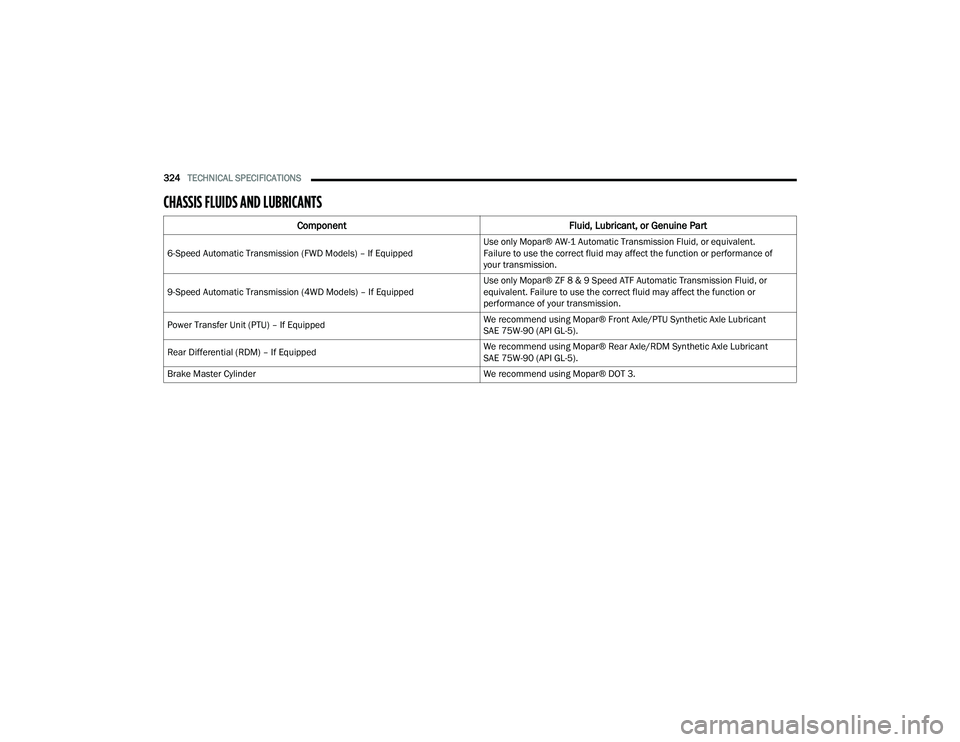
324TECHNICAL SPECIFICATIONS
CHASSIS FLUIDS AND LUBRICANTS
Component Fluid, Lubricant, or Genuine Part
6-Speed Automatic Transmission (FWD Models) – If Equipped Use only Mopar® AW-1 Automatic Transmission Fluid, or equivalent.
Failure to use the correct fluid may affect the function or performance of
your transmission.
9-Speed Automatic Transmission (4WD Models) – If Equipped Use only Mopar® ZF 8 & 9 Speed ATF Automatic Transmission Fluid, or
equivalent. Failure to use the correct fluid may affect the function or
performance of your transmission.
Power Transfer Unit (PTU) – If Equipped We recommend using Mopar® Front Axle/PTU Synthetic Axle Lubricant
SAE 75W-90 (API GL-5).
Rear Differential (RDM) – If Equipped We recommend using Mopar® Rear Axle/RDM Synthetic Axle Lubricant
SAE 75W-90 (API GL-5).
Brake Master Cylinder We recommend using Mopar® DOT 3.
22_MP_OM_EN_USC_t.book Page 324
Page 335 of 344
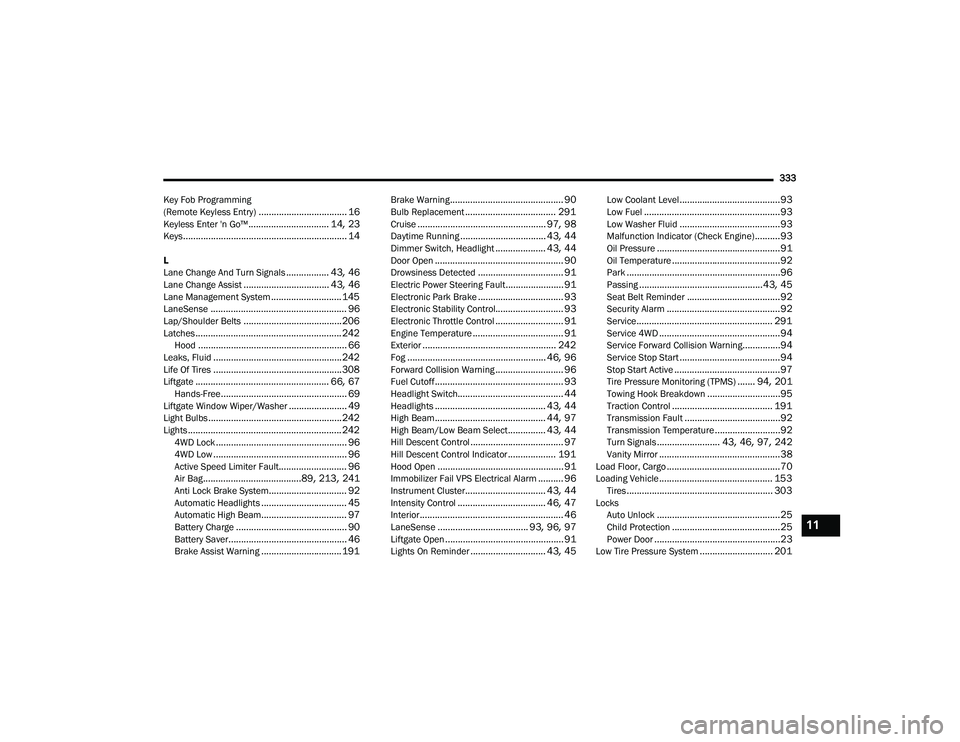
333
Key Fob Programming
(Remote Keyless Entry)
................................... 16Keyless Enter 'n Go™................................ 14, 23Keys................................................................. 14
L
Lane Change And Turn Signals................. 43, 46Lane Change Assist.................................. 43, 46Lane Management System............................ 145LaneSense...................................................... 96Lap/Shoulder Belts....................................... 206Latches.......................................................... 242Hood........................................................... 66Leaks, Fluid................................................... 242Life Of Tires................................................... 308Liftgate..................................................... 66, 67Hands-Free.................................................. 69Liftgate Window Wiper/Washer....................... 49Light Bulbs..................................................... 242Lights............................................................. 2424WD Lock.................................................... 964WD Low..................................................... 96Active Speed Limiter Fault........................... 96Air Bag.......................................89, 213, 241Anti Lock Brake System............................... 92Automatic Headlights.................................. 45Automatic High Beam.................................. 97Battery Charge............................................ 90Battery Saver............................................... 46Brake Assist Warning................................ 191
Brake Warning............................................. 90Bulb Replacement.................................... 291Cruise................................................... 97, 98Daytime Running.................................. 43, 44Dimmer Switch, Headlight.................... 43, 44Door Open................................................... 90Drowsiness Detected.................................. 91Electric Power Steering Fault....................... 91Electronic Park Brake.................................. 93Electronic Stability Control........................... 93Electronic Throttle Control........................... 91Engine Temperature.................................... 91Exterior..................................................... 242Fog....................................................... 46, 96Forward Collision Warning........................... 96Fuel Cutoff................................................... 93Headlight Switch.......................................... 44Headlights............................................ 43, 44High Beam............................................ 44, 97High Beam/Low Beam Select............... 43, 44Hill Descent Control..................................... 97Hill Descent Control Indicator................... 191Hood Open.................................................. 91Immobilizer Fail VPS Electrical Alarm.......... 96Instrument Cluster................................ 43, 44Intensity Control................................... 46, 47Interior......................................................... 46LaneSense.................................... 93, 96, 97Liftgate Open............................................... 91Lights On Reminder.............................. 43, 45
Low Coolant Level........................................93Low Fuel......................................................93Low Washer Fluid........................................93Malfunction Indicator (Check Engine)..........93Oil Pressure.................................................91Oil Temperature...........................................92Park.............................................................96Passing.................................................43, 45Seat Belt Reminder.....................................92Security Alarm.............................................92Service...................................................... 291Service 4WD................................................94Service Forward Collision Warning...............94Service Stop Start........................................94Stop Start Active..........................................97Tire Pressure Monitoring (TPMS)....... 94, 201Towing Hook Breakdown.............................95Traction Control........................................ 191Transmission Fault......................................92Transmission Temperature..........................92Turn Signals......................... 43, 46, 97, 242Vanity Mirror................................................38Load Floor, Cargo.............................................70Loading Vehicle............................................. 153Tires.......................................................... 303Locks Auto Unlock.................................................25Child Protection...........................................25Power Door..................................................23Low Tire Pressure System............................. 201
11
22_MP_OM_EN_USC_t.book Page 333