Park sense JEEP COMPASS 2023 User Guide
[x] Cancel search | Manufacturer: JEEP, Model Year: 2023, Model line: COMPASS, Model: JEEP COMPASS 2023Pages: 344, PDF Size: 18.8 MB
Page 142 of 344
140STARTING AND OPERATING
PARKSENSE ACTIVE PARK ASSIST SYSTEM —
IF EQUIPPED
The ParkSense Active Park Assist system is
intended to assist the driver during parallel,
perpendicular, and parallel park exit maneuvers by
identifying a proper parking space, providing
audible/visual instructions, and controlling the
steering wheel. The ParkSense Active Park Assist
system is defined as “semi-automatic” since the
driver maintains control of the accelerator, gear
selector and brakes. Depending on the driver's
parking maneuver selection, the ParkSense Active Park Assist system is capable of maneuvering a
vehicle into a parallel or a perpendicular parking
space on either side (i.e., driver side or passenger
side), as well as exiting a parallel parking space.
NOTE:
The driver is always responsible for controlling
the vehicle, responsible for any surrounding
objects, and must intervene as required.
The system is designed to assist the driver and
not to substitute the driver.
During a semi-automatic maneuver, if the driver
touches the steering wheel after being
instructed to remove their hands from the
steering wheel, the system will cancel, and the
driver will be required to manually complete the
parking maneuver.
The system may not work in all conditions
(e.g. environmental conditions such as heavy
rain, snow, etc., or if searching for a parking
space that has surfaces that will absorb the
ultrasonic sensor waves).
New vehicles from the dealer must have at least
30 miles (48 km) accumulated before the Park
-
Sense Active Park Assist system is fully cali -
brated and performs accurately. This is due to
the system’s dynamic vehicle calibration to
improve the performance of the feature.
ENABLING AND DISABLING THE
P
ARKSENSE ACTIVE PARK ASSIST
S
YSTEM
The ParkSense Active Park Assist system
can be enabled and disabled with the
ParkSense Active Park Assist switch,
located on the switch panel below the
Uconnect display.
To enable or disable the ParkSense Active Park
Assist system, push the ParkSense Active Park
Assist switch once (LED turns on). Pushing the
switch a second time will disable the system
(LED turns off).
The ParkSense Active Park Assist system will turn
off automatically for any of the following
conditions:
Parking maneuver is complete.
Vehicle speed is greater than 18 mph
(30 km/h) when searching for a parking space.
Vehicle speed is greater than 5 mph (7 km/h) during active steering guidance into the parking
space.
Steering Wheel is touched during active
steering guidance into the parking space.
ParkSense Park Assist switch is pushed.
CAUTION!
ParkSense is only a parking aid and it is
unable to recognize every obstacle, including
small obstacles. Parking curbs might be
temporarily detected or not detected at all.
Obstacles located above or below the sensors
will not be detected when they are in close
proximity.
The vehicle must be driven slowly when using
ParkSense in order to be able to stop in time
when an obstacle is detected. It is recom -
mended that the driver looks over his/her
shoulder when using ParkSense.
22_MP_OM_EN_USC_t.book Page 140
Page 143 of 344
STARTING AND OPERATING141
Driver's door is opened.
Rear liftgate is opened.
Electronic Stability Control/Anti-lock Braking
System intervention.
The ParkSense Active Park Assist system will allow
a maximum number of shifts between DRIVE and
REVERSE. If the maneuver cannot be completed
within the maximum amount of shifts, the system
will cancel and the instrument cluster display will
instruct the driver to complete the maneuver
manually.
The ParkSense Active Park Assist system will only
operate and search for a parking space when the
following conditions are present:
Gear selector is in DRIVE.
Ignition is in the RUN position.
ParkSense Active Park Assist switch is acti -
vated.
Driver's door is closed.
Rear liftgate is closed.
The outer surface and the underside of the front
and rear fascias/bumpers are clean and clear
of snow, ice, mud, dirt or other obstruction.
Vehicle speed is less than 15 mph (25 km/h).
NOTE:If the vehicle is driven above approximately
15 mph (25 km/h), the instrument cluster display
will instruct the driver to slow down. If the vehicle
is driven above approximately 18 mph (30 km/h),
the system will cancel. The driver must then reac -
tivate the system by pushing the ParkSense Active
Park Assist switch.
When pushed, the LED on the ParkSense Active
Park Assist switch will blink momentarily, and then
the LED will turn off if any of the above conditions
are not present.
PARALLEL/PERPENDICULAR PARKING
S
PACE ASSISTANCE OPERATION
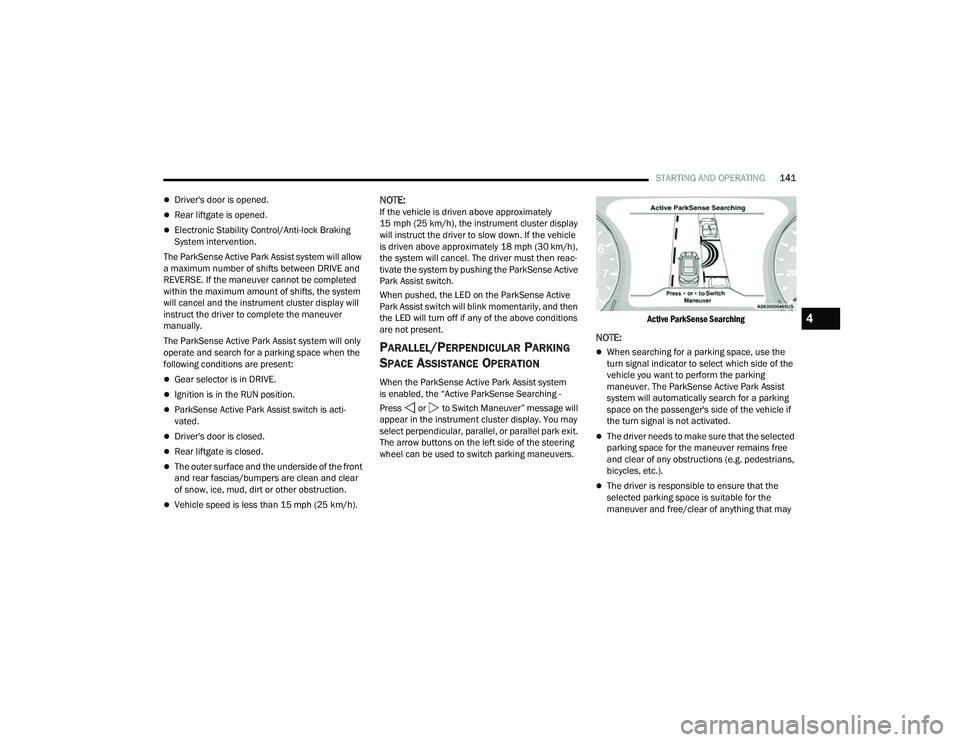
When the ParkSense Active Park Assist system
is enabled, the “Active ParkSense Searching -
Press or to Switch Maneuver” message will
appear in the instrument cluster display. You may
select perpendicular, parallel, or parallel park exit.
The arrow buttons on the left side of the steering
wheel can be used to switch parking maneuvers.
Active ParkSense Searching
NOTE:
When searching for a parking space, use the
turn signal indicator to select which side of the
vehicle you want to perform the parking
maneuver. The ParkSense Active Park Assist
system will automatically search for a parking
space on the passenger's side of the vehicle if
the turn signal is not activated.
The driver needs to make sure that the selected
parking space for the maneuver remains free
and clear of any obstructions (e.g. pedestrians,
bicycles, etc.).
The driver is responsible to ensure that the
selected parking space is suitable for the
maneuver and free/clear of anything that may
4
22_MP_OM_EN_USC_t.book Page 141
Page 144 of 344
142STARTING AND OPERATING
be overhanging or protruding into the parking
space (e.g., ladders, tailgates, etc. from
surrounding objects/vehicles).
When searching for a parking space, the driver
should drive as parallel or perpendicular
(depending on the type of maneuver) to other
vehicles as possible.
The feature will only indicate the last detected
parking space (example: if passing multiple
available parking spaces, the system will only
indicate the last detected parking space for the
maneuver).
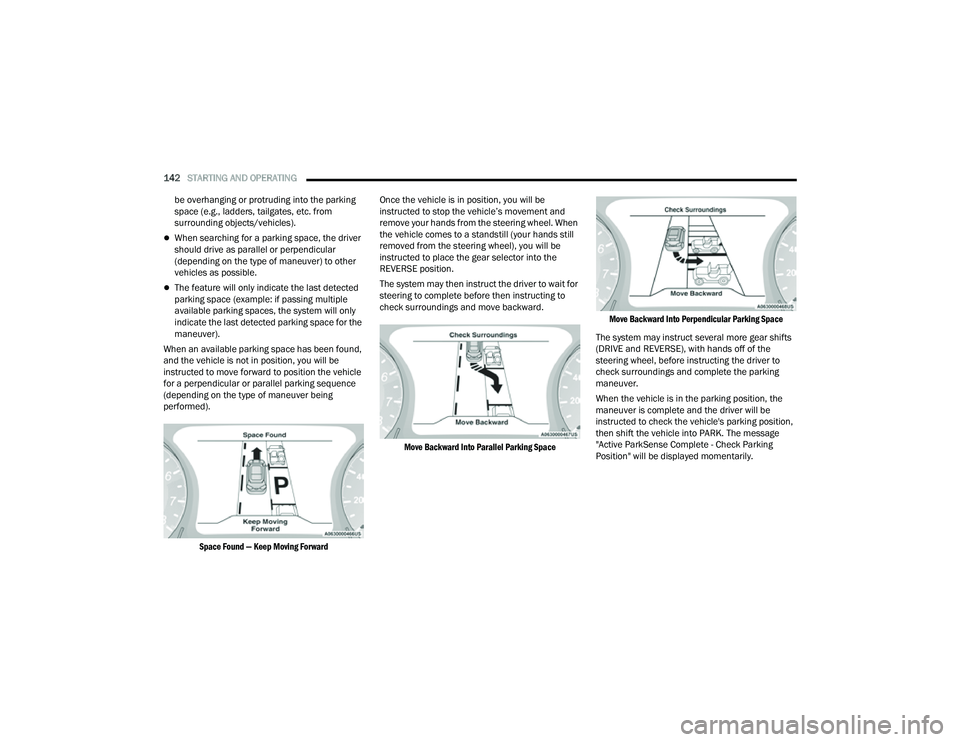
When an available parking space has been found,
and the vehicle is not in position, you will be
instructed to move forward to position the vehicle
for a perpendicular or parallel parking sequence
(depending on the type of maneuver being
performed).
Space Found — Keep Moving Forward
Once the vehicle is in position, you will be
instructed to stop the vehicle’s movement and
remove your hands from the steering wheel. When
the vehicle comes to a standstill (your hands still
removed from the steering wheel), you will be
instructed to place the gear selector into the
REVERSE position.
The system may then instruct the driver to wait for
steering to complete before then instructing to
check surroundings and move backward.
Move Backward Into Parallel Parking Space Move Backward Into Perpendicular Parking Space
The system may instruct several more gear shifts
(DRIVE and REVERSE), with hands off of the
steering wheel, before instructing the driver to
check surroundings and complete the parking
maneuver.
When the vehicle is in the parking position, the
maneuver is complete and the driver will be
instructed to check the vehicle's parking position,
then shift the vehicle into PARK. The message
"Active ParkSense Complete - Check Parking
Position" will be displayed momentarily.
22_MP_OM_EN_USC_t.book Page 142
Page 145 of 344
STARTING AND OPERATING143
(Continued)
(Continued)
NOTE:
It is the driver's responsibility to use the brake
and accelerator during the semi-automatic
parking maneuver.
It is the driver's responsibility to use the brake
and stop the vehicle. The driver should check
their surroundings and be prepared to stop the
vehicle either when instructed to, or when driver
intervention is required.
When the system instructs the driver to remove
their hands from the steering wheel, the driver
should check their surroundings and begin to
back up slowly.
The ParkSense Active Park Assist system will
allow a maximum of six shifts between DRIVE
and REVERSE. If the maneuver cannot be
completed within six shifts, the system will
cancel and the instrument cluster display will
instruct the driver to complete the maneuver
manually.
The system will cancel the maneuver if the
vehicle speed exceeds 5 mph (7 km/h) during
active steering guidance into the parking space.
The system will provide a warning to the driver
at 3 mph (5 km/h) that tells them to slow down.
The driver is then responsible for completing the
maneuver if the system is canceled.
If the system is canceled during the maneuver
for any reason, the driver must take control of
the vehicle.
WARNING!
Drivers must be careful when performing
parallel or perpendicular parking maneuvers
even when using the ParkSense Active Park
Assist system. Always check carefully behind
and in front of your vehicle, look behind and in
front of you, and be sure to check for pedes
-
trians, animals, other vehicles, obstructions,
and blind spots before backing up and moving
forward. You are responsible for safety and
must continue to pay attention to your
surroundings. Failure to do so can result in
serious injury or death.
Before using the ParkSense Active Park Assist
system, it is strongly recommended that the
ball mount and hitch ball assembly be discon -
nected from the vehicle when the vehicle is
not used for towing. Failure to do so can result
in injury or damage to vehicles or obstacles
because the hitch ball will be much closer to
the obstacle than the rear fascia when the
vehicle sounds the continuous tone. Also, the
sensors could detect the ball mount and hitch
ball assembly, depending on its size and
shape, giving a false indication that an
obstacle is behind the vehicle.
CAUTION!
The ParkSense Active Park Assist system is
only a parking aid and it is unable to recognize
every obstacle, including small obstacles.
Parking curbs might be temporarily detected
or not detected at all. Obstacles located above
or below the sensors will not be detected
when they are in close proximity.
WARNING!
4
22_MP_OM_EN_USC_t.book Page 143
Page 146 of 344
144STARTING AND OPERATING
EXITING THE PARKING SPACE
NOTE:The function does not work for exiting a perpen -
dicular parking space, but only exiting parallel
parking spaces.
Activation
To activate this function, shift to DRIVE, push the
ParkSense Active Park Assist switch, and then use
the steering wheel arrow buttons to select the
Parallel Park Exit feature. After the selection, the
system activates and instructs the driver through
the instrument cluster display about the
operations that have to be carried out to perform
the maneuver correctly.
Start Of Maneuver
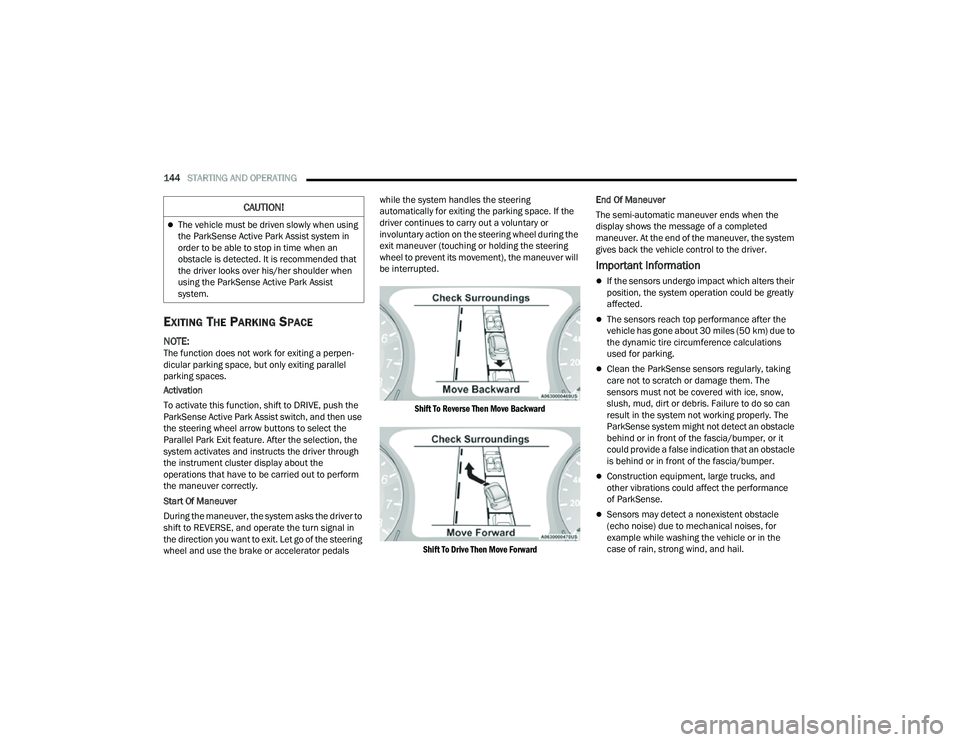
During the maneuver, the system asks the driver to
shift to REVERSE, and operate the turn signal in
the direction you want to exit. Let go of the steering
wheel and use the brake or accelerator pedals while the system handles the steering
automatically for exiting the parking space. If the
driver continues to carry out a voluntary or
involuntary action on the steering wheel during the
exit maneuver (touching or holding the steering
wheel to prevent its movement), the maneuver will
be interrupted.
Shift To Reverse Then Move Backward
Shift To Drive Then Move Forward
End Of Maneuver
The semi-automatic maneuver ends when the
display shows the message of a completed
maneuver. At the end of the maneuver, the system
gives back the vehicle control to the driver.
Important Information
If the sensors undergo impact which alters their
position, the system operation could be greatly
affected.
The sensors reach top performance after the
vehicle has gone about 30 miles (50 km) due to
the dynamic tire circumference calculations
used for parking.
Clean the ParkSense sensors regularly, taking
care not to scratch or damage them. The
sensors must not be covered with ice, snow,
slush, mud, dirt or debris. Failure to do so can
result in the system not working properly. The
ParkSense system might not detect an obstacle
behind or in front of the fascia/bumper, or it
could provide a false indication that an obstacle
is behind or in front of the fascia/bumper.
Construction equipment, large trucks, and
other vibrations could affect the performance
of ParkSense.
Sensors may detect a nonexistent obstacle
(echo noise) due to mechanical noises, for
example while washing the vehicle or in the
case of rain, strong wind, and hail.
The vehicle must be driven slowly when using
the ParkSense Active Park Assist system in
order to be able to stop in time when an
obstacle is detected. It is recommended that
the driver looks over his/her shoulder when
using the ParkSense Active Park Assist
system.
CAUTION!
22_MP_OM_EN_USC_t.book Page 144
Page 150 of 344
148STARTING AND OPERATING
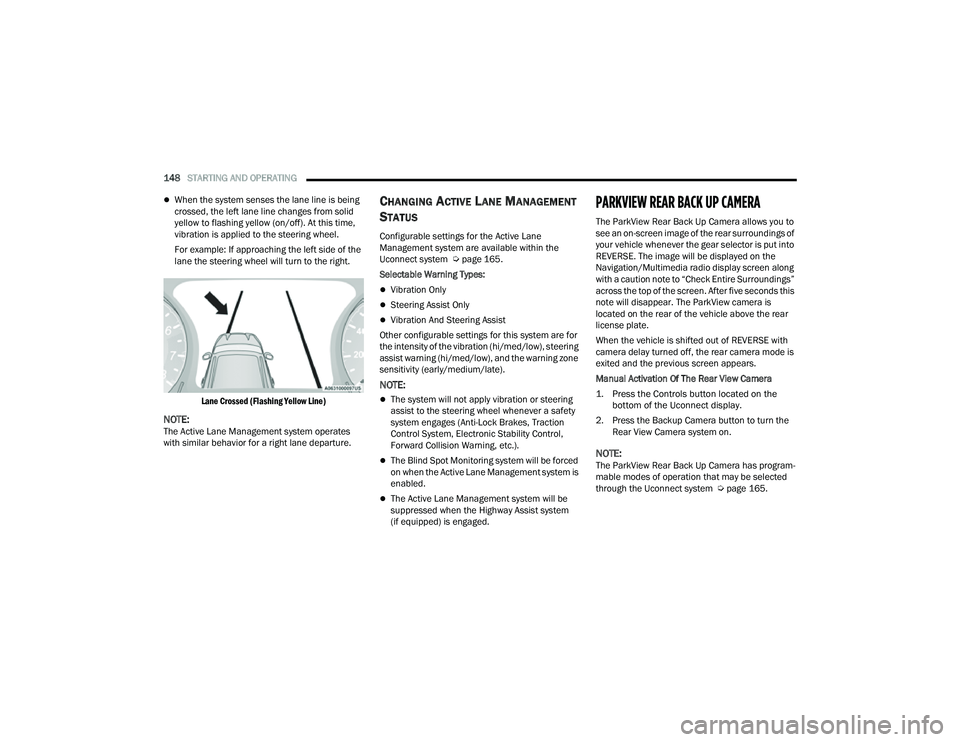
When the system senses the lane line is being
crossed, the left lane line changes from solid
yellow to flashing yellow (on/off). At this time,
vibration is applied to the steering wheel.
For example: If approaching the left side of the
lane the steering wheel will turn to the right.
Lane Crossed (Flashing Yellow Line)
NOTE:The Active Lane Management system operates
with similar behavior for a right lane departure.
CHANGING ACTIVE LANE MANAGEMENT
S
TATUS
Configurable settings for the Active Lane
Management system are available within the
Uconnect system Ú page 165.
Selectable Warning Types:
Vibration Only
Steering Assist Only
Vibration And Steering Assist
Other configurable settings for this system are for
the intensity of the vibration (hi/med/low), steering
assist warning (hi/med/low), and the warning zone
sensitivity (early/medium/late).
NOTE:
The system will not apply vibration or steering
assist to the steering wheel whenever a safety
system engages (Anti-Lock Brakes, Traction
Control System, Electronic Stability Control,
Forward Collision Warning, etc.).
The Blind Spot Monitoring system will be forced
on when the Active Lane Management system is
enabled.
The Active Lane Management system will be
suppressed when the Highway Assist system
(if equipped) is engaged.
PARKVIEW REAR BACK UP CAMERA
The ParkView Rear Back Up Camera allows you to
see an on-screen image of the rear surroundings of
your vehicle whenever the gear selector is put into
REVERSE. The image will be displayed on the
Navigation/Multimedia radio display screen along
with a caution note to “Check Entire Surroundings”
across the top of the screen. After five seconds this
note will disappear. The ParkView camera is
located on the rear of the vehicle above the rear
license plate.
When the vehicle is shifted out of REVERSE with
camera delay turned off, the rear camera mode is
exited and the previous screen appears.
Manual Activation Of The Rear View Camera
1. Press the Controls button located on the bottom of the Uconnect display.
2. Press the Backup Camera button to turn the Rear View Camera system on.
NOTE:The ParkView Rear Back Up Camera has program -
mable modes of operation that may be selected
through the Uconnect system Ú page 165.
22_MP_OM_EN_USC_t.book Page 148
Page 152 of 344
150STARTING AND OPERATING
SURROUND VIEW CAMERA SYSTEM —
IF EQUIPPED
Your vehicle may be equipped with the Surround
View Camera system that allows you to see an
on-screen image of the surroundings and Top View
of your vehicle whenever the gear selector is put
into REVERSE or a different view is selected
through the touchscreen soft buttons. The Top
View of the vehicle will show which doors are open.
The image will be displayed on the touchscreen
display along with a caution note “Check Entire
Surroundings” across the top of the screen.
After five seconds, this note will disappear. The
Surround View Camera system is comprised of four
sequential cameras located in the front grille, rear
liftgate and side mirrors.
NOTE:The Surround View Camera system has program -
mable settings that may be selected through the
Uconnect system Ú page 165.
Press this button on the touchscreen to
enter the Surround View Camera menu in
the Uconnect system.
When the vehicle is shifted into REVERSE, the Rear
View and Top View is the default view of the
system.
When the vehicle is shifted out of REVERSE with
camera delay turned on, the camera image will
continue to be displayed for up to 10 seconds
unless the vehicle speed exceeds 8 mph (13 km/h),
the vehicle is shifted into PARK or the ignition is
placed in the OFF position. There is a touchscreen
button X to disable the display of the camera image.
When the vehicle is shifted out of REVERSE with
camera delay turned off, the Surround View
Camera mode is exited and the last known screen
appears again.
When enabled, active guidelines are overlaid on
the image to illustrate the width of the vehicle,
including the side view mirrors and its projected
backup path based on the steering wheel position.
Different colored zones indicate the distance to
the rear of the vehicle.
The following table shows the approximate
distances for each zone:
Modes Of Operation
Manual activation of the Surround View Camera is
selected by pressing the Surround View Camera
soft key located in the Controls menu within the
Uconnect system.
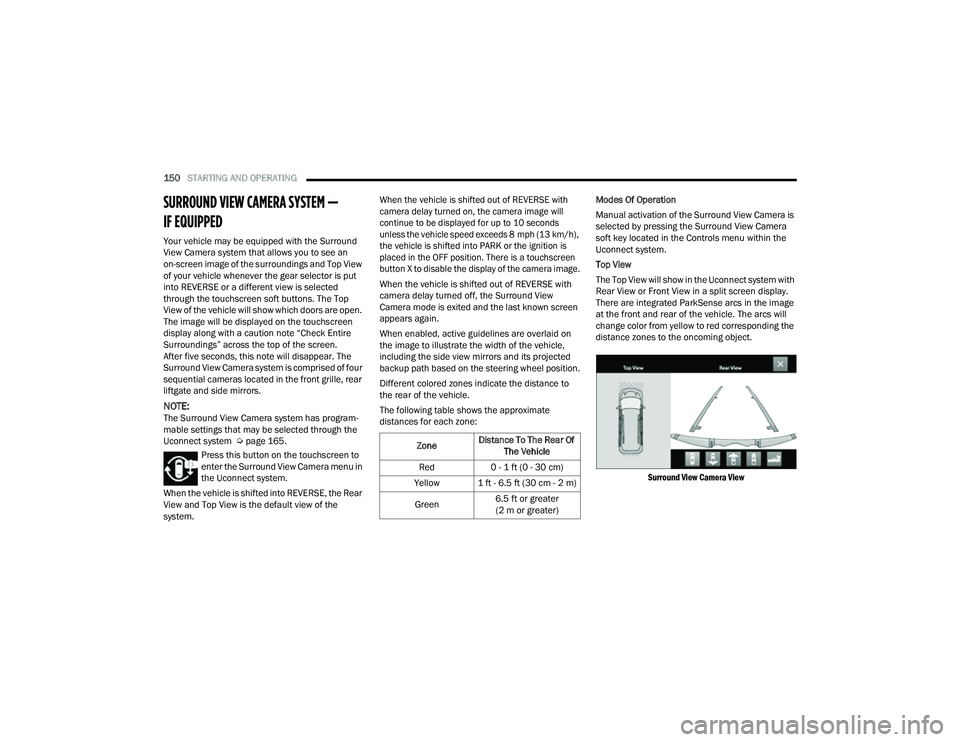
Top View
The Top View will show in the Uconnect system with
Rear View or Front View in a split screen display.
There are integrated ParkSense arcs in the image
at the front and rear of the vehicle. The arcs will
change color from yellow to red corresponding the
distance zones to the oncoming object.
Surround View Camera View
Zone Distance To The Rear Of
The Vehicle
Red 0 - 1 ft (0 - 30 cm)
Yellow 1 ft - 6.5 ft (30 cm - 2 m)
Green 6.5 ft or greater
(2 m or greater)
22_MP_OM_EN_USC_t.book Page 150
Page 173 of 344
MULTIMEDIA171
Pedestrian Emergency Braking — Located In Automatic Emergency Braking
Submenu This setting will turn the Pedestrian Emergency Braking system on or off.
Lane Management — Located In Active Lane Management This setting will activate the system that will alert the driver when a lane
departure is detected. If selected, steering assist can be provided.
The available options are “Vibration Only”, “Steering Assist Only”, and
“Vibration + Steering Assist”.
Lane Warning — Located In Active Lane Management This setting will set the warning type for Active Lane Management.
The available options are “Early”, “Medium”, and “Late”.
Vibration Strength — Located In Active Lane Management This setting will set the strength of the steering wheel vibration. The available
options are “Low”, “Medium”, and “High”.
Steering Assist Strength — Located In Active Lane Management This setting will set the strength of the steering wheel pull when a lane
departure is detected. The available options are “Low”, “Medium”, and
“High”.
LaneSense Warning — Located In LaneSense submenu This setting will set the warning type for LaneSense. The available options are
“Early”, “Medium”, and “Late”.
LaneSense Strength — Located In LaneSense submenu This setting will set the strength of the LaneSense system. The available
options are “Low”, “Medium”, and “High”.
ParkSense This setting will change the type of ParkSense alert when a close object is
detected. The “Sound Only” setting will provide an audible chime when an
object is detected. The “Sound and Display” setting will provide both an
audible chime and a visual display when an object is detected.
Front ParkSense Volume This setting adjusts the volume of the Front ParkSense system. The available
settings are “Low”, “Medium”, and “High”.
Rear ParkSense Volume This setting adjusts the volume of the Rear ParkSense system. The available
settings are “Low”, “Medium”, and “High”.
Setting Name
Description
5
22_MP_OM_EN_USC_t.book Page 171
Page 174 of 344
172MULTIMEDIA
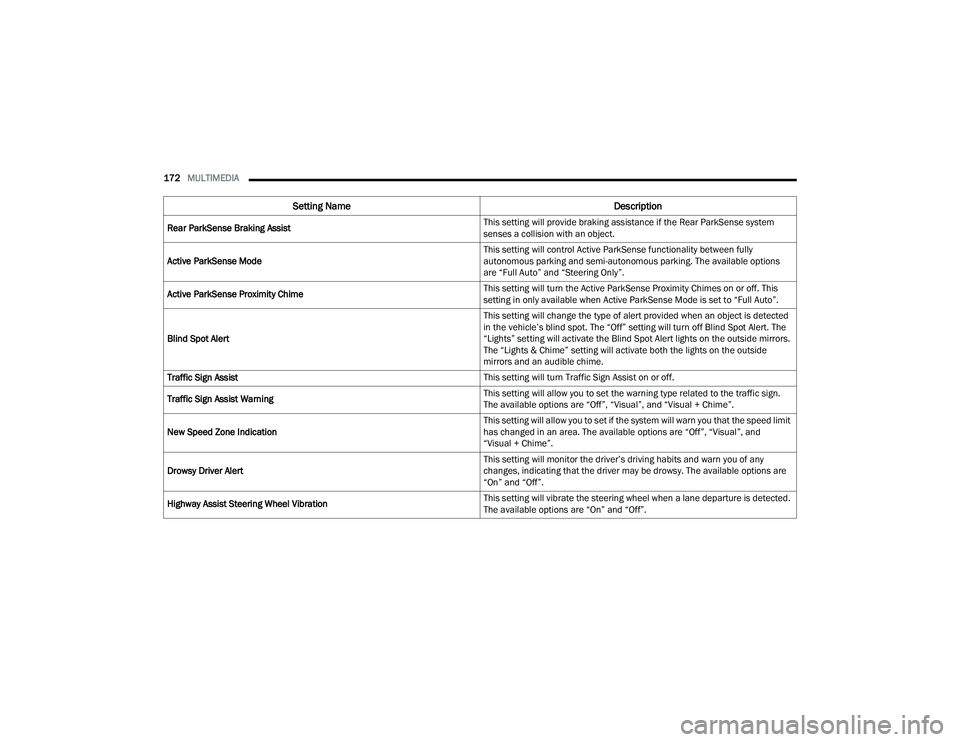
Rear ParkSense Braking Assist This setting will provide braking assistance if the Rear ParkSense system
senses a collision with an object.
Active ParkSense Mode This setting will control Active ParkSense functionality between fully
autonomous parking and semi-autonomous parking. The available options
are “Full Auto” and “Steering Only”.
Active ParkSense Proximity Chime This setting will turn the Active ParkSense Proximity Chimes on or off. This
setting in only available when Active ParkSense Mode is set to “Full Auto”.
Blind Spot Alert This setting will change the type of alert provided when an object is detected
in the vehicle’s blind spot. The “Off” setting will turn off Blind Spot Alert. The
“Lights” setting will activate the Blind Spot Alert lights on the outside mirrors.
The “Lights & Chime” setting will activate both the lights on the outside
mirrors and an audible chime.
Traffic Sign Assist This setting will turn Traffic Sign Assist on or off.
Traffic Sign Assist Warning This setting will allow you to set the warning type related to the traffic sign.
The available options are “Off”, “Visual”, and “Visual + Chime”.
New Speed Zone Indication This setting will allow you to set if the system will warn you that the speed limit
has changed in an area. The available options are “Off”, “Visual”, and
“Visual + Chime”.
Drowsy Driver Alert This setting will monitor the driver’s driving habits and warn you of any
changes, indicating that the driver may be drowsy. The available options are
“On” and “Off”.
Highway Assist Steering Wheel Vibration This setting will vibrate the steering wheel when a lane departure is detected.
The available options are “On” and “Off”.
Setting Name
Description
22_MP_OM_EN_USC_t.book Page 172
Page 292 of 344
290SERVICING AND MAINTENANCE
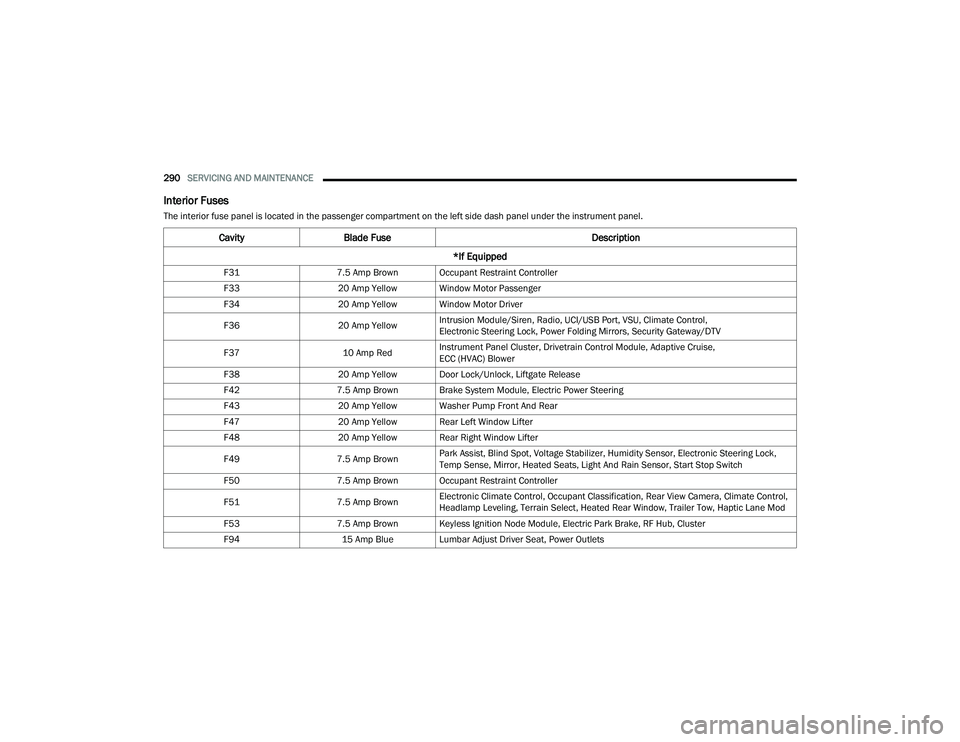
Interior Fuses
The interior fuse panel is located in the passenger compartment on the left side dash panel under the instrument panel.
CavityBlade Fuse Description
*If Equipped
F31 7.5 Amp Brown Occupant Restraint Controller
F33 20 Amp Yellow Window Motor Passenger
F34 20 Amp Yellow Window Motor Driver
F36 20 Amp YellowIntrusion Module/Siren, Radio, UCI/USB Port, VSU, Climate Control,
Electronic Steering Lock, Power Folding Mirrors, Security Gateway/DTV
F37 10 Amp RedInstrument Panel Cluster, Drivetrain Control Module, Adaptive Cruise,
ECC (HVAC) Blower
F38 20 Amp Yellow Door Lock/Unlock, Liftgate Release
F42 7.5 Amp Brown Brake System Module, Electric Power Steering
F43 20 Amp Yellow Washer Pump Front And Rear
F47 20 Amp Yellow Rear Left Window Lifter
F48 20 Amp Yellow Rear Right Window Lifter
F49 7.5 Amp BrownPark Assist, Blind Spot, Voltage Stabilizer, Humidity Sensor, Electronic Steering Lock,
Temp Sense, Mirror, Heated Seats, Light And Rain Sensor, Start Stop Switch
F50 7.5 Amp Brown Occupant Restraint Controller
F51 7.5 Amp BrownElectronic Climate Control, Occupant Classification, Rear View Camera, Climate Control,
Headlamp Leveling, Terrain Select, Heated Rear Window, Trailer Tow, Haptic Lane Mod
F53 7.5 Amp Brown Keyless Ignition Node Module, Electric Park Brake, RF Hub, Cluster
F94 15 Amp Blue Lumbar Adjust Driver Seat, Power Outlets
22_MP_OM_EN_USC_t.book Page 290