key fob JEEP COMPASS 2023 User Guide
[x] Cancel search | Manufacturer: JEEP, Model Year: 2023, Model line: COMPASS, Model: JEEP COMPASS 2023Pages: 344, PDF Size: 18.8 MB
Page 24 of 344
22GETTING TO KNOW YOUR VEHICLE
NOTE:If the system is armed by pushing the lock button
on the interior door panel, the Vehicle Security
Light will flash rapidly for about 15 seconds once
the door is closed, then slow down to every three
seconds.
TO DISARM THE SYSTEM
The Vehicle Security system can be disarmed using
any of the following methods:
Push the unlock button on the key fob.
Grab the Passive Entry door handle to unlock
the door Úpage 23.
Cycle the ignition out of the OFF position to
disarm the system.
NOTE:
The driver's door key cylinder and the liftgate
button on the key fob cannot arm or disarm the
Vehicle Security system.
The Vehicle Security system remains armed
during power liftgate entry. Pushing the liftgate
button will not disarm the Vehicle Security
system. If someone enters the vehicle through
the liftgate and opens any door, the alarm will
sound.
When the Vehicle Security system is armed, the
interior power door lock switches will not unlock
the doors. The Vehicle Security system is designed to protect
your vehicle. However, you can create conditions
where the system will give you a false alarm. If one
of the previously described arming sequences has
occurred, the Vehicle Security system will arm
regardless of whether you are in the vehicle or not.
If you remain in the vehicle and open a door, the
alarm will sound. If this occurs, disarm the Vehicle
Security system.
If the Vehicle Security system is armed and the
battery becomes disconnected, the Vehicle
Security system will remain armed when the
battery is reconnected; the exterior lights will flash,
and the horn will sound. If this occurs, disarm the
Vehicle Security system.
REARMING OF THE SYSTEM
If something triggers the alarm, and no action is
taken to disarm it, the Vehicle Security system will
turn the horn off after approximately 90 seconds,
and then the Vehicle Security system will rearm
itself.
SECURITY SYSTEM MANUAL OVERRIDE
The Vehicle Security system will not arm if you lock
the doors using the manual door lock.
DOORS
MANUAL DOOR LOCKS
The door locks can be manually locked from inside
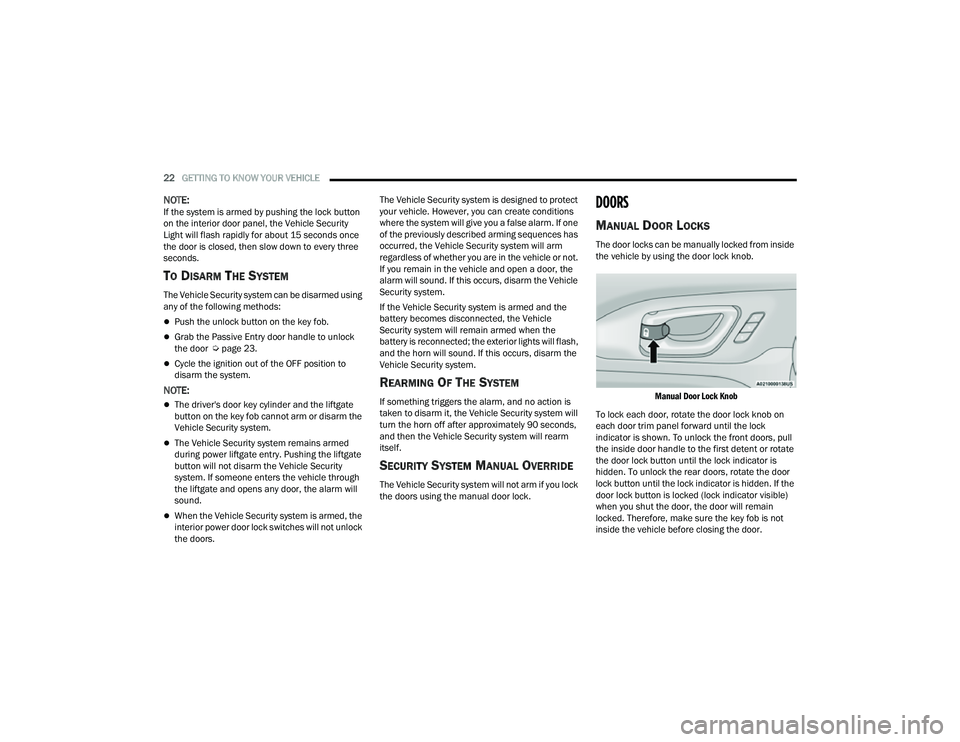
the vehicle by using the door lock knob.
Manual Door Lock Knob
To lock each door, rotate the door lock knob on
each door trim panel forward until the lock
indicator is shown. To unlock the front doors, pull
the inside door handle to the first detent or rotate
the door lock button until the lock indicator is
hidden. To unlock the rear doors, rotate the door
lock button until the lock indicator is hidden. If the
door lock button is locked (lock indicator visible)
when you shut the door, the door will remain
locked. Therefore, make sure the key fob is not
inside the vehicle before closing the door.
22_MP_OM_EN_USC_t.book Page 22
Page 25 of 344
GETTING TO KNOW YOUR VEHICLE23
(Continued)
NOTE:
Manually locking the vehicle will not arm the
Vehicle Security system.
The manual door locks will not lock or unlock the
liftgate.
POWER DOOR LOCKS
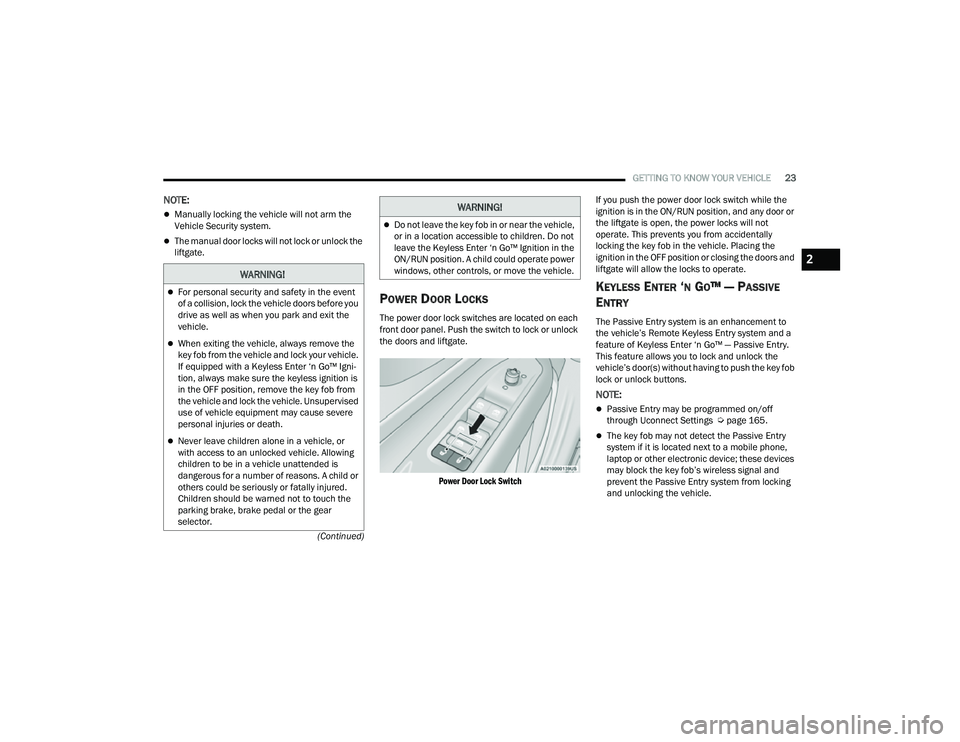
The power door lock switches are located on each
front door panel. Push the switch to lock or unlock
the doors and liftgate.
Power Door Lock Switch
If you push the power door lock switch while the
ignition is in the ON/RUN position, and any door or
the liftgate is open, the power locks will not
operate. This prevents you from accidentally
locking the key fob in the vehicle. Placing the
ignition in the OFF position or closing the doors and
liftgate will allow the locks to operate.
KEYLESS ENTER ‘N GO™ — PASSIVE
E
NTRY
The Passive Entry system is an enhancement to
the vehicle’s Remote Keyless Entry system and a
feature of Keyless Enter ‘n Go™ — Passive Entry.
This feature allows you to lock and unlock the
vehicle’s door(s) without having to push the key fob
lock or unlock buttons.
NOTE:
Passive Entry may be programmed on/off
through Uconnect Settings Ú page 165.
The key fob may not detect the Passive Entry
system if it is located next to a mobile phone,
laptop or other electronic device; these devices
may block the key fob’s wireless signal and
prevent the Passive Entry system from locking
and unlocking the vehicle.
WARNING!
For personal security and safety in the event
of a collision, lock the vehicle doors before you
drive as well as when you park and exit the
vehicle.
When exiting the vehicle, always remove the
key fob from the vehicle and lock your vehicle.
If equipped with a Keyless Enter ‘n Go™ Igni -
tion, always make sure the keyless ignition is
in the OFF position, remove the key fob from
the vehicle and lock the vehicle. Unsupervised
use of vehicle equipment may cause severe
personal injuries or death.
Never leave children alone in a vehicle, or
with access to an unlocked vehicle. Allowing
children to be in a vehicle unattended is
dangerous for a number of reasons. A child or
others could be seriously or fatally injured.
Children should be warned not to touch the
parking brake, brake pedal or the gear
selector.
Do not leave the key fob in or near the vehicle,
or in a location accessible to children. Do not
leave the Keyless Enter ‘n Go™ Ignition in the
ON/RUN position. A child could operate power
windows, other controls, or move the vehicle.
WARNING!
2
22_MP_OM_EN_USC_t.book Page 23
Page 26 of 344
24GETTING TO KNOW YOUR VEHICLE
If wearing gloves, or if it has been raining/
snowing on the Passive Entry door handle, the
unlock sensitivity can be affected, resulting in a
slower response time.
If the vehicle is unlocked by Passive Entry and
no door is opened within 60 seconds, the
vehicle will relock and, if equipped, will arm the
Vehicle Security system.
To Unlock From The Driver's Side Or Passenger’s
Side
With a valid Passive Entry key fob within 5 ft
(1.5 m) of either front door handle, grab the door
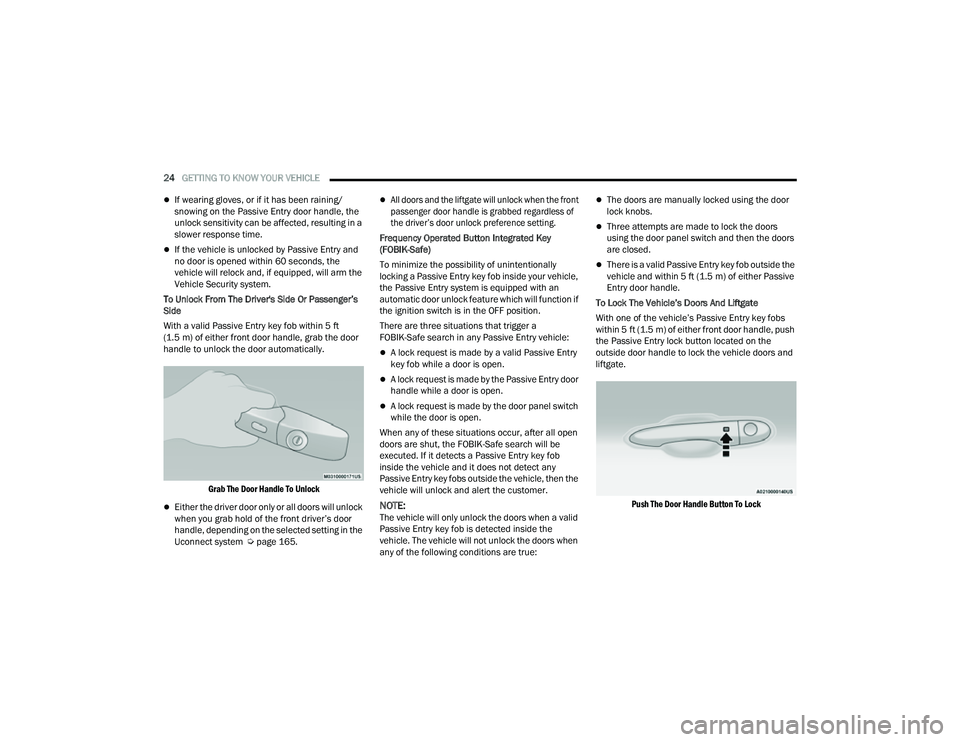
handle to unlock the door automatically.
Grab The Door Handle To Unlock
Either the driver door only or all doors will unlock
when you grab hold of the front driver’s door
handle, depending on the selected setting in the
Uconnect system Ú page 165.
All doors and the liftgate will unlock when the front
passenger door handle is grabbed regardless of
the driver’s door unlock preference setting.
Frequency Operated Button Integrated Key
(FOBIK-Safe)
To minimize the possibility of unintentionally
locking a Passive Entry key fob inside your vehicle,
the Passive Entry system is equipped with an
automatic door unlock feature which will function if
the ignition switch is in the OFF position.
There are three situations that trigger a
FOBIK-Safe search in any Passive Entry vehicle:
A lock request is made by a valid Passive Entry
key fob while a door is open.
A lock request is made by the Passive Entry door
handle while a door is open.
A lock request is made by the door panel switch
while the door is open.
When any of these situations occur, after all open
doors are shut, the FOBIK-Safe search will be
executed. If it detects a Passive Entry key fob
inside the vehicle and it does not detect any
Passive Entry key fobs outside the vehicle, then the
vehicle will unlock and alert the customer.
NOTE:The vehicle will only unlock the doors when a valid
Passive Entry key fob is detected inside the
vehicle. The vehicle will not unlock the doors when
any of the following conditions are true:
The doors are manually locked using the door
lock knobs.
Three attempts are made to lock the doors
using the door panel switch and then the doors
are closed.
There is a valid Passive Entry key fob outside the
vehicle and within 5 ft (1.5 m) of either Passive
Entry door handle.
To Lock The Vehicle’s Doors And Liftgate
With one of the vehicle’s Passive Entry key fobs
within 5 ft (1.5 m) of either front door handle, push
the Passive Entry lock button located on the
outside door handle to lock the vehicle doors and
liftgate.
Push The Door Handle Button To Lock
22_MP_OM_EN_USC_t.book Page 24
Page 27 of 344
GETTING TO KNOW YOUR VEHICLE25
NOTE:
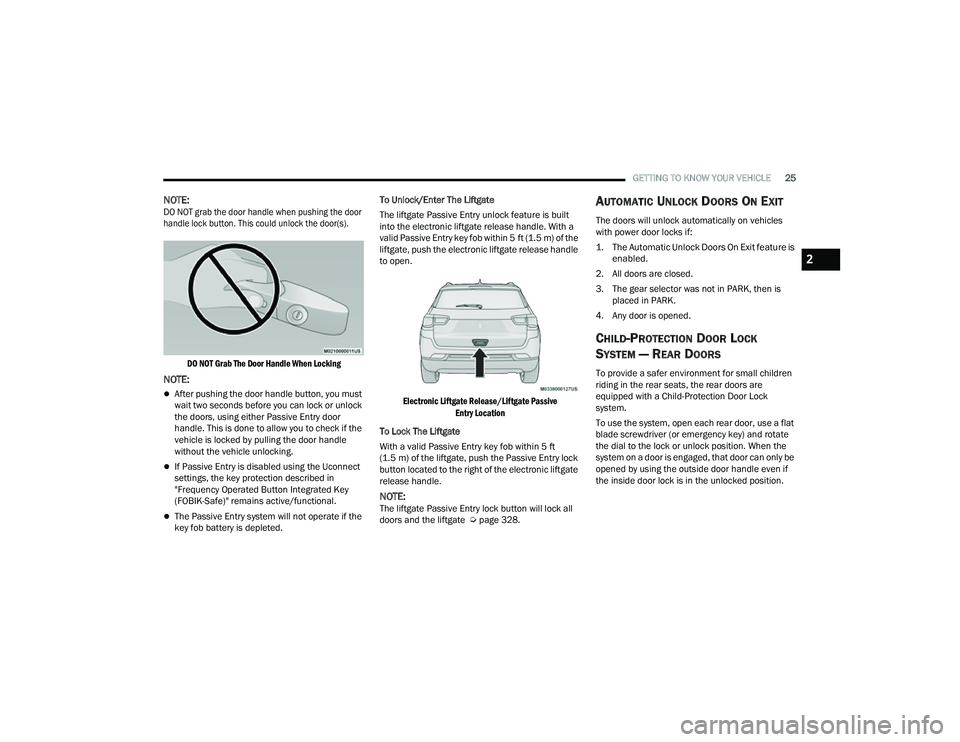
DO NOT grab the door handle when pushing the door
handle lock button. This could unlock the door(s).
DO NOT Grab The Door Handle When Locking
NOTE:
After pushing the door handle button, you must
wait two seconds before you can lock or unlock
the doors, using either Passive Entry door
handle. This is done to allow you to check if the
vehicle is locked by pulling the door handle
without the vehicle unlocking.
If Passive Entry is disabled using the Uconnect
settings, the key protection described in
"Frequency Operated Button Integrated Key
(FOBIK-Safe)" remains active/functional.
The Passive Entry system will not operate if the
key fob battery is depleted. To Unlock/Enter The Liftgate
The liftgate Passive Entry unlock feature is built
into the electronic liftgate release handle. With a
valid Passive Entry key fob within 5 ft (1.5 m) of the
liftgate, push the electronic liftgate release handle
to open.
Electronic Liftgate Release/Liftgate Passive Entry Location
To Lock The Liftgate
With a valid Passive Entry key fob within 5 ft
(1.5 m) of the liftgate, push the Passive Entry lock
button located to the right of the electronic liftgate
release handle.
NOTE:The liftgate Passive Entry lock button will lock all
doors and the liftgate Ú page 328.
AUTOMATIC UNLOCK DOORS ON EXIT
The doors will unlock automatically on vehicles
with power door locks if:
1. The Automatic Unlock Doors On Exit feature is
enabled.
2. All doors are closed.
3. The gear selector was not in PARK, then is placed in PARK.
4. Any door is opened.
CHILD-PROTECTION DOOR LOCK
S
YSTEM — REAR DOORS
To provide a safer environment for small children
riding in the rear seats, the rear doors are
equipped with a Child-Protection Door Lock
system.
To use the system, open each rear door, use a flat
blade screwdriver (or emergency key) and rotate
the dial to the lock or unlock position. When the
system on a door is engaged, that door can only be
opened by using the outside door handle even if
the inside door lock is in the unlocked position.
2
22_MP_OM_EN_USC_t.book Page 25
Page 29 of 344
GETTING TO KNOW YOUR VEHICLE27
HEATED STEERING WHEEL —
I
F EQUIPPED
The steering wheel contains a heating
element that helps warm your hands in
cold weather. The heated steering wheel
has only one temperature setting. Once
the heated steering wheel has been turned on, it
will stay on until the operator turns it off. The
heated steering wheel may not turn on when it is
already warm.
The heated steering wheel control button is
located within the Uconnect system. You can gain
access to the control button through the climate
screen or the controls screen.
Push the heated steering wheel button once to
turn the heating element on.
Push the heated steering wheel button a second
time to turn the heating element off.
NOTE:The engine must be running for the heated
steering wheel to operate.
For information on use with the Remote Start
system, see Ú page 20.
DRIVER MEMORY SETTINGS — IF EQUIPPED
This feature allows the driver to save up to two
different memory profiles for easy recall through a
memory switch. Each memory profile saves
desired position settings for the following features:
Driver seat position
Easy Entry/Exit seat (if equipped)
A set of desired radio station presets
NOTE:Your vehicle is equipped with two key fobs, each
can be linked to either memory position 1 or 2.
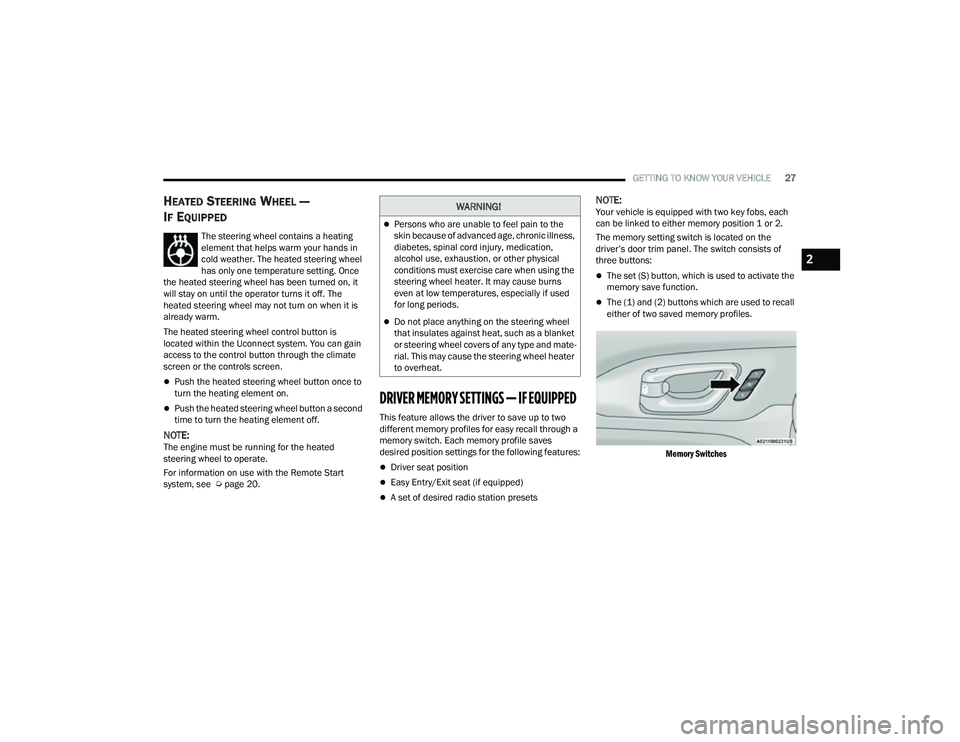
The memory setting switch is located on the
driver’s door trim panel. The switch consists of
three buttons:
The set (S) button, which is used to activate the
memory save function.
The (1) and (2) buttons which are used to recall
either of two saved memory profiles.
Memory Switches
WARNING!
Persons who are unable to feel pain to the
skin because of advanced age, chronic illness,
diabetes, spinal cord injury, medication,
alcohol use, exhaustion, or other physical
conditions must exercise care when using the
steering wheel heater. It may cause burns
even at low temperatures, especially if used
for long periods.
Do not place anything on the steering wheel
that insulates against heat, such as a blanket
or steering wheel covers of any type and mate -
rial. This may cause the steering wheel heater
to overheat.
2
22_MP_OM_EN_USC_t.book Page 27
Page 30 of 344
28GETTING TO KNOW YOUR VEHICLE
PROGRAMMING THE MEMORY FEATURE
To create a new memory profile, perform the
following:
NOTE:Saving a new memory profile will erase an existing
profile from memory.
1. Place the vehicle’s ignition in the ON position.
2. Adjust all memory profile settings to desired
preferences (i.e., seat and radio station
presets).
3. Push the set (S) button on the memory switch, and then push the desired memory button
(1 or 2) within five seconds. The instrument
cluster display will display which memory
position is being set.
NOTE:Memory profiles can be set without the vehicle in
PARK, but the vehicle must be in PARK to recall a
memory profile.
LINKING AND UNLINKING THE REMOTE
K
EYLESS ENTRY KEY FOB TO MEMORY
Your remote keyless entry key fob can be
programmed to recall one of two saved memory
profiles.
NOTE:Before programming your key fob you must select
the “Memory Linked To FOB” feature through the
Uconnect Settings Ú page 165.
To program your key fob, perform the following:
1. Place the vehicle’s ignition in the OFF position.
2. Select the desired memory profile (1) or (2).
3. Push and release the set (S) button on the memory switch, then within five seconds push
and release the button labeled (1) or (2)
accordingly. “Memory Profile Set” (1 or 2) will
display in the instrument cluster display.
4. Push and release the lock button on the key fob within 10 seconds.
NOTE:Your key fob can be unlinked from your memory
settings by pushing the set (S) button, followed by
pushing the unlock button on the key fob within
10 seconds.
MEMORY POSITION RECALL
NOTE:The vehicle must be in PARK to recall memory posi -
tions. If a recall is attempted when the vehicle is
not in PARK, a message will display in the
instrument cluster display. To recall the memory settings for driver one or two,
push the desired memory button number (1 or 2)
or the unlock button on the key fob linked to the
desired memory position.
A recall can be canceled by pushing any of the
memory buttons (S, 1, or 2) during a recall. When
a recall is canceled, the driver seat will stop
moving. A delay of one second will occur before
another recall can be selected.
SEATS
Seats are a part of the Occupant Restraint system
of the vehicle.
WARNING!
It is dangerous to ride in a cargo area, inside
or outside of a vehicle. In a collision, people
riding in these areas are more likely to be seri
-
ously injured or killed.
Do not allow people to ride in any area of your
vehicle that is not equipped with seats and
seat belts. In a collision, people riding in these
areas are more likely to be seriously injured or
killed.
Be sure everyone in your vehicle is in a seat
and using a seat belt properly.
22_MP_OM_EN_USC_t.book Page 28
Page 64 of 344
62GETTING TO KNOW YOUR VEHICLE
WINDOWS
POWER WINDOW CONTROLS
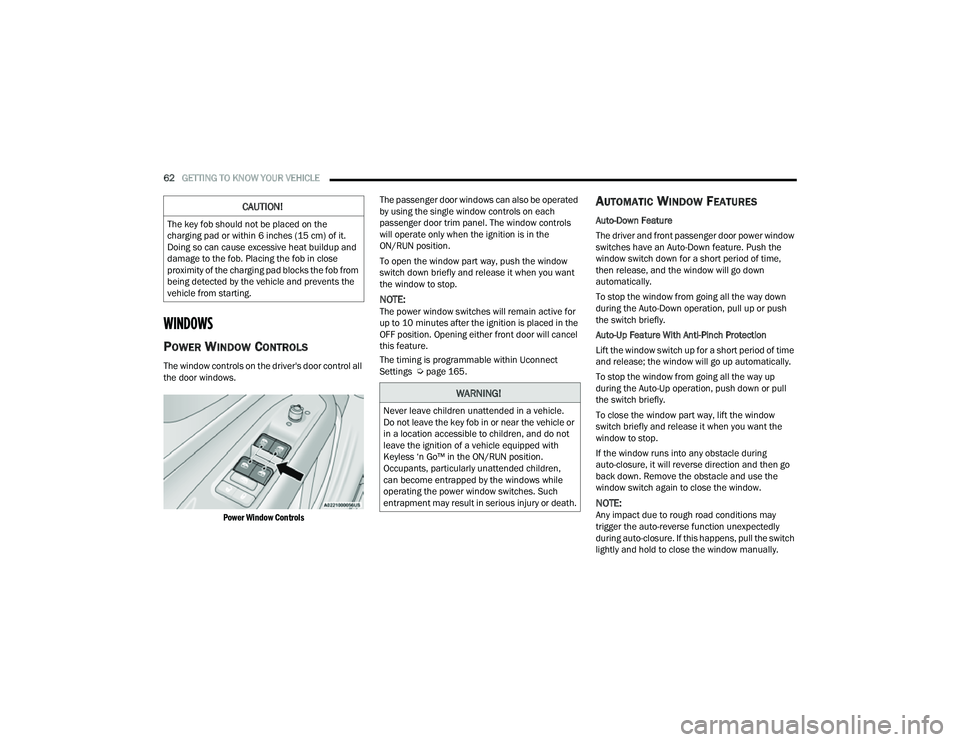
The window controls on the driver's door control all
the door windows.
Power Window Controls
The passenger door windows can also be operated
by using the single window controls on each
passenger door trim panel. The window controls
will operate only when the ignition is in the
ON/RUN position.
To open the window part way, push the window
switch down briefly and release it when you want
the window to stop.
NOTE:The power window switches will remain active for
up to 10 minutes after the ignition is placed in the
OFF position. Opening either front door will cancel
this feature.
The timing is programmable within Uconnect
Settings Ú
page 165.
AUTOMATIC WINDOW FEATURES
Auto-Down Feature
The driver and front passenger door power window
switches have an Auto-Down feature. Push the
window switch down for a short period of time,
then release, and the window will go down
automatically.
To stop the window from going all the way down
during the Auto-Down operation, pull up or push
the switch briefly.
Auto-Up Feature With Anti-Pinch Protection
Lift the window switch up for a short period of time
and release; the window will go up automatically.
To stop the window from going all the way up
during the Auto-Up operation, push down or pull
the switch briefly.
To close the window part way, lift the window
switch briefly and release it when you want the
window to stop.
If the window runs into any obstacle during
auto-closure, it will reverse direction and then go
back down. Remove the obstacle and use the
window switch again to close the window.
NOTE:Any impact due to rough road conditions may
trigger the auto-reverse function unexpectedly
during auto-closure. If this happens, pull the switch
lightly and hold to close the window manually.
CAUTION!
The key fob should not be placed on the
charging pad or within 6 inches (15 cm) of it.
Doing so can cause excessive heat buildup and
damage to the fob. Placing the fob in close
proximity of the charging pad blocks the fob from
being detected by the vehicle and prevents the
vehicle from starting.
WARNING!
Never leave children unattended in a vehicle.
Do not leave the key fob in or near the vehicle or
in a location accessible to children, and do not
leave the ignition of a vehicle equipped with
Keyless ‘n Go™ in the ON/RUN position.
Occupants, particularly unattended children,
can become entrapped by the windows while
operating the power window switches. Such
entrapment may result in serious injury or death.
22_MP_OM_EN_USC_t.book Page 62
Page 66 of 344
64GETTING TO KNOW YOUR VEHICLE
OPENING AND CLOSING THE SUNROOF
The sunroof has two programmed open positions,
comfort stop position and full open position. The
comfort stop position has been optimized to
minimize wind buffeting when driving with side
windows closed and sunroof open. If the sunshade
is in the closed position when initiating a sunroof
open or vent command the sunshade will
automatically open to the half open position prior
to the sunroof opening.
Express Open/Close
Push the switch to open and release it within
one-half second and the sunroof will open to the
comfort stop (partially opened) position and
automatically stop. Push the switch and release it
again, and the sunroof will open to the full open
position then automatically stop.
Pull the switch to close and release it within
one-half second and the sunroof will completely
close automatically from any position.
During Express Open or Express Close operation,
any movement of the sunroof switch will stop the
sunroof. Manual Open/Close
Push and hold the switch to open. The sunroof will
open to the comfort stop (partially opened)
position and automatically stop. Push the switch
and hold it again, and the sunroof will open to the
full open position then automatically stop.
Pull and hold the switch to completely close the
sunroof from any position.
Any release of the switch during open or close
operation will stop the sunroof movement. The
sunroof will remain in a partially opened position
until the switch is operated and held again.
VENTING SUNROOF
Push and release the vent switch within one-half
second and the sunroof will move from the closed
position to the vent position. This is called “Express
Vent.” During Express Vent operation, any
movement of the switch will stop the sunroof.
NOTE:When the sunroof is in a full open or a partial open
position, Express Vent operation is not available.
You must push and hold the vent switch to cycle
the sunroof from a slide open position to the vent
position. Sunroof movement will stop if the switch
is released prior to the sunroof reaching the vent
position.
WARNING!
Never leave children unattended in a vehicle,
or with access to an unlocked vehicle. Never
leave the key fob in or near the vehicle, or in a
location accessible to children. Do not leave
the ignition of a vehicle equipped with Keyless
Enter ‘n Go™ in the ON/RUN position. Occu
-
pants, particularly unattended children, can
become entrapped by the power sunroof while
operating the power sunroof switch. Such
entrapment may result in serious injury or
death.
In a collision, there is a greater risk of being
thrown from a vehicle with an open sunroof.
You could also be seriously injured or killed.
Always fasten your seat belt properly and
make sure all passengers are also properly
secured.
Do not allow small children to operate the
sunroof. Never allow your fingers, other body
parts, or any object, to project through the
sunroof opening. Injury may result.
Do not use the sunroof and its related parts
for supporting and/or grabbing purposes.
Serious personal injury may result to fingers
and other body parts as well as damage to the
sunroof.
22_MP_OM_EN_USC_t.book Page 64
Page 68 of 344
66GETTING TO KNOW YOUR VEHICLE
HOOD
OPENING THE HOOD
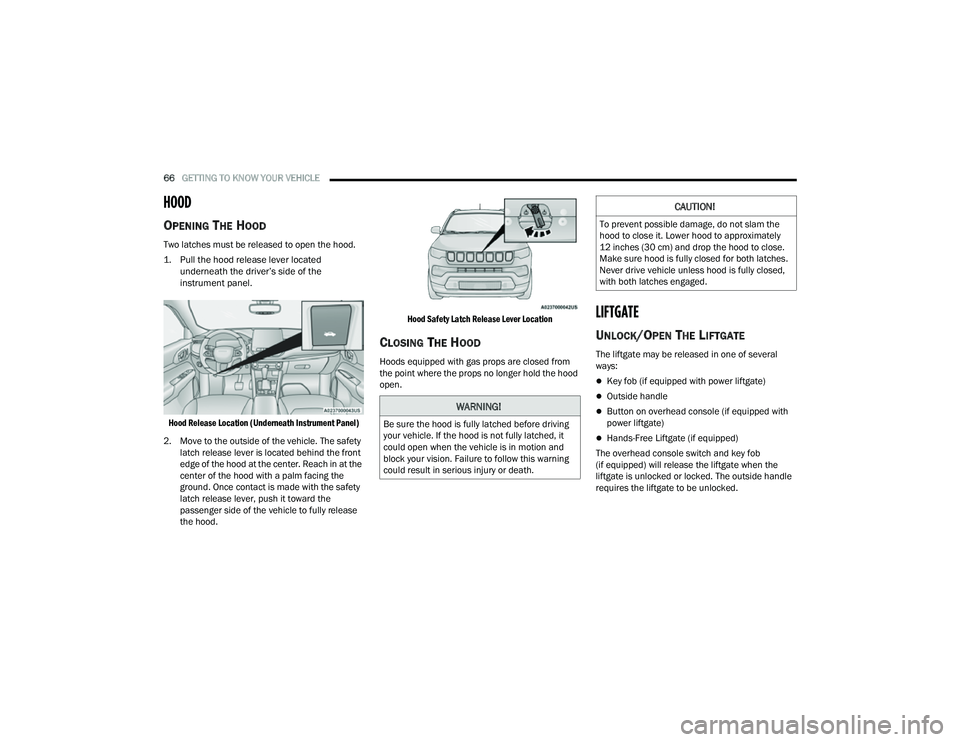
Two latches must be released to open the hood.
1. Pull the hood release lever located
underneath the driver’s side of the
instrument panel.
Hood Release Location (Underneath Instrument Panel)
2. Move to the outside of the vehicle. The safety latch release lever is located behind the front
edge of the hood at the center. Reach in at the
center of the hood with a palm facing the
ground. Once contact is made with the safety
latch release lever, push it toward the
passenger side of the vehicle to fully release
the hood.
Hood Safety Latch Release Lever Location
CLOSING THE HOOD
Hoods equipped with gas props are closed from
the point where the props no longer hold the hood
open.
LIFTGATE
UNLOCK/OPEN THE LIFTGATE
The liftgate may be released in one of several
ways:
Key fob (if equipped with power liftgate)
Outside handle
Button on overhead console (if equipped with
power liftgate)
Hands-Free Liftgate (if equipped)
The overhead console switch and key fob
(if equipped) will release the liftgate when the
liftgate is unlocked or locked. The outside handle
requires the liftgate to be unlocked.
WARNING!
Be sure the hood is fully latched before driving
your vehicle. If the hood is not fully latched, it
could open when the vehicle is in motion and
block your vision. Failure to follow this warning
could result in serious injury or death.
CAUTION!
To prevent possible damage, do not slam the
hood to close it. Lower hood to approximately
12 inches (30 cm) and drop the hood to close.
Make sure hood is fully closed for both latches.
Never drive vehicle unless hood is fully closed,
with both latches engaged.
22_MP_OM_EN_USC_t.book Page 66
Page 69 of 344
GETTING TO KNOW YOUR VEHICLE67
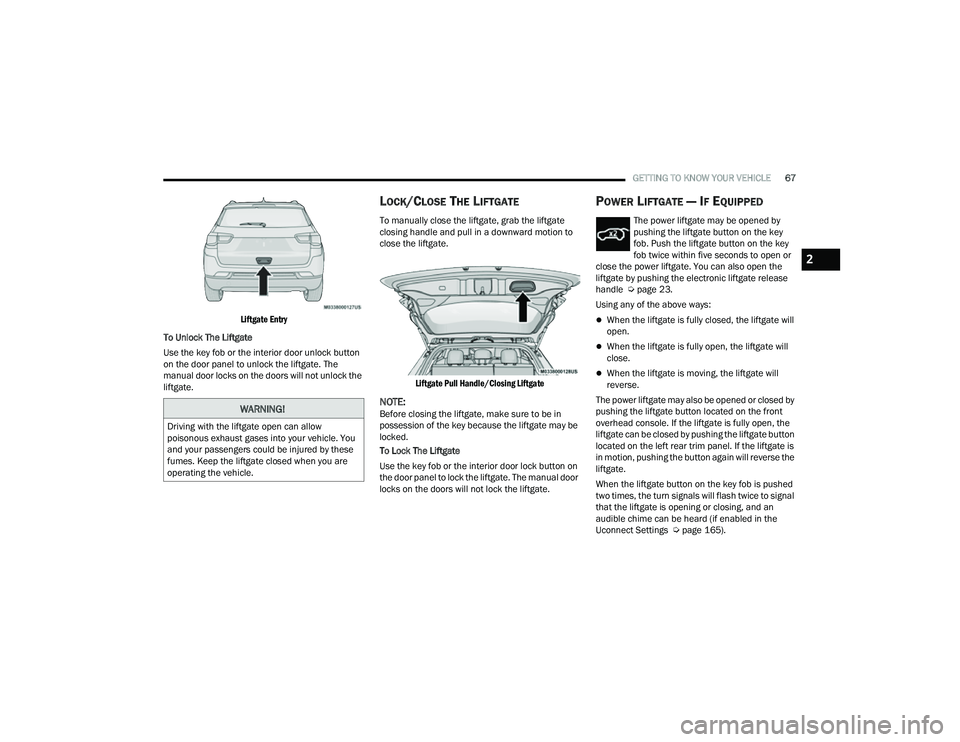
Liftgate Entry
To Unlock The Liftgate
Use the key fob or the interior door unlock button
on the door panel to unlock the liftgate. The
manual door locks on the doors will not unlock the
liftgate.
LOCK/CLOSE THE LIFTGATE
To manually close the liftgate, grab the liftgate
closing handle and pull in a downward motion to
close the liftgate.
Liftgate Pull Handle/Closing Liftgate
NOTE:Before closing the liftgate, make sure to be in
possession of the key because the liftgate may be
locked.
To Lock The Liftgate
Use the key fob or the interior door lock button on
the door panel to lock the liftgate. The manual door
locks on the doors will not lock the liftgate.
POWER LIFTGATE — IF EQUIPPED
The power liftgate may be opened by
pushing the liftgate button on the key
fob. Push the liftgate button on the key
fob twice within five seconds to open or
close the power liftgate. You can also open the
liftgate by pushing the electronic liftgate release
handle Ú page 23.
Using any of the above ways:
When the liftgate is fully closed, the liftgate will
open.
When the liftgate is fully open, the liftgate will
close.
When the liftgate is moving, the liftgate will
reverse.
The power liftgate may also be opened or closed by
pushing the liftgate button located on the front
overhead console. If the liftgate is fully open, the
liftgate can be closed by pushing the liftgate button
located on the left rear trim panel. If the liftgate is
in motion, pushing the button again will reverse the
liftgate.
When the liftgate button on the key fob is pushed
two times, the turn signals will flash twice to signal
that the liftgate is opening or closing, and an
audible chime can be heard (if enabled in the
Uconnect Settings Ú page 165).
WARNING!
Driving with the liftgate open can allow
poisonous exhaust gases into your vehicle. You
and your passengers could be injured by these
fumes. Keep the liftgate closed when you are
operating the vehicle.
2
22_MP_OM_EN_USC_t.book Page 67