turn signal JEEP COMPASS 2023 Owner's Manual
[x] Cancel search | Manufacturer: JEEP, Model Year: 2023, Model line: COMPASS, Model: JEEP COMPASS 2023Pages: 344, PDF Size: 18.8 MB
Page 147 of 344
STARTING AND OPERATING145
The sensors may not detect objects of a partic -
ular shape or made from particular materials
(very thin poles, trailer beams, panels, nets,
bushes, anti-parking posts, pavements, rubbish
bins, motor vehicles, etc.). Always take great
care to check that the vehicle and its path are
actually compatible with the parking place iden -
tified by the system.
The use of wheels and tires that are different
size to the original equipment could affect the
operation of the system.
The operation of the rear sensors is automati -
cally deactivated when the trailer's electric plug
is inserted in the vehicle's tow hook socket,
while the front sensors stay active and can
provide acoustic and visual warnings. If this situ -
ation occurs, Active Park Assist will not work.
The rear sensors are automatically reactivated
when the trailer's cable plug is removed.
In "Search in Progress" mode, the system could
incorrectly identify a parking place to carry out
the maneuver (e.g. by a junction, driveways,
roads crossing the direction of travel, etc.).
In the case of parking maneuvers on roads with
inclines, the performance of the system could
be inferior and it may deactivate.
If a parking maneuver is being carried out
between two parked vehicles alongside a curb,
the system may cause the vehicle to drive up
onto the curb.
Some maneuvers at very tight bends might be
impossible to be carried out.
Take great care to ensure that conditions do not
change during the parking maneuver (e.g. if
there are persons and/or animals in the parking
place, moving vehicles, etc.) and intervene
immediately if necessary.
During parking maneuvers, pay attention to vehi -
cles approaching from the opposite direction.
Always abide by the law and road regulations.
NOTE:
Correct system operation is not guaranteed if
snow chains or the compact spare tire are fitted.
The function only informs the driver about the
last appropriate parking place (parallel or
perpendicular) detected by the parking sensors.
Some messages displayed are accompanied by
acoustic warnings.
ACTIVE LANE MANAGEMENT SYSTEM —
IF EQUIPPED
ACTIVE LANE MANAGEMENT OPERATION
The Active Lane Management (ALM) system uses a
forward facing camera to detect lane markings or
road edges and measure vehicle position within
the lane boundaries. It also uses the Blind Spot Monitoring sensors to detect vehicles in adjacent
lanes while the driver is preparing to change lanes.
The system is operational at speeds above 37 mph
(60 km/h) and below 112 mph (180 km/h).
When both lane markings are detected, and the
vehicle drifts out of the lane (no turn signal
applied), the Active Lane Management system
provides a visual warning in the instrument cluster,
as well as a steering assist torque (if configured in
Uconnect Settings), to prompt the driver to remain
within the lane boundaries. If the driver continues
to drift out of the lane, the system provides a
flashing visual warning through the instrument
cluster display as well as a haptic steering wheel
vibration (if configured in Uconnect Settings) when
the vehicle crosses the lane boundary.
The warning will be in the form of a vibration in the
steering wheel, and/or automatic steering
assistance to direct the vehicle back toward the
center of the lane.
When both lane markings are detected, and the
driver uses the turn signal to indicate a lane
change while the system detects another vehicle in
the Blind Spot Monitoring zone on that side of the
vehicle, the Active Lane Management system
provides a warning in the form of steering assist
and/or steering vibration (depending on radio
settings) to guide the vehicle back to the center of
the lane.
4
22_MP_OM_EN_USC_t.book Page 145
Page 148 of 344
146STARTING AND OPERATING
Depending on the type of warning selected, the
system will either guide the vehicle back to the
center of the lane, provide a vibration in the
steering wheel, or both.
NOTE:For an event where the Active Lane Management
system is reacting to a target vehicle in the
adjacent lane, the steering vibration will occur as
soon as the vehicle starts to depart the center of its
lane (as opposed to waiting until the lane marker is
crossed), the Blind Spot Monitoring indicator LED
on the mirror will flash, and the steering wheel
torque will be greater than for a normal lane
departure (no vehicle in adjacent lane).
The driver may manually override the steering
assist warning by applying force into the steering
wheel at any time.
When only a single lane marking is detected and the
driver drifts across the lane marking (no turn signal
applied), the Active Lane Management system
provides a visual warning in the instrument cluster,
as well as a steering assist torque (if configured in
Uconnect Settings), to prompt the driver to remain
within the lane boundaries. If the driver continues to
drift out of the lane, the system provides a flashing
visual warning through the instrument cluster
display as well as a haptic steering wheel vibration
(if configured in Uconnect Settings) when the
vehicle crosses the lane boundary.
NOTE:When operating conditions have been met, the
Active Lane Management system will monitor if the
driver’s hands are on the steering wheel and
provides an audible and visual warning to the
driver if removed. The system will cancel if the
driver does not return their hands to the wheel.
TURNING ACTIVE LANE MANAGEMENT
O
N OR OFF
The Active Lane Management button is
located on the switch panel below the
Uconnect display.
To turn the system on, push the Active Lane
Management button (LED turns off). A message is
shown in the instrument cluster display.
To turn the system off, push the button again
(LED turns on).
NOTE:The Active Lane Management system will retain
the last system state on or off from the last ignition
cycle when the ignition is placed in the ON/RUN
position.
ACTIVE LANE MANAGEMENT WARNING
M
ESSAGE
The Active Lane Management system will indicate
the current lane drift condition through the
instrument cluster display.
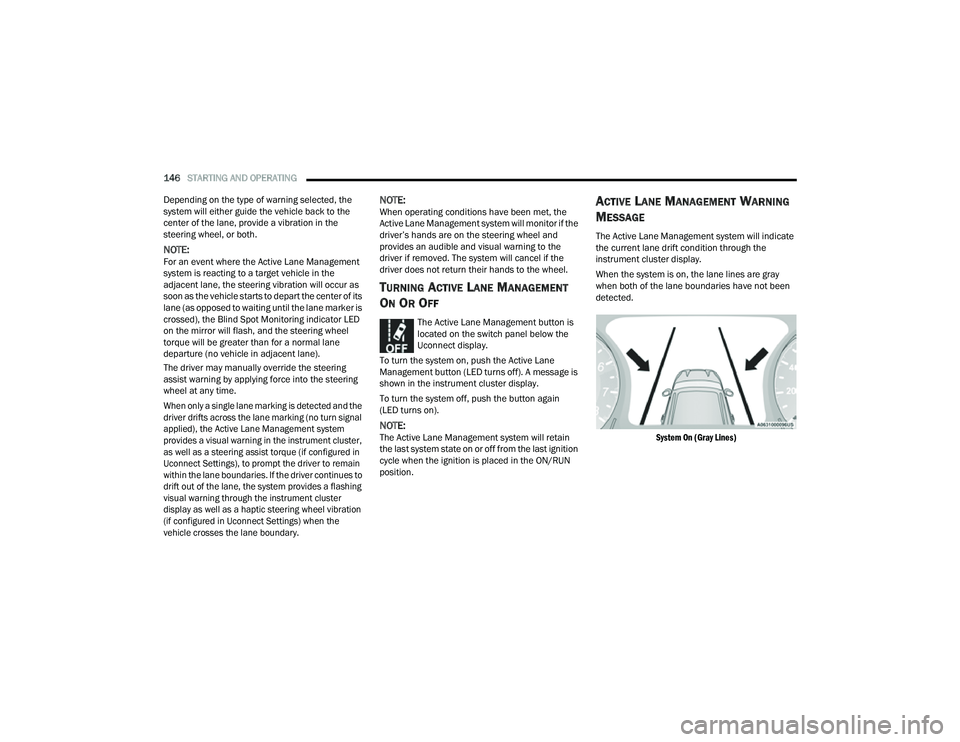
When the system is on, the lane lines are gray
when both of the lane boundaries have not been
detected.
System On (Gray Lines)
22_MP_OM_EN_USC_t.book Page 146
Page 160 of 344
158STARTING AND OPERATING
Towing Requirements — Trailer Lights And
Wiring
Whenever you pull a trailer, regardless of the trailer
size, stoplights and turn signals on the trailer are
required for motoring safety.
The Trailer Tow Package may include a four- and
seven-pin wiring harness. Use a factory approved
trailer harness and connector.
NOTE:Do not cut or splice wiring into the vehicle’s wiring
harness.
The electrical connections are all complete to the
vehicle but you must mate the harness to a trailer
connector. Refer to the following illustrations.
NOTE:
Disconnect trailer wiring connector from the
vehicle before launching a boat (or any other
device plugged into vehicle’s electrical connect)
into water.
Be sure to reconnect once clear from water
area.
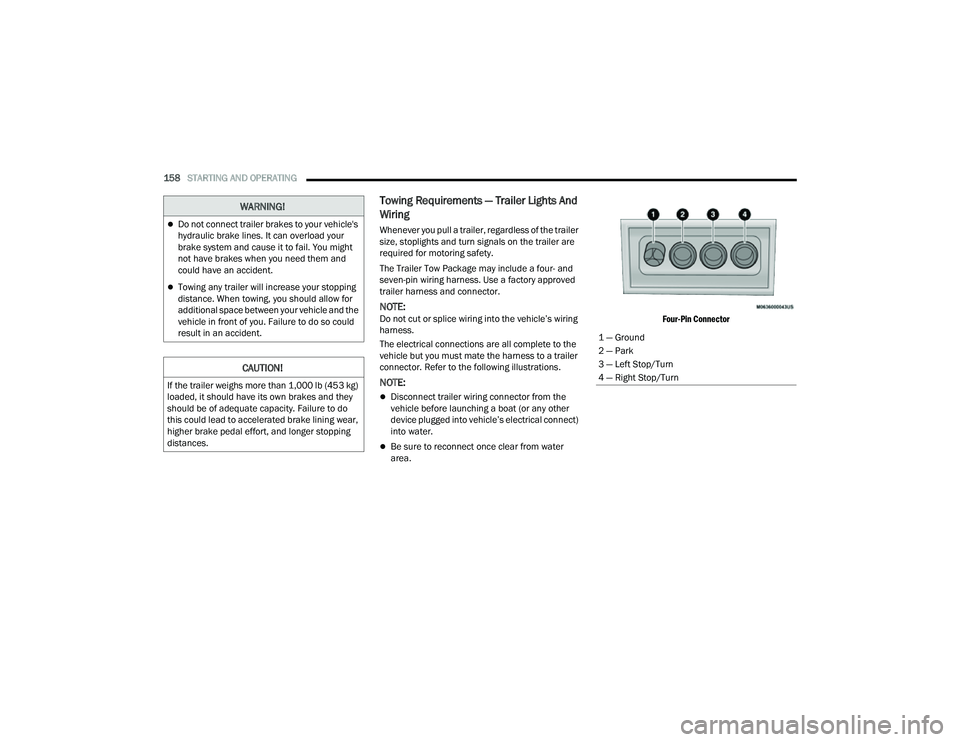
Four-Pin Connector
WARNING!
Do not connect trailer brakes to your vehicle's
hydraulic brake lines. It can overload your
brake system and cause it to fail. You might
not have brakes when you need them and
could have an accident.
Towing any trailer will increase your stopping
distance. When towing, you should allow for
additional space between your vehicle and the
vehicle in front of you. Failure to do so could
result in an accident.
CAUTION!
If the trailer weighs more than 1,000 lb (453 kg)
loaded, it should have its own brakes and they
should be of adequate capacity. Failure to do
this could lead to accelerated brake lining wear,
higher brake pedal effort, and longer stopping
distances.
1 — Ground
2 — Park
3 — Left Stop/Turn
4 — Right Stop/Turn
22_MP_OM_EN_USC_t.book Page 158
Page 172 of 344
170MULTIMEDIA
Safety/Driving Assistance
Touchscreen Beep This setting will allow you to turn the touchscreen beep on or off.
Show Main Category Bar Labels This setting will allow the main category bar labels to be shown on or off.
Navigation Next Turn Pop-ups Displayed in Cluster This setting will display navigation prompts in the Instrument Cluster Display.
Phone Pop-ups Displayed In Cluster This setting will display smartphone notifications and messages in the
Instrument Cluster Display.
Setting Name
Description
When the Safety/Driving Assistance button is pressed on the touchscreen, the system displays the options related to the vehicle’s safety settings. These
options will differ depending on the features equipped on the vehicle. The settings may display in list form or within subfolders on the screen. To access a
subfolder, select the desired folder; the available options related to that feature will then display on the screen.
NOTE:Depending on the vehicle’s options, feature settings may vary.
Setting NameDescription
Forward Collision Warning — Located In Automatic Emergency Braking
Submenu This setting will turn the Forward Collision Warning system on or off. The “Off”
setting will deactivate the FCW system. The “Warning Only” setting will provide
only an audible chime when a collision is detected. The “Warning + Active
Braking” setting will provide an audible chime and apply some brake pressure
when a collision is detected.
Forward Collision Warning Sensitivity — Located In Automatic Emergency
Braking Submenu This setting will change the distance at which the Forward Collision Warning
(FCW) alert sounds. The “Medium” setting will have the FCW system signal
when an object is in view, and the possibility of a collision is detected. The
“Near” setting will have the FCW system signal when the object is closer to the
vehicle. The “Far” setting will have the FCW system signal when an object is at
a far distance from the vehicle.
22_MP_OM_EN_USC_t.book Page 170
Page 180 of 344
178MULTIMEDIA
Brakes
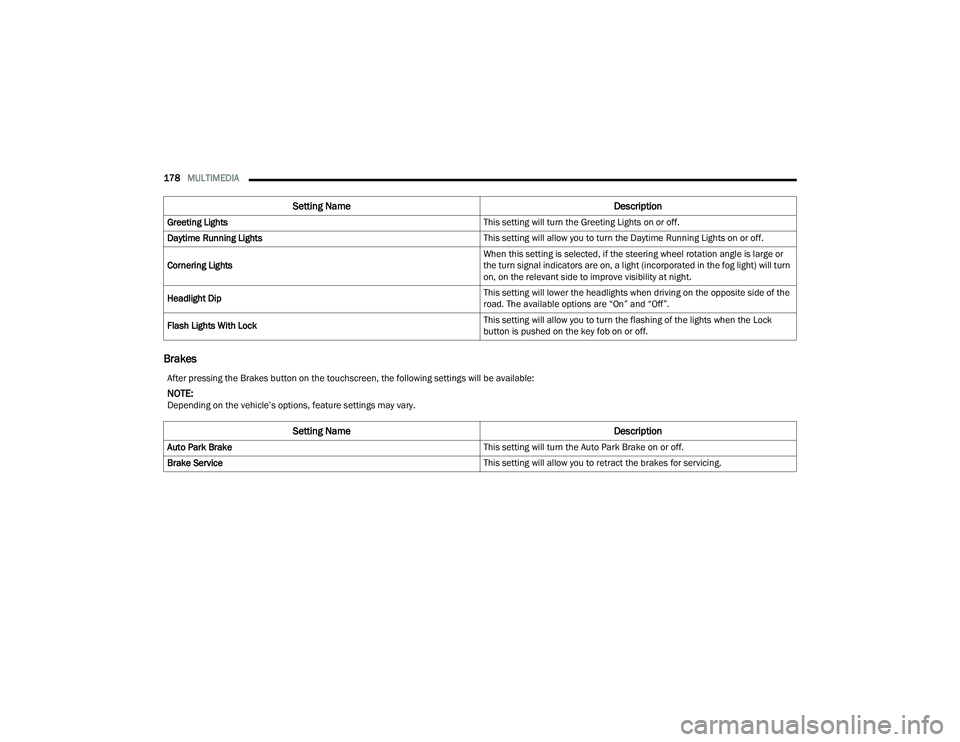
Greeting Lights This setting will turn the Greeting Lights on or off.
Daytime Running Lights This setting will allow you to turn the Daytime Running Lights on or off.
Cornering Lights When this setting is selected, if the steering wheel rotation angle is large or
the turn signal indicators are on, a light (incorporated in the fog light) will turn
on, on the relevant side to improve visibility at night.
Headlight Dip This setting will lower the headlights when driving on the opposite side of the
road. The available options are “On” and “Off”.
Flash Lights With Lock This setting will allow you to turn the flashing of the lights when the Lock
button is pushed on the key fob on or off.
Setting Name
Description
After pressing the Brakes button on the touchscreen, the following settings will be available:
NOTE:Depending on the vehicle’s options, feature settings may vary.
Setting NameDescription
Auto Park Brake This setting will turn the Auto Park Brake on or off.
Brake Service This setting will allow you to retract the brakes for servicing.
22_MP_OM_EN_USC_t.book Page 178
Page 193 of 344
SAFETY191
To turn ESC on again, momentarily push the ESC
OFF button. This will restore the “ESC On” mode of
operation.
NOTE:The “ESC OFF” message will display and an audible
chime will sound when the gear selector is placed
into the PARK position from any other position, and
then moved out of the PARK position. This will
occur even if the message was previously cleared.
ESC Activation/Malfunction Indicator Light
And ESC OFF Indicator Light
The ESC Activation/Malfunction Indicator
Light in the instrument cluster will come
on when the ignition is placed in the ON
mode. It should go out with the engine
running. If the ESC Activation/Malfunction
Indicator Light comes on continuously with the
engine running, a malfunction has been detected
in the ESC system. If this light remains on after
several ignition cycles, and the vehicle has been driven several miles (km) at speeds greater than
30 mph (48 km/h), see an authorized dealer as
soon as possible to have the problem diagnosed
and corrected.
The ESC Activation/Malfunction Indicator Light
starts to flash as soon as the tires lose traction and
the ESC system becomes active. The ESC
Activation/Malfunction Indicator Light also flashes
when Traction Control System (TCS) is active. If the
ESC Activation/Malfunction Indicator Light begins
to flash during acceleration, ease up on the
accelerator and apply as little throttle as possible.
Be sure to adapt your speed and driving to the
prevailing road conditions.
The ESC OFF Indicator Light indicates the
customer has elected to have the
Electronic Stability Control (ESC) in a
reduced mode.
NOTE:
The ESC Activation/Malfunction Indicator Light
and the ESC OFF Indicator Light come on
momentarily each time the ignition is placed in
the ON/RUN position.
Each time the ignition is placed in the ON/RUN
position, the ESC system will be on even if it was
turned off previously.
The ESC system will make buzzing or clicking
sounds when it is active. This is normal; the
sounds will stop when ESC becomes inactive
following the maneuver that caused the ESC
activation.
Emergency Stop Signal (ESS) —
If Equipped
The ESS activates the hazard lights at a faster than
normal speed when heavy brake pressure is
applied. ESS will only activate when the speed is
above 31 mph (50 km/h). The ESS operates
independently of other lamps, and will turn on and
off automatically. This indicates to others that the
vehicle is stopping quickly.
NOTE:
A warning light will illuminate within the instru -
ment cluster to inform the driver that the ESS
feature has been activated.
When towing a trailer, ESS will also activate the
rear indicator lights of the trailer.
Hill Descent Control (HDC) — If Equipped
Hill Descent Control (HDC) is intended for low
speed off-road driving while in 4WD Low. HDC
maintains vehicle speed while descending hills
during various driving situations. HDC controls
vehicle speed by actively controlling the brakes.
WARNING!
In the "Full Off" mode, the engine torque
reduction and stability features are disabled. In
an emergency evasive maneuver, the ESC
system will not engage to assist in maintaining
stability. “Full Off” mode is intended for
off-highway or off-road use only.
6
22_MP_OM_EN_USC_t.book Page 191
Page 197 of 344
SAFETY195
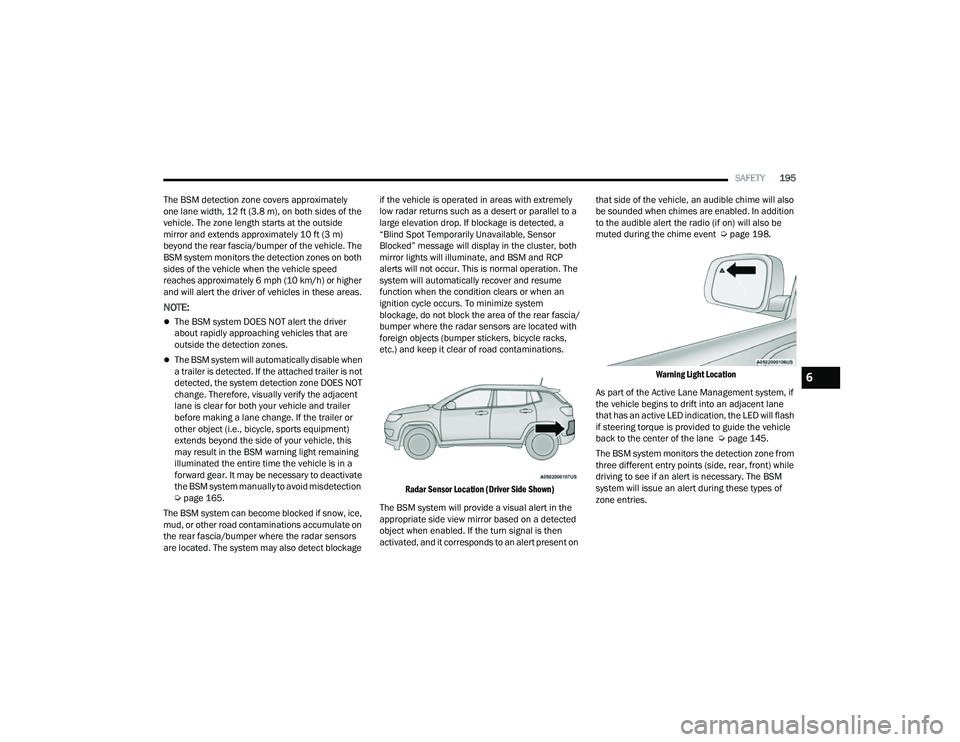
The BSM detection zone covers approximately
one lane width, 12 ft (3.8 m), on both sides of the
vehicle. The zone length starts at the outside
mirror and extends approximately 10 ft (3 m)
beyond the rear fascia/bumper of the vehicle. The
BSM system monitors the detection zones on both
sides of the vehicle when the vehicle speed
reaches approximately 6 mph (10 km/h) or higher
and will alert the driver of vehicles in these areas.
NOTE:
The BSM system DOES NOT alert the driver
about rapidly approaching vehicles that are
outside the detection zones.
The BSM system will automatically disable when
a trailer is detected. If the attached trailer is not
detected, the system detection zone DOES NOT
change. Therefore, visually verify the adjacent
lane is clear for both your vehicle and trailer
before making a lane change. If the trailer or
other object (i.e., bicycle, sports equipment)
extends beyond the side of your vehicle, this
may result in the BSM warning light remaining
illuminated the entire time the vehicle is in a
forward gear. It may be necessary to deactivate
the BSM system manually to avoid misdetection
Ú page 165.
The BSM system can become blocked if snow, ice,
mud, or other road contaminations accumulate on
the rear fascia/bumper where the radar sensors
are located. The system may also detect blockage if the vehicle is operated in areas with extremely
low radar returns such as a desert or parallel to a
large elevation drop. If blockage is detected, a
“Blind Spot Temporarily Unavailable, Sensor
Blocked” message will display in the cluster, both
mirror lights will illuminate, and BSM and RCP
alerts will not occur. This is normal operation. The
system will automatically recover and resume
function when the condition clears or when an
ignition cycle occurs. To minimize system
blockage, do not block the area of the rear fascia/
bumper where the radar sensors are located with
foreign objects (bumper stickers, bicycle racks,
etc.) and keep it clear of road contaminations.
Radar Sensor Location (Driver Side Shown)
The BSM system will provide a visual alert in the
appropriate side view mirror based on a detected
object when enabled. If the turn signal is then
activated, and it corresponds to an alert present on that side of the vehicle, an audible chime will also
be sounded when chimes are enabled. In addition
to the audible alert the radio (if on) will also be
muted during the chime event Ú
page 198.
Warning Light Location
As part of the Active Lane Management system, if
the vehicle begins to drift into an adjacent lane
that has an active LED indication, the LED will flash
if steering torque is provided to guide the vehicle
back to the center of the lane Ú page 145.
The BSM system monitors the detection zone from
three different entry points (side, rear, front) while
driving to see if an alert is necessary. The BSM
system will issue an alert during these types of
zone entries.
6
22_MP_OM_EN_USC_t.book Page 195
Page 199 of 344
SAFETY197
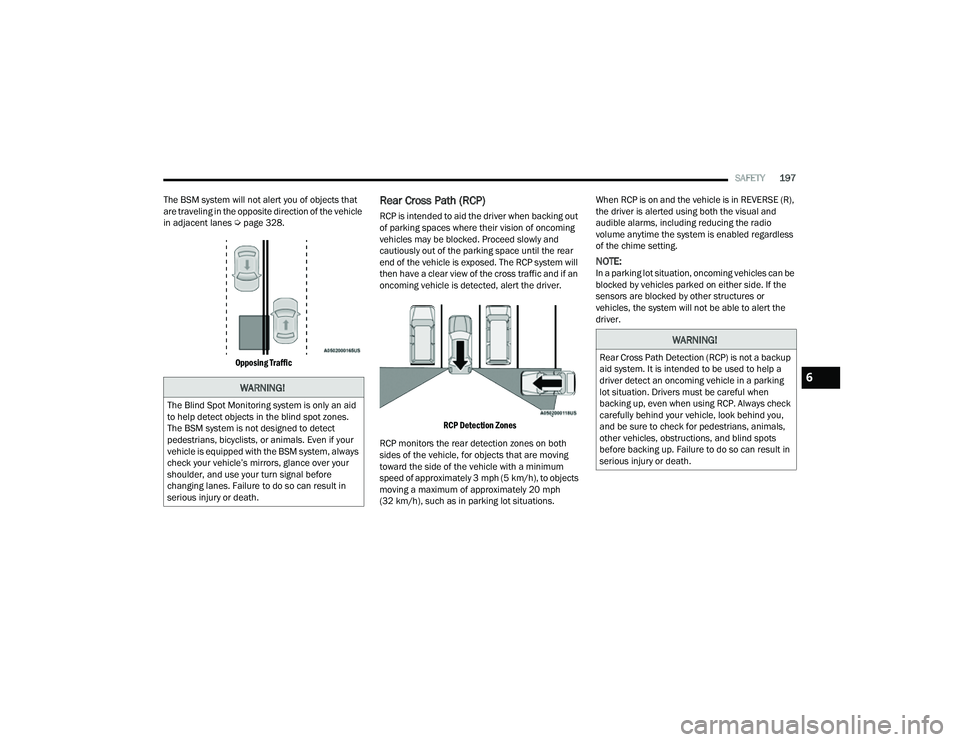
The BSM system will not alert you of objects that
are traveling in the opposite direction of the vehicle
in adjacent lanes Ú page 328.
Opposing Traffic
Rear Cross Path (RCP)
RCP is intended to aid the driver when backing out
of parking spaces where their vision of oncoming
vehicles may be blocked. Proceed slowly and
cautiously out of the parking space until the rear
end of the vehicle is exposed. The RCP system will
then have a clear view of the cross traffic and if an
oncoming vehicle is detected, alert the driver.
RCP Detection Zones
RCP monitors the rear detection zones on both
sides of the vehicle, for objects that are moving
toward the side of the vehicle with a minimum
speed of approximately 3 mph (5 km/h), to objects
moving a maximum of approximately 20 mph
(32 km/h), such as in parking lot situations. When RCP is on and the vehicle is in REVERSE (R),
the driver is alerted using both the visual and
audible alarms, including reducing the radio
volume anytime the system is enabled regardless
of the chime setting.
NOTE:In a parking lot situation, oncoming vehicles can be
blocked by vehicles parked on either side. If the
sensors are blocked by other structures or
vehicles, the system will not be able to alert the
driver.
WARNING!
The Blind Spot Monitoring system is only an aid
to help detect objects in the blind spot zones.
The BSM system is not designed to detect
pedestrians, bicyclists, or animals. Even if your
vehicle is equipped with the BSM system, always
check your vehicle’s mirrors, glance over your
shoulder, and use your turn signal before
changing lanes. Failure to do so can result in
serious injury or death.
WARNING!
Rear Cross Path Detection (RCP) is not a backup
aid system. It is intended to be used to help a
driver detect an oncoming vehicle in a parking
lot situation. Drivers must be careful when
backing up, even when using RCP. Always check
carefully behind your vehicle, look behind you,
and be sure to check for pedestrians, animals,
other vehicles, obstructions, and blind spots
before backing up. Failure to do so can result in
serious injury or death.
6
22_MP_OM_EN_USC_t.book Page 197
Page 200 of 344
198SAFETY
Blind Spot Modes
Blind Spot Alert has three selectable modes of
operation that are available in the Uconnect
system.
Blind Spot Alert Lights Only (Default Setting)
When operating in Lights Only mode, the BSM
system will provide a visual alert in the appropriate
side view mirror based on a detected object.
However, when the system is operating in Rear
Cross Path (RCP) mode, the system will respond
with both visual and audible alerts when a
detected object is present. Whenever an audible
alert is requested, the radio is muted for the
duration of the chime.
Blind Spot Alert Lights/Chime
When operating in Blind Spot Alert Lights/Chime
mode, the BSM system will provide a visual alert in
the appropriate side view mirror based on a
detected object. If the turn signal is then activated,
and it corresponds to an alert present on that side
of the vehicle, an audible chime will also be
sounded. Whenever a turn signal and detected
object are present on the same side at the same
time, both the visual and audible alerts will be
issued. In addition to the audible alert the radio
(if on) will also be muted. When the system is in RCP, the system shall
respond with both visual and audible alerts when a
detected object is present. Whenever an audible
alert is requested, the radio volume is reduced.
Turn/hazard signal status is ignored; the RCP state
always requests the chime.
Blind Spot Alert Off
When the BSM system is turned off, there will be
no visual or audible alerts from either the BSM or
RCP systems.
NOTE:The BSM system will store the current operating
mode when the vehicle is shut off. Each time the
vehicle is started the previously stored mode will
be recalled and used.
Blocked Sensor
If the system detects degraded performance due
to contamination or foreign objects, a message will
warn you of a blocked sensor and the warning
indicators in side view mirrors will be illuminated.
The warning indicators will remain illuminated until
blockage clearing conditions are met. First clear
the fascia/bumper area around the sensors of the
blockage. After removing the blockage, reset the
system by cycling the ignition from ON to OFF and
then back ON.
FORWARD COLLISION WARNING (FCW)
W
ITH MITIGATION — IF EQUIPPED
FCW with Mitigation provides the driver with
audible warnings, visual warnings (within the
instrument cluster display), and may apply a brake
jerk to warn the driver when it detects a potential
frontal collision. The warnings and limited braking
are intended to provide the driver with enough time
to react, avoid or mitigate the potential collision.
NOTE:FCW monitors the information from the forward
looking sensors as well as the Electronic Brake
Controller (EBC), to calculate the probability of a
forward collision. When the system determines
that a forward collision is probable, the driver will
be provided with audible and visual warnings and
may provide a brake jerk warning.
If the driver does not take action based upon these
progressive warnings, then the system will provide
a limited level of active braking to help slow the
vehicle and mitigate the potential forward collision.
If the driver reacts to the warnings by braking and
the system determines that the driver intends to
avoid the collision by braking but has not applied
sufficient brake force, the system will compensate
and provide additional brake force as required.
22_MP_OM_EN_USC_t.book Page 198
Page 205 of 344
SAFETY203
Tire Pressure Monitoring System Low
Pressure Warnings
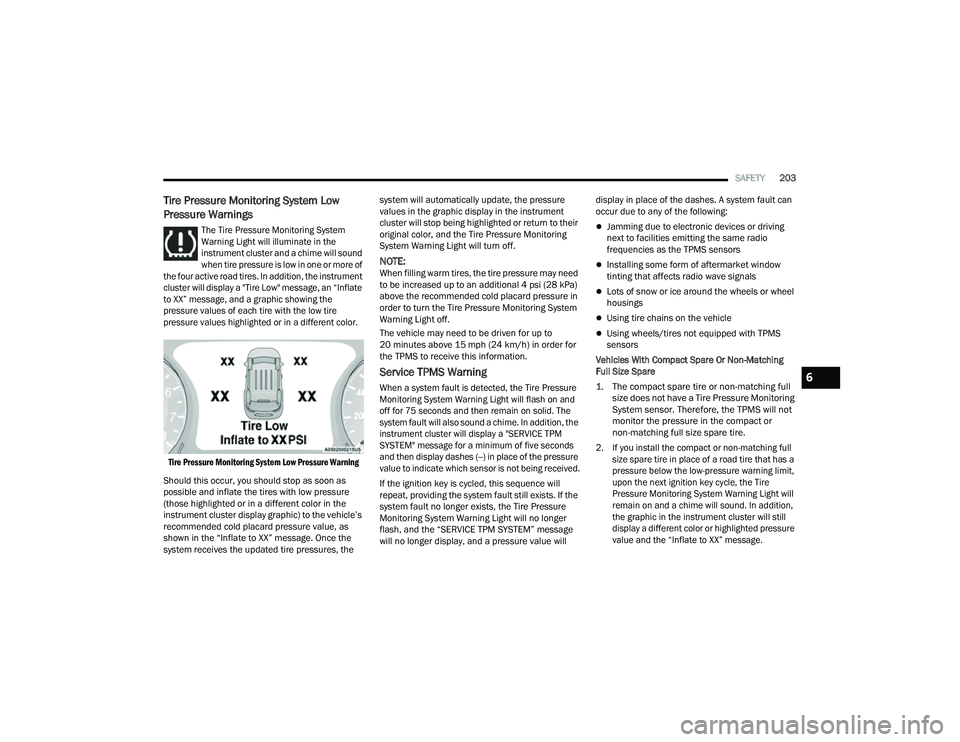
The Tire Pressure Monitoring System
Warning Light will illuminate in the
instrument cluster and a chime will sound
when tire pressure is low in one or more of
the four active road tires. In addition, the instrument
cluster will display a "Tire Low" message, an “Inflate
to XX” message, and a graphic showing the
pressure values of each tire with the low tire
pressure values highlighted or in a different color.
Tire Pressure Monitoring System Low Pressure Warning
Should this occur, you should stop as soon as
possible and inflate the tires with low pressure
(those highlighted or in a different color in the
instrument cluster display graphic) to the vehicle’s
recommended cold placard pressure value, as
shown in the “Inflate to XX” message. Once the
system receives the updated tire pressures, the system will automatically update, the pressure
values in the graphic display in the instrument
cluster will stop being highlighted or return to their
original color, and the Tire Pressure Monitoring
System Warning Light will turn off.
NOTE:When filling warm tires, the tire pressure may need
to be increased up to an additional 4 psi (28 kPa)
above the recommended cold placard pressure in
order to turn the Tire Pressure Monitoring System
Warning Light off.
The vehicle may need to be driven for up to
20 minutes above 15 mph (24 km/h) in order for
the TPMS to receive this information.
Service TPMS Warning
When a system fault is detected, the Tire Pressure
Monitoring System Warning Light will flash on and
off for 75 seconds and then remain on solid. The
system fault will also sound a chime. In addition, the
instrument cluster will display a "SERVICE TPM
SYSTEM" message for a minimum of five seconds
and then display dashes (--) in place of the pressure
value to indicate which sensor is not being received.
If the ignition key is cycled, this sequence will
repeat, providing the system fault still exists. If the
system fault no longer exists, the Tire Pressure
Monitoring System Warning Light will no longer
flash, and the “SERVICE TPM SYSTEM” message
will no longer display, and a pressure value will
display in place of the dashes. A system fault can
occur due to any of the following:
Jamming due to electronic devices or driving
next to facilities emitting the same radio
frequencies as the TPMS sensors
Installing some form of aftermarket window
tinting that affects radio wave signals
Lots of snow or ice around the wheels or wheel
housings
Using tire chains on the vehicle
Using wheels/tires not equipped with TPMS
sensors
Vehicles With Compact Spare Or Non-Matching
Full Size Spare
1. The compact spare tire or non-matching full size does not have a Tire Pressure Monitoring
System sensor. Therefore, the TPMS will not
monitor the pressure in the compact or
non-matching full size spare tire.
2. If you install the compact or non-matching full size spare tire in place of a road tire that has a
pressure below the low-pressure warning limit,
upon the next ignition key cycle, the Tire
Pressure Monitoring System Warning Light will
remain on and a chime will sound. In addition,
the graphic in the instrument cluster will still
display a different color or highlighted pressure
value and the “Inflate to XX” message.
6
22_MP_OM_EN_USC_t.book Page 203