transmission fluid JEEP GLADIATOR 2023 Owners Manual
[x] Cancel search | Manufacturer: JEEP, Model Year: 2023, Model line: GLADIATOR, Model: JEEP GLADIATOR 2023Pages: 448, PDF Size: 17.37 MB
Page 6 of 448

4
INSTRUMENT CLUSTER DISPLAY ...................... 121 Instrument Cluster Display Location And
Controls .......................................................... 122
Oil Life Reset — If Equipped
S
................... 122
Off Road+ Display — If Equipped .................. 123
Instrument Cluster Display Selectable
Items .............................................................. 123
Instrument Cluster Display Menu Items ...... 124
Battery Saver On, Battery Saver Mode
Message, And Electrical Load Reduction
Actions
(If Equipped) .................................................. 127
Diesel Displays .............................................. 128 Diesel Particulate Filter (DPF) Messages .... 128Fuel System Messages ................................. 130
WARNING LIGHTS AND MESSAGES ................. 132
Red Warning Lights ....................................... 132
Yellow Warning Lights ................................... 135Yellow Indicator Lights .................................. 138
Green Indicator Lights................................... 139White Indicator Lights ................................... 140Blue Indicator Lights ..................................... 141
ONBOARD DIAGNOSTIC SYSTEM — OBD II ...... 141
Onboard Diagnostic System
(OBD II) Cybersecurity ................................... 142
EMISSIONS INSPECTION AND MAINTENANCE
PROGRAMS .......................................................... 142
STARTING AND OPERATING
STARTING THE ENGINE — GASOLINE ENGINE
(IF EQUIPPED) ...................................................... 144
Manual Transmission — If Equipped ........... 144Automatic Transmission —
If Equipped .................................................... 144
Normal Starting ............................................ 144
AutoPark ........................................................ 145Extreme Cold Weather
(Below –22°F Or −30°C) ............................ 146
Extended Park Starting ................................. 146
If Engine Fails To Start ................................. 147
After Starting ................................................. 147
STARTING THE ENGINE — DIESEL ENGINE
(IF EQUIPPED) ...................................................... 147
Automatic Transmission ............................... 148
Extreme Cold Weather .................................. 148
Normal Starting ............................................. 148Starting Fluids ............................................... 149
NORMAL OPERATION — DIESEL ENGINE ......... 149
Cold Weather Precautions ............................ 149
Engine Idling .................................................. 150
Stopping The Engine ..................................... 150
Cooling System Tips — Automatic
Transmission ................................................. 151
ENGINE BREAK-IN RECOMMENDATIONS —
GASOLINE ENGINE (IF EQUIPPED) ................... 151 ENGINE BREAK-IN RECOMMENDATIONS —
DIESEL ENGINE (IF EQUIPPED) .......................... 152
PARKING BRAKE ................................................. 152
MANUAL TRANSMISSION — IF EQUIPPED ....... 153
Shifting........................................................... 154
Downshifting.................................................. 155
AUTOMATIC TRANSMISSION —
IF EQUIPPED ......................................................... 155
Ignition Park Interlock................................... 156
Brake/Transmission Shift Interlock (BTSI)
System .......................................................... 1578–Speed Automatic Transmission .............. 157
Gear Ranges .................................................. 157
FOUR–WHEEL DRIVE OPERATION ................... 161
Four-Position Transfer Case —
If Equipped .................................................... 161
Five-Position Transfer Case —
If Equipped .................................................... 163
Trac-Lok Rear Axle — If Equipped ................ 165Axle Lock (Tru-Lok) Front And Rear —
If Equipped ................................................... 165
Axle Lock (Tru-Lok) Rear Only —
If Equipped ................................................... 166
Electronic Sway Bar Disconnect —
If Equipped ................................................... 166
OFF ROAD+ — If Equipped ............................ 168
ELECTRO-HYDRAULIC POWER STEERING ....... 168
23_JT_OM_EN_USC_t.book Page 4
Page 7 of 448

5
STOP/START SYSTEM — AUTOMATIC
TRANSMISSION (IF EQUIPPED) ........................ 169 Autostop Mode .............................................. 169Possible Reasons The Engine Does Not
Autostop ......................................................... 170
To Start The Engine While In Autostop
Mode .............................................................. 170
To Manually Turn Off The Stop/Start
System ........................................................... 171To Manually Turn On The Stop/Start
System ........................................................... 171System Malfunction ...................................... 171
STOP/START SYSTEM — MANUAL
TRANSMISSION (IF EQUIPPED) .........................171
Autostop Mode .............................................. 172Possible Reasons The Engine Does Not
Autostop ......................................................... 172
To Start The Engine While In Autostop
Mode .............................................................. 172
To Manually Turn Off The Stop/Start
System ........................................................... 173To Manually Turn On The Stop/Start
System ........................................................... 173System Malfunction ...................................... 173
CRUISE CONTROL SYSTEMS —
IF EQUIPPED ........................................................ 173
Cruise Control ............................................... 173
Adaptive Cruise Control (ACC) ...................... 175 PARKSENSE FRONT/REAR PARK ASSIST
SYSTEM — IF EQUIPPED .................................... 184
ParkSense Sensors ....................................... 184
ParkSense Warning Display ......................... 184
ParkSense Display ........................................ 184Enabling And Disabling ParkSense .............. 187Service The ParkSense Park Assist
System ........................................................... 187
Cleaning The ParkSense System ................. 187
ParkSense System Usage Precautions........ 188
PARKVIEW REAR BACK UP CAMERA............... 189
TRAILCAM SYSTEM — IF EQUIPPED ................ 190
REFUELING THE VEHICLE — GASOLINE
ENGINE (IF EQUIPPED) ....................................... 191 Fuel Filler Cap................................................ 191Loose Fuel Filler Cap Message ................... 192
REFUELING THE VEHICLE — DIESEL ENGINE
(IF EQUIPPED) ..................................................... 192
Avoid Using Contaminated Fuel ................... 193Bulk Fuel Storage — Diesel Fuel................... 193Diesel Exhaust Fluid ..................................... 193
VEHICLE LOADING .............................................. 195
Certification Label ......................................... 195
TRAILER TOWING ............................................... 197
Common Towing Definitions......................... 197
Trailer Hitch Classification ............................ 199
Trailer Towing Weights (Maximum Trailer
Weight Ratings) ............................................ 199
Trailer And Tongue Weight............................ 202
Towing Requirements ................................... 202Towing Tips .................................................... 204 RECREATIONAL TOWING (BEHIND
MOTORHOME) ...................................................... 205
Towing This Vehicle Behind Another
Vehicle ........................................................... 205
Recreational Towing — Four-Wheel Drive
Models ........................................................... 205
DRIVING TIPS ....................................................... 207
On-Road Driving Tips..................................... 207Off-Road Driving Tips .................................... 207
MULTIMEDIA
UCONNECT SYSTEMS ......................................... 214
CYBERSECURITY ................................................. 214
UCONNECT SETTINGS ......................................... 215 Customer Programmable Features ............. 215
UCONNECT INTRODUCTION................................ 230
System Overview .......................................... 230Drag & Drop Menu Bar ................................. 232
Safety And General Information................... 232
UCONNECT MODES ............................................. 233
Steering Wheel Audio Controls .................... 233
Radio Mode .................................................. 234Media Mode ................................................. 242
Phone Mode ................................................. 244
ANDROID AUTO™ & APPLE CARPLAY® —
IF EQUIPPED ......................................................... 254
Android Auto™
S
........................................ 254
Apple CarPlay®
S
....................................... 256
Android Auto™ And Apple CarPlay® Tips
And Tricks ...................................................... 258
23_JT_OM_EN_USC_t.book Page 5
Page 9 of 448

7
TOWING A DISABLED VEHICLE .......................... 350 Four–Wheel Drive Models ............................ 351
Without The Key Fob ..................................... 351
Emergency Tow Hooks —
If Equipped .................................................... 351
ENHANCED ACCIDENT RESPONSE SYSTEM
(EARS) .................................................................. 352
EVENT DATA RECORDER (EDR) ......................... 352
SERVICING AND MAINTENANCE
SCHEDULED SERVICING — GASOLINE
ENGINE ................................................................. 353
Maintenance Plan ......................................... 354
SCHEDULED SERVICING — DIESEL ENGINE .... 357
Maintenance Plan — Diesel Fuel Up To
B5 Biodiesel................................................... 358Additional Maintenance — B6 To B20
Biodiesel ........................................................ 361
ENGINE COMPARTMENT .................................... 362
3.6L Gasoline Engine ................................... 3623.0L Diesel Engine ........................................ 363
Checking Oil Level ......................................... 364
Adding Washer Fluid ..................................... 364
Maintenance-Free Battery ............................ 364
Pressure Washing ......................................... 365 VEHICLE MAINTENANCE..................................... 365
Engine Oil ....................................................... 365
Engine Oil Filter ............................................. 366Engine Air Cleaner Filter ............................... 366
Draining Fuel/Water Separator Filter —
Diesel Engine ................................................. 368
Fuel Filter Replacement — Diesel Engine .... 369
Priming If The Engine Has Run Out Of
Fuel — Diesel Engine .................................... 370
Intervention Regeneration Strategy —
Message Process Flow ................................ 371Diesel Exhaust Fluid ..................................... 371
Accessory Drive Belt Inspection ................... 372Air Conditioner Maintenance........................ 372
Body Lubrication ........................................... 374Windshield Wiper Blades.............................. 374Exhaust System ............................................ 376
Cooling System .............................................. 377
Charge Air Cooler — Inter-Cooler
(Diesel Engine) .............................................. 379
Brake System ............................................... 380
Front/Rear Axle Fluid ................................... 380Transfer Case ............................................... 381
Manual Transmission — If Equipped............ 381
Automatic Transmission —
If Equipped .................................................... 381
Fuses ............................................................. 382Bulb Replacement ........................................ 392 TIRES ..................................................................... 395
Tire Safety Information ................................. 395
Tires — General Information ......................... 401
Tire Types....................................................... 405Spare Tires — If Equipped ............................ 406
Wheel And Wheel Trim Care......................... 407
Snow Traction Devices ................................. 408
Tire Rotation Recommendations ................. 409
DEPARTMENT OF TRANSPORTATION
UNIFORM TIRE QUALITY GRADES .................... 410
Treadwear...................................................... 410
Traction Grades ............................................. 410Temperature Grades..................................... 410
STORING THE VEHICLE ....................................... 411
BODYWORK .......................................................... 411
Protection From Atmospheric Agents .......... 411
Body And Underbody Maintenance ............. 412
Preserving The Bodywork ............................. 412
INTERIORS ........................................................... 414
Carpet Safety Information ............................ 414
Carpet Removal............................................. 415Seats And Fabric Parts ................................. 416
Plastic And Coated Parts .............................. 417
Leather Surfaces........................................... 417
Glass Surfaces ............................................. 417
23_JT_OM_EN_USC_t.book Page 7
Page 14 of 448
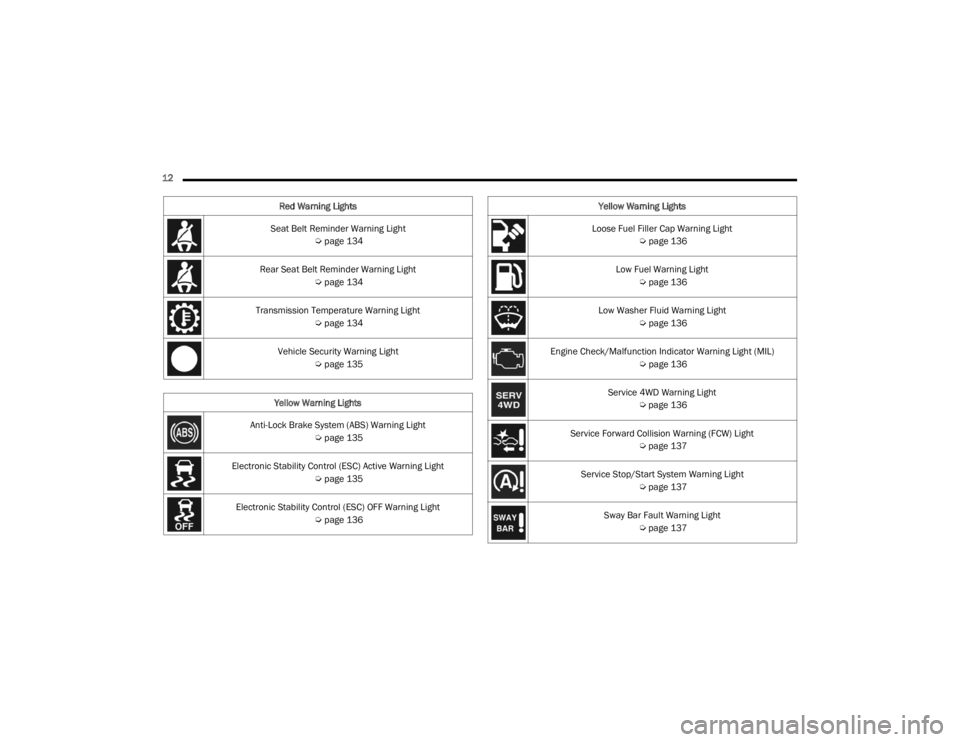
12 Seat Belt Reminder Warning Light Úpage 134
Rear Seat Belt Reminder Warning Light Úpage 134
Transmission Temperature Warning Light Úpage 134
Vehicle Security Warning Light Úpage 135
Yellow Warning Lights
Anti-Lock Brake System (ABS) Warning Light Úpage 135
Electronic Stability Control (ESC) Active Warning Light Úpage 135
Electronic Stability Control (ESC) OFF Warning Light Úpage 136
Red Warning Lights
Loose Fuel Filler Cap Warning Light
Úpage 136
Low Fuel Warning Light Úpage 136
Low Washer Fluid Warning Light Úpage 136
Engine Check/Malfunction Indicator Warning Light (MIL) Úpage 136
Service 4WD Warning Light Úpage 136
Service Forward Collision Warning (FCW) Light Úpage 137
Service Stop/Start System Warning Light Úpage 137
Sway Bar Fault Warning Light Úpage 137
Yellow Warning Lights
23_JT_OM_EN_USC_t.book Page 12
Page 126 of 448
124GETTING TO KNOW YOUR INSTRUMENT PANEL
INSTRUMENT CLUSTER DISPLAY MENU
I
TEMS
NOTE:Depending on the vehicle’s options, feature
settings may vary.
Speedometer
Push and release the up or down arrow
button until the speedometer menu icon is
displayed in the instrument cluster display. Push
and release the OK button to toggle between mph
and km/h.
Vehicle Info
Push and release the up or down arrow
button until the Vehicle Info menu icon is displayed
in the instrument cluster display. Push and release
the left or right arrow button to scroll
through the information submenus and push and
release the OK button to select or reset the
resettable submenus.
Off Road — If Equipped
Push and release the up or down arrow
button until the Off Road menu icon is displayed in
the instrument cluster display. Push and release
the left or right arrow button to scroll
through the information submenus.
Drivetrain
Front Wheel Angle: displays the graphical and
numerical value of calculated average front
wheel angle from the steering wheel orientation.
Transfer Case Lock Status: displays “Lock”
graphic only during 4WD High, 4WD Auto, or
4WD Low status.
Axle Lock And Sway Bar Status (if equipped):
displays front and rear or rear only axle locker
graphic, and sway bar connection graphic with
text message (connected or disconnected).
Pitch And Roll
Displays the pitch and roll of the vehicle in the
graphic with the angle number on the screen.
NOTE:When vehicle speed becomes too high to display
the pitch and roll, “- -” will display in place of the
numbers, and the graphic will be grayed out. A
message indicating the necessary speed for the
feature to become available will also display.
Driver Assist — If Equipped
The Driver Assist menu displays the status of the
ACC system.
Push and release the up or down arrow
button until the Driver Assist menu is displayed in
the instrument cluster display.
Adaptive Cruise Control (ACC) Feature —
If Equipped
The instrument cluster display displays the current
ACC system settings. The information displayed
depends on ACC system status.
Push the ACC ON/OFF button (located on the
steering wheel) until one of the following displays
in the instrument cluster display:
Adaptive Cruise Control Off
When ACC is deactivated, the display will read
“Adaptive Cruise Control Off.”
Adaptive Cruise Control Ready
When ACC is activated but the vehicle speed
setting has not been selected, the display will read
“Adaptive Cruise Control Ready.”
Push the SET + or the SET - button (located on the
steering wheel), and the following will display in the
instrument cluster display.
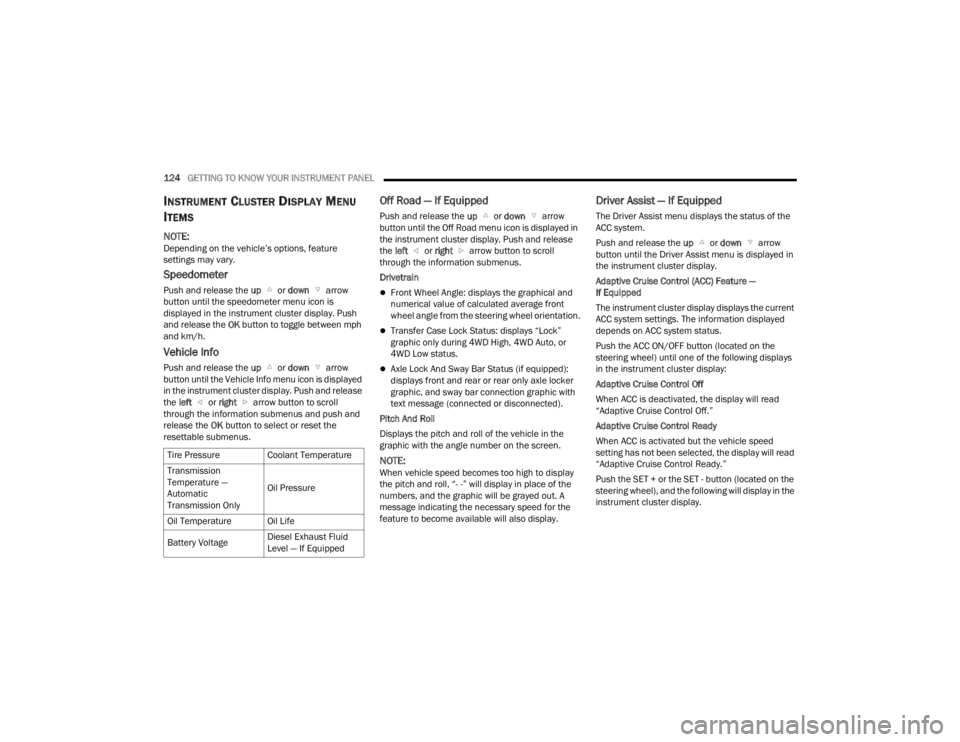
Tire Pressure
Coolant Temperature
Transmission
Temperature —
Automatic
Transmission Only Oil Pressure
Oil Temperature Oil Life
Battery Voltage Diesel Exhaust Fluid
Level — If Equipped
23_JT_OM_EN_USC_t.book Page 124
Page 136 of 448
134GETTING TO KNOW YOUR INSTRUMENT PANEL
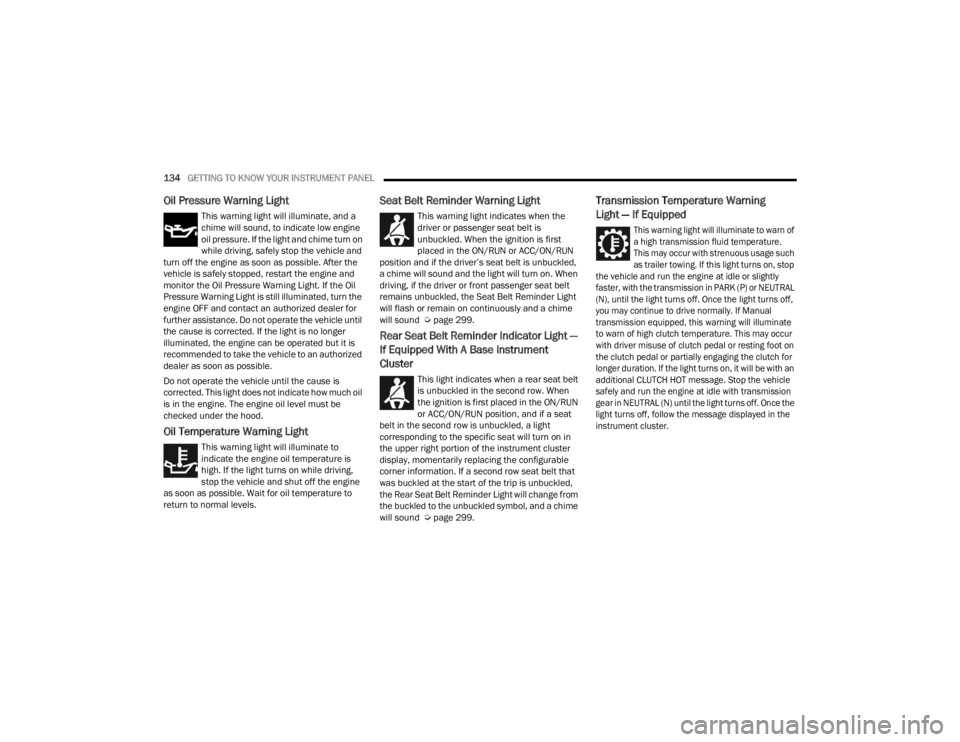
Oil Pressure Warning Light
This warning light will illuminate, and a
chime will sound, to indicate low engine
oil pressure. If the light and chime turn on
while driving, safely stop the vehicle and
turn off the engine as soon as possible. After the
vehicle is safely stopped, restart the engine and
monitor the Oil Pressure Warning Light. If the Oil
Pressure Warning Light is still illuminated, turn the
engine OFF and contact an authorized dealer for
further assistance. Do not operate the vehicle until
the cause is corrected. If the light is no longer
illuminated, the engine can be operated but it is
recommended to take the vehicle to an authorized
dealer as soon as possible.
Do not operate the vehicle until the cause is
corrected. This light does not indicate how much oil
is in the engine. The engine oil level must be
checked under the hood.
Oil Temperature Warning Light
This warning light will illuminate to
indicate the engine oil temperature is
high. If the light turns on while driving,
stop the vehicle and shut off the engine
as soon as possible. Wait for oil temperature to
return to normal levels.
Seat Belt Reminder Warning Light
This warning light indicates when the
driver or passenger seat belt is
unbuckled. When the ignition is first
placed in the ON/RUN or ACC/ON/RUN
position and if the driver’s seat belt is unbuckled,
a chime will sound and the light will turn on. When
driving, if the driver or front passenger seat belt
remains unbuckled, the Seat Belt Reminder Light
will flash or remain on continuously and a chime
will sound Ú page 299.
Rear Seat Belt Reminder Indicator Light —
If Equipped With A Base Instrument
Cluster
This light indicates when a rear seat belt
is unbuckled in the second row. When
the ignition is first placed in the ON/RUN
or ACC/ON/RUN position, and if a seat
belt in the second row is unbuckled, a light
corresponding to the specific seat will turn on in
the upper right portion of the instrument cluster
display, momentarily replacing the configurable
corner information. If a second row seat belt that
was buckled at the start of the trip is unbuckled,
the Rear Seat Belt Reminder Light will change from
the buckled to the unbuckled symbol, and a chime
will sound Ú page 299.
Transmission Temperature Warning
Light — If Equipped
This warning light will illuminate to warn of
a high transmission fluid temperature.
This may occur with strenuous usage such
as trailer towing. If this light turns on, stop
the vehicle and run the engine at idle or slightly
faster, with the transmission in PARK (P) or NEUTRAL
(N), until the light turns off. Once the light turns off,
you may continue to drive normally. If Manual
transmission equipped, this warning will illuminate
to warn of high clutch temperature. This may occur
with driver misuse of clutch pedal or resting foot on
the clutch pedal or partially engaging the clutch for
longer duration. If the light turns on, it will be with an
additional CLUTCH HOT message. Stop the vehicle
safely and run the engine at idle with transmission
gear in NEUTRAL (N) until the light turns off. Once the
light turns off, follow the message displayed in the
instrument cluster.
23_JT_OM_EN_USC_t.book Page 134
Page 137 of 448
GETTING TO KNOW YOUR INSTRUMENT PANEL135
Vehicle Security Warning Light —
If Equipped
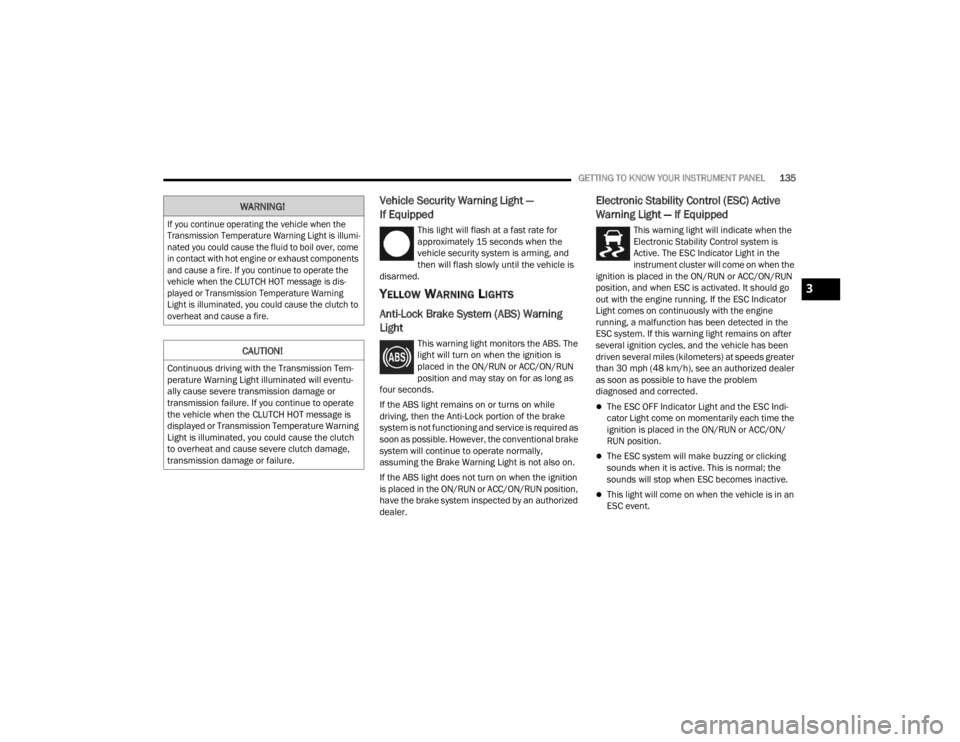
This light will flash at a fast rate for
approximately 15 seconds when the
vehicle security system is arming, and
then will flash slowly until the vehicle is
disarmed.
YELLOW WARNING LIGHTS
Anti-Lock Brake System (ABS) Warning
Light
This warning light monitors the ABS. The
light will turn on when the ignition is
placed in the ON/RUN or ACC/ON/RUN
position and may stay on for as long as
four seconds.
If the ABS light remains on or turns on while
driving, then the Anti-Lock portion of the brake
system is not functioning and service is required as
soon as possible. However, the conventional brake
system will continue to operate normally,
assuming the Brake Warning Light is not also on.
If the ABS light does not turn on when the ignition
is placed in the ON/RUN or ACC/ON/RUN position,
have the brake system inspected by an authorized
dealer.
Electronic Stability Control (ESC) Active
Warning Light — If Equipped
This warning light will indicate when the
Electronic Stability Control system is
Active. The ESC Indicator Light in the
instrument cluster will come on when the
ignition is placed in the ON/RUN or ACC/ON/RUN
position, and when ESC is activated. It should go
out with the engine running. If the ESC Indicator
Light comes on continuously with the engine
running, a malfunction has been detected in the
ESC system. If this warning light remains on after
several ignition cycles, and the vehicle has been
driven several miles (kilometers) at speeds greater
than 30 mph (48 km/h), see an authorized dealer
as soon as possible to have the problem
diagnosed and corrected.
The ESC OFF Indicator Light and the ESC Indi -
cator Light come on momentarily each time the
ignition is placed in the ON/RUN or ACC/ON/
RUN position.
The ESC system will make buzzing or clicking
sounds when it is active. This is normal; the
sounds will stop when ESC becomes inactive.
This light will come on when the vehicle is in an
ESC event.
WARNING!
If you continue operating the vehicle when the
Transmission Temperature Warning Light is illumi -
nated you could cause the fluid to boil over, come
in contact with hot engine or exhaust components
and cause a fire. If you continue to operate the
vehicle when the CLUTCH HOT message is dis -
played or Transmission Temperature Warning
Light is illuminated, you could cause the clutch to
overheat and cause a fire.
CAUTION!
Continuous driving with the Transmission Tem -
perature Warning Light illuminated will eventu -
ally cause severe transmission damage or
transmission failure. If you continue to operate
the vehicle when the CLUTCH HOT message is
displayed or Transmission Temperature Warning
Light is illuminated, you could cause the clutch
to overheat and cause severe clutch damage,
transmission damage or failure.
3
23_JT_OM_EN_USC_t.book Page 135
Page 138 of 448
136GETTING TO KNOW YOUR INSTRUMENT PANEL
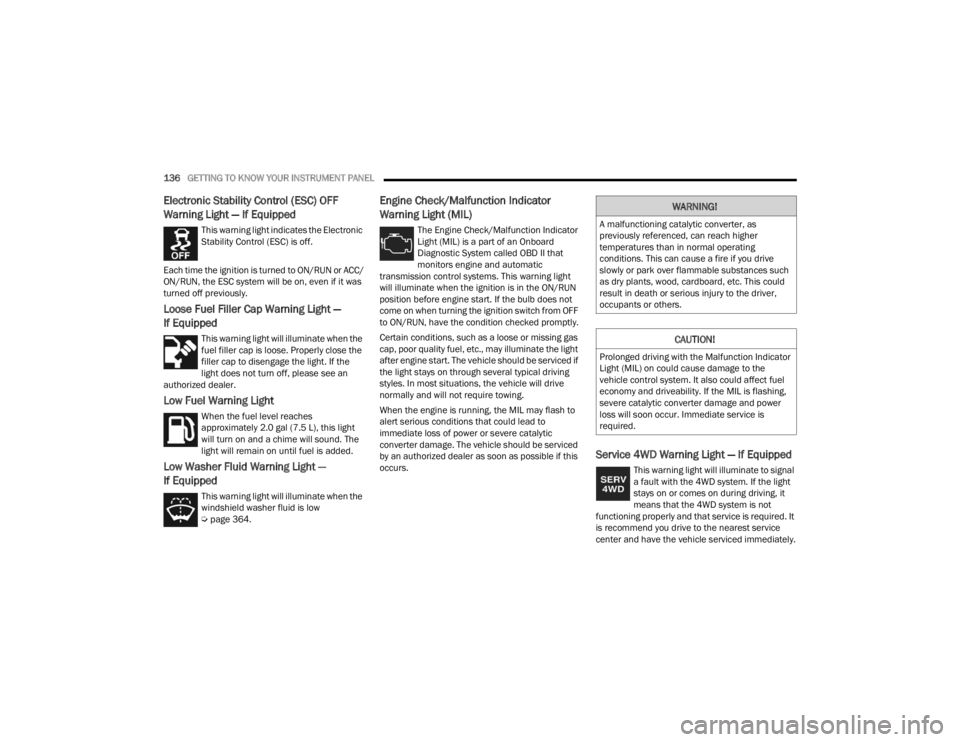
Electronic Stability Control (ESC) OFF
Warning Light — If Equipped
This warning light indicates the Electronic
Stability Control (ESC) is off.
Each time the ignition is turned to ON/RUN or ACC/
ON/RUN, the ESC system will be on, even if it was
turned off previously.
Loose Fuel Filler Cap Warning Light —
If Equipped
This warning light will illuminate when the
fuel filler cap is loose. Properly close the
filler cap to disengage the light. If the
light does not turn off, please see an
authorized dealer.
Low Fuel Warning Light
When the fuel level reaches
approximately 2.0 gal (7.5 L), this light
will turn on and a chime will sound. The
light will remain on until fuel is added.
Low Washer Fluid Warning Light —
If Equipped
This warning light will illuminate when the
windshield washer fluid is low
Ú page 364.
Engine Check/Malfunction Indicator
Warning Light (MIL)
The Engine Check/Malfunction Indicator
Light (MIL) is a part of an Onboard
Diagnostic System called OBD II that
monitors engine and automatic
transmission control systems. This warning light
will illuminate when the ignition is in the ON/RUN
position before engine start. If the bulb does not
come on when turning the ignition switch from OFF
to ON/RUN, have the condition checked promptly.
Certain conditions, such as a loose or missing gas
cap, poor quality fuel, etc., may illuminate the light
after engine start. The vehicle should be serviced if
the light stays on through several typical driving
styles. In most situations, the vehicle will drive
normally and will not require towing.
When the engine is running, the MIL may flash to
alert serious conditions that could lead to
immediate loss of power or severe catalytic
converter damage. The vehicle should be serviced
by an authorized dealer as soon as possible if this
occurs.
Service 4WD Warning Light — If Equipped
This warning light will illuminate to signal
a fault with the 4WD system. If the light
stays on or comes on during driving, it
means that the 4WD system is not
functioning properly and that service is required. It
is recommend you drive to the nearest service
center and have the vehicle serviced immediately.
WARNING!
A malfunctioning catalytic converter, as
previously referenced, can reach higher
temperatures than in normal operating
conditions. This can cause a fire if you drive
slowly or park over flammable substances such
as dry plants, wood, cardboard, etc. This could
result in death or serious injury to the driver,
occupants or others.
CAUTION!
Prolonged driving with the Malfunction Indicator
Light (MIL) on could cause damage to the
vehicle control system. It also could affect fuel
economy and driveability. If the MIL is flashing,
severe catalytic converter damage and power
loss will soon occur. Immediate service is
required.
23_JT_OM_EN_USC_t.book Page 136
Page 156 of 448
154STARTING AND OPERATING
NOTE:During cold weather, you may experience
increased effort in shifting until the transmission
fluid warms up. This is normal.
Manual Transmission Shifter
To shift the gears, fully press the clutch pedal and
place the gear selector into the desired gear
position (the diagram for the engagement of the
gears is displayed on the handle of the selector).
The gear position will be displayed in the
instrument cluster.
To engage REVERSE gear from the NEUTRAL
position, lift the REVERSE ring, located below the
knob and move the gear selector all the way left
and then forward.
SHIFTING
Fully press the clutch pedal before shifting gears.
As you release the clutch pedal, lightly press the
accelerator pedal.
You should always use FIRST gear when starting
from a standing position.
NOTE:A certain amount of noise from the transmission is
normal. This noise can be most noticeable when
the vehicle is idling in NEUTRAL with the clutch
engaged (clutch pedal released), but it may also be
heard when driving. The noise may also be more
noticeable when the transmission is warm. This
noise is normal and is not an indication of a
problem with your clutch or transmission.
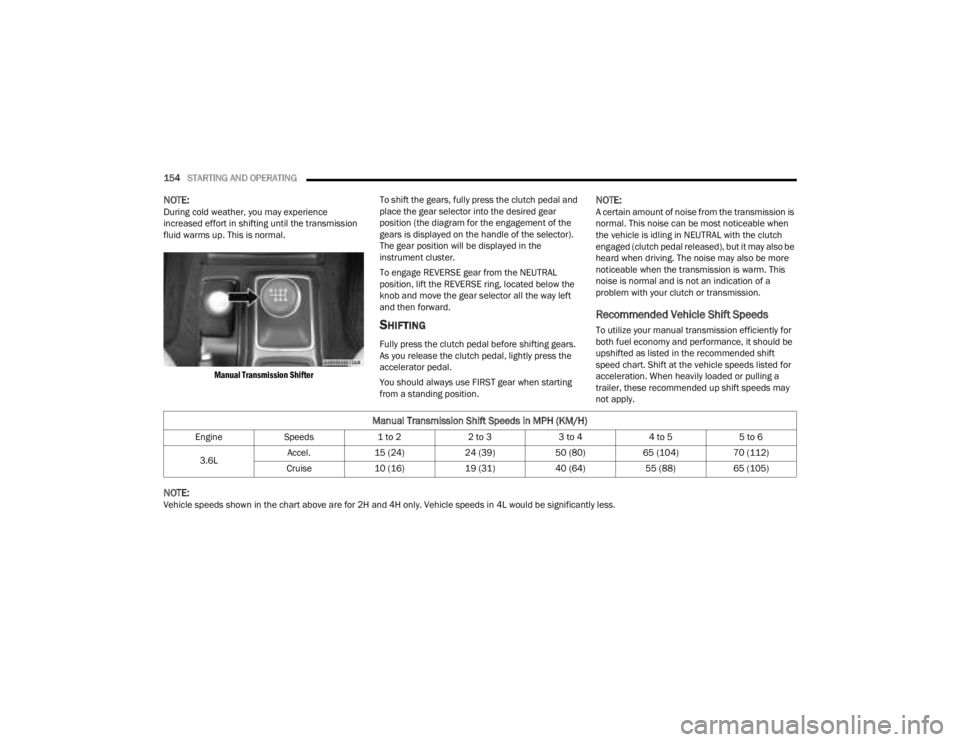
Recommended Vehicle Shift Speeds
To utilize your manual transmission efficiently for
both fuel economy and performance, it should be
upshifted as listed in the recommended shift
speed chart. Shift at the vehicle speeds listed for
acceleration. When heavily loaded or pulling a
trailer, these recommended up shift speeds may
not apply.
NOTE:Vehicle speeds shown in the chart above are for 2H and 4H only. Vehicle speeds in 4L would be significantly less.
Manual Transmission Shift Speeds in MPH (KM/H)
Engine
Speeds 1 to 22 to 33 to 44 to 55 to 6
3.6L Accel.
15 (24) 24 (39)50 (80)65 (104) 70 (112)
Cruise 10 (16) 19 (31)40 (64)55 (88)65 (105)
23_JT_OM_EN_USC_t.book Page 154
Page 164 of 448
162STARTING AND OPERATING
4L
Four-Wheel Drive Low Range — This range provides
low speed four-wheel drive. It maximizes torque to
the front driveshaft, forcing the front and rear
wheels to rotate at the same speed. This range
provides additional traction and maximum pulling
power for loose, slippery road surfaces only. Do not
exceed 25 mph (40 km/h).
The transfer case is intended to be driven in the 2H
position for normal street and highway conditions,
such as hard-surfaced roads.
In the event that additional traction is required, the
transfer case 4H and 4L positions can be used to
lock the front and rear driveshafts together, forcing
the front and rear wheels to rotate at the same
speed. The 4H and 4L positions are intended for
loose, slippery road surfaces only and not intended
for normal driving. Driving in the 4H and 4L
positions on hard-surfaced roads will cause
increased tire wear and damage to the driveline
components. For further information on shifting
into 4H or 4L Ú page 162.
The instrument cluster alerts the driver that the
vehicle is in four-wheel drive, and the front and
rear driveshafts are locked together. The light will
illuminate when the transfer case is shifted into
the 4H position.
When operating your vehicle in 4L, the engine
speed will be approximately three times (four times
for Rubicon models) that of the 2H or 4H positions at a given road speed. Take care not to overspeed
the engine.
Proper operation of four-wheel drive vehicles
depends on tires of equal size, type, and
circumference on each wheel. Any difference will
adversely affect shifting and cause damage to the
transfer case.
Because four-wheel drive provides improved
traction, there is a tendency to exceed safe turning
and stopping speeds. Do not go faster than road
conditions permit.
Shifting Procedures
2H TO 4H OR 4H TO 2H
Shifting between 2H and 4H can be made with the
vehicle stopped or in motion. The preferred shifting
speed would be 0 to 45 mph (72 km/h). With the
vehicle in motion, the transfer case will engage/
disengage faster if you momentarily release the
accelerator pedal after completing the shift. Do not
accelerate while shifting the transfer case. Apply a
constant force when shifting the transfer case lever.
NOTE:
Do not attempt to make a shift while only the
front or rear wheels are spinning. The front and
rear driveshaft speeds must be equal for the
shift to take place. Shifting while only the front
or rear wheels are spinning can cause damage
to the transfer case.
Delayed shifts out of four-wheel drive may be
experienced due to uneven tire wear, low or
uneven tire pressures, excessive vehicle
loading, or cold temperatures.
Shifting effort will increase with speed, this is
normal.
During cold weather, you may experience
increased effort in shifting until the transfer case
fluid warms up. This is normal.
4H TO 4L OR 4L TO 4H
With the vehicle rolling at 1 to 3 mph (2 to 5 km/h),
shift an automatic transmission into NEUTRAL (N), or
press the clutch pedal on a manual transmission.
While the vehicle is coasting at 1 to 3 mph (2 to
5 km/h), shift the transfer case lever firmly to the
desired position. Do not pause with the transfer case
in N (Neutral). Once the shift is completed, place the
automatic transmission into DRIVE or release the
clutch pedal on a manual transmission.
NOTE:Shifting into or out of 4L is possible with the vehicle
completely stopped; however, difficulty may occur
due to the mating teeth not being properly aligned.
Several attempts may be required for clutch teeth
alignment and shift completion to occur. The
preferred method is with the vehicle rolling at 1 to
3 mph (2 to 5 km/h). Avoid attempting to engage
or disengage 4L with the vehicle moving faster
than 1 to 3 mph (2 to 5 km/h).
23_JT_OM_EN_USC_t.book Page 162