parking brake JEEP GRAND CHEROKEE 2002 WJ / 2.G Owner's Manual
[x] Cancel search | Manufacturer: JEEP, Model Year: 2002, Model line: GRAND CHEROKEE, Model: JEEP GRAND CHEROKEE 2002 WJ / 2.GPages: 2199, PDF Size: 76.01 MB
Page 363 of 2199

INSPECTION
For complete circuit diagrams, refer toStarting
Systemin the Contents of Group 8W - Wiring Dia-
grams. Before removing any unit from the starting
system for repair or diagnosis, perform the following
inspections:
WARNING: ON VEHICLES EQUIPPED WITH AIR-
BAGS, REFER TO GROUP 8M - PASSIVE
RESTRAINT SYSTEMS BEFORE ATTEMPTING ANY
STEERING WHEEL, STEERING COLUMN, OR
INSTRUMENT PANEL COMPONENT DIAGNOSIS OR
SERVICE. FAILURE TO TAKE THE PROPER PRE-
CAUTIONS COULD RESULT IN ACCIDENTAL AIR-
BAG DEPLOYMENT AND POSSIBLE PERSONAL
INJURY.
²Battery- Visually inspect the battery for indi-
cations of physical damage and loose or corroded
cable connections. Determine the state-of-charge and
cranking capacity of the battery. Charge or replace
the battery, if required. Refer toBatteryin the
proper section of Group 8A - Battery for complete ser-
vice information for the battery.
²Ignition Switch- Visually inspect the ignition
switch for indications of physical damage and loose
or corroded wire harness connections. Refer toIgni-
tion Switch and Key Lock Cylinderin the proper
section of Group 8D - Ignition System for complete
service information for the ignition switch.
²Park/Neutral Position Switch- Visually
inspect the park/neutral position switch for indica-
tions of physical damage and loose or corroded wire
harness connections. Refer toPark/Neutral Posi-
tion Switchin the proper section of Group 21 -
Transmission for complete service information for the
park/neutral position switch.
²Starter Relay- Visually inspect the starter
relay for indications of physical damage and loose or
corroded wire harness connections.
²Starter Motor- Visually inspect the starter
motor for indications of physical damage and loose or
corroded wire harness connections.
²Starter Solenoid- Visually inspect the starter
solenoid for indications of physical damage and loose
or corroded wire harness connections.
²Wiring- Visually inspect the wire harnesses for
damage. Repair or replace any faulty wiring, as
required. Refer to the proper section ofGroup 8W -
Wiring Diagramsfor complete service information
and circuit diagrams for the starting system wiring
components.TESTING
COLD CRANKING TEST
For complete circuit diagrams, refer toStarting
Systemin the Contents of Group 8W - Wiring Dia-
grams. The battery must be fully-charged and load-
tested before proceeding. Refer toBatteryin the
Diagnosis and Testing section of Group 8A - Battery
for the procedures.
(1) Connect a suitable volt-ampere tester to the
battery terminals (Fig. 1). See the instructions pro-
vided by the manufacturer of the volt-ampere tester
being used.
(2) Fully engage the parking brake.
(3) Place the automatic transmission gearshift
selector lever in the Park position.
(4) Verify that all lamps and accessories are
turned off.
(5) To prevent the engine from starting, remove
the Automatic ShutDown (ASD) relay. The ASD relay
is located in the Power Distribution Center (PDC), in
the engine compartment. Refer to the fuse and relay
layout label affixed to the underside of the PDC cover
for ASD relay identification and location.
(6) Rotate and hold the ignition switch in the Start
position. Note the cranking voltage and current
(amperage) draw readings shown on the volt-ampere
tester.
(a) If the voltage reads below 9.6 volts, refer to
Starter Motorin the Diagnosis and Testing sec-
tion of this group. If the starter motor is OK, refer
toEngine Diagnosisin the Diagnosis and Testing
section of Group 9 - Engine for further testing of
the engine. If the starter motor is not OK, replace
the faulty starter motor.
Fig. 1 Volts-Amps Tester Connections - Typical
1 - POSITIVE CLAMP
2 - NEGATIVE CLAMP
3 - INDUCTION AMMETER CLAMP
8F - 32 STARTINGWJ
STARTING (Continued)
Page 364 of 2199

(b) If the voltage reads above 9.6 volts and the
current (amperage) draw reads below specifica-
tions, refer toFeed Circuit Testin this section.
(c) If the voltage reads 12.5 volts or greater and
the starter motor does not turn, refer toControl
Circuit Testingin this section.
(d) If the voltage reads 12.5 volts or greater and
the starter motor turns very slowly, refer toFeed
Circuit Testin this section.
NOTE: A cold engine will increase the starter cur-
rent (amperage) draw reading, and reduce the bat-
tery voltage reading.
FEED CIRCUIT TEST
The starter feed circuit test (voltage drop method)
will determine if there is excessive resistance in the
high-amperage feed circuit. For complete circuit dia-
grams, refer toStarting Systemin the Contents of
Group 8W - Wiring Diagrams.
When performing these tests, it is important to
remember that the voltage drop is giving an indica-
tion of the resistance between the two points at
which the voltmeter probes are attached.
Example:When testing the resistance of the bat-
tery positive cable, touch the voltmeter leads to the
battery positive cable clamp and the cable connector
at the starter solenoid. If you probe the battery pos-
itive terminal post and the cable connector at the
starter solenoid, you are reading the combined volt-
age drop in the battery positive cable clamp-to-termi-
nal post connection and the battery positive cable.
The following operation will require a voltmeter
accurate to 1/10 (0.10) volt. Before performing the
tests, be certain that the following procedures are
accomplished:
²Battery is fully-charged and load-tested. Refer to
Batteryin the Diagnosis and Testing section of
Group 8A - Battery for the procedures.
²Fully engage the parking brake.
²Place the automatic transmission gearshift selec-
tor lever in the Park position.
²
Verify that all lamps and accessories are turned off.
²To prevent the engine from starting, remove the
Automatic ShutDown (ASD) relay. The ASD relay is
located in the Power Distribution Center (PDC), in
the engine compartment. Refer to the fuse and relay
layout label affixed to the underside of the PDC cover
for ASD relay identification and location.
(1) Connect the positive lead of the voltmeter to
the battery negative terminal post. Connect the neg-
ative lead of the voltmeter to the battery negative
cable clamp (Fig. 2). Rotate and hold the ignition
switch in the Start position. Observe the voltmeter. If
voltage is detected, correct the poor contact between
the cable clamp and the terminal post.(2) Connect the positive lead of the voltmeter to
the battery positive terminal post. Connect the nega-
tive lead of the voltmeter to the battery positive cable
clamp (Fig. 3). Rotate and hold the ignition switch in
the Start position. Observe the voltmeter. If voltage
is detected, correct the poor contact between the
cable clamp and the terminal post.
(3) Connect the voltmeter to measure between the
battery positive terminal post and the starter sole-
noid battery terminal stud (Fig. 4). Rotate and hold
the ignition switch in the Start position. Observe the
voltmeter. If the reading is above 0.2 volt, clean and
tighten the battery cable connection at the solenoid.
Fig. 2 Test Battery Negative Connection Resistance
- Typical
1 - VOLTMETER
2 - BATTERY
Fig. 3 Test Battery Positive Connection Resistance -
Typical
1 - VOLTMETER
2 - BATTERY
WJSTARTING 8F - 33
STARTING (Continued)
Page 430 of 2199

Diagnostic Trouble Code (DTC) for any malfunction it
detects. Each time the airbag indicator fails to illu-
minate due to an open or short in the cluster airbag
indicator circuit, the cluster sends a message notify-
ing the ACM of the condition, then the instrument
cluster and the ACM will each store a DTC. For
proper diagnosis of the airbag system, the ACM, the
PCI data bus, or the electronic message inputs to the
instrument cluster that control the airbag indicator,
a DRBIIItscan tool is required. Refer to the appro-
priate diagnostic information.
BRAKE/PARK BRAKE
INDICATOR
DESCRIPTION
A brake indicator is standard equipment on all
instrument clusters. The brake indicator is located
near the left edge of the instrument cluster, to the
left of the tachometer. There are two versions of the
brake indicator. The version used depends upon the
market for which the vehicle is manufactured. The
version of the brake indicator used for vehicles man-
ufactured for the United States consists of the word
ªBRAKEº imprinted on a red lens. The Rest-Of-World
(ROW) market version of this indicator has two
International Control and Display Symbol icons
imprinted on the red lens; one is the icon for ªBrake
Failureº, and the other is the icon for ªParking
Brakeº. In either case, the lens is located behind a
cutout in the opaque layer of the instrument cluster
overlay. The dark outer layer of the overlay prevents
the indicator from being clearly visible when it is not
illuminated. The ªBRAKEº text or the two icons
appear silhouetted against a red field through the
translucent outer layer of the overlay when the indi-
cator is illuminated from behind by a Light Emitting
Diode (LED), which is soldered onto the instrument
cluster electronic circuit board. The brake indicator
lens is serviced as a unit with the instrument cluster
lens, hood and mask unit.
OPERATION
The brake indicator gives an indication to the vehi-
cle operator when the parking brake is applied, when
the fluid level of the brake hydraulic system is low,
or if there are certain malfunctions of the Anti-lock
Brake System (ABS). This indicator is controlled by a
transistor on the instrument cluster electronic circuit
board based upon cluster programming, electronic
messages received by the cluster from the Controller
Anti-lock Brake (CAB) over the Programmable Com-
munications Interface (PCI) data bus, and a hard
wired input to the cluster from the park brake
switch. The brake indicator Light Emitting Diode(LED) is completely controlled by the instrument
cluster logic circuit, and that logic will only allow
this indicator to operate when the instrument cluster
receives a battery current input on the fused ignition
switch output (run-start) circuit. Therefore, the indi-
cator will always be off when the ignition switch is in
any position except On or Start. The LED only illu-
minates when it is provided a path to ground by the
instrument cluster transistor. The instrument cluster
will turn on the brake indicator for the following rea-
sons:
²Bulb Test- Each time the ignition switch is
turned to the On position the brake indicator is illu-
minated by the instrument cluster for about three
seconds as a bulb test.
²Brake Indicator Lamp-On Message- Each
time the cluster receives a brake indicator lamp-on
message from the CAB, the brake indicator will be
illuminated. The indicator remains illuminated until
the cluster receives a brake indicator lamp-off mes-
sage from the CAB.
²Park Brake Switch Input- Each time the
cluster logic circuit detects ground on the park brake
switch sense circuit (park brake switch closed = park
brake applied or not fully released) the brake indica-
tor is illuminated. The indicator remains illuminated
until the park brake switch sense input to the cluster
is an open circuit (park brake switch open = park
brake fully released), or until the ignition switch is
turned to the Off position, whichever occurs first.
²Communication Error- If the cluster receives
no brake indicator lamp-on or lamp-off messages
from the CAB for six consecutive seconds, the brake
indicator is illuminated. The indicator remains illu-
minated until the cluster receives a single valid
brake indicator lamp-off message from the CAB.
²Actuator Test- Each time the cluster is put
through the actuator test, the brake indicator will be
turned on for the duration of the test to confirm the
functionality of the LED and the cluster control cir-
cuitry.
The park brake switch on the park brake pedal
mechanism provides a hard wired ground input to
the instrument cluster circuitry through the red
brake warning indicator driver circuit whenever the
park brake is applied or not fully released. The CAB
continually monitors the input from the brake fluid
level switch and the circuits of the anti-lock brake
system, then sends the proper brake indicator
lamp-on or lamp-off messages to the instrument clus-
ter. If the CAB sends a brake indicator lamp-on mes-
sage after the bulb test, it indicates that the CAB
has detected a brake hydraulic system malfunction
and/or that the ABS system has become inoperative.
The CAB will store a Diagnostic Trouble Code (DTC)
for any malfunction it detects.
WJINSTRUMENT CLUSTER 8J - 15
AIRBAG INDICATOR (Continued)
Page 431 of 2199

For further diagnosis of the brake indicator or the
instrument cluster circuitry that controls the indica-
tor, (Refer to 8 - ELECTRICAL/INSTRUMENT
CLUSTER - DIAGNOSIS AND TESTING). The park
brake switch input to the instrument cluster can be
diagnosed using conventional diagnostic tools and
methods. For proper diagnosis of the brake fluid level
switch input to the CAB, the anti-lock brake system,
the CAB, the PCI data bus, or the electronic message
inputs to the instrument cluster that control the
brake indicator, a DRBIIItscan tool is required.
Refer to the appropriate diagnostic information.
DIAGNOSIS AND TESTING - BRAKE INDICATOR
The diagnosis found here addresses an inoperative
park brake indicator condition. If there are problems
with several indicators in the instrument cluster,
(Refer to 8 - ELECTRICAL/INSTRUMENT CLUS-
TER - DIAGNOSIS AND TESTING). If the brake
indicator stays on with the ignition switch in the On
position and the park brake released, or comes on
while driving, (Refer to 5 - BRAKES - DIAGNOSIS
AND TESTING). If no brake system problem is
found, the following procedures will help to locate a
shorted or open circuit, or a faulty park brake switch
input. Refer to the appropriate wiring information.
The wiring information includes wiring diagrams,
proper wire and connector repair procedures, details
of wire harness routing and retention, connector pin-
out information and location views for the various
wire harness connectors, splices and grounds.
WARNING: ON VEHICLES EQUIPPED WITH AIR-
BAGS, DISABLE THE SUPPLEMENTAL RESTRAINT
SYSTEM BEFORE ATTEMPTING ANY STEERING
WHEEL, STEERING COLUMN, DRIVER AIRBAG,
PASSENGER AIRBAG, SIDE CURTAIN AIRBAG,
FRONT IMPACT SENSOR, SIDE IMPACT SENSOR,
OR INSTRUMENT PANEL COMPONENT DIAGNOSIS
OR SERVICE. DISCONNECT AND ISOLATE THE
BATTERY NEGATIVE (GROUND) CABLE, THEN
WAIT TWO MINUTES FOR THE SYSTEM CAPACI-
TOR TO DISCHARGE BEFORE PERFORMING FUR-
THER DIAGNOSIS OR SERVICE. THIS IS THE ONLY
SURE WAY TO DISABLE THE SUPPLEMENTAL
RESTRAINT SYSTEM. FAILURE TO TAKE THE
PROPER PRECAUTIONS COULD RESULT IN ACCI-
DENTAL AIRBAG DEPLOYMENT AND POSSIBLE
PERSONAL INJURY.
INDICATOR ILLUMINATES DURING BULB TEST, BUT DOES
NOT WHEN PARK BRAKE APPLIED
(1) Disconnect and isolate the battery negative
cable. Disconnect the instrument panel wire harness
connector for the park brake switch from the switch
terminal. Apply the parking brake. Check for conti-nuity between the park brake switch terminal and a
good ground. There should be continuity. If OK, go to
Step 2. If not OK, replace the faulty park brake
switch.
(2) Disconnect the instrument panel wire harness
connector for the instrument cluster from the cluster
connector receptacle. Check for continuity between
the red brake warning indicator driver circuit cavi-
ties of the instrument panel wire harness connector
for the park brake switch and the instrument panel
wire harness connector for the instrument cluster.
There should be continuity. If not OK, repair the
open red brake warning indicator driver circuit
between the park brake switch and the instrument
cluster as required.
INDICATOR REMAINS ILLUMINATED - BRAKE SYSTEM
CHECKS OK
(1) Disconnect and isolate the battery negative
cable. Disconnect the instrument panel wire harness
connector for the park brake switch from the park
brake switch terminal. Check for continuity between
the terminal of the park brake switch and a good
ground. There should be no continuity with the park
brake released, and continuity with the park brake
applied. If OK, go to Step 2. If not OK, replace the
faulty park brake switch.
(2) Disconnect the instrument panel wire harness
connector for the instrument cluster from the cluster
connector receptacle. Check for continuity between
the red brake warning indicator driver circuit cavity
of the instrument panel wire harness connector for
the park brake switch and a good ground. There
should be no continuity. If not OK, repair the shorted
red brake warning indicator driver circuit between
the park brake switch and the instrument cluster as
required.
CHECK GAUGES INDICATOR
DESCRIPTION
A check gauges indicator is standard equipment on
all instrument clusters. The check gauges indicator is
located on the right edge of the instrument cluster, to
the right of the speedometer. The check gauges indi-
cator consists of the words ªCHECK GAGESº
imprinted on a red lens. The lens is located behind a
cutout in the opaque layer of the instrument cluster
overlay. The dark outer layer of the overlay prevents
the indicator from being clearly visible when it is not
illuminated. The ªCHECK GAGESº text appears sil-
houetted against a red field through the translucent
outer layer of the overlay when the indicator is illu-
minated from behind by a Light Emitting Diode
(LED), which is soldered onto the instrument cluster
electronic circuit board. The check gauges indicator
8J - 16 INSTRUMENT CLUSTERWJ
BRAKE/PARK BRAKE INDICATOR (Continued)
Page 460 of 2199

Turn signal inputs that actuate the combination
flasher are low current grounds, each drawing a
maximum of 300 milliamperes.The hazard warning
signal input is a low current ground drawing a max-
imum of 600 milliamperes.
REMOVAL
WARNING: ON VEHICLES EQUIPPED WITH AIR-
BAGS, DISABLE THE AIRBAG SYSTEM BEFORE
ATTEMPTING ANY STEERING WHEEL, STEERING
COLUMN, OR INSTRUMENT PANEL COMPONENT
DIAGNOSIS OR SERVICE. DISCONNECT AND ISO-
LATE THE BATTERY NEGATIVE (GROUND) CABLE,
THEN WAIT TWO MINUTES FOR THE AIRBAG SYS-
TEM CAPACITOR TO DISCHARGE BEFORE PER-
FORMING FURTHER DIAGNOSIS OR SERVICE. THIS
IS THE ONLY SURE WAY TO DISABLE THE AIRBAG
SYSTEM. FAILURE TO TAKE THE PROPER PRE-
CAUTIONS COULD RESULT IN ACCIDENTAL AIR-
BAG DEPLOYMENT AND POSSIBLE PERSONAL
INJURY.
(1) Disconnect and isolate the battery negative
cable.
(2) Remove the steering column cover. (Refer to 23
- BODY/INSTRUMENT PANEL/STEERING COL-
UMN OPENING COVER - REMOVAL).
(3) Remove the combination flasher from the Junc-
tion Block (JB) (Fig. 8).
INSTALLATION
WARNING: ON VEHICLES EQUIPPED WITH AIR-
BAGS, DISABLE THE AIRBAG SYSTEM BEFORE
ATTEMPTING ANY STEERING WHEEL, STEERING
COLUMN, OR INSTRUMENT PANEL COMPONENT
DIAGNOSIS OR SERVICE. DISCONNECT AND ISO-
LATE THE BATTERY NEGATIVE (GROUND) CABLE,
THEN WAIT TWO MINUTES FOR THE AIRBAG SYS-
TEM CAPACITOR TO DISCHARGE BEFORE PER-
FORMING FURTHER DIAGNOSIS OR SERVICE. THIS
IS THE ONLY SURE WAY TO DISABLE THE AIRBAG
SYSTEM. FAILURE TO TAKE THE PROPER PRE-
CAUTIONS COULD RESULT IN ACCIDENTAL AIR-
BAG DEPLOYMENT AND POSSIBLE PERSONAL
INJURY.
(1) Align the terminals of the combination flasher
with the terminal cavities in the JB. (Fig. 8)
(2) Push in firmly and evenly on the combination
flasher until the terminals are fully seated.
(3) Reinstall the steering column opening cover.
(Refer to 23 - BODY/INSTRUMENT PANEL/STEER-
ING COLUMN OPENING COVER - INSTALLA-
TION).
(4) Reconnect the battery negative cable.
DAYTIME RUNNING LAMP
MODULE
DESCRIPTION
The Daytime Running Lights (Headlamps) System
is installed on vehicles manufactured for sale in Can-
ada only. A separate module, mounted in the junction
block under the dash, controls the DRL.
OPERATION
The headlamps are illuminated at a reduced inten-
sity when the engine is running, headlamp switch
off, and the parking brake released.
REMOVAL
(1) Lower the junction block. (Refer to 8 - ELEC-
TRICAL/POWER DISTRIBUTION/JUNCTION
BLOCK - REMOVAL) for service procedures.
(2) Remove the module from the junction block.
INSTALLATION
(1) Position the module in the junction block and
press to secure.
(2) Install the junction block. (Refer to 8 - ELEC-
TRICAL/POWER DISTRIBUTION/JUNCTION
BLOCK - INSTALLATION) for service procedures.
Fig. 8 Combination Flasher
1 - COMBINATION FLASHER
2 - JUNCTION BLOCK
WJLAMPS/LIGHTING - EXTERIOR 8L - 9
COMBINATION FLASHER (Continued)
Page 465 of 2199
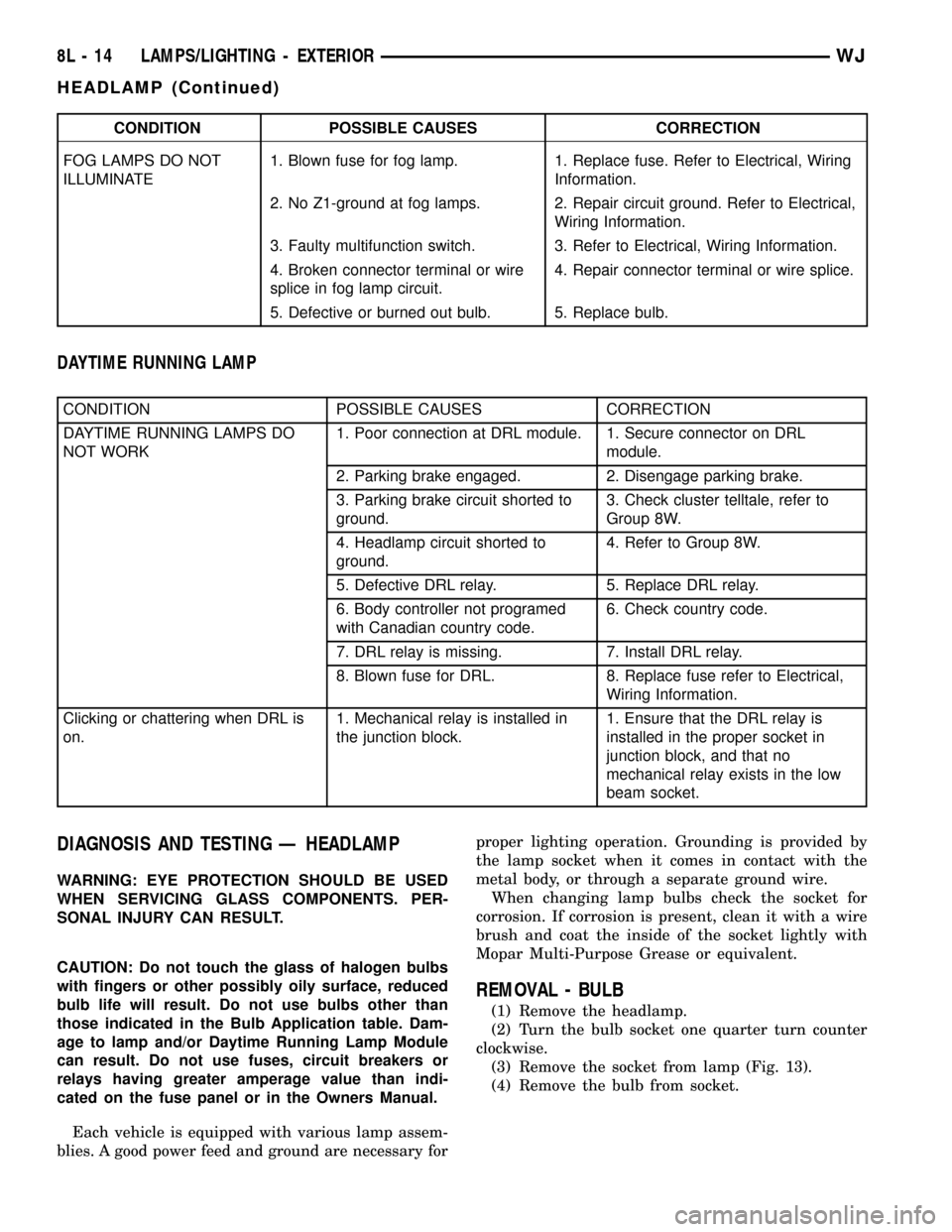
CONDITION POSSIBLE CAUSES CORRECTION
FOG LAMPS DO NOT
ILLUMINATE1. Blown fuse for fog lamp. 1. Replace fuse. Refer to Electrical, Wiring
Information.
2. No Z1-ground at fog lamps. 2. Repair circuit ground. Refer to Electrical,
Wiring Information.
3. Faulty multifunction switch. 3. Refer to Electrical, Wiring Information.
4. Broken connector terminal or wire
splice in fog lamp circuit.4. Repair connector terminal or wire splice.
5. Defective or burned out bulb. 5. Replace bulb.
DAYTIME RUNNING LAMP
CONDITION POSSIBLE CAUSES CORRECTION
DAYTIME RUNNING LAMPS DO
NOT WORK1. Poor connection at DRL module. 1. Secure connector on DRL
module.
2. Parking brake engaged. 2. Disengage parking brake.
3. Parking brake circuit shorted to
ground.3. Check cluster telltale, refer to
Group 8W.
4. Headlamp circuit shorted to
ground.4. Refer to Group 8W.
5. Defective DRL relay. 5. Replace DRL relay.
6. Body controller not programed
with Canadian country code.6. Check country code.
7. DRL relay is missing. 7. Install DRL relay.
8. Blown fuse for DRL. 8. Replace fuse refer to Electrical,
Wiring Information.
Clicking or chattering when DRL is
on.1. Mechanical relay is installed in
the junction block.1. Ensure that the DRL relay is
installed in the proper socket in
junction block, and that no
mechanical relay exists in the low
beam socket.
DIAGNOSIS AND TESTING Ð HEADLAMP
WARNING: EYE PROTECTION SHOULD BE USED
WHEN SERVICING GLASS COMPONENTS. PER-
SONAL INJURY CAN RESULT.
CAUTION: Do not touch the glass of halogen bulbs
with fingers or other possibly oily surface, reduced
bulb life will result. Do not use bulbs other than
those indicated in the Bulb Application table. Dam-
age to lamp and/or Daytime Running Lamp Module
can result. Do not use fuses, circuit breakers or
relays having greater amperage value than indi-
cated on the fuse panel or in the Owners Manual.
Each vehicle is equipped with various lamp assem-
blies. A good power feed and ground are necessary forproper lighting operation. Grounding is provided by
the lamp socket when it comes in contact with the
metal body, or through a separate ground wire.
When changing lamp bulbs check the socket for
corrosion. If corrosion is present, clean it with a wire
brush and coat the inside of the socket lightly with
Mopar Multi-Purpose Grease or equivalent.
REMOVAL - BULB
(1) Remove the headlamp.
(2) Turn the bulb socket one quarter turn counter
clockwise.
(3) Remove the socket from lamp (Fig. 13).
(4) Remove the bulb from socket.
8L - 14 LAMPS/LIGHTING - EXTERIORWJ
HEADLAMP (Continued)
Page 511 of 2199

(4) Turn the ignition switch to the Off position.
Check for continuity between the ground circuit cav-
ity of the overhead wire harness connector for the
automatic day/night mirror and a good ground. There
should be continuity. If OK, go to Step 5. If not OK,
repair the open ground circuit to ground as required.
(5) Turn the ignition switch to the On position. Set
the parking brake. Place the transmission gear selec-
tor lever in the Reverse position. Check for battery
voltage at the backup lamp switch output circuit cav-
ity of the overhead wire harness connector for the
automatic day/night mirror. If OK, reconnect the
overhead wire harness connector to the automatic
day/night mirror connector receptacle and go to Step
6. If not OK, repair the open backup lamp switch
output circuit as required.
(6) Place the transmission gear selector lever in
the Neutral position. Place the automatic day/night
mirror switch in the Auto (LED next to the switch is
lighted) position (Fig. 1). Cover the forward facing
ambient photocell sensor to keep out any ambient
light.
NOTE: The ambient photocell sensor must be cov-
ered completely, so that no light reaches the sen-
sor. Use a finger pressed tightly against the sensor,
or cover the sensor completely with electrical tape.
(7) Shine a light into the rearward facing head-
lamp photocell sensor. The automatic day/night mir-
ror should darken. If OK, go to Step 8. If not OK,
replace the faulty automatic day/night mirror unit.
(8) With the mirror darkened, place the transmis-
sion gear selector lever in the Reverse position. The
automatic day/night mirror should return to its nor-
mal reflectance. If not OK, replace the faulty auto-
matic day/night mirror unit.POWER FOLD-AWAY MIRROR -
EXPORT
DESCRIPTION
Some vehicles are equipped with Power Fold-Away
Side View Mirrors. This feature allows both the
driver and passenger side view mirrors to fold
inward (retract) on demand. This feature is con-
trolled by an additional switch located on the power
mirror switch.
The fold-away side view mirror is attached to the
vehicle's door in the same manner as mirrors without
the fold-away option. The fold-away mirrors unique
option is the internal motor which allows the mirrors
to fold inward on demand. the fold-away mirror
motor is not serviceable separately, and if a motor is
found to be faulty the entire side view mirror must
be replaced.
OPERATION
When the mirror retract switch is depressed, both
of the side view mirrors will fold inward, thus mak-
ing the overall width of the vehicle the smallest pos-
sible. This can be very helpful where parking space is
an absolute minimum.
DIAGNOSIS AND TESTING - POWER
FOLD-AWAY MIRROR - EXPORT
The most reliable, efficient and accurate means to
diagnose the power mirror system requires the use of
a DRB scan tool and the proper Diagnostic Proce-
dures manual. The DRB scan tool can provide confir-
mation that the PCI data bus is functional, that all
of the electronic modules are sending and receiving
the proper messages on the PCI data bus, that the
power mirror motors are being sent the proper hard
wired outputs, and that the mirror position potenti-
ometers are returning the proper outputs to the door
modules for them to perform their power mirror sys-
tem functions.
REMOVAL
The fold-away mirror motor is not serviceable sep-
arately, and if a motor is found to be faulty the entire
side view mirror must be replaced. (Refer to 8 -
ELECTRICAL/POWER MIRRORS/SIDEVIEW MIR-
ROR - REMOVAL).
Fig. 1 Automatic Day/Night Mirror
1 - LED INDICATOR
2 - SWITCH
3 - HEADLAMP SENSOR
8N - 14 POWER MIRRORSWJ
AUTOMATIC DAY/NIGHT MIRROR (Continued)
Page 662 of 2199

DESCRIPTION - CONNECTOR, GROUND AND
SPLICE INFORMATION
CAUTION: Not all connectors are serviced. Some
connectors are serviced only with a harness. A typ-
ical example might be the Supplemental Restraint
System connectors. Always check parts availability
before attempting a repair.
IDENTIFICATION
In-line connectors are identified by a number, as
follows:
²In-line connectors located in the engine compart-
ment are C100 series numbers
²In-line connectors located in the Instrument
Panel area are C200 series numbers.
²In-line connectors located in the body are C300
series numbers.
²Jumper harness connectors are C400 series
numbers.
²Grounds and ground connectors are identified
with a ªGº and follow the same series numbering as
the in-line connectors.
²Splices are identified with an ªSº and follow the
same series numbering as the in-line connectors.
²Component connectors are identified by the com-
ponent name instead of a number. Multiple connec-
tors on a component use a C1, C2, etc. identifier.
LOCATIONS
Section 8W-91 contains connector/ground/splice
location illustrations. The illustrations contain the
connector name (or number)/ground number/splice
number and component identification. Connector/
ground/splice location charts in section 8W-91 refer-
ence the figure numbers of the illustrations.
The abbreviation T/O is used in the component
location section to indicate a point in which the wir-
ing harness branches out to a component. The abbre-
viation N/S means Not Shown in the illustrations
WARNING
WARNINGS - GENERAL
WARNINGSprovide information to prevent per-
sonal injury and vehicle damage. Below is a list of
general warnings that should be followed any time a
vehicle is being serviced.
WARNING: ALWAYS WEAR SAFETY GLASSES FOR
EYE PROTECTION.
WARNING: USE SAFETY STANDS ANYTIME A PRO-
CEDURE REQUIRES BEING UNDER A VEHICLE.WARNING: BE SURE THAT THE IGNITION SWITCH
ALWAYS IS IN THE OFF POSITION, UNLESS THE
PROCEDURE REQUIRES IT TO BE ON.
WARNING: SET THE PARKING BRAKE WHEN
WORKING ON ANY VEHICLE. AN AUTOMATIC
TRANSMISSION SHOULD BE IN PARK. A MANUAL
TRANSMISSION SHOULD BE IN NEUTRAL.
WARNING: OPERATE THE ENGINE ONLY IN A
WELL-VENTILATED AREA.
WARNING: KEEP AWAY FROM MOVING PARTS
WHEN THE ENGINE IS RUNNING, ESPECIALLY THE
FAN AND BELTS.
WARNING: TO PREVENT SERIOUS BURNS, AVOID
CONTACT WITH HOT PARTS SUCH AS THE RADIA-
TOR, EXHAUST MANIFOLD(S), TAIL PIPE, CATA-
LYTIC CONVERTER AND MUFFLER.
WARNING: DO NOT ALLOW FLAME OR SPARKS
NEAR THE BATTERY. GASES ARE ALWAYS
PRESENT IN AND AROUND THE BATTERY.
WARNING: ALWAYS REMOVE RINGS, WATCHES,
LOOSE HANGING JEWELRY AND AVOID LOOSE
CLOTHING.
DIAGNOSIS AND TESTING - WIRING HARNESS
TROUBLESHOOTING TOOLS
When diagnosing a problem in an electrical circuit
there are several common tools necessary. These tools
are listed and explained below.
²Jumper Wire - This is a test wire used to con-
nect two points of a circuit. It can be used to bypass
an open in a circuit.
WARNING: NEVER USE A JUMPER WIRE ACROSS
A LOAD, SUCH AS A MOTOR, CONNECTED
BETWEEN A BATTERY FEED AND GROUND.
²Voltmeter - Used to check for voltage on a cir-
cuit. Always connect the black lead to a known good
ground and the red lead to the positive side of the
circuit.
CAUTION: Most of the electrical components used
in today's vehicles are Solid State. When checking
voltages in these circuits, use a meter with a 10 -
megohm or greater impedance rating.
WJ8W-01 WIRING DIAGRAM INFORMATION 8W - 01 - 7
WIRING DIAGRAM INFORMATION (Continued)
Page 1589 of 2199

(1) A result of restricted fluid flow through the
main and/or auxiliary cooler. This condition is usu-
ally the result of a faulty or improperly installed
drainback valve, a damaged main cooler, or severe
restrictions in the coolers and lines caused by debris
or kinked lines.
(2) Heavy duty operation with a vehicle not prop-
erly equipped for this type of operation. Trailer tow-
ing or similar high load operation will overheat the
transmission fluid if the vehicle is improperly
equipped. Such vehicles should have an auxiliary
transmission fluid cooler, a heavy duty cooling sys-
tem, and the engine/axle ratio combination needed to
handle heavy loads.
DIAGNOSIS AND TESTING - FLUID
CONTAMINATION
Transmission fluid contamination is generally a
result of:
²adding incorrect fluid
²failure to clean dipstick and fill tube when
checking level
²engine coolant entering the fluid
²internal failure that generates debris
²overheat that generates sludge (fluid break-
down)
²failure to reverse flush cooler and lines after
repair
²failure to replace contaminated converter after
repair
The use of non-recommended fluids can result in
transmission failure. The usual results are erratic
shifts, slippage, abnormal wear and eventual failure
due to fluid breakdown and sludge formation. Avoid
this condition by using recommended fluids only.
The dipstick cap and fill tube should be wiped
clean before checking fluid level. Dirt, grease and
other foreign material on the cap and tube could fall
into the tube if not removed beforehand. Take the
time to wipe the cap and tube clean before withdraw-
ing the dipstick.
Engine coolant in the transmission fluid is gener-
ally caused by a cooler malfunction. The only remedy
is to replace the radiator as the cooler in the radiator
is not a serviceable part. If coolant has circulated
through the transmission, an overhaul is necessary.
The transmission cooler and lines should be
reverse flushed whenever a malfunction generates
sludge and/or debris. The torque converter should
also be replaced at the same time.
Failure to flush the cooler and lines will result in
recontamination. Flushing applies to auxiliary coolers
as well. The torque converter should also be replaced
whenever a failure generates sludge and debris. This
is necessary because normal converter flushing proce-
dures will not remove all contaminants.
STANDARD PROCEDURE
STANDARD PROCEDURE - FLUID LEVEL
CHECK
Low fluid level can cause a variety of conditions
because it allows the pump to take in air along with
the fluid. As in any hydraulic system, air bubbles
make the fluid spongy, therefore, pressures will be
low and build up slowly.
Improper filling can also raise the fluid level too
high. When the transmssion has too much fluid, the
geartrain churns up foam and cause the same condi-
tions which occur with a low fluid level.
In either case, air bubbles can cause overheating
and/or fluid oxidation, and varnishing. This can
interfere with normal valve, clutch, and accumulator
operation. Foaming can also result in fluid escaping
from the transmission vent where it may be mis-
taken for a leak.
After the fluid has been checked, seat the dipstick
fully to seal out water and dirt.
The transmission has a dipstick to check oil level.
It is located on the right side of the engine. Be sure
to wipe all dirt from dipstick handle before removing.
Fluid level is checked with the engine running at
curb idle speed, the transmission in NEUTRAL and
the transmission fluid at normal operating tempera-
ture.The engine should be running at idle
speed for at least one minute, with the vehicle
on level ground.
The transmission fluid level can be checked two
ways.
PROCEDURE ONE
(1) Transmission fluid must be at normal operat-
ing temperature for accurate fluid level check. Drive
vehicle if necessary to bring fluid temperature up to
normal hot operating temperature of 82ÉC (180ÉF).
(2) Position vehicle on level surface.
(3) Start and run engine at curb idle speed.
(4) Apply parking brakes.
(5) Shift transmission momentarily into all gear
ranges. Then shift transmission back to NEUTRAL.
(6) Clean top of filler tube and dipstick to keep
dirt from entering tube.
(7) Remove dipstick (Fig. 87) and check fluid level
as follows:
(a) Correct acceptable level is in crosshatch area.
(b) Correct maximum level is to MAX arrow
mark.
(c) Incorrect level is at or below MIN line.
(d) If fluid is low, add only enough MopartAT F
+4, type 9602, to restore correct level. Do not over-
fill.
21 - 70 AUTOMATIC TRANSMISSION - 42REWJ
FLUID AND FILTER (Continued)
Page 1590 of 2199

PROCEDURE TWO
(1) Start engine and apply parking brake.
(2) Shift the transmission into DRIVE for approxi-
mately 2 seconds.
(3) Shift the transmission into REVERSE for
approximately 2 seconds.
(4) Shift the transmission into PARK.
(5) Hook up DRBtscan tool and select engine.
(6) Select sensors.
(7) Read the transmission temperature value.
(8) Compare the fluid temperature value with the
figure. (Fig. 88)
(9) Adjust transmission fluid level shown on the
dipstick according to the figure.NOTE: After adding any fluid to the transmission,
wait a minimum of 2 minutes for the oil to fully
drain from the fill tube into the transmission before
rechecking the fluid level.
(10) Check transmission for leaks.
STANDARD PROCEDURE - FLUID AND FILTER
REPLACEMENT
For proper service intervals (Refer to LUBRICA-
TION & MAINTENANCE/MAINTENANCE SCHED-
ULES - DESCRIPTION). The service fluid fill after a
filter change is approximately 3.8 liters (4.0 quarts).
REMOVAL
(1) Hoist and support vehicle on safety stands.
(2) Place a large diameter shallow drain pan
beneath the transmission pan.
(3) Remove bolts holding front and sides of pan to
transmission (Fig. 89).
(4) Loosen bolts holding rear of pan to transmis-
sion.
(5) Slowly separate front of pan and gasket away
from transmission allowing the fluid to drain into
drain pan.
(6) Hold up pan and remove remaining bolt hold-
ing pan to transmission.
Fig. 88 42/44RE Fluid Fill Graph
Fig. 87 Dipstick Fluid Level Marks - Typical
1 - DIPSTICK
2 - MAXIMUM CORRECT FLUID LEVEL
3 - ACCEPTABLE FLUID LEVEL
WJAUTOMATIC TRANSMISSION - 42RE 21 - 71
FLUID AND FILTER (Continued)