direction JEEP GRAND CHEROKEE 2003 WJ / 2.G Workshop Manual
[x] Cancel search | Manufacturer: JEEP, Model Year: 2003, Model line: GRAND CHEROKEE, Model: JEEP GRAND CHEROKEE 2003 WJ / 2.GPages: 2199, PDF Size: 76.01 MB
Page 1874 of 2199

BODY
TABLE OF CONTENTS
page page
BODY
DIAGNOSIS AND TESTING
WATER LEAKS........................1
WIND NOISE..........................2
STANDARD PROCEDURE
STANDARD PROCEDURE - BODY
LUBRICATION.........................2
STANDARD PROCEDURE - DRILLING AND
WELDING............................3
SPECIFICATIONS
BODY LUBRICANTS....................3
SPECIFICATIONS - TORQUE.............4
SPECIAL TOOLS
BODY...............................4DECKLID/HATCH/LIFTGATE/TAILGATE........5
DOOR - FRONT.........................11
DOORS - REAR.........................19
EXTERIOR.............................25
HOOD.................................33
INSTRUMENT PANEL SYSTEM.............36
INTERIOR..............................69
PAINT.................................81
SEATS................................83
STATIONARY GLASS.....................93
SUNROOF.............................96
WEATHERSTRIP/SEALS..................105
BODY STRUCTURE.....................112
BODY
DIAGNOSIS AND TESTING
WATER LEAKS
Water leaks can be caused by poor sealing,
improper body component alignment, body seam
porosity, missing plugs, or blocked drain holes. Cen-
trifugal and gravitational force can cause water to
drip from a location away from the actual leak point,
making leak detection difficult. All body sealing
points should be water tight in normal wet-driving
conditions. Water flowing downward from the front of
the vehicle should not enter the passenger or luggage
compartment. Moving sealing surfaces will not
always seal water tight under all conditions. At
times, side glass or door seals will allow water to
enter the passenger compartment during high pres-
sure washing or hard driving rain (severe) condi-
tions. Overcompensating on door or glass
adjustments to stop a water leak that occurs under
severe conditions can cause premature seal wear and
excessive closing or latching effort. After completing
a repair, water test vehicle to verify leak has stopped
before returning vehicle to use.
VISUAL INSPECTION BEFORE WATER LEAK TESTS
Verify that floor and body plugs are in place, body
drains are clear, and body components are properly
aligned and sealed. If component alignment or seal-
ing is necessary, refer to the appropriate section of
this group for proper procedures.
WATER LEAK TESTS
WARNING: DO NOT USE ELECTRIC SHOP LIGHTS
OR TOOLS IN WATER TEST AREA. PERSONAL
INJURY CAN RESULT.
When the conditions causing a water leak have
been determined, simulate the conditions as closely
as possible.
²If a leak occurs with the vehicle parked in a
steady light rain, flood the leak area with an open-
ended garden hose.
²If a leak occurs while driving at highway speeds
in a steady rain, test the leak area with a reasonable
velocity stream or fan spray of water. Direct the
spray in a direction comparable to actual conditions.
²If a leak occurs when the vehicle is parked on an
incline, hoist the end or side of the vehicle to simu-
late this condition. This method can be used when
the leak occurs when the vehicle accelerates, stops or
turns. If the leak occurs on acceleration, hoist the
front of the vehicle. If the leak occurs when braking,
hoist the back of the vehicle. If the leak occurs on left
turns, hoist the left side of the vehicle. If the leak
occurs on right turns, hoist the right side of the vehi-
cle. For hoisting recommendations refer to Group 0,
Lubrication and Maintenance, General Information
section.
WATER LEAK DETECTION
To detect a water leak point-of-entry, do a water
test and watch for water tracks or droplets forming
on the inside of the vehicle. If necessary, remove inte-
rior trim covers or panels to gain visual access to the
WJBODY 23 - 1
Page 1904 of 2199

(4) Remove the screws attaching the supports to
the roof panel.
(5) Separate the supports from the roof panel.
NOTE: If a crossbar needs to be serviced, the for-
ward or rearward supports will have to be removed.
INSTALLATION
(1) Position the supports on the roof panel and
install the screw. Be sure that the gasket is properly
seated.
(2) Position the luggage rack on the supports.
(3) Install the screws attaching the side rails to
the supports.
(4) Position the supports covers on the supports
and press into place.
SIDE VIEW MIRROR GLASS
REMOVAL
(1) With damaged mirror still on vehicle, position
mirror glass down and centered.
(2) Position a wide leverage device between the
bottom edge of the glass and the mirror shell.
(3) Firmly apply pressure in an upward direction
until glass assembly disengages from adapter plate.
(4) Disconnect the heater wire terminal, if
equipped, or the EC plug, if equipped.
INSTALLATION
(1) Connect the heater wire terminal or the EC
plug, if equipped.
(2) Position the replacement glass in the mirror
shell and align the four snap tabs with the four cav-
ities in the shell.
(3) Apply firm pressure inward until the replace-
ment glass assembly engages with the adapter plate.
Correct assembly will result in a firm click. Glass
assembly should exhibit even gaps to the shell when
complete.
(4) Pull lightly on corners of glass assembly to
ensure all four snaps are engaged and there is no
free play.
SIDE VIEW MIRROR
REMOVAL
(1) Remove door trim panel, refer to (Refer to 23 -
BODY/DOOR - FRONT/TRIM PANEL - REMOVAL).
(2) Disengage power mirror harness connector, if
equipped.
(3) Remove mirror flag seal.
(4) Remove nuts attaching mirror to door (Fig. 11).
(5) Separate mirror from door.
INSTALLATION
(1) Position mirror on door. Verify that gasket seal
is properly positioned.
(2) Install nuts attaching mirror to door (Fig. 11).
(3) Install mirror retaining nuts.
(4) Install mirror flag seal.
(5) Engage power mirror harness connector, if
equipped.
(6) Install door trim panel, refer to (Refer to 23 -
BODY/DOOR - FRONT/TRIM PANEL - INSTALLA-
TION).
Fig. 11 Side View Mirror
1 - SIDEVIEW MIRROR
2 - MIRROR FLAG SEAL
3 - CONNECTOR
WJEXTERIOR 23 - 31
LUGGAGE RACK (Continued)
Page 1920 of 2199

REMOVAL
WARNING: ON VEHICLES EQUIPPED WITH AIR-
BAGS, DISABLE THE AIRBAG SYSTEM BEFORE
ATTEMPTING ANY STEERING WHEEL, STEERING
COLUMN, OR INSTRUMENT PANEL COMPONENT
DIAGNOSIS OR SERVICE. DISCONNECT AND ISO-
LATE THE BATTERY NEGATIVE (GROUND) CABLE,
THEN WAIT TWO MINUTES FOR THE AIRBAG SYS-
TEM CAPACITOR TO DISCHARGE BEFORE PER-
FORMING FURTHER DIAGNOSIS OR SERVICE. THIS
IS THE ONLY SURE WAY TO DISABLE THE AIRBAG
SYSTEM. FAILURE TO TAKE THE PROPER PRE-
CAUTIONS COULD RESULT IN ACCIDENTAL AIR-
BAG DEPLOYMENT AND POSSIBLE PERSONAL
INJURY.
(1) Disconnect and isolate the battery negative
cable.
(2) Roll the glove box down from the instrument
panel. (Refer to 23 - BODY/INSTRUMENT PANEL/
GLOVE BOX - STANDARD PROCEDURE - GLOVE
BOX ROLL DOWN).
NOTE: Be certain to use care not to damage or
remove the glove box hinge bumpers on the lower
instrument panel glove box opening reinforcement
when removing the glove box from the instrument
panel.
(3) Firmly grip both ends of the glove box door,
then twist and pull the door as necessary to disen-
gage the inboard hinge hook from the inboard hinge
pin on the instrument panel and reorient the hook to
the underside of the hinge pin (Fig. 18).(4) Raise the glove box door until it is perpendicu-
lar to the instrument panel.
(5) Twist the door slightly in the counterclockwise
direction and use a jiggling action to disengage the
remaining two hinge hooks from their respective
hinge pins on the instrument panel.
(6) Remove the glove box from the instrument
panel.
INSTALLATION
WARNING: ON VEHICLES EQUIPPED WITH AIR-
BAGS, DISABLE THE AIRBAG SYSTEM BEFORE
ATTEMPTING ANY STEERING WHEEL, STEERING
COLUMN, OR INSTRUMENT PANEL COMPONENT
DIAGNOSIS OR SERVICE. DISCONNECT AND ISO-
LATE THE BATTERY NEGATIVE (GROUND) CABLE,
THEN WAIT TWO MINUTES FOR THE AIRBAG SYS-
TEM CAPACITOR TO DISCHARGE BEFORE PER-
FORMING FURTHER DIAGNOSIS OR SERVICE. THIS
IS THE ONLY SURE WAY TO DISABLE THE AIRBAG
SYSTEM. FAILURE TO TAKE THE PROPER PRE-
CAUTIONS COULD RESULT IN ACCIDENTAL AIR-
BAG DEPLOYMENT AND POSSIBLE PERSONAL
INJURY.
NOTE: Be certain to use care not to damage or
remove the glove box hinge bumpers on the lower
instrument panel glove box opening reinforcement
when installing the glove box onto the instrument
panel.
(1) Position the glove box to the instrument panel
with the outboard hinge hook oriented over the out-
board hinge pin and the center hinge hook oriented
under the center hinge pin (Fig. 18).
(2) Raise the glove box door until it is perpendicu-
lar to the instrument panel.
(3) Firmly grip both ends of the glove box door and
twist the door slightly in the clockwise direction to
engage the inboard glove box hinge hook over the
inboard hinge pin on the instrument panel.
(4) Roll the glove box back up into the instrument
panel. (Refer to 23 - BODY/INSTRUMENT PANEL/
GLOVE BOX - STANDARD PROCEDURE - GLOVE
BOX ROLL DOWN).
(5) Reconnect the battery negative cable.
Fig. 18 Glove Box Remove/Install
1 - GLOVE BOX HINGE HOOKS AND HINGE PINS (3)
WJINSTRUMENT PANEL SYSTEM 23 - 47
GLOVE BOX (Continued)
Page 1982 of 2199

LIFTGATE OPENING
WEATHERSTRIP
REMOVAL
(1) Pull seal away from flange around edge of lift-
gate opening.
(2) Separate weatherstrip from opening (Fig. 9).
(3) Clean weatherstrip flange as necessary.
INSTALLATION
(1) Position weatherstrip in opening with left end
of seal at opening centerline.
(2) Press weatherstrip onto flange in a clockwise
direction.
(3) Center and butt weatherstrip ends together at
centerline.
(4) If necessary, cut surplus from weatherstrip
(non-plug end only).
RDR INNER BELT
WEATHERSTRIP
REMOVAL
(1) Remove door trim panel (Refer to 23 - BODY/
DOORS - REAR/TRIM PANEL - REMOVAL).
(2) Using a trim stick, carefully pry rear inner
edge of inner belt weatherstrip upward.
(3) Grasp weatherstrip and pull upward to sepa-
rate from door flange (Fig. 10).
INSTALLATION
(1) Position weatherstrip on door flange.
(2) Firmly press downward to seat weatherstrip on
flange.
(3) Install trim panel (Refer to 23 - BODY/DOORS
- REAR/TRIM PANEL - INSTALLATION).
RDR OUTER BELT
WEATHERSTRIP
REMOVAL
(1) Remove trim panel (Refer to 23 - BODY/
DOORS - REAR/TRIM PANEL - REMOVAL).
(2) Using a small flat blade, disengage tangs
attaching outer belt weatherstrip to inner door panel.
(3) Lift weatherstrip upward and separate from
door (Fig. 10).
INSTALLATION
(1) Position the weatherstrip onto the door flange.
(2) Force the weatherstrip onto door flange and
engage tangs. Continue rearward until it is seated on
flange.
(3) Instal trim panel (Refer to 23 - BODY/DOORS
- REAR/TRIM PANEL - INSTALLATION).
Fig. 9 Liftgate Opening Weatherstrip
1 - LIFTGATE
2 - WEATHERSTRIP
Fig. 10 Rear Door Inner/Outer Belt Weatherstrip
1 - INNER BELT WEATHERSTRIP
2 - OUTER BELT WEATHERSTRIP
WJWEATHERSTRIP/SEALS 23 - 109
Page 2083 of 2199

DIAGNOSIS AND TESTING - HEATER
PERFORMANCE
Before performing the following tests, refer to Cool-
ing for the procedures to check the radiator coolant
level, serpentine drive belt tension, radiator air flow
and the radiator fan operation. Also be certain that
the accessory vacuum supply line is connected at the
engine intake manifold for the manual temperature
control system.
MAXIMUM HEATER OUTPUT
Engine coolant is delivered to the heater core
through two heater hoses. With the engine idling at
normal operating temperature, set the temperature
control knob in the full hot position, the mode control
switch knob in the floor heat position, and the blower
motor switch knob in the highest speed position.
Using a test thermometer, check the temperature of
the air being discharged at the HVAC housing floor
outlets. Compare the test thermometer reading to the
Temperature Reference chart.
Temperature Reference
Ambient Air Temperature15.5É C
(60É F)21.1É C
(70É F)26.6É C
(80É F)32.2É C
(90É F)
Minimum Air Temperature at
Floor Outlet62.2É C
(144É F)63.8É C
(147É F)65.5É C
(150É F)67.2É C
(153É F)
If the floor outlet air temperature is too low, refer
to Cooling to check the engine coolant temperature
specifications. Both of the heater hoses should be hot
to the touch. The coolant return heater hose should
be slightly cooler than the coolant supply heater
hose. If the return hose is much cooler than the sup-
ply hose, locate and repair the engine coolant flow
obstruction in the cooling system. Refer to Cooling
for the procedures.
OBSTRUCTED COOLANT FLOW
Possible locations or causes of obstructed coolant
flow:
²Pinched or kinked heater hoses.
²Improper heater hose routing.
²Plugged heater hoses or supply and return ports
at the cooling system connections.
²A plugged heater core.
If proper coolant flow through the cooling system is
verified, and heater outlet air temperature is still
low, a mechanical problem may exist.
MECHANICAL PROBLEMS
Possible locations or causes of insufficient heat:
²An obstructed cowl air intake.
²Obstructed heater system outlets.
²A blend door not functioning properly.
TEMPERATURE CONTROL
If the heater outlet air temperature cannot be
adjusted with the temperature control knob(s) on the
A/C Heater control panel, the following could require
service:
²The A/C heater control.
²The blend door actuator(s).
²The wire harness circuits for the A/C heater con-
trol or the blend door actuator(s).²The blend door(s).
²Improper engine coolant temperature.
STANDARD PROCEDURE - DIODE
REPLACEMENT
(1) Disconnect and isolate the negative battery
cable.
(2) Locate the diode in the harness, and remove
the protective covering.
(3) Remove the diode from the harness, pay atten-
tion to the current flow direction (Fig. 3).
(4) Remove the insulation from the wires in the
harness. Only remove enough insulation to solder in
the new diode.
Fig. 3 DIODE IDENTIFICATION
1 - CURRENT FLOW
2 - BAND AROUND DIODE INDICATES CURRENT FLOW
3 - DIODE AS SHOWN IN THE DIAGRAMS
24 - 6 HEATING & AIR CONDITIONINGWJ
HEATING & AIR CONDITIONING (Continued)
Page 2095 of 2199
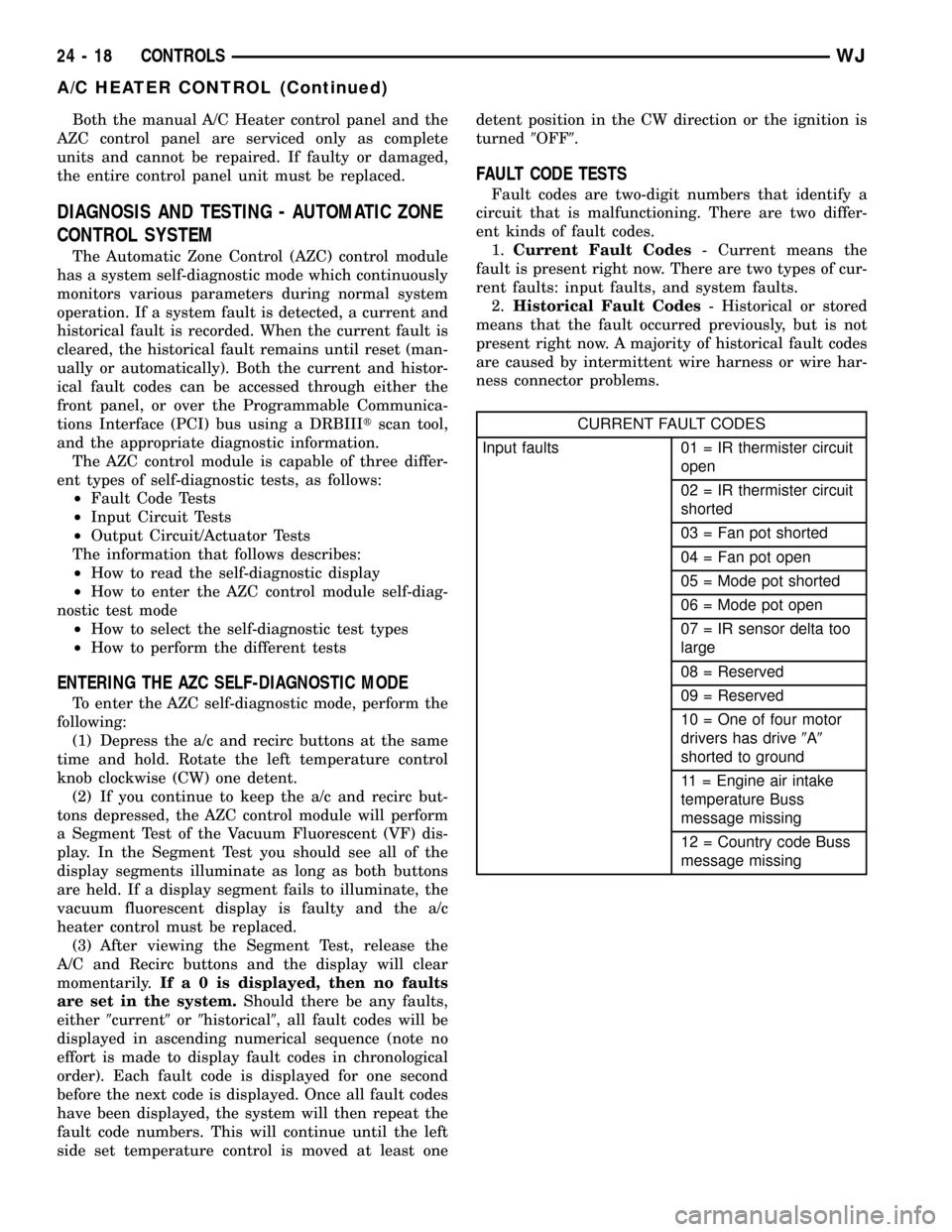
Both the manual A/C Heater control panel and the
AZC control panel are serviced only as complete
units and cannot be repaired. If faulty or damaged,
the entire control panel unit must be replaced.
DIAGNOSIS AND TESTING - AUTOMATIC ZONE
CONTROL SYSTEM
The Automatic Zone Control (AZC) control module
has a system self-diagnostic mode which continuously
monitors various parameters during normal system
operation. If a system fault is detected, a current and
historical fault is recorded. When the current fault is
cleared, the historical fault remains until reset (man-
ually or automatically). Both the current and histor-
ical fault codes can be accessed through either the
front panel, or over the Programmable Communica-
tions Interface (PCI) bus using a DRBIIItscan tool,
and the appropriate diagnostic information.
The AZC control module is capable of three differ-
ent types of self-diagnostic tests, as follows:
²Fault Code Tests
²Input Circuit Tests
²Output Circuit/Actuator Tests
The information that follows describes:
²How to read the self-diagnostic display
²How to enter the AZC control module self-diag-
nostic test mode
²How to select the self-diagnostic test types
²How to perform the different tests
ENTERING THE AZC SELF-DIAGNOSTIC MODE
To enter the AZC self-diagnostic mode, perform the
following:
(1) Depress the a/c and recirc buttons at the same
time and hold. Rotate the left temperature control
knob clockwise (CW) one detent.
(2) If you continue to keep the a/c and recirc but-
tons depressed, the AZC control module will perform
a Segment Test of the Vacuum Fluorescent (VF) dis-
play. In the Segment Test you should see all of the
display segments illuminate as long as both buttons
are held. If a display segment fails to illuminate, the
vacuum fluorescent display is faulty and the a/c
heater control must be replaced.
(3) After viewing the Segment Test, release the
A/C and Recirc buttons and the display will clear
momentarily.Ifa0isdisplayed, then no faults
are set in the system.Should there be any faults,
either9current9or9historical9, all fault codes will be
displayed in ascending numerical sequence (note no
effort is made to display fault codes in chronological
order). Each fault code is displayed for one second
before the next code is displayed. Once all fault codes
have been displayed, the system will then repeat the
fault code numbers. This will continue until the left
side set temperature control is moved at least onedetent position in the CW direction or the ignition is
turned9OFF9.
FAULT CODE TESTS
Fault codes are two-digit numbers that identify a
circuit that is malfunctioning. There are two differ-
ent kinds of fault codes.
1.Current Fault Codes- Current means the
fault is present right now. There are two types of cur-
rent faults: input faults, and system faults.
2.Historical Fault Codes- Historical or stored
means that the fault occurred previously, but is not
present right now. A majority of historical fault codes
are caused by intermittent wire harness or wire har-
ness connector problems.
CURRENT FAULT CODES
Input faults 01 = IR thermister circuit
open
02 = IR thermister circuit
shorted
03 = Fan pot shorted
04 = Fan pot open
05 = Mode pot shorted
06 = Mode pot open
07 = IR sensor delta too
large
08 = Reserved
09 = Reserved
10 = One of four motor
drivers has drive9A9
shorted to ground
11 = Engine air intake
temperature Buss
message missing
12 = Country code Buss
message missing
24 - 18 CONTROLSWJ
A/C HEATER CONTROL (Continued)
Page 2098 of 2199
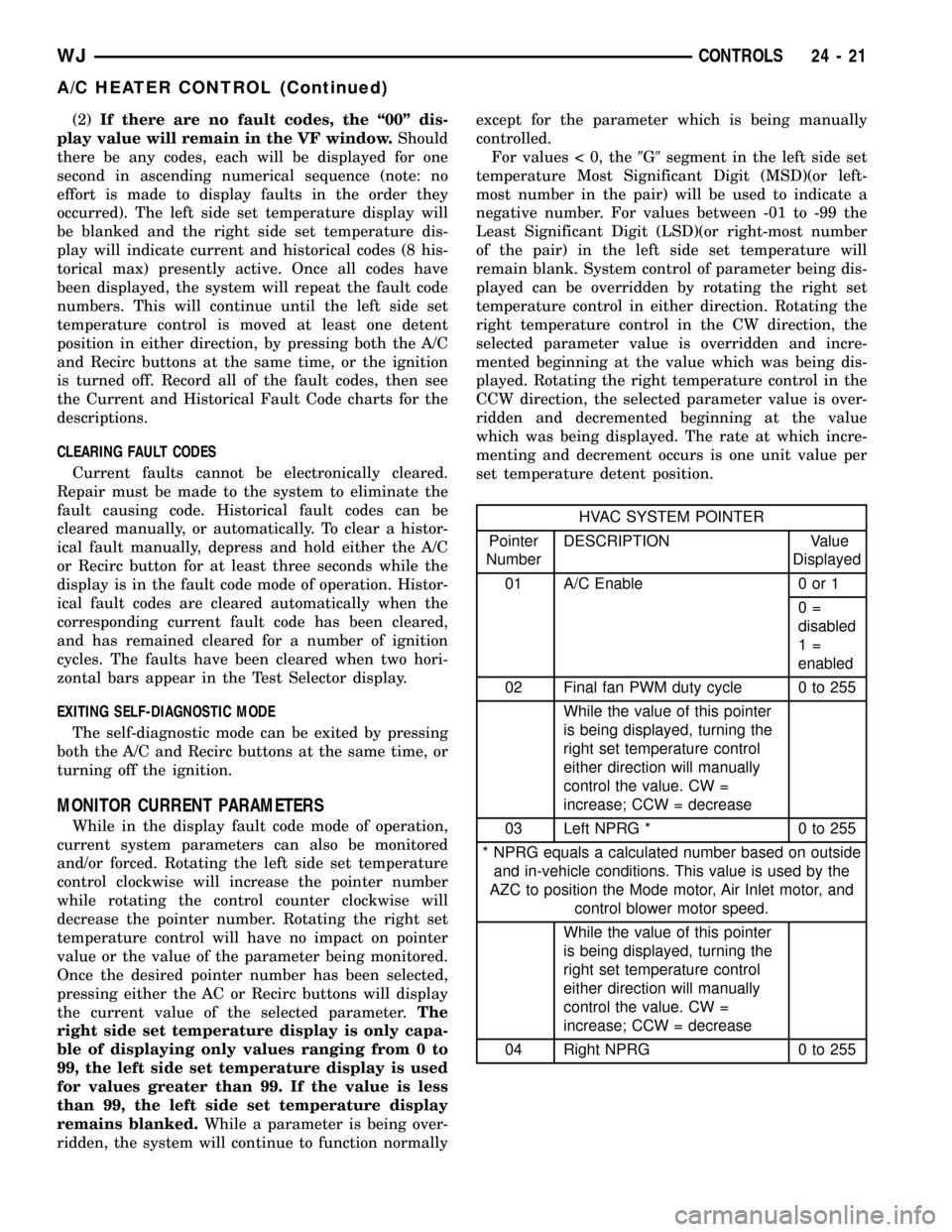
(2)If there are no fault codes, the ª00º dis-
play value will remain in the VF window.Should
there be any codes, each will be displayed for one
second in ascending numerical sequence (note: no
effort is made to display faults in the order they
occurred). The left side set temperature display will
be blanked and the right side set temperature dis-
play will indicate current and historical codes (8 his-
torical max) presently active. Once all codes have
been displayed, the system will repeat the fault code
numbers. This will continue until the left side set
temperature control is moved at least one detent
position in either direction, by pressing both the A/C
and Recirc buttons at the same time, or the ignition
is turned off. Record all of the fault codes, then see
the Current and Historical Fault Code charts for the
descriptions.
CLEARING FAULT CODES
Current faults cannot be electronically cleared.
Repair must be made to the system to eliminate the
fault causing code. Historical fault codes can be
cleared manually, or automatically. To clear a histor-
ical fault manually, depress and hold either the A/C
or Recirc button for at least three seconds while the
display is in the fault code mode of operation. Histor-
ical fault codes are cleared automatically when the
corresponding current fault code has been cleared,
and has remained cleared for a number of ignition
cycles. The faults have been cleared when two hori-
zontal bars appear in the Test Selector display.
EXITING SELF-DIAGNOSTIC MODE
The self-diagnostic mode can be exited by pressing
both the A/C and Recirc buttons at the same time, or
turning off the ignition.
MONITOR CURRENT PARAMETERS
While in the display fault code mode of operation,
current system parameters can also be monitored
and/or forced. Rotating the left side set temperature
control clockwise will increase the pointer number
while rotating the control counter clockwise will
decrease the pointer number. Rotating the right set
temperature control will have no impact on pointer
value or the value of the parameter being monitored.
Once the desired pointer number has been selected,
pressing either the AC or Recirc buttons will display
the current value of the selected parameter.The
right side set temperature display is only capa-
ble of displaying only values ranging from 0 to
99, the left side set temperature display is used
for values greater than 99. If the value is less
than 99, the left side set temperature display
remains blanked.While a parameter is being over-
ridden, the system will continue to function normallyexcept for the parameter which is being manually
controlled.
For values < 0, the9G9segment in the left side set
temperature Most Significant Digit (MSD)(or left-
most number in the pair) will be used to indicate a
negative number. For values between -01 to -99 the
Least Significant Digit (LSD)(or right-most number
of the pair) in the left side set temperature will
remain blank. System control of parameter being dis-
played can be overridden by rotating the right set
temperature control in either direction. Rotating the
right temperature control in the CW direction, the
selected parameter value is overridden and incre-
mented beginning at the value which was being dis-
played. Rotating the right temperature control in the
CCW direction, the selected parameter value is over-
ridden and decremented beginning at the value
which was being displayed. The rate at which incre-
menting and decrement occurs is one unit value per
set temperature detent position.
HVAC SYSTEM POINTER
Pointer
NumberDESCRIPTION Value
Displayed
01 A/C Enable 0 or 1
0=
disabled
1=
enabled
02 Final fan PWM duty cycle 0 to 255
While the value of this pointer
is being displayed, turning the
right set temperature control
either direction will manually
control the value. CW =
increase; CCW = decrease
03 Left NPRG * 0 to 255
* NPRG equals a calculated number based on outside
and in-vehicle conditions. This value is used by the
AZC to position the Mode motor, Air Inlet motor, and
control blower motor speed.
While the value of this pointer
is being displayed, turning the
right set temperature control
either direction will manually
control the value. CW =
increase; CCW = decrease
04 Right NPRG 0 to 255
WJCONTROLS 24 - 21
A/C HEATER CONTROL (Continued)
Page 2099 of 2199
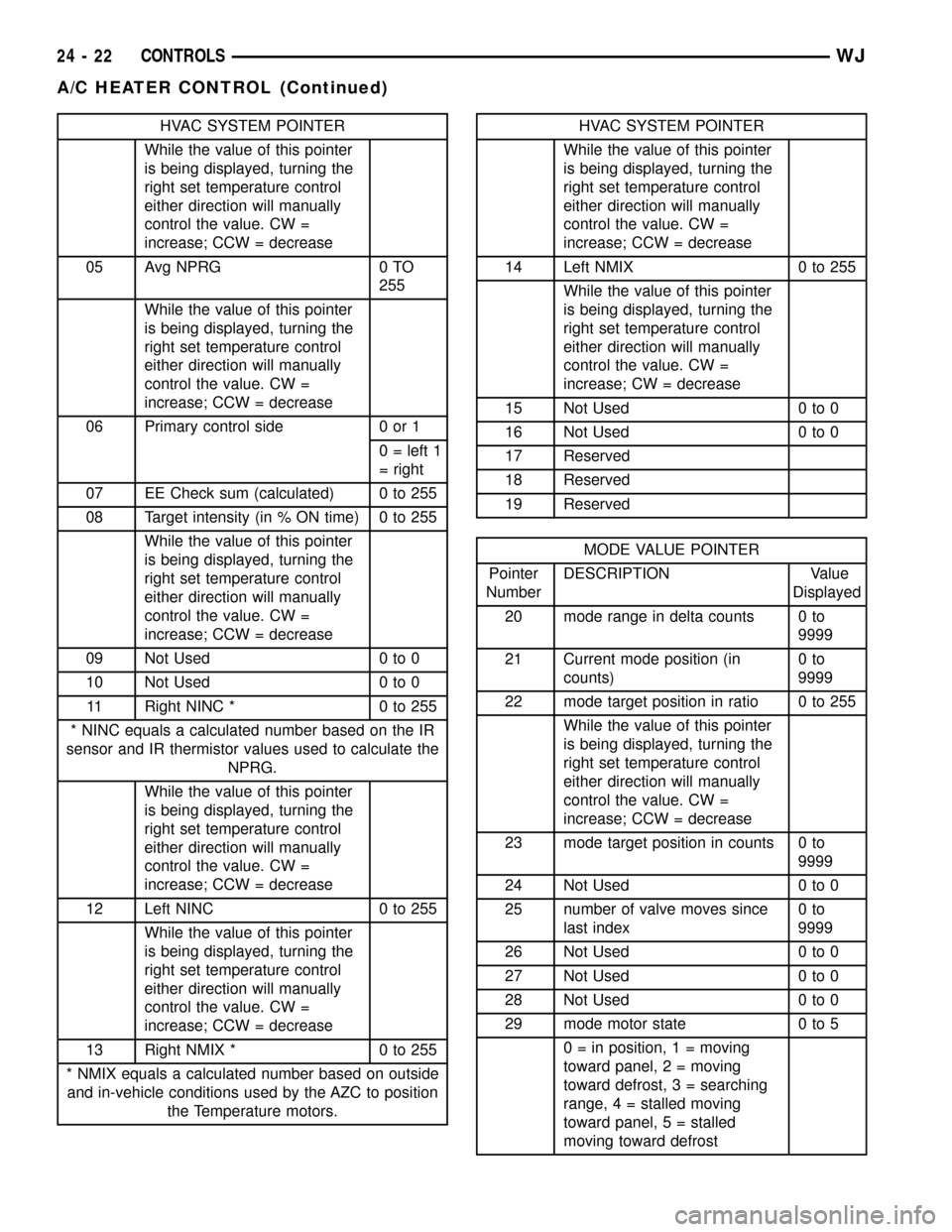
HVAC SYSTEM POINTER
While the value of this pointer
is being displayed, turning the
right set temperature control
either direction will manually
control the value. CW =
increase; CCW = decrease
05 Avg NPRG 0 TO
255
While the value of this pointer
is being displayed, turning the
right set temperature control
either direction will manually
control the value. CW =
increase; CCW = decrease
06 Primary control side 0 or 1
0 = left 1
= right
07 EE Check sum (calculated) 0 to 255
08 Target intensity (in % ON time) 0 to 255
While the value of this pointer
is being displayed, turning the
right set temperature control
either direction will manually
control the value. CW =
increase; CCW = decrease
09 Not Used 0 to 0
10 Not Used 0 to 0
11 Right NINC * 0 to 255
* NINC equals a calculated number based on the IR
sensor and IR thermistor values used to calculate the
NPRG.
While the value of this pointer
is being displayed, turning the
right set temperature control
either direction will manually
control the value. CW =
increase; CCW = decrease
12 Left NINC 0 to 255
While the value of this pointer
is being displayed, turning the
right set temperature control
either direction will manually
control the value. CW =
increase; CCW = decrease
13 Right NMIX * 0 to 255
* NMIX equals a calculated number based on outside
and in-vehicle conditions used by the AZC to position
the Temperature motors.HVAC SYSTEM POINTER
While the value of this pointer
is being displayed, turning the
right set temperature control
either direction will manually
control the value. CW =
increase; CCW = decrease
14 Left NMIX 0 to 255
While the value of this pointer
is being displayed, turning the
right set temperature control
either direction will manually
control the value. CW =
increase; CW = decrease
15 Not Used 0 to 0
16 Not Used 0 to 0
17 Reserved
18 Reserved
19 Reserved
MODE VALUE POINTER
Pointer
NumberDESCRIPTION Value
Displayed
20 mode range in delta counts 0 to
9999
21 Current mode position (in
counts)0to
9999
22 mode target position in ratio 0 to 255
While the value of this pointer
is being displayed, turning the
right set temperature control
either direction will manually
control the value. CW =
increase; CCW = decrease
23 mode target position in counts 0 to
9999
24 Not Used 0 to 0
25 number of valve moves since
last index0to
9999
26 Not Used 0 to 0
27 Not Used 0 to 0
28 Not Used 0 to 0
29 mode motor state 0 to 5
0 = in position, 1 = moving
toward panel, 2 = moving
toward defrost, 3 = searching
range, 4 = stalled moving
toward panel, 5 = stalled
moving toward defrost
24 - 22 CONTROLSWJ
A/C HEATER CONTROL (Continued)
Page 2100 of 2199
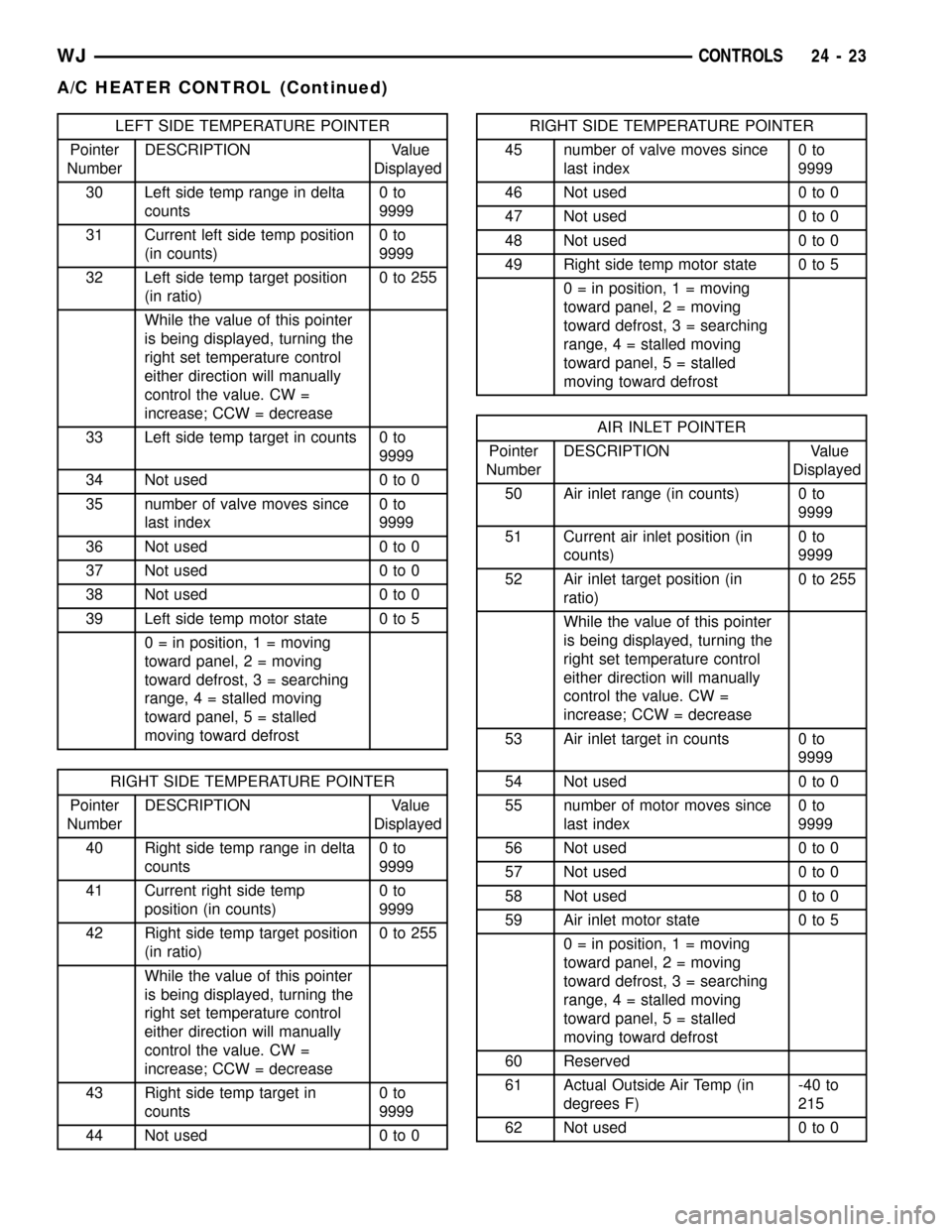
LEFT SIDE TEMPERATURE POINTER
Pointer
NumberDESCRIPTION Value
Displayed
30 Left side temp range in delta
counts0to
9999
31 Current left side temp position
(in counts)0to
9999
32 Left side temp target position
(in ratio)0to255
While the value of this pointer
is being displayed, turning the
right set temperature control
either direction will manually
control the value. CW =
increase; CCW = decrease
33 Left side temp target in counts 0 to
9999
34 Not used 0 to 0
35 number of valve moves since
last index0to
9999
36 Not used 0 to 0
37 Not used 0 to 0
38 Not used 0 to 0
39 Left side temp motor state 0 to 5
0 = in position, 1 = moving
toward panel, 2 = moving
toward defrost, 3 = searching
range, 4 = stalled moving
toward panel, 5 = stalled
moving toward defrost
RIGHT SIDE TEMPERATURE POINTER
Pointer
NumberDESCRIPTION Value
Displayed
40 Right side temp range in delta
counts0to
9999
41 Current right side temp
position (in counts)0to
9999
42 Right side temp target position
(in ratio)0to255
While the value of this pointer
is being displayed, turning the
right set temperature control
either direction will manually
control the value. CW =
increase; CCW = decrease
43 Right side temp target in
counts0to
9999
44 Not used 0 to 0
RIGHT SIDE TEMPERATURE POINTER
45 number of valve moves since
last index0to
9999
46 Not used 0 to 0
47 Not used 0 to 0
48 Not used 0 to 0
49 Right side temp motor state 0 to 5
0 = in position, 1 = moving
toward panel, 2 = moving
toward defrost, 3 = searching
range, 4 = stalled moving
toward panel, 5 = stalled
moving toward defrost
AIR INLET POINTER
Pointer
NumberDESCRIPTION Value
Displayed
50 Air inlet range (in counts) 0 to
9999
51 Current air inlet position (in
counts)0to
9999
52 Air inlet target position (in
ratio)0to255
While the value of this pointer
is being displayed, turning the
right set temperature control
either direction will manually
control the value. CW =
increase; CCW = decrease
53 Air inlet target in counts 0 to
9999
54 Not used 0 to 0
55 number of motor moves since
last index0to
9999
56 Not used 0 to 0
57 Not used 0 to 0
58 Not used 0 to 0
59 Air inlet motor state 0 to 5
0 = in position, 1 = moving
toward panel, 2 = moving
toward defrost, 3 = searching
range, 4 = stalled moving
toward panel, 5 = stalled
moving toward defrost
60 Reserved
61 Actual Outside Air Temp (in
degrees F)-40 to
215
62 Not used 0 to 0
WJCONTROLS 24 - 23
A/C HEATER CONTROL (Continued)
Page 2111 of 2199

INSTALLATION
INSTALLATION - RECIRCULATION DOOR
VACUUM ACTUATOR
(1) Install the recirculation door vacuum actuator
on the HVAC housing and tighten the mounting
screws to 2.2 N´m (20 in. lbs.).
(2) Engage the recirculation door actuating rod
with the recirculation door lever.
(3) Engage the recirculation door pivot connection
with the door pivot pin.
(4) Plug in the vacuum harness connector to the
recirculation door vacuum actuator.
(5) Install the instrument panel in the vehicle.
Refer to Instrument Panel System for the procedures.
INSTALLATION - RECIRCULATION DOOR
ELECTRIC ACTUATOR
(1) Install the recirculation door actuator on the
recirculation door housing and tighten the mounting
screws to 2.2 N´m (20 in. lbs.).
(2) Install the recirculation door housing on the
HVAC unit and tighten the mounting screws to 2.2
N´m (20 in. lbs.).
(3) Plug in the wire harness connector to the recir-
culation door actuator.
(4) Install the instrument panel in the vehicle.
Refer to Instrument Panel System for the procedures.
VACUUM CHECK VALVE
DESCRIPTION
Two vacuum check valves (non AZC only) are
installed on the vacuum supply system. One is on the
accessory vacuum supply line in the engine compart-
ment, near the vacuum tap on the engine intake
manifold. A second vacuum check valve is located on
the bottom of the HVAC unit behind the passenger
front floor duct on the black vacuum line. The vac-
uum check valves are designed to allow vacuum to
flow in only one direction through the accessory vac-
uum supply circuits.
OPERATION
The use of a vacuum check valve helps to maintain
the system vacuum needed to retain the selected A/C
Heater mode settings. The check valve will prevent
the engine from bleeding down system vacuum
through the intake manifold during extended heavy
engine load (low engine vacuum) operation.
The vacuum check valve cannot be repaired and, if
faulty or damaged, it must be replaced.
REMOVAL
(1) Unplug the HVAC vacuum supply line connec-
tor at the vacuum check valve near the engine intake
manifold vacuum adapter fitting.
(2) Note the orientation of the check valve in the
vacuum supply line for correct installation.
(3) Unplug the vacuum check valve from the vac-
uum supply line fittings.
INSTALLATION
(1) Plug in the vacuum check valve at the vacuum
supply line fittings, noting the orientation of the
check valve in the vacuum supply line for correct
installation.
(2) Plug in the HVAC vacuum supply line connec-
tor at the vacuum check valve near the engine intake
manifold vacuum adapter fitting.
VACUUM RESERVOIR
DESCRIPTION
The vacuum reservoir is mounted in the right front
of the vehicle behind the headlamp mounting module
(Fig. 22). The headlamp mounting module and head-
lamp assembly must be removed from the vehicle to
access the vacuum reservoir for service. Refer to
Lamps/Lighting for the procedures.
OPERATION
Engine vacuum is stored in the vacuum reservoir.
The stored vacuum is used to operate the vacuum-
Fig. 21 RECIRCULATION DOOR HOUSING
1 - RECIRCULATION DOOR HOUSING
2 - ATTACHING SCREWS
24 - 34 CONTROLSWJ
RECIRCULATION DOOR ACTUATOR (Continued)